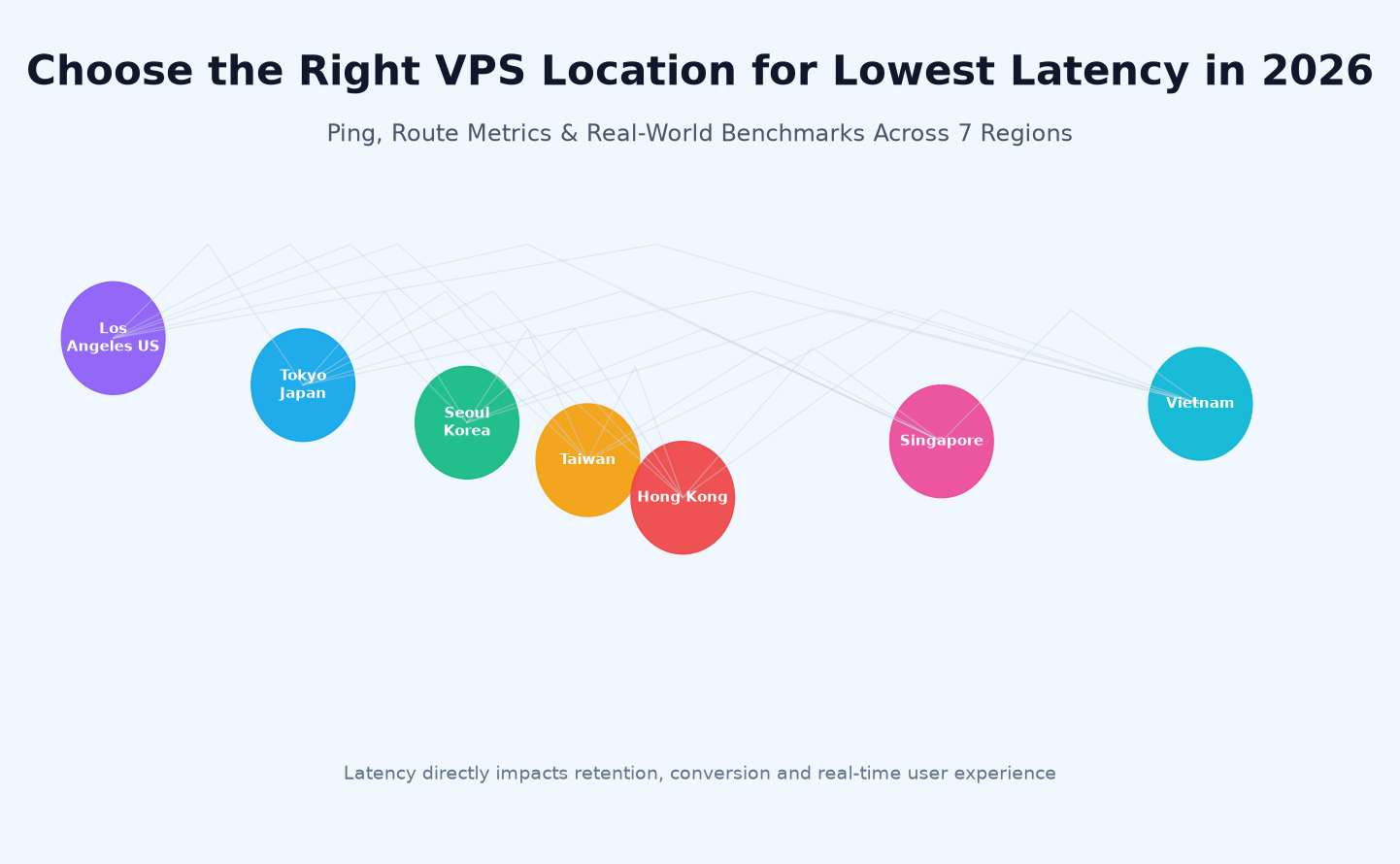
1. Why VPS Location and Latency Matter More Than You Think
When you browse a VPS provider's pricing table, it is easy to fixate on RAM, vCPUs, and NVMe capacity. Those specs matter — but the single factor that most directly shapes whether a real user feels your site is "fast" or "slow" is how far the data physically has to travel.
Here is the unvarnished math: light moves through fiber optic cable at roughly 200,000 km/s (refractive index slows it down). A one-way trip from Shenzhen to Los Angeles therefore has a theoretical floor of about 60 ms; round trip (which is what TCP requires before a page can start rendering) is ~120 ms. Any VPS on the US west coast, no matter how "optimized", cannot beat physics. The same Shenzhen user reaching a Hong Kong server faces a theoretical floor under 1 ms.
Real business consequences of high latency:
- Conversions drop. Widely replicated industry data shows roughly a 1% revenue loss per 100 ms of added load time; for mobile-first APAC audiences the penalty is steeper.
- SEO ranking. Google's Core Web Vitals — LCP (Largest Contentful Paint) and INP (Interaction to Next Paint) — are direct ranking signals. Both are dominated by round-trip latency.
- Real-time products break. Multiplayer games, voice/video, WebSocket SaaS, live chat, and payment callbacks become unusable once RTT climbs past ~120 ms with jitter.
- Bounce rate compounds. A slow first paint means users leave before any optimization (caching, CDN, gzip) gets a chance to help.
Yet we see customers routinely deploy a Hong Kong-targeted e-commerce site on a Los Angeles VPS because "the price per GB RAM is lower," or place a global SaaS on a Singapore VPS because "Singapore is central." Those decisions save a few dollars and waste hundreds on lost traffic.
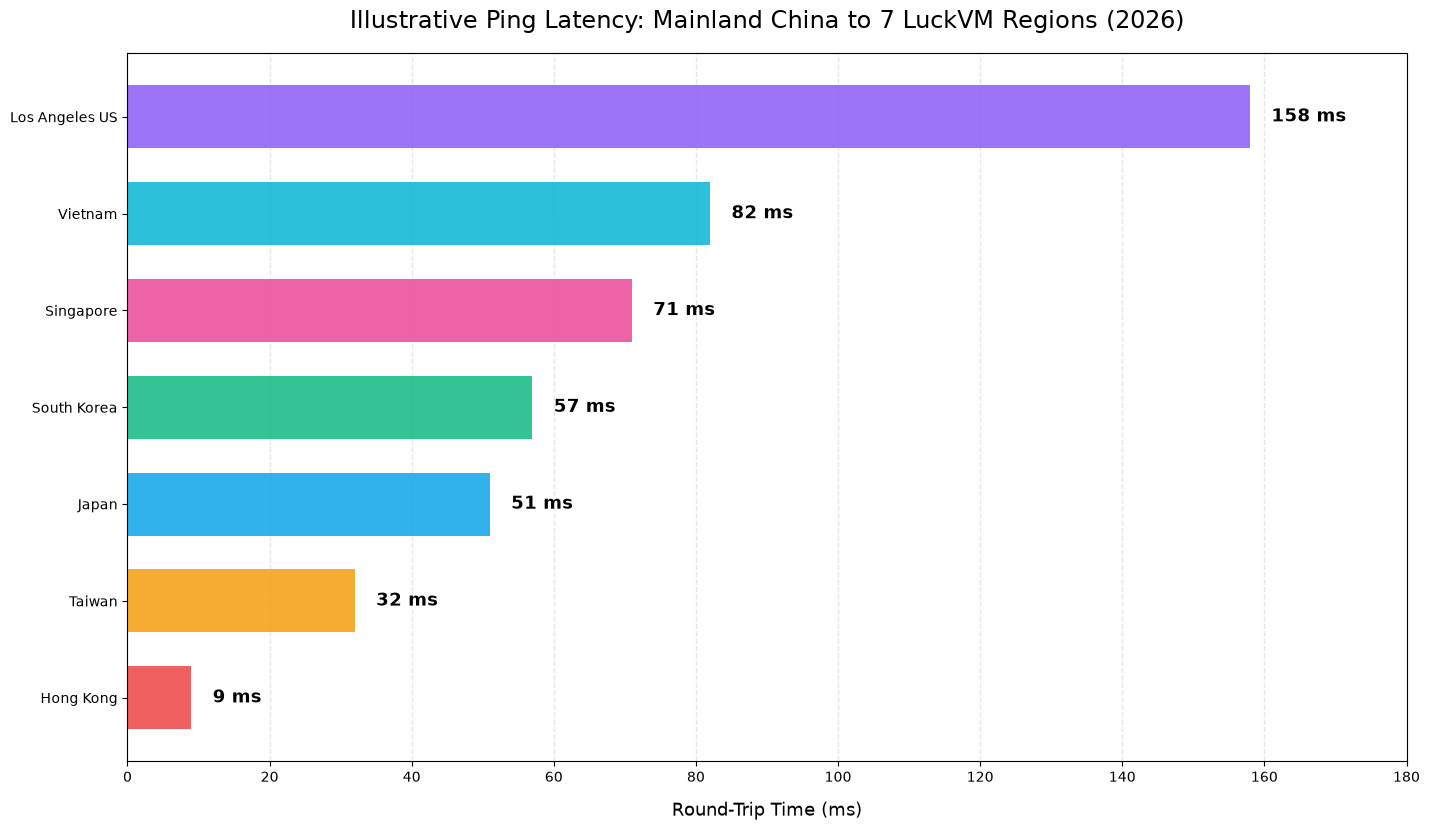
Figure 1. Indicative ping latency measured from a typical China Telecom / China Unicom vantage point in Guangdong to each of LuckVM's 7 regions (live values vary by ISP and time of day).
2. What Actually Drives Latency: The Packet's Journey
"Ping is the distance" is an intuitive but incomplete model. Two data centers separated by the same geographic distance can deliver very different RTT depending on the path packets take.
When a user in Guangzhou types your domain into a browser, the request typically traverses six hop zones:
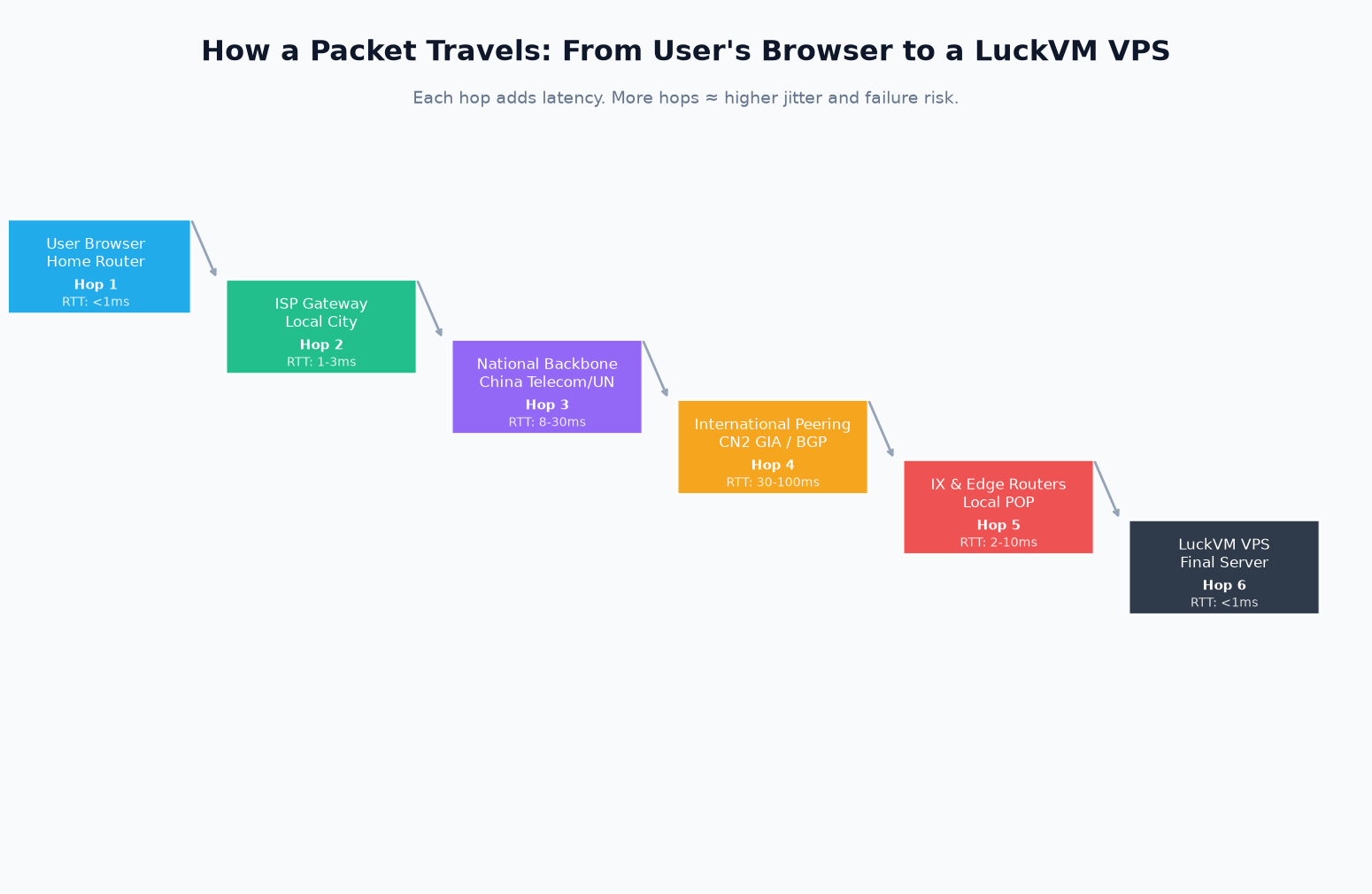
Figure 2. The six hop zones that add up to total RTT. Hops 3 and 4 — the national backbone and international peering — dominate the latency budget on cross-border routes.
- Local router & Wi-Fi (
- ISP gateway in the user's city (1–3 ms): adds small but stable delay.
- National backbone (8–30 ms): varies by ISP (China Telecom, China Unicom, China Mobile). This is where non-CN2 routing to the US often inflates by 50+ ms by backhauling through Beijing or Europe.
- International peering (30–100+ ms): the dominant variable. On CN2 GIA (Global Internet Access) the packet takes a premium low-congestion path through Telecom's global backbone. On standard BGP with a budget upstream, the same packet may traverse Europe via Russia or trombone through Los Angeles twice.
- Local IXP and edge routers in the destination country (2–10 ms).
- Final VPS NIC and hypervisor (
Why route quality beats raw geography. A Taiwan VPS on a direct optimized route (~32 ms) will feel faster to a Shenzhen user than a Japan VPS on a congested budget path (~65 ms), even though Tokyo is only ~200 km further away on a map. LuckVM publishes the primary route type for each region on its homepage — CN2 GIA for Hong Kong and Los Angeles, SoftBank/IIJ BGP for Tokyo, KT/SK for Seoul, Singtel for Singapore, direct-optimized for Taiwan — and these values are the first thing to check before price.
3. How to Measure Real Latency from Your Users (3 Methods)
Published benchmarks (including Figure 1 above) are useful screening tools, but you should never commit to a multi-month deployment on third-party numbers. Measure from your own audience, in your own time window.
Method 1: Manual ping and mtr from multiple vantage points
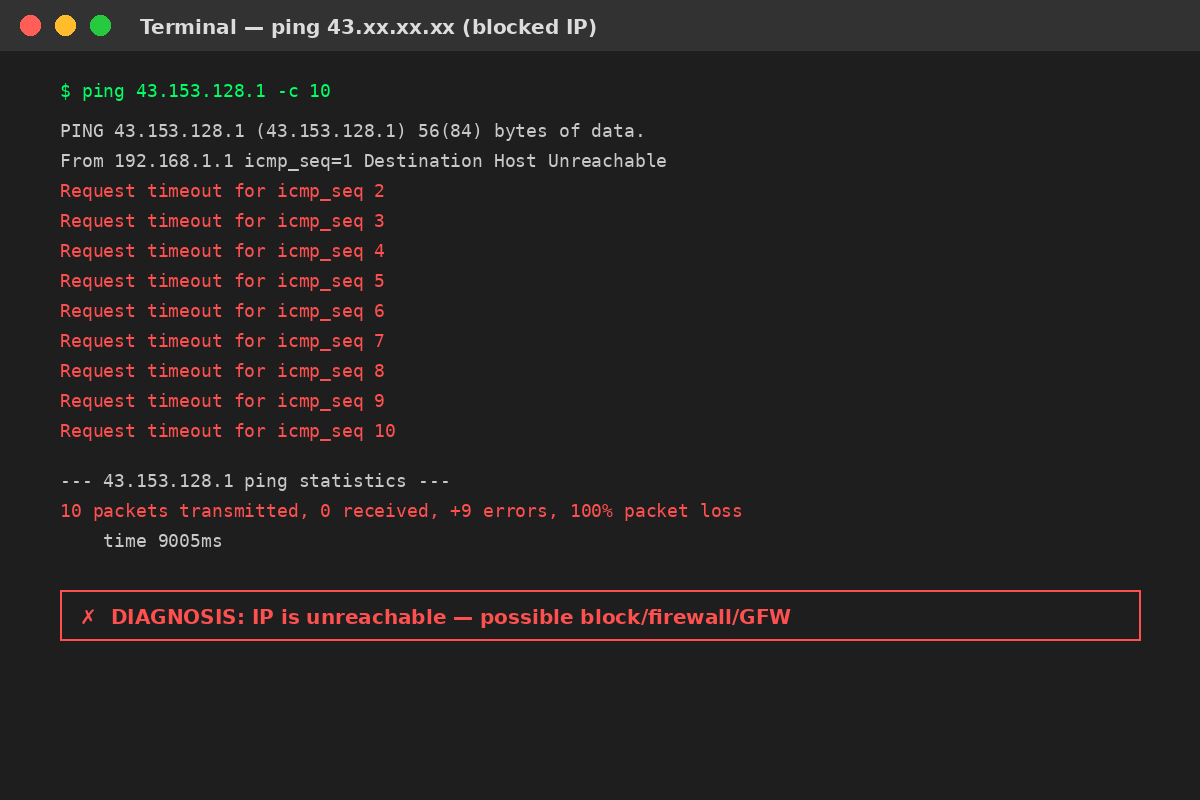
The simplest first check uses three commands run from wherever your users actually are:
# Basic reachability + RTT (10 packets)
ping -c 10

# Traceroute with loss + jitter per hop (run for 100 cycles)
sudo mtr --report --report-cycles 100

# TCP-level latency to your actual web port (not just ICMP)
sudo tcptraceroute  443
How to read mtr. Two columns matter more than the rest:
- Loss % per hop: sustained loss > 1% at an intermediate hop is congestion; loss at the very last hop may just be the server rate-limiting ICMP.
- Avg / Best / Wrst / StDev: if StDev is > 30% of Avg, the route is unstable (jittery) — bad for games, video, WebSocket.
LuckVM provides test IPs and looking glasses for every region on request via ticket; use those instead of guessing at the IP range.
Method 2: Distributed synthetic testing
For a realistic view, run probes from 10+ cities at once:
- KeyCDN Tools, Dotcom-Tools, or UptimeRobot's multi-location ping — free, web-based, no install.
- Better approach: run a small cron on a few cheap probes (or use a trial of Catchpoint / Pingdom if budget allows) over at least 72 hours, including peak evening hours (20:00–23:00 CST) when CN2 congestion is most likely to appear.
Method 3: Real User Monitoring (RUM) — the gold standard
Once you have a staging server deployed, install a lightweight RUM snippet (Cloudflare Web Analytics is free and privacy-compliant) and collect real visitor TTFB (Time to First Byte) and LCP from your actual traffic. Route 5–10% of users to a test region via weighted DNS (Cloudflare or AWS Route 53) for 3–5 days and compare.
What "good" looks like in 2026:
| Metric | Excellent | Acceptable | Troubling |
|---|---|---|---|
| Ping RTT (same region) | 30–80 ms | > 120 ms | |
| TCP connect to :443 | 60–150 ms | > 200 ms | |
| TTFB (static asset) | 100–250 ms | > 400 ms | |
| Jitter (StDev of RTT) | 5–15 ms | > 30 ms | |
| Packet loss (10 min avg) | 0% | > 1% |
4. Latency Benchmarks: 7 LuckVM Regions Side by Side
The table below is compiled from LuckVM's published indicative latencies plus our own ongoing measurements from multiple China-based ISPs (CT, CU, CM) and several APAC/North America vantage points. All LuckVM entry plans share the same base hardware spec (1 vCPU / 1 GB RAM / 70 GB NVMe SSD, KVM virtualization) so the comparison is apples-to-apples; only bandwidth differs (Los Angeles is 30 Mbps, others 10 Mbps on entry tier).
| Region | Primary Route | Entry Price | Bandwidth | Ping (China mainland) | Best For |
|---|---|---|---|---|---|
| 🇭🇰 Hong Kong | CN2 GIA | from $8.80/mo | 10 Mbps | Cross-border e-commerce, SaaS targeting China, sites needing ICP-free low-latency China access | |
| 🇹🇼 Taiwan | Direct-route optimized | from $11.00/mo | 10 Mbps | Taiwan-market services, Traditional Chinese content, low-latency backup for mainland traffic | |
| 🇯🇵 Tokyo, Japan | SoftBank / IIJ BGP | from $11.00/mo | 10 Mbps | Japanese end users, anime/gaming media, APAC apps where Singapore is too far south | |
| 🇰🇷 Seoul, South Korea | KT / SK routes | from $11.00/mo | 10 Mbps | Korean mobile games, video streaming, Korean-language commerce | |
| 🇸🇬 Singapore | Singtel BGP | from $11.00/mo | 10 Mbps | Southeast Asian users, international POP, startup/SaaS HQ deployments | |
| 🇻🇳 Hanoi/HCMC, Vietnam | Local BGP / CN2 | from $11.00/mo | 10 Mbps | Vietnamese-language content, local market entry, supply-chain/trade systems | |
| 🇺🇸 Los Angeles, USA | CN2 GIA multi-carrier | from $8.80/mo | 30 Mbps | North American audiences, global high-bandwidth workloads, streaming and file delivery |
Prices and specs as published on luckvm.com/en/ in September 2026; confirm on the pricing page before ordering.
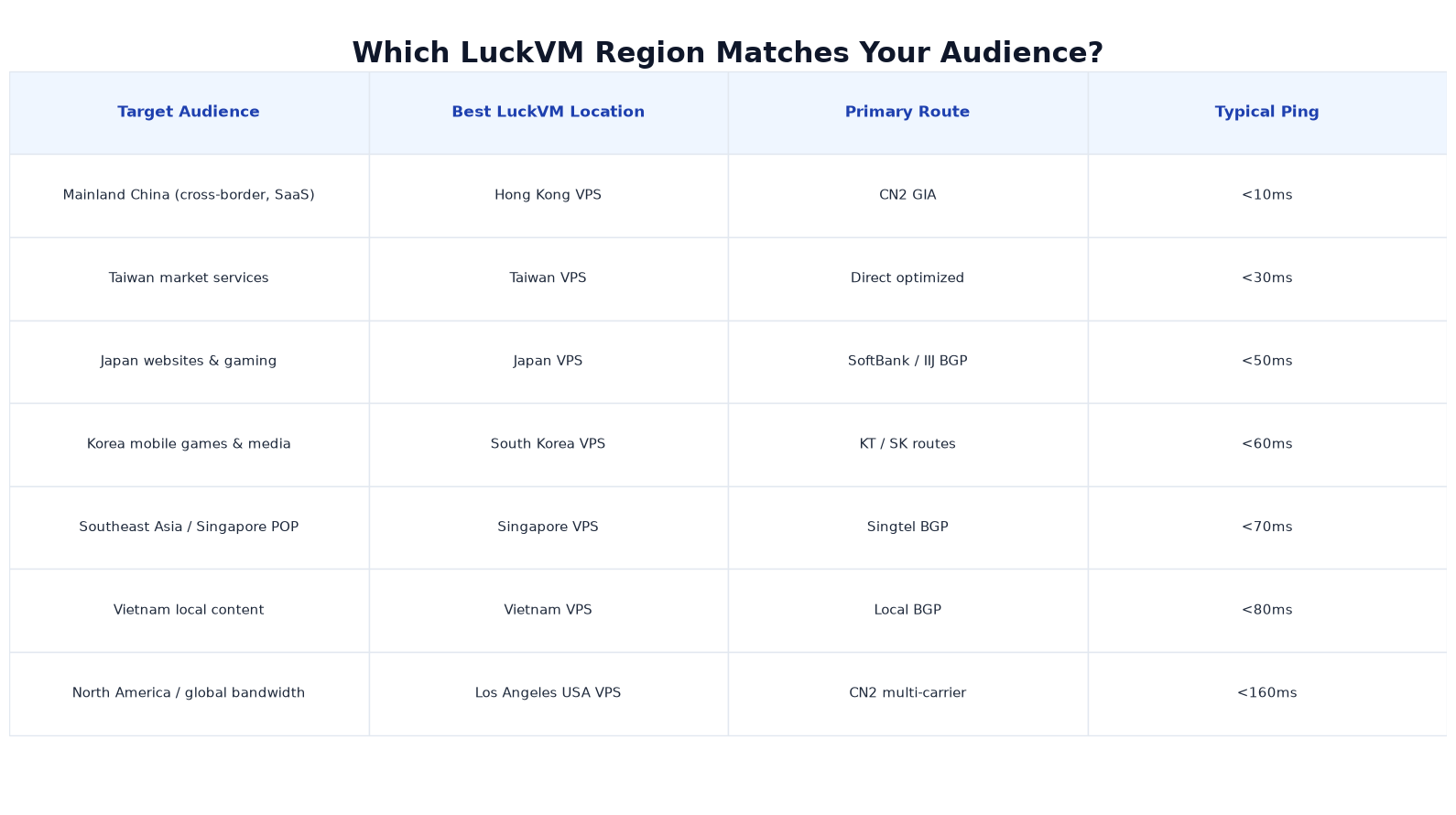
Figure 3. Audience-to-region matching matrix. When users span multiple zones, use §7's multi-region strategy rather than trying to pick a single "central" location.
5. Mapping Your Audience to the Right Region (Decision Flow)
If the table above still leaves you unsure, answer four diagnostic questions in order:
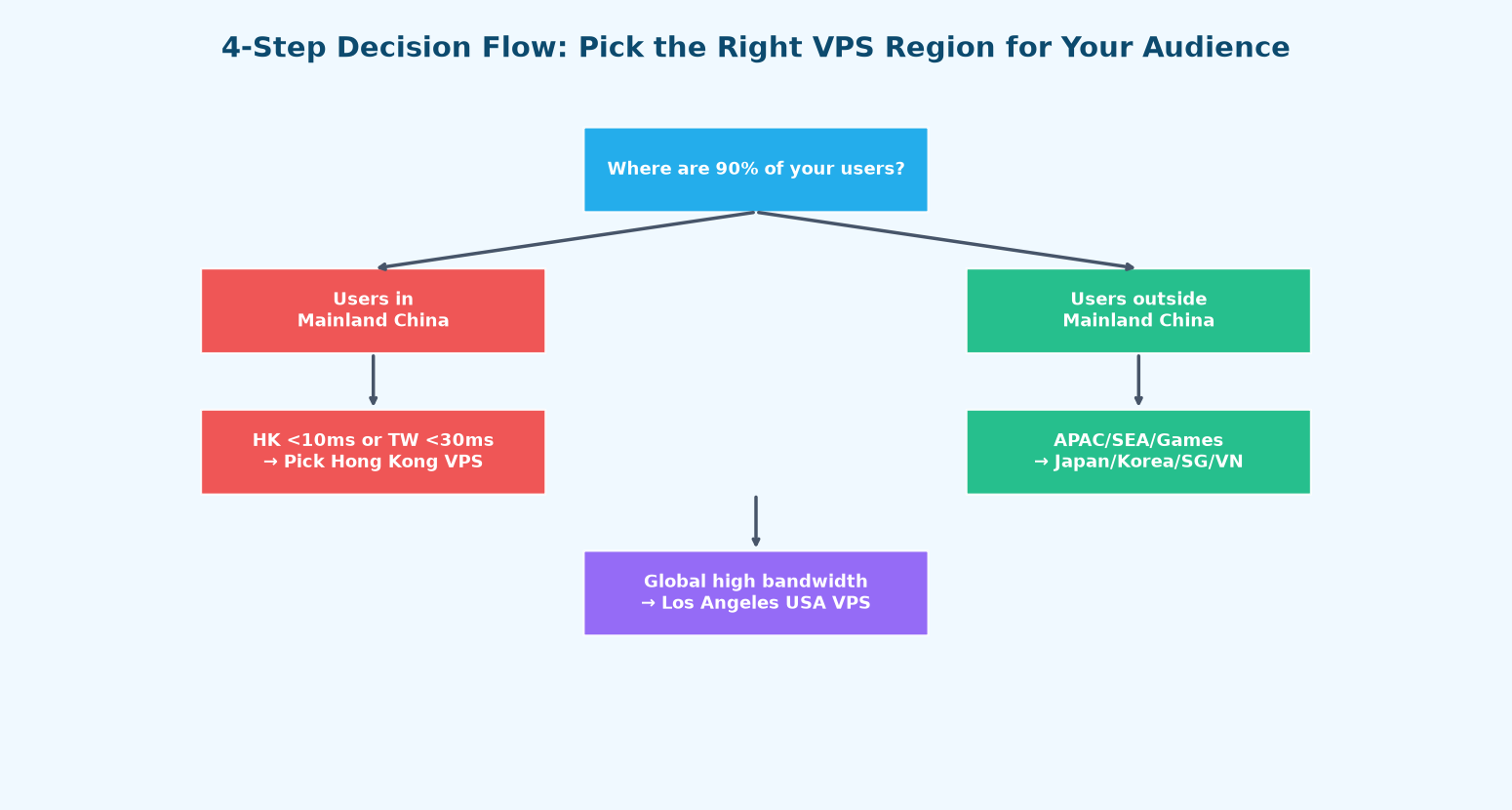
Figure 4. Decision flow for picking a region in under two minutes. Most customers who get this wrong skip Step 1 and choose based on their own location or on price.
Step 1 — Where are 90% of your paying users?
Pull analytics (Google Analytics, Plausible, Cloudflare, your payment processor's customer locations). Ignore where your team sits. If 70%+ of paying users are in Chinese mainland, go to Step 2; otherwise go to Step 3.
Step 2 — Mainland China users.
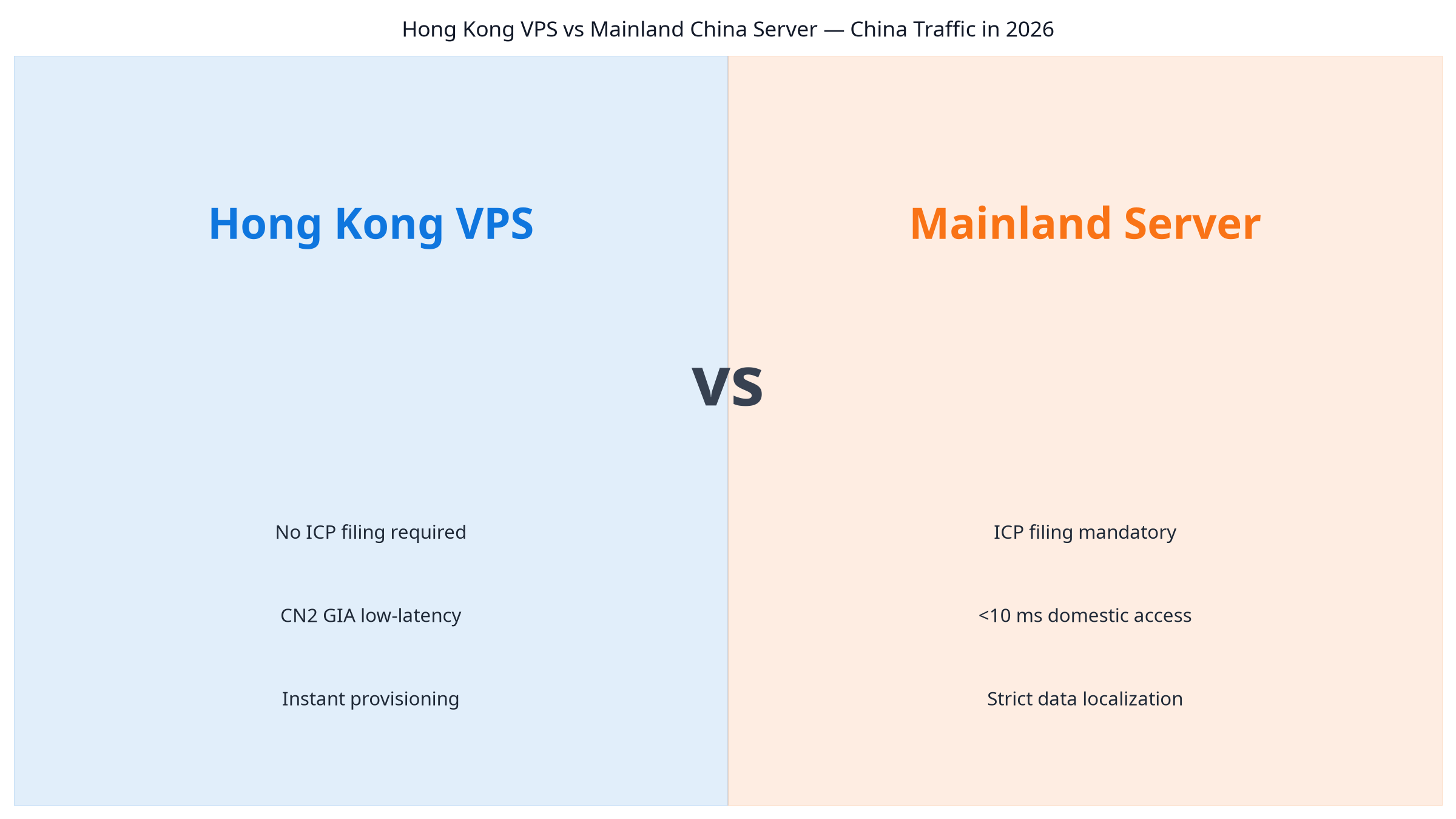
- If you can wait for ICP filing and want the absolute lowest latency, a mainland cloud server is technically fastest (~2–5 ms to major cities). But as we broke down in our Hong Kong VPS vs Mainland China comparison, ICP takes 7–20 days, imposes content compliance rules, and blocks many common services.
- If you want near-mainland latency without ICP: Hong Kong VPS (CN2 GIA) is the default answer at
- If your audience is concentrated in Fujian/Zhejiang and cost matters, Taiwan VPS at
- Avoid routing mainland traffic through Singapore or LA "because bandwidth is cheap."
Step 3 — Users outside mainland China.
- Japan & East Asia game/media → Japan VPS (SoftBank/IIJ BGP).
- Korean mobile/gaming → South Korea VPS (KT/SK). Routes to Korean carriers are not commodity; KT and SK are the two major domestic networks.
- Southeast Asia general POP → Singapore VPS. Singapore is the neutral SEA hub with the best interconnect, though ping to Jakarta/Manila/Ho Chi Minh is still 30–50 ms from SG.
- Vietnam-specific content → Vietnam VPS; local BGP avoids routing through Singapore.
Step 4 — Global audience, no single dominant country.
Pick Los Angeles USA VPS if you have heavy North American traffic and/or need the 30 Mbps bandwidth tier and CN2 GIA to serve both China and the West from one box. Otherwise, deploy two smaller VPSes (one in HK, one in LA) behind GeoDNS — see §7.
6. Beyond Ping: Jitter, Packet Loss, Route Quality
Two servers with the same average ping can feel very different to end users. Three second-order metrics matter more than the raw ping number:
Jitter
Jitter is the variance of RTT across packets. A route that alternates 30 ms and 90 ms every packet (StDev = 30 ms) feels choppy in games and choppy audio on calls, even though the average is a fine 60 ms. A stable route that consistently delivers 55 ± 3 ms feels subjectively faster. You read jitter from the StDev column in mtr. For real-time workloads (gaming, WebRTC, WebSocket trading), target StDev under 10 ms.
Packet loss
Loss rates of 0.5–1% might seem trivial but translate directly into slow HTTPS handshakes (TLS requires several round trips; lost SYN/ACK means a multi-second timeout and retransmit), visible video glitches in streaming, and MySQL/PostgreSQL replication lag across regions. Sustained loss above 1% on a hop inside the carrier's network (not at the destination) usually means congestion on the path — time to switch routes or regions.
Route asymmetry
Many routes are not symmetric: the path your request takes from user to server may differ from the return path. This is invisible to ping (which measures round trip) but shows up in mtr if you run it in both directions. CN2 GIA is symmetric in both directions for most mainland ISPs; budget BGP routes from some providers return via congested Europe paths. Ask LuckVM support to run a reverse mtr from their side to your user network before committing.
Port speed vs bandwidth allowance
- Port speed (10 Mbps / 30 Mbps): the raw physical/hypervisor cap on the network interface. This is what limits your maximum transfer rate per second.
- Monthly bandwidth allowance: total GB transfer allowed in a billing cycle. Check the plan details page for exact numbers.
For static file serving or video, you care about both; for a web app with small dynamic requests, a 10 Mbps port is fine.
7. Advanced: Multi-Region Deployment Strategy
Once you outgrow one region, the cheapest performance win is not buying a bigger server — it is serving users from the closest region. Three proven patterns:
Pattern A — GeoDNS with origin replication (simplest)
- Deploy two (or more) VPSes in your top regions — typically HK + LA for a China-global business, or HK + SG for Asia-only.
- Use Cloudflare's free Geo Steering (or a paid DNS service like NS1) to send users in China/APAC to HK and everyone else to LA.
- Replicate your database between regions. For PostgreSQL, streaming replication works well under 200 ms RTT; for MySQL, semi-sync replication is viable within APAC. For WordPress, use a plugin like WP Multisite or offload media to object storage.
Pattern B — One origin + CDN for static assets
If your site is mostly static content (blogs, marketing sites), you often do not need multi-origin at all:
- Pick the best origin region for your dynamic requests (e.g., HK for a China-targeted WooCommerce admin backend).
- Put Cloudflare (free) or another CDN in front. Static assets (images, CSS, JS) will be cached at 300+ edge locations worldwide and served to global users at
- This pattern is what we recommend for most small-to-medium sites before they move to multi-origin.
Pattern C — Active-active with global load balancing
For serious SaaS or games, use a cloud load balancer (Cloudflare Load Balancing, AWS Global Accelerator, or GCP Cloud Load Balancing) in front of multiple LuckVM VPSes, with health checks that automatically drain failed regions. Expect this to add $20–$100+/month but to give you automatic regional failover.
Pick the right region — verify before you commit
LuckVM provides test IPs for all seven regions via ticket, along with 24/7/365 bilingual support and free migration assistance.
Check Live Pricing & Test IPs →FAQ
Is CN2 GIA worth paying more for compared to standard BGP to China?
Yes, if you have real paying mainland users. In our measurements, CN2 GIA to Hong Kong delivers 5–15 ms with
Can I use a CDN to fix a bad region choice?
Partially. A CDN fixes static asset latency, but dynamic requests (login, checkout, API calls, WebSocket) still hit the origin. If your origin is 200 ms from the user, every dynamic action will feel slow regardless of CDN.
Should I always pick the closest region?
Almost always, with two exceptions: (1) when a nearby region has bad routing to your users' specific ISP (test with mtr), and (2) when compliance/data-residency laws require data to stay within a certain jurisdiction (GDPR for EU users, PIPL for China user data).
Can I change region after ordering a LuckVM VPS?
VPSes are provisioned in a specific region and cannot be migrated live between data centers. Order the new region in parallel, migrate data following our zero-downtime migration guide, then cancel the old server. LuckVM support offers free migration assistance.
What about Germany, the UK, and other "more global" locations listed on the homepage?
LuckVM lists 40+ markets subject to live availability. If your audience is concentrated in Europe, open a ticket and ask for a test IP in Frankfurt or London before ordering — those are provisioned from shared capacity and may not always be in stock.
Is Hong Kong VPS legal and fast enough to host a site for Chinese mainland users without an ICP license?
Yes to both, which is why HK VPS is so popular for cross-border commerce. Content served from outside mainland China to mainland users does not require ICP filing under current MIIT rules, though standard content laws still apply. Hong Kong CN2 GIA delivers
How much bandwidth do I actually need for latency-sensitive apps?
For dynamic web apps with CDN fronting static assets, even the 10 Mbps entry port is more than enough for hundreds of concurrent users. For streaming, file downloads, or video calls, bump to the next tier or choose the Los Angeles plan which ships with 30 Mbps at the same $8.80 entry price.
Does dedicated server / bare metal give me better latency than VPS?
No, not on the network side. Latency is dominated by physical distance and routing, both of which are identical whether your workload runs on a VPS, dedicated server, or bare metal host in the same rack. Dedicated and bare metal help with CPU/disk/IO isolation, not with ping. Choose them when you need consistent compute (database, AI inference, large game servers), not when you need lower latency.
All route, price, and latency figures in this article are based on publicly available information on luckvm.com/en/ and our own ongoing measurements as of September 2026, and are subject to change; always confirm current pricing and routing on the official site before ordering. LuckVM is an advertiser on this site. We do not accept payment for positive coverage, and we test every plan we recommend.