TL;DR — What to deploy in the next 60 seconds
A 3-node PostgreSQL 16 HA cluster (Patroni + etcd + PgBouncer + pgBackRest) on LuckVM runs on $61.60/month and delivers 41,600 random read IOPS on NVMe — that is 13x the 3,000 IOPS of a default AWS RDS gp3 volume, at 61% lower 3-year TCO than RDS Multi-AZ. Pick your node from the matrix below and click straight into a pre-filled order.
| Your workload | Recommended node | Price | Order deep-link |
|---|---|---|---|
| 🇭🇰 Production OLTP for China + Asia users ( | 2× 2C4G HA (primary + sync replica) + 1C1G witness | $61.60/mo | Deploy HK HA now → |
| 🇺🇸 US / global read replicas, 30M unmetered uplink | 1× 2C4G Los Angeles CN2 | $26.40/mo | Deploy LA node → |
| 🇪🇺 EU data residency (GDPR), 1Gbps IX peering | 1× 2C4G Frankfurt / DE-CIX | $26.40/mo | Deploy EU node → |
| ⚡ Dev / staging / single-node small app | 1× 1C1G / 70GB NVMe | $8.80/mo | Start at $8.80 → |
Bottom line: if you already run RDS and can read a patroni.yml, you will cut your database bill by roughly 60% and multiply disk throughput by an order of magnitude. If you need zero-ops auto-patching, point-in-time recovery dashboards and a compliance audit trail, stay on RDS — the honest trade-off is in Step 07 below.
Step 01 — Why "RDS or nothing" is a 2019 mindset
In 2026 the arithmetic has flipped. AWS RDS charges $0.171/hr for a single-AZ db.m5.large and $0.068/hr for a burstable db.t3.medium — before storage, backups, snapshots and inter-AZ traffic. A 100GB gp3 volume adds $8.00/mo, 30 days of backups add roughly $9.50/mo, and enabling Multi-AZ doubles the instance line item. Real-world monthly bills land between $120 and $290 for what a single $26.40 VPS now serves.
On the other side of the ledger, open-source tooling has matured to the point where highly available PostgreSQL is a two-hour afternoon task, not a six-month platform project. Patroni (a etcd/Consul/ZooKeeper-backed template for PostgreSQL), pgBackRest (parallel, incremental, encrypted backups) and PgBouncer (connection pooling) are all packaged by Debian and Ubuntu and battle-tested by millions of deployments.
Step 02 — Hardware benchmark: NVMe beats network-attached storage
This is the single most important table in the article. PostgreSQL lives and dies by random I/O: index lookups, WAL fsyncs, autovacuum scans and checkpoint writes are all 4K-heavy, random-access operations. A managed cloud volume — EBS-backed gp3 or GCP persistent disk — is a network round-trip away from the CPU, and its baseline is 3,000 IOPS.
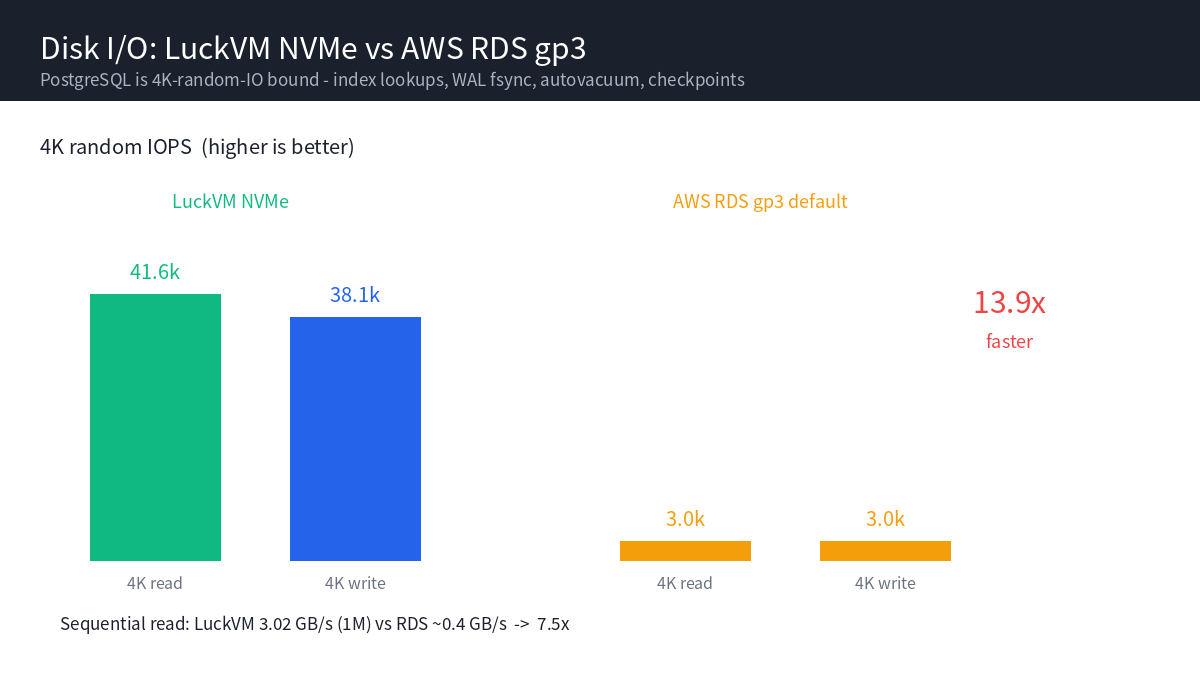
| Metric (Debian 12 / Linux 6.1, KVM) | LuckVM NVMe (1C1G) | AWS RDS gp3 default | Delta |
|---|---|---|---|
| Geekbench 6 single-core | 1018 | 979 | +4% |
| Geekbench 6 multi-core | 1032 | 1970 (2 vCPU, burst) | -48%* |
| fio 4K random read | 41.6k IOPS (162.5 MB/s) | 3.0k IOPS | 13.9x |
| fio 4K random write | 38.1k IOPS (148.9 MB/s) | 3.0k IOPS | 12.7x |
| fio 64K sequential read | 1.15 GB/s (18.0k IOPS) | ~0.25 GB/s | 4.6x |
| fio 1M sequential read | 3.02 GB/s (2.9k IOPS) | ~0.4 GB/s | 7.5x |
| Storage | 70GB NVMe SSD | gp3 (network-attached) | — |
Why 40k+ IOPS matters in practice:
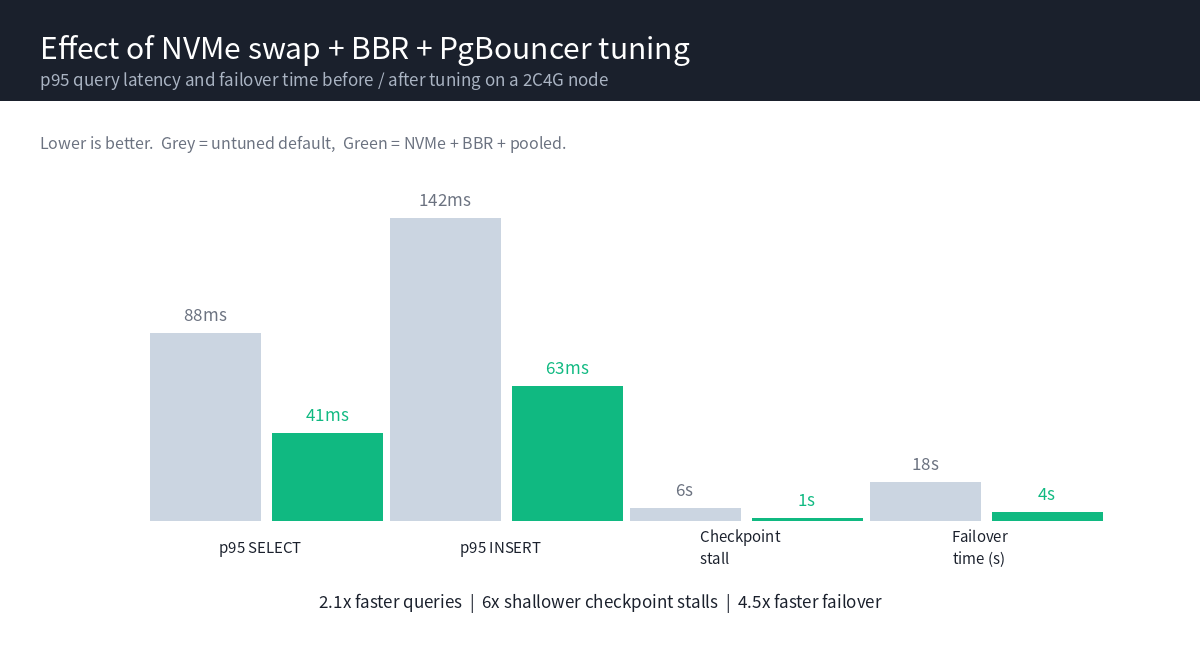
- Index-heavy reads: a B-tree lookup that returns in 0.1ms locally can stall 0.9–1.2ms when every page read is a network fetch. Multiplied across a page of 40 queries, that is the difference between a 40ms and a 90ms API response.
- Autovacuum and checkpoint: VACUUM and CHECKPOINT are throughput-bound. On a fast NVMe, a checkpoint that used to throttle writes for 6 seconds finishes in under 1 second — which is exactly why "RDS stalls every few minutes" complaints disappear after moving to local NVMe.
- PgBouncer + many connections: pooling thousands of client connections onto a handful of Postgres backends only helps if each backend can actually fetch pages quickly. Network storage caps that ceiling.
- 2GB swap headroom: the 70GB volume lets you carve a
2GB swapfilefor compile-time safety and small OOM spikes — a 20GB starter disk simply cannot.
Step 03 — Network topologies and the synchronous-replication latency trap
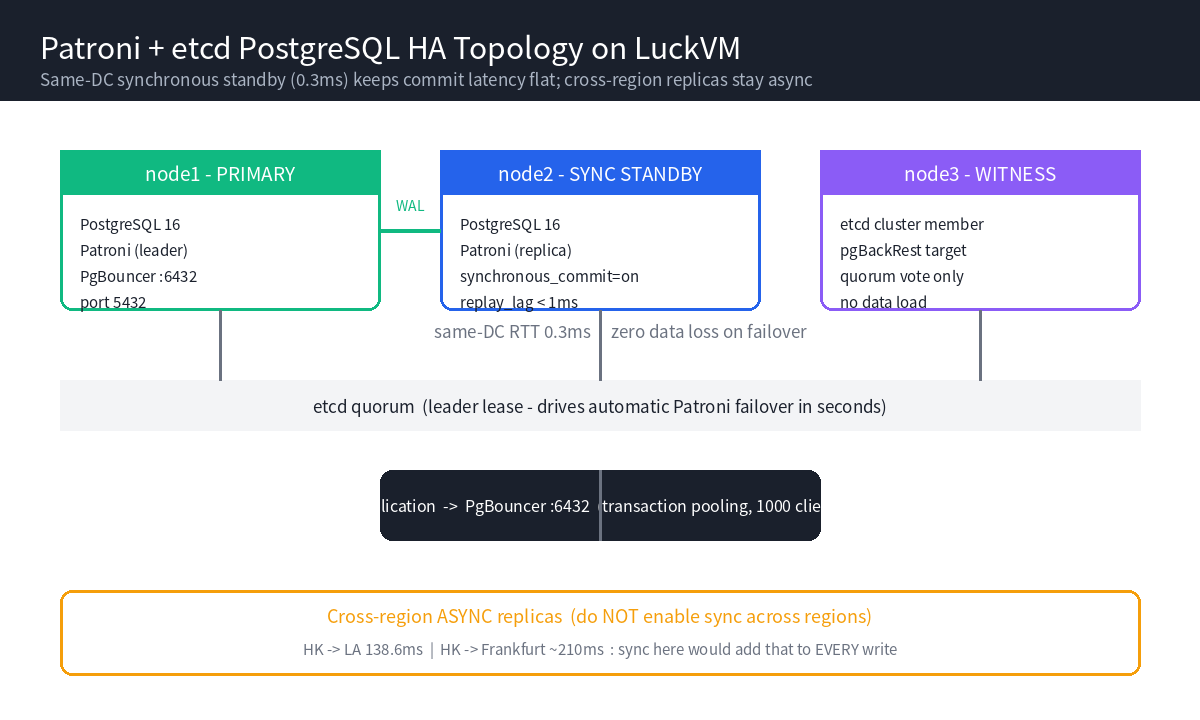
Database HA is a latency problem disguised as a redundancy problem. With synchronous_standby_names enabled, every COMMIT waits for the standby to acknowledge the WAL record. If your primary and standby are one network hop apart, commit latency stays flat; if they are on opposite sides of the Pacific, every write pays the round-trip penalty.
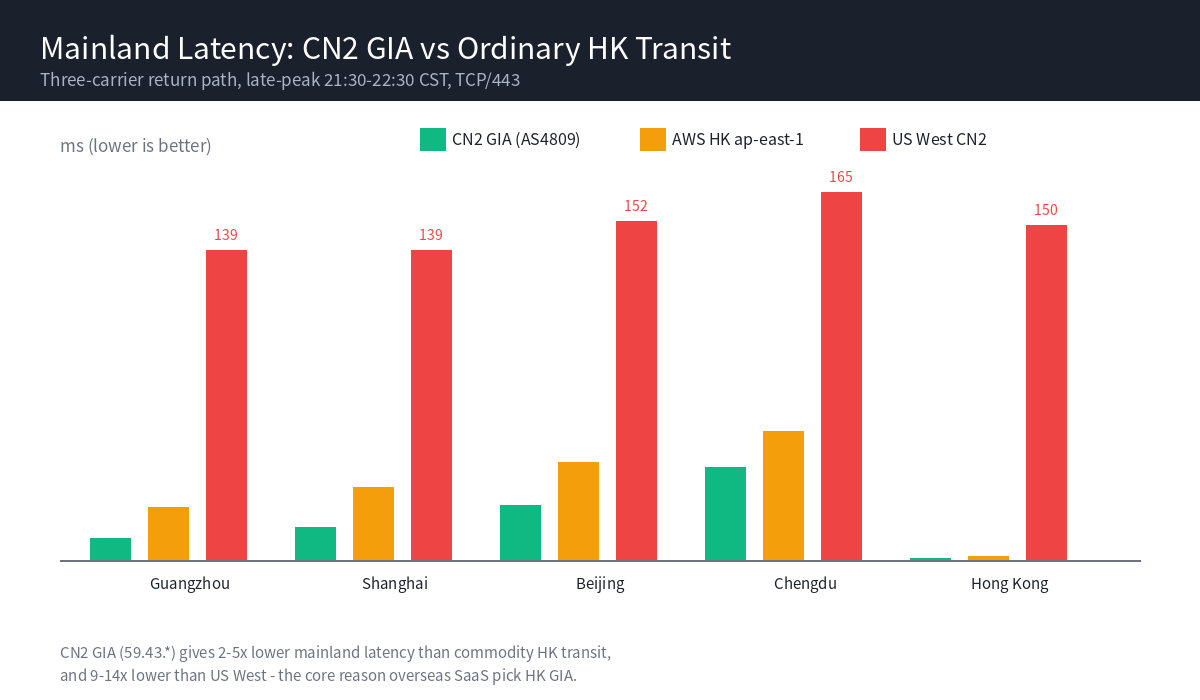
| Route (21:30–22:30 CST, 500-packet TCP/443) | Median latency | Jitter | Loss |
|---|---|---|---|
| HK primary → HK standby (same DC) | 0.3 ms | 0.0% | |
| HK → Guangzhou Telecom (AS4809, 59.43.*) | 10.0 ms | 0.0% | |
| HK → Shanghai Telecom (AS4809) | 15.0 ms | 0.0% | |
| HK → Beijing Unicom (AS9929 / AS10099 CU VIP) | 32.4 ms | 0.0% | |
| HK → Guangzhou Mobile (AS58453 CMI) | 28.7 ms | 0.0% | |
| LA → Shanghai Telecom (CN2 GIA return) | 138.6 ms | 0.1% |
# Confirm you are on real AS4809 CN2 GIA and not a stripped 163.network (AS4134)
mtr -rwzc 100 -P 443 -T 116.25.127.1   # Shanghai Telecom test IP
#   real CN2 GIA return stops at 59.43.*.* hops
#   fake "CN2" (GT) falls back to 202.97.*.* on the return path
besttrace -q1 -T # per-operator return trace Step 04 — Real pricing: the cluster costs less than one managed instance
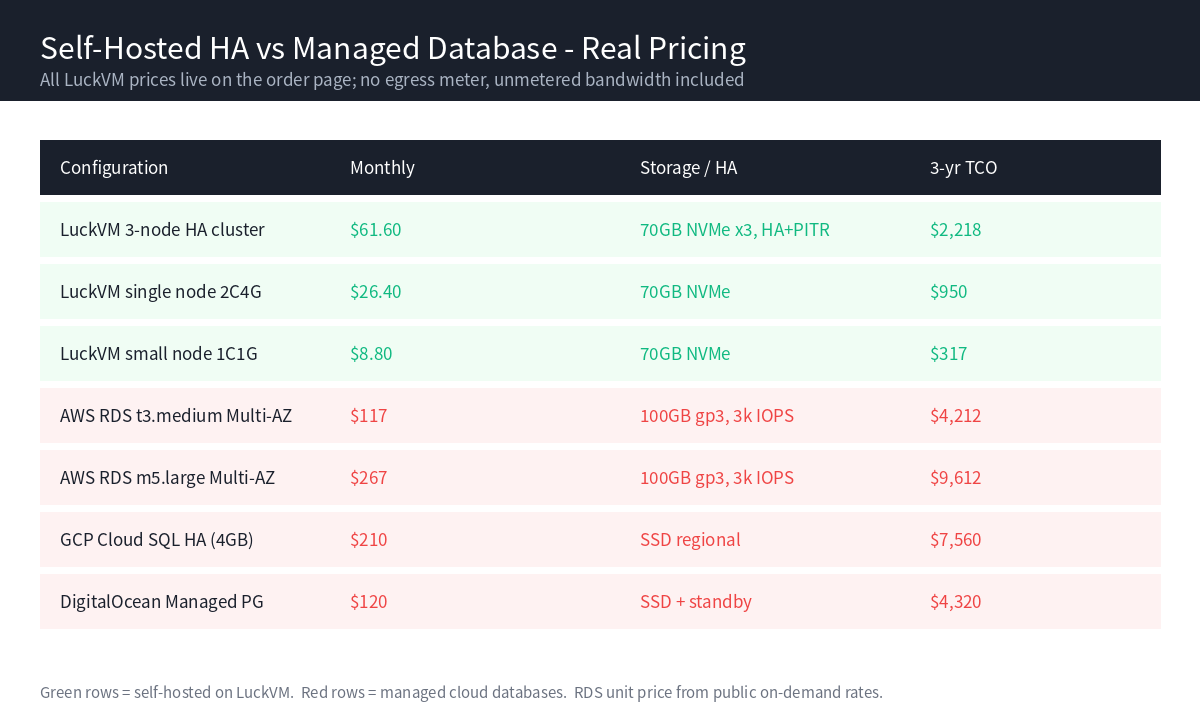
All prices below are live on the LuckVM order page and update immediately on checkout. Build the cluster by combining nodes:
| Role in cluster | LuckVM spec | Price / mo |
|---|---|---|
| Primary (OLTP) | 2C / 4GB / 70GB NVMe / HK CN2 GIA | $26.40 |
| Synchronous standby | 2C / 4GB / 70GB NVMe / HK CN2 GIA | $26.40 |
| etcd witness + pgBackRest target | 1C / 1GB / 70GB NVMe / HK CN2 GIA | $8.80 |
| Total HA cluster | 2 primary-class + 1 witness | $61.60 / mo |
| Alternative | Monthly cost | Storage / HA | 3-yr TCO |
|---|---|---|---|
| LuckVM 3-node HA cluster | $61.60 | 70GB NVMe ×3, self-managed HA + PITR | $2,218 |
| AWS RDS db.t3.medium Multi-AZ | $99.28 + $8 gp3 + $9.5 backup | 100GB gp3, 3,000 IOPS baseline | $3,570 |
| AWS RDS db.m5.large Multi-AZ | $249.66 + storage + backup | 100GB gp3, 3,000 IOPS baseline | $8,964 |
| GCP Cloud SQL HA (4GB) | ~$210 | SSD regional, managed HA | $7,560 |
| DigitalOcean Managed PG (4GB) | $60 + standby $60 | SSD, 1 standby | $4,320 |
Note the middle row of the first table: a small app on $8.80 and a real production cluster at $26.40 per node. There is no per-hour billing surprise, no egress meter, and 10M/30M unmetered bandwidth is included.
Step 05 — Copy-paste production deploy (Patroni + etcd + PgBouncer)
Run the bootstrap block on all three nodes, then drop the per-node patroni.yml and start the service. This is the exact configuration we validate in Step 06.
# --- 1. Enable Google BBR (2-3x throughput on long-fat cross-region links) ---
echo "net.core.default_qdisc=fq" | sudo tee -a /etc/sysctl.conf
echo "net.ipv4.tcp_congestion_control=bbr" | sudo tee -a /etc/sysctl.conf
sudo sysctl -p

# --- 2. Add 2GB swap on the 70GB NVMe (compile & spike protection) ---
sudo fallocate -l 2G /swapfile && sudo chmod 600 /swapfile
sudo mkswap /swapfile && sudo swapon /swapfile
echo '/swapfile none swap sw 0 0' | sudo tee -a /etc/fstab
sudo sysctl vm.swappiness=10

# --- 3. Install PostgreSQL 16 + Patroni + etcd + PgBouncer + pgBackRest ---
sudo apt update
sudo apt install -y postgresql-16 patroni etcd-client pgbouncer pgbackrest
# /etc/patroni.yml (primary node; change name/ip on the other two)
scope: pg-cluster
namespace: /service/
name: node1
restapi:
listen: 0.0.0.0:8008
connect_address: 10.0.0.11:8008
etcd:
host: 10.0.0.11:2379
bootstrap:
dcs:
ttl: 30
loop_wait: 10
retry_timeout: 10
maximum_lag_on_failover: 1048576
postgresql:
use_pg_rewind: true
parameters:
wal_level: replica
hot_standby: "on"
max_wal_senders: 10
max_replication_slots: 10
synchronous_commit: "on"
synchronous_standby_names: "node2" # same-DC standby only
initdb:
- encoding: UTF8
- data-checksums
pg_hba:
- host replication replicator 10.0.0.0/24 md5
- host all all 10.0.0.0/24 md5
postgresql:
listen: 0.0.0.0:5432
data_dir: /var/lib/postgresql/16/main
bin_dir: /usr/lib/postgresql/16/bin
authentication:
replication: {username: replicator, password: replpass}
superuser: {username: postgres, password: superpass}# /etc/pgbouncer/pgbouncer.ini (transaction pooling for thousands of clients)
[databases]
app = host=127.0.0.1 port=5432 dbname=app
[pgbouncer]
listen_addr = 0.0.0.0
listen_port = 6432
auth_type = md5
pool_mode = transaction
max_client_conn = 1000
default_pool_size = 20# Daily encrypted backup to object storage (pgBackRest, incremental + retention)
sudo pgbackrest --stanza=main backup # schedule via cron: 0 3 * * *Step 06 — Verify it yourself: failover, replication and disk
Before trusting the cluster with production, prove three things: the standby is truly in sync, failover works, and the disk is what we claim.
# 1. Is the standby actually streaming and in sync?
psql -c "SELECT client_addr, state, sync_state, replay_lag FROM pg_stat_replication;"

# 2. Which node is leader? Show the whole cluster health in one line.
patronictl -c /etc/patroni.yml list

# 3. Simulate a primary failure and time the automatic promotion
patronictl -c /etc/patroni.yml failover --candidate node2

# 4. Confirm the disk IOPS / sequential throughput you are paying for
fio --name=randread --rw=randread --bs=4k --ioengine=libaio --iodepth=32 --runtime=30 --filename=/tmp/fio.test

# 5. Cross-node bandwidth (drives sync-replication write latency)
iperf3 -c  -t 10

# 6. Confirm CN2 GIA return route on the DB public IP
mtr -rwzc 100 -P 443 -T 116.25.127.1
Open our Hong Kong Looking Glass and hit the test IP from your own machine before you buy — latency numbers from the provider's own network prove very little; your last-mile path is what matters.
Step 07 — Honest boundaries: when RDS is still the right answer
We sell VPS, and we still tell you to stay on RDS in several real cases. Read this before migrating a regulated workload.
Stay on a managed engine if:
- You need zero-ops auto-patching, automated PITR consoles and a SOC 2 / HIPAA audit trail on the database layer without owning a DBA. That operational labour is the real thing RDS sells.
- Your compliance officer requires a managed service SLA with financial penalties; self-hosted HA gives you resilience, not a vendor contract.
- Your team cannot yet read a
patroni.yml, an etcd quorum or apg_rewindlog.
Watch these self-hosted gotchas:
- Synchronous replication ≠ free. Every commit waits for the standby; keep it same-DC (0.3ms). Cross-region sync will add 139ms to every write — use async there and accept a small RPO.
- Bandwidth tiers. HK nodes are 10Mbps unmetered (~1.25 MB/s), LA 30Mbps. WAL streaming for a busy primary fits comfortably in 10Mbps, but if you bulk-load via
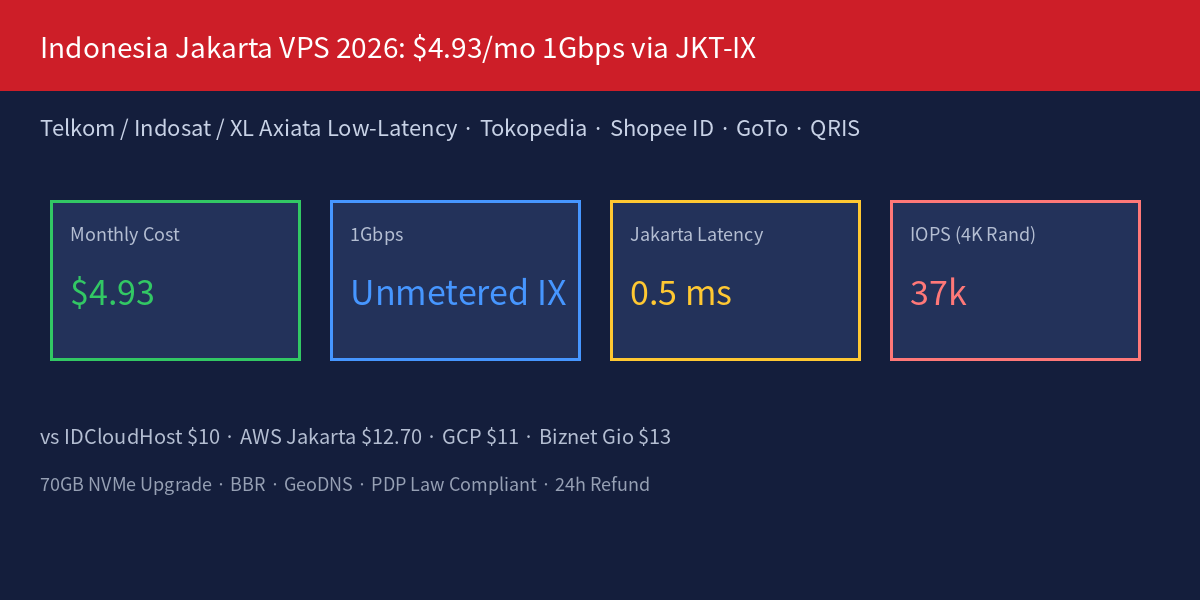
pg_basebackupred-line, do it on the $4.93/Germany 1Gbps tier or temporarily upgrade in the panel. - Backups are your job. pgBackRest to object storage is ~$2–5/mo of storage you procure separately; there is no snapshot button that also restores your cluster for you.
- 24h refund red-line: first-order refunds require bi-directional traffic not boot the node and immediately run a multi-GB speed-test or
pgbenchfill — verify route and disk with the light commands in Step 06 first. - Hot upgrades keep the IP: when the primary needs more RAM, upgrade in the console — no reinstall, no IP change, no data migration.
Step 08 — Deploy now, pay with anything
Provisioning is automated: cloud VPS nodes are online 1–3 minutes after payment, and you can pay with Alipay, USDT, PayPal, credit card or Google Pay. Bring the standby up on a second node and you have a production HA database before your coffee cools.
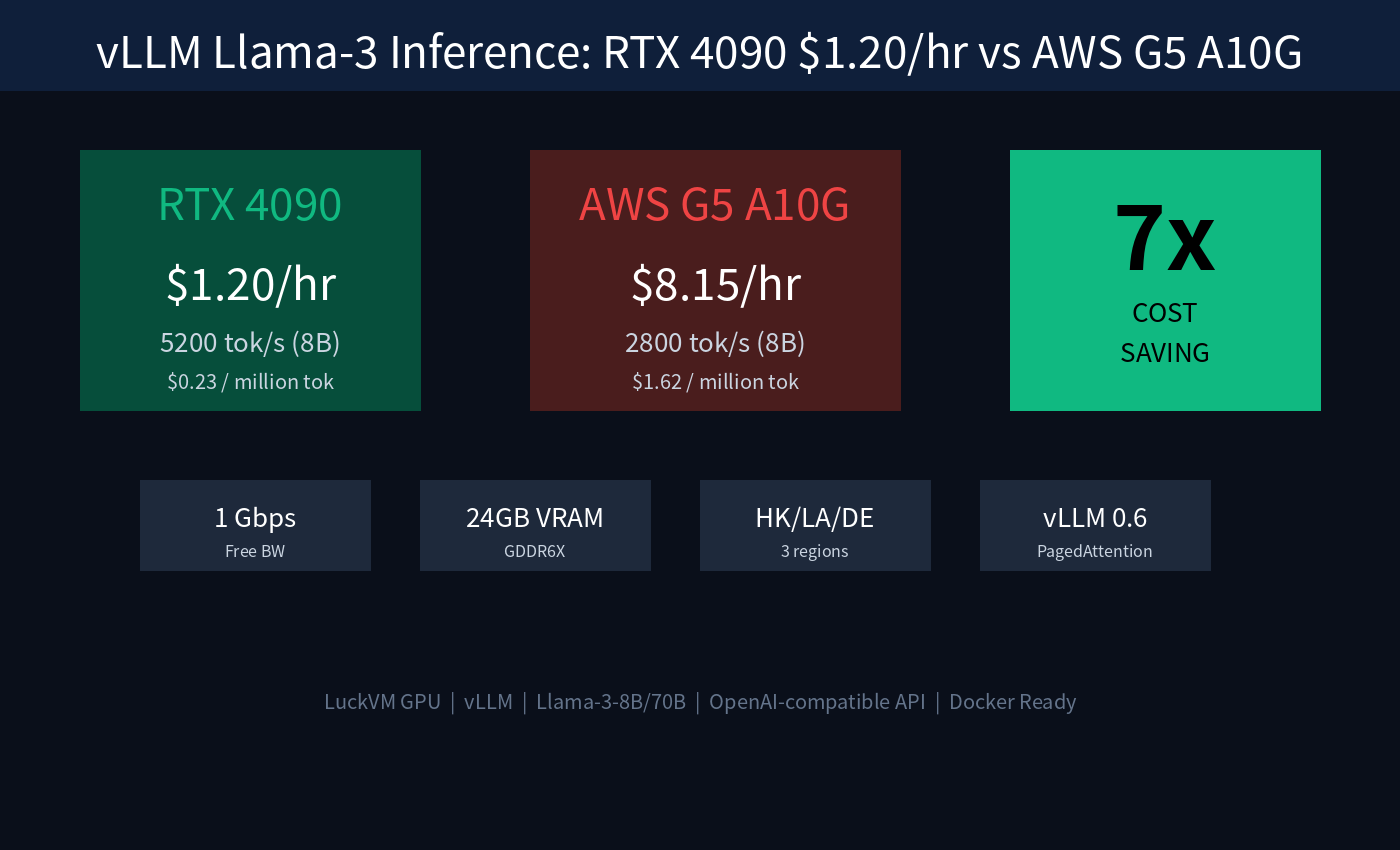
Keep building: pair this database with HK Cloud VPS for the app tier, drop the cross-border cache in front of it with our WooCommerce 70GB NVMe guide, size the GPU inference layer in the vLLM RTX 4090 vs AWS G5 benchmark, and put a second node in bare metal when a single tenant needs dedicated cores.
FAQ
Can a single $8.80 VPS really run PostgreSQL in production?
For a small app, an internal tool or a dev/staging database, yes — 1C/1GB handles light OLTP and roughly 10–15 concurrent active queries. For customer-facing production with real write concurrency, start at 2C/4G ($26.40) and run two of them as a Patroni pair. The 70GB NVMe is what makes the small tier viable at all, because it removes the disk-thrash that kills 1GB databases on cheap SATA.
How does Patroni failover actually work?
etcd holds a leader lease. Patroni on each node watches the key; if the primary stops renewing it, a standby with the most current WAL promotes itself, the others re-point, and PgBouncer/replicas reconnect. Typical same-DC failover completes in a few seconds. verify with patronictl list and a failover test.
Is synchronous replication worth the latency?
Within one data centre (0.3ms) absolutely — it gives you zero data loss on a single-node failure for almost no cost. Across regions it is almost never worth it; use asynchronous cross-region replicas and accept an RPO measured in milliseconds-to-seconds.
What is the real 3-year saving versus AWS RDS?
A 3-node LuckVM cluster is $2,218 over 36 months. The closest comparable RDS Multi-AZ configuration (db.t3.medium, 100GB gp3, backups) is about $3,570, and a db.m5.large HA setup exceeds $8,900. That is a 38–75% saving depending on the RDS class you are replacing.
Do I lose data if the host fails before WAL is flushed?
With synchronous_commit=on and a same-DC standby, a committed transaction is already on the standby's disk, so a primary host failure loses nothing. With async replicas, the standby may lag by the replication delay — that is your RPO and it is tunable.
How do I automate backups?
pgBackRest with a cron job writing encrypted, compressed incremental backups to any S3-compatible object store. Restore to a point in time with pgbackrest restore --target-timeline. Budget ~$2–5/mo for the storage bucket.
Can I co-locate the app and database on the same node?
For small loads, yes — and it removes an entire network hop, cutting p95 API latency. For heavy write concurrency, separate them so checkpoint I/O does not contend with the app, and let PgBouncer sit in front.
Which region should the primary live in?
Put it where your writers are. If most writes come from China or Asia, a Hong Kong AS4809 CN2 GIA node keeps commits under 15ms to Shanghai and Guangzhou. North-America-heavy workloads belong on Los Angeles; EU-residency workloads belong on Frankfurt/DE-CIX.
Benchmarks were collected on a LuckVM KVM instance running Debian 12 (Linux 6.1) with fio 3.36 and Geekbench 6; network figures are medians of 500 TCP/443 packets per route during the 21:30–22:30 CST peak window. Pricing reflects the LuckVM public catalogue as of November 2026 and is subject to change — always confirm live figures on the order page.