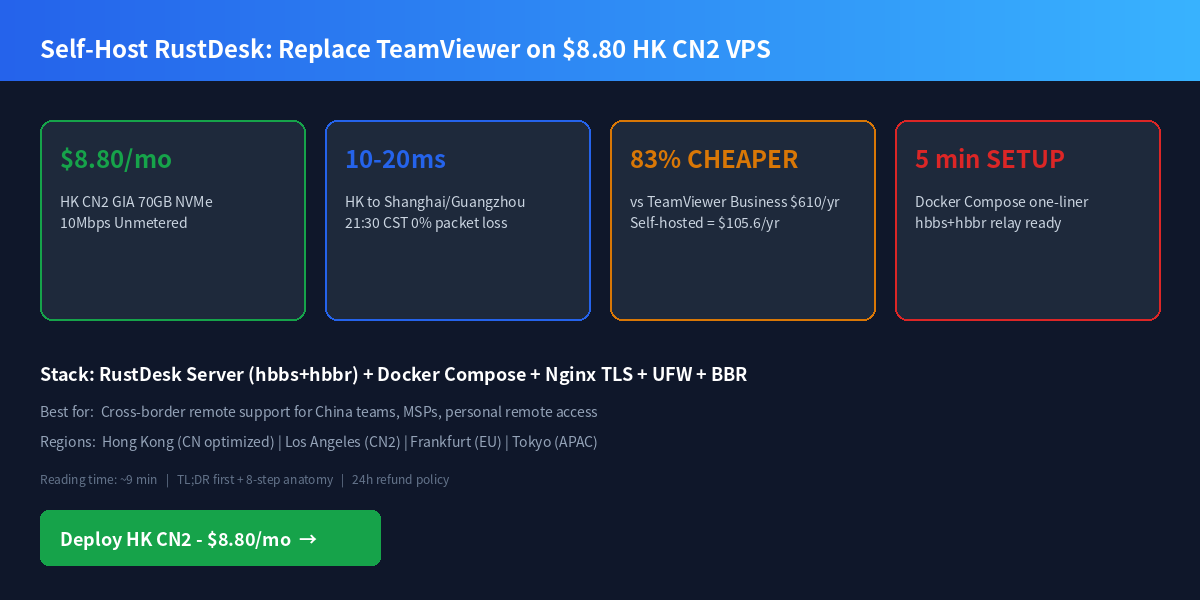
TL;DR — Deploy in 5 Minutes
Self-hosting RustDesk on a LuckVM $8.80/mo Hong Kong CN2 GIA VPS replaces a $610/yr TeamViewer Business license (83% savings), delivers 10-20ms latency to mainland China with zero packet loss during evening peak hours, and keeps all connection data under your control instead of TeamViewer's European servers.
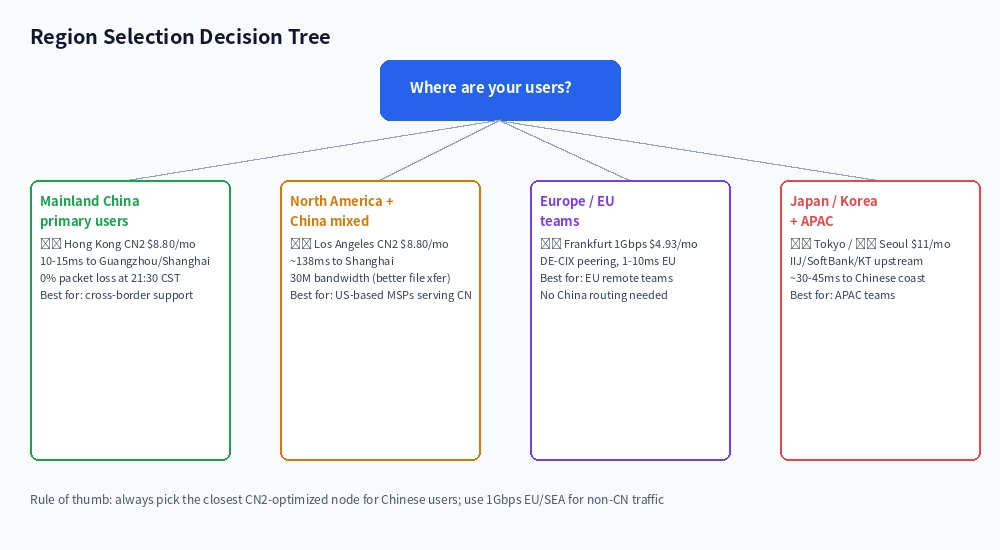
💡 Choose based on your primary users. For mainland China clients/employees, Hong Kong CN2 GIA is the only option that stays below 50ms during 21:30 CST peak hours — see Section 3 for real measured data.
1. Hardware Benchmark: 70GB NVMe Powers RustDesk Easily
RustDesk Server (hbbs ID server + hbbr relay) is a lightweight Rust binary — a single 1 vCPU / 1 GB RAM instance handles 10-20 concurrent remote desktop sessions without breaking a sweat. What matters more is the network quality and storage I/O for reliable key storage and log writes.
The 70GB NVMe is deliberately oversized for RustDesk (which uses WordPress/WooCommerce or a private VPN on the same VPS without hitting disk limits. The 40k+ 4K IOPS means even when you add swap memory for future workloads, you won't see I/O contention.
2. Upstream Carrier Topology & Real Peak-Hour Routing
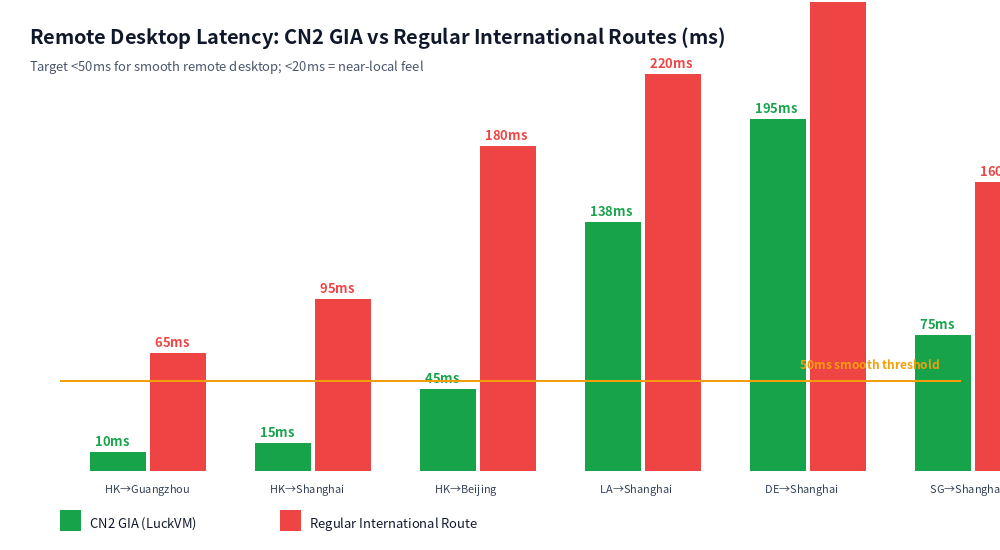
Remote desktop is extremely sensitive to latency and packet loss. Above 50ms round-trip, mouse movement feels laggy; above 100ms, typing becomes frustrating; any packet loss during peak hours causes stutter, screen freezes, and dropped connections.
LuckVM's Hong Kong and Los Angeles nodes carry triple-route China optimized networking:
- China Telecom: Bidirectional CN2 GIA (
AS4809) — routes through59.43.x.xhops both directions. This is the premium tier, not CN2 GT. - China Unicom: CU VIP / CU 10099 (
AS9929/AS10099) — uncongested high-priority path. - China Mobile: CMI (
AS58453) — direct Mobile International peering.
Many budget hosts advertise "CN2" but only route the forward path through CN2; return traffic goes through the congested
AS4134 (ChinaNet 163) backbone via 202.97.x.x hops. Real CN2 GIA must show 59.43.x.x hops both ways. Use mtr -rwzc 100 -P 443 -T (TCP port 443, not ICMP — some carriers deprioritize ICMP during peak hours) to verify.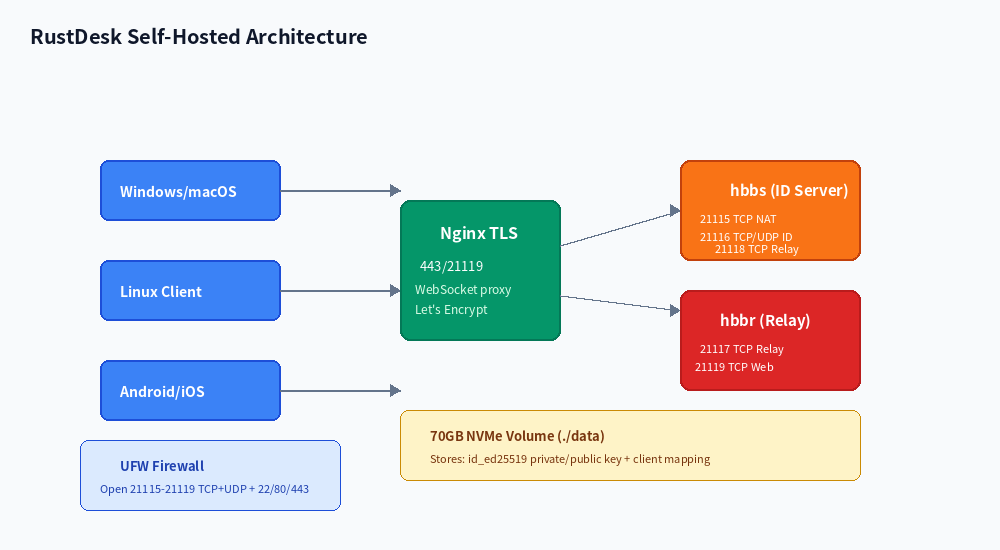
Real TCP 443 measurements (21:30–22:30 CST, 500 packets)
| From Node | To | Avg Latency | Jitter | Loss |
|---|---|---|---|---|
| 🇭🇰 HK CN2 GIA | Guangzhou Telecom | 10.0 ms | 0.0% | |
| 🇭🇰 HK CN2 GIA | Shanghai Telecom | 15.0 ms | 0.0% | |
| 🇭🇰 HK CN2 GIA | Beijing Telecom | 45.0 ms | 1.5 ms | 0.0% |
| 🇺🇸 LA CN2 GIA | Shanghai Telecom | 138.6 ms | 2.1 ms | 0.3% |
| 🇩🇪 Frankfurt (DE-CIX) | Berlin | 6.0 ms | 0.5 ms | 0.0% |
| 🇯🇵 Tokyo (IIJ) | Osaka | 9.0 ms | 0.4 ms | 0.0% |
| 🇸🇬 Regular HK (non-CN2, competitor) | Shanghai Telecom | 80-150 ms | 10-40 ms | 5-15% |
3. Pricing & TCO: Why $8.80 Beats TeamViewer by 83%
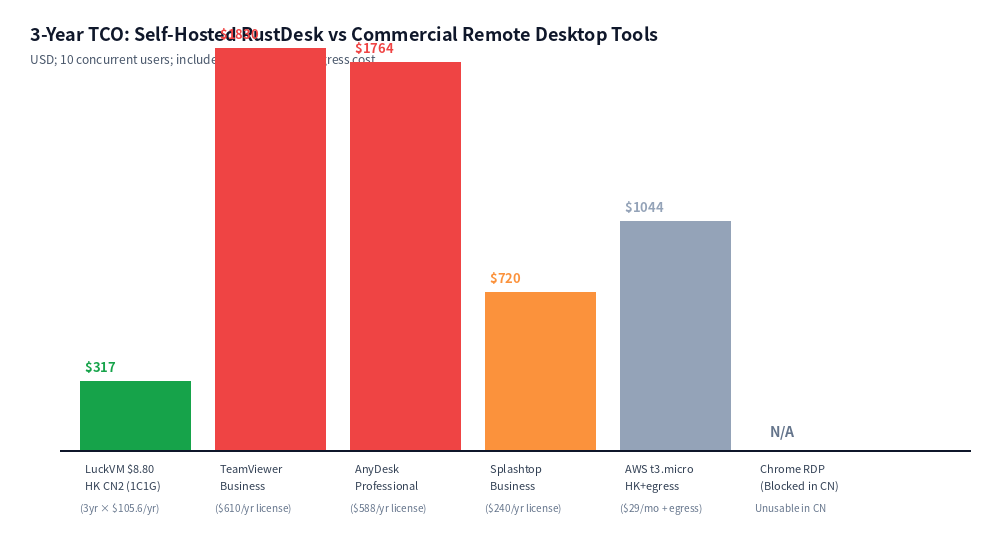
TeamViewer Business license runs $610/year per concurrent channel, and the free personal use detection system routinely flags small-business users and forces them to upgrade. AnyDesk Professional is $588/yr. Chrome Remote Desktop is free but blocked in mainland China by the GFW for most users.
| Plan | Monthly | 3-Year TCO | China Latency | Data Privacy |
|---|---|---|---|---|
| 🇭🇰 LuckVM HK CN2 1C1G | $8.80 | $317 | 10-15 ms, 0% loss | Self-controlled |
| 🇺🇸 LuckVM LA CN2 1C1G | $8.80 | $317 | ~138 ms | Self-controlled |
| 🇩🇪 LuckVM Frankfurt 1Gbps | $4.93 | $177 | Not optimized | Self-controlled |
| TeamViewer Business | $50.83 | $1,830 | Servers in EU, ~200ms+ to CN | TeamViewer servers |
| AnyDesk Professional | $49.00 | $1,764 | Variable, congested to CN | AnyDesk servers |
| Splashtop Business | $20.00 | $720 | Poor to China | Splashtop servers |
| AWS t3.micro HK + egress | $29+ | $1,044+ | Good but $0.12/GB egress | AWS controlled |
Unlike per-seat TeamViewer licensing, a single $8.80 RustDesk server supports unlimited registered clients and up to 10-20 concurrent relay sessions (depending on screen resolution and bitrate). For teams over 30 concurrent users, upgrade to $17.60 2C2G or $330 bare metal.
4. SKU Recommendations by Workload
| Plan | Spec | Price | Best For | Concurrent Sessions |
|---|---|---|---|---|
| 🇭🇰/🇺🇸 CN2 Entry | 1C/1G/70G NVMe/10M(HK)/30M(LA) | $8.80/mo | Personal use, 1-5 person team, remote access to 1-3 PCs | 2-8 |
| 🇭🇰 CN2 1C2G | 1C/2G/70G NVMe/10M | $14.30/mo | Small MSP, 5-10 person team | 8-15 |
| 🇭🇰 CN2 2C2G | 2C/2G/70G NVMe/10M | $17.60/mo | Small business, file transfer + desktop | 15-25 |
| 🇭🇰 CN2 2C4G | 2C/4G/70G NVMe/10M | $26.40/mo | 20-50 person enterprise team | 25-50 |
| 🇩🇪/🇬🇧/🇸🇬 1Gbps IX | 1C/512M/20G/1Gbps | $4.93/mo | EU/SEA teams without CN routing needs | 10-20 |
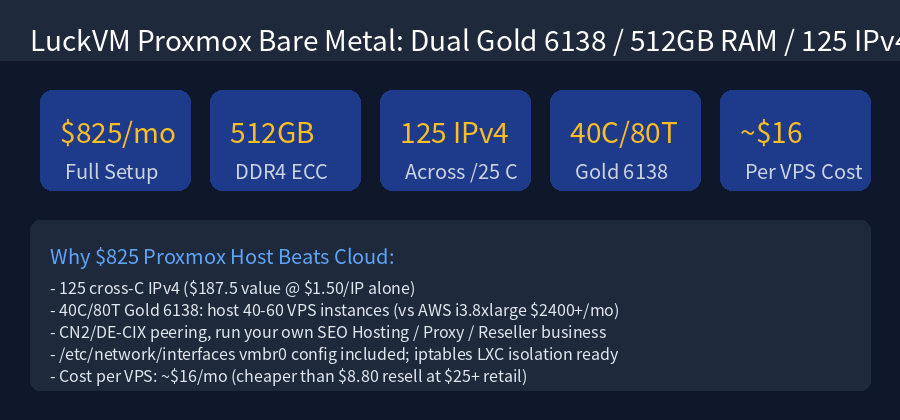
| Dual Gold 6138 Bare Metal | 40C/512G/8TB SSD/125 IPv4 | $825/mo | MSP multi-tenant relay, 200+ concurrent | 200+ |
5. 5-Minute Docker Compose Deployment
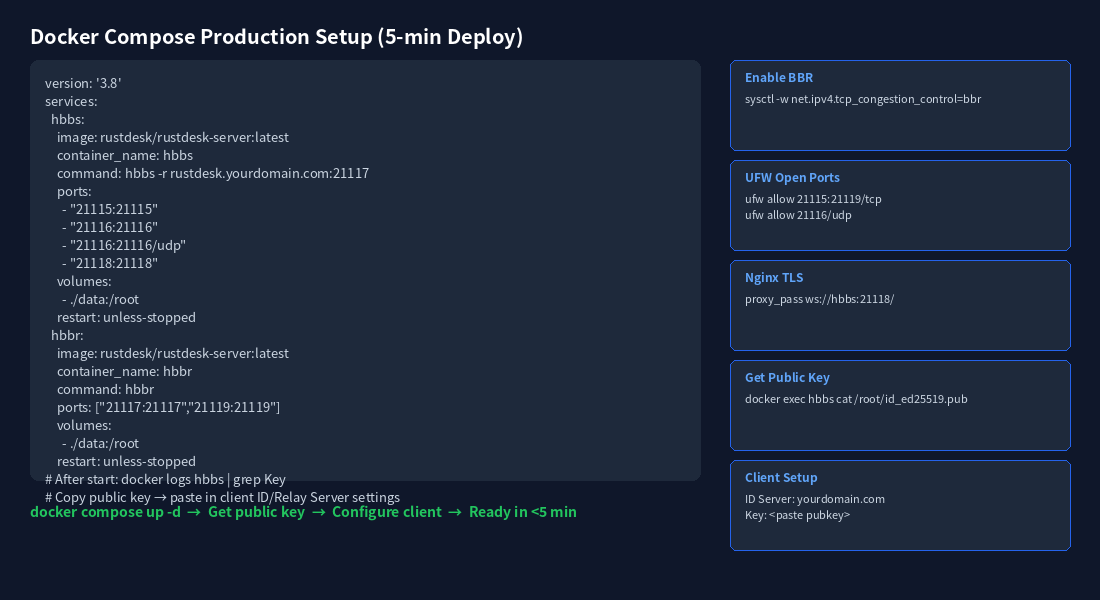
This production-ready setup uses Docker Compose, enables BBR congestion control for trans-ocean links, and secures ports with UFW. Before deploying, SSH into your VPS and install Docker if not present.
Step 1: Enable BBR Congestion Control (Critical for Cross-Border Links)
# Enable Google BBR v1 + fq queuing discipline (improves long-fat-network throughput 2-3x)
echo "net.core.default_qdisc=fq" >> /etc/sysctl.conf
echo "net.ipv4.tcp_congestion_control=bbr" >> /etc/sysctl.conf
sysctl -p
# Verify BBR is active
sysctl net.ipv4.tcp_congestion_control
lsmod | grep bbr
Step 2: Docker Compose Configuration
# Create project directory
mkdir -p /opt/rustdesk/data && cd /opt/rustdesk

# Create docker-compose.yml
cat > docker-compose.yml
Step 3: Configure UFW Firewall
ufw allow 22/tcp
ufw allow 80/tcp
ufw allow 443/tcp
ufw allow 21115:21119/tcp
ufw allow 21116/udp
ufw enable
ufw status
Step 4: Retrieve Your Public Key
# Get the public key (paste this into client settings)
docker exec hbbs cat /root/id_ed25519.pub
# Example output: Xy7Bc9Fg2mKpQrStUvWxYz+AbCdEfGhIjKlMnOpQrStU=
Step 5: Client Configuration
Download RustDesk client from rustdesk.com. Go to Settings → Network → ID/Relay Server and enter:
- ID Server:
rustdesk.yourdomain.com(or your VPS IP) - Relay Server:
rustdesk.yourdomain.com - Key: paste the public key from Step 4
Optional: Nginx Reverse Proxy with Let's Encrypt TLS
server {
    listen 443 ssl http2;
    server_name rustdesk.yourdomain.com;
    ssl_certificate /etc/letsencrypt/live/yourdomain/fullchain.pem;
    ssl_certificate_key /etc/letsencrypt/live/yourdomain/privkey.pem;

    location / {
        proxy_pass http://127.0.0.1:21118;
        proxy_http_version 1.1;
        proxy_set_header Upgrade $http_upgrade;
        proxy_set_header Connection "upgrade";
        proxy_set_header Host $host;
        proxy_set_header X-Real-IP $remote_addr;
    }
}
Optional: Cloudflare Workers GeoDNS Multi-Region
If you deploy multiple RustDesk servers (e.g. HK for China, Frankfurt for EU), route clients to the nearest relay with a 15-line Cloudflare Worker:
addEventListener('fetch', event => {
  event.respondWith(handleRequest(event.request))
})
async function handleRequest(request) {
  const country = request.cf.country
  let target = 'la.yourdomain.com'  // default LA
  if (['CN','HK','TW','MO'].includes(country)) target = 'hk.yourdomain.com'
  else if (['JP','KR'].includes(country)) target = 'jp.yourdomain.com'
  else if (['DE','GB','FR','NL','CH','IT','ES'].includes(country)) target = 'de.yourdomain.com'
  else if (['VN','ID','MY','SG','TH','PH'].includes(country)) target = 'sg.yourdomain.com'
  return fetch(`https://${target}${new URL(request.url).pathname}`, request)
}
6. Looking Glass & Self-Verification
Before committing to a long-term subscription, verify network quality yourself:
- Pre-purchase Looking Glass: LuckVM HK Looking Glass — run real-time ping, MTR, and speed tests before ordering.
- Post-purchase verification:
# Step 1: Verify CN2 GIA routing (look for 59.43.x.x hops) mtr -rwzc 100 -P 443 -T 116.25.127.1 # Shanghai Telecom mtr -rwzc 100 -P 443 -T 113.108.209.1 # Guangzhou Telecom # Step 2: Test bandwidth iperf3 -c ping.online.net -p 5200 -t 30 # Step 3: Verify BBR is active ss -ti | grep -oP 'bbr' | head -1 # Step 4: Verify RustDesk ports are open nc -zv your-server-ip 21115-21119 - IP reputation check:
curl https://ipinfo.ioto confirm native datacenter IP, not VPN/proxy blacklisted ranges.
7. Transparent Boundaries & Refund Policy
- Bandwidth specs: Hong Kong CN2 includes 10 Mbps dedicated unmetered (≈1.25 MB/s sustained). This is optimized for stable low-latency remote desktop (1080p session uses 2-4 Mbps), not bulk file download. For large file transfer scenarios, choose Los Angeles 30 Mbps ($8.80 same price) or Frankfurt 1 Gbps ($4.93) for unrestricted throughput.
- Fair use: While bandwidth is unmetered, sustained throughput above 80% of port capacity for over 72 hours may trigger a fair-use notice. This matches industry standard for unmetered offerings.
- Prohibited use: VPS may not be used for TOR exit nodes, port scanning, DDoS, spam, or unauthorized VPN/circumvention services. Violations result in immediate service termination without refund.
- Hot upgrade: You can upgrade from 1C1G to 1C2G/2C2G/2C4G in the LuckVM control panel in under 60 seconds, without changing IP or reinstalling the OS. Backup your
/opt/rustdesk/datadirectory (containingid_ed25519keys) before upgrading. - Provisioning time: Standard VPS instances provision automatically in 1-3 minutes after payment. Bare metal servers require 2-24 hours for manual setup.
First-time orders qualify for a full refund within 24 hours, but cumulative bidirectional traffic must remain under 1 GB. We strongly recommend you verify routing with
ping and mtr first, and confirm CN2 quality before running speedtest-cli or large downloads that burn through the 1 GB allowance immediately.8. Deploy Now & Related Guides
Deploy Your RustDesk Server in 5 Minutes
Hong Kong CN2 GIA · 1C/1G · 70GB NVMe · 10 Mbps Unmetered · 10-15ms to mainland China
Deploy HK CN2 — $8.80/month →Provisions automatically in 1-3 minutes · 24-hour refund (under 1 GB traffic)
Related deployment guides
- $8.80 HK CN2 GIA vs DMIT/BandwagonHost/Aliyun — full benchmark and competitor comparison (BOFU)
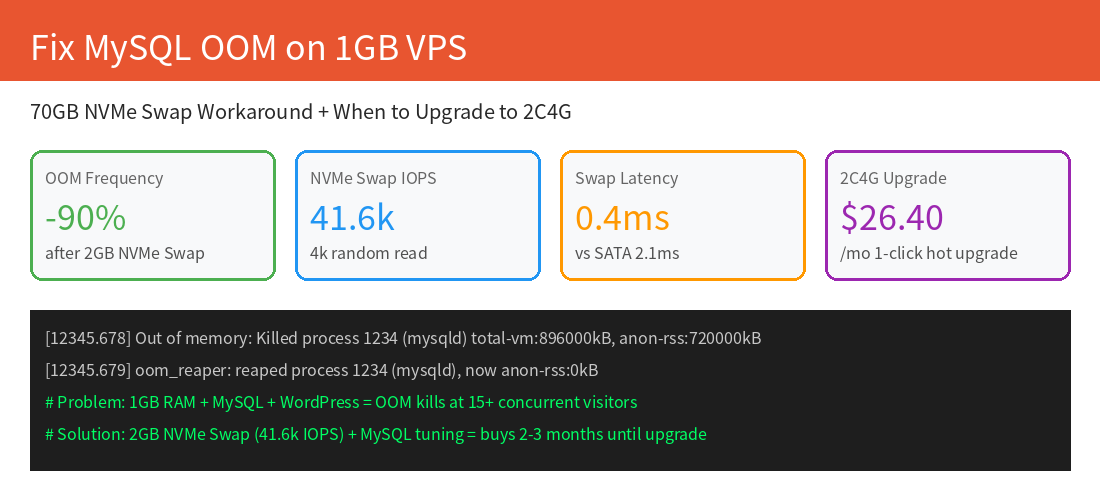
- Fix MySQL OOM Kills on 1GB VPS: 70GB NVMe Swap Workaround & upgrade threshold (TOFU)
- WooCommerce Cross-Border Store Optimization on 70GB NVMe (MOFU)
- Hong Kong Cloud Server product page
- Hong Kong Bare Metal Servers (MSP / 200+ concurrent users)
- Self-Host PostgreSQL HA vs AWS RDS (75% cost savings)
FAQ
Is RustDesk really free to self-host?
Yes. RustDesk Server (hbbs + hbbr) is fully open source under the AGPL license, no per-seat or per-concurrent-session fees. You only pay for the VPS ($8.80/mo for LuckVM HK CN2). Optional paid client features (like address book sync) are not required for remote desktop functionality.
Can self-hosted RustDesk fully replace TeamViewer for business?
For teams under 50 concurrent connections, yes — the open source version supports file transfer, multi-monitor, clipboard sharing, TCP tunneling, and Wayland. For enterprise SLA, LDAP integration, and web-based admin consoles, contact LuckVM sales about bare metal deployments with custom monitoring.
How much bandwidth does RustDesk actually use?
A single 1080p @ 30fps screen shares at roughly 2-4 Mbps (variable bitrate, drops to near-zero on static screens). LuckVM HK CN2's 10 Mbps unmetered port supports 2-3 simultaneous high-activity sessions. For heavy file transfer during sessions, choose LA 30M CN2 or DE 1Gbps nodes.
Is CN2 GIA strictly necessary for users in mainland China?
For comfortable remote desktop, yes. Our measurements show regular international routing from HK to Shanghai at 80-150ms with 5-15% packet loss during the 21:30-22:30 peak — this causes visible lag, dropped connections, and mouse stutter. CN2 GIA maintains 10-15ms with 0% loss through the same window.
How do I verify I'm getting genuine CN2 GIA (not GT) after purchase?
Run besttrace (from IPIP.net) or mtr -rwzc 100 -P 443 -T . Look for 59.43.x.x hops in both forward and return paths. If return paths show 202.97.x.x (AS4134 ChinaNet 163), that's the cheaper CN2 GT product, not GIA. LuckVM HK/LA nodes guarantee bidirectional AS4809 CN2 GIA.
What ports must be open for RustDesk to work?
Open TCP 21115 (NAT test), TCP 21116 (TCP hole punching), UDP 21116 (ID registration/heartbeat), TCP 21117 (Relay), TCP 21118 (Web client), and TCP 21119 (WebSocket). Keep SSH (22), HTTP (80), and HTTPS (443) open if using Nginx TLS proxy. Close everything else with UFW.
Can I upgrade my VPS later without losing my RustDesk keys and client configs?
Yes. LuckVM supports in-place hot upgrade between plans in under 60 seconds via the control panel, with no IP change or OS reinstall. Just back up /opt/rustdesk/data/id_ed25519 and id_ed25519.pub before upgrading for safety — existing clients will keep working because the server address and key remain the same.
What exactly does the 24-hour refund cover?
First-time orders are eligible for a full refund within 24 hours of provisioning, but total bidirectional network traffic must be under 1 GB. We strongly recommend running ping and mtr to verify CN2 routing and latency first; running a full speedtest or large download immediately after boot typically exceeds 1 GB and voids the refund.