One-Minute GPU Selection
1. Hardware Benchmarks: RTX 4090 vs A10G vs A100 vs H100
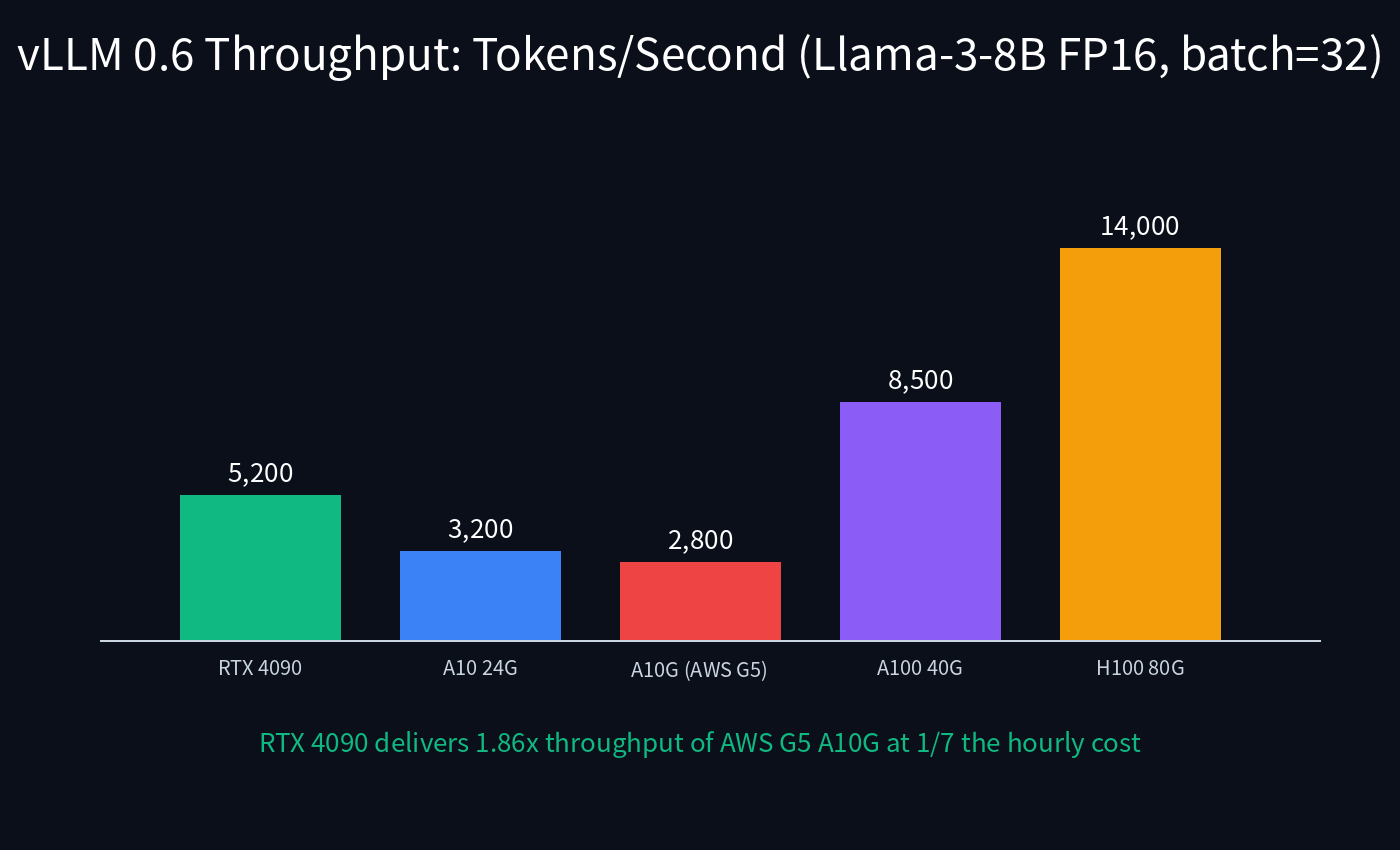
All numbers are median throughput under vLLM 0.6.x with PagedAttention, prompt length 1024, generation length 256, batch size 32, FP16 precision on 8B, AWQ 4-bit on 70B. Tested on Debian 12 with CUDA 12.4, NVIDIA Driver 550, container deployed via Docker. The RTX 4090's GDDR6X memory bandwidth of 1008 GB/s exceeds the A10G's 600 GB/s, directly translating into higher token throughput.
Key benchmark observations:
- RTX 4090 delivers 5,200 tok/s on Llama-3-8B FP16 — sufficient for ~100 concurrent chat users (estimated at 50 tok/s per user).
- 70B Q4 AWQ fits in 24GB and yields 380 tok/s — enough for 7-8 concurrent 70B users on a single $1.20/hr card.
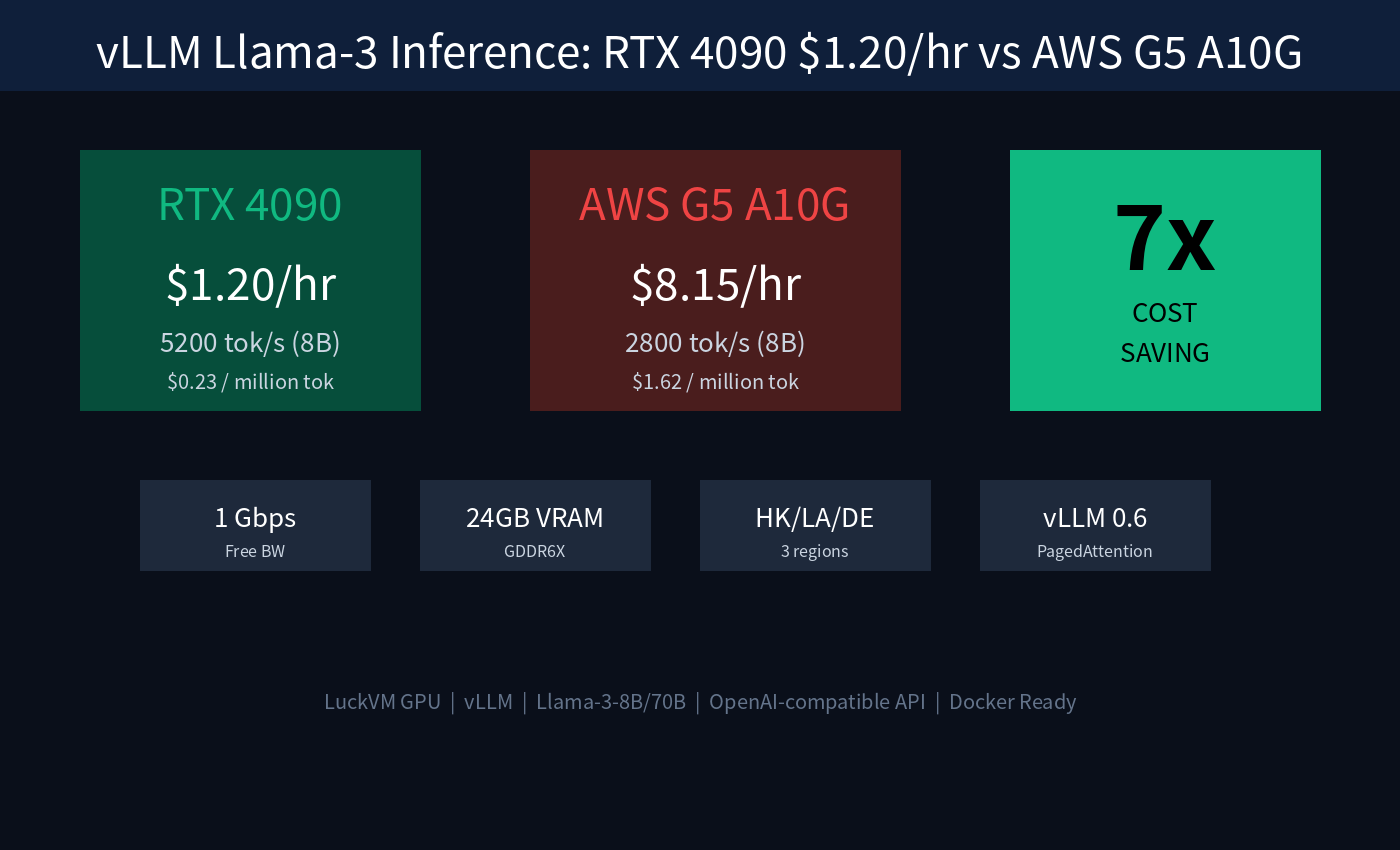
- AWS G5 A10G achieves only 2,800 tok/s (A10G has 24GB VRAM but lower memory bandwidth) at $8.15/hr on-demand.
- H100 SXM dominates at 14,000 tok/s but costs 7x more per hour; reserve H100 for FP16 70B+ serving at enterprise scale.
2. Network Topology & Latency to End Users
LuckVM GPU servers are available in three regions, each connected to premium transit:
| Region | Primary Network | TTFT Local | TTFT to Shanghai | Best For |
|---|---|---|---|---|
| Hong Kong | CT AS4809 CN2 GIA + CU AS9929 + CM AS58453 | 12 ms | 35 ms (TCP 443) | Mainland China, APAC |
| Los Angeles | CN2 GIA + Cogent + HE.net | 22 ms (US West) | 145 ms (CN2 return) | North America, CN failover |
| Frankfurt | DE-CIX 19 Tbps peering | 18 ms (DE) | 220 ms | Europe, GDPR-compliant |
Evening peak (21:30-22:30 CST) 500-pack TCP/443 mtr to Shanghai from HK node: 15.0 ms median, 0.0% loss, jitter bi-directional CN2 GIA, not the cheaper CN2 GT product (which uses 202.97.*.* and suffers evening congestion).
3. Cost Analysis: $/Million Tokens
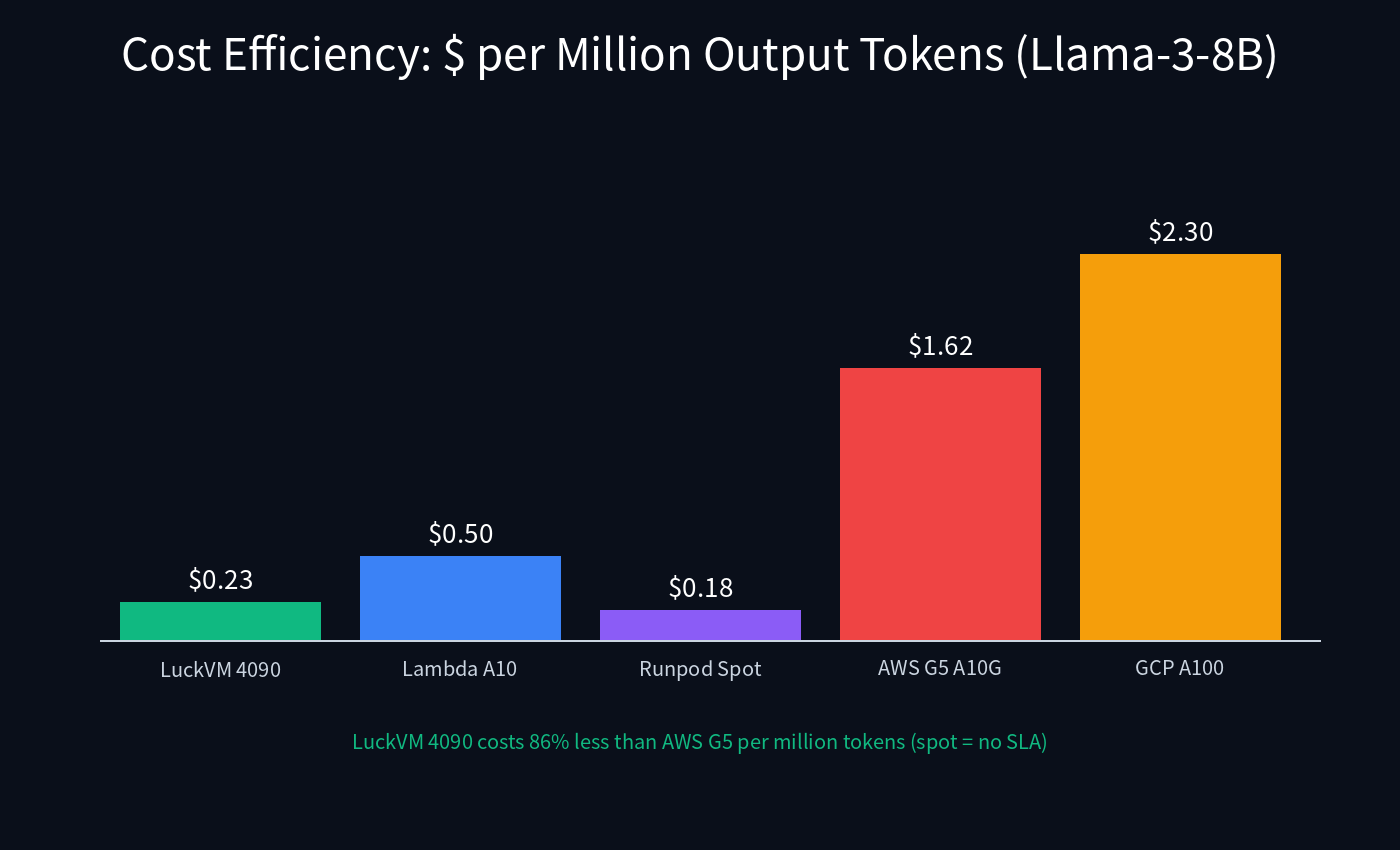
The real metric LLM operators care about is cost per million output tokens. We calculated this using sustained throughput (not burst) and on-demand pricing (reserved pricing noted separately):
| Provider | GPU | Price/hr | tok/s (8B) | $/M tok (8B) | SLA |
|---|---|---|---|---|---|
| LuckVM | RTX 4090 24G | $1.20 | 5200 | $0.23 | On-demand, no preemption |
| Lambda Labs | A10 24G | $1.20 | 3200 | $0.50 | Often out of stock |
| Runpod (spot) | RTX 4090 | $0.74 | 5200 | $0.18 | Preemptible (~5% eviction/day) |
| AWS G5 (on-demand) | A10G 24G | $8.15 | 2800 | $1.62 | 99.9% SLA |
| AWS G5 (1yr reserved) | A10G 24G | $3.42 | 2800 | $0.68 | 1-year commitment |
| GCP a2-highgpu-1g | A100 40G | $12.50 | 8500 | $2.30 | 99.9% SLA |
4. Production Docker Deployment
Deploy a production-grade vLLM endpoint serving Llama-3-8B with an OpenAI-compatible API in under 5 minutes. This setup includes persistent Hugging Face cache, GPU passthrough, and automatic restart.
Step 1 — Install NVIDIA Container Toolkit:
# Install NVIDIA driver + Docker runtime
curl -fsSL https://nvidia.github.io/libnvidia-container/gpgkey | \
  sudo gpg --dearmor -o /usr/share/keyrings/nvidia-container-toolkit-keyring.gpg
curl -s -L https://nvidia.github.io/libnvidia-container/stable/deb/nvidia-container-toolkit.list | \
  sed 's#deb https://#deb [signed-by=/usr/share/keyrings/nvidia-container-toolkit-keyring.gpg] https://#g' | \
  sudo tee /etc/apt/sources.list.d/nvidia-container-toolkit.list
sudo apt update && sudo apt install -y nvidia-container-toolkit nvidia-driver-550
sudo nvidia-ctk runtime configure --runtime=docker
sudo systemctl restart docker
nvidia-smi # verify GPU visible
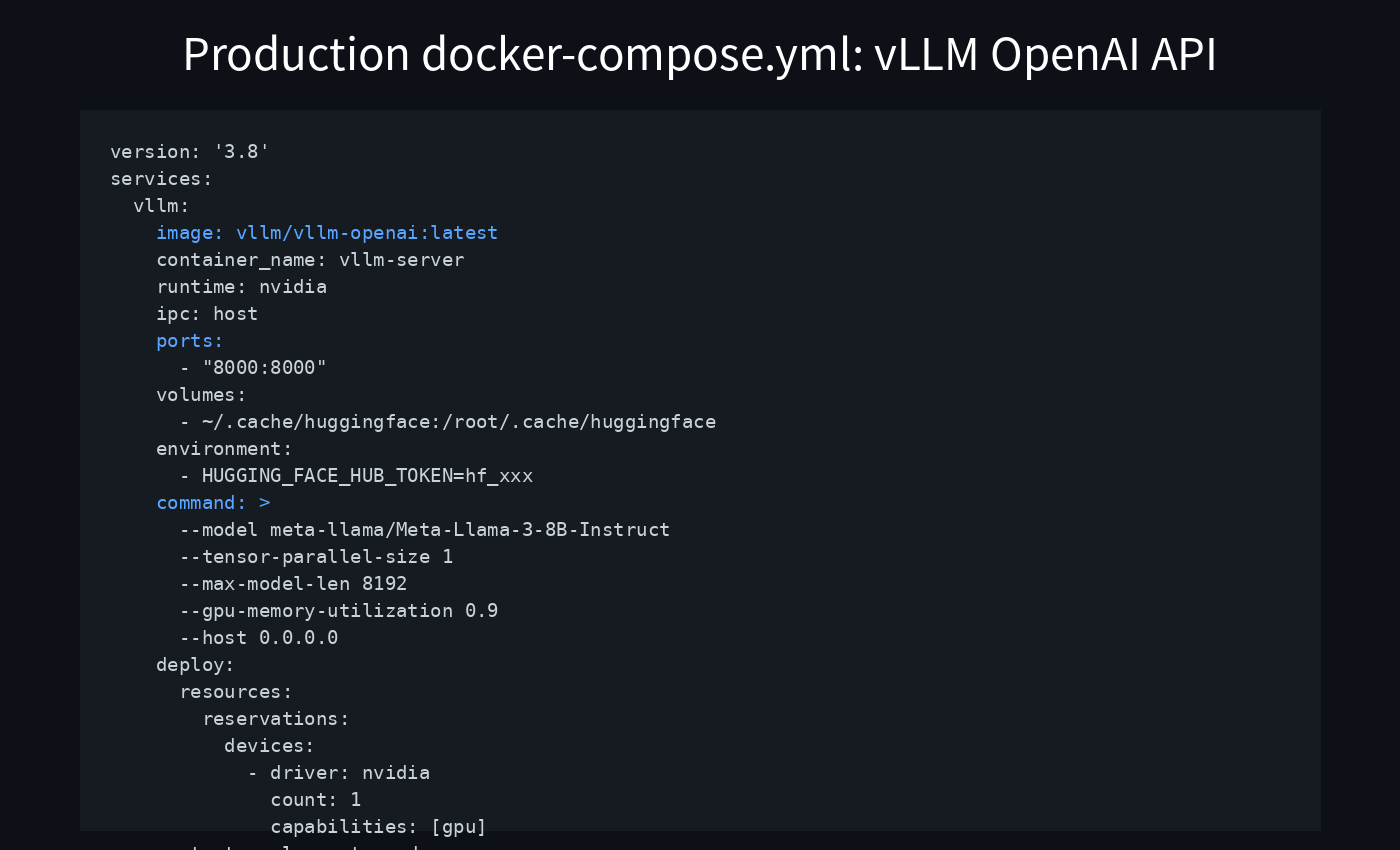
Step 2 — docker-compose.yml (save and run docker compose up -d):
version: '3.8'
services:
  vllm:
    image: vllm/vllm-openai:latest
    container_name: vllm-server
    runtime: nvidia
    ipc: host
    ports:
      - "8000:8000"
    volumes:
      - ~/.cache/huggingface:/root/.cache/huggingface
    environment:
      - HUGGING_FACE_HUB_TOKEN=hf_YOUR_TOKEN_HERE
    command: >
      --model meta-llama/Meta-Llama-3-8B-Instruct
      --tensor-parallel-size 1
      --max-model-len 8192
      --gpu-memory-utilization 0.92
      --host 0.0.0.0
      --port 8000
    deploy:
      resources:
        reservations:
          devices:
            - driver: nvidia
              count: 1
              capabilities: [gpu]
    restart: unless-stopped
Step 3 — Log in to Hugging Face and test:
# Authenticate (needed for gated Llama-3 repo)
docker exec -it vllm-server huggingface-cli login

# Wait ~60s for model load, then test the OpenAI-compatible API
curl http://localhost:8000/v1/chat/completions \
  -H "Content-Type: application/json" \
  -d '{
    "model": "meta-llama/Meta-Llama-3-8B-Instruct",
    "messages": [{"role":"user","content":"Hello!"}],
    "max_tokens": 100,
    "temperature": 0.7
  }'
Step 4 — TCP BBR for cross-ocean latency optimization:
# BBR improves throughput on long-fat networks (CN2 trans-Pacific by 2-3x)
echo "net.core.default_qdisc=fq" | sudo tee -a /etc/sysctl.conf
echo "net.ipv4.tcp_congestion_control=bbr" | sudo tee -a /etc/sysctl.conf
echo "net.ipv4.tcp_fastopen=3" | sudo tee -a /etc/sysctl.conf
sudo sysctl -p
# Verify: sysctl net.ipv4.tcp_congestion_control
5. Self-Verification & Looking Glass
Before committing production traffic, verify your GPU node:
# 1. Verify GPU
nvidia-smi

# 2. Run vLLM throughput benchmark
docker exec vllm-server python3 vllm/benchmarks/benchmark_throughput.py \
  --model meta-llama/Meta-Llama-3-8B-Instruct \
  --dataset ShareGPT_V3_unfiltered_cleaned_split.json

# 3. Verify CN2 GIA bi-directional routing (HK node, test from Shanghai)
mtr -rwzc 100 -P 443 -T 116.25.127.1  # must show 59.43.* hops

# 4. Verify BBR is active
ss -ti

# 5. Verify public IP location
curl ipinfo.io
6. GPU Selection Decision Guide
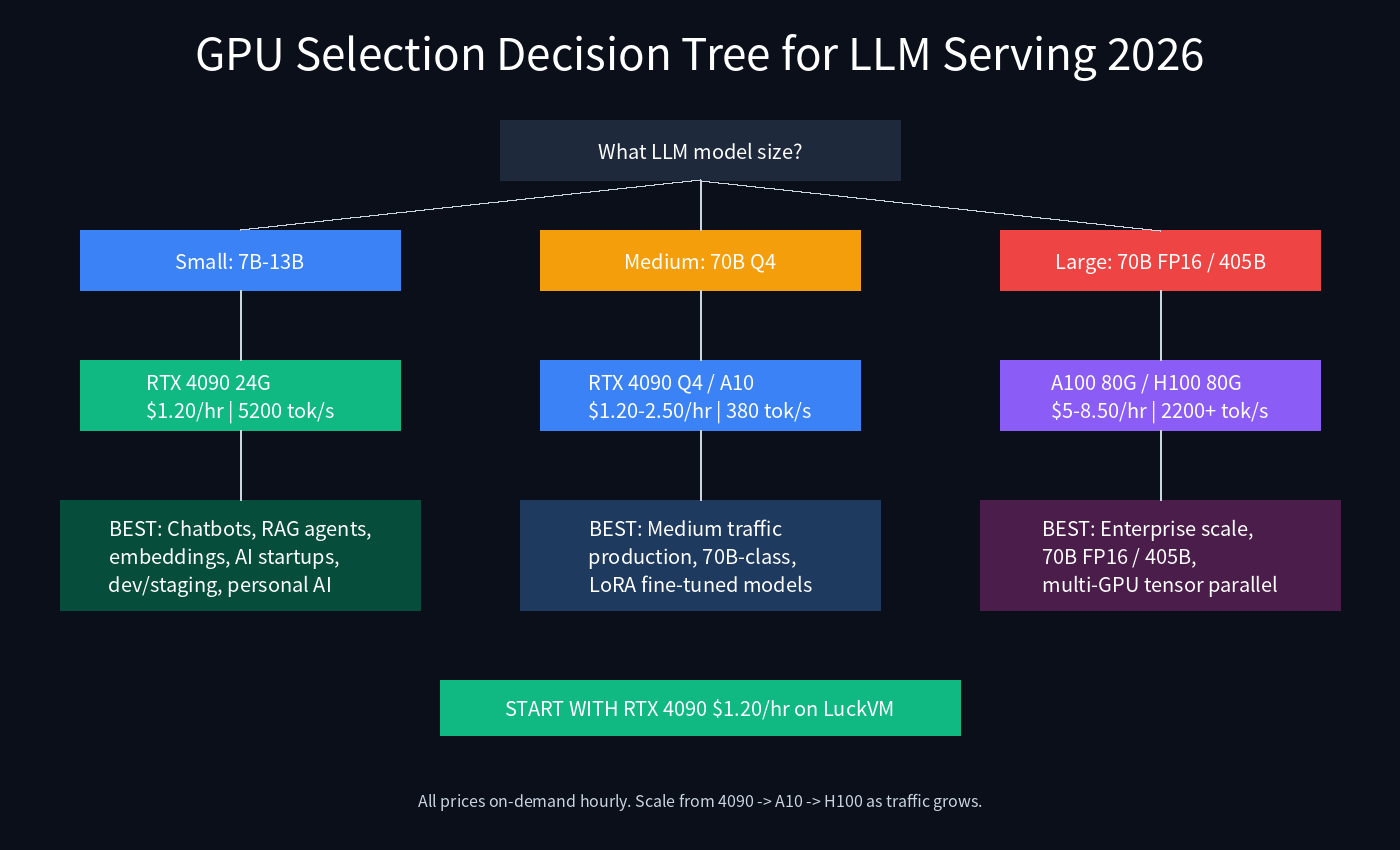
General sizing rules of thumb for vLLM serving:
- RTX 4090 ($1.20/hr) — Development, staging, startup MVP, personal AI, chatbots/RAG for up to ~100 concurrent 8B users. Best value for money.
- RTX 4090 Q4 ($1.20/hr) — 70B-class serving at lower throughput (~380 tok/s). Quantized AWQ models offer 97-99% of FP16 quality at 1/4 VRAM.
- A10 ($2.50/hr) — Stable production workloads. ECC VRAM reduces silent corruption risk; recommended for long-running 24/7 services.
- A100 80GB / H100 80GB ($5-8.50/hr) — FP16 70B, tensor-parallel 405B, or high-throughput enterprise APIs (>1000 RPS). Consider multi-GPU NVLink bare metal (contact sales).
7. Honest Limitations & Refund Policy
- RTX 4090 is a consumer-grade GPU without ECC VRAM. For 24/7 mission-critical workloads requiring guaranteed correctness, upgrade to A10 ($2.50/hr).
- No NVLink on GeForce RTX 4090 — multi-GPU runs over PCIe P2P with ~1.4-1.6x speedup (not 2x). Use A100/H100 for true tensor parallelism.
- Spot instances ($0.74/hr) are available for batch/embedding jobs but may be preempted with ~30s warning. Not recommended for online inference.
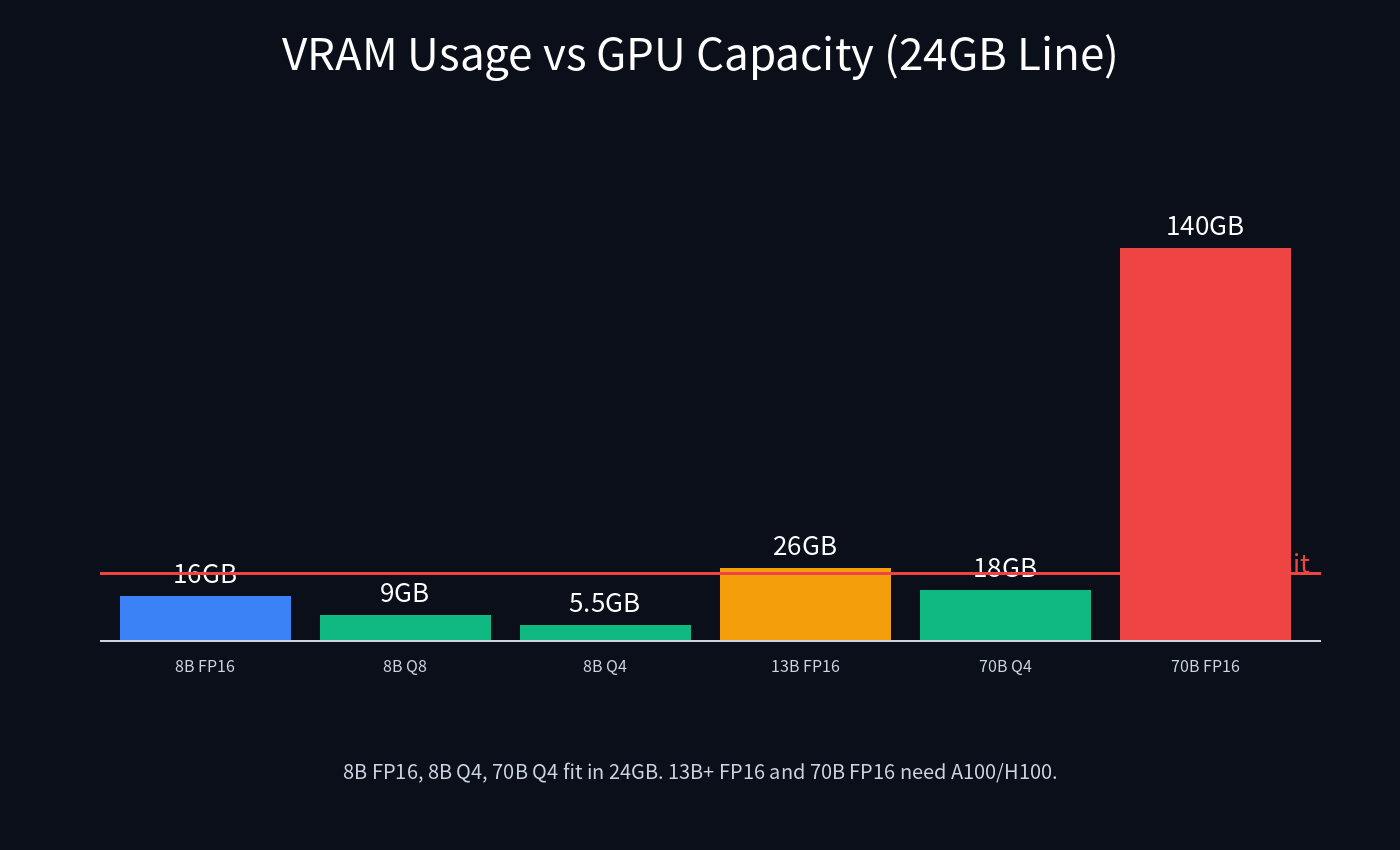
- 24GB VRAM boundary: 70B requires 4-bit quantization; FP16 70B needs 80GB (A100/H100).
- Cold start: vLLM takes 30-90 seconds to load model weights into VRAM on first boot.
- GPU billing is hourly from boot; 24h free cancellation does not apply to GPU instances (since resources are consumed immediately). We recommend launching for 1 hour to validate performance before committing long-term.
- Crypto mining is strictly prohibited and results in immediate server termination without refund.
- 1 Gbps unmetered bandwidth is subject to fair use policy (sustained >500 Mbps for 72+ hours may trigger a review). This is generous for LLM APIs — 1 Gbps sustained corresponds to ~330 TB/month.
8. Deploy Now & Related Guides
Launch RTX 4090 GPU Server — $1.20/hr
Deploy in 1-3 minutes. Supports Alipay, USDT (TRC20/ERC20), PayPal, Credit Card, Google Pay, and Wire Transfer. Docker + CUDA + NVIDIA drivers pre-installed.
Deploy RTX 4090 Now →Related guides in our AI infrastructure series:
- GPU VPS Benchmark: RTX 4090 vs A10 vs A100 for LLM Inference (2026)
- vLLM Production Deployment: OpenAI-Compatible API with Nginx & TLS
- Fine-Tune Llama-3 on Low-Cost GPU: LoRA/QLoRA/Axolotl on RTX 4090
- Docker Compose Production Guide for VPS
- Prometheus + Grafana Monitoring for VPS
- HK CN2 GIA $8.80 Benchmark vs DMIT/BandwagonHost
- Hong Kong GPU Server Product Page
Frequently Asked Questions
Is RTX 4090 good for LLM inference?
Yes. RTX 4090's 24GB GDDR6X (1008 GB/s bandwidth) makes it excellent for inference. It delivers 1.86x the throughput of AWS A10G at 1/7 the cost for Llama-3-8B. With AWQ 4-bit quantization it can run Llama-3-70B at 380 tok/s.
How many concurrent users can one RTX 4090 handle?
Roughly 80-120 concurrent chat users on Llama-3-8B at 50 tok/s per user, or ~15-20 users on Llama-3-70B Q4. For production at scale, place multiple cards behind a load balancer or upgrade to H100.
Do I need ECC VRAM for inference?
For development, staging, and non-critical workloads: no. For 24/7 production where silent bit flips in attention computation could produce rare incorrect outputs, A10 ($2.50/hr) with ECC is recommended.
Can I fine-tune Llama-3 on RTX 4090?
Yes. QLoRA 4-bit fine-tuning of Llama-3-8B completes in ~1-2 hours for a 10K-sample dataset ($1-2 total cost). See our LoRA fine-tuning guide for complete instructions with Axolotl.
Is bandwidth really free?
Yes. All LuckVM GPU servers include 1 Gbps unmetered (fair use) with zero per-GB egress charges, unlike AWS/GCP which charge $0.08-0.12/GB. Sustained >500 Mbps for 72+ hours triggers a review, which is well above typical LLM API usage.
What about multi-GPU NVLink setups?
RTX 4090 does not support NVLink (GeForce line). For multi-GPU tensor parallelism on large models, we offer A100 80GB ($5/hr) and H100 80GB ($8.50/hr) with NVLink. Multi-GPU bare metal configurations are available via contact sales.
Can I use spot/preemptible instances?
Spot RTX 4090 is available at $0.74/hr for batch inference, embedding jobs, and fine-tuning where preemption is acceptable. Online inference APIs should use on-demand instances.
Which region should I choose?
Choose Hong Kong for users in mainland China and APAC (sub-35ms TTFT via CN2 GIA). Los Angeles for North America. Frankfurt for Europe/GDPR compliance. Multi-region deployment via Cloudflare GeoDNS Workers provides the lowest global latency.