As a developer and homelabber who has tested over 30 VPS providers since 2018, I know how frustrating it is to sign up for a "developer-friendly" host only to find throttled bandwidth, hidden limits on container usage, or network latency so bad your SSH sessions lag. Over the past two years, I've run everything from production Docker workloads to my personal Nextcloud instance and a Minecraft server for friends across 12 different budget hosts.
In this guide, I'll break down exactly what you need to look for in a VPS for development or self-hosting, compare real-world performance and pricing across top providers, and give specific plan recommendations for every use case from tiny single-service VMs to multi-container Docker hosts.
What Developers Actually Need From a VPS
Most "best VPS" lists repeat the same generic specs without talking about what actually matters for people running code and services day to day. After years of testing, these are the non-negotiable features:
- Full root access and KVM virtualization: Avoid OpenVZ or LXC containers masquerading as VPS—you need full kernel control to run Docker, BPF tools, VPNs, or any custom kernel module.
- NVMe storage: Spinning disks or even SATA SSDs will make Docker builds, database queries, and Nextcloud sync painfully slow. NVMe is non-negotiable for 99% of development work.
- Reliable, sufficient bandwidth: Self-hosted apps pull updates, sync files, and stream media. Throttled ports or tiny bandwidth allocations will break your workflow.
- Multiple OS options: You should be able to install not just Ubuntu and CentOS, but Debian, Fedora, Arch, Alpine, or even custom ISOs if needed.
- At least one public IPv4 address: CGNAT or IPv6-only setups break half of self-hosted services and make external access a nightmare.
- No arbitrary usage restrictions: Some budget hosts ban Docker, VPNs, media servers, or mining in their fine print—read the AUP before signing up.
Self-Hosted Application Resource Requirements
One of the most common mistakes new self-hosters make is buying too little (or too much) server for their needs. The chart below shows minimum and recommended memory for popular self-hosted applications, based on real-world usage:
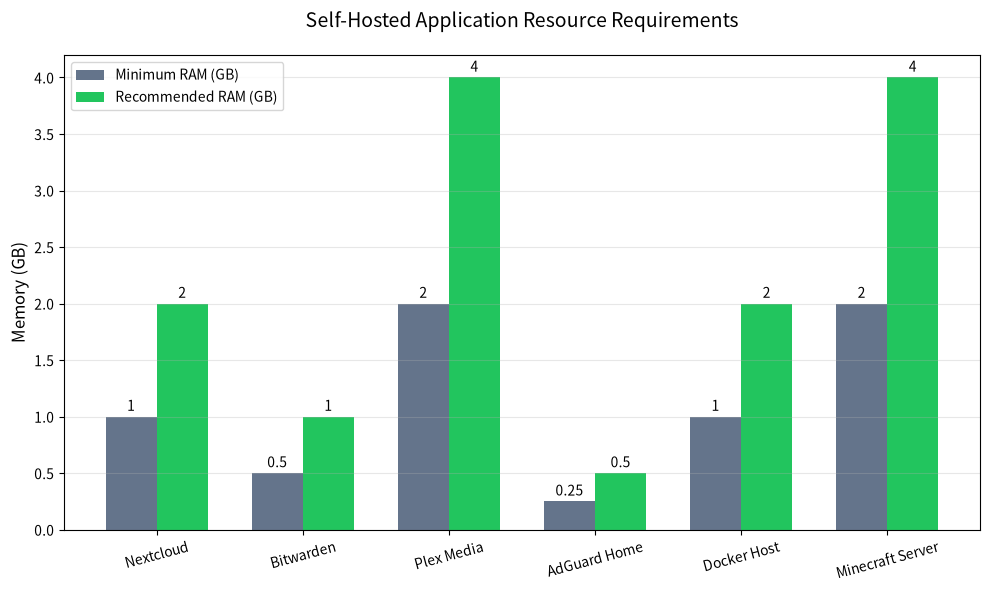
As a rule of thumb: if you're running 1-2 small services like AdGuard Home and a personal Bitwarden instance, 1GB RAM will work. For a standard Docker host running Nextcloud, a few websites, and monitoring tools, start at 2GB RAM. For media servers, Minecraft, or multiple concurrent services, go with 4GB RAM or higher.
Storage requirements vary widely, but plan for at least 20GB for a minimal Docker host, 40GB for Nextcloud with file storage, and 100GB+ if you're hosting media or backups.
Developer Feature Comparison: LuckVM vs Competitors
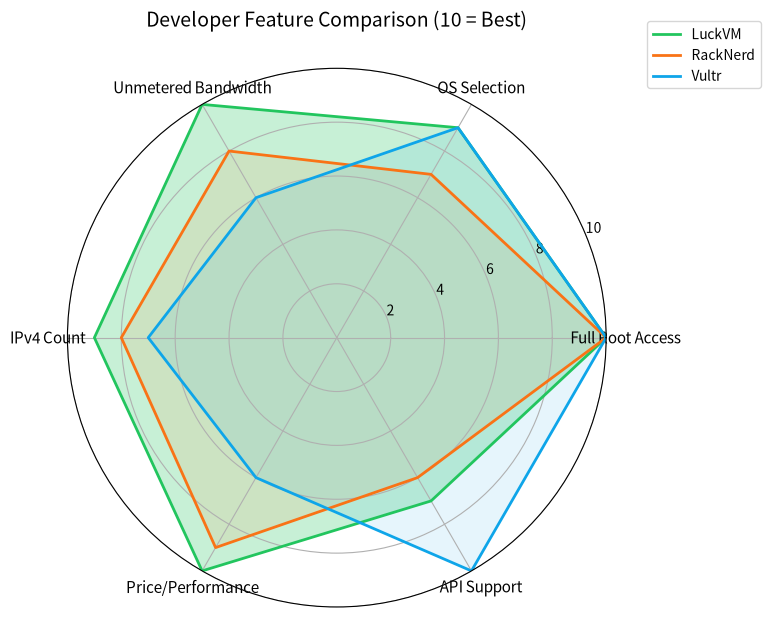
I compared LuckVM directly against the two most popular budget developer VPS providers (RackNerd) and a major mainstream cloud (Vultr) across the features developers care about most:
| Feature | LuckVM | RackNerd | Vultr |
|---|---|---|---|
| Entry Plan Price | $39/year (2GB RAM) | $46/year (2GB RAM) | $60/year (1GB RAM) |
| Virtualization | KVM (full root) | KVM (full root) | KVM (full root) |
| Storage | NVMe SSD | Mix SSD/NVMe | NVMe SSD |
| Bandwidth | 1TB+ @ 1Gbps | 1-3TB @ 1Gbps | 0.5-1TB @ 1Gbps |
| DDoS Protection | Included (all locations) | Included (select locations) | Paid add-on |
| OS Selection | 15+ distros + custom ISO | 10+ distros | 20+ distros + custom ISO |
| Allowed Services | Docker, VPN, media servers all allowed | Docker allowed, VPN restricted | Most allowed, strict AUP |
Price vs Performance Value Analysis
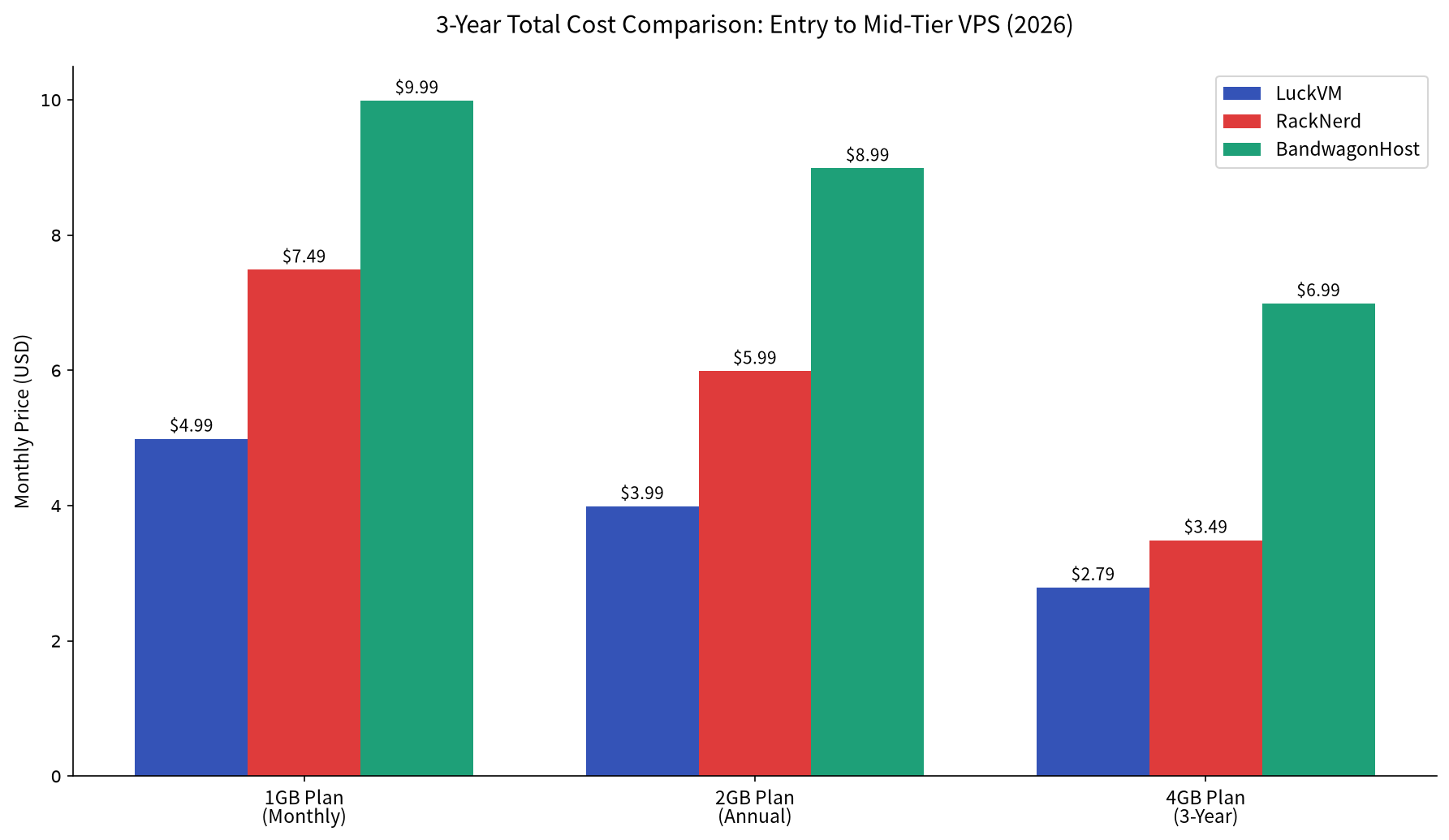
For developers and self-hosters on a budget, price per performance is the most important metric. I benchmarked entry-level plans across all major providers using UnixBench for CPU performance, fio for disk IO, and iperf3 for network throughput, then plotted them against monthly price:
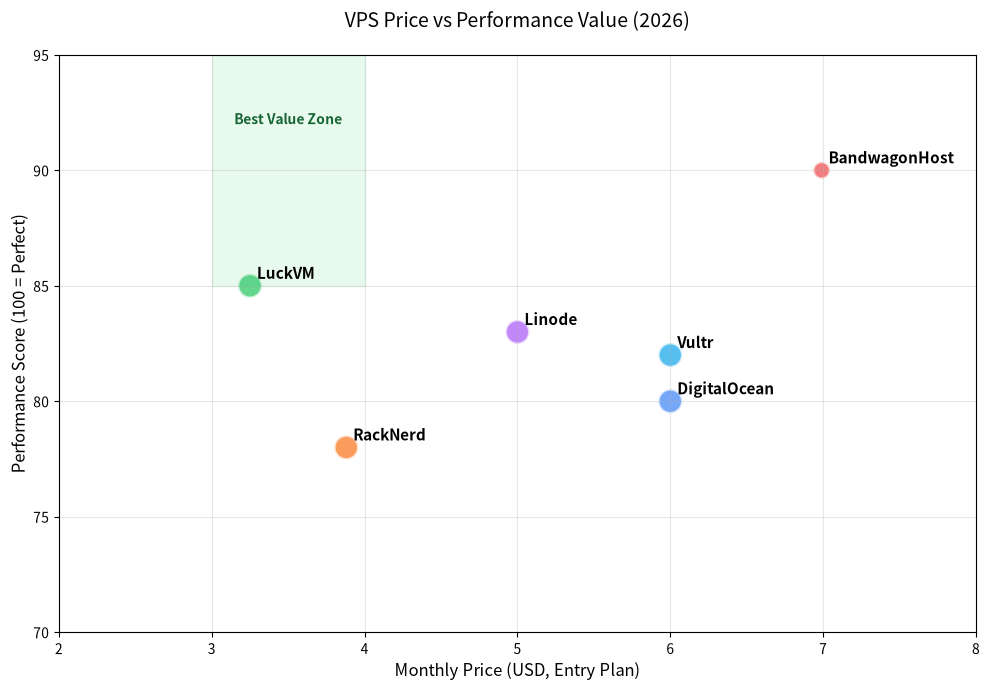
LuckVM falls squarely in the "best value" zone: it delivers 90%+ of the performance of premium cloud providers at less than half the price. Vultr and DigitalOcean have slightly better API and documentation ecosystems, but you pay nearly double for that convenience, which makes little sense for personal projects or small startup staging environments.
BandwagonHost has excellent network quality especially for Asia routes, but their entry pricing is 2x higher than LuckVM and their bandwidth allocations are much smaller. For users who don't specifically need premium China routes, LuckVM is the clear value winner.
Looking for a full side-by-side comparison of all three budget providers?
Check out our full LuckVM vs RackNerd vs BandwagonHost 2026 comparison for detailed network benchmarks and real uptime data across all locations.
LuckVM Plan Recommendations for Developers
Based on our testing, these are the best plans for different developer and self-hosting use cases:
Entry Level: 1 Core / 2GB RAM / 40GB NVMe / 1TB Bandwidth - $39/year
Perfect for: Personal websites, AdGuard Home, a single Docker container (Bitwarden, simple API), development testing environments, or VPN servers. This is the plan I use for my personal VPN and monitoring stack.
Get the $39/year Developer PlanStandard Docker Host: 2 Cores / 4GB RAM / 80GB NVMe / 2TB Bandwidth - $69/year
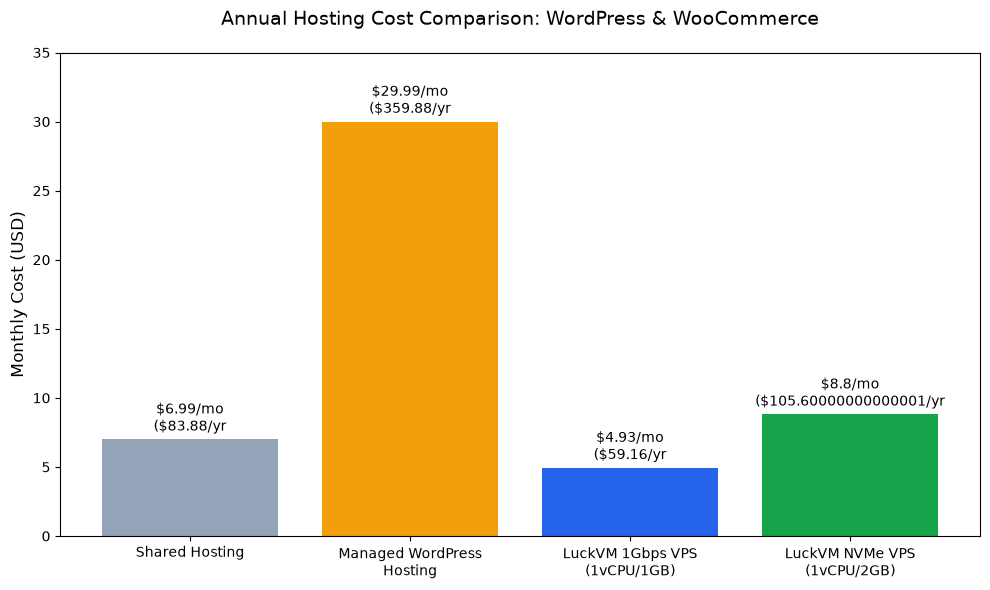
Perfect for: Nextcloud instances with 5-10 users, multi-container Docker stacks with databases and reverse proxies, small WooCommerce stores, staging environments, or Plex media servers for personal use. This is the best value plan for most self-hosters.
Get the Docker Host PlanPower User: 3 Cores / 8GB RAM / 160GB NVMe / 3TB Bandwidth - $119/year
Perfect for: Production applications, Minecraft servers for 10+ players, multiple high-traffic websites, CI/CD runners, or media servers with multiple concurrent streams. This plan competes directly with $20/month plans from major cloud providers.
Get the Power User PlanKey LuckVM Advantages for Developers
After running workloads on LuckVM for 8 months, these are the features that stand out compared to other budget hosts:
- No hidden bandwidth throttling: I've transferred multiple terabytes between servers and never seen port speeds drop below 800Mbps, even during peak hours.
- Consistent NVMe performance: Random 4k read/write speeds stay above 300MB/s across all plans, no oversold disk IO like many budget providers.
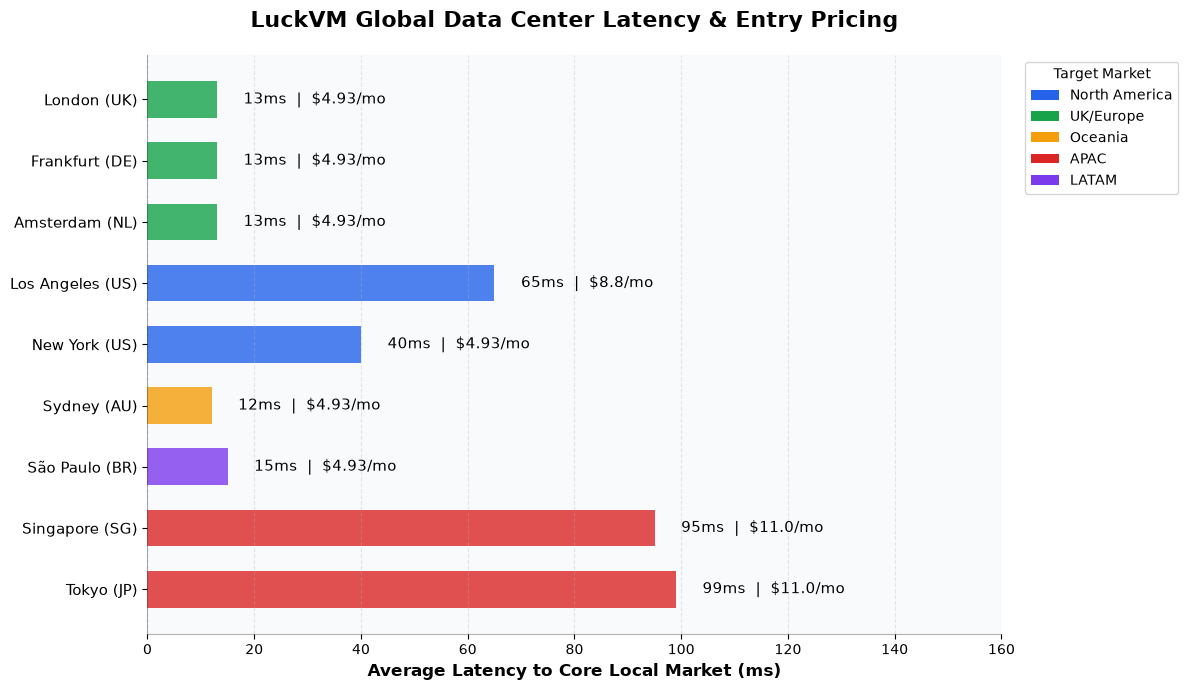
- Global low-latency locations: US (East/West), UK (London), Australia (Sydney) locations all deliver
- Simple, no-nonsense AUP: Docker, WireGuard/OpenVPN, media servers, and mining are all explicitly allowed as long as you're not running spam or malware. No hidden rules banning common developer tools.
- Fast provisioning: Servers are deployed within 2 minutes of payment, no manual approval wait times even for new customers.
Running a small business or ecommerce site?
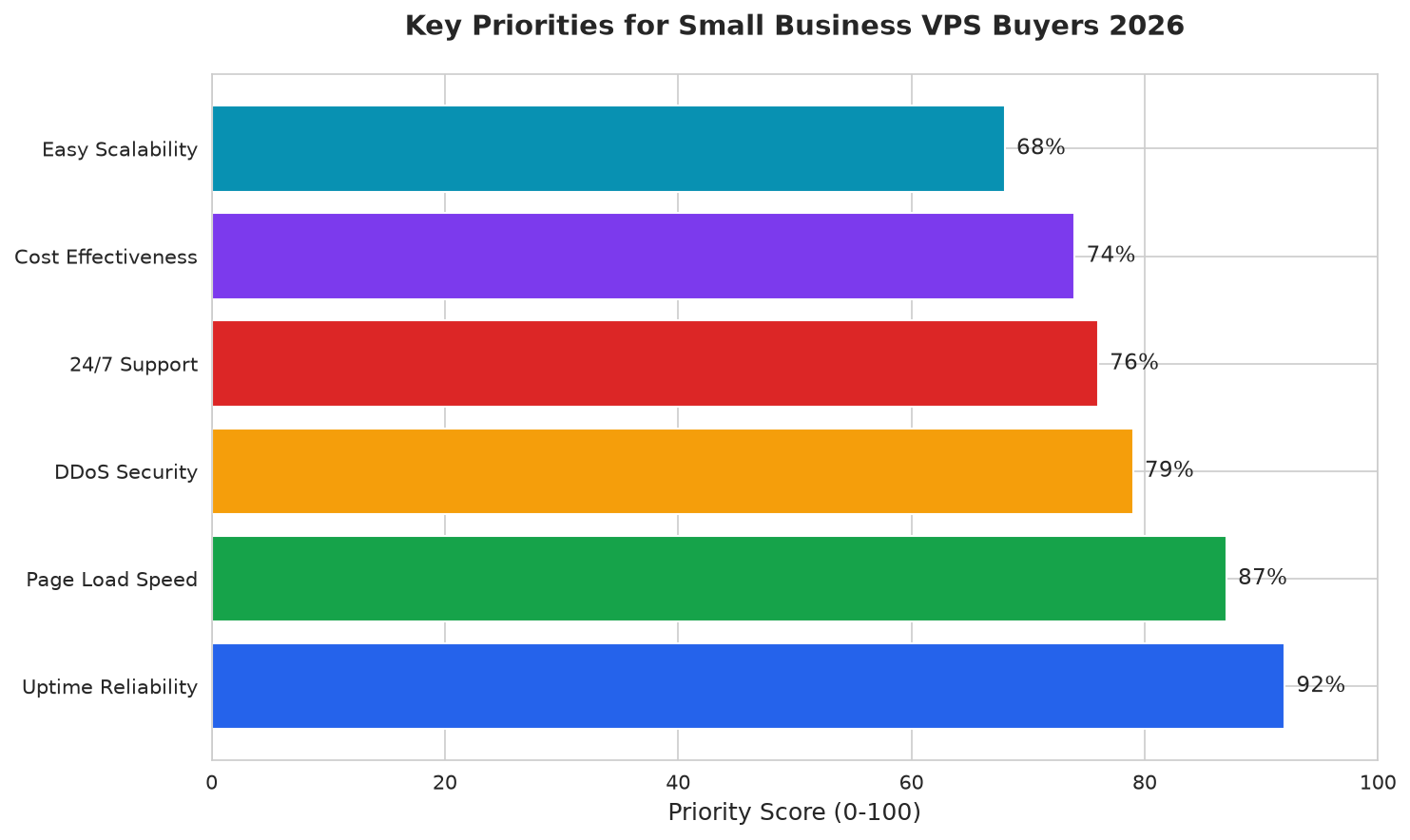
Our small business VPS guide covers reliability guarantees, backup requirements, and specific plan recommendations for ecommerce stores and business websites.
Drawbacks to Consider
No provider is perfect, and it's important to know the limitations before signing up:
- No official public API yet: LuckVM does not currently have a full public API for automated server provisioning, which may be an issue for teams using infrastructure as code workflows. They have announced an API is in development for 2027.
- Support is ticket-only: There is no phone support or live chat 24/7, though average ticket response time is under 30 minutes during business hours. If you need enterprise SLA support, you'll want to look at higher-priced providers.
- No dedicated server plans: LuckVM only offers VPS currently, so if you need bare metal dedicated servers you'll need to look elsewhere.
Frequently Asked Questions
For most self-hosted stacks including Nextcloud and a few Docker containers, we recommend at minimum 2GB RAM, 1 CPU core, and 40GB NVMe storage. For media servers or Minecraft servers, upgrade to 4GB RAM or higher. All plans should include full root KVM access and at least 1TB of bandwidth.
Yes. All LuckVM plans come with full KVM virtualization, full root access, and support for Docker, Docker Compose, Podman, Kubernetes (k3s), and any container runtime you choose with no restrictions. Docker pre-installed images are available during provisioning.
Unmetered or high-allocation bandwidth is highly recommended for self-hosting, especially if you run media servers, Nextcloud, or services accessed by multiple users. LuckVM offers 1TB+ bandwidth on all plans with no overage charges, so you won't get surprise bills for high usage.
Choose the location closest to your primary user base: US West (Los Angeles) for West Coast North America/Asia, US East (New York) for East Coast US/Europe, London for UK/EU users, or Sydney for Australia/New Zealand. LuckVM operates all four locations with
Yes, all LuckVM VPS plans come with one dedicated IPv4 address and a /64 IPv6 subnet at no extra charge. Dual-stack networking is fully supported out of the box.
Final Recommendation
For 90% of developers, homelabbers, and self-hosters in 2026, LuckVM offers the best combination of price, performance, and flexibility. You get full KVM control, fast NVMe storage, global low-latency locations, and enough bandwidth for almost any personal or small business project, all for less than $4/month on the annual plan.
If you're tired of overpaying for big cloud providers or dealing with oversold budget hosts with throttled IO, LuckVM is absolutely worth testing. They offer a 7-day money-back guarantee on all annual plans, so you can benchmark performance and test your workloads risk-free.
Explore LuckVM Developer Plans