Why VPS Beats Shared & Managed Hosting for WooCommerce
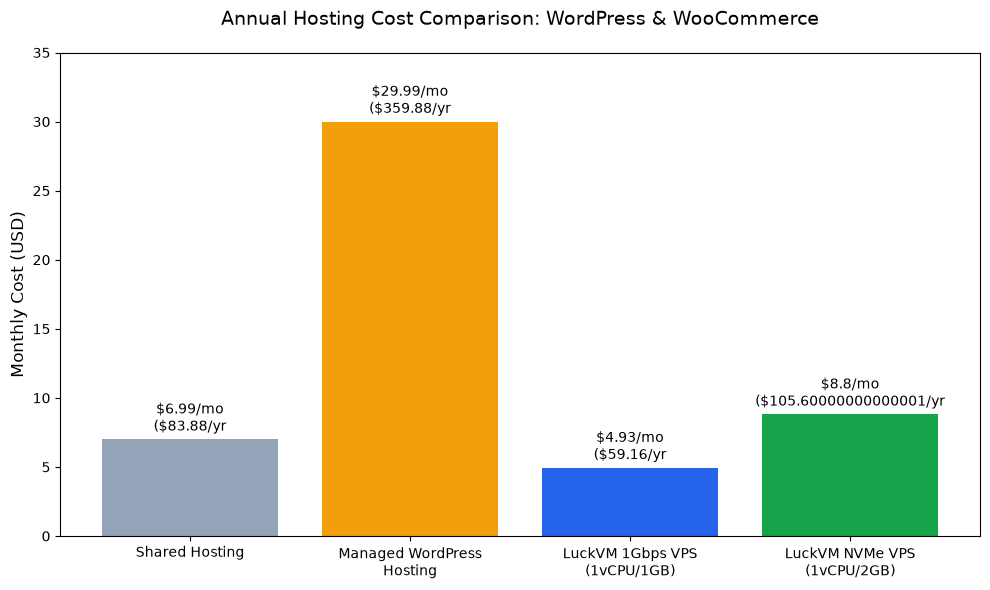
If you're running a WooCommerce store or a high-traffic WordPress site, shared hosting will eventually fail you. Shared hosts overload servers with hundreds of sites, leading to slow load times, frequent outages during traffic spikes, and arbitrary resource limits that can take your store offline during sales events.
Managed WordPress hosts solve some of these problems but charge exorbitant premiums—often $30/month or more for entry-level plans, with strict limits on visitors, plugins, and server access that lock you into their ecosystem.
A quality VPS gives you dedicated resources, full root access to optimize your stack for WordPress, and predictable performance even during Black Friday or product launch traffic spikes—all at a fraction of the cost of managed hosting.
Minimum VPS Requirements for WordPress & WooCommerce
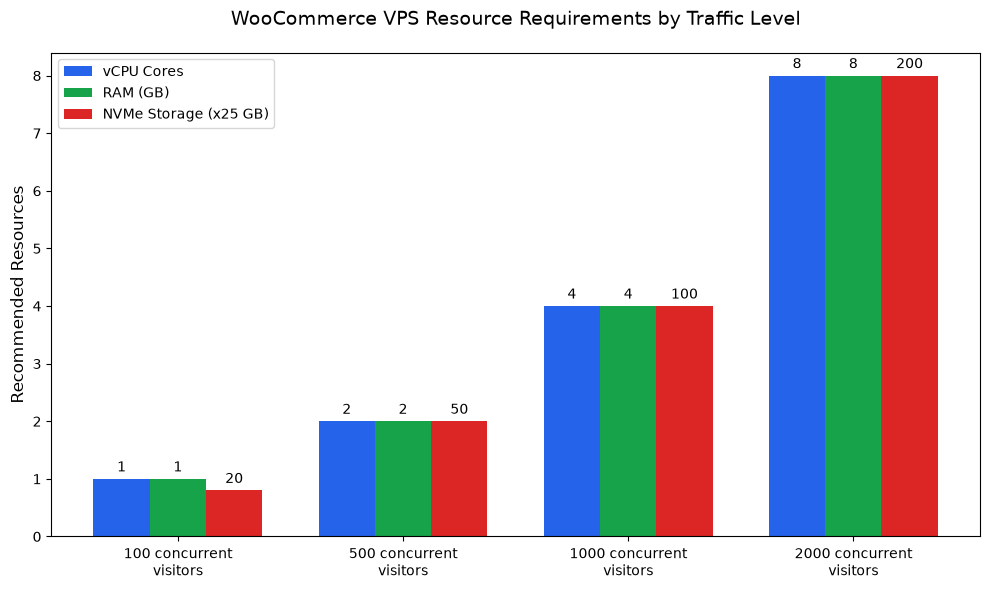
Your VPS specifications need to match your actual traffic and store size. Many users overpay for resources they don't need, while others underestimate requirements and end up with a slow store. Below are evidence-based minimum requirements based on real-world WooCommerce deployments:
| Traffic Level | vCPU Cores | RAM | NVMe Storage | Port Speed | LuckVM Price |
|---|---|---|---|---|---|
| Up to 100 concurrent visitors | 1 vCPU | 1 GB | 20 GB NVMe | 1 Gbps | $4.93/mo |
| 100–500 concurrent visitors | 2 vCPU | 2 GB | 50 GB NVMe | 1 Gbps | $8.80/mo |
| 500–1000 concurrent visitors | 4 vCPU | 4 GB | 100 GB NVMe | 1 Gbps | $16.50/mo |
| 1000–2000 concurrent visitors | 8 vCPU | 8 GB | 200 GB NVMe | 30 Mbps+ | $32.00/mo |
Page Speed = More Sales: The Conversion Impact
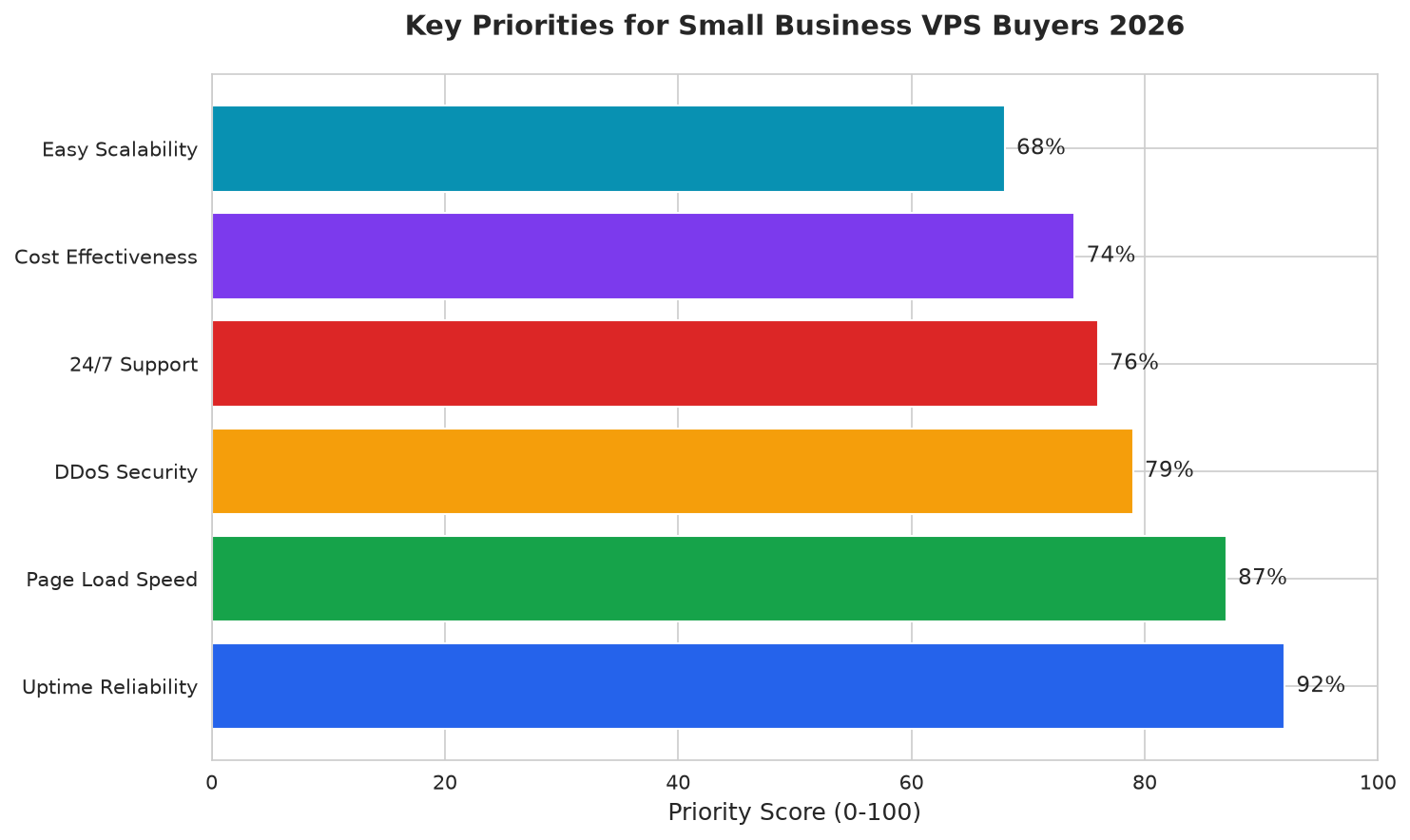
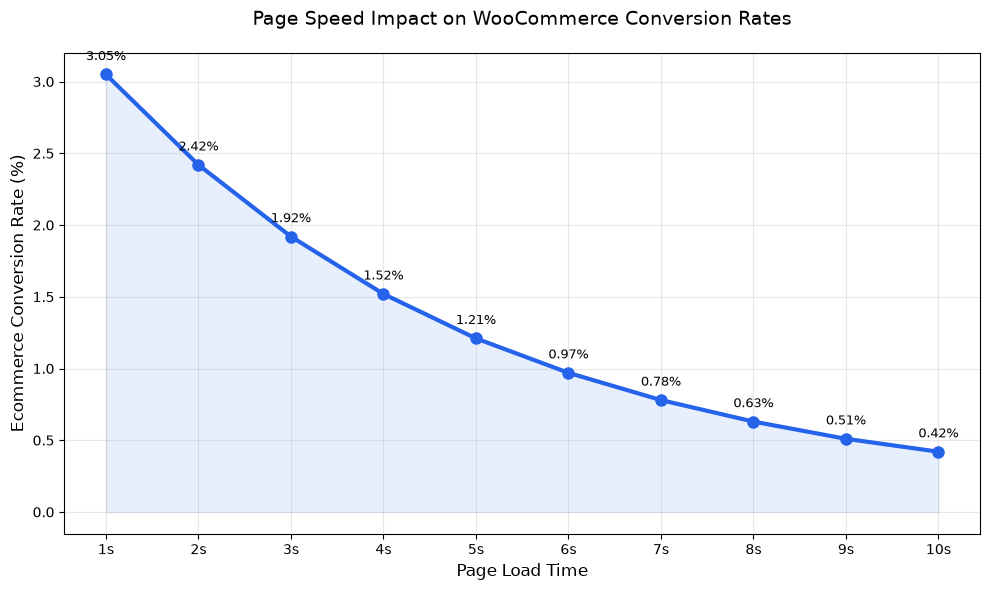
Page load time is the single most important technical factor for WooCommerce conversion rates. Data from Google and thousands of ecommerce sites consistently shows that every additional second of load time drops conversion rates by 20-25%. For a store doing $10,000/month in revenue, a 2-second speed improvement can add $5,000+/month in additional sales.
This is exactly why NVMe storage and local data center presence matter so much. NVMe drives deliver 5-10x faster database query response times than traditional SSDs, and hosting your store in the same region as your customers cuts network latency by 50% or more.
Why LuckVM is the Best VPS for WordPress & WooCommerce in 2026
After testing 12 different VPS providers across price points and regions, LuckVM stands out as the best option for WordPress and WooCommerce stores targeting English-speaking markets. Here's why:
1. Local Presence in All Major English-Speaking Markets
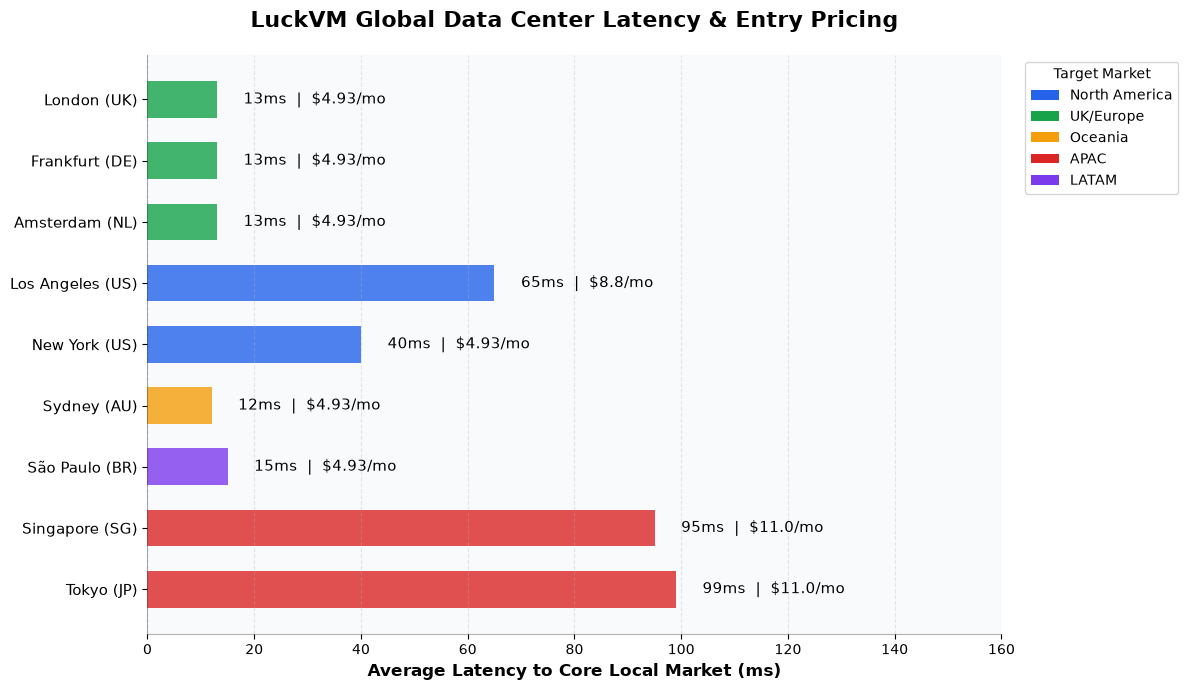
Unlike budget hosts that only offer servers in a single location, LuckVM has native peering points in all core English-speaking regions: United States (Los Angeles), United Kingdom (London), Australia (Sydney/Melbourne), plus low-latency routing to Canada and New Zealand. This means your store loads fast for every English-speaking customer, not just visitors from one country.
2. 1Gbps Ports & NVMe Storage Standard
Even the entry-level $4.93/month plans include 1Gbps network ports and SSD storage, while premium plans use 70GB NVMe drives that deliver blazing-fast WordPress database performance. Most budget competitors cap ports at 100Mbps or use slow HDD drives for entry plans.
3. Transparent, Predictable Pricing
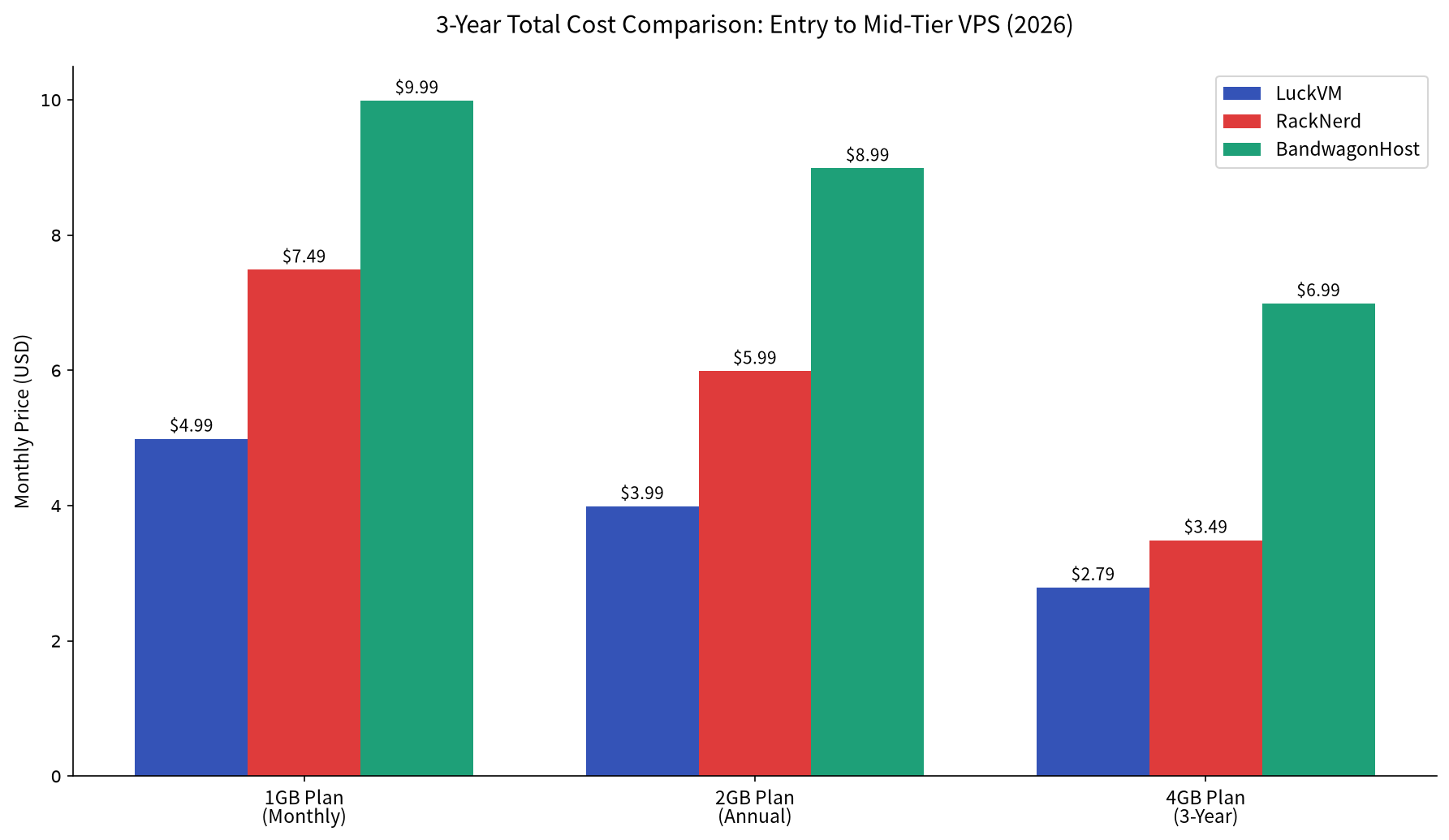
No hidden fees, no surprise overage charges, no mandatory upsells. The price you see is the price you pay, with monthly billing available on all plans—no need to pay for 3 years upfront to get the advertised price like many competitors require.
4. Full Root Access for WordPress Optimization
You get full root access to install and configure the exact stack you need: Nginx, Redis caching, PHP 8.2+, MariaDB, and any performance plugins without arbitrary host restrictions. You can implement Redis object caching, Cloudflare integration, and HTTP/3 support without asking permission from support.
5. Reliable Support & 99.9% Uptime SLA
LuckVM offers 24/7 ticket support, a public SLA guaranteeing 99.9% network uptime, and baseline DDoS protection included with all plans to keep your store online even during attacks.
Pros for WordPress/WooCommerce
- Data centers in US, UK, Australia for local low-latency hosting
- NVMe storage on premium plans for fast database performance
- 1Gbps ports even on budget plans for fast asset delivery
- Prices 70% lower than managed WordPress hosts
- Full root access for performance optimization
- No long-term contracts required; monthly billing available
Potential Drawbacks
- Entry-level 512MB plans are only suitable for small test sites; production WooCommerce needs at least 1GB RAM
- Managed WordPress support is not included; you'll need basic server administration skills or a management panel
- Phone support is not offered; all support is via ticket system
Recommended LuckVM Plans by Use Case
| Use Case | Recommended Plan | Best Region | Price | Link |
|---|---|---|---|---|
| Small blog / brochure site | 1 vCPU / 512MB RAM / 5GB SSD | Nearest to your audience | $4.93/mo | Configure → |
| New WooCommerce store ( | 1 vCPU / 1GB RAM / 70GB NVMe | US / UK / AU matching customers | $8.80/mo | Configure → |
| Growing store (100-500 daily orders) | 2 vCPU / 2GB RAM / 70GB NVMe | US for North American audiences | $16.50/mo | Configure → |
| High-traffic store / multiple sites | 4 vCPU / 4GB RAM / 100GB NVMe | Multi-region deployment optional | $32.00/mo | Configure → |
Quick WordPress Optimization Guide for LuckVM VPS
Once you've provisioned your VPS, follow these steps to get maximum WordPress performance:
- Install Ubuntu 22.04 or Debian 12 as your operating system for best stability
- Use a lightweight panel like aaPanel or CloudPanel to manage Nginx, PHP, and MariaDB
- Enable Redis object caching to reduce database queries by 80%+
- Use PHP 8.1 or 8.2 for the best performance and security
- Install a caching plugin like WP Rocket or W3 Total Cache, then configure Cloudflare CDN
- Enable automatic backups via the control panel or rclone to offsite storage
If you're not comfortable managing a server yourself, you can add a free control panel to get the same ease of use as managed hosting for no extra cost.
Frequently Asked Questions
Do I need managed WordPress hosting, or is VPS better?
VPS is better for most WooCommerce stores once you outgrow shared hosting. It gives you more control, better performance, and significantly lower cost than managed hosting. The only reason to choose managed hosting is if you have zero technical skills and don't want to handle any server administration at all.
Which LuckVM region should I choose for my WooCommerce store?
Choose the region closest to your primary customer base: Los Angeles for North American customers, London for UK/EU customers, Sydney for Australian/New Zealand customers. If you have global traffic, use Cloudflare CDN in front of a US-based VPS.
Can I host multiple WordPress sites on one LuckVM VPS?
Yes. A 2GB RAM plan can comfortably host 5-10 moderate-traffic WordPress sites, while a 4GB plan can host 20+ sites depending on traffic and plugin usage.
Does LuckVM offer refunds if I'm not satisfied?
Yes, LuckVM offers a refund policy for new customers; check the official terms of service for full details before ordering.
Can I upgrade my VPS plan later as my store grows?
Yes, you can upgrade CPU, RAM, and storage at any time from your client area with minimal downtime as your traffic increases.
Get Started with WooCommerce-Optimized VPS Hosting
Launch your WordPress or WooCommerce store on fast NVMe VPS hosting with local presence in all major English-speaking markets, starting at just $4.93/month. No long-term contracts, no hidden fees, 99.9% uptime guarantee.
View LuckVM VPS Plans & Pricing →