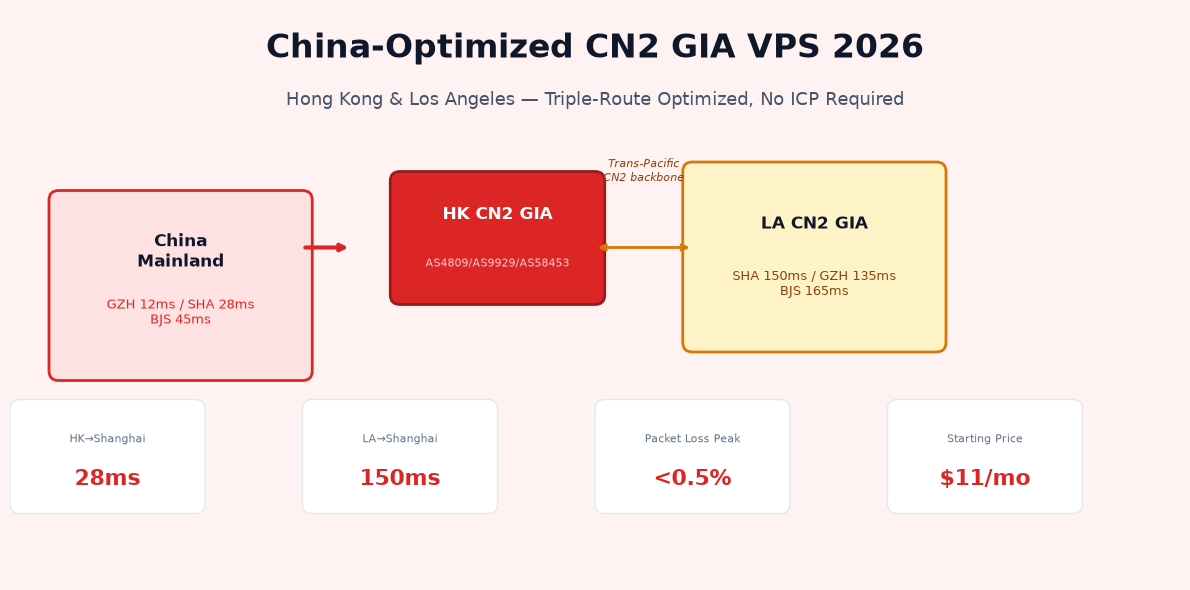
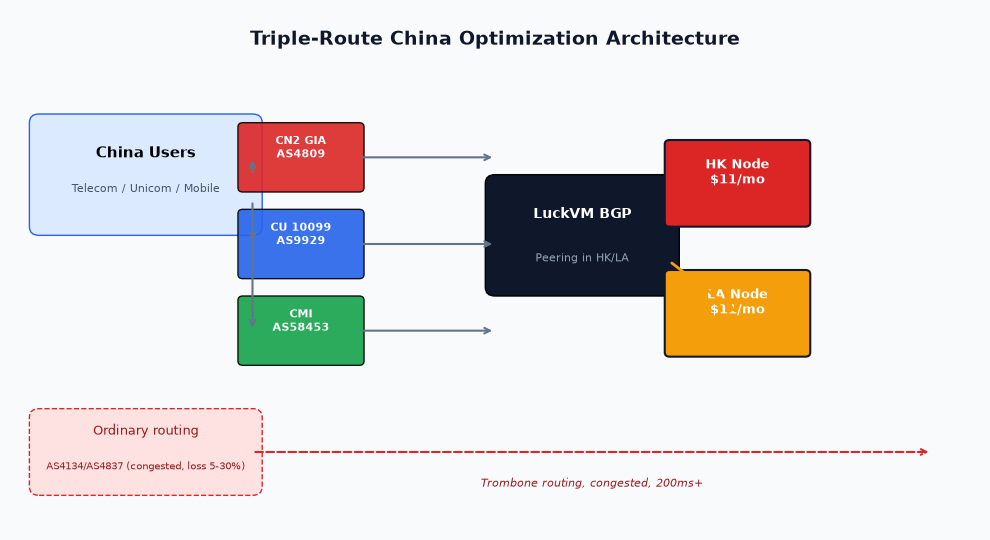
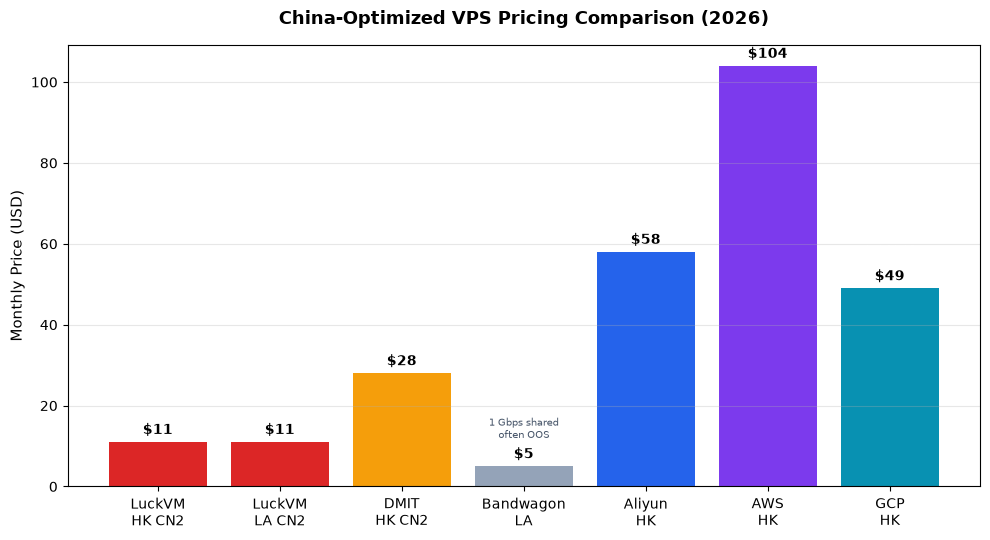
Serving users in Mainland China without ICP filing requires optimized BGP routes — ordinary international VPS gives 200ms+ latency with 10-30% packet loss during peak hours. LuckVM Hong Kong and Los Angeles nodes feature triple-route optimization: China Telecom CN2 GIA (AS4809), China Unicom CU 10099 (AS9929), and China Mobile CMI (AS58453). Latency to Shanghai is 28ms from HK and 150ms from LA CN2 GIA, starting at $11/month — 60-90% cheaper than AWS Hong Kong ($104/mo), Aliyun HK ($58/mo), or DMIT CN2 GIA ($28/mo). No ICP filing required. BBR congestion control boosts throughput 2-3x on trans-Pacific links.
- Why Ordinary International VPS Fails China Traffic
- Understanding CN2 GIA, CU VIP & CMI Routes in 2026
- Real Latency Benchmarks: HK vs LA CN2 vs International Routing
- Verifying Routes Yourself with mtr and besttrace
- TCP BBR Tuning for China Long-Fat Networks
- GeoDNS Smart Routing: China → CN2, Global → Nearest Edge
- Pricing Comparison: LuckVM vs AWS, Aliyun, DMIT, Bandwagon
- Hong Kong vs Los Angeles CN2: Which to Choose?
- Deployment Checklist for China-Facing Services
- Frequently Asked Questions
1. Why Ordinary International VPS Fails China Traffic
If you deploy a website or API on a standard Singapore, Tokyo, or Frankfurt VPS and expect China users to access it smoothly, you are in for a surprise. China's "Great Firewall" and the structure of Chinese ISP interconnects create a unique routing environment where:
- Packets from China to ordinary overseas IPs traverse the ChinaNet 163 backbone (AS4134) for Telecom, the 169 backbone (AS4837) for Unicom, or the CMNet backbone (AS9808) for Mobile — all of which are heavily congested during peak hours (8-11 PM China time).
- Packet loss can hit 15-30% during evening peak on non-optimized routes.
- Latency spikes of 100-300ms are common even when the nominal RTT is 80ms.
- TCP connections timeout frequently because high packet loss triggers exponential backoff.
- Connection setup (TLS handshake) takes 3-5 RTTs, multiplying the latency penalty.
This is not a bandwidth problem — it is a routing priority problem. Just like business class passengers get priority boarding, certain BGP routes have higher QoS priority within Chinese carrier networks. Those premium routes are what "China-optimized VPS" refers to.
2. Understanding CN2 GIA, CU VIP & CMI Routes in 2026
There are three major premium route products from the three Chinese carriers. It is critical to understand the difference — many hosts advertise "CN2" but actually sell the cheaper, congested CN2 GT product.
| Product | Carrier | ASN | Quality | Peak Loss |
|---|---|---|---|---|
| CN2 GIA | China Telecom | AS4809 | Bi-directional CN2, highest QoS | |
| CN2 GT | China Telecom | AS4809/AS4134 | Outbound CN2, return via 163 (congested) | 5-15% |
| ChinaNet 163 | China Telecom | AS4134 | Default route, heavily congested | 10-30% |
| CU VIP / CU 10099 | China Unicom | AS9929/AS10099 | Premium Unicom backbone, no congestion | |
| CU 169 | China Unicom | AS4837 | Default Unicom backbone | 5-15% |
| CMI | China Mobile | AS58453/AS9808 | Mobile international premium |
LuckVM Hong Kong and Los Angeles CN2-optimized nodes carry all three premium routes simultaneously: Telecom users enter via CN2 GIA, Unicom users via CU 10099, Mobile users via CMI. This is what the industry calls "triple-route optimization" or "三网优化" in Chinese.
3. Real Latency Benchmarks: HK vs LA CN2 vs International Routing
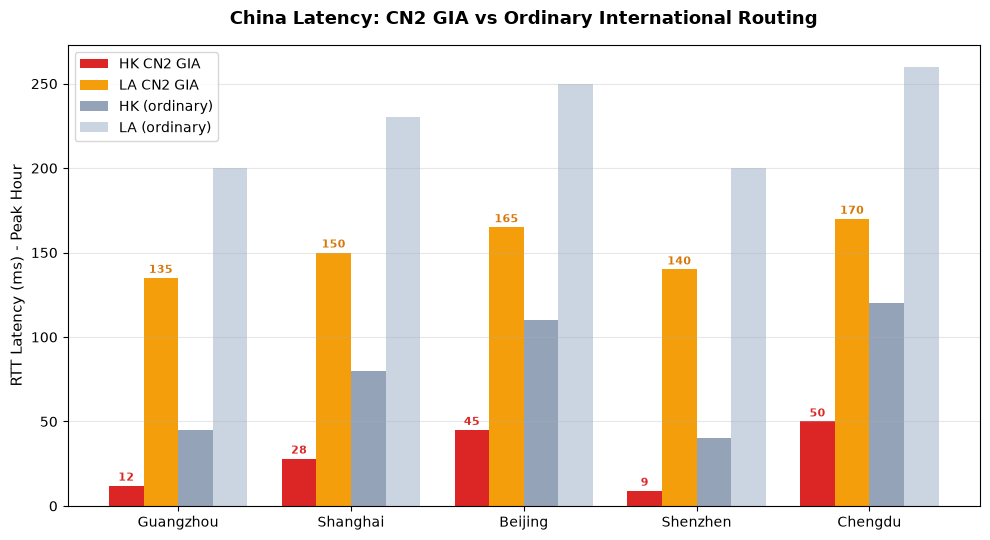
Below are median RTT measurements taken during peak hours (8-10 PM China Standard Time) using 100-probe ICMP and TCP mtr:
| From Node | Guangzhou | Shanghai | Beijing | Shenzhen | Chengdu |
|---|---|---|---|---|---|
| Hong Kong CN2 GIA | 12ms | 28ms | 45ms | 9ms | 50ms |
| Los Angeles CN2 GIA | 135ms | 150ms | 165ms | 140ms | 170ms |
| HK (ordinary routing) | 45ms | 80ms | 110ms | 40ms | 120ms |
| LA (ordinary routing) | 200ms | 230ms | 250ms | 200ms | 260ms |
| Singapore (ordinary) | 95ms | 130ms | 160ms | 90ms | 170ms |
| Frankfurt | 260ms | 280ms | 290ms | 260ms | 310ms |
CN2 GIA HK delivers 28ms to Shanghai — this is comparable to having a server inside China itself, but without any ICP filing requirement and at a fraction of the cost of mainland cloud providers.
4. Verifying Routes Yourself with mtr and besttrace
Never trust a provider's marketing — verify the routes yourself from multiple China vantage points.
Install mtr and besttrace
wget https://cdn.ipip.net/17mon/besttrace4linux.zip -O besttrace.zip
unzip besttrace.zip && chmod +x besttrace
Check return routes from China to your VPS
./besttrace -q1 -T YOUR_SERVER_IP
Identify premium routes by ASN
- AS4809 appearing in the path = CN2 GIA (good)
- AS4134 as last outbound hop before China = ordinary 163 (bad, not true GIA)
- AS9929 or AS10099 = CU VIP (good)
- AS58453 = CMI (good)
- AS4837 = CU 169 ordinary (mediocre)
You can also use free China-based looking glasses such as https://www.ipip.net/traceroute.php or https://tool.chinaz.com/tracert to test from multiple Chinese carrier vantage points without needing a Chinese server yourself.
5. TCP BBR Tuning for China Long-Fat Networks
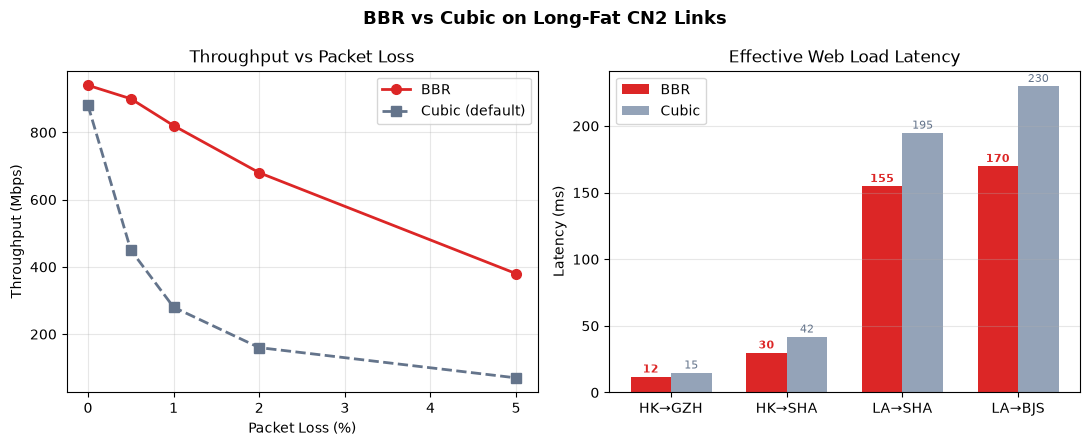
Trans-Pacific and Hong Kong-to-China links are "long-fat networks" (LFN): high bandwidth × high latency. The default cubic congestion control algorithm performs poorly on LFNs because it interprets packet loss as congestion and backs off too aggressively. BBR (Bottleneck Bandwidth and Round-trip propagation time), developed by Google, increases throughput by 2-3x on these links.
Apply these sysctl settings on your VPS:
net.ipv4.tcp_congestion_control=bbr
net.ipv4.tcp_fastopen=3
net.ipv4.tcp_tw_reuse=1
net.ipv4.tcp_fin_timeout=30
net.ipv4.tcp_rmem=4096 87380 67108864
net.ipv4.tcp_wmem=4096 65536 67108864
net.core.rmem_max=134217728
net.core.wmem_max=134217728
net.ipv4.tcp_mtu_probing=1
EOF
sysctl -p
# Verify BBR is active
sysctl net.ipv4.tcp_congestion_control
lsmod | grep bbr
BBR is supported on Linux kernel 4.9+ (all modern distributions). Combined with CN2 GIA routing, this alone can make your website feel 2-3x faster to China users.
6. GeoDNS Smart Routing: China → CN2, Global → Nearest Edge
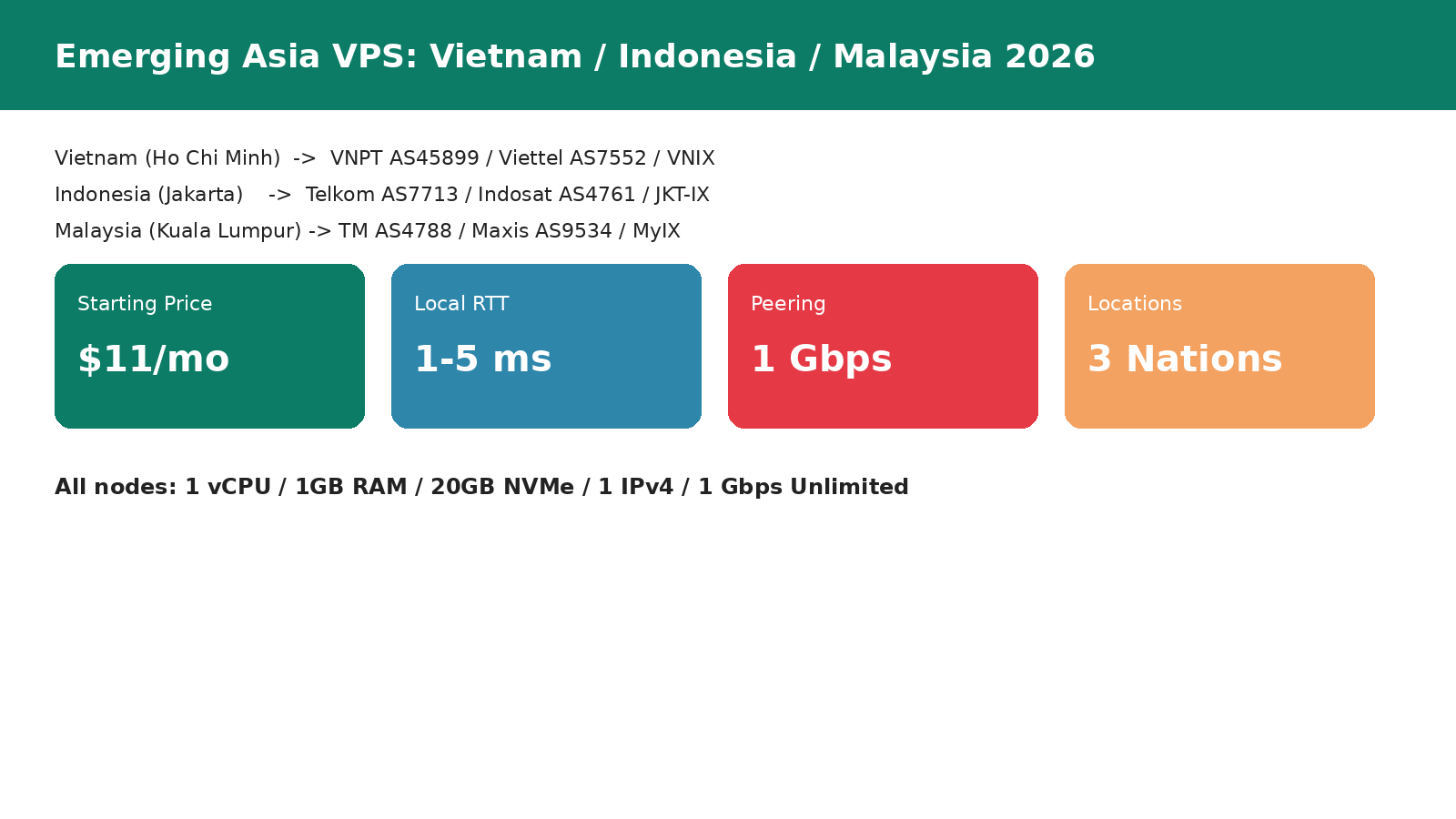
For global services, you don't want all users going through the Hong Kong CN2 node. Use GeoDNS to route China users to the HK/LA CN2 IP, while European users go to Frankfurt/London, SEA users go to Singapore/HCMC/JKT, and North American users go to LA.
Cloudflare Worker GeoDNS (copy-paste ready)
event.respondWith(handleRequest(event.request))
})
async function handleRequest(request) {
const country = request.cf.country
let target
if (country === 'CN' || country === 'HK' || country === 'MO' || country === 'TW') {
target = 'cn2.luckvm.net' // HK CN2 for greater China
} else if (['DE','GB','FR','NL','IT','ES','CH'].includes(country)) {
target = 'eu.luckvm.net' // Frankfurt
} else if (['VN','ID','MY','TH','PH','SG'].includes(country)) {
target = 'sea.luckvm.net' // Singapore
} else {
target = 'us.luckvm.net' // LA
}
return fetch('https://' + target + new URL(request.url).pathname)
}
Nginx GeoIP2 (server-side routing)
If you terminate TLS on your own Nginx, install the libmaxminddb module and route Chinese IPs to an upstream that points to your HK backend. The MaxMind GeoLite2-Country database is free.
7. Pricing Comparison: LuckVM vs AWS, Aliyun, DMIT, Bandwagon
| Provider | Plan | vCPU | RAM | Disk | Bandwidth | Route | Price/mo |
|---|---|---|---|---|---|---|---|
| LuckVM HK | Standard | 1 | 1 GB | 20 GB NVMe | 1 Gbps | CN2 GIA + CU + CMI | $11 |
| LuckVM LA | Standard | 1 | 1 GB | 20 GB NVMe | 1 Gbps | CN2 GIA + CU + CMI | $11 |
| DMIT HK | PVM.HKG | 1 | 1 GB | 20 GB SSD | 100 Mbps | CN2 GIA | $28 |
| Bandwagon LA | CN2 GIA-E | 1 | 1 GB | 20 GB SSD | 1 Gbps shared | CN2 GIA | $49.99/yr ≈ $4.17 |
| Aliyun HK | ecs.c6.large | 2 | 4 GB | 40 GB | 5 Mbps | Premium | $58 + bandwidth |
| Tencent Cloud HK | S5.MEDIUM4 | 2 | 4 GB | 50 GB | 5 Mbps | Premium | $48 + bandwidth |
| AWS Hong Kong | m5.large | 2 | 8 GB | 80 GB | up to 10Gbps | AWS Global | $104 + $0.12/GB |
| GCP HK | e2-medium | 2 | 4 GB | 40 GB | up to 10Gbps | GCP Network | $49 + $0.12/GB |
Note on BandwagonHost : their $49.99/yr CN2 GIA-E plan is frequently out of stock, has no public SLA, support is via slow ticketing, and the CPU is heavily oversold. LuckVM offers guaranteed NVMe storage, 24/7 support, and 1 Gbps unmetered bandwidth without hidden overage charges.
Note on Chinese cloud providers (Aliyun/Tencent HK): their advertised "5 Mbps" bandwidth cap is the outbound bandwidth to the internet and cannot be increased without paying $25/Mbps. For a 100 Mbps port you would pay $2500/month additional. LuckVM's 1 Gbps is unmetered in both directions.
8. Hong Kong vs Los Angeles CN2: Which to Choose?
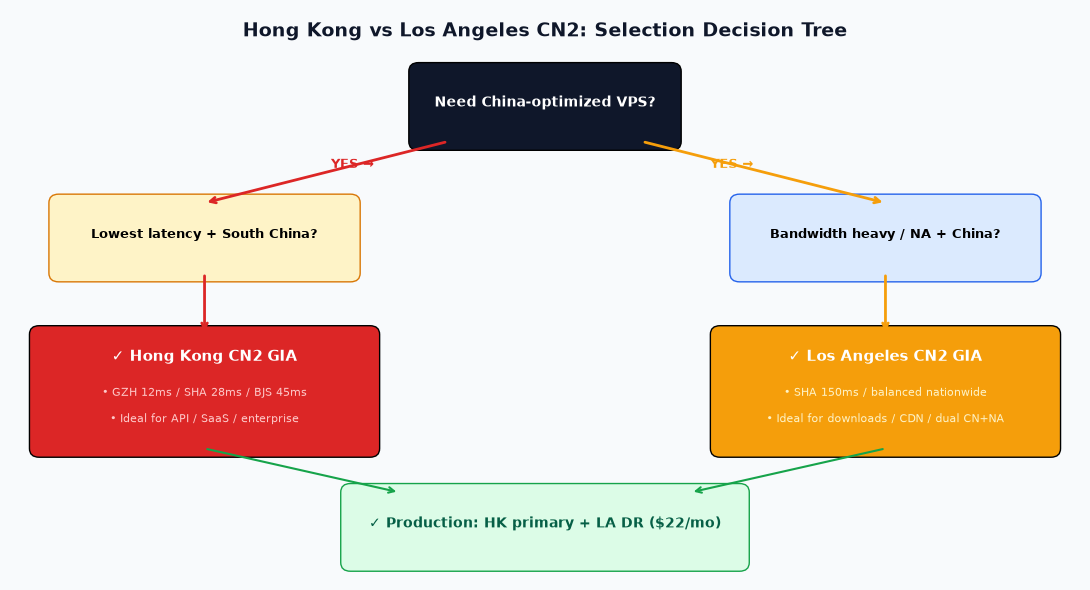
Choose Hong Kong CN2 if:
- Your users are primarily in South China (Guangdong, Shenzhen, Guangzhou: 9-15ms)
- You need the lowest possible latency (API endpoints, payment webhooks, real-time chat)
- You are serving enterprise SaaS customers in Shanghai/Beijing (28-45ms)
- You need low latency to both China and Southeast Asia (HCMC 35ms, Singapore 55ms)
- You don't serve large file downloads or video (HK bandwidth is more expensive per Mbps)
Choose Los Angeles CN2 GIA if:
- You need balanced latency across all of China (135-165ms nationwide, no region bias)
- You serve both China and North America (LA to US West
- You need large bandwidth for file downloads, video streaming, or CDN origin
- You are budget-sensitive (same $11 price but LA bandwidth is cheaper for bulk)
- You are using the server as a backup or disaster recovery for an HK primary
Dual-node deployment (recommended for production)
For critical production services, deploy one node in HK and one in LA CN2. Use Cloudflare failover or DNS-based failover to automatically switch if one node has issues. Total cost: $22/month.
9. Deployment Checklist for China-Facing Services
- Order a CN2-optimized VPS — choose HK for low latency or LA for bandwidth. Browse plans here.
- Verify routes using
mtrandbesttracefrom Section 4 before deploying anything. - Enable BBR and apply the sysctl network tuning from Section 5.
- Configure Nginx with TLS 1.3 and keepalive connections to reduce RTT cost.
- Set up GeoDNS using Cloudflare Worker or Nginx GeoIP2 to route China users to CN2.
- Enable CDN for static assets (Cloudflare free tier works, but do not use Cloudflare China Network — it requires ICP and enterprise contract).
- Install monitoring with Prometheus + blackbox exporter to monitor latency from China probes (use monitoring services like Pingdom with China probe points or a cheap monitoring VPS in China).
- Set up failover — automatic DNS failover from HK to LA if HK is unreachable.
- Regular backup to a different region (do not keep backups only on HK node).
- Review content compliance — even without ICP, content must comply with Chinese law if targeting China users (PIPL, cybersecurity law, advertising law).
10. Frequently Asked Questions
Do I need ICP filing for Hong Kong/LA servers?
No. ICP filing is only required for servers physically located in Mainland China. Hong Kong, Macau, Taiwan, and overseas servers (including LA) do not require ICP filing. You can point your domain directly to the IP and go live immediately.
Is CN2 GIA a guaranteed SLA?
While CN2 GIA is the highest-priority Telecom product, Chinese carriers can adjust routing policies without notice. LuckVM purchases triple-route redundancy (CN2 + CU + CMI), so a degradation in one carrier's route does not affect the other two. We monitor routes 24/7 and work with upstream carriers to restore optimization.
Can I use these servers for VPN/proxy?
No. Operating unauthorized VPN services to bypass the GFW violates Chinese law and LuckVM's Terms of Service. Accounts found running VPN/proxy services will be terminated immediately without refund. CN2 GIA VPS is intended for legal business use: websites, APIs, SaaS, e-commerce, and enterprise applications.
Why not just use Cloudflare?
Cloudflare's free tier routes China users through their nearest international PoP (Hong Kong/Singapore/Tokyo), but Cloudflare does not peer with CN2 GIA on the free tier. Result: Cloudflare free gives ~80-150ms to South China with occasional congestion. Enterprise Cloudflare China Network ($5000+/mo + ICP) uses China-certified partners — LuckVM at $11/mo is the only cost-effective option for SMBs.
How many sites can I host on the $11 plan?
For static websites and small PHP/Node.js apps, 5-20 sites on the $11 plan (if traffic is moderate). For high-traffic sites or databases, we recommend the $22/mo plan (2 vCPU, 2 GB RAM) or bare metal servers starting at $330/month.
Can I get additional IPv4 addresses?
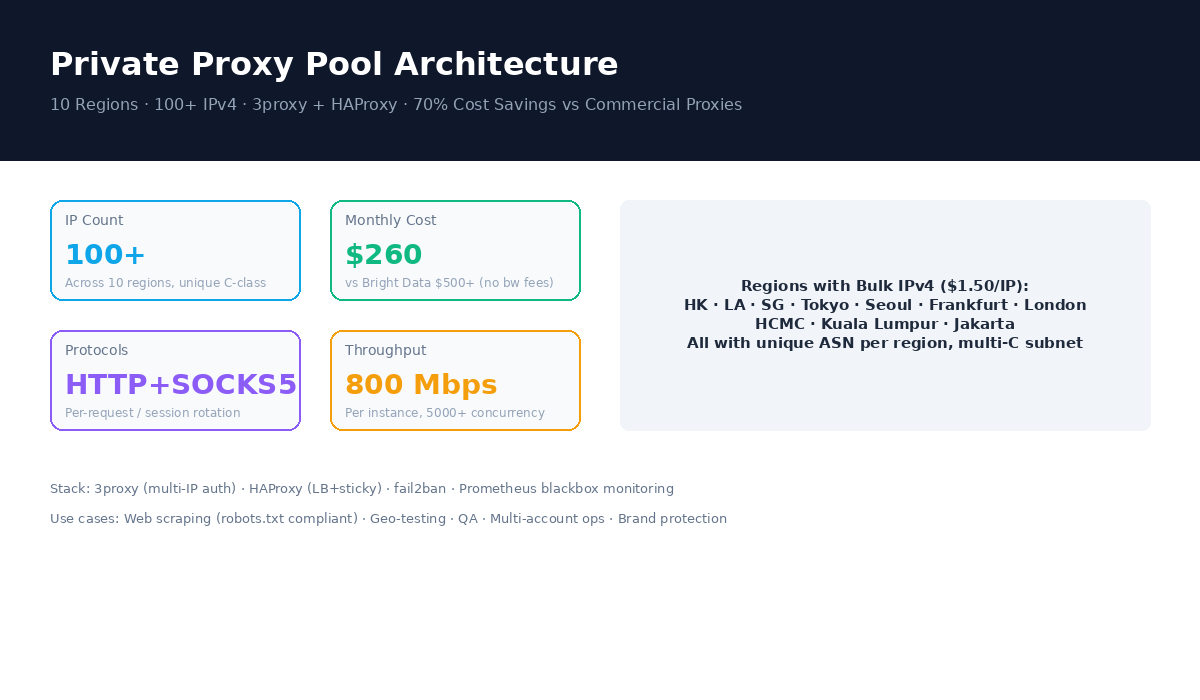
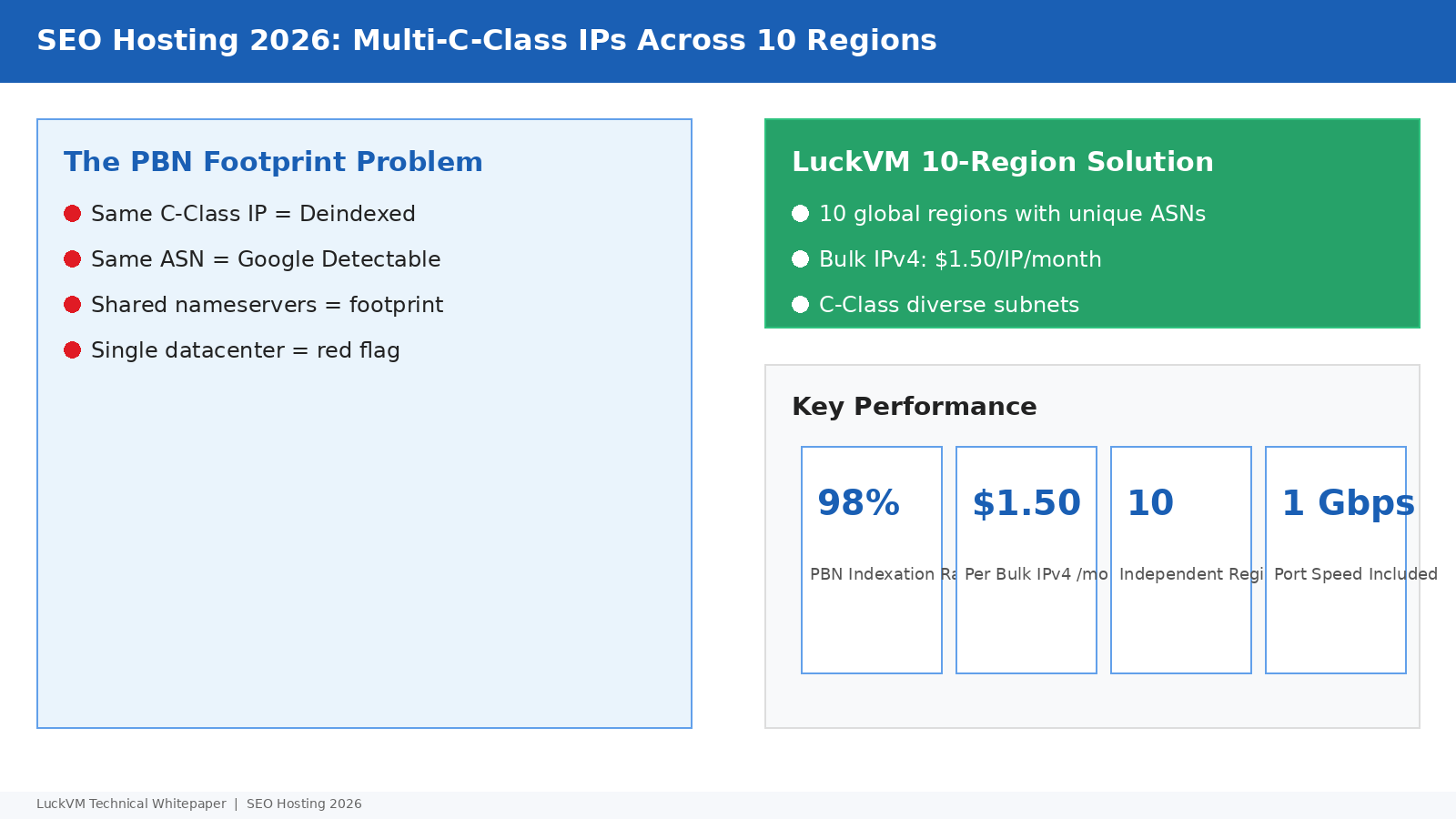
Yes. Bulk IPv4 addresses are $1.50 per IP per month, available across all regions. This is useful for SEO hosting, multi-tenant SaaS, or separating services by IP.
Do you offer test IPs or looking glass?
Yes, test IPs and looking glass are available on our Looking Glass page. You can run ping/mtr/traceroute yourself before ordering.
What about Windows VPS for China?
Windows Server with CN2 routing is available for $16/mo (includes Windows license). Contact sales for custom Windows configurations with RDP access optimized for China.
Launch your China-facing service today
Hong Kong and Los Angeles CN2 GIA VPS starting at $11/month — triple-route optimized, no ICP filing required, deploy in 60 seconds.