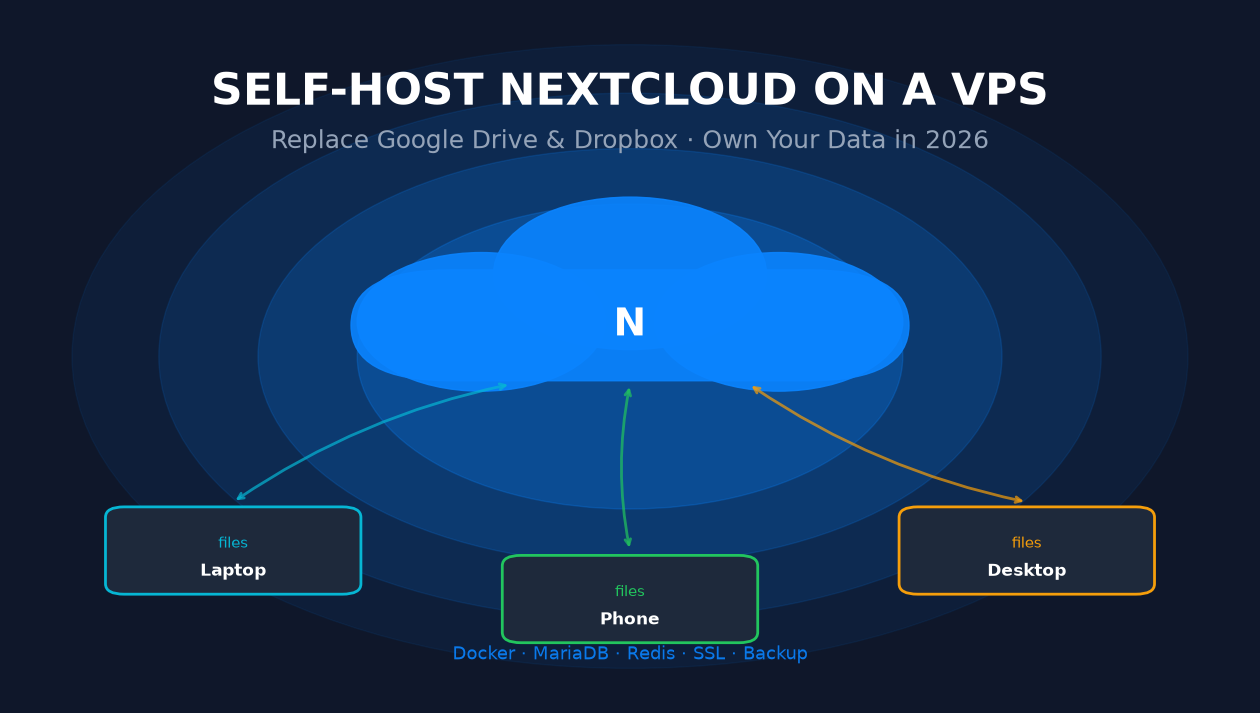
TL;DR — What you'll walk away with
You can run a private Nextcloud instance on a VPS for as little as USD 8.80/month, serving 1–2 users with 70 GB NVMe on a Hong Kong or Los Angeles plan from LuckVM, or a small team from a USD 11/month Singapore VPS. This guide walks you through provisioning the server, installing Docker, writing a production docker-compose.yml, getting Let's Encrypt SSL, tuning PHP/Redis for speed, hardening the box, and setting up a real 3-2-1 backup plan. The whole setup takes roughly 45 minutes. If you prefer us to handle it, LuckVM offers free migration assistance on all VPS plans.
1. Why Self-Host Your Cloud in 2026?
Every year another headline reminds us why "the cloud" is really just someone else's computer. Between Google account bans that lock people out of years of photos, Dropbox raising prices for the third time in as many years, Microsoft quietly scanning OneDrive contents for training data, and the steady creep of AI features that nobody asked for, more people — from solo developers to small teams and even families — are asking: what if I just hosted my files myself?
That is exactly what Nextcloud does. It is an open-source, self-hosted productivity platform: file sync (desktop, mobile, web), calendar, contacts, tasks, notes, photo galleries, collaborative document editing (via Collabora Online or OnlyOffice), video calls (Talk), and even an app store full of extras. You can point your own domain at it, encrypt data at rest, and never see an ad. In 2026 it is mature, fast, and — installed correctly on a VPS — genuinely usable for day-to-day work.
The goal of this guide is not to sell you on self-hosting. It is to give you an honest, working setup and a clear idea of what you gain and what you give up. If you decide to build it, you will finish this article with a production-ready instance that you can start migrating files to today.
2. An Honest Comparison: Nextcloud vs. Google Drive, Dropbox, OneDrive
Self-hosted advocates sometimes oversell the benefits. Below is an unvarnished ten-dimension comparison of the four major options. Green means the option is strong on that dimension, red means it is weak, and orange means it depends on how you set it up.
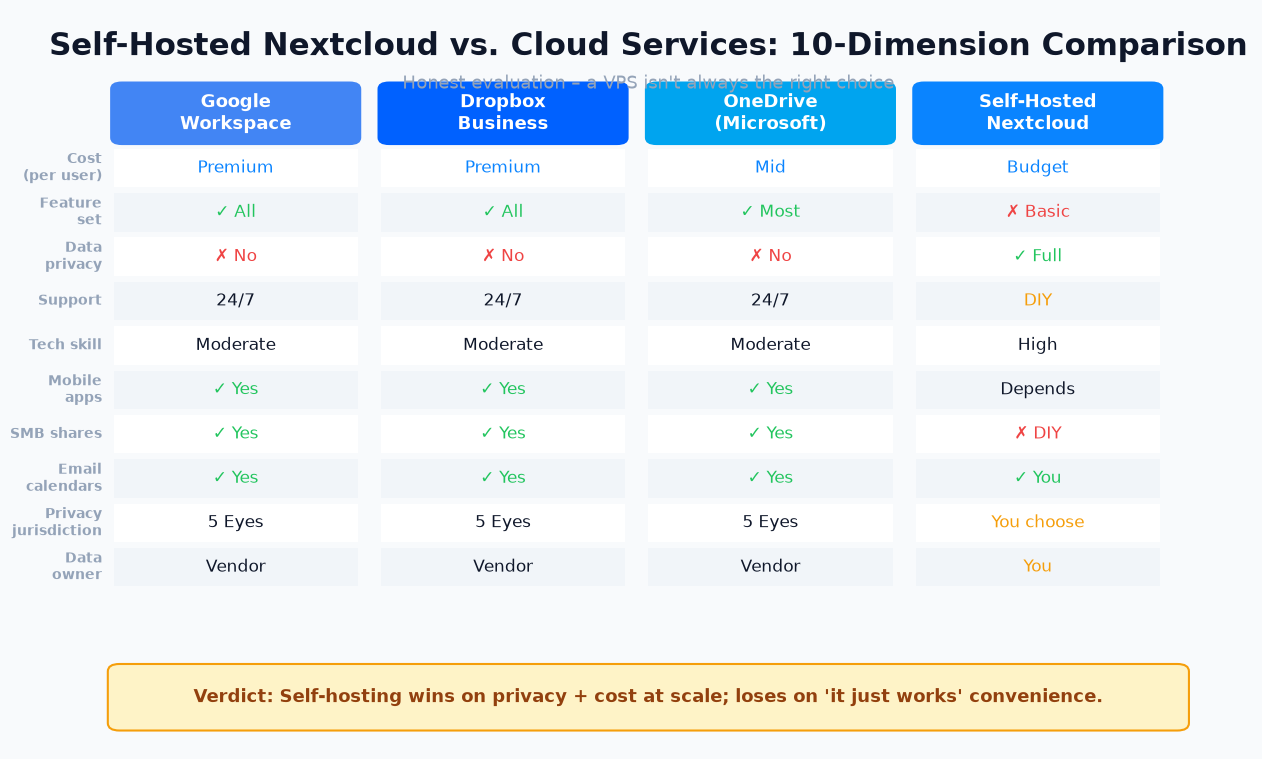
Figure 1 — Honest 10-dimension comparison. Self-hosted wins on privacy and long-term cost; commercial services win on convenience and support.
A few things stand out:
- You own your data on a self-hosted Nextcloud. That means you — not Google, not Microsoft, not Dropbox — decide who sees it, what AI models train on it, and when it gets deleted. It also means you are the SRE on call at 2 a.m. when the disk fills up.
- Cost savings are real at team scale, marginal for one person. A USD 8.80/month VPS handles 1–2 personal users; for a team of five the 3-year bill is roughly a quarter of Google Workspace. For a single casual user, the savings vanish once you value your own troubleshooting time.
- Mobile apps exist and work well — the official Nextcloud Android and iOS apps support automatic photo upload, file sync, end-to-end encrypted folders, and Talk calls — but they are not as polished as Google Drive's.
- Email and calendars are self-hostable (Nextcloud Mail + Calendar + Contacts) but mail deliverability from a fresh VPS IP is a real problem. Most teams keep email on a dedicated provider (Fastmail, Proton, Migadu) and point Nextcloud at it via IMAP.
3. Who Should NOT Self-Host
- You are not comfortable with SSH, the command line, and basic Linux administration.
- You need 99.99% uptime and cannot tolerate being your own on-call engineer.
- You primarily use proprietary integrations that only Google/Microsoft support.
- You will not set up off-server backups (see section 8). No backup = no production.
In those cases, pay for a managed Nextcloud host (Hetzner Storage Share, Nextcloud Hub from the official vendor, or a cloud drive with proper zero-knowledge encryption) and save yourself the ops burden.
4. Picking the Right VPS Plan & Region
Nextcloud is not heavy, but undersizing it is the #1 reason people say "Nextcloud is slow." The bottleneck is almost always RAM (PHP-FPM workers, Redis, MariaDB buffer pool) and disk I/O — which is why NVMe VPS plans beat budget HDD plans every time.
Recommended specs by team size
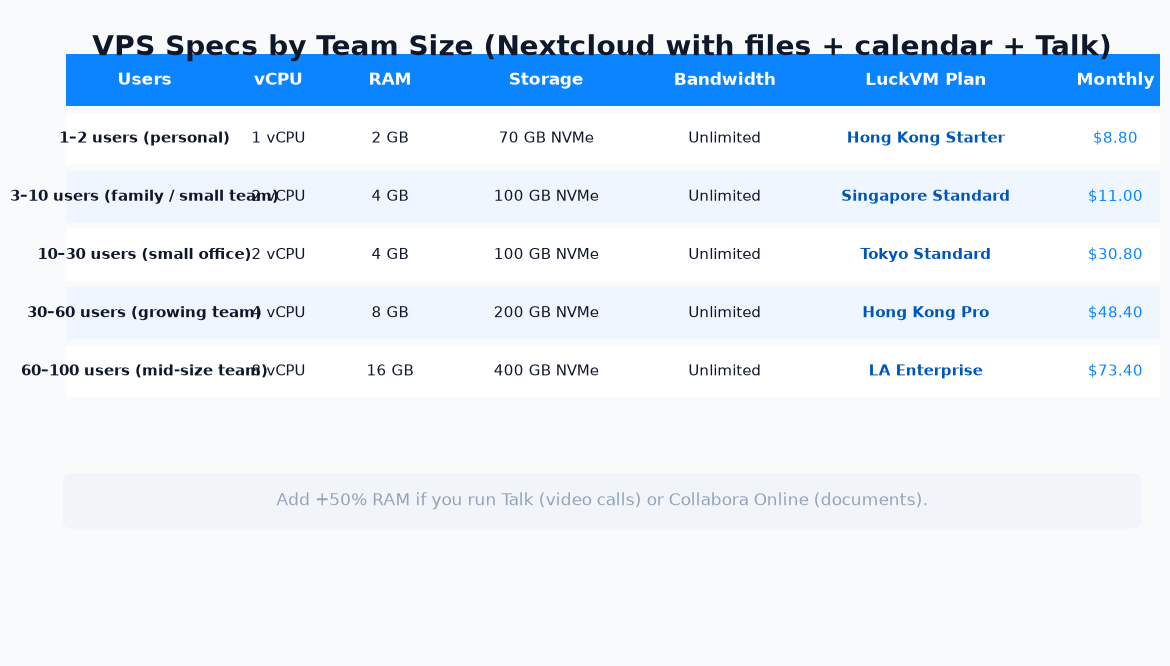
Figure 2 — VPS sizing guide for Nextcloud. Add ~50% RAM if you run Talk (video) or Collabora Online (documents).
On LuckVM the plans line up cleanly against these tiers. Prices as of September 2026:
| Users | Recommended plan | Region | Specs | Price/mo |
|---|---|---|---|---|
| 1–2 (personal) | Starter | Hong Kong / Los Angeles | 1 vCPU · 2 GB RAM · 70 GB NVMe | $8.80 |
| 3–10 (family/small team) | Standard | Singapore | 1 vCPU · 2 GB RAM · 50 GB NVMe | $11.00 |
| 10–30 (small office) | Standard | Tokyo | 2 vCPU · 4 GB RAM · 100 GB NVMe | $30.80 |
| 30–60 (growing team) | Pro | Hong Kong | 4 vCPU · 8 GB RAM · 200 GB NVMe | $48.40 |
| 60–100 (mid-size) | Enterprise | Los Angeles | 8 vCPU · 16 GB RAM · 400 GB NVMe | $73.40 |
Which region should you pick?
Two factors dominate: latency to your users and privacy jurisdiction.
- Latency: pick the datacenter closest to the majority of users. Uploads, directory browsing, and photo previews all feel snappier under 80 ms RTT. See our VPS latency guide for real-world ping numbers across regions.
- Privacy jurisdiction: if you care about Five/Nine/Fourteen Eyes surveillance alliances, Singapore and Tokyo are outside the club; the US (Los Angeles) is a Five Eyes country and is not the best pick for privacy-first users. We covered this in more depth in our WireGuard VPN guide.
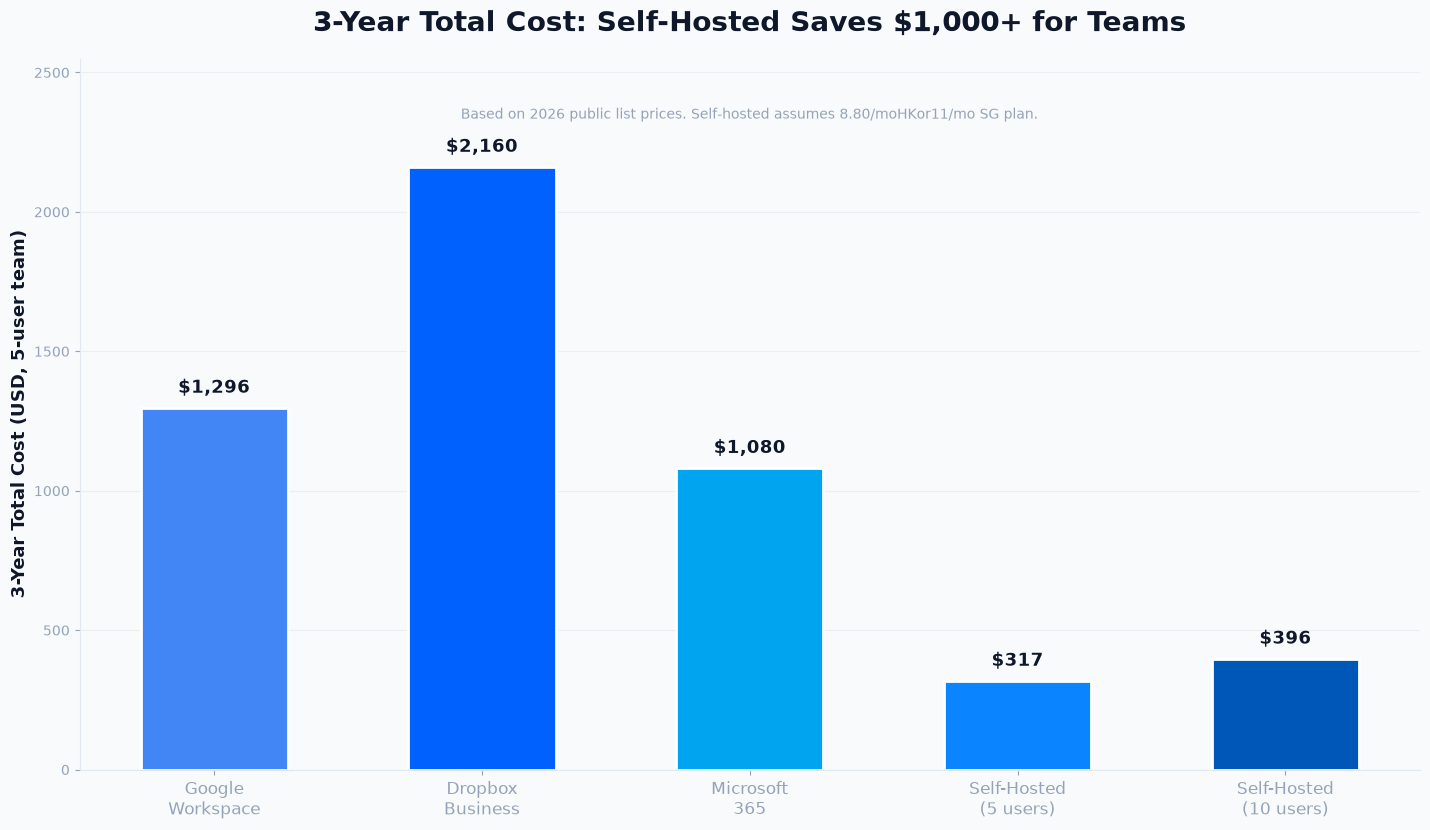
Figure 3 — 3-year total cost for a 5-user team, list prices 2026. Self-hosted recovers its setup time within the first year.
5. The Docker Architecture We'll Build
We will use Docker Compose with five containers, all on a private Docker network, with only the reverse proxy exposed to the internet on ports 80 and 443.
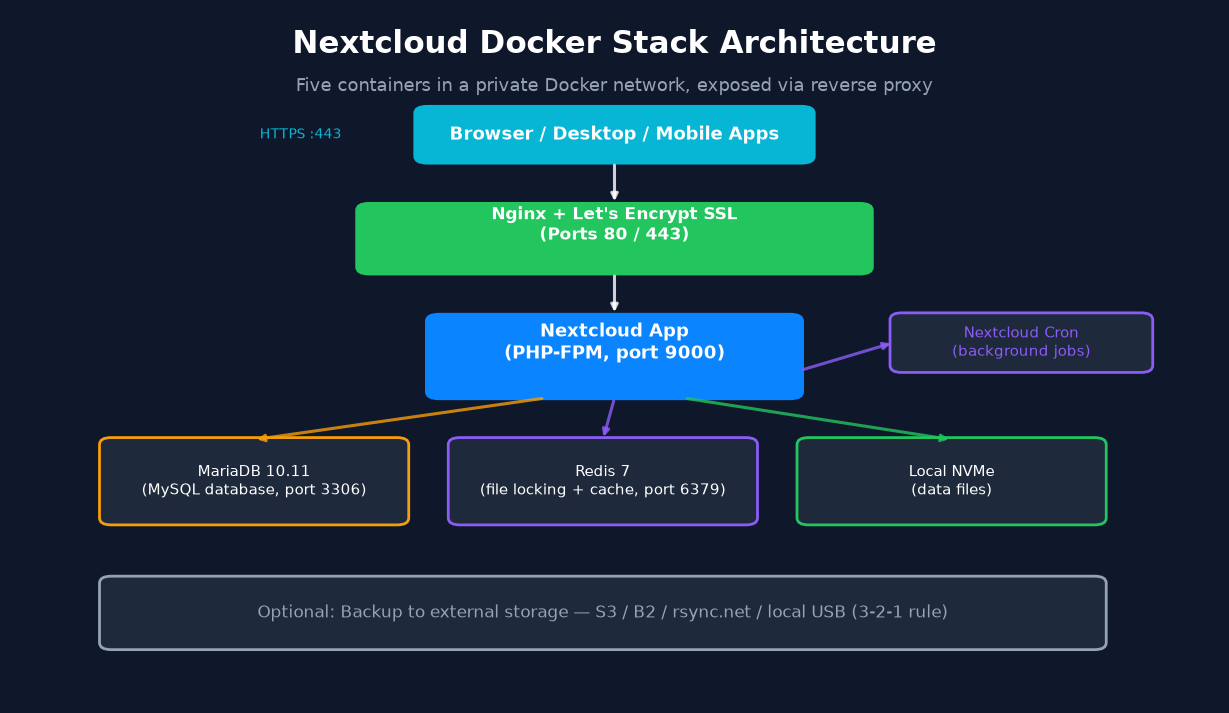
Figure 4 — The five-container Docker stack. Only Nginx is reachable from the internet; MariaDB and Redis listen only on the internal Docker network.
- nginx + Let's Encrypt: terminates TLS with an auto-renewed certificate, forwards traffic to the Nextcloud app container.
- nextcloud (PHP-FPM + Apache): the application itself, on the official
nextcloud:stable-fpmimage. - mariadb:10.11: transactional database — Nextcloud officially recommends MariaDB over MySQL in 2026.
- redis:7: used for file locking and transactional caching, which dramatically cuts TTFB.
- nextcloud-cron: runs background jobs (cron) every 5 minutes — more reliable than AJAX cron and lighter than system cron.
External backups go to a separate location (B2, S3, rsync.net, or a local USB at your house) — never only on the same VPS.
6. Step-by-Step Setup (7 Steps, ~45 Minutes)
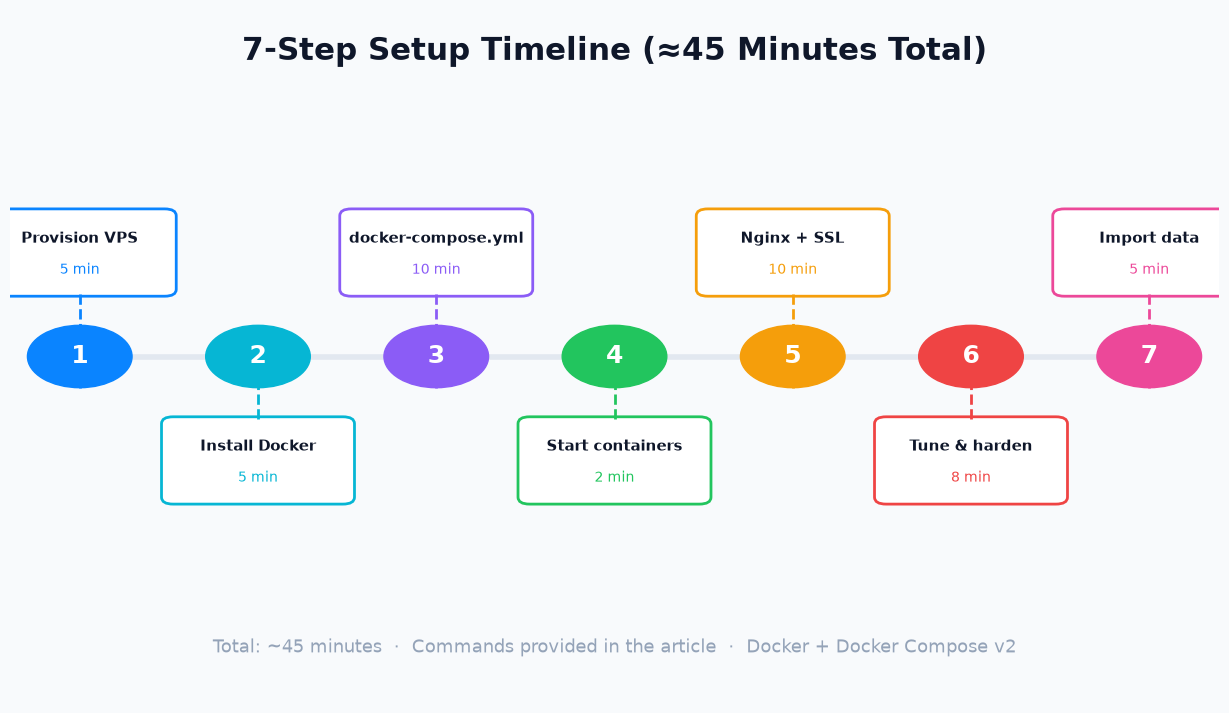
Figure 5 — The seven steps we walk through below, with realistic per-step time.
1Provision a VPS (5 min)
Spin up a fresh VPS running Ubuntu 24.04 LTS or Debian 12 on LuckVM. You will get a public IPv4 address and root SSH access within 5–10 minutes. Point a domain or subdomain (e.g. cloud.yourdomain.com) at the IP with an A/AAAA record — DNS can take a few minutes to propagate, so do this first. If you are new to hardening a fresh server, follow our 15-step VPS hardening checklist before continuing.
2Install Docker & Docker Compose (5 min)
# Update & install prerequisites
apt update && apt upgrade -y
apt install -y ca-certificates curl gnupg ufw

# Add Docker's official GPG key + repo
install -m 0755 -d /etc/apt/keyrings
curl -fsSL https://download.docker.com/linux/ubuntu/gpg | gpg --dearmor -o /etc/apt/keyrings/docker.gpg
chmod a+r /etc/apt/keyrings/docker.gpg
echo \
  "deb [arch=$(dpkg --print-architecture) signed-by=/etc/apt/keyrings/docker.gpg] https://download.docker.com/linux/ubuntu \
  $(. /etc/os-release && echo $VERSION_CODENAME) stable" > /etc/apt/sources.list.d/docker.list
apt update && apt install -y docker-ce docker-ce-cli containerd.io docker-buildx-plugin docker-compose-plugin

# Verify
docker --version && docker compose version
Create a non-root user for the stack and add it to the docker group:
adduser nextcloud
usermod -aG docker nextcloud
su - nextcloud3Write the docker-compose.yml (10 min)
Create a project directory and place this compose file inside it. This is the full production config we recommend — not a toy example.
mkdir -p ~/nextcloud && cd ~/nextcloud

cat > .env docker-compose.yml certbot and mount the certs into the Nginx container. This keeps renewal simple and avoids containers requesting certs every restart.4Start the containers (2 min)
docker compose up -d
docker compose ps # all five services should show "healthy" or "running"5Nginx config & Let's Encrypt SSL (10 min)
Drop this minimal but production-ready nginx.conf into the project folder. Replace cloud.yourdomain.com with your actual domain, then obtain the cert:
apt install -y certbot
# Stop Nginx container briefly so certbot standalone can bind port 80
docker compose stop web
certbot certonly --standalone -d cloud.yourdomain.com --agree-tos -m you@yourdomain.com --non-interactive
mkdir -p certs && cp -L /etc/letsencrypt/live/cloud.yourdomain.com/* certs/
docker compose start web

# Auto-renewal hook (copy fresh certs + reload Nginx monthly)
echo '0 3 1 * * certbot renew --quiet && cp -L /etc/letsencrypt/live/cloud.yourdomain.com/* /home/nextcloud/nextcloud/certs/ && docker exec -i nextcloud-web-1 nginx -s reload' | crontab -
The full Nginx config is provided in the downloadable package below — it includes HSTS, large file upload sizes (required for video), proper MIME types, and security headers.
6Performance tuning & hardening (8 min)
The defaults are conservative. Run these occ commands (as the web server user inside the app container) to enable Redis caching, file locking, and the default phone region:
docker compose exec -u www-data app php occ config:system:set \
  memcache.local --value '\OC\Memcache\APCu'
docker compose exec -u www-data app php occ config:system:set \
  memcache.distributed --value '\OC\Memcache\Redis'
docker compose exec -u www-data app php occ config:system:set \
  memcache.locking --value '\OC\Memcache\Redis'
docker compose exec -u www-data app php occ config:system:set \
  redis host --value redis
docker compose exec -u www-data app php occ config:system:set \
  default_phone_region --value US   # change to your ISO country code
docker compose exec -u www-data app php occ db:add-missing-indices
docker compose exec -u www-data app php occ db:convert-filecache-bigint -n
docker compose exec -u www-data app php occ maintenance:theme:update7Import your data (5 min to start, hours to transfer)
Open https://cloud.yourdomain.com, log in with admin and the password printed in .env, and create user accounts. To migrate existing files the cleanest way, install the Nextcloud desktop client on your old computer, point it at the new server, and let it sync. For very large datasets (hundreds of GB), rsync files directly onto the Docker volume and run docker compose exec -u www-data app php occ files:scan --all so Nextcloud discovers them.
7. Performance Tuning After Install
Out of the box your instance will work; these tweaks will make it fast:
- PHP OPcache: mount a custom
opcache.iniinto/usr/local/etc/php/conf.d/opcache-recommended.iniinside the app container withopcache.enable=1,opcache.interned_strings_buffer=32,opcache.max_accelerated_files=10000,opcache.memory_consumption=128,opcache.save_comments=1,opcache.revalidate_freq=1. - Preview generation: install the Preview Generator app and set up a cron job to pre-generate thumbnails overnight — browsing photos becomes instant.
- PHP upload limits: set
upload_max_filesize = 16Gandpost_max_size = 16Gin a custom PHP ini, and matchclient_max_body_size 16G;in Nginx. - Enable HTTP/2 or HTTP/3: Nginx's
listen 443 quic reuseport;plus HSTS adds real-world speed for mobile clients. - Add the Brute-force Protection app (shipped by default) and consider a Web Application Firewall like CrowdSec in front of Nginx.
If you expect uploads to be slow from your location, pick a VPS closer to you — see our VPS location and latency guide for real ping numbers.
8. Backups: The 3-2-1 Rule Nobody Skips
docker compose down -v. Disks fail. Operators make typos. You need a real backup strategy.Follow the classic 3-2-1 rule: 3 copies of your data, on 2 different media types, 1 of them off-site.
- Copy 1 — the live server itself (VPS NVMe).
- Copy 2 — daily
rsync+mysqldumpsnapshots to a second storage location (a second VPS, a local NAS, or an attached volume). - Copy 3 — encrypted backups to a cheap object store like Backblaze B2, Wasabi, or AWS S3 Glacier.
resticandkopiaboth handle client-side encryption, deduplication, and scheduling beautifully.
Test a full restore at least once a quarter. Backups you have never restored do not count.
9. Security Hardening Checklist
You are putting your files on a public internet server, so treat it like any other production host:
- SSH: disable root login, disable password auth, use SSH keys only, and change the SSH port from 22 (see our VPS hardening guide for the full 15-step playbook).
- Firewall (UFW): open only ports 22 (SSH, restricted to your IP if possible), 80, and 443. Everything else stays closed.
- Fail2ban: install the nextcloud-brute-force jail to block repeated login attempts.
- Nextcloud hardening: in the Admin → Security panel, enable HSTS, disable the preview providers you don't need, and enable server-side encryption if you store sensitive data.
- Updates: watch Nextcloud security advisories; use
docker compose pull && docker compose up -don a schedule and always read the changelog. - Do not run Nextcloud on port 80 without TLS. Ever.
10. Frequently Asked Questions
Is self-hosted Nextcloud really cheaper than Google Drive?
For teams of 5 or more, yes. A USD 8.80/month VPS serves 5 users for 3 years at roughly USD 317 total, compared to about USD 1,296 for Google Workspace Business Starter at USD 7.20 per user per month. For 1–2 users the picture is mixed once you value your own troubleshooting time.
Do I need a VPS or can I run Nextcloud at home?
A VPS gives you a public IP, reliable bandwidth and is reachable from mobile networks without exposing your home IP. Home hosting works if your ISP allows inbound ports 80/443 and you accept the uptime and IP reputation risks. Many consumer ISPs block those ports or use CGNAT.
Which VPS region is best for a Nextcloud server?
Pick the region closest to the majority of your users for lowest latency. If privacy matters more than speed, choose a jurisdiction outside the Five/Nine/Fourteen Eyes alliances (for example Singapore).
How much RAM does Nextcloud need?
1–2 vCPU with 2 GB RAM handles 1–2 personal users comfortably. Add 50% RAM if you run Talk (video calls) or Collabora Online document editing. 4 GB is a safe starting point for a small team.
Is Docker the easiest way to install Nextcloud in 2026?
Yes. Docker Compose gives you the app, database, cache and cron job in reproducible containers, and makes backups and upgrades much simpler than a manual LAMP install.
Can I use a self-hosted Nextcloud for business?
Absolutely. You will be on call for uptime and backups yourself — there is no enterprise SLA unless you pay Nextcloud GmbH for a support subscription. Small teams and privacy-conscious shops often prefer this trade-off.
How do I migrate existing Google Drive or Dropbox files into Nextcloud?
Use the official Nextcloud desktop client to upload from your local synced folder, or use the Nextcloud External Storage app to mount Google Drive temporarily and copy files over. For very large datasets, rsync files directly onto the server and run occ files:scan --all.
What happens if my VPS goes down?
You lose access until you restore from backup. With a proper 3-2-1 backup strategy you can be back online on a fresh VPS within an hour. If this risk is unacceptable, stick with a managed cloud service.
Ready to deploy your own Nextcloud?
Spin up an NVMe VPS from $8.80/month on LuckVM — Hong Kong, Singapore, Tokyo, Korea, and Los Angeles regions. Free migration assistance included if you already have a Nextcloud or cloud-drive folder you want moved over.
View VPS Pricing →You might also like
How to Move from Shared Hosting to a VPS Without Downtime (2026 Guide)Best VPS Location for Your Audience (Latency vs. Price vs. Routes)
VPS Security Checklist: 15 Steps to Harden a New Server in 2026
How to Build Your Own WireGuard VPN on a VPS in 2026
How to Speed Up WordPress on a VPS: The 2026 Optimization Playbook
How to Host a Minecraft Server on a VPS in 2026