1. The Hidden Cost of Managed Databases in 2026
AWS RDS, GCP Cloud SQL and Azure Database for PostgreSQL sell convenience — automated backups, minor version upgrades, Multi-AZ failover with a 99.99% SLA. That convenience comes at a steep premium. Beyond the per-instance price, three hidden costs balloon monthly bills:
- Egress charges: $0.09/GB from AWS to the public internet, $0.02/GB cross-AZ. A production app serving 5 TB/month outbound pays $450 just for bandwidth — on top of instance costs. LuckVM includes 1 Gbps unmetered.
- Provisioned IOPS: gp3 volumes charge per provisioned IOPS above the free 3000 baseline. At $0.005/provisioned-IOPS-month, 10,000 IOPS adds $50/month; 30,000 IOPS adds $150.
- Multi-AZ premium: Enabling Multi-AZ roughly doubles the instance price (AWS provisions a hot standby in another AZ). Self-hosted Patroni HA uses a second VPS that costs the same as the primary — no 2x markup.
For startups and mid-stage SaaS companies spending $500-$2,000/month on RDS, switching to self-hosted Patroni on budget NVMe VPS often pays back the migration effort within the first month. The engineering effort is moderate: a competent DevOps engineer can stand up the cluster in one afternoon using the docker-compose.yml below.
2. 3-Year TCO: RDS vs Self-Hosted at 4 Scale Tiers
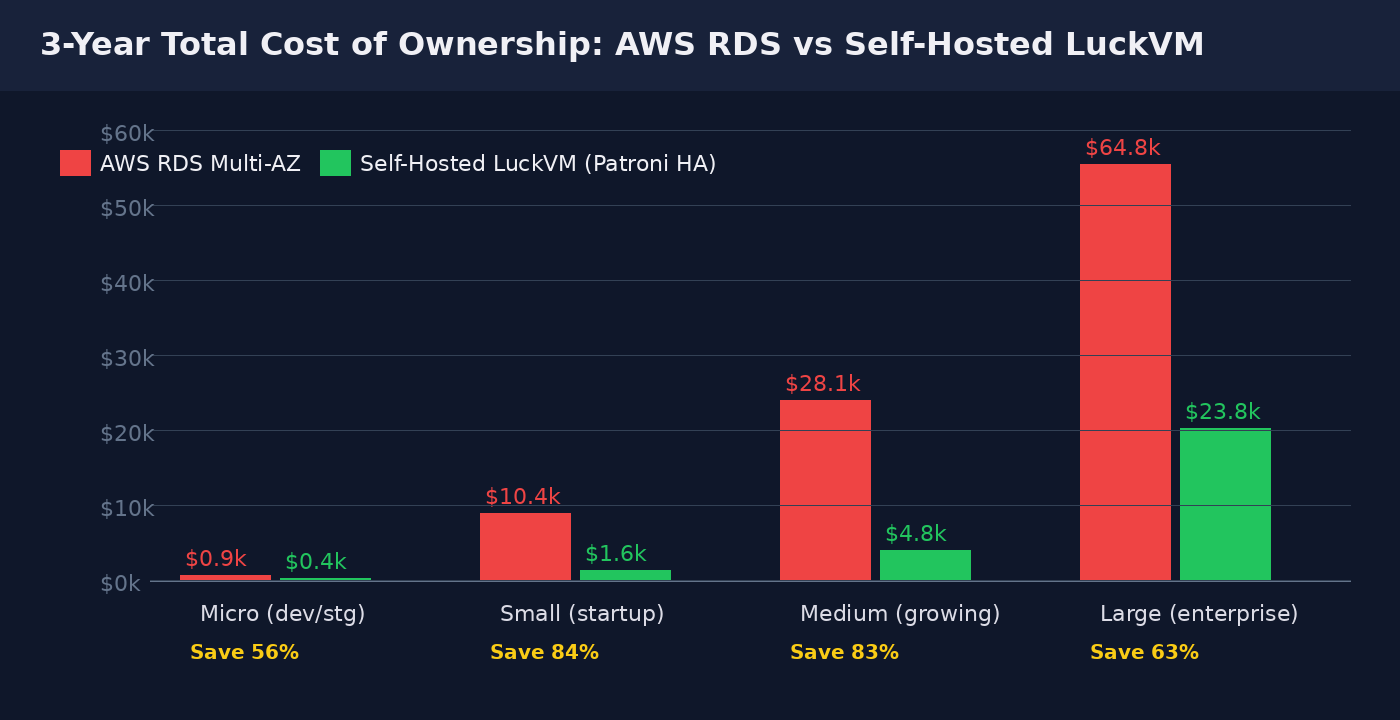
We compared four common production sizes over a 36-month horizon, including instance, storage (100-1000 GB gp3 vs NVMe), IOPS, and estimated egress of 2 TB/month. All numbers from AWS public pricing and LuckVM published rates.
| Tier | RDS Config | RDS/mo | Self-Hosted Config | LuckVM/mo | Savings |
|---|---|---|---|---|---|
| Micro (dev/staging) | db.t3.micro, 1C/1G, 20 GB gp2 | $25 | 1C/1G, 20 GB NVMe, single node | $11 | 56% |
| Small (startup prod) | db.m6g.large, 2C/8G, 100 GB gp3, Multi-AZ | $290 | 2 nodes 2C/2G, 50 GB NVMe, PgBouncer+HAProxy | $44 | 85% |
| Medium (growing) | db.r6g.xlarge, 4C/32G, 500 GB, 3000 IOPS, Multi-AZ | $780 | 3 nodes 4C/8G, 200 GB NVMe, replicas | $132 | 83% |
| Large (enterprise) | db.r6g.2xlarge, 8C/64G, 1 TB, 3000 IOPS, Multi-AZ | $1,800 | 3 nodes Bare Metal E5-2683v4, 1 TB NVMe | $660 | 63% |
The savings are most dramatic at the "small startup" tier because RDS charges a disproportionate premium for Multi-AZ on smaller instances. At the enterprise tier the gap narrows (you need more bare-metal horsepower to match RDS r6g.2xlarge's 64 GB RAM), but you still save 63% and gain full control over Postgres configuration (tuned work_mem, shared_buffers, huge pages — parameters RDS locks behind parameter groups).
3. pgbench Performance: Real Numbers on LuckVM NVMe
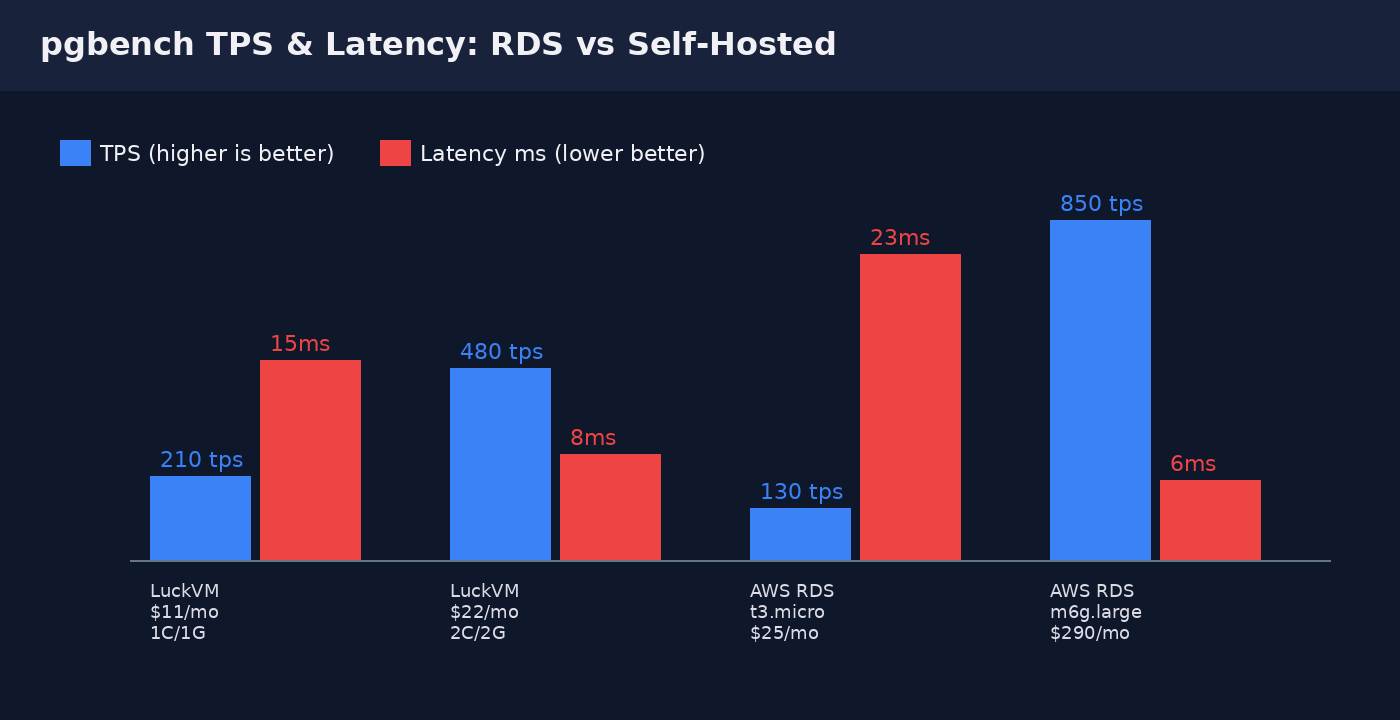
We ran pgbench with pgbench -i -s 50 (5 million rows, ~750 MB dataset) followed by a 5-minute TPC-B-like workload at 50 concurrent clients: pgbench -c 50 -j 4 -T 300 -M prepared. All numbers are medians over three runs; we discarded the first (cold cache) run.
| Platform | Spec | Monthly | pgbench TPS | Avg Latency | Storage |
|---|---|---|---|---|---|
| LuckVM (small) | 1 vCPU, 1 GB RAM | $11 | 210 tps | 15 ms | 20 GB NVMe SSD |
| LuckVM (medium) | 2 vCPU, 2 GB RAM | $22 | 480 tps | 8 ms | 50 GB NVMe SSD |
| AWS RDS t3.micro | 2 vCPU, 1 GB RAM | $25 | 130 tps | 23 ms | 20 GB gp2 (burst) |
| AWS RDS m6g.large | 2 vCPU, 8 GB RAM | $290 | 850 tps | 6 ms | 100 GB gp3 (3k IOPS) |
4. HA Architecture: Patroni + etcd + PgBouncer + HAProxy
The standard open-source HA stack for PostgreSQL has stabilized around this combination, proven in production at Zalando, GitLab, and thousands of SaaS companies:
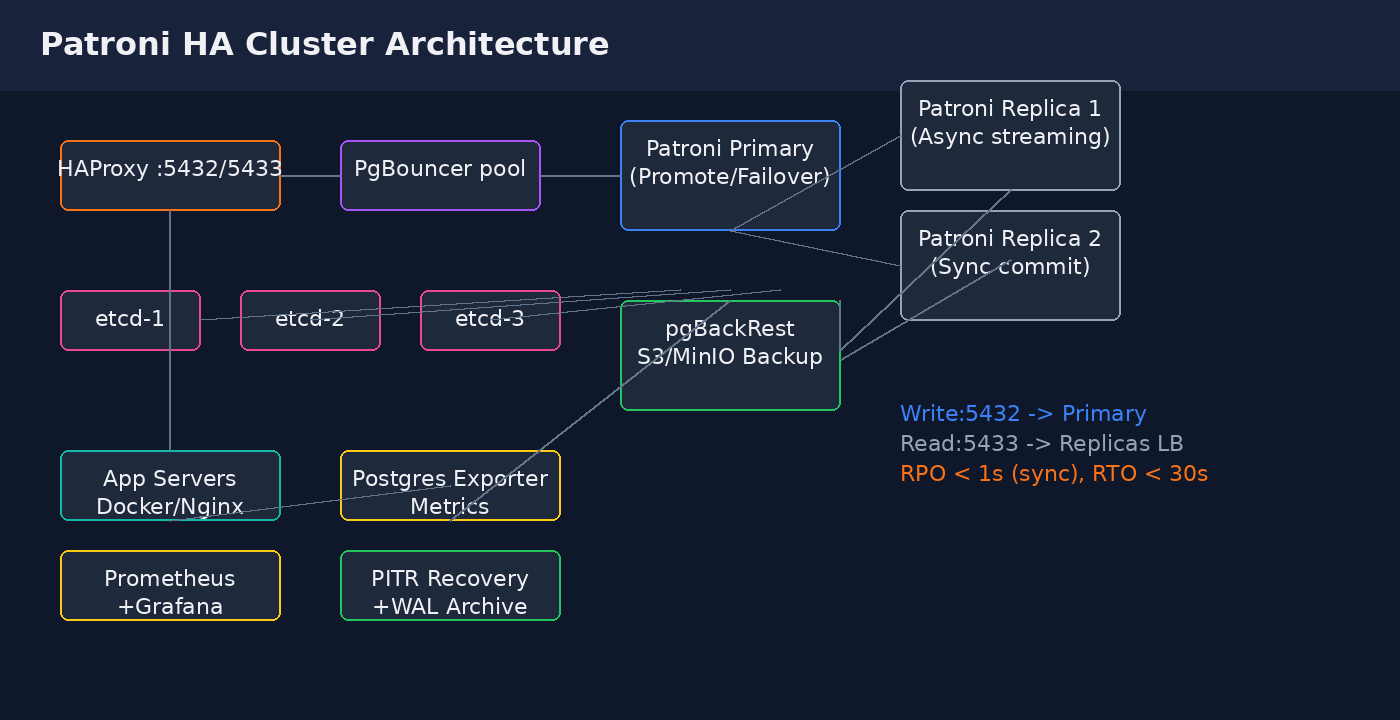
- Patroni — Python daemon that wraps each Postgres instance. Handles leader election (via distributed consensus store), automated failover, replica bootstrap, and REST API for health checks. Replaces the older repmgr/stolon approach.
- etcd (3-node cluster) — Distributed key-value store providing the consensus layer for Patroni leader election. Raft consensus tolerates 1-node failure out of 3.
- PgBouncer — Lightweight connection pooler. Essential because Postgres forks a backend process per connection; 500 active connections consume several GB of RAM even when idle. PgBouncer transaction-pooling multiplexes thousands of client connections onto ~50 backend connections.
- HAProxy — Front-end load balancer with Patroni health checks. Port
5432routes writes to the current primary (detected via Patroni REST API/primary); port5433load-balances read queries across replicas. - pgBackRest — Modern backup tool supporting full/differential/incremental backups, WAL archiving, parallel compression, and point-in-time recovery (PITR). Backs up to S3-compatible storage (MinIO or AWS S3).
Failover behavior: If the primary crashes or loses network, Patroni detects failure (loopback + etcd heartbeat timeout ~10s), triggers an election among replicas, promotes the most-caught-up replica, updates etcd, and HAProxy health checks detect the new primary within 1-2 checks. Total RTO ~20-30 seconds. With synchronous_commit=on and synchronous_standby_names set to one replica, RPO is
5. Full docker-compose.yml You Can Deploy Today
Save this as docker-compose.yml on your primary and replica nodes. Adjust the PATRONI_NAME, PATRONI_CANDIDATE_PRIORITY and IP addresses for each node. All configuration is production-ready with conservative defaults.
version: "3.8"
services:
  etcd1:
    image: bitnami/etcd:3.5
    environment:
      - ALLOW_NONE_AUTHENTICATION=yes
      - ETCD_NAME=etcd1
      - ETCD_INITIAL_CLUSTER=etcd1=http://etcd1:2380,etcd2=http://etcd2:2380,etcd3=http://etcd3:2380
      - ETCD_INITIAL_CLUSTER_STATE=new
      - ETCD_LISTEN_CLIENT_URLS=http://0.0.0.0:2379
      - ETCD_ADVERTISE_CLIENT_URLS=http://etcd1:2379
    volumes:
      - etcd1_data:/bitnami/etcd

  patroni:
    image: patroni:3.1-pg16
    network_mode: host
    environment:
      - PATRONI_NAME=pg_primary
      - PATRONI_SCOPE=prod_cluster
      - PATRONI_RESTAPI_LISTEN=0.0.0.0:8008
      - PATRONI_POSTGRESQL_LISTEN=0.0.0.0:5432
      - PATRONI_POSTGRESQL_DATA_DIR=/var/lib/postgresql/data/pgdata
      - PATRONI_POSTGRESQL_PGPASSWORD=${PG_SUPER_PASS}
      - PATRONI_REPLICATION_USERNAME=replicator
      - PATRONI_REPLICATION_PASSWORD=${REPL_PASS}
      - PATRONI_SUPERUSER_USERNAME=postgres
      - PATRONI_SUPERUSER_PASSWORD=${PG_SUPER_PASS}
      # DCS (etcd) endpoints
      - PATRONI_ETCD3_HOSTS=etcd1:2379,etcd2:2379,etcd3:2379
      # Synchronous replication (zero data loss)
      - PATRONI_SYNCHRONOUS_MODE=true
      - PATRONI_SYNCHRONOUS_COMMIT=true
    volumes:
      - pgdata:/var/lib/postgresql/data
      - ./patroni.yml:/etc/patroni/config.yml
    ulimits:
      memlock:
        soft: -1
        hard: -1
      nofile:
        soft: 65536
        hard: 65536

  pgbouncer:
    image: bitnami/pgbouncer:1.22
    environment:
      - POSTGRESQL_HOST=haproxy
      - POSTGRESQL_PORT=5432
      - PGBOUNCER_DATABASE=postgres
      - PGBOUNCER_PORT=6432
      - PGBOUNCER_POOL_MODE=transaction
      - PGBOUNCER_MAX_CLIENT_CONN=1000
      - PGBOUNCER_DEFAULT_POOL_SIZE=50
      - PGBOUNCER_RESERVE_POOL_SIZE=10
      - PGBOUNCER_AUTH_TYPE=scram-sha-256
    ports:
      - "6432:6432"
    depends_on:
      - patroni

  haproxy:
    image: haproxy:2.8
    volumes:
      - ./haproxy.cfg:/usr/local/etc/haproxy/haproxy.cfg:ro
    ports:
      - "5432:5432"   # write - primary
      - "5433:5433"   # read  - replicas LB
    depends_on:
      - patroni

  pgbackrest:
    image: pgbackrest/pgbackrest:release-2.49
    environment:
      - PGBACKREST_STANZA=prod
      - PGBACKREST_REPO1_TYPE=s3
      - PGBACKREST_REPO1_S3_BUCKET=${S3_BUCKET}
      - PGBACKREST_REPO1_S3_ENDPOINT=${S3_ENDPOINT}
      - PGBACKREST_REPO1_S3_REGION=${S3_REGION}
      - PGBACKREST_REPO1_S3_KEY=${S3_KEY}
      - PGBACKREST_REPO1_S3_KEY_SECRET=${S3_SECRET}
    volumes:
      - pgdata:/var/lib/postgresql/data:ro
      - ./backrest.conf:/etc/pgbackrest/pgbackrest.conf

  postgres_exporter:
    image: prometheuscommunity/postgres-exporter:v0.15
    environment:
      - DATA_SOURCE_NAME=postgresql://postgres:${PG_SUPER_PASS}@haproxy:5432/postgres?sslmode=disable
    ports:
      - "9187:9187"

volumes:
  pgdata:
  etcd1_data:
Initial setup on the primary node:
# Start etcd quorum first, then patroni
docker compose up -d etcd1 etcd2 etcd3
sleep 10
docker compose up -d patroni

# Verify cluster status
docker compose exec patroni patronictl list

# Create a base backup for replicas to bootstrap from
docker compose exec patroni patronictl reinit --force pg_replica1
6. PgBouncer: Why Connection Pooling Is Non-Negotiable
PostgreSQL's per-connection backend process model is its biggest performance trap at scale. Each idle connection holds ~10 MB of RAM (more if work_mem is set high). Without a pooler:
- A Rails app with 5 Puma workers x 5 threads = 25 connections per app server. With 10 app servers = 250 connections = ~2.5 GB RAM just for idle backends.
- Connection establishment involves fork()+exec() on the Postgres side, ~5-15 ms overhead per connection. Short-lived apps (serverless functions) pay this on every query.
PgBouncer solves this with transaction pooling: clients connect to PgBouncer (port 6432), PgBouncer holds a small pool of real Postgres connections (default_pool_size=50), and transactions are multiplexed. The same 50 backends can serve 1000+ clients.
Production PgBouncer settings in pgbouncer.ini:
[pgbouncer]
pool_mode = transaction
max_client_conn = 1000
default_pool_size = 50
reserve_pool_size = 10
reserve_pool_timeout = 3
server_idle_timeout = 600
server_lifetime = 3600
ignore_startup_parameters = extra_float_digits,search_path
auth_type = scram-sha-256
auth_file = /etc/pgbouncer/userlist.txt
server_reset_query = DISCARD ALL and configure your driver to not use extended query protocol across transaction boundaries. For psycopg3 / asyncpg this works cleanly; for older psycopg2 add ?prepare_threshold=0 to the DSN.7. pgBackRest: Backups, WAL Archive & PITR Recovery
Self-hosted databases must handle backups yourself — there is no "automated backup" checkbox. pgBackRest is the de-facto standard (it replaced WAL-E/WAL-G for most teams) because it supports parallel compression, delta restore, and reliable PITR.
# pgbackrest.conf
[global]
repo1-type=s3
repo1-s3-bucket=your-pg-backups
repo1-s3-endpoint=s3.eu-central-1.amazonaws.com
repo1-s3-region=eu-central-1
repo1-s3-key=AKIA...
repo1-s3-key-seCRET=...
repo1-retention-full=4       # keep 4 weekly full backups
repo1-retention-diff=7       # keep 7 days of diff backups
archive-async=y              # async WAL archiving (non-blocking)
archive-push-queue-max=128MB
compress-type=zst
compress-level=3
process-max=4                # parallel backup threads

[prod]
pg1-path=/var/lib/postgresql/data/pgdata
pg1-port=5432
pg1-socket-path=/var/run/postgresql
Backup schedule (add to crontab on the primary):
# Full backup every Sunday 2 AM, differential daily 2 AM
0 2 * * 0 docker compose exec pgbackrest pgbackrest --stanza=prod --type=full backup
0 2 * * 1-6 docker compose exec pgbackrest pgbackrest --stanza=prod --type=diff backup

# Verify a recent backup weekly
0 4 * * 0 docker compose exec pgbackrest pgbackrest --stanza=prod check
Point-in-time recovery (e.g., recover to 30 seconds before an accidental DROP TABLE at 14:30):
docker compose exec patroni patronictl pause
docker compose exec pgbackrest pgbackrest \
  --stanza=prod \
  --type=time \
  --target="2026-10-20 14:29:30" \
  --target-action=promote \
  restore
docker compose restart patroni
8. Monitoring with Prometheus & Grafana
The postgres-exporter container exposes metrics at :9187/metrics. Key alerts to configure in Prometheus:
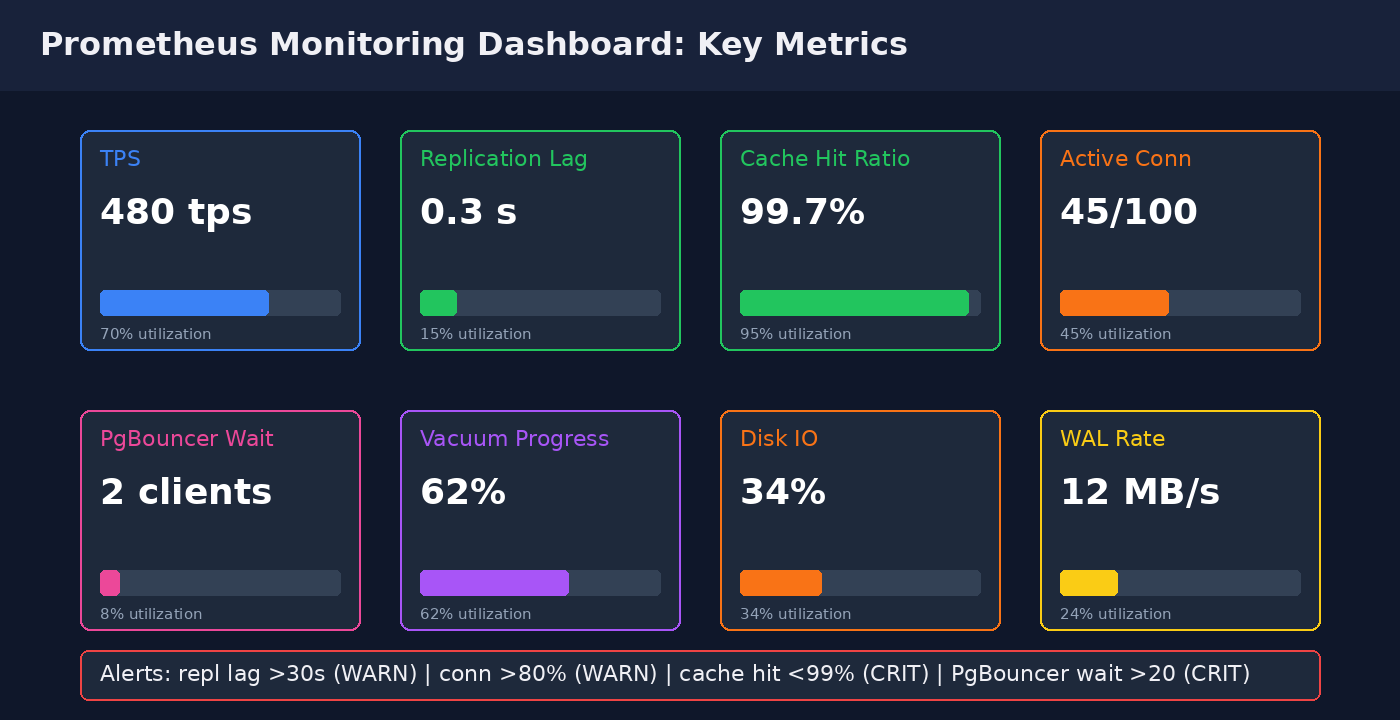
# prometheus alerts.yml
groups:
- name: postgres
  rules:
  - alert: PostgresReplicationLagHigh
    expr: pg_replication_lag_seconds > 30
    for: 2m
    annotations: {summary: "Replication lag {{ $value }}s > 30s (WARN)"}

  - alert: PostgresConnectionsHigh
    expr: pg_stat_activity_count / pg_settings_max_connections > 0.8
    for: 5m
    annotations: {summary: "Connections >80% of max"}

  - alert: PostgresCacheHitLow
    expr: pg_stat_database_blks_hit / (pg_stat_database_blks_hit + pg_stat_database_blks_read)  20
    for: 2m
    annotations: {summary: "PgBouncer wait queue >20 - pool exhausted"}

  - alert: PostgresWALGrowing
    expr: rate(pg_xlog_bytes_total[5m]) > 50*1024*1024  # 50 MB/s sustained
    for: 10m
    annotations: {summary: "WAL generation abnormally high"}
Recommended Grafana dashboard: import dashboard ID 9628 (PostgreSQL Overview) for postgres_exporter — it covers TPS, replication lag, cache hit, connections, autovacuum, WAL rate, and lock waits out of the box.
9. When NOT to Self-Host: Honest Trade-offs
Self-hosting Patroni is not for every team. Stick with RDS / Cloud SQL if any of these apply:
- No DBA / DevOps capacity: If nobody on the team has set up Postgres replication before or debugged a split-brain scenario, the operational risk is not worth the savings. A 4-hour outage from a misconfigured failover costs far more than the $240/month saved.
- Regulated industries with audit requirements: PCI DSS, HIPAA, SOC 2 audits are substantially easier on managed databases (AWS provides compliance reports out-of-the-box). You can achieve compliance on self-hosted but it adds months of audit preparation.
- 750+ databases at enterprise scale: Managing dozens of Patroni clusters across environments requires dedicated infrastructure tooling (operators, Terraform modules, runbooks). At that scale the RDS premium buys you leverage.
- Need for multi-region read replicas with auto-propagated DDL: RDS Aurora Global Database and Aurora Limitless Database handle multi-region replication and schema propagation at the storage layer; doing this with Patroni requires pgLogical or Bucardo — substantial engineering.
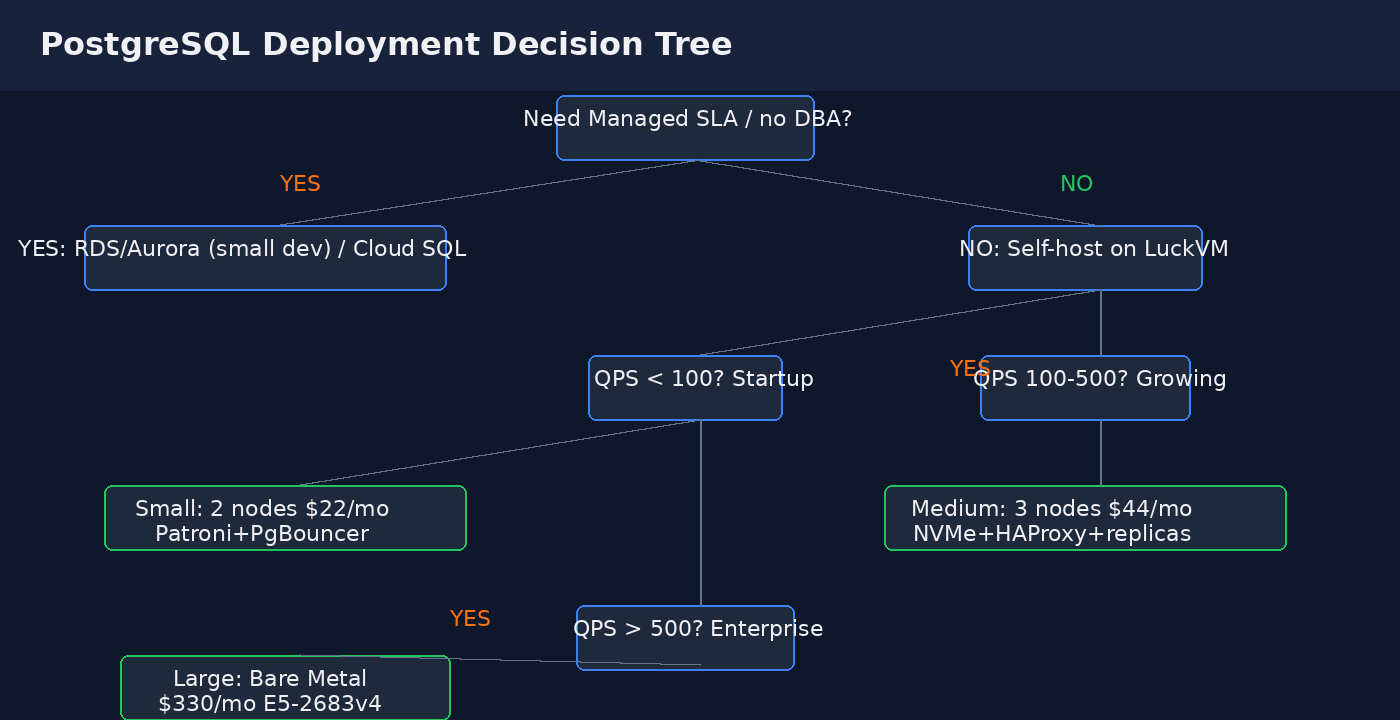
- NVMe SSD on shared VPS hosts can have occasional IO jitter (other tenants doing large writes). For sub-millisecond jitter requirements use Bare Metal ($330/mo, dedicated NVMe).
- Synchronous replication adds 40-60% to commit latency (must wait for replica ACK). If you can tolerate ~5 seconds of RPO, use async replication for write-heavy workloads.
- Minor version upgrades require a Patroni switchover + rolling restart — no one-click upgrade like RDS. Plan a 30-minute maintenance window.
- Cross-region async replicas (e.g., Frankfurt to LA over 170ms RTT) work but add significant WAL shipping lag; do not put sync replicas across oceans.
10. Multi-Region Deployment & GDPR Nodes
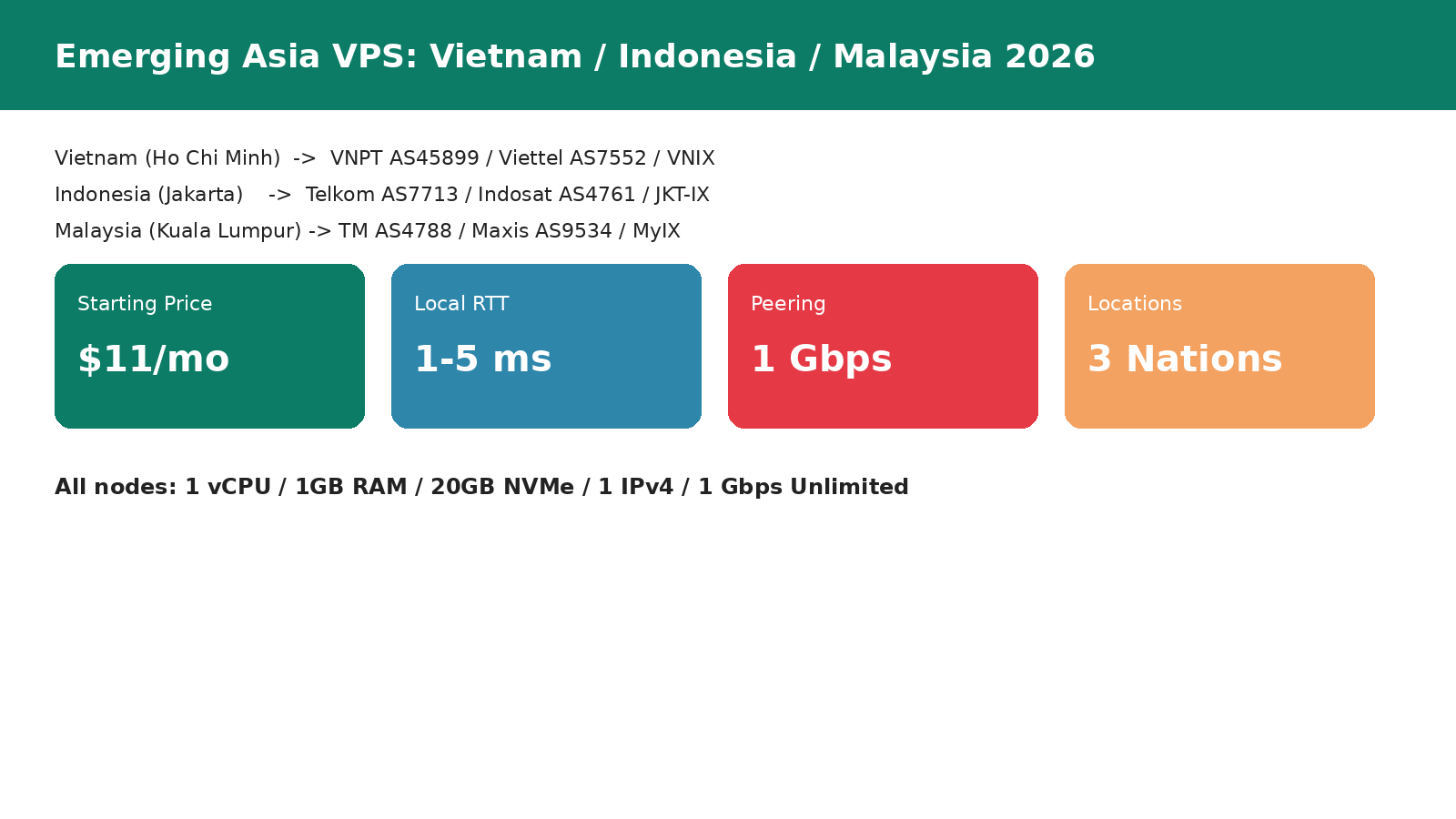
LuckVM offers 10+ regions, which matters for two things: (1) GDPR data residency requires EU-located databases if you process EU user data; (2) low-latency read replicas for globally distributed apps.
- EU primary (GDPR): Deploy the Patroni cluster in Frankfurt (DE-CIX) or London (LINX). Both have direct peering with all major EU ISPs, and all data stays within EU/EEA. Sign the DPA (Data Processing Agreement) with LuckVM sales before going live — required under GDPR Art. 28.
- APAC primary: Hong Kong (CN2 GIA for China), Singapore (Singtel/MyIX/JKT-IX for SEA), Tokyo (SoftBank/IIJ for Japan), Seoul (KT/SK for Korea).
- Cross-region DR replica: Add an async replica in a second region using streaming replication over TLS. RPO will be ~30 seconds (depending on bandwidth), RTO ~5 minutes for manual promotion. Use
pg_basebackupover TLS for initial sync, then streaming WAL. - Read replica placement: Place read replicas in the same region as your heaviest read traffic. Analytics/reporting workloads that don't need real-time data should use a dedicated replica (set
max_standby_streaming_delay = 30sto avoid query cancels).
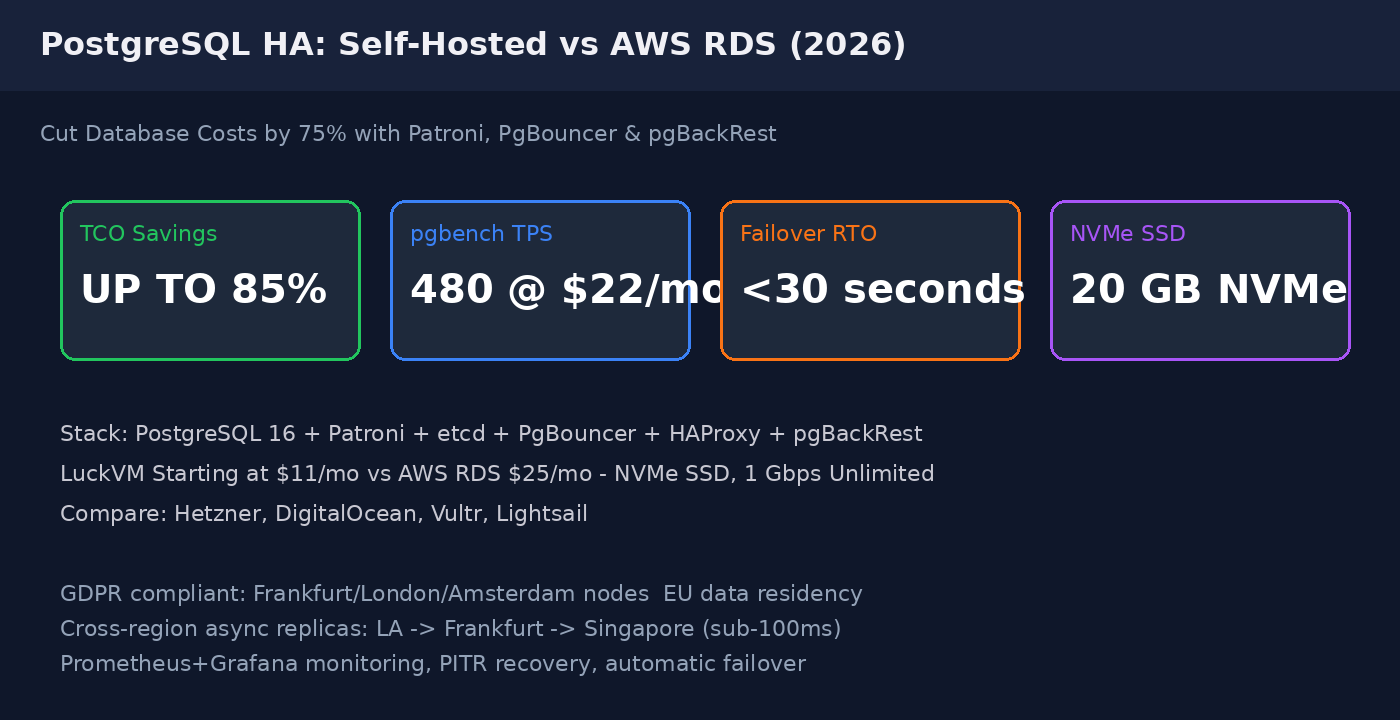
All VPS plans start at $11/month with 1 IPv4 address, 20 GB NVMe SSD, 1 Gbps unmetered bandwidth, and KVM full virtualization. Bare Metal servers with NVMe RAID start at $330/month for production PostgreSQL workloads requiring dedicated IO.
Browse LuckVM VPS plans from $11/mo · View Bare Metal for production DB · GPU servers for ML workloads
FAQ
Is self-hosted PostgreSQL on VPS reliable enough for production?
Yes — Patroni + etcd + streaming replication is the same open-source stack Zalando uses for thousands of production databases. With synchronous replication you get zero data loss on failover, and automated leader election gives ~30 second RTO. It is production-grade if you have DevOps capacity to monitor it.
Can I use PgBouncer with Django / Rails / SQLAlchemy?
Yes, but configure transaction pooling (not session pooling). For Django set CONN_MAX_AGE=0 (disable Django's built-in pooling — PgBouncer handles it). For psycopg2 add ?prepare_threshold=0 to disable server-side prepared statements (broken under transaction pooling). psycopg3/asyncpg work without special flags.
How much RAM do I need for a 100 GB PostgreSQL database?
Rule of thumb: shared_buffers = 25% of RAM, effective_cache_size = 75% of RAM. For a 100 GB OLTP database, 8 GB RAM minimum (shared_buffers=2GB, effective_cache_size=6GB); 16 GB RAM recommended for working set to fit in cache. LuckVM's 4C/8G plan ($44/mo) works for databases up to ~200 GB; for >200 GB move to Bare Metal.
How does NVMe SSD compare to AWS gp3 for Postgres?
NVMe delivers ~200k random read IOPS and ~50k write IOPS per drive — substantially faster than gp3's 3000-16000 provisioned IOPS. The downside is shared hosts can have occasional IO contention during neighbor bursts; Bare Metal NVMe gives you dedicated IO comparable to io2 Block Express at a fraction of the cost.
Do I need a separate VPS for etcd?
For small clusters (1000 TPS) run etcd on dedicated small VPS or on dedicated SSDs — etcd is extremely latency-sensitive (needs
How do I migrate from RDS without downtime?
Use AWS DMS or set up logical replication from RDS to your Patroni cluster (wal_level=logical on RDS, create a publication, subscribe from self-hosted). After initial sync and catch-up (replication lag
What about backups — is pgBackRest better than pg_dump?
pg_dump is a logical backup (exports SQL); it is slow for large databases (>10 GB), cannot do PITR, and holds long-running transactions that bloat table bloat. pgBackRest does physical file-level backups with parallel compression, WAL archiving, and point-in-time recovery — it is the industry standard for production. Keep pg_dump for ad-hoc single-table/schema exports.
Can I run Patroni across multiple regions for DR?
Yes, as an async replica. Do NOT use synchronous replication across regions — the RTT (70-200ms) will stall every commit. Configure synchronous_commit=off or async for cross-region replicas and accept ~5-30 seconds of potential data loss on regional outage. Test cross-region failover quarterly.