TL;DR
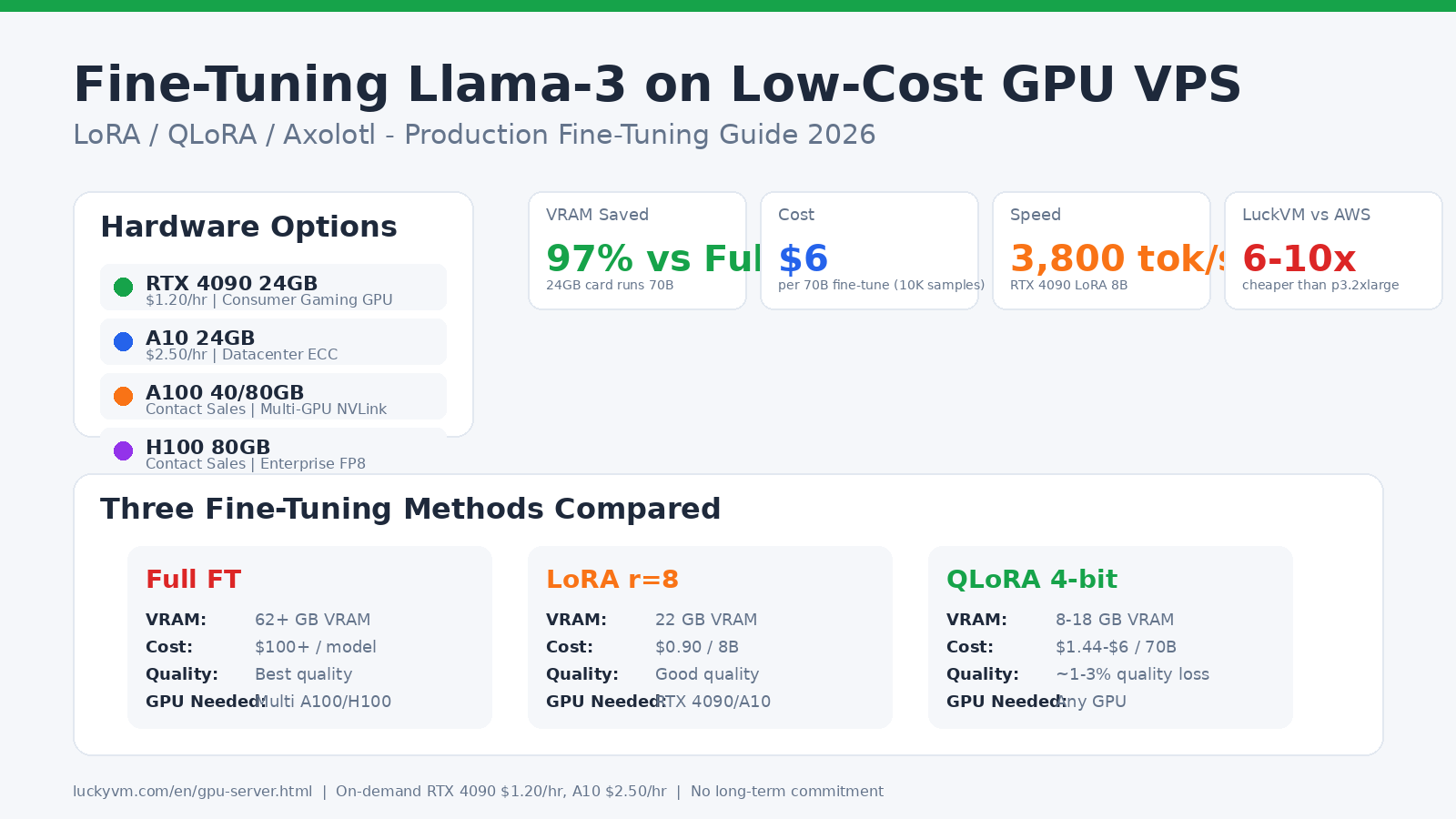
You can now fine-tune Llama-3-8B for under $1 and Llama-3-70B for about $6 using QLoRA 4-bit on a LuckVM RTX 4090 ($1.20/hr). This is 6-10x cheaper than AWS p3.2xlarge (V100) and doesn't require multi-GPU NVLink clusters. This guide walks you through data preparation, choosing between LoRA vs QLoRA vs full fine-tuning, writing Axolotl YAML configs, running training, merging adapters, evaluating quality, and deploying directly to a vLLM production inference endpoint.
1. Why Fine-Tune Instead of Prompt Engineering?
In 2024-2025, many developers believed few-shot prompting and RAG made fine-tuning obsolete. By 2026, the consensus has shifted: fine-tuning is now the most cost-effective way to achieve:
- Consistent output format: When RAG and prompts produce 80% correct output, fine-tuning closes that last 20% with deterministic format adherence (JSON schema, tone, terminology).
- Specific domain knowledge: Medical coding, legal contract parsing, proprietary enterprise APIs, or code generation against internal frameworks — tasks where RAG retrieval is noisy.
- Tool calling reliability: Llama-3-8B-instruct makes function call errors 15-20% of the time; a LoRA fine-tune on 2K tool-use samples can push accuracy above 95%.
- Cost reduction at inference: A fine-tuned 8B model can outperform GPT-4 on narrow tasks at 1/100th the inference cost.
- Latency improvement: Shorter prompts (no 30-shot examples) means faster first-token latency for real-time applications.
The reason fine-tuning is finally accessible is QLoRA (Quantized Low-Rank Adaptation), published by Dettmers et al. in 2023 and production-ready by early 2025. QLoRA lets you fine-tune a 70B-parameter model on a single consumer GPU by quantizing the base model to 4-bit and only training small "adapter" matrices.
2. The Three Fine-Tuning Methods: Full FT, LoRA, QLoRA
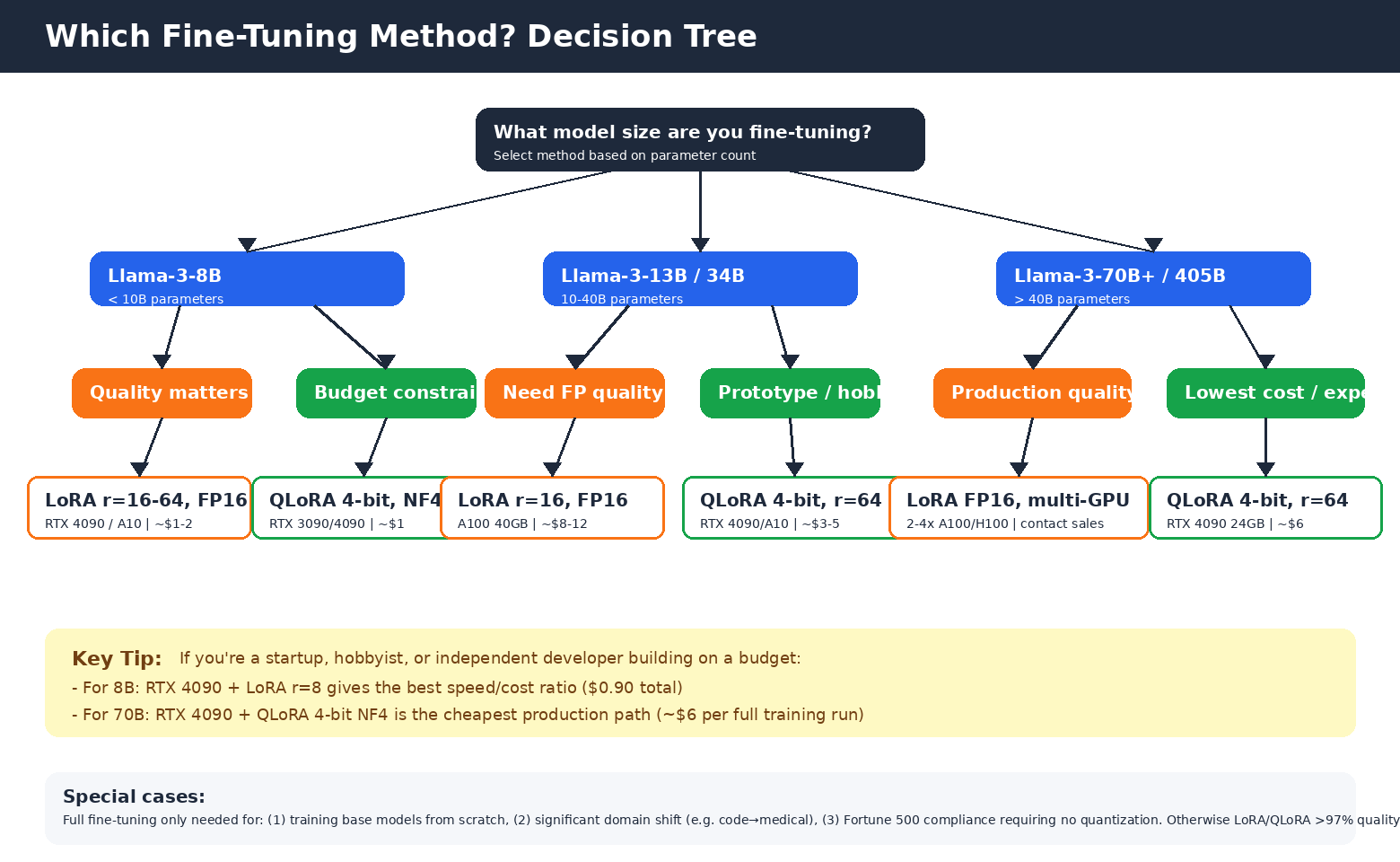
Before you spin up a GPU, you need to choose a training method. The decision almost entirely depends on your model size and budget.
Full Fine-Tuning (All Parameters Updated)
All model weights are updated during training. This gives the highest quality for massive domain shifts (e.g., training a base Llama-3 model from general text to medical diagnosis), but is expensive:
- Llama-3-8B: ~62 GB VRAM minimum (requires A100 80GB or multi-GPU)
- Llama-3-70B: ~560 GB VRAM (8× A100 minimum)
- Cost for 8B: $100+ on A100; for 70B: $1000+
- When to use it: Training base models from scratch, massive domain shifts, or Fortune 500 compliance requiring no quantization. 95% of readers should not full fine-tune.
LoRA (Low-Rank Adaptation)
Published by Hu et al. (Microsoft, 2021). The idea: freeze the base model weights and train only small "adapter" matrices (rank 4-64) injected into each attention layer. This reduces trainable parameters by ~10,000x while preserving nearly full fine-tune quality.
- Llama-3-8B LoRA r=8: ~22 GB VRAM (fits on RTX 4090/A10)
- Training speed: much faster than full FT, nearly no inference overhead when merged
- Cost for 8B on RTX 4090: $0.90 (45 minutes)
- When to use it: 8B-13B models when you have 24+ GB VRAM and want the best possible quality without quantization
QLoRA (Quantized LoRA)
Published by Dettmers et al. (University of Washington, 2023). Combines 4-bit NormalFloat (NF4) quantization of the frozen base model with LoRA adapters trained in BF16. Uses Double Quantization and Paged Optimizers to save additional memory.
- Llama-3-8B QLoRA: ~8 GB VRAM (fits on RTX 3060/3090!)
- Llama-3-70B QLoRA: ~18 GB VRAM (fits on a single RTX 4090 24GB!)
- Quality: within 1-3% of full fine-tuning on most benchmarks
- Cost for 70B on RTX 4090: ~$6 (5 hours)
- When to use it: 70B+ models on consumer hardware, prototype/low-budget projects, or any scenario where you're willing to accept tiny quality loss for massive cost savings
3. Choosing the Right GPU: RTX 4090 vs A10 vs A100 vs H100
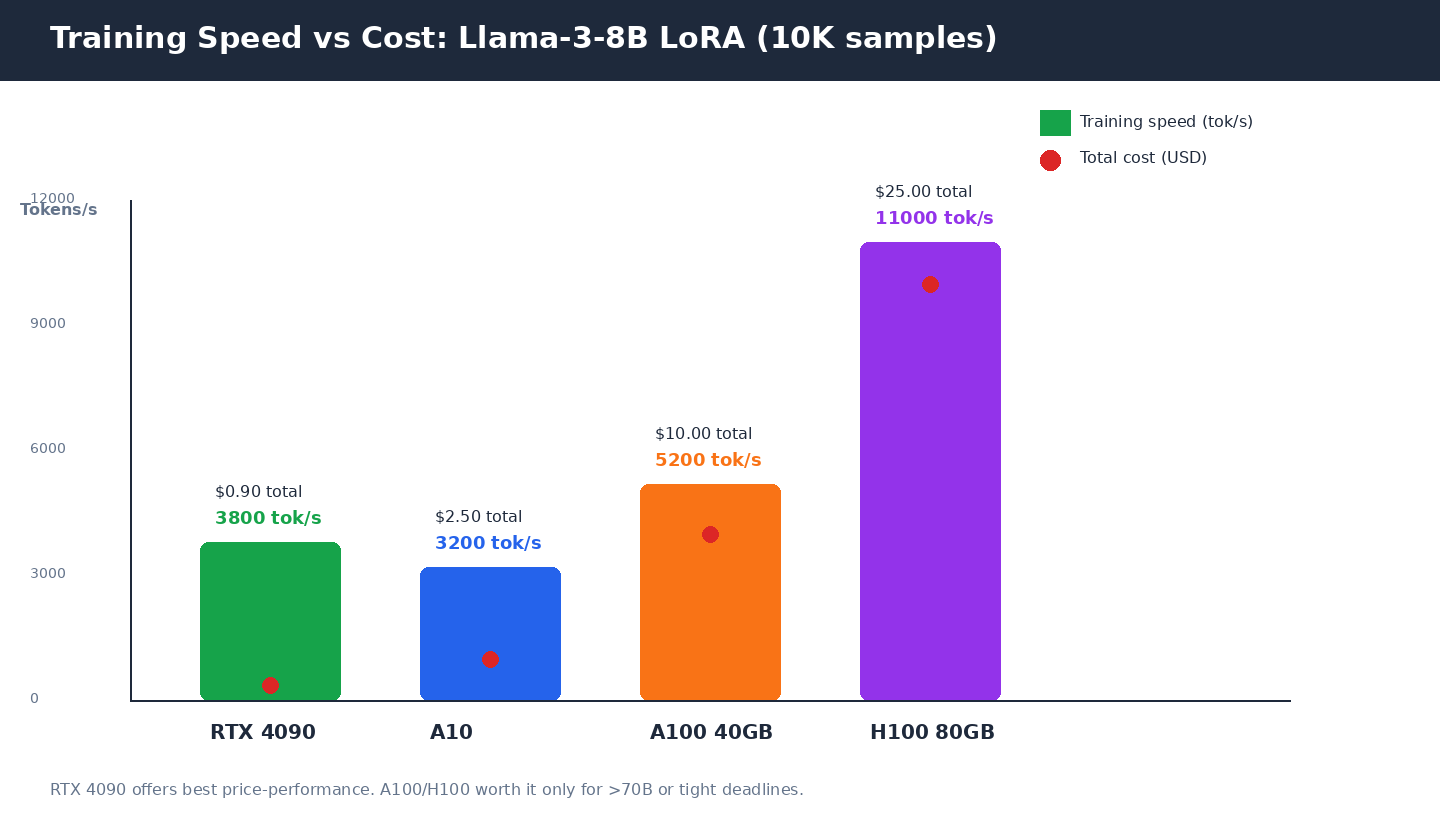
LuckVM currently offers RTX 4090 ($1.20/hr) and A10 ($2.50/hr) as on-demand instances; A100 and H100 multi-GPU clusters with NVLink are available by contacting sales. Here's when to use each:
| GPU | VRAM | Price | Best For | Caveats |
|---|---|---|---|---|
| RTX 4090 | 24 GB GDDR6X | $1.20/hr | Prototypes, side projects, 8B LoRA, 70B QLoRA | No ECC memory; no NVLink on GeForce version; 24GB ceiling |
| A10 24GB | 24 GB GDDR6 | $2.50/hr | Production 8B/13B, stable long runs, BF16 | Slower than 4090 in raw FP16 but datacenter reliability |
| A100 40/80GB | 40/80 GB HBM2e | Contact sales | 70B LoRA FP16, multi-GPU NVLink, MIG partitioning | Significantly more expensive; overkill for 8B |
| H100 80GB | 80 GB HBM3 | Contact sales | 405B models, FP8 Transformer Engine, enterprise | Only worth it for large-scale production inference/training |
| AWS p3.2xlarge (V100 16GB) | 16 GB | $3.06/hr | Legacy setups | ~10x more expensive than LuckVM RTX 4090 for same work |
4. VRAM Requirements: What Actually Fits
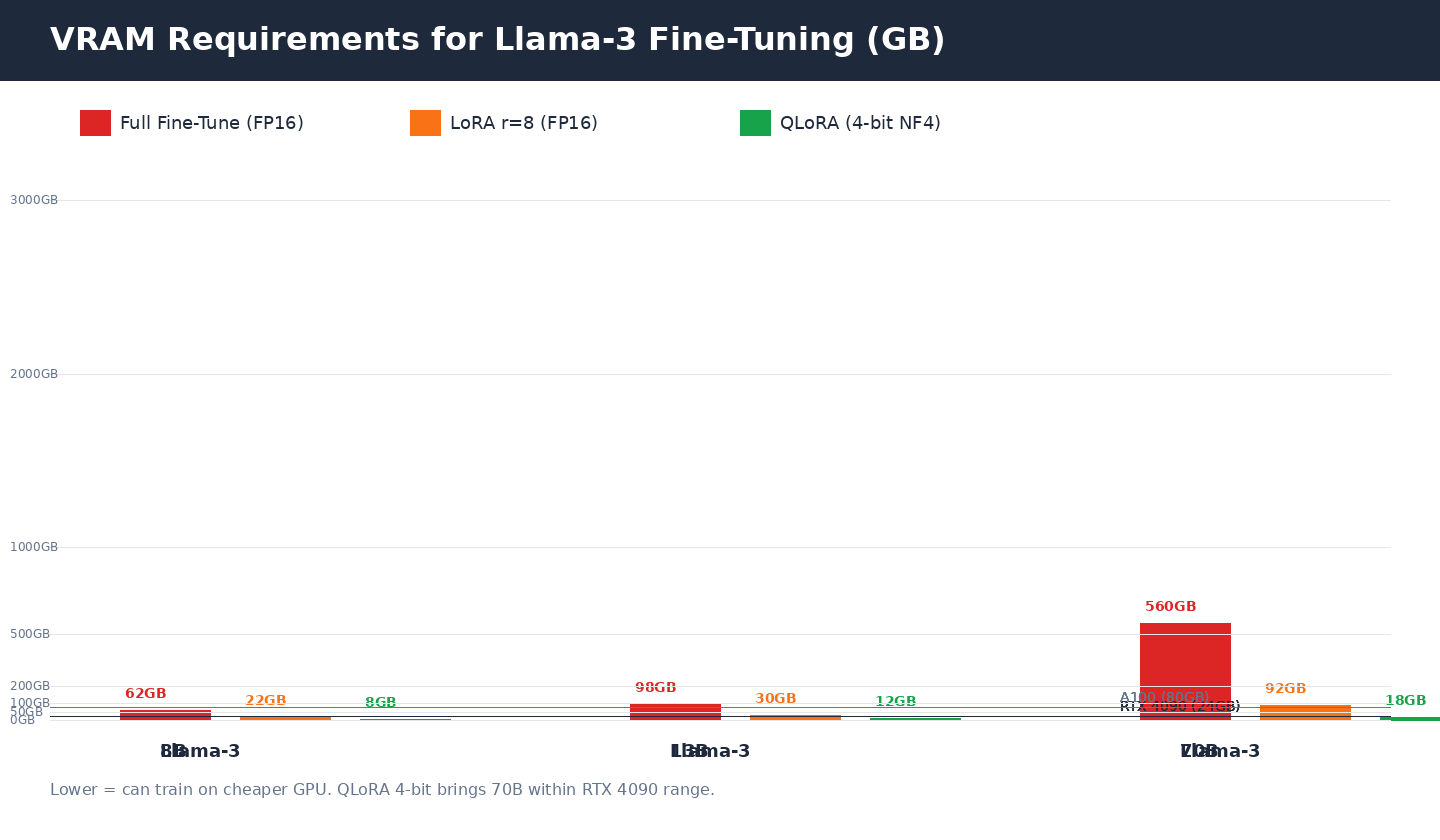
The chart above shows VRAM requirements across all four model sizes and three methods. The horizontal lines represent common GPU VRAM ceilings:
- 24GB line (RTX 4090 / A10): Fits 8B LoRA FP16 and all QLoRA variants up through 70B. This is the sweet spot for independent developers.
- 80GB line (A100/H100): Fits 8B/13B full fine-tuning, 70B LoRA, and 405B QLoRA.
VRAM usage depends on several factors; these are median estimates for batch size 4, sequence length 2048, LoRA rank 8:
- Increase
per_device_train_batch_sizefrom 4 → 8: +3-5 GB - Increase
max_seq_lengthfrom 2048 → 8192: +6-10 GB (attention is O(n²) in sequence length) - Increase LoRA rank r from 8 → 64: +4-8 GB
- Training on more layers (all linear vs just q_proj/v_proj): +2-4 GB
5. Data Preparation: Quality Beats Quantity
The #1 mistake in fine-tuning is spending $500 on GPU time while using garbage training data. The axiom "garbage in, garbage out" applies more in LLM fine-tuning than anywhere else.
Data Format
Llama-3 uses the ChatML format (not Alpaca). Each sample should be structured:
{
  "conversations": [
    {"role": "system", "content": "You are a helpful medical coding assistant."},
    {"role": "user", "content": "What is the ICD-10 code for type 2 diabetes?"},
    {"role": "assistant", "content": "E11.9 (Type 2 diabetes mellitus without complications)"}
  ]
}
Store your dataset as JSONL (one JSON object per line). Axolotl also supports Parquet, ShareGPT format, and Hugging Face datasets directly.
How Much Data?
- 200-500 high-quality samples: Proof of concept, demonstrates format/tonal adaptation
- 1,000-5,000 samples: Good production fine-tune for narrow tasks (tool calling, classification, specific output format)
- 10,000-50,000 samples: Strong domain adaptation (medical, legal, code for a specific framework)
- 100,000+: Rarely needed; consider continued pre-training instead
- Remove duplicates (exact and near-duplicate via MinHash LSH)
- Filter out samples where assistant response is shorter than 20 tokens or longer than 4096
- Human-review at least 50 random samples; if you find errors, clean the whole dataset
- Reserve 5-10% as a held-out evaluation set (never train on eval samples!)
- Ensure response distribution matches your production use case (if 80% of production calls are short answers, don't train on 80% long essays)
6. Environment Setup on a LuckVM GPU VPS
Step 1: Provision a GPU instance
Go to LuckVM GPU Servers and deploy an Ubuntu 22.04 instance with your chosen GPU. For this guide we recommend starting with RTX 4090 24GB at $1.20/hr (you can always scale up later).
Step 2: Verify GPU and install NVIDIA drivers
LuckVM GPU instances come with CUDA 12.x pre-installed. SSH in and verify:
# Verify GPU is visible
nvidia-smi
# Should show your GPU (RTX 4090 / A10) and CUDA version 12.x

# Verify CUDA toolkit
nvcc --version
Step 3: Install Python environment
# Install system packages
sudo apt update && sudo apt install -y python3.11 python3.11-venv python3-pip git

# Create project directory
mkdir -p ~/llm-finetune && cd ~/llm-finetune
python3.11 -m venv venv
source venv/bin/activate

# Install training stack
pip install torch==2.4.1 --index-url https://download.pytorch.org/whl/cu124
pip install transformers==4.45.0 peft==0.13.0 bitsandbytes==0.44.1
pip install trl==0.11.4 accelerate==1.0.1 datasets==3.0.2
pip install axolotl[deepspeed,wandb]==0.4.1 deepspeed==0.15.4 wandb==0.18.0
pip install flash-attn==2.6.3 --no-build-isolationflash-attn takes 5-10 minutes to compile and requires nvcc in PATH.7. Fine-Tuning with Axolotl: Production YAML Configuration
Axolotl is the industry-standard tool for LLM fine-tuning. Instead of writing 200 lines of Python training boilerplate, you write a single YAML config file. Axolotl handles dataset loading, tokenization, LoRA/QLoRA injection, DeepSpeed ZeRO, checkpointing, evaluation, and logging automatically.
Create an Axolotl config for Llama-3-8B QLoRA
Save this as llama3-8b-qlora.yml:
base_model: meta-llama/Meta-Llama-3-8B-Instruct
model_type: LlamaForCausalLM
tokenizer_type: AutoTokenizer

# Load in 4-bit for QLoRA
load_in_4bit: true
adapter: qlora

# LoRA hyperparameters
lora_r: 8
lora_alpha: 16
lora_dropout: 0.05
lora_target_linear: true   # train ALL linear layers (not just q/v)
lora_modules_to_save: [embed_tokens, lm_head]  # train embeddings for better adaptation

# Dataset
datasets:
  - path: ./my-custom-data.jsonl
    type: sharegpt
    conversation: llama-3
dataset_prepared_path: ./last_run_prepared
val_set_size: 0.1
output_dir: ./lora-out

# Training hyperparameters
num_epochs: 3
batch_size: 4
gradient_accumulation_steps: 4   # effective batch size = 4*4 = 16
learning_rate: 2.0e-4
lr_scheduler: cosine
warmup_steps: 100
weight_decay: 0.01

# Sequence length
sequence_len: 4096

# Precision / compute
bf16: auto
fp16: false
tf32: true
gradient_checkpointing: true
gradient_checkpointing_kwargs:
  use_reentrant: false

# Logging and evaluation
logging_steps: 10
eval_steps: 200
save_steps: 200
eval_strategy: steps
save_total_limit: 3
wandb_project: llama3-finetune
wandb_run_name: llama3-8b-qlora-run1

# Speed optimizations
sample_packing: true
pad_to_sequence_len: true
flash_attention: true
Launch training
# Login to Weights & Biases for monitoring (optional but highly recommended)
wandb login

# Login to Hugging Face to download Llama-3 (accept license at hf.co/meta-llama)
huggingface-cli login

# Launch training (single GPU)
accelerate launch -m axolotl.cli.train llama3-8b-qlora.yml

# For multi-GPU (A100 NVLink), use DeepSpeed ZeRO-3
# accelerate launch -m axolotl.cli.train llama3-8b-qlora.yml --deepspeed deepspeed_zero3.json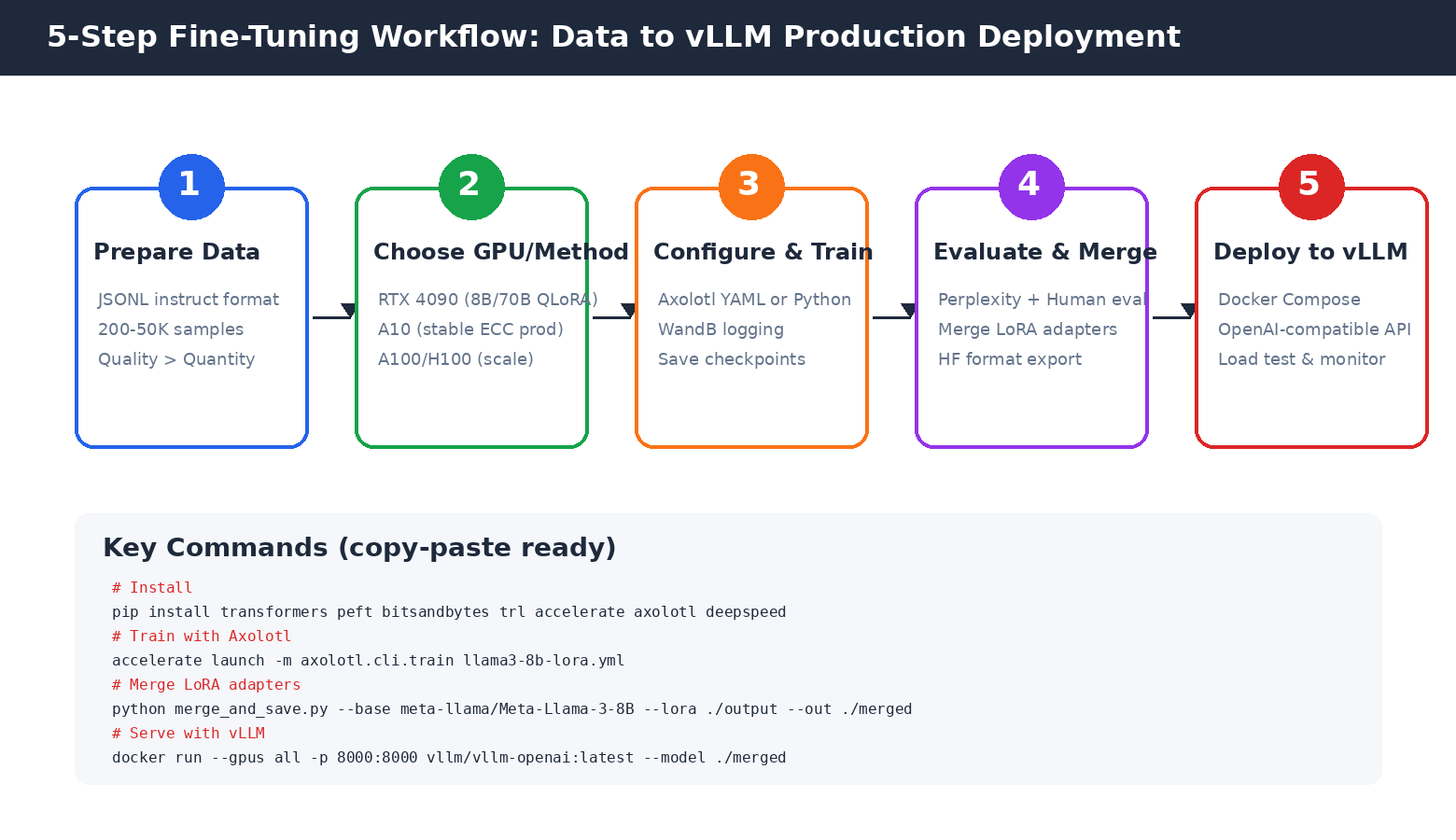
train/lossandeval/loss: Both should decrease steadily. Ifeval/lossstarts increasing whiletrain/losskeeps dropping, you're overfitting — stop early.train/learning_rate: Should follow cosine decay to near zero by the last step.gpu_memory_allocated: Should stabilize below 22-23 GB (leave ~1GB headroom on RTX 4090).
8. Native Hugging Face QLoRA (Without Axolotl)
If you prefer full control (custom loss functions, exotic architectures, or debugging), here's a minimal Python script that does QLoRA training directly with Hugging Face PEFT + TRL:
# train_qlora.py
import torch
from datasets import load_dataset
from transformers import AutoModelForCausalLM, AutoTokenizer, BitsAndBytesConfig, TrainingArguments
from peft import LoraConfig, get_peft_model, prepare_model_for_kbit_training
from trl import SFTTrainer

# 4-bit quantization config
bnb_config = BitsAndBytesConfig(
    load_in_4bit=True,
    bnb_4bit_quant_type="nf4",        # NormalFloat4, better than plain 4-bit
    bnb_4bit_compute_dtype=torch.bfloat16,
    bnb_4bit_use_double_quant=True,   # Double Quantization saves ~0.8GB
)

# Load base model
model = AutoModelForCausalLM.from_pretrained(
    "meta-llama/Meta-Llama-3-8B-Instruct",
    quantization_config=bnb_config,
    device_map="auto",
    attn_implementation="flash_attention_2",
)
tokenizer = AutoTokenizer.from_pretrained("meta-llama/Meta-Llama-3-8B-Instruct")
tokenizer.pad_token = tokenizer.eos_token
tokenizer.padding_side = "right"

# Prepare for k-bit training
model = prepare_model_for_kbit_training(model)

# LoRA config
lora_config = LoraConfig(
    r=8,
    lora_alpha=16,
    lora_dropout=0.05,
    bias="none",
    task_type="CAUSAL_LM",
    target_modules=["q_proj", "k_proj", "v_proj", "o_proj",
                    "gate_proj", "up_proj", "down_proj"],
)
model = get_peft_model(model, lora_config)
model.print_trainable_parameters()
# Output: trainable params: 20,971,520 || all params: 8,051,231,744 || trainable%: 0.2605

# Load dataset
dataset = load_dataset("json", data_files="my-custom-data.jsonl", split="train")

# Training args
args = TrainingArguments(
    output_dir="./lora-out",
    num_train_epochs=3,
    per_device_train_batch_size=4,
    gradient_accumulation_steps=4,
    learning_rate=2e-4,
    lr_scheduler_type="cosine",
    warmup_steps=100,
    logging_steps=10,
    save_steps=200,
    bf16=True,
    tf32=True,
    gradient_checkpointing=True,
    report_to="wandb",
)

# SFTTrainer handles chat template formatting
trainer = SFTTrainer(
    model=model,
    tokenizer=tokenizer,
    args=args,
    train_dataset=dataset,
    peft_config=lora_config,
    max_seq_length=4096,
    dataset_text_field="conversations",  # or use formatting_func
    packing=True,
)

trainer.train()
trainer.save_model("./lora-out/final")
# Run it
python train_qlora.py9. Evaluation: Don't Deploy Blindly
Before merging and deploying, you must evaluate. Low training loss does not mean your model is good (it can overfit or suffer from catastrophic forgetting).
Automated Metrics
- Perplexity: Run on your held-out eval set. Lower is better. A good QLoRA fine-tune should achieve perplexity 10-25% lower than the base model on your domain data.
- ROUGE / BLEU: For summarization/translation tasks, compare generated text to reference answers.
- Function call accuracy: For tool-use fine-tunes, count how often parameters and function names match the schema.
Human Evaluation
Automated metrics miss nuance. Create an eval set of 100 representative questions and have 2-3 people blindly compare outputs from:
- Base Llama-3-8B-Instruct
- Your fine-tuned model
- (Optional) GPT-4o / Claude as a quality ceiling
Use a simple rubric (1-5) for correctness, format adherence, and helpfulness. Statistical significance (p
10. Merging LoRA Adapters & Exporting to vLLM
After training, you have a LoRA "adapter" (~100 MB for r=8) that must be merged with the base model to produce a standalone model for vLLM production deployment.
# merge_adapter.py
from peft import PeftModel, PeftConfig
from transformers import AutoModelForCausalLM, AutoTokenizer
import torch

adapter_path = "./lora-out/final"
base_model_name = "meta-llama/Meta-Llama-3-8B-Instruct"
output_path = "./merged-llama3-8b-custom"

# Load base model in FP16 (not quantized for serving)
model = AutoModelForCausalLM.from_pretrained(
    base_model_name,
    torch_dtype=torch.float16,
    device_map="cpu",   # merge on CPU to save VRAM
)
tokenizer = AutoTokenizer.from_pretrained(base_model_name)

# Load LoRA adapter and merge
model = PeftModel.from_pretrained(model, adapter_path)
model = model.merge_and_unload()  # fuse LoRA weights into base

# Save standalone model
model.save_pretrained(output_path, safe_serialization=True)
tokenizer.save_pretrained(output_path)
print(f"Merged model saved to {output_path}")
print(f"Size: ~15 GB for 8B FP16")
python merge_adapter.py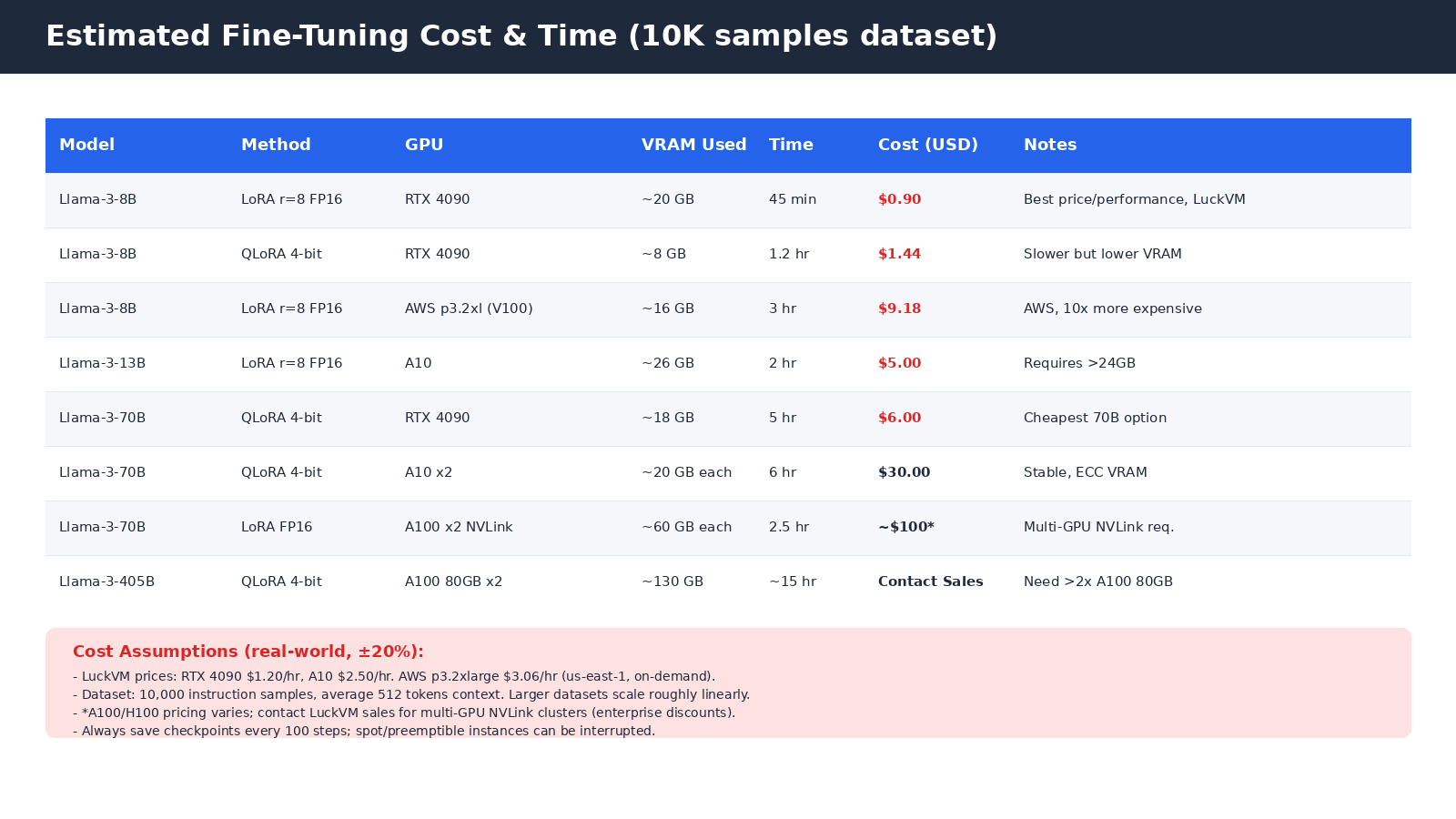
11. Deploy Your Fine-Tuned Model with vLLM + Nginx
Once merged, serving your model is identical to serving stock Llama-3. We cover this in depth in our vLLM Production Deployment Guide, but the minimal Docker command is:
# Serve with vLLM OpenAI-compatible API
docker run -d --gpus all \
  --name vllm-custom \
  -p 127.0.0.1:8000:8000 \
  -v ./merged-llama3-8b-custom:/model \
  vllm/vllm-openai:latest \
  --model /model \
  --served-model-name llama3-8b-custom \
  --host 0.0.0.0 --port 8000 \
  --gpu-memory-utilization 0.92 \
  --max-model-len 16384 \
  --enable-prefix-caching

# Test it
curl http://127.0.0.1:8000/v1/chat/completions \
  -H "Content-Type: application/json" \
  -d '{"model":"llama3-8b-custom","messages":[{"role":"user","content":"Hello!"}]}'
Add Nginx as a reverse proxy with TLS termination, rate limiting, and API key authentication. See the vLLM guide for the complete production docker-compose.yml with Prometheus monitoring.
❓ Frequently Asked Questions
Can I fine-tune Llama-3-70B on an RTX 4090?
Yes, using QLoRA 4-bit NF4 quantization. Llama-3-70B QLoRA requires approximately 18 GB VRAM, which fits on a single RTX 4090 24GB. Expect training 10K samples to take roughly 5 hours at $1.20/hr, costing about $6 total on LuckVM. Use sequence length ≤ 4096 to avoid VRAM overflow.
What is the difference between LoRA and QLoRA?
LoRA trains small adapter weights in FP16/BF16 while keeping the frozen base model in FP16, requiring ~22 GB for 8B models. QLoRA quantizes the frozen base to 4-bit NF4 (with Double Quantization and Paged Optimizers), cutting base model memory by ~75% and enabling 70B training on a single 24GB GPU, at a cost of 1-3% quality degradation on most benchmarks.
How much does it cost to fine-tune Llama-3-8B?
On LuckVM RTX 4090 ($1.20/hr), a standard LoRA fine-tune with 10K instruction samples takes approximately 45 minutes, costing about $0.90 in GPU time. QLoRA takes about 1.2 hours, costing $1.44. The same LoRA job on AWS p3.2xlarge (V100 16GB) costs approximately $9.18 — 10x more.
Do I need multiple GPUs for Llama-3-70B?
For QLoRA 4-bit training, a single RTX 4090 24GB is sufficient. For LoRA FP16 training (best quality), you need 2+ A100 80GB GPUs connected by NVLink — PCIe-only multi-GPU adds 35-45% communication overhead. For full fine-tuning you need 8+ A100/H100 GPUs. Contact LuckVM sales for multi-GPU bare-metal configurations with NVLink.
What is the difference between Axolotl and writing your own script?
Axolotl is a configuration-driven training framework that abstracts away the boilerplate of dataset loading, tokenizer chat templates, DeepSpeed/FSDP integration, LoRA injection, checkpoint rotation, evaluation, and logging. It is the de facto standard for production LLM fine-tuning in 2026. Writing your own Hugging Face script with PEFT+TRL gives you maximum flexibility for custom loss functions or exotic architectures but requires more code and debugging time.
Should I use RTX 4090 or A10 for fine-tuning?
The RTX 4090 at $1.20/hr offers 3800 tok/s on 8B LoRA, making it ideal for prototyping, hobby projects, and cost-sensitive startups. However, it lacks ECC memory (risk of silent corruption in multi-hour runs) and consumer RTX 4090s do not support NVLink. The A10 at $2.50/hr is a datacenter card with ECC VRAM, BF16 acceleration, and better reliability for multi-day training jobs. We recommend 4090 for exploration/short runs and A10 for production training you plan to ship.
How do I deploy my fine-tuned model to production?
After training, use merge_and_unload() to combine LoRA adapters with the base model into a standalone directory. Serve with vLLM Docker for 10-100x higher throughput than Hugging Face Transformers. Place Nginx in front with TLS, rate limiting, and API key auth. See our complete vLLM Production Deployment Guide for Docker Compose, Prometheus monitoring, and autoscaling.
How many training samples do I need?
Start with 200-500 high-quality samples for a proof of concept — this is enough to teach the model a new format or tone. Production fine-tunes for narrow tasks typically use 1,000-50,000 samples. Going beyond 100K rarely improves quality and increases cost linearly. The quality of samples matters far more than quantity: 1,000 carefully curated examples beat 100,000 scraped/auto-generated ones.
Ready to Fine-Tune Your Model?
Rent an RTX 4090 for $1.20/hr or A10 for $2.50/hr — billed per second, no long-term commitment. Multi-GPU A100/H100 NVLink clusters available on request.
⚡ Deploy GPU NowContinue reading: Cloud GPU Price-Performance Benchmark 2026 · vLLM Production Deployment Guide · Docker on VPS Guide · Nginx Reverse Proxy · Backup Strategy