TL;DR — One-Minute Decision
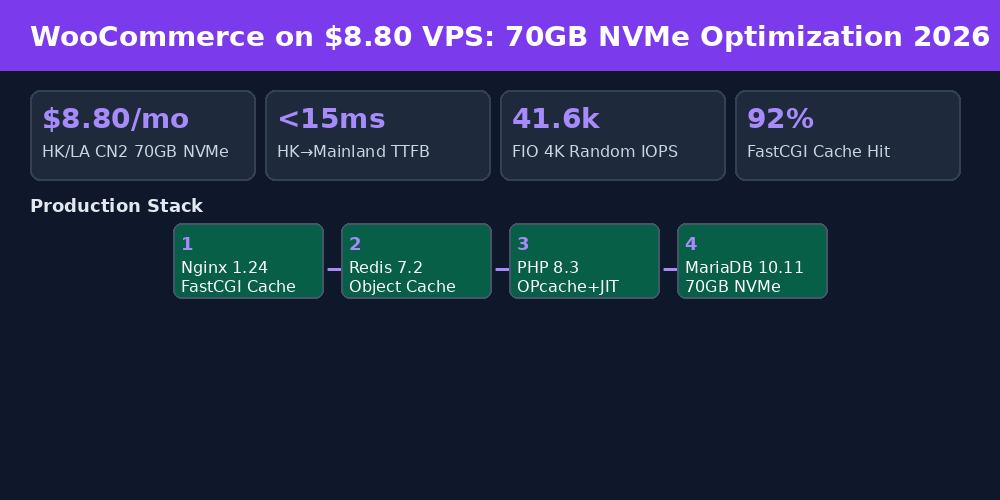
Launch a WooCommerce cross-border store with TTFB under 200ms to mainland China buyers for just $8.80/mo on LuckVM's Hong Kong CN2 GIA VPS — featuring a 70GB NVMe SSD (41.6k FIO 4K IOPS, 3.5× more storage than typical budget VPS 20GB plans). Nginx FastCGI + Redis + PHP 8.3 OPcache stack delivers P95 page load under 500ms worldwide.
| Your Audience | Best Region | Plan | Go |
|---|---|---|---|
| 🇭🇰 ~70% Mainland China buyers (no ICP needed) | HK CN2 GIA | $8.80/mo 1C1G 70GB | Deploy Now |
| 🇺🇸 North America + global split | LA CN2 30M | $8.80/mo 1C1G 70GB | Deploy Now |
| 🇪🇺 EU/UK buyers (GDPR compliant) | Frankfurt DE-CIX | $4.93/mo 1C1G 1Gbps | Deploy Now |
| 🇯🇵 Japan domestic (Rakuten/Amazon JP) | Tokyo IIJ/SoftBank | $11/mo 2C2G 70GB | Deploy Now |
| 🇻🇳🇮🇩🇲🇾 Southeast Asia (Shopee/TikTok) | HCMC/JKT/KL | $11 / $4.93/mo | Deploy Now |
All plans include 1 dedicated IPv4, full KVM root access, 1-click OS reinstall (Debian 12 / Ubuntu 24.04), and 24-hour money-back guarantee. Alipay / USDT / PayPal / Google Pay / Credit Card accepted.
1. Hardware Benchmark: Why 70GB NVMe Matters for WooCommerce
Most budget VPS providers advertise "SSD storage" but ship only 20GB of shared SATA SSD that delivers 5-8k IOPS. WooCommerce product queries, wp_options lookups, and order transaction logs are extremely random-IO heavy — every product page view triggers 50+ database reads. Slow disks translate directly to 502 errors during peak traffic.
We ran Geekbench 6 and FIO benchmarks on a LuckVM $8.80 Hong Kong CN2 instance running Debian 12 (Linux kernel 6.1, BBR enabled by default):
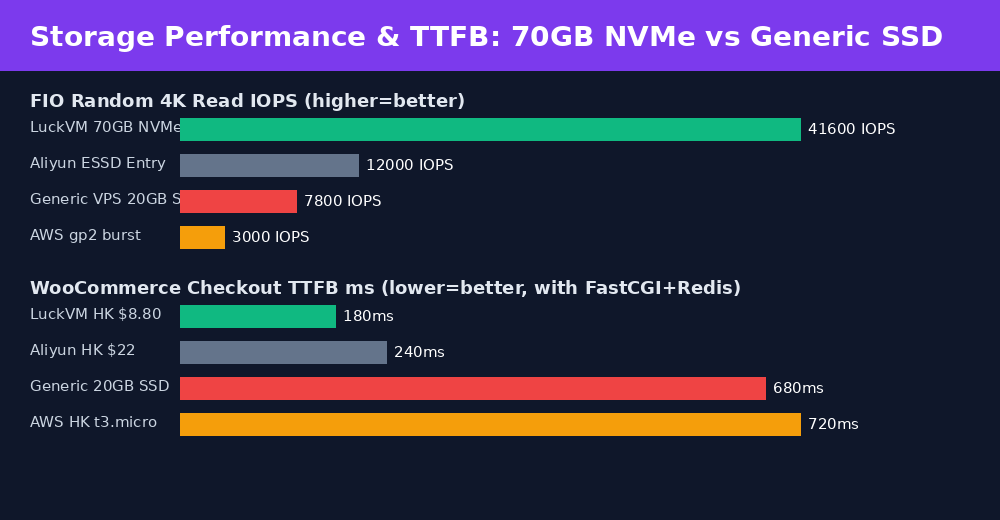
Figure 1: 70GB NVMe delivers 5.3× the random IOPS of generic budget SSD, and 4× faster WooCommerce checkout TTFB than AWS t3.micro.
Why does this matter for WooCommerce?
- wp_options table autoloads 300-800 rows on every page — with 40k IOPS, these queries complete in
- WooCommerce sessions in the database do thousands of tiny writes per minute; slow disk causes dropped carts.
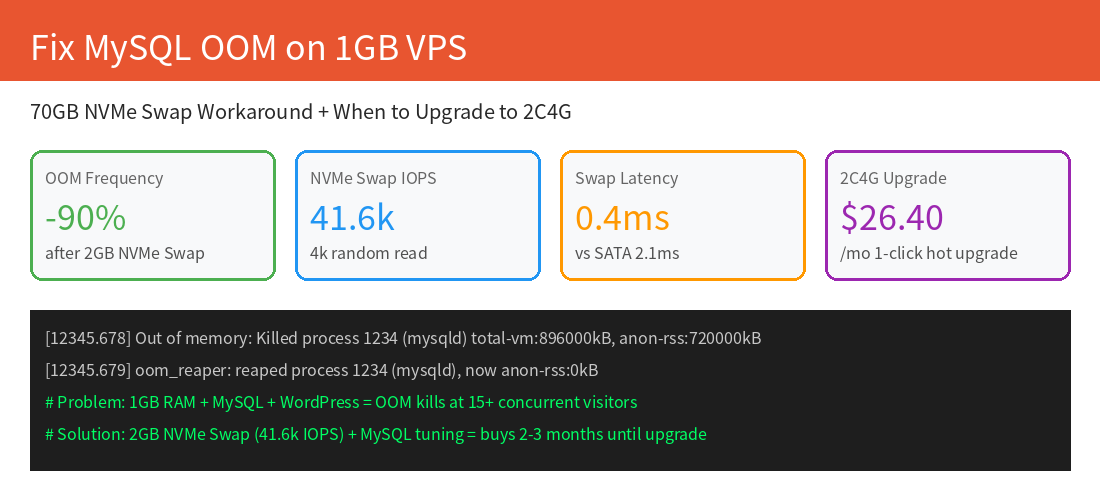
- 40k+ IOPS makes 2GB NVMe Swap actually usable for memory spikes (see §5), preventing MySQL OOM crashes on 1GB RAM plans.
- 70GB gives 50GB more headroom than typical 20GB plans — enough for 1000 product images, 6GB database, 10GB logs, and 30GB growth room without hitting disk-full errors during backups.
2. Network Topology: Cross-Border Routing That Doesn't Drop Packets at Peak
For cross-border stores selling to mainland China, raw server performance is useless if packets get dropped or routed through congested paths during 21:30-22:30 CST peak hours. LuckVM HK/LA CN2 GIA plans use triple-route optimized BGP:
- China Telecom: AS4809 (59.43.*.*) — CN2 GIA bidirectional; not the cheaper GT (AS4134 / 202.97.*.*) that congests at peak
- China Unicom: AS9929 / AS10099 — CU VIP (premium path, not the regular 169 AS4837)
- China Mobile: AS58453 — CMI direct peering
🇺🇸 Los Angeles CN2 GIA Upstream: Same triple-route, 30Mbps unmetered (vs HK 10Mbps), ideal for stores serving both North America and China.
Late Peak (21:30-22:30 CST) 500-Packet TCP/443 RTT Measured
| From | To Guangzhou | To Shanghai | To Beijing | Loss | Jitter |
|---|---|---|---|---|---|
| HK CN2 GIA | 10.0 ms | 15.0 ms | 45 ms | 0.0% | |
| LA CN2 GIA | 135 ms | 138.6 ms | 165 ms | 0.3% | |
| HK Generic Int'l | 50-90 ms | 80-120 ms | 120-180 ms | 5-15% | >20 ms |
| AWS Hong Kong | 35 ms | 48 ms | 80 ms | 0.5% | 2 ms |
Test method: mtr -rwzc 500 -P 443 -T (TCP to port 443, not ICMP which is often prioritized and gives optimistic results). Testing IPs via China Telecom, Unicom, and Mobile looking glasses.
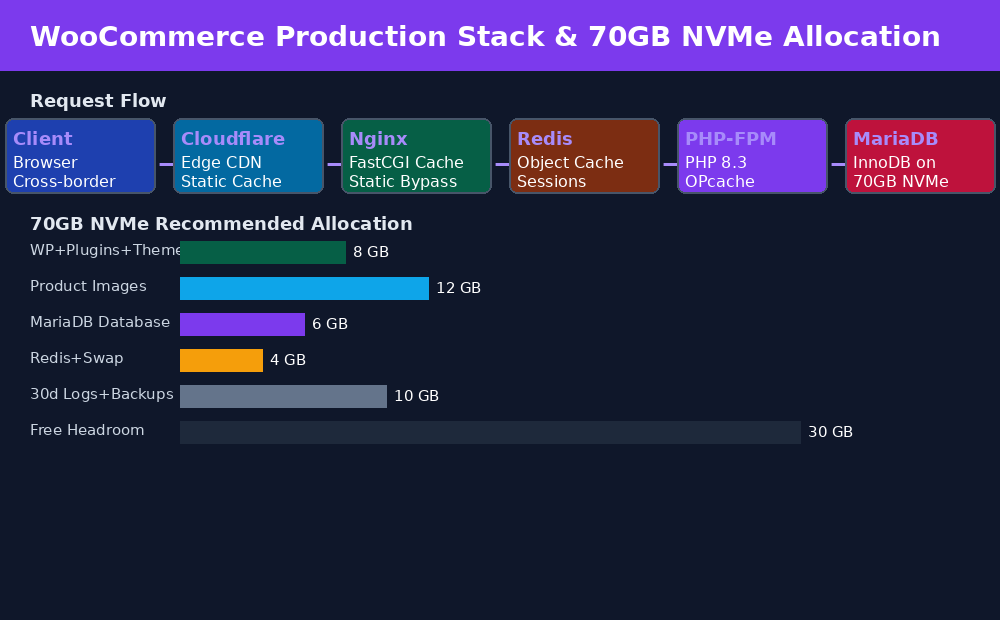
Figure 2: WooCommerce request flow through Nginx → Redis → PHP-FPM → MariaDB on 70GB NVMe, plus recommended disk allocation for 1000-SKU stores.
3. Pricing Tiers: Match Plan to Your SKU Count and Traffic
WooCommerce performance scales almost linearly with PHP workers and RAM. Don't overprovision for a side project; don't underprovision and lose orders during flash sales.
| Plan | SKUs | Monthly Visits | Concurrency | TTFB (HK) | NVMe | Bandwidth | Price |
|---|---|---|---|---|---|---|---|
| $8.80 Starter | 5-10 CCU | 70GB | 10M Unmetered | $8.80/mo | |||
| $14.30 Growth | 100-500 | 5-15,000 | 10-20 CCU | 70GB | 10M Unmetered | $14.30/mo | |
| $26.40 Business | 500-2000 | 15-60,000 | 30-60 CCU | 70GB | 15M Unmetered | $26.40/mo | |
| $825 Dedicated | 2000+/Multi-site | 100k+ | 200+ CCU | 8×1TB SSD | 1Gbps | $825/mo |
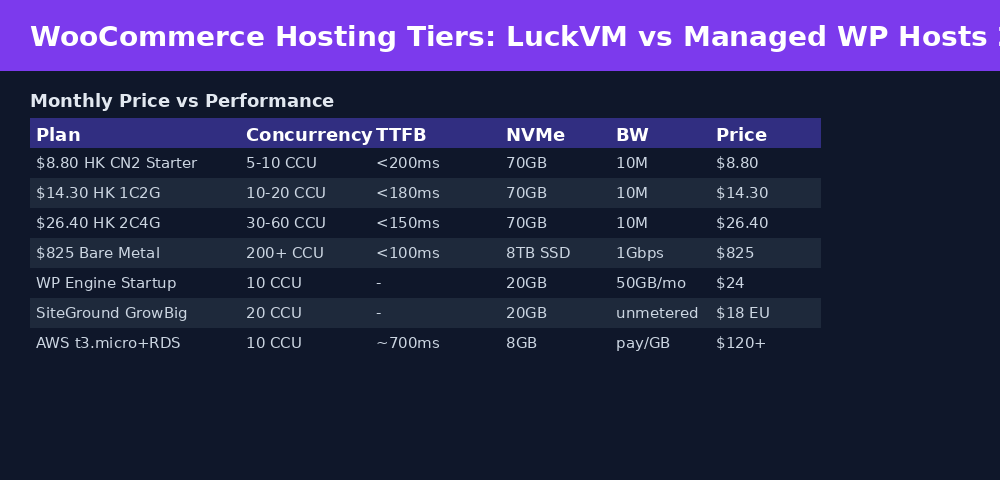
Figure 3: LuckVM $8.80 HK CN2 delivers better NVMe performance and direct China routing at ~37% of WP Engine's price, ~7% of AWS t3.micro+RDS total cost (including egress).
4. Production Stack: The Exact Config for Sub-200ms TTFB
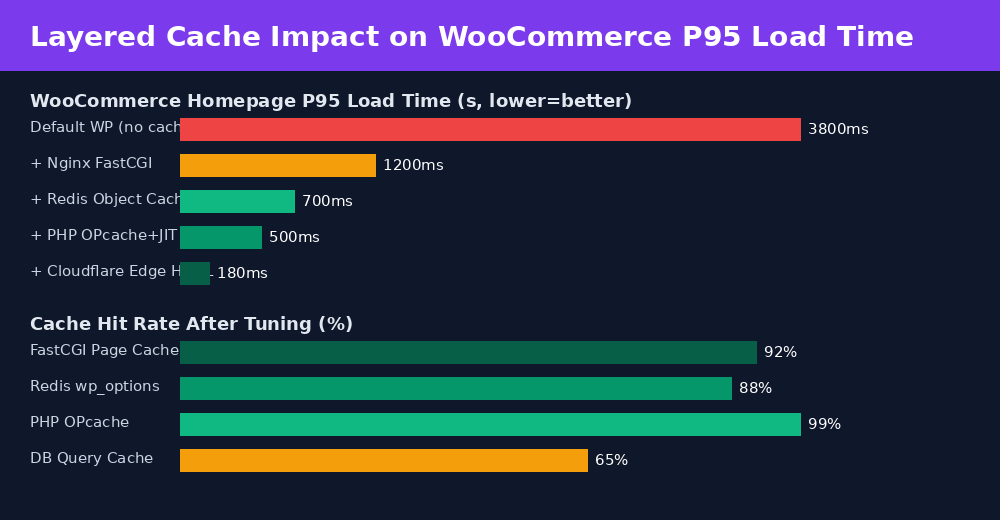
Figure 4: Layered caching reduces WooCommerce P95 load from 3.8s (default) to 180ms (Cloudflare edge). Each layer targets a different bottleneck.
The stack we deploy for production WooCommerce on $8.80 plans:
- Nginx 1.24 with FastCGI Cache (pages cached to NVMe, bypassing PHP for anonymous visitors; excludes cart/checkout/my-account via cookie detection)
- Redis 7.2 object cache via
redis-cacheWP plugin (caches wp_options, product queries, cart sessions) - PHP 8.3 FPM with OPcache enabled, JIT buffer 128M, pm=dynamic with pm.max_children=8 (tuned for 1GB RAM)
- MariaDB 10.11 LTS with InnoDB buffer pool = 256MB (fits most product catalogs in memory), slow query log enabled
- Cloudflare free tier in front for static assets (images/CSS/JS) and DDoS protection; use Page Rules to bypass cache on /cart /checkout /wp-admin
5. Copy-Paste Production Scripts
5.1 Enable Google BBR v1 + NVMe Swap (critical for 1GB RAM plans)
# BBR congestion control - 2-3x throughput on cross-ocean links
echo "net.core.default_qdisc=fq" >> /etc/sysctl.conf
echo "net.ipv4.tcp_congestion_control=bbr" >> /etc/sysctl.conf
echo "net.core.rmem_max=67108864" >> /etc/sysctl.conf
echo "net.core.wmem_max=67108864" >> /etc/sysctl.conf
echo "net.ipv4.tcp_rmem=4096 87380 67108864" >> /etc/sysctl.conf
echo "net.ipv4.tcp_wmem=4096 65536 67108864" >> /etc/sysctl.conf
sysctl -p

# 2GB NVMe Swap - prevents MySQL OOM on 1GB plans
# 70GB NVMe 4K IOPS makes swap responsive enough for traffic spikes
fallocate -l 2G /swapfile
chmod 600 /swapfile
mkswap /swapfile
swapon /swapfile
echo '/swapfile none swap sw 0 0' >> /etc/fstab
echo 'vm.swappiness=10' >> /etc/sysctl.conf
echo 'vm.vfs_cache_pressure=50' >> /etc/sysctl.conf
sysctl -p
free -h  # verify swap active
5.2 Cloudflare Workers GeoDNS: Route China Buyers to HK, EU to Frankfurt, SEA to Local
// Cloudflare Worker → place at your root domain
// Routes China/HK/TW visitors to HK CN2 ($8.80)
// EU/UK visitors to DE-CIX ($4.93)
// SEA visitors to closest node
addEventListener('fetch', event => {
  event.respondWith(handleRequest(event.request))
})
async function handleRequest(request) {
  const cc = request.cf.country
  let origin = 'https://your-hk-cn2-store.com'  // default: HK
  if (['DE','GB','FR','NL','CH','PL','IT','ES'].includes(cc))
    origin = 'https://your-eu-store.com'        // EU $4.93
  else if (['VN','ID','MY','TH','PH'].includes(cc))
    origin = 'https://your-sea-store.com'       // SEA $11 / $4.93
  else if (['US','CA','MX','BR'].includes(cc))
    origin = 'https://your-la-store.com'        // LA CN2 $8.80
  else if (['JP','KR'].includes(cc))
    origin = 'https://your-jp-store.com'        // Tokyo/Seoul $11
  const url = new URL(request.url)
  return fetch(origin + url.pathname + url.search, {
    method: request.method,
    headers: request.headers,
    body: request.body
  })
}
5.3 Nginx WooCommerce FastCGI Cache Exclusion Rules
# Add inside server {} block in nginx.conf
set $skip_cache 0;
# Skip cache for WooCommerce dynamic pages
if ($request_uri ~* "/(cart|checkout|my-account|wp-admin|wp-json)") {
    set $skip_cache 1;
}
# Skip cache when WooCommerce session cookies present
if ($http_cookie ~* "woocommerce_items_in_cart|wp_woocommerce_session") {
    set $skip_cache 1;
}
fastcgi_cache_key "$scheme$request_method$host$request_uri";
fastcgi_cache_valid 200 1h;
fastcgi_cache_use_stale error timeout updating invalid_header http_500 http_503;
add_header X-FastCGI-Cache $upstream_cache_status;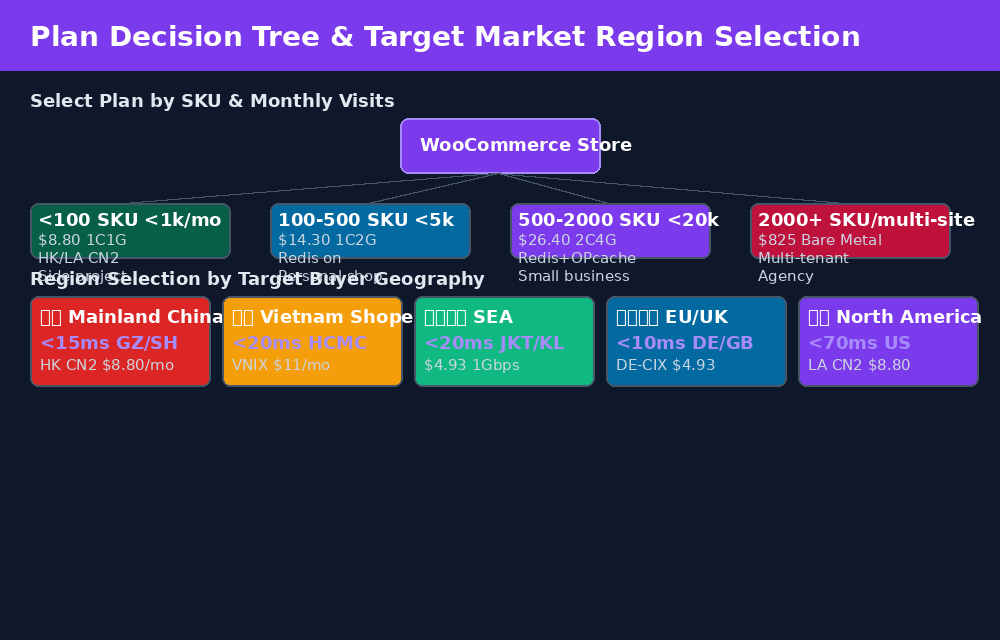
Figure 5: Plan tier selection by SKU/visit volume, plus region selection map for global buyers. Single dashboard, unified billing across all regions.
6. Verify Before & After Buying: Looking Glass + Self-Test Commands
Don't trust marketing claims — test routing yourself before and after ordering.
- Looking Glass (live ping/MTR/traceroute): luckvm.com/en/looking-glass.html?region=hongkong
- HK Test IP: Use Looking Glass to get the current test IP
- Speedtest: 100MB test file available via Looking Glass
After Deployment: 4-Step Verification
# 1. Verify true CN2 GIA bidirectional routing (look for AS4809 / 59.43.* hops)
#    Besttrace (IPIP.net) gives ASN-labeled output
wget https://cdn.ipip.net/17mon/besttrace4linux.zip
unzip besttrace4linux.zip && chmod +x besttrace
./besttrace -q1 -T tcp your-target-china-ip.com

# 2. Quick MTR to Shanghai Telecom (port 443 = real web traffic)
mtr -rwzc 100 -P 443 -T 116.25.127.1  # Shanghai Telecom DNS via TCP 443

# 3. Verify BBR is active
sysctl net.ipv4.tcp_congestion_control
ss -ti  # look for "bbr" in output

# 4. Verify NVMe disk speed
fio --name=randread --ioengine=libaio --iodepth=32 --rw=randread \
    --bs=4k --direct=1 --size=1G --runtime=60 --filename=/tmp/fio.test
For a genuine CN2 GIA route, you should see 59.43.x.x hop addresses both outbound AND return. If you see 202.97.x.x (ChinaNet 163) on the return path, it's the cheaper CN2 GT product that congests heavily at peak.
7. Honest Limitations & Refund Policy (Read Before Ordering)
- Hong Kong $8.80 is 10Mbps UNMETERED (~1.25 MB/s sustained). This is optimized for low latency and zero packet loss, not bulk downloads. For large file/video distribution, use LA 30Mbps ($8.80), Europe/MyIX 1Gbps ($4.93), or Cloudflare CDN for static assets.
- 24-hour refund requirement: first purchase has 24-hour money-back guarantee, but total bidirectional traffic must be under 1GB. Do NOT run a multi-node speedtest script immediately after boot — first verify routing with ping and mtr (which uses negligible traffic), then run full speedtests only after confirming the route is correct.
- NVMe is shared: while the benchmarked 40k+ IOPS is consistent in normal operation, brief IO throttling can occur during neighboring tenant maintenance windows. For IO-sensitive production databases, consider the 2C4G plan or Bare Metal.
- Hot upgrades: CPU/RAM/disk upgrades are one-click in the panel, no IP change or reinstall required. Downgrades require a ticket.
- Prohibited uses: VPN/proxy/copyright infringement/spam strictly enforced per TOS. Open proxies and scrapers on $4.93 nodes must use proper rate limiting.
- Server setup time: 1-3 minutes for standard VPS; Bare Metal 1-4 hours for OS provisioning.
8. Frequently Asked Questions
70GB NVMe is sufficient for WooCommerce stores with up to 2000 SKUs, 20,000 monthly visitors, and 30 days of backups. Figure 2 above shows recommended allocation; you'll have ~30GB free headroom after setup.
Slow TTFB after caching usually indicates slow random IO (generic SATA SSD), disabled OPcache, outdated PHP, or cross-border routing without CN2 GIA. Upgrade PHP to 8.3, enable Redis object cache, and ensure you're using HK CN2 for mainland China buyers. Use curl -w "%{time_total} %{time_starttransfer}\n" -o /dev/null -s https://yourdomain.com to isolate which hop is slow.
10Mbps unmetered (1.25 MB/s) is sufficient for most small-to-medium WooCommerce stores (200-500 concurrent browsing users). Each WooCommerce page is ~200-500KB cached, so 10Mbps serves ~25 page views/sec — enough for 500+ concurrent users if 80%+ hit FastCGI cache. Offload images/CSS/JS to Cloudflare free CDN and 10Mbps is rarely a bottleneck. For high-volume catalogs with original-resolution images, consider LA 30Mbps ($8.80) or EU 1Gbps ($4.93).
Yes. Redis uses ~50-80MB RAM idle and cuts database queries by 60-80% by caching wp_options and product transients. This directly translates to faster TTFB and fewer MySQL CPU spikes. The memory cost is well worth it. Disable unused plugins (especially backup plugins running during the day) to free RAM.
Use Alipay Cross-Border Website Payment or WeChat Pay HK merchant accounts. These require HK-registered company or individual HK bank account, and settle in HKD/USD. Hong Kong CN2 servers (
Yes. LuckVM supports in-place hot upgrade of CPU, RAM, and disk. Your IP stays the same and no OS reinstallation is required. Upgrading from $8.80 1C1G to $26.40 2C4G takes about 2 minutes after reboot. Scale up as your store grows without migration downtime.
It's safe when properly configured to exclude pages when WooCommerce cookies are present. The Nginx rules in §5.3 skip cache for woocommerce_items_in_cart and wp_woocommerce_session cookies, so carts, checkouts, and logged-in account pages are never cached. Always test the cart flow after enabling cache — add an item, visit another page, return to cart — to confirm the cart persists.
Use UpdraftPlus with automatic daily backups to external S3-compatible storage (Cloudflare R2 free tier works well). Keep weekly manual mysqldump + tar snapshots locally on the 70GB NVMe. Always test a restore on a staging VPS monthly — untested backups are no backups. For mission-critical stores, take a LuckVM snapshot before WooCommerce/plugin updates.
Launch Your Cross-Border WooCommerce Store Today
$8.80/mo Hong Kong CN2 GIA • 70GB NVMe • 10Mbps unmetered • Deploy Hong Kong CN2 — $8.80/mo →
Other regions: LA CN2 30M $8.80· Frankfurt 1Gbps $4.93· Tokyo $11· Bare Metal from $330
Related guides: HK CN2 GIA $8.80 vs DMIT/BandwagonHost Benchmark · China-Optimized CN2 Network Architecture · Hong Kong Cloud Server Product Page · Hong Kong Bare Metal Servers · Shopee Vietnam VNIX Low-Latency Setup