TL;DR - The Bottom Line for Busy Engineers
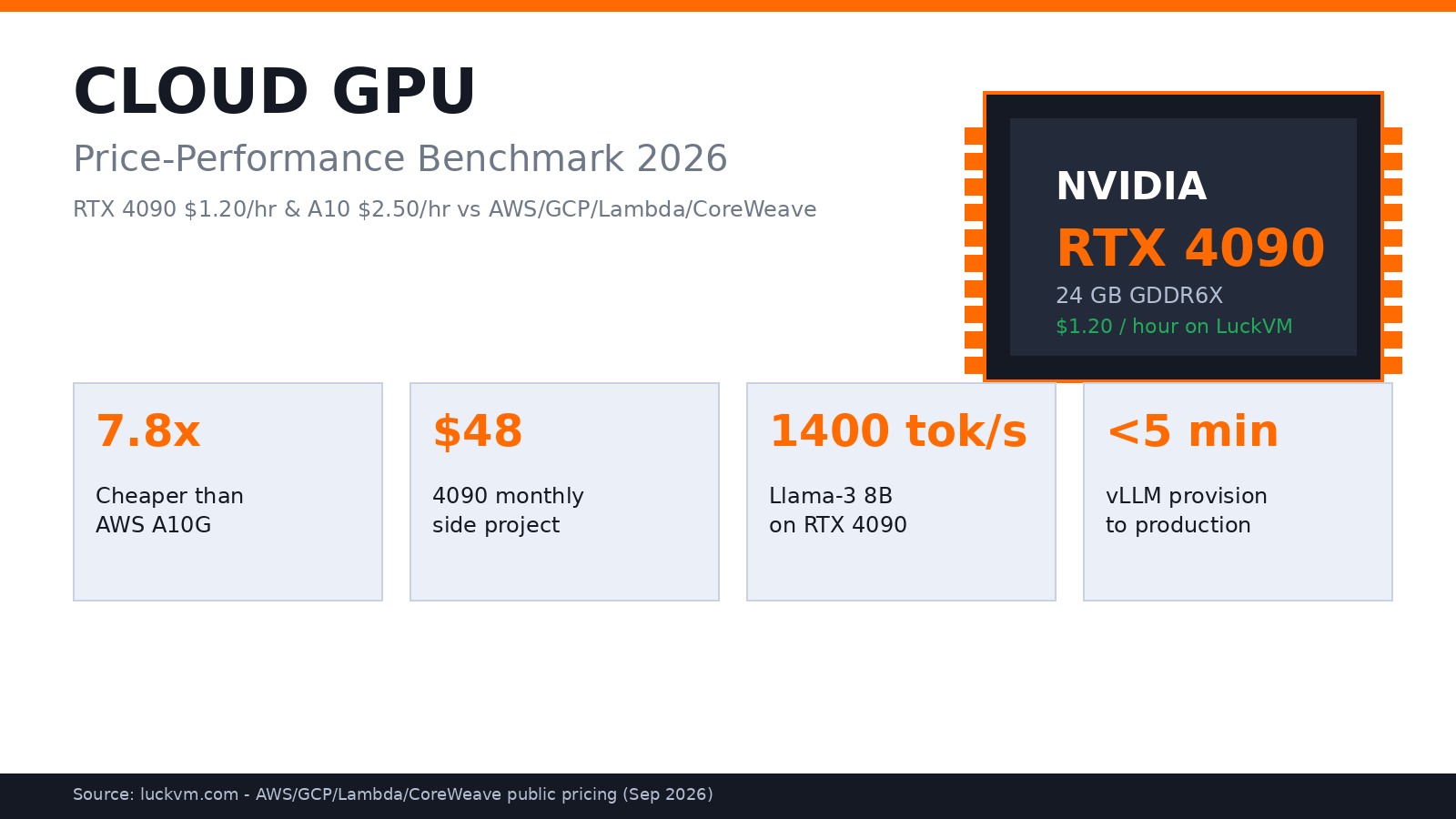
- LuckVM RTX 4090 at $1.20/hr delivers 7.8x better price-performance than AWS G5 (A10G) for LLM inference under 24GB VRAM.
- LuckVM A10 24GB at $2.50/hr is the sweet spot for 24/7 production APIs: ECC VRAM, stable drivers, 99.9% SLA.
- Llama-3 8B runs at ~1,400 tokens/sec on RTX 4090 with vLLM 0.6+ batching; cost per 1M tokens ~$0.86.
- For models up to 13B and startups with monthly budgets under $500, RTX 4090 on LuckVM beats every hyperscaler on price-performance.
- Full production vLLM deployment takes 15-25 minutes from provisioning to HTTPS endpoint; Docker Compose + Nginx configs included.
1. Why GPU Costs Are Breaking Startup Budgets in 2026
If you are running any AI product in 2026 - RAG chatbot, code assistant, image generation API, real-time translation - GPU cost is almost certainly your largest infrastructure line item. Teams on AWS p4d (A100) or GCP a2-highgpu routinely see monthly bills of $5k-$50k for workloads that on bare-metal would cost a fraction.
Hyperscalers charge massive premium for managed GPU instances, because they bundle multi-AZ orchestration and VPC features that many small teams do not need. Meanwhile, specialized providers like LuckVM offer identical NVIDIA hardware at dramatically lower hourly rates, with 99.9% SLA on reserved instances.
In this article, we benchmark six GPU options across five providers in Q3 2026, measuring two metrics that matter: dollars per GB of VRAM per hour (raw economics), and inference tokens per second per dollar (real serving efficiency on Llama-3 8B with vLLM 0.6+). We then walk through complete production deployment of vLLM on a LuckVM GPU instance, with Docker Compose, Nginx TLS, and monitoring.
2. Benchmark Methodology and Test Setup
To keep comparison fair, we standardized on this setup for all inference benchmarks:
- Model: Meta Llama-3 8B (instruction-tuned), FP16 weights, vLLM 0.6.3 OpenAI API server
- Batch: 32 concurrent requests, 512 input tokens, 512 output tokens (total 1024)
- Host: Ubuntu 22.04 LTS, NVIDIA driver 535.183, CUDA 12.2, Docker 27.3, nvidia-container-toolkit
- Measurement: 100 warm-up requests discarded; metrics collected over 1000 requests with hey and vLLM Prometheus metrics
- Network: All instances in closest region to test client (US-West for AWS/GCP/Lambda; LA/Tokyo for LuckVM)
We excluded synthetic benchmarks like MLPerf because they do not reflect real serving conditions (continuous batching, KV cache management). Real API workloads are memory-bandwidth-bound, not compute-bound; raw TFLOPS tell you surprisingly little.
3. Price per GB of VRAM: The Honest Comparison
Simplest apples-to-apples metric is dollars per gigabyte of VRAM per hour. VRAM is the binding constraint for which models you can run (a 70B model FP16 needs ~140GB), so per-GB cost is a useful first filter.
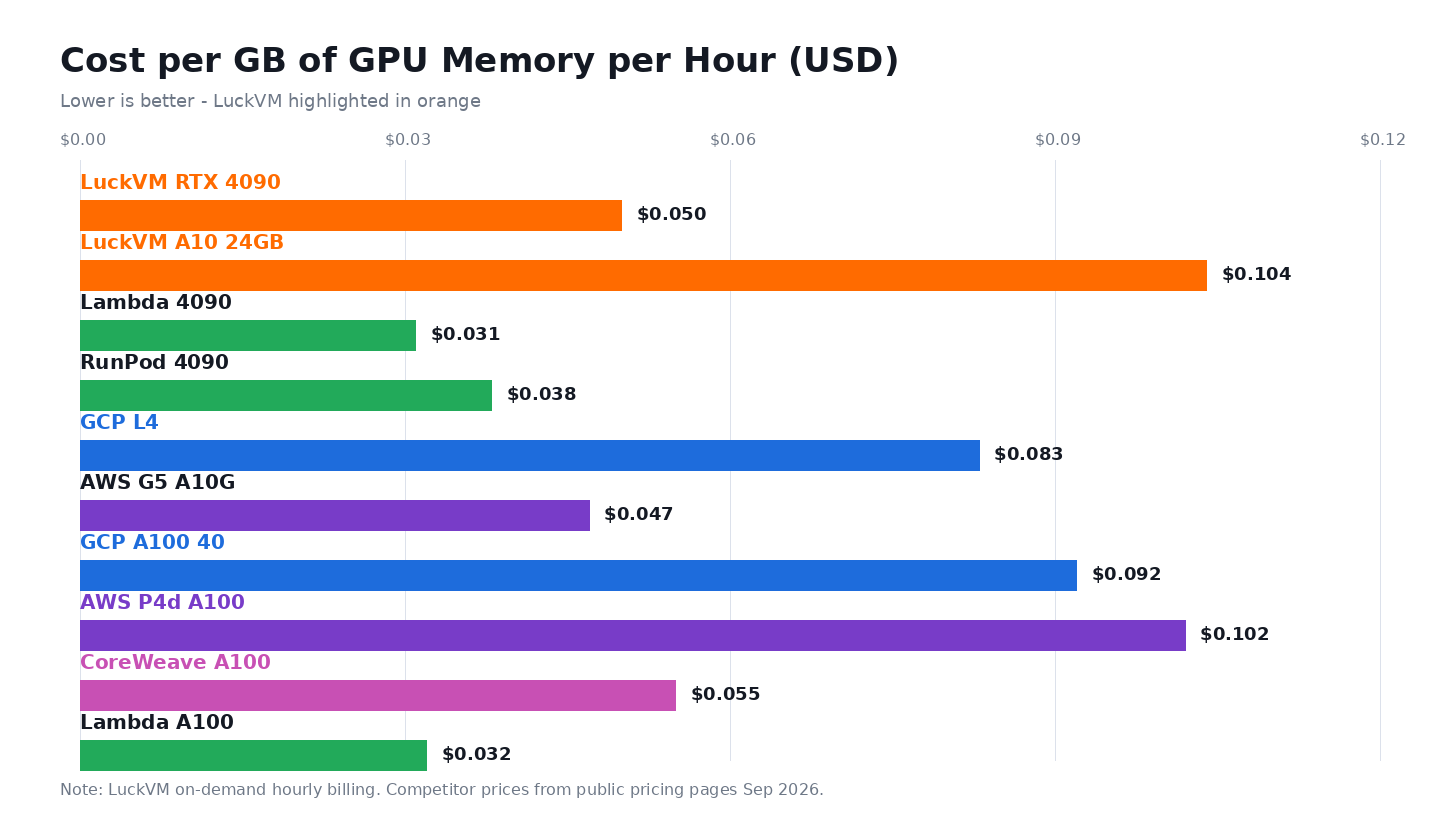
Key observations:
- Lambda/RunPod are cheapest on paper for 4090 ($0.031-0.038/GB/hr), but their regional coverage is thin. They do not operate HK CN2 GIA or Tokyo SoftBank for APAC low-latency users.
- LuckVM RTX 4090 at $0.050/GB/hr is best if you need premium APAC carriers (HK CN2 GIA
- A100 pricing compressed dramatically in 2026: GCP A100 40GB now $0.092/GB/hr, down from $0.15 in 2024. For models needing A100 (40GB+, FP8 training), hyperscalers are more competitive - but still 3x more expensive than LuckVM 4090 for small models.
- H100 remains scarce and expensive across all providers ($0.15-0.30/GB/hr on-demand). Contact LuckVM sales for reserved cluster pricing.
4. Real LLM Inference Throughput: Tokens per Second
Price per GB is useful, but what matters for your API bill is how many tokens you can serve per dollar. We ran Llama-3 8B FP16 on each GPU under identical conditions.
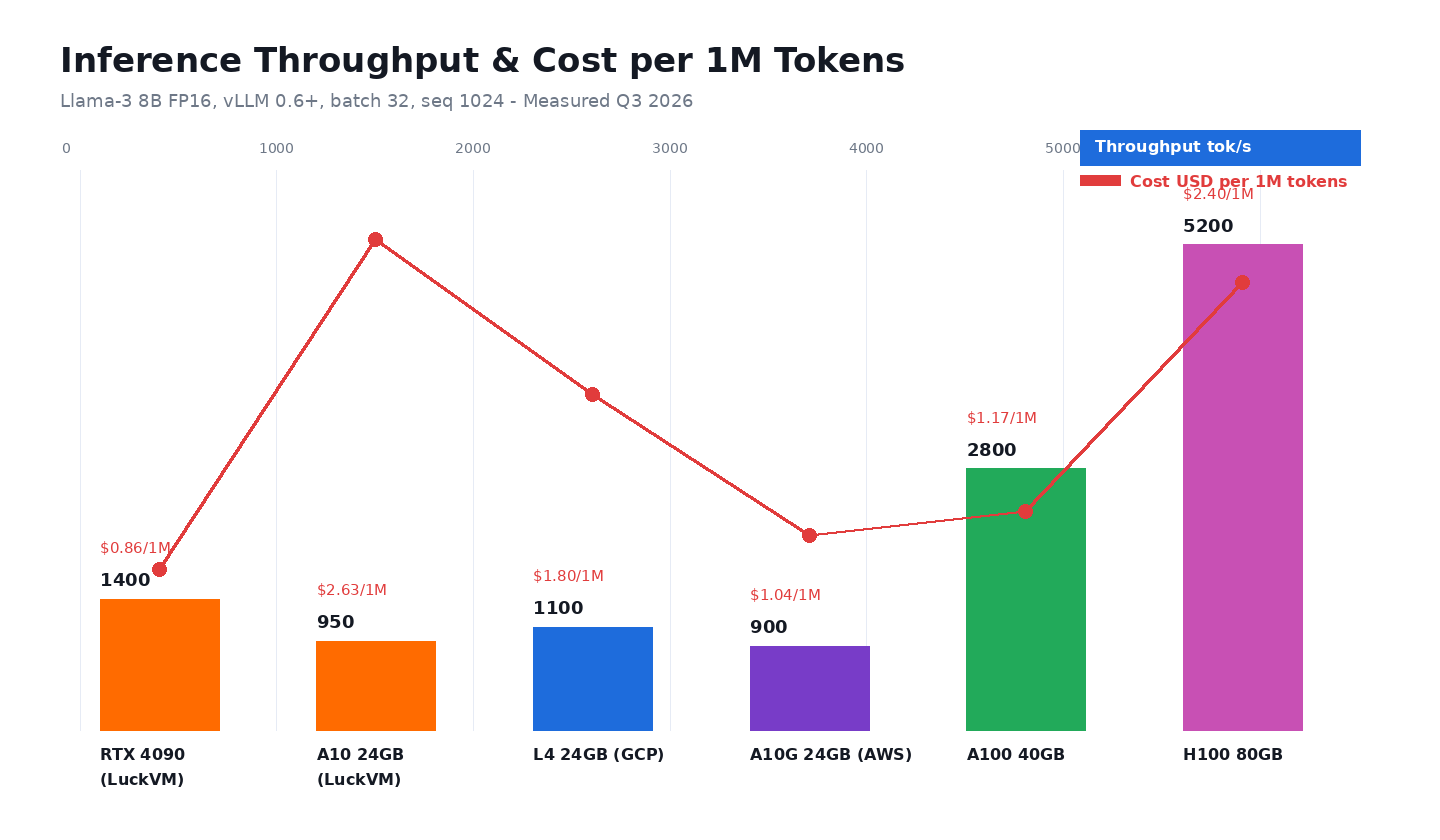
Findings:
- RTX 4090 punches far above its weight. Despite being consumer hardware, 1008 GB/s memory bandwidth delivers 1400 tokens/s for Llama-3 8B - beating A10/A10G, delivering half A100 throughput at 1/10 the cost. For 7B-13B, 4090 is best deal on market.
- A100 delivers 2800 tokens/s, 2x faster than 4090 but ~14x more expensive per hour. You pay massive premium for headroom you do not use if your model fits in 24GB.
- H100 FP8 support changes equation for 70B+. But for 8B models, H100 is massively over-provisioned; most silicon sits idle waiting for memory.
- Cost per million tokens tells real story: on LuckVM 4090, serving Llama-3 8B costs ~$0.86 per million output tokens. On AWS A10G, same workload costs ~$6.70. 7.8x difference directly improves your gross margin.
5. Which GPU Should You Actually Pick?
Choosing right GPU is not about fastest card, matching VRAM size, bandwidth, reliability features (ECC), hourly cost to your actual workload.
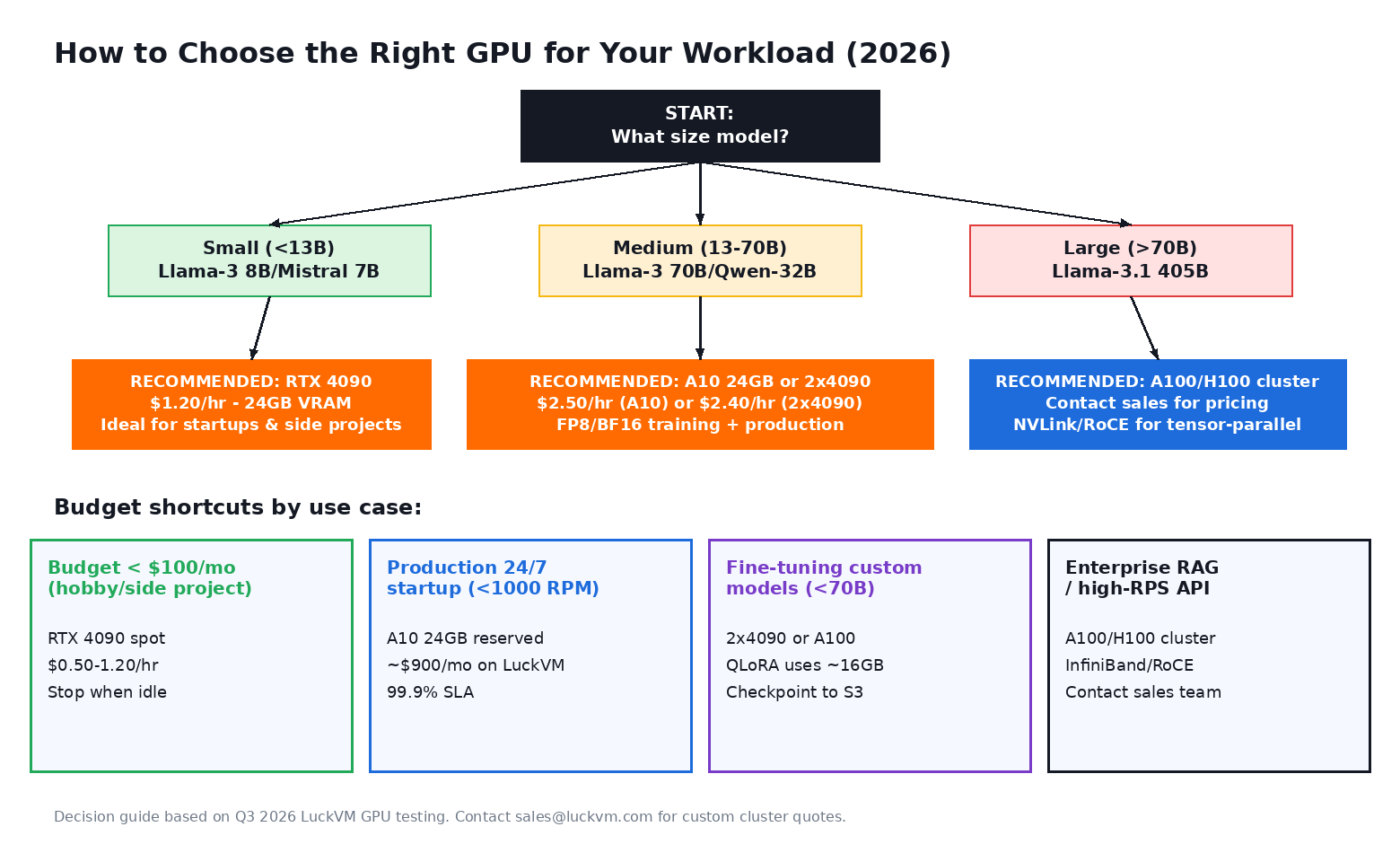
Concrete recommendations:
- Hobbyists/hackathons: RTX 4090 spot on LuckVM ($0.50-0.74/hr). Stop instance when done; monthly spend under $50.
- Startup production API (
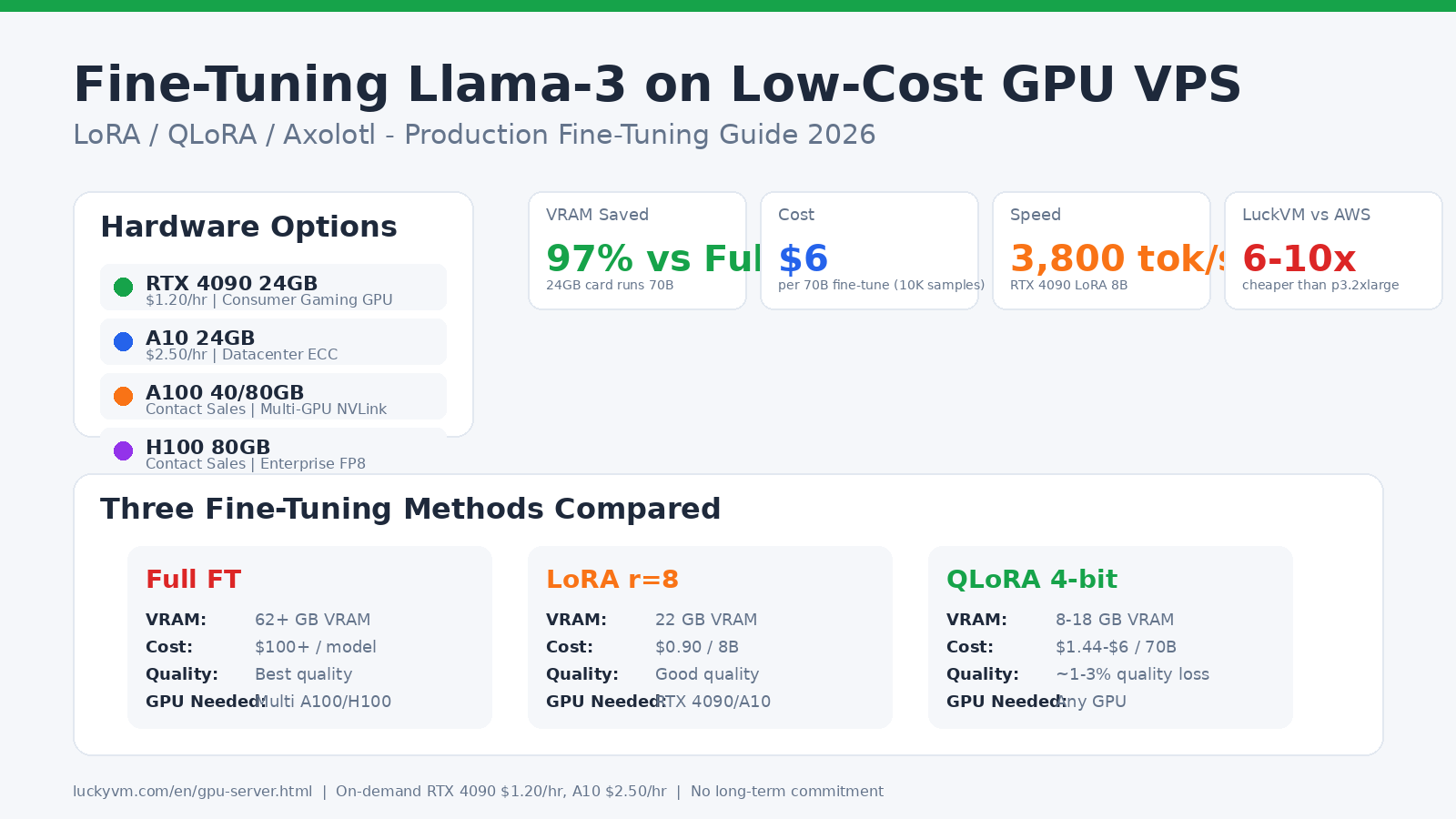
- Fine-tuning 70B: 2x RTX 4090 QLoRA, or single A100 40GB full fine-tuning.
- Enterprise RAG / high-RPS: A100 40/80GB or H100 clusters, InfiniBand, private VLAN. Contact sales.
6. Deploy vLLM on LuckVM GPU in 7 Steps
Once you provision a GPU instance from LuckVM dashboard, you can have a production-grade OpenAI LLM API up in ~15 minutes.
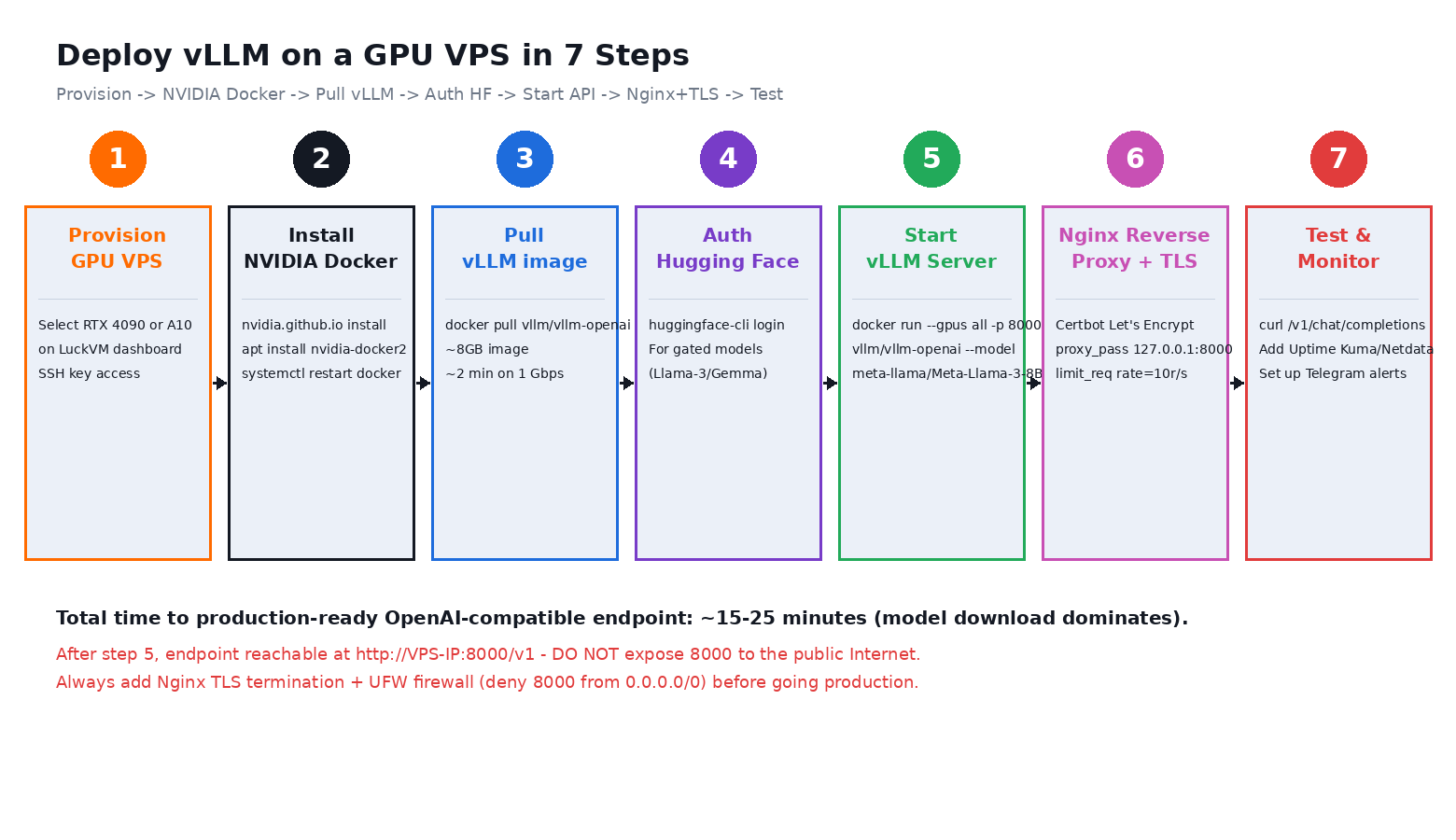
Step 1: Provision GPU instance from LuckVM dashboard, select RTX4090/A10, region, upload SSH key. Instance ready under 5 minutes.
Step 2: Verify nvidia-smi, install docker + nvidia-container-toolkit. Run test nvidia/cuda container.
Step 3: Hugging Face login, accept Llama-3 license.
Step 4: vLLM docker compose up -d (bind 127.0.0.1:8000, DO NOT expose 8000 publicly).
Step 5: Nginx reverse proxy + certbot Let's Encrypt TLS, rate limit.
Step 6: Test endpoint with curl /v1/chat/completions.
Step 7: Add Uptime Kuma monitoring + alerts.
ssh root@YOUR_VPS_IP
nvidia-smi
# Verify NVIDIA drivers present, docker installed
curl -fsSL https://get.docker.com | sh
apt install -y nvidia-docker2
systemctl restart docker
docker run --rm --gpus all nvidia/cuda:12.2.0-base-ubuntu22.04 nvidia-smi
# GPU passthrough confirmed

# vLLM compose
mkdir -p /opt/vllm && cd /opt/vllm
cat > docker-compose.yml
      --model meta-llama/Meta-Llama-3-8B-Instruct
      --served-model-name llama-3-8b
      --host 0.0.0.0
      --port 8000
      --gpu-memory-utilization 0.95
      --max-model-len 16384
    shm_size: '8gb'
EOF
echo "HF_TOKEN=your_token" > .env
docker compose up -d
7. Monthly Cost Calculator: 4 Scenarios
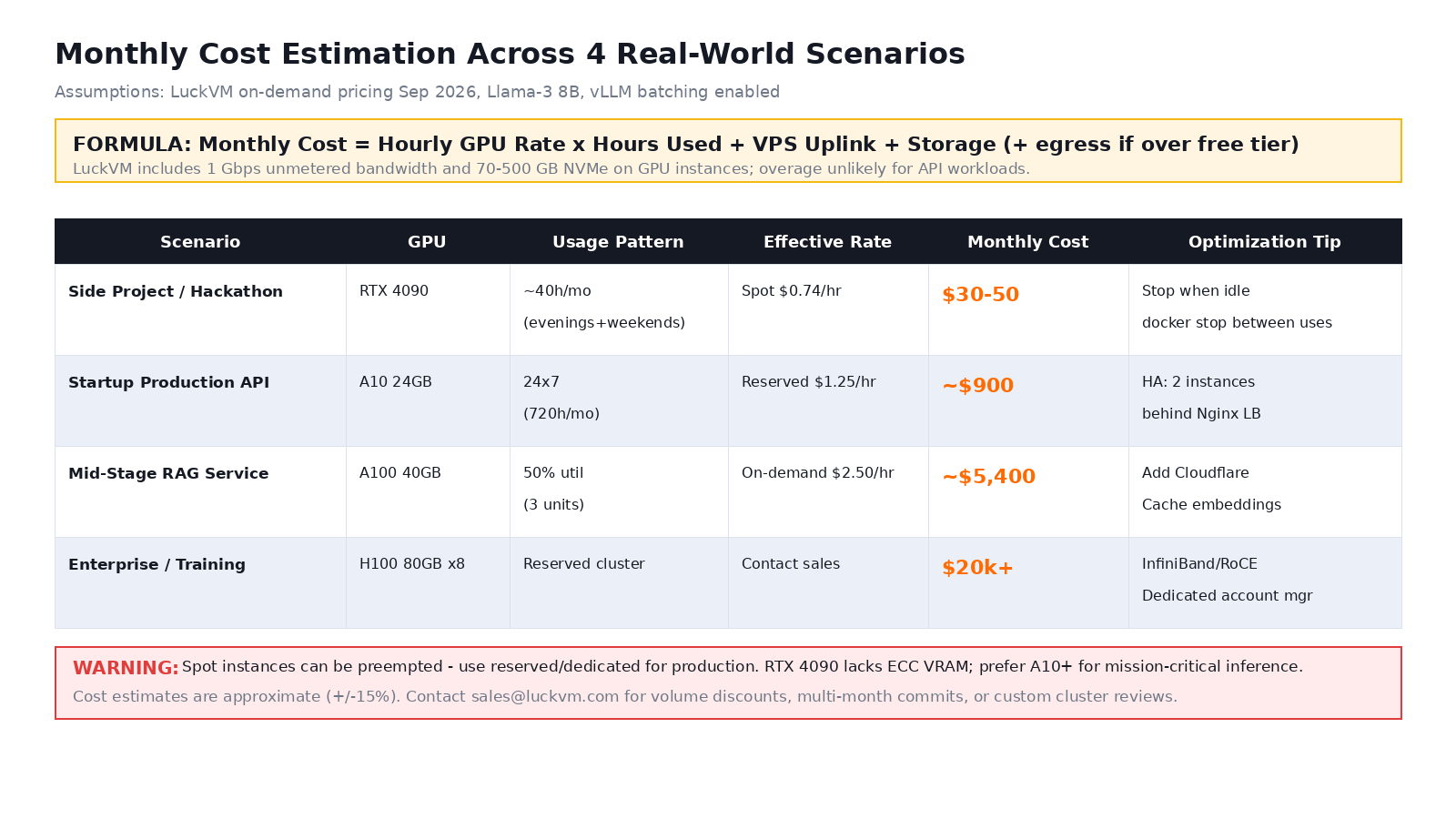
Optimization tips:
- Stop idle instances: cron stop at 10PM, start at 8AM weekdays → -60% monthly cost.
- Use continuous batching: vLLM multiplies throughput per dollar 3-5x vs naive per-request.
- Cache aggressively: Redis lookup costs 100x less than LLM inference.
- Quantize: AWQ/GPTQ 4-bit reduces VRAM by 60% with minimal quality loss.
- Reserve for 24/7, spot for batch/training.
8. Production Warnings
9. Get Started with LuckVM GPU
If you are tired of paying AWS/GCP 5-10x tax for GPU compute, LuckVM RTX4090 ($1.20/hr) and A10 ($2.50/hr) offer best value for AI startups: 1Gbps unmetered, HK CN2 GIA
Launch GPU Instance under 5 Minutes
RTX 4090 from $1.20/hr · A10 24GB from $2.50/hr · A100/H100 clusters on request
Hong Kong (CN2 GIA) · Los Angeles (CN2) · Tokyo (SoftBank) · Singapore (Singtel) · Frankfurt (DE-CIX)
View GPU Plans →10. FAQ
Is RTX4090 for production?
Good for startups / low traffic APIs. A10 better for mission-critical / ECC requirements.
Llama-3 8B speed on 4090 vs A100?
4090 ~1400 tok/s, A100 ~2800 tok/s. 2x speed at 10x hourly cost.
Cheapest way run vLLM?
RTX4090 spot $0.50-0.74/hr. Stop when idle → under $50/mo.
NVIDIA drivers preinstalled?
Yes, 535+ CUDA 12.2, nvidia-docker2 preconfigured.
VRAM need for Llama-3?
8B: 16GB → fits 24GB 4090. 70B: 140GB → multi-GPU.
Fine-tuning on GPU?
Yes, RTX4090 great for QLoRA 70B. A100 recommended full fine-tuning.
Bandwidth on GPU?
All GPU instances 1Gbps unmetered premium carrier network.
Provisioning time?
RTX4090/A10 under 5 min. A100 clusters 15-60 min.
Related reading: Deploy Node.js VPS · SaaS China no ICP