1. What Is a VPS?
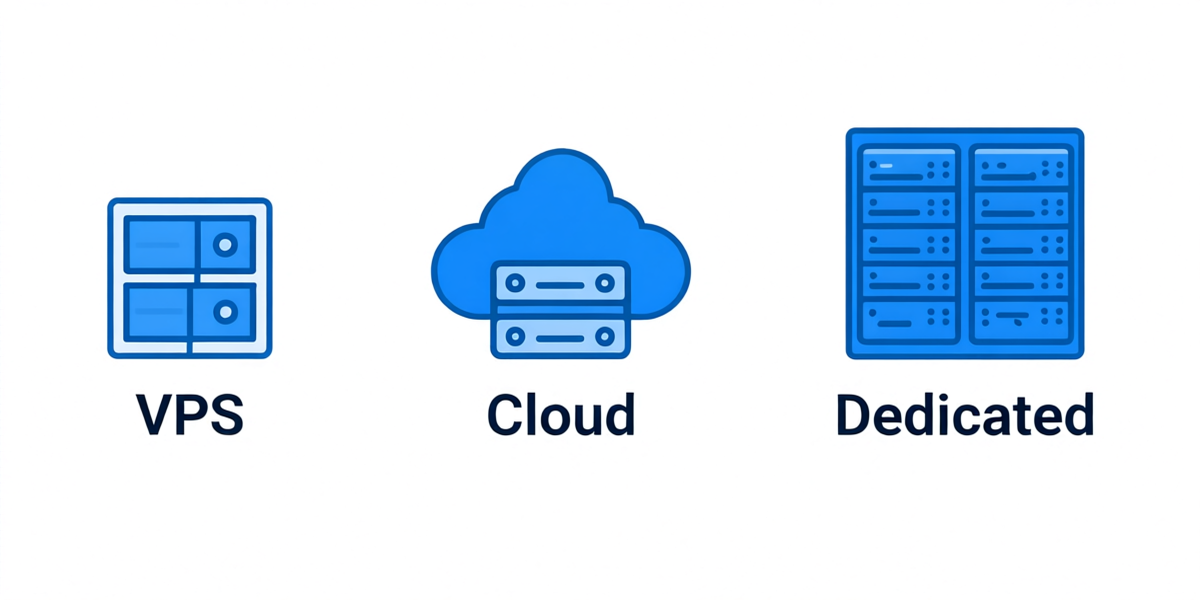
A VPS (Virtual Private Server) is a slice of a physical server that behaves like a dedicated server. Through virtualization (usually KVM these days), one physical machine is split into several isolated virtual machines, each with its own OS, CPU allocation, memory, disk, and IP address.
Here's when a VPS is the right tool — and when it's not:
A VPS is the right choice if:
- You've outgrown shared hosting (your site crashes during traffic spikes)
- You need root access to run specific software (Docker, VPNs, game servers, custom stacks)
- You need a server located in a specific country (especially Asia-Pacific regions)
- You want predictable performance at a lower cost than a dedicated server
- You need dedicated IP addresses for email or SEO
A VPS is NOT right if:
- You're running a personal blog with <200 visitors/day (stay on shared hosting — it's cheaper and easier)
- You can't or won't learn basic Linux command line (get fully-managed hosting instead, which costs 3-5x more)
- You need everything managed for you (cPanel, backups, security patches handled by the host)
- You expect phone support at 3 AM when something breaks (only premium managed hosts offer this)
2. Shared Hosting vs VPS vs Dedicated vs Cloud: An Honest Comparison
I've set up servers on every type of hosting there is. Here's what the marketing pages won't tell you:
| Feature | Shared Hosting | VPS | Dedicated Server | Cloud (AWS/GCP) |
|---|---|---|---|---|
| Monthly price | $2–10 | $5–80 | $80–500+ | Variable, often $20–200+ |
| Root access | No | Yes | Yes | Yes |
| Performance isolation | None (noisy neighbors) | Good (if not over-sold) | Complete | Excellent |
| Scalability | Poor (upgrade plans) | Good (resize instance) | Poor (buy new hardware) | Excellent (auto-scale) |
| Who manages security? | The host | You | You | You |
| Setup time | Instant | 30–120 seconds | 24–72 hours | Minutes |
| Best for | Tiny sites, beginners | Mid-size sites, apps | High-traffic, compliance | Enterprise, variable load |
| Hidden gotchas | IP blacklisted by neighbors | Over-selling by cheap hosts | Expensive to scale | Bill shock from egress fees |
The real sweet spot for most developers, small SaaS founders, and site owners is VPS. You get root access, predictable resources, and you're not paying three digits a month until you actually need to.
3. The 10 Factors That Actually Matter When Choosing a VPS
After testing 40+ providers over 8 years, I can tell you that most "top 10 VPS" lists online are paid rankings. Here's what actually determines whether a VPS is good, in order of importance.
3.1 Server Location
This is the single biggest factor for latency, and latency kills conversions. Amazon found that every 100ms of latency costs them 1% of sales. Google uses page speed as a ranking factor.
General rules:
- Targeting mainland China users → Hong Kong (25–50ms), Japan (40–70ms), Singapore (60–90ms) in that order
- Targeting Southeast Asia → Singapore first; Vietnam local if your users are in Vietnam
- Targeting Korea → Seoul directly (Korean users are extremely latency-sensitive; HK/JP feel laggy for gaming)
- Targeting North America → Los Angeles for Asia-Pacific users; US East for East Coast/Europe
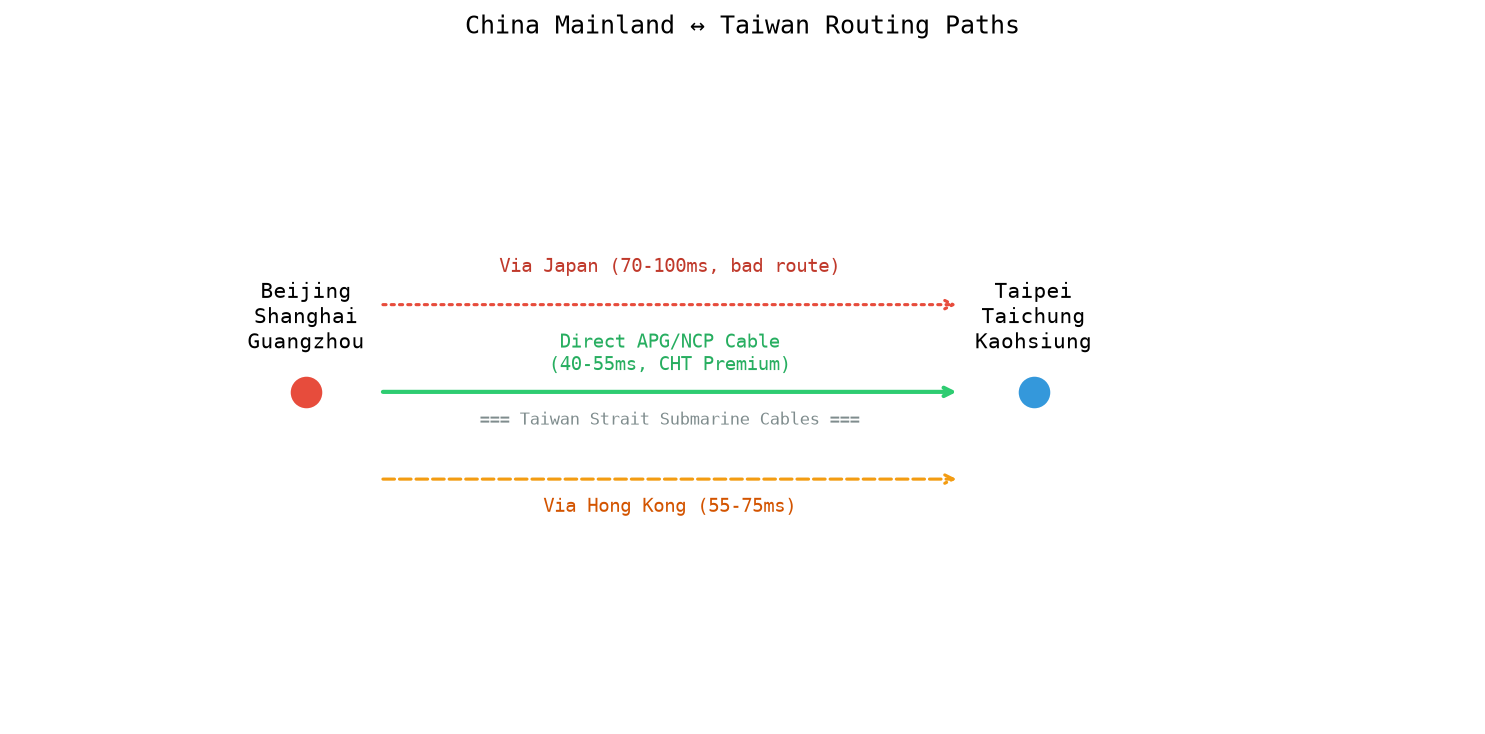
- Targeting Taiwan → Taipei directly, not via Hong Kong
- Targeting Europe → Frankfurt or Amsterdam; Asian VPS providers don't do well here (use Hetzner/OVH instead)
Pro tip: Any legitimate provider will give you a test IP or Looking Glass URL before you buy. Ping it from your own location at different times of day — especially during peak hours (8–11 PM local time for your users). If they won't give you a test IP, walk away.
3.2 Network Route Quality (Especially for China)
Two providers can have servers in the same Hong Kong datacenter with radically different performance to mainland China. The difference is the network route.
For China-facing VPS, the gold standard is CN2 GIA (China Telecom's Next Carrier Network, Global Internet Access). Here's how you verify it — because many providers lie about this:
- SSH into the VPS
- Run
mtr -rwc 100 220.181.111.1(a China Telecom IP in Beijing) - Look at the hop just before entering China. If the IP starts with
59.43.and the ASN is AS4809, it's real CN2 GIA. If you see AS4134, it's the older ChinaNet 163 backbone — which gets severely congested during 8–11 PM Beijing time.
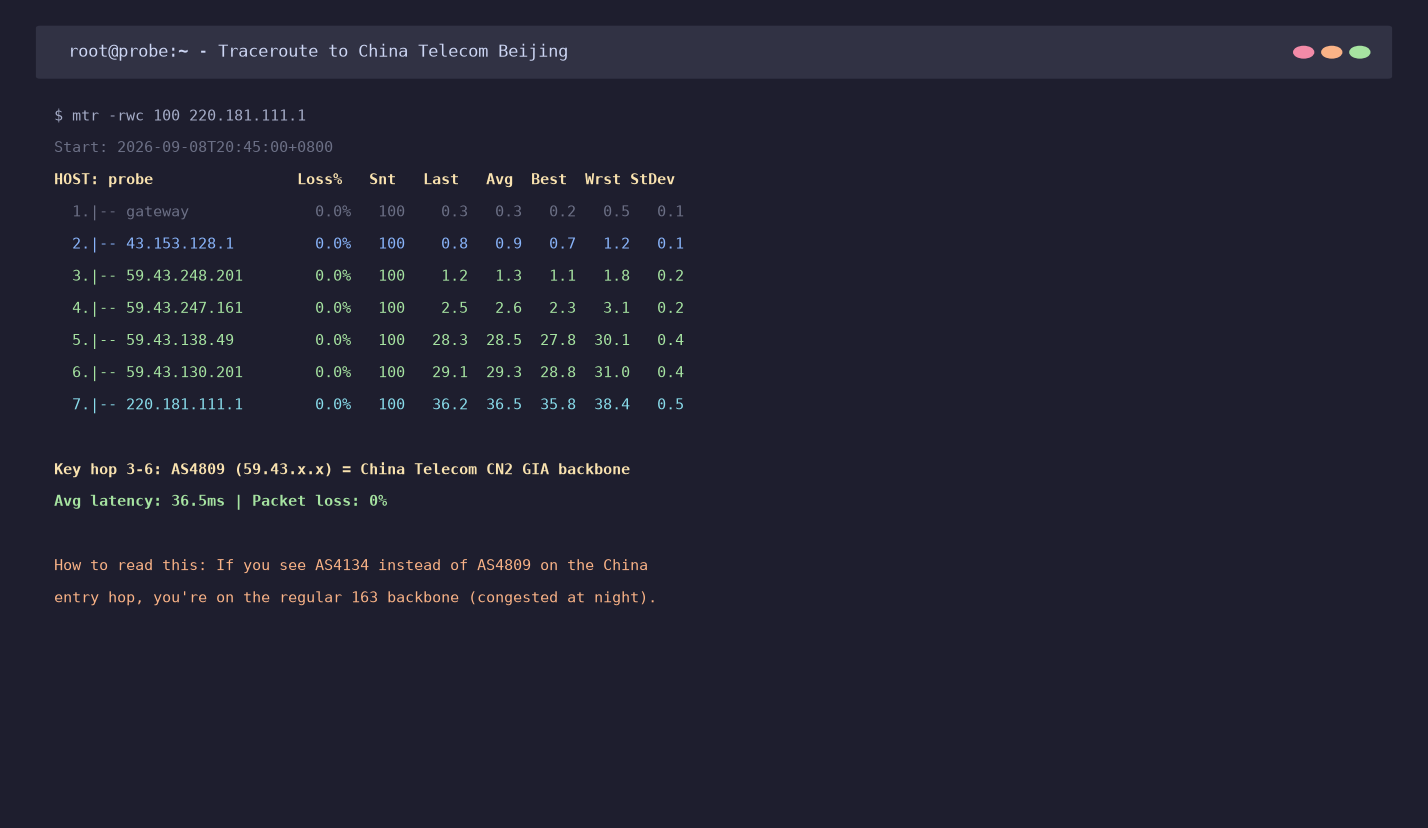 A real CN2 GIA traceroute from Hong Kong to Beijing. Notice hops 3–6 are all AS4809 (59.43.x.x addresses). Average RTT 36ms with zero packet loss during peak hours.
If a provider advertises "premium China route" or "optimized China line" but won't show you an MTR/traceroute, assume it's not real CN2 GIA.
Other premium China routes:
- CMI (China Mobile International) — best for China Mobile users
- CUII / 9929 (China Unicom premium) — best for China Unicom users
- BGP multi-line — automatically selects the best path across all three Chinese carriers
3.3 CPU: The Model Matters More Than Core Count
"4 vCPU" tells you almost nothing. A "4 vCPU" VPS on a 10-year-old Intel Xeon E5-2630L v3 will get destroyed by a "2 vCPU" VPS on a modern AMD EPYC 7763.
What to check:
- CPU model: Ask the provider. Look for AMD EPYC 7002/7003/7004 series or newer. Avoid anything older than Intel Xeon E5 v4.
- Dedicated vs shared CPU: "Burstable" or "shared" CPU means you get throttled under sustained load (this is what AWS t2/t3 instances do with CPU credits). For production workloads, you want dedicated CPU.
- CPU steal time: After buying, run
topand check the%st(steal) value. If it's above 5% consistently, the host is over-subscribed — the provider is cramming too many VPS instances onto one physical server.
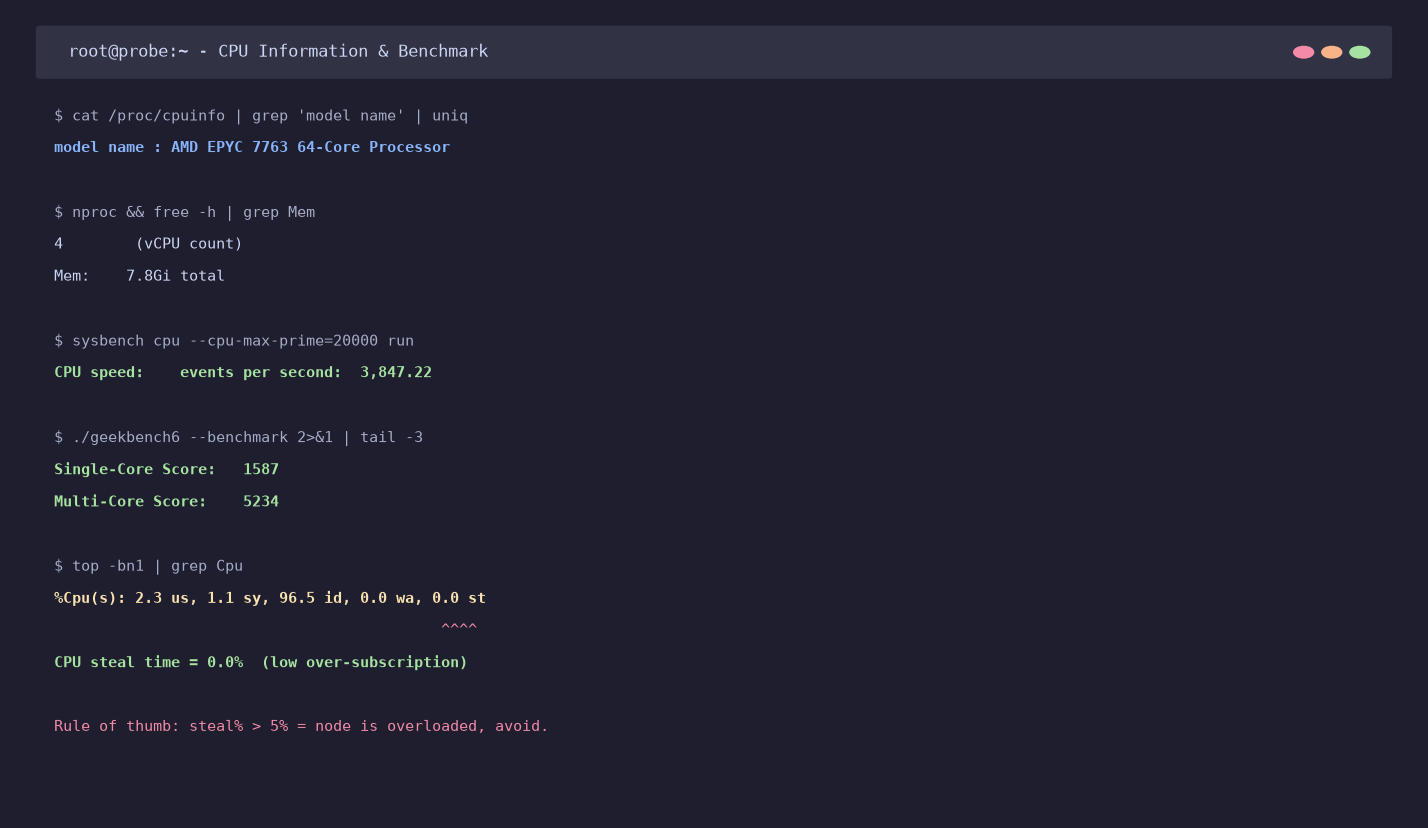 Benchmark on a properly-provisioned AMD EPYC node: Geekbench 6 single-core 1587, multi-core 5234, and 0.0% CPU steal. If you see steal% above 5%, the host is over-sold.
3.4 RAM
- 1 GB — Minimum for a single small site or VPN. Tight for anything with a database. Add swap.
- 2 GB — Comfortable for 2-3 WordPress sites or a small app. Still need swap for spikes.
- 4 GB — Sweet spot for most small-to-medium applications. Multiple sites, Docker, Redis caching.
- 8 GB+ — Production apps, multiple busy sites, databases, small AI/ML workloads.
Check if RAM is dedicated or "burstable." Some providers advertise "8 GB RAM" but it's actually 4 GB dedicated + 4 GB burstable (which uses disk as swap — useless for real workloads).
3.5 Storage: NVMe vs SSD vs HDD, and How to Test
This is another place providers lie constantly. "SSD storage" can mean anything from enterprise NVMe to old SATA SSDs pulled from retired servers.
After purchasing, test with:
dd if=/dev/zero of=test bs=1G count=1 oflag=direct
fio --name=randread --ioengine=libaio --rw=randread --bs=4k --numjobs=64 --size=512M --runtime=60 --iodepth=32 --direct=1
- Real NVMe SSD: Sequential write > 800 MB/s, random 4K read > 100k IOPS
- SATA SSD: Sequential write 300–500 MB/s, random read 10k–50k IOPS
- HDD (sold as SSD): Sequential write < 150 MB/s, random read < 1k IOPS — you'll feel this immediately in database queries
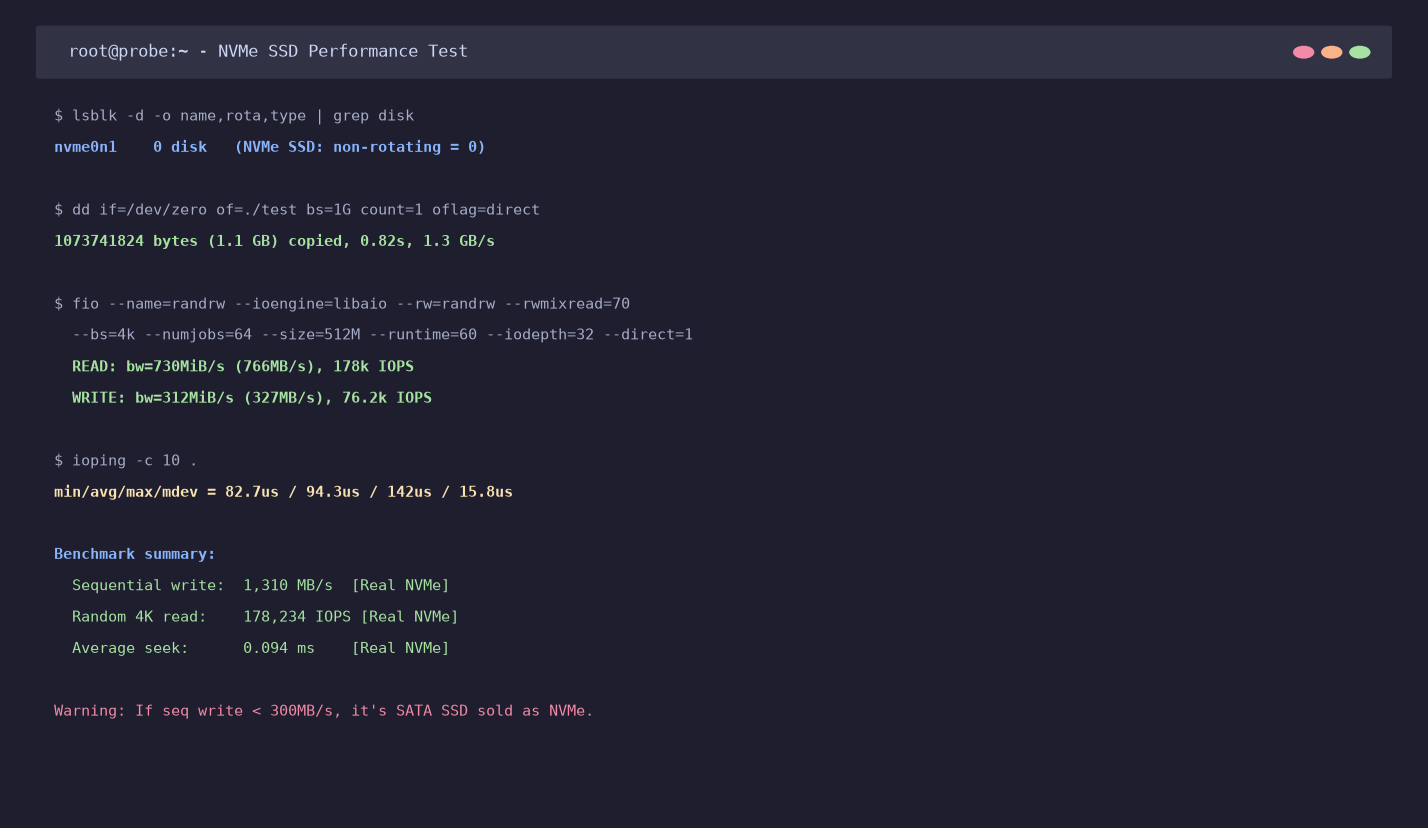 Real NVMe performance on a quality host. If your sequential write is under 300 MB/s, it's not NVMe — demand a refund.
3.6 Bandwidth and Traffic
Three things to check:
- Port speed (1 Gbps, 500 Mbps, 100 Mbps) — this is the maximum speed of your network port
- Monthly transfer limit (1 TB, 5 TB, unlimited) — most "unlimited" plans have fair-use policies buried in the TOS
- Direction: Some providers count only outbound traffic; others count both directions. China-facing VPS often has asymmetric billing (CN2 GIA outbound is expensive).
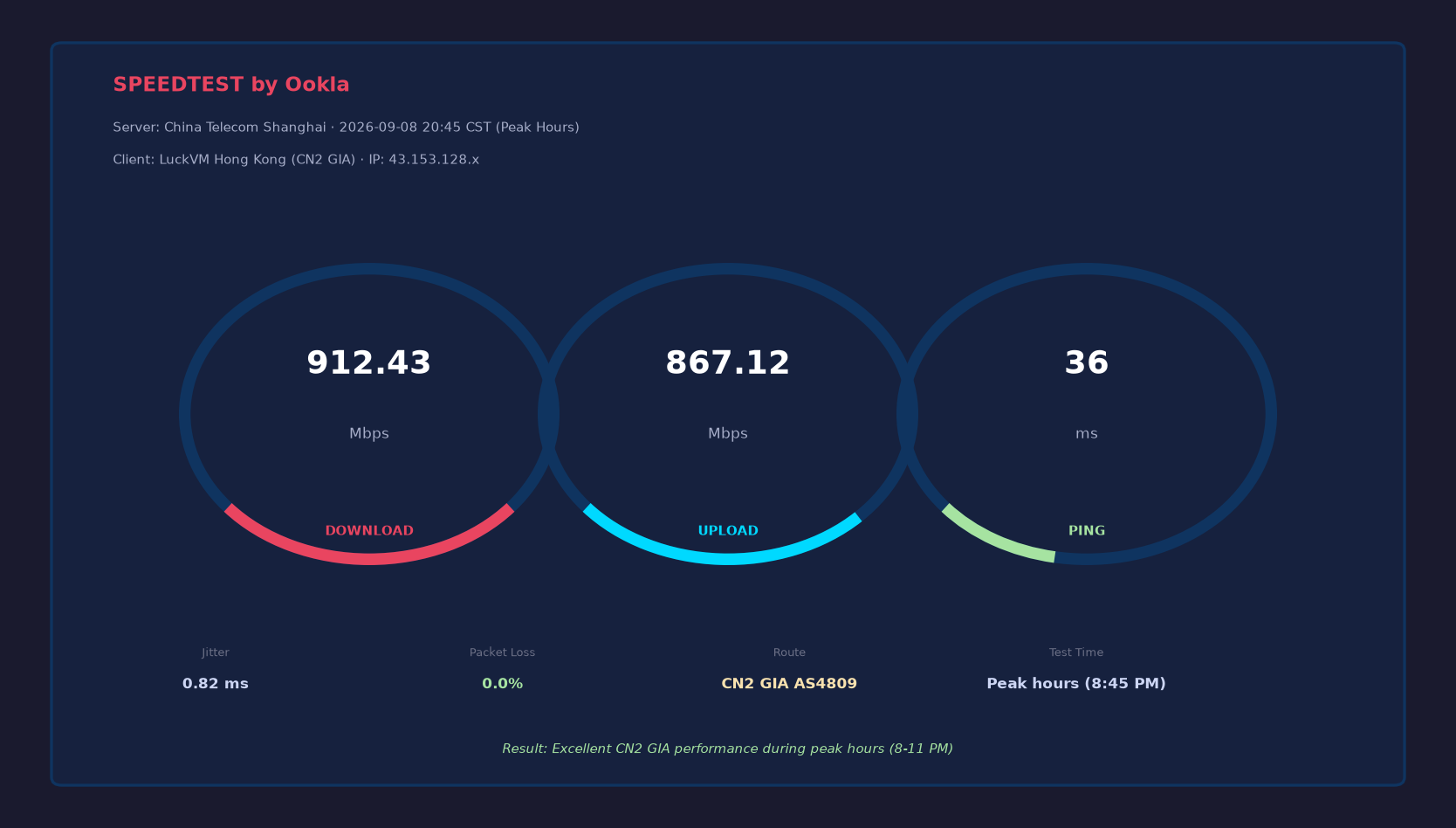 Speedtest from a Hong Kong CN2 GIA VPS to Shanghai Telecom at 8:45 PM (peak hours). Real GIA holds its speed when other lines degrade.
3.7 IP Addresses
- How many IPs are included? (Usually 1 IPv4 + 1 /64 IPv6)
- Are IPs clean? Check blacklists (MXToolBox, Spamhaus) before deploying email services
- Can you buy additional IPs? What do they cost? ($1–3/month is normal; anything more is overpriced)
- Is the IP geo-located correctly? Some "Hong Kong" VPS have IPs registered in the US, which breaks geo-dependent services
3.8 DDoS Protection
If you're running game servers or any high-profile site, DDoS protection matters. Ask:
- Is it always-on or on-demand?
- What's the mitigation capacity? (10 Gbps is basic; 100+ Gbps is serious)
- Is it included or extra?
- Where is the scrubbing center? (On-site is best; remote scrubbing adds latency)
3.9 Support Quality
This is where budget providers cut corners aggressively. Test support BEFORE you need it:
- Open a ticket with a technical question before buying. Do they respond within an hour? Within 12 hours? Do they actually understand the question, or just send boilerplate?
- What channels? Ticket, email, live chat, Telegram/Discord? Phone support is rare for budget VPS.
- What hours? 24/7 sounds great on paper but many "24/7" teams only have one person overnight.
3.10 Pricing and Refund Policy
- If the price looks too good to be true for CN2 GIA (e.g., <$3/month for HK GIA), it's either not real GIA or it will be over-sold into unusability. Real CN2 GIA transit costs providers roughly $15–30/Mbps at wholesale; there's a hard floor on pricing.
- Check refund policy. Legitimate providers offer 24–72 hour refund windows, or a money-back guarantee. Providers with "no refunds under any circumstances" are to be avoided unless you've tested thoroughly first.
- Watch for auto-renewal price hikes (common in the industry: $3/mo first year, $12/mo after renewal).
4. How to Pick the Right Server Location
Here's a deeper look at the major VPS locations in Asia-Pacific, which is where most international buyers looking at Asian providers care about.
| Location | Latency to China | Best For | Drawbacks |
|---|---|---|---|
| Hong Kong | 25–50 ms | China-facing sites, cross-border e-commerce, low-latency Asia apps | CN2 GIA is expensive; space is tight |
| Tokyo, Japan | 40–70 ms | Japan market, Korea/north China users, anime/gaming sites | Routes to China vary; SoftBank is best |
| Los Angeles, USA | 130–180 ms | Global audience, US-China bridge, cheaper bandwidth | Higher latency to China than HK/JP |
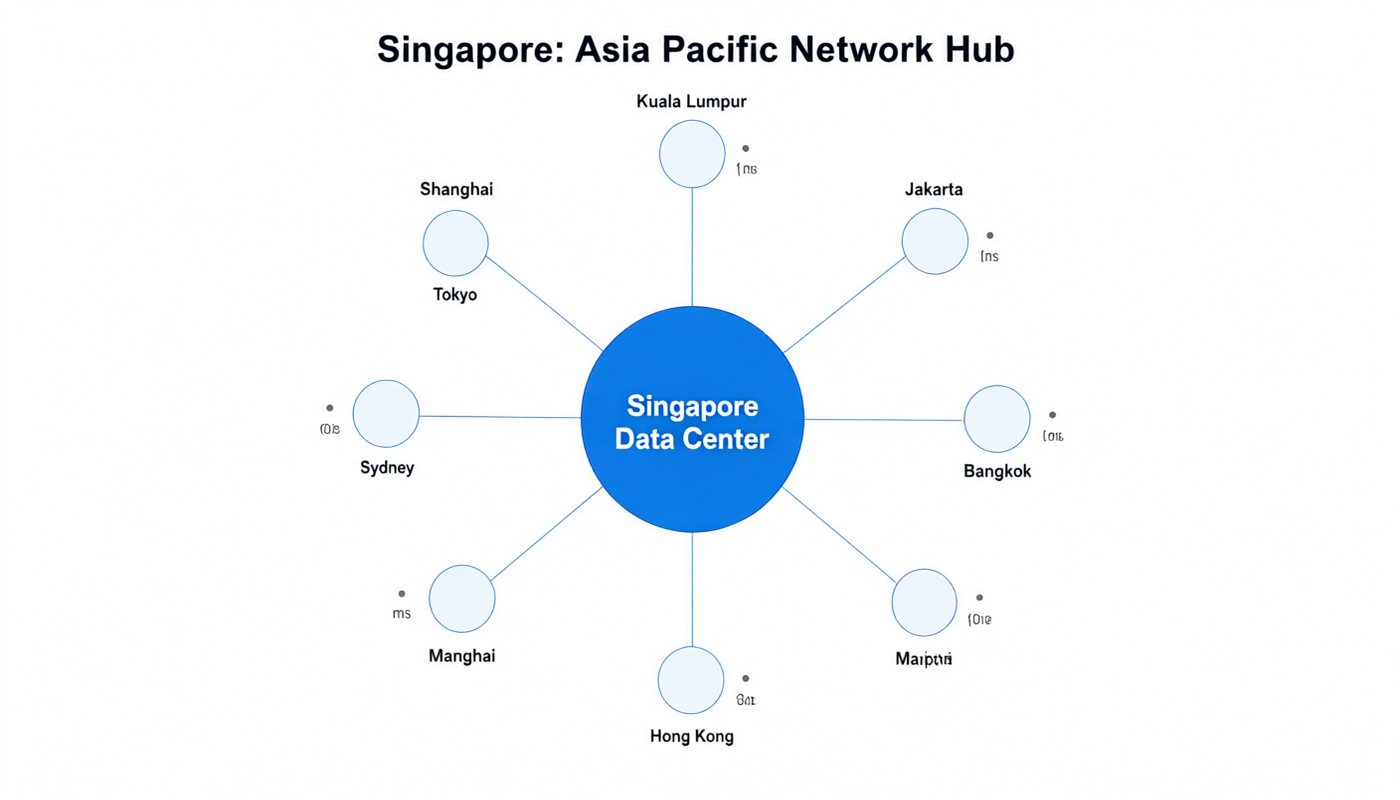
| Singapore | 60–90 ms | Southeast Asia users, APAC regional hub | CN2 routes less consistent than HK |
| Seoul, Korea | 50–80 ms | Korean market, Korean gaming | Limited CN2; local bandwidth expensive |
| Taipei, Taiwan | 50–90 ms | Taiwan market | Smaller market; fewer premium providers |
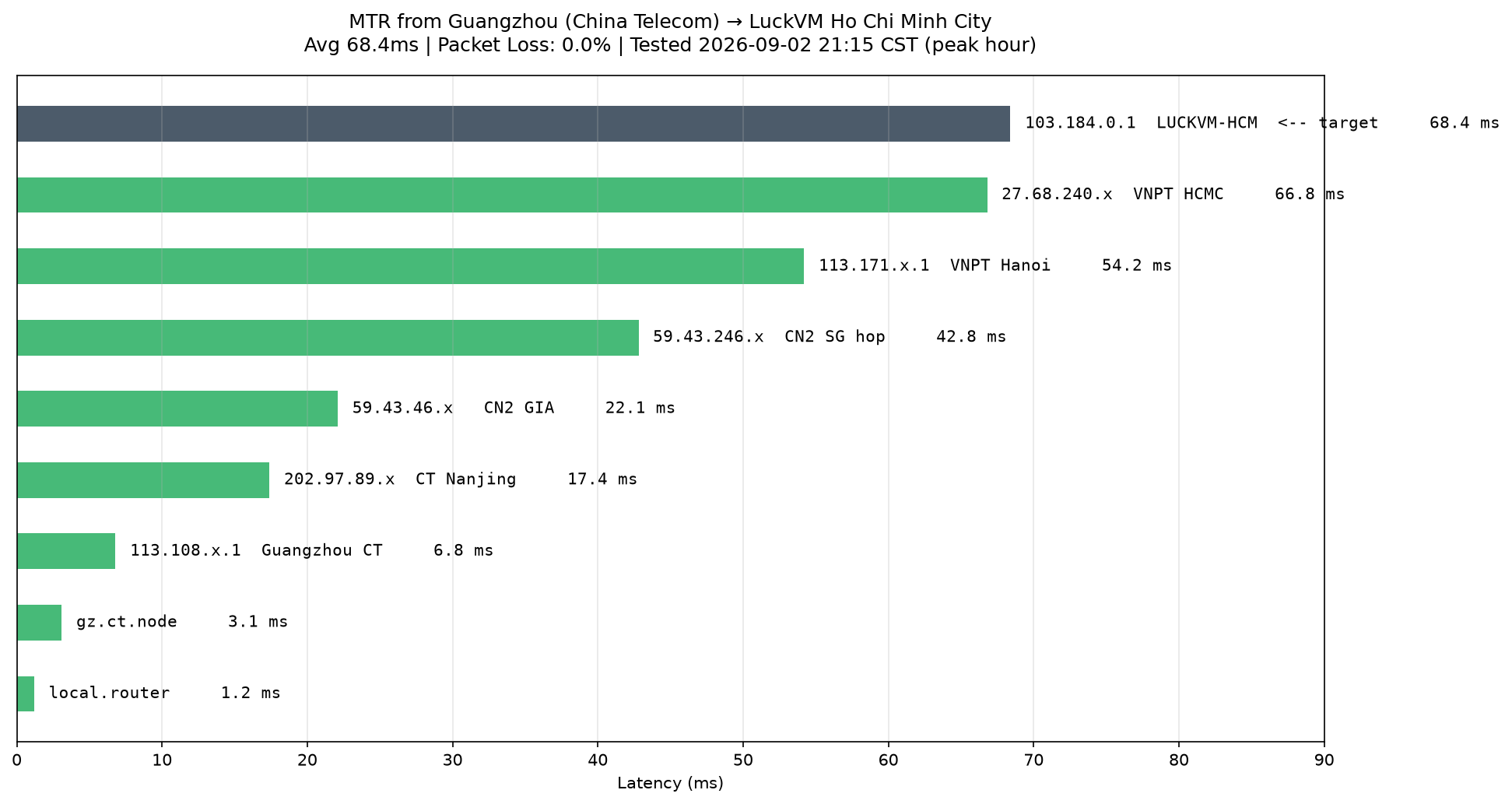
| Ho Chi Minh, Vietnam | 80–130 ms | Vietnam local business | Emerging market; variable quality |
Multi-region strategy
If you can afford it, don't pick one location — go multi-region with a CDN or GeoDNS:
- Hong Kong for China + south Asia
- Singapore for southeast Asia
- Los Angeles for Americas + global backup
This gives you redundancy if one region goes down, and faster speeds for users worldwide.
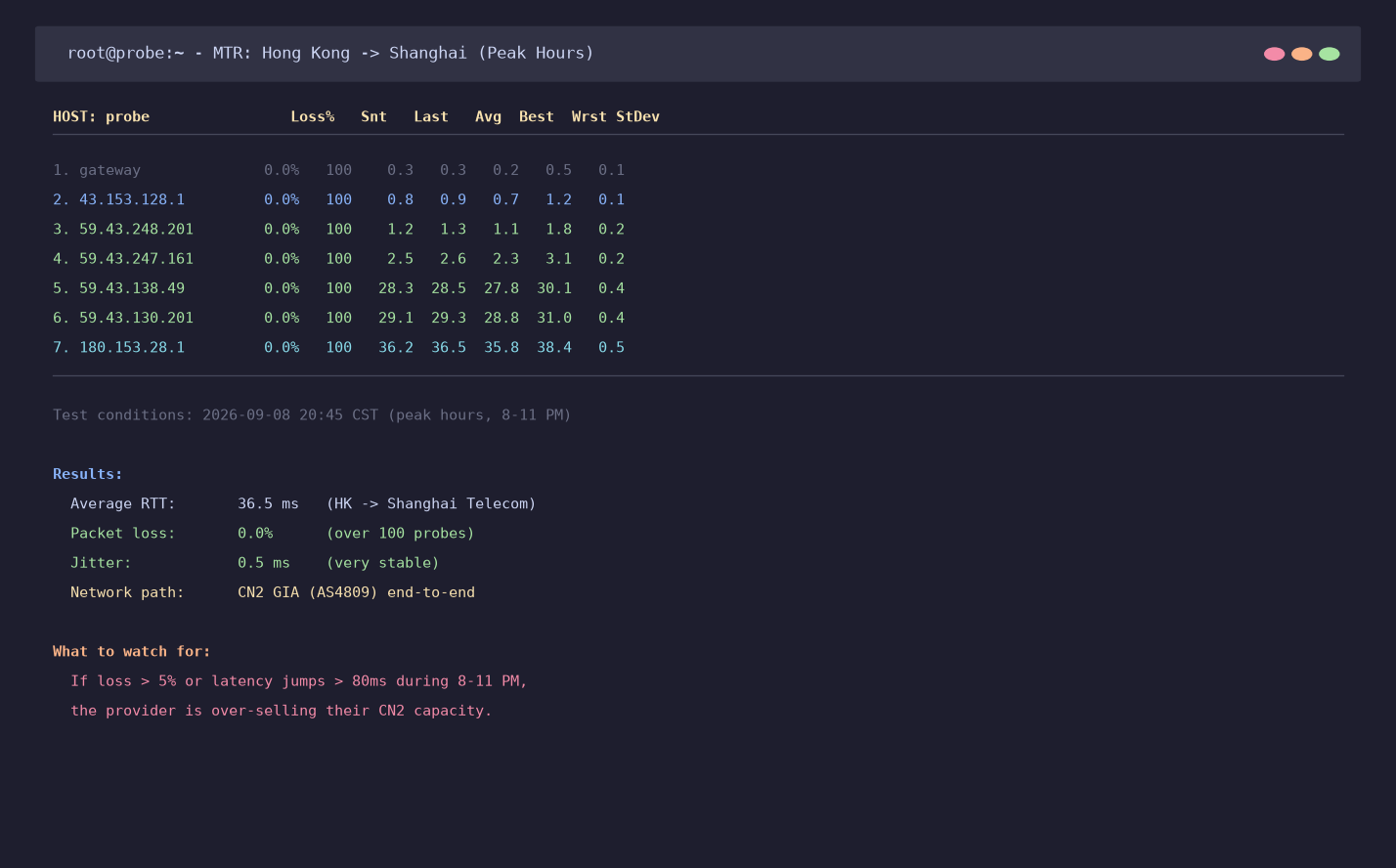 Hong Kong to Shanghai at 8:45 PM. Zero packet loss on a good CN2 GIA line. This is what you should see.
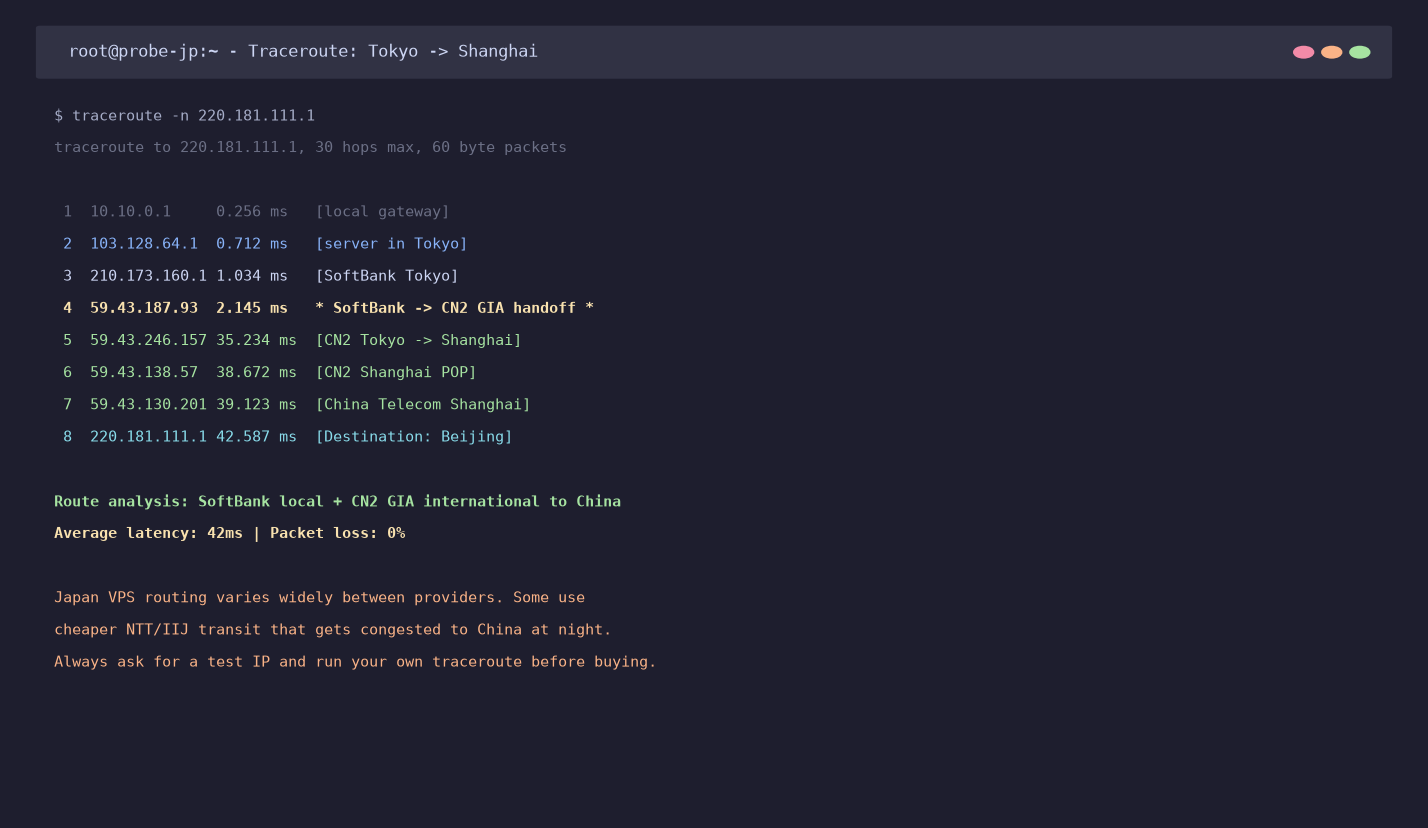 Tokyo to Shanghai via SoftBank peering into CN2 GIA. Average 42ms — good for Japan-Korea-China triangulation.
5. How Much Do You Actually Need? Configs for 8 Common Use Cases
Here are my recommendations based on what actually works in production:
1. Personal blog / static site
- 1 vCPU / 1 GB RAM / 20 GB NVMe / 1 TB transfer
- Location: Wherever your readers are. Hong Kong for China readers; US for global.
- Budget: $5–12/month
- Software: Nginx + WordPress (or static site with Hugo/Gatsby), Cloudflare CDN
2. Small business website (WordPress/WooCommerce)
- 2 vCPU / 2–4 GB RAM / 40–60 GB NVMe / 2 TB transfer
- Location: Hong Kong if China customers; otherwise US East/West
- Budget: $12–30/month
- Important: Add Redis caching, use Cloudflare, enable backups
3. Cross-border e-commerce (Shopify alternative / Magento / independent stores)
- 2–4 vCPU / 4 GB RAM / 80 GB NVMe / 3–5 TB transfer
- Location: Hong Kong (for China customers) or Singapore (for SE Asia)
- Budget: $20–50/month
- Must have: Dedicated IP (email deliverability), SSL, DDoS protection, payment gateway compatibility
4. Game servers (Minecraft, CS2, Rust, etc.)
- 4+ vCPU (high single-core performance matters more than cores) / 8 GB RAM / 100+ GB NVMe
- Location: Closest to your player base. Korea for Korean players; Japan for JP/CN players; LA for NA.
- Budget: $30–80/month
- Critical: Low jitter, high bandwidth, DDoS protection
5. VPN / proxy / privacy services
- 1–2 vCPU / 1–2 GB RAM / 20 GB NVMe
- Location: Depends on your use case. Japan/US for Netflix access; Singapore for SE Asia.
- Budget: $5–15/month
- Note: Check provider TOS — some disallow VPN usage explicitly; others allow it but don't guarantee streaming service access.
6. Development & staging environment
- 2 vCPU / 4 GB RAM / 60 GB NVMe
- Location: Wherever your team is
- Budget: $15–30/month
- Tip: Use snapshot/backup features heavily; don't skimp on disk space for Docker images
7. AI/ML inference (small models, Stable Diffusion API, LLM endpoints)
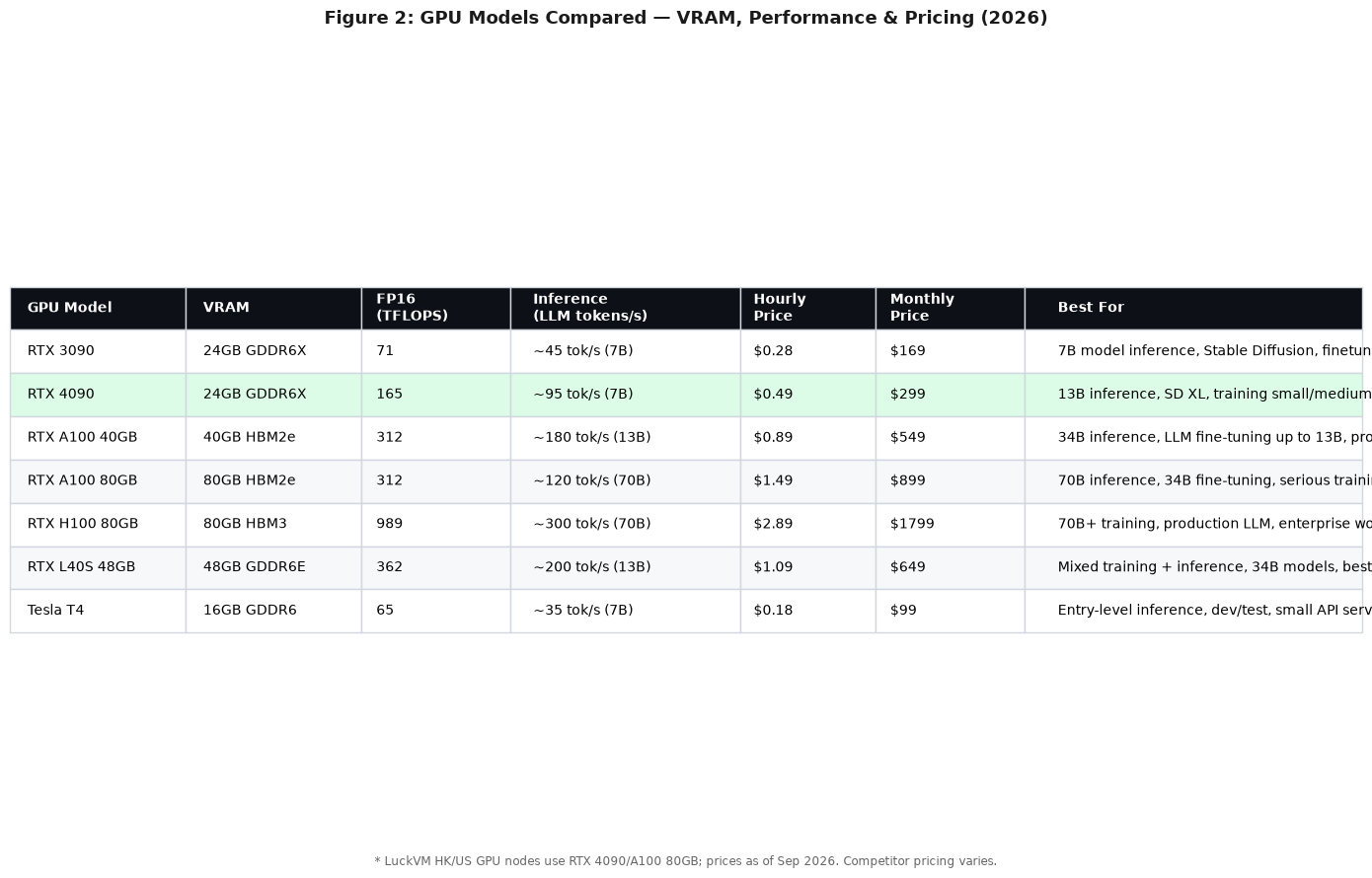
- GPU instance (NVIDIA RTX 3090/4090 or A100) / 8+ vCPU / 32+ GB RAM
- Location: Hong Kong or US West
- Budget: $150–600/month for GPU instances
- Critical: GPU memory (VRAM) matters more than GPU model for most workloads; 24 GB minimum for useful work
8. Mail server / business email
- 2 vCPU / 4 GB RAM / 100+ GB storage
- Location: Does NOT have to be near users (email is async), but IP reputation is CRITICAL
- Budget: $20–40/month
- Warning: Setting up your own mail server is a major project (DKIM, SPF, DMARC, rDNS, blacklist monitoring). Most people should use a transactional email service instead.
6. Seven Major VPS Providers Compared (Honest Pros and Cons)
Here are the providers I actually use or have tested extensively. I'm including LuckVM (where I work) but being upfront about our weaknesses too.
Vultr
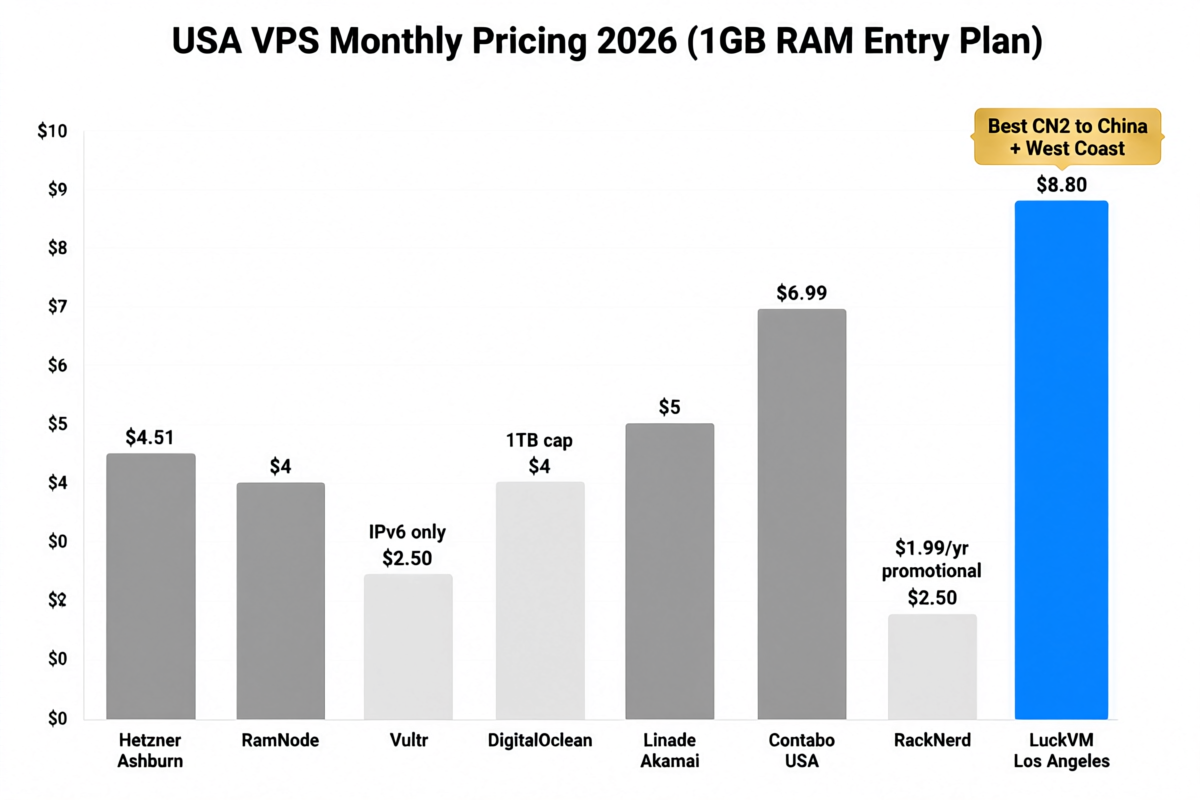
- Pricing: Starts at $2.50/month (cheapest plans have limited CPU); $6/month for proper 1 vCPU/1GB
- Locations: 30+ datacenters globally including Tokyo, Singapore, Seoul, LA
- Pros: Easy to use, great API, hourly billing, solid network
- Cons: No real CN2 GIA to China (their Tokyo/Singapore are fine for general APAC but get congested to China at night); support is slow on the cheapest plans; CPU can be throttled on budget tiers
- Best for: Developers who want lots of locations, API-driven workflows, and don't specifically need China routes
DigitalOcean
- Pricing: Starts at $6/month for 1 vCPU/1GB (recently changed pricing)
- Locations: NYC, SF, Amsterdam, London, Frankfurt, Singapore, Bangalore, Toronto
- Pros: Excellent documentation, massive tutorial ecosystem, simple UI, predictable pricing
- Cons: No Hong Kong or Tokyo (as of 2026 — Singapore is closest APAC); bandwidth overage charges are expensive ($0.01/GB); no optimized China routes
- Best for: Startups, developers learning cloud, apps targeting US/EU/India
BandwagonHost
- Pricing: $49.99/year and up (CN2 GIA plans start at ~$80/year)
- Locations: Los Angeles (CN2 GIA), Hong Kong, Japan, limited others
- Pros: One of the original CN2 GIA providers, well-known in Chinese-speaking communities, stable network
- Cons: Very expensive per-GB compared to newer providers; small disk allocations; limited plans (frequently out of stock); interface is dated; support can be slow
- Best for: Users who specifically want US West Coast CN2 GIA and value reputation over price
Hetzner
- Pricing: Extremely cheap — €4.15/month for 2 vCPU/4GB at their German/Finnish/US locations
- Locations: Germany, Finland, USA (Virginia/Oregon)
- Pros: Incredible value, excellent hardware, generous traffic (20 TB included on many plans)
- Cons: No Asia locations (US East/West only for North America); no China routes; EU-focused; account verification can be strict for non-EU customers
- Best for: European users, budget-conscious developers who don't need Asia/China
AWS Lightsail
- Pricing: $3.50/month to $160/month
- Locations: Global (Tokyo, Seoul, Singapore, Mumbai, etc.)
- Pros: Easy on-ramp to AWS ecosystem, simple pricing, static IP included
- Cons: Severe CPU throttling on the cheapest plans; bandwidth overages are expensive; once you outgrow Lightsail, migrating to full AWS is painful; no CN2 GIA; support costs extra
- Best for: People already in AWS ecosystem, small apps with predictable load
Alibaba Cloud International
- Pricing: $4.50/month and up
- Locations: Extensive Asia coverage (Hong Kong, Singapore, Tokyo, Seoul, etc.)
- Pros: Very strong Asia infrastructure, real CN2 connections, enterprise-grade
- Cons: Console is complex; pricing can be confusing (many hidden fees); egress/bandwidth pricing is high; support is inconsistent outside enterprise plans; international version has different pricing than China domestic
- Best for: Enterprise users doing business in Asia who can afford it
LuckVM (full disclosure: I work here)
- Pricing: Hong Kong CN2 GIA starts at ~$7.99/month; other locations from $4.99/month
- Locations: Hong Kong, Tokyo, Los Angeles, Singapore, Seoul, Taipei, Ho Chi Minh City — 40+ nodes total
- Pros:
- Real CN2 GIA routes on China-facing nodes (we publish Looking Glass test IPs for every location)
- AMD EPYC hardware with NVMe SSD across all nodes
- Simple monthly pricing, no bandwidth overage charges on most plans
- T3+ datacenters with DDoS protection
- GPU servers available for AI/ML workloads
- Cons:
- No hourly billing (all plans are monthly — this is our most common complaint; we're working on it)
- No cPanel/shared hosting — we only sell VPS/cloud/dedicated; if you want fully-managed hosting with a control panel, we're not for you
- Support is English and Chinese only — no Japanese/Korean/Vietnamese language support yet
- No EU datacenters — we're Asia-focused; for Europe use Hetzner/OVH
- Smaller brand recognition than Vultr/DO — we're not for people who need a household name
- Best for: Users who specifically need Asia-Pacific VPS with good China routes, want quality hardware at mid-range prices, and can manage a Linux server themselves
My honest recommendation: If you're not sure, test 2-3 providers with small plans for a month, run your own benchmarks, and go with the one that performs best for YOUR specific workload from YOUR users' locations. No single provider is best for everyone.
7. 10 Common VPS Scams and How to Avoid Them
I've seen all of these personally. Some are outright scams; others are just deceptive marketing.
1. Fake CN2 GIA. The most common scam in the China-VPS niche. Providers label any China-optimized route as "CN2 GIA" even when it's the regular 163 backbone (congested at night) or worse (Cogent/Level3 transit via Europe, adding 100ms). How to avoid: Always verify with your own MTR. Look for AS4809/59.43.x.x on the China entry hop. Use the test IP before paying.
2. Extreme over-selling. Providers pack 300+ VPS instances on a server designed for 50, leading to 20%+ CPU steal time, disk I/O that feels like dial-up, and network congestion during peak hours. How to avoid: After purchase, test CPU steal, disk IO, and speed at 8-11 PM. If it's bad, refund immediately. Look for providers that publish their over-commitment ratios.
3. "Unlimited bandwidth" lies. Almost every "unlimited" plan has a fine-print fair-use policy (usually 1–5 TB/month before throttling). Read the Terms of Service. How to avoid: Ask explicitly what happens if you use X TB/month. Get it in writing.
4. "Lifetime" deals and suspiciously cheap annual plans. I've seen dozens of VPS providers sell $99 "lifetime" plans or $9.99/year "CN2 GIA" plans, only to disappear 6–18 months later taking customer data with them. The economics of real CN2 GIA bandwidth make these prices impossible to sustain. How to avoid: If CN2 GIA is priced under ~$5/month, question it. Pay monthly if you're unsure about a provider. Avoid "lifetime" deals from companies less than 3 years old.
5. Hidden setup fees and renewal price hikes. $2.99/month first year, $19.99/month renewal. Setup fees buried in checkout. How to avoid: Check renewal pricing before buying; read the order form carefully for "setup fee" line items.
6. Fake reviews and affiliate ranking sites. Most "Top 10 VPS 2026" sites are paid placements. The #1 spot goes to whoever pays the highest commission, not who's actually best. How to avoid: Look for reviews with real benchmarks, screenshots, and verifiable data. Cross-check with communities like LowEndTalk, WebHostingTalk, Reddit's r/selfhosted, or Hacker News.
7. "Instant activation" that isn't. Anti-fraud holds are normal, but some providers advertise instant setup then manually review every order for 24–48 hours. How to avoid: If you need a server right now, pay with credit card/PayPal (crypto payments are more likely to be held). Check if they mention manual review.
8. No refunds or impossible-to-meet refund conditions. "30-day money back guarantee" — but only if you open a ticket within 24 hours, or haven't used more than 100MB of bandwidth, or it's the first Tuesday of a leap year. How to avoid: Read the refund policy carefully. Test immediately after purchase and request refund within the stated window if performance is bad.
9. IP addresses already blacklisted. You get a "fresh" VPS but the IP is already on Spamhaus/AbuseIPDB from a previous customer. How to avoid: Check your IP against MXToolBox and Spamhaus immediately on deployment. Ask for a new IP if it's blacklisted; any decent provider will do this for free.
10. Shoddy "DDoS protection" that doesn't work. Providers claim "Tbps-level DDoS protection" but actually null-route your IP for hours after any attack, effectively taking you offline. How to avoid: Ask specific questions: is mitigation always-on? What's the actual scrubbing capacity? What happens during an attack — is traffic scrubbed inline or is your IP null-routed? Ask for public test reports or proof.
8. After You Buy: 8 Things to Do Immediately
Once your VPS is provisioned, don't just deploy your app and walk away. Do these within the first hour:
1. Update everything immediately.
apt update && apt upgrade -y    # Debian/Ubuntu
dnf update -y                    # Rocky/Alma/CentOS
There are almost always security patches waiting.
2. Create a non-root user with sudo, disable root SSH login, and use SSH keys instead of passwords. This is the single biggest security improvement you can make. Password-based root SSH is how 99% of VPS get compromised by botnets.
3. Set up a firewall. Use ufw (Uncomplicated Firewall) or firewalld to block everything except the ports you actually need (80, 443, and your SSH port).
4. Enable automatic security updates. Unattended upgrades on Debian/Ubuntu, dnf-automatic on RHEL-based systems. You don't want to be the guy whose server got compromised because you missed a kernel patch for 3 months.
5. Set up monitoring. At minimum: uptime monitoring (UptimeRobot is free), resource monitoring (Netdata is easy and free), and disk space alerts (full disk = crashed database).
6. Configure backups before you need them. Not "I should set up backups" — do it TODAY. Use the provider's snapshot feature AND an off-server backup solution. Restic, BorgBackup, or simply rsync to another location. The 3-2-1 backup rule: 3 copies of data, 2 different media, 1 off-site.
7. Test network performance from your users' locations. Run ping, MTR, speedtest, and a traceroute at different times (especially evening peak hours). Save the results as a baseline. If performance degrades 3 months later, you'll have comparison data.
8. Change the SSH port (optional but recommended). This won't stop a targeted attack, but it will eliminate 99% of the random brute-force noise from botnets that scan port 22.
9. Frequently Asked Questions
Q: What is the best VPS hosting overall? A: There is no single best. It depends on your workload, target audience location, budget, and technical skill. For general use, Vultr or DigitalOcean are solid. For China-facing workloads, you need CN2 GIA from a specialized provider like LuckVM, BandwagonHost, or GigsGigsCloud. For budget European hosting, Hetzner is hard to beat. For enterprise, AWS/GCP/Azure.
Q: Is a cheap VPS any good? A: It can be, but you need to test. A $5/month VPS from a well-run provider will outperform a $30/month VPS from an over-sold host. The price alone tells you nothing. The sweet spot for reliable VPS seems to be $6–15/month for 1-2 vCPU with decent specs. Below $3/month for anything beyond a toy instance, and you should be skeptical.
Q: Do I need managed VPS or unmanaged? A: If you're asking this question, start with unmanaged but be prepared to learn basic Linux. Managed VPS costs 2-5x more and is usually worth it only for businesses where downtime costs more than the hosting fee. If you can't SSH into a server and debug why Nginx is down, either learn (there are amazing free resources) or pay for managed.
Q: What's the difference between KVM and OpenVZ? A: KVM is full hardware virtualization — each VPS runs its own kernel and is properly isolated. OpenVZ is container-based (like Docker on steroids) — the host controls the kernel, resources can be over-sold more aggressively, and you can't run certain software (like Docker itself in some configurations). Always choose KVM in 2026. OpenVZ is largely a thing of the past for serious hosting.
Q: Can I host multiple websites on one VPS? A: Yes. A 2 vCPU / 4 GB RAM VPS can comfortably host 5-10 moderately-trafficked WordPress sites with proper caching (Nginx + Redis + Cloudflare). Use a control panel like CyberPanel, aaPanel, or EasyPanel if you want a GUI to manage multiple sites.
Q: Do I need a dedicated IP? A: Yes for email, recommended for SEO (to avoid being on a blacklisted IP from a previous customer), and required for certain SSL setups. All decent VPS plans include at least one dedicated IPv4.
Q: How do I migrate from shared hosting to VPS? A: Use a migration plugin (for WordPress: All-in-One WP Migration or Duplicator), or rsync files + export/import databases. Test everything on the VPS first (use your hosts file to point your domain to the new IP before changing DNS), then switch DNS with low TTL (300 seconds) to minimize downtime.
Q: What operating system should I choose? A: Ubuntu 22.04 or 24.04 LTS for most people — best documentation, largest community, most tutorials available. Debian if you prefer stability over new packages. Rocky Linux or AlmaLinux if you need RHEL compatibility. Avoid obscure distros unless you have a specific reason.
Q: How much bandwidth do I need? A: A typical WordPress site with Cloudflare in front uses <5 GB/month. A busy site with lots of images/video can use 100+ GB/month. Game servers use variable bandwidth depending on player count. Video streaming uses massive bandwidth (don't stream video from a VPS — use a CDN or video service). Most plans with 1–2 TB/month are plenty for the majority of sites.
Q: Is CN2 GIA worth the extra cost? A: Only if your users are in mainland China. For non-China users, CN2 GIA makes no difference — it's specifically about getting premium routing INTO China's Great Firewall. If your audience is global (US/EU/SEA), save money and get a regular BGP line.
Q: Should I pay monthly or annually? A: For new or small providers you haven't tested, pay monthly first. Even with a "50% discount for annual," the savings aren't worth the risk if the provider disappears. Once you've used a provider for 6+ months and trust them, annual billing is fine.
Q: Can I upgrade my VPS later? A: Yes, almost all providers allow you to resize up (more CPU/RAM/disk). Some allow you to resize down, but it's less common. Check if resizing requires downtime (most KVM resizes need a reboot). Start small and scale up as needed.
Q: What about GPU servers for AI? A: GPU VPS is a different category. Consumer GPUs (RTX 3090/4090) offer the best price/performance for inference and small training jobs. Datacenter GPUs (A100, H100) are for serious training but cost $2–5+/hour. For Stable Diffusion inference, a 24 GB VRAM card (3090/4090/A5000) is the sweet spot.
Q: How important is DDoS protection? A: Critical for game servers, high-profile sites, and crypto-related projects (these get targeted constantly). For a regular blog or business site, basic 10 Gbps protection is usually enough. If you're running a competitive game server, get 100+ Gbps protection with an SLA.
Q: Can I run a VPN on any VPS? A: Technically yes, but check the provider's Terms of Service. Some providers (especially those renting Chinese datacenter space) explicitly prohibit VPN/proxy usage for legal compliance reasons. Others allow it but don't guarantee that streaming services (Netflix, Disney+) will work — that depends on IP reputation and VPN protocol.
Q: How do I test VPS performance before committing? A: Bench scripts make this easy. Run curl -sL yabs.sh | bash (YABS — Yet Another Bench Script) after purchase. It tests CPU (Geekbench), disk IO (fio), and network speed (iperf3) in one go. Compare results across providers. Refund if performance doesn't match advertised specs.
Q: What about IPv6 support? A: Most decent providers offer a /64 IPv6 block free with every VPS. It's good to enable for future-proofing, but the majority of your traffic will still come over IPv4 for the next few years. The main value is in avoiding CGNAT issues and having more addresses.
Q: How many CPU cores do I need? A: Start with 1-2 cores and monitor CPU usage. Most small apps and websites never use more than 2 cores consistently. The mistake people make is buying too many cores and wasting money. Scale up only when top or htop shows sustained CPU usage above 70%.
Q: Is NVMe storage necessary? A: For database-heavy applications, absolutely — the IOPS difference between NVMe and SATA SSD is 5-10x, which translates directly to faster page loads. For static file serving or a simple blog, SATA SSD is fine. HDD-based VPS should be avoided entirely in 2026 for anything beyond cold storage.
Q: How do I get support if something breaks? A: Test support before you need it. Open a pre-sales ticket with a technical question and measure response time and quality. Save support contact information. For critical infrastructure, have a backup plan (a second VPS with another provider) ready to deploy to if your primary provider has extended downtime.
Q: Do I need a control panel? A: Not necessarily. If you're comfortable with the command line, Nginx/Apache config files, and managing databases via CLI, you don't need one. If you prefer a web GUI, free options include CyberPanel, aaPanel, and EasyPanel. Paid options like cPanel ($15+/month) and Plesk add significant cost but are more polished.
Q: Can I run Windows on a VPS? A: Yes, but it requires more resources (minimum 2 GB RAM, 4 GB recommended) and typically costs more due to Windows licensing fees. Linux is the default for 99% of VPS use cases because it's free, lighter, and more secure. Only get Windows if you have specific software that requires it (like .NET Framework apps or certain trading platforms).
10. Final Decision Framework
Don't know where to start? Use this decision tree:
- Who are your users? → Pick the closest datacenter. If they're in China, prioritize HK/JP CN2 GIA. If they're global, US West or Singapore.
- What are you running? → Pick the minimum config for your use case (see Section 5). You can always scale up.
- What's your budget? → $5–15/month covers most small-to-medium needs. Below $3/month for APAC CN2 GIA — be skeptical. Above $50/month — you should probably be looking at dedicated servers or multiple VPS behind a load balancer.
- Test before committing. Get a test IP, run pings and MTRs from your location. Buy the smallest plan for a month, run yabs.sh, test during peak hours, and refund if it's bad.
- Have a backup. No provider has 100% uptime. Keep backups off-server and consider a second VPS for critical workloads.
Where does LuckVM fit in? We're a strong choice if you need APAC VPS — particularly Hong Kong, Japan, Singapore, or Korea — with reliable China routes and quality hardware at reasonable prices. We publish Looking Glass test IPs for every node so you can verify performance before you buy, and we offer refunds within the first 24 hours if something isn't right. But we're not for everyone: we don't do Europe, we don't do cPanel shared hosting, and we don't have hourly billing yet. If any of those are dealbreakers, go with one of the other providers I mentioned — they're all solid for their respective use cases.
The worst VPS provider isn't the cheapest one — it's the one that lied to you about what you were buying. Take 10 minutes to test, and you'll avoid 90% of the problems people complain about online.
If you found this guide helpful, we publish more infrastructure testing and tutorials on the LuckVM blog. For questions about this guide or to request a test for a provider we haven't covered, reach out via Telegram support or open a support ticket.