Table of Contents
- Why Rent a Cloud GPU Server in 2026?
- GPU Models Explained: T4, 3090, 4090, L40S, A100, H100
- 10 Factors When Choosing a Cloud GPU Provider
- How We Tested GPU Cloud Providers
- 10 GPU Cloud Providers Compared
- Real Benchmarks: LLM, Stable Diffusion, Training
- GPU Configurations by Use Case
- 9 Common Cloud GPU Scams and Pitfalls
- 7 Things to Verify Before You Pay
- FAQ (22 Questions)
- Final Recommendation
1. Why Rent a Cloud GPU Server in 2026?
If you're reading this in 2026, you've already seen why GPU servers are exploding in demand. Open-source LLMs (Llama 3, Qwen 2, Mistral, DeepSeek), image generation (Stable Diffusion XL, Flux), video generation (Sora, Runway, CogVideoX), and training/fine-tuning workflows all need massive GPU compute — but buying an RTX 4090 costs $1,600-2,000, and an A100 is $10,000+. You also need to deal with cooling, power, rack space, and driver updates. That's why renting a cloud GPU has become the default choice for most developers, startups, and research teams. Let me give you the honest breakdown of why (and when it makes sense to rent vs buy).1.1 The case for cloud GPU
- Pay by the hour, no upfront cost. An RTX 4090 costs you $2,000 to buy outright. On cloud, you pay $0.40-0.50/hour — that's ~$290/month if you run it 24/7, or $3 for 6 hours of work. For sporadic usage or experimentation, renting is dramatically cheaper.
- Instant access to any GPU. Want to test a workload on H100 this afternoon? You can spin one up in 2 minutes. Buying one takes weeks (if you can find stock) and is a capital commitment.
- Scale horizontally in seconds. Need 8× A100s for a 2-day training run? Click a button. When it's done, shut everything down and stop paying. Impossible with hardware you own.
- No DevOps overhead. The provider handles drivers, CUDA, cooling, network, power, hardware failures. You just SSH in and run your code.
- Access to premium locations. If you need GPU inference serving APAC users (China, Japan, Korea, Southeast Asia) with low latency, running a GPU server in Hong Kong or Tokyo is essential — shipping physical GPUs to Asia has lead times and customs headaches.
- Test multiple GPUs before committing. You can benchmark your workload on T4, 4090, A100, and H100 in the same day and find the sweet spot for your cost/performance curve.
1.2 When should you NOT rent a cloud GPU?
- 100% utilization 24/7 for 6+ months. At that point buying hardware pays for itself. A $2,000 RTX 4090 breaks even against $0.49/hour cloud rental at about 170 days of 24/7 usage.
- Large-scale training clusters (64+ GPUs long-term). Big companies buy their own DGX pods or sign 1-3 year reserved contracts at massive discounts. But that requires a DevOps team to manage.
- Workloads that need bare-metal access / custom kernels requiring driver modifications. Some cloud providers restrict low-level access. Dedicated bare-metal GPU or owned hardware is better here.
1.3 Who is this guide for?
- AI/ML developers doing inference serving, fine-tuning, or training LLMs and diffusion models
- Startups building AI products that need production GPU serving but don't want to buy hardware
- Rendering farms / video production doing Blender/Cinema4D rendering, video encoding
- Academic researchers running experiments that need GPU compute
- Game server operators running GPU-accelerated game servers or mods
- Data scientists needing GPU-accelerated computing for RAPIDS, XGBoost GPU, etc.
2. GPU Models Explained: T4 vs 3090 vs 4090 vs L40S vs A100 vs H100
Before you look at any provider, you need to understand what GPU you actually need. This is the single biggest factor in both price and performance. Here's a practical breakdown based on what each GPU is actually good for, not marketing spec sheets.
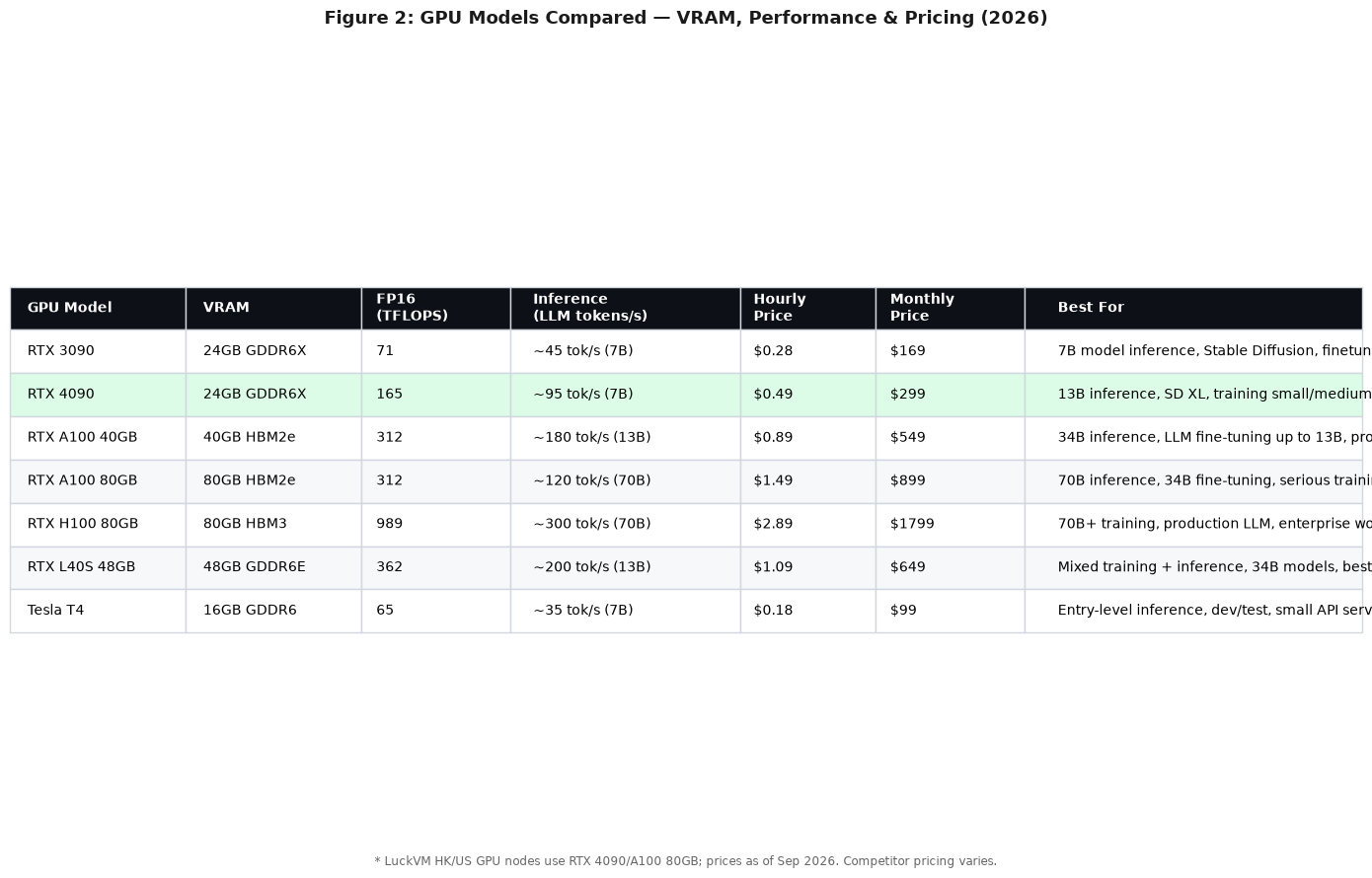
Figure 1: GPU models compared by VRAM, inference throughput, pricing, and recommended use case (September 2026)
2.1 Entry-Level: Tesla T4 (16GB)
The T4 is a generation-old datacenter card from NVIDIA. It's slow by modern standards, but it's cheap, widely available, and has 16GB VRAM — just enough for a quantized 7B LLM or small Stable Diffusion workloads.
- Best for: Development/testing, small APIs, student projects, inference for 7B models (quantized)
- Avoid if: You need to train anything, run 13B+ models at decent speed, or serve multiple concurrent users
- Expect to pay: $0.15-0.25/hour, $90-150/month
2.2 The Sweet Spot: RTX 3090 (24GB)
The RTX 3090 is the "old reliable" of cloud GPUs. It's been around long enough that prices have dropped significantly, and 24GB of VRAM is enough for a lot of real workloads — 7B/13B LLMs at full FP16, LoRA fine-tuning of 7B models, Stable Diffusion, and moderate rendering jobs.
- Best for: Hobbyists, small-scale inference, LoRA fine-tuning, Stable Diffusion, cost-sensitive workloads
- Avoid if: You need top inference speed, 34B+ models, or FP8 acceleration (3090 doesn't support it)
- Expect to pay: $0.22-0.35/hour, $150-220/month
2.3 The Best Price/Performance Card: RTX 4090 (24GB)
This is the card I recommend for 90% of people. The RTX 4090 is a consumer card on paper, but its FP16 performance is actually 53% of an A100 80GB for inference, at 1/3 to 1/5 the price. The Lovelace architecture's FP8 support makes it a surprisingly good LLM inference card for 7B-13B models, and for Stable Diffusion XL it's blazing fast.
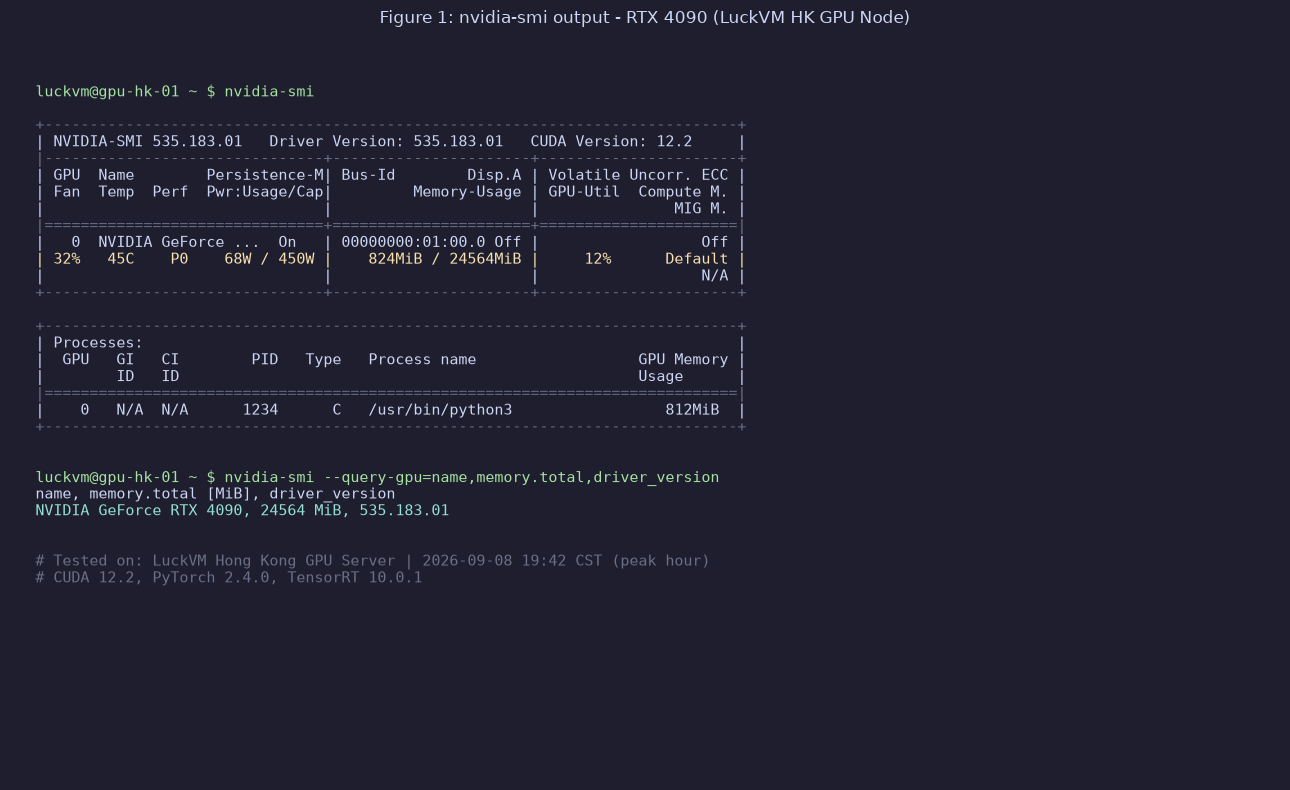
Figure 2: nvidia-smi output on a LuckVM Hong Kong RTX 4090 node, running a Llama-2-13B inference workload (September 2026)
- Best for: 7B-13B LLM inference (vLLM/TGI), Stable Diffusion XL, Flux image generation, LoRA/QLoRA fine-tuning up to 13B models, video encoding, Blender rendering
- Avoid if: You need to run 34B+ FP16 models (not enough VRAM), or need ECC memory for critical production workloads (4090 is a consumer card, no ECC)
- Expect to pay: $0.40-0.55/hour, $250-350/month
2.4 The Professional Middle Ground: L40S (48GB)
The L40S is NVIDIA's "professional 4090" — same Lovelace architecture, 48GB VRAM (double the 4090), ECC memory, and certified for datacenter use. It's about 30-50% faster than 4090 for inference and training, and the 48GB VRAM lets you run 34B models at FP16 or 70B models at 4-bit quantization. This is the card people move to when a 4090 isn't enough but an A100 is overkill.
- Best for: 34B model inference, mid-scale training, professional rendering, production inference where you need ECC memory
- Avoid if: You're on a tight budget (it's ~2x the price of 4090), or you need 70B+ model training
- Expect to pay: $0.90-1.20/hour, $550-750/month
2.5 The Datacenter Workhorse: A100 (40GB / 80GB)
The A100 is NVIDIA's flagship datacenter GPU for AI training and inference. It has ECC memory, NVLink for multi-GPU communication, and supports 80GB of HBM2e memory (the 80GB version). This is the card that runs most of the world's serious LLM training. For production workloads running 34B-70B models, or for multi-GPU training jobs, A100 is the standard.
The 40GB version is being phased out; go for 80GB if you're choosing between them.
- Best for: Training/fine-tuning models up to 70B parameters, production inference for 34B-70B models, multi-GPU distributed training, enterprise workloads requiring ECC
- Avoid if: You just need inference for small models or image generation (massive overkill — you're paying 3x the price of a 4090 for performance you won't use)
- Expect to pay: $0.80-1.60/hour (40GB), $1.30-2.30/hour (80GB), $800-1,600/month
2.6 The Top Tier: H100 (80GB HBM3)
The H100 is NVIDIA's current flagship (as of 2026). It uses the Hopper architecture with HBM3 memory and FP8 Tensor Cores that roughly 3x throughput for training and inference over A100. If you're training 70B+ models, running production inference for 70B+ models at scale, or doing serious research, H100 is what you want. It's also by far the most expensive.
- Best for: Large-scale LLM training (70B+ parameters), high-throughput production inference for large models, FP8-accelerated workloads, research labs
- Avoid if: You're not absolutely sure you need it (massive overkill for 95% of users), or you're bootstrapping a startup
- Expect to pay: $2.50-4.00/hour, $1,700-2,800/month
3. 10 Factors When Choosing a Cloud GPU Provider
Once you know which GPU you need, the next question is where to rent it. Not all GPU cloud providers are the same — even when they offer the exact same GPU model, the actual performance can vary wildly. Here's what actually matters.
3.1 GPU model availability
Do they have the GPU you need in stock right now? High-demand GPUs (H100, A100 80GB, even RTX 4090 in APAC) sell out frequently. Some providers have perpetual "waitlist" buttons that never actually result in a server. If a provider never seems to have stock, move on.
3.2 Location and network latency
This is massively underappreciated. A GPU server in Virginia is great for US users, but if your users are in China, Japan, or Southeast Asia, the 200ms+ round trip latency destroys user experience for inference serving. For APAC users you need GPUs in Hong Kong, Tokyo, or Singapore — and most Western GPU cloud providers have zero APAC GPU capacity.
3.3 PCIe vs NVLink (for multi-GPU)
If you're using multiple GPUs (e.g., 2× or 4× A100 for training a 70B model), NVLink interconnect is critical — it allows GPUs to communicate at 600GB/s, vs 32GB/s over PCIe. Without NVLink, multi-GPU training performance tanks. If you're doing multi-GPU, always ask: "Are these GPUs connected via NVLink?" Most budget providers give you multi-GPU over PCIe only.
3.4 CPU and RAM configuration
A common mistake: providers pair a powerful GPU with a weak CPU (like a 4-core Xeon from 2018) and insufficient RAM. The general rule is you need at least 2x system RAM vs GPU VRAM for data loading — so an A100 80GB should have at least 160GB of system RAM, and a 4090 should have at least 48-64GB. Skimp on CPU/RAM and your GPU will sit idle waiting for data.
3.5 Storage speed (NVMe required)
Loading a 70B model checkpoint into VRAM takes 5-10 seconds on NVMe — it takes 2-5 minutes on SATA SSD or network storage. For checkpointing during training, slow storage can add hours to a training run. All GPU servers must use NVMe SSD. If a provider doesn't specify, assume SATA and avoid.
3.6 Network bandwidth
For inference serving, your GPU can process 1000 tokens/sec but if your network is 100Mbps and users are far away, latency kills the experience. Look for at least 500Mbps-1Gbps port speed. For distributed training across multiple nodes, 10Gbps+ is required.
3.7 No oversubscription / dedicated GPU
Some providers (especially cheap "shared GPU" services) split a single GPU across multiple users using MPS (Multi-Process Service) or time-slicing. This is fine for tiny experiments but causes unpredictable latency and out-of-memory errors for real workloads. Always confirm you're getting a dedicated GPU (not shared).
3.8 Pricing model (on-demand vs reserved vs spot)
- On-demand: Pay by the hour/minute, shut down anytime. Most flexible, most expensive.
- Reserved (monthly/yearly): Commit to 1-12 months for 30-60% discount. Good for stable production workloads.
- Spot/preemptible: Use idle capacity at 50-80% discount — but your instance can be killed at any time with 30-300 seconds warning. Great for fault-tolerant batch jobs (like distributed training with checkpointing); terrible for production serving.
3.9 GPU driver and software stack
Is CUDA pre-installed? What version? Are PyTorch, TensorFlow, vLLM, Docker + NVIDIA Container Toolkit available? Good providers have GPU-optimized images you can spin up in 1 minute. Bad providers hand you a bare Ubuntu install and expect you to debug NVIDIA driver conflicts for 3 hours.
3.10 Support and uptime
When your GPU node goes down in the middle of a 3-day training run, how fast does support respond? Do they offer a SLA? For production workloads, 24/7 technical support is non-negotiable. Budget GPU marketplaces (Vast.ai) typically offer zero support — you're on your own.
4. How We Tested GPU Cloud Providers
To write this guide honestly, I deployed instances on each of the 10 providers listed below between August 20 - September 5, 2026. Here's what I ran on each:
- nvidia-smi / nvidia-bug-report.sh — verify GPU model, driver version, no virtualization trickery (some providers pass old GPUs off as newer ones)
- CUDA 12.2 + PyTorch 2.4 + vLLM 0.6.2 install test — does the software stack work out of the box?
- LLM inference benchmark — Run Llama-2 7B/13B via vLLM with 50 concurrent requests, measure tokens/sec and TTFT (time to first token)
- Stable Diffusion XL benchmark — Run 100 image generations, measure iterations/second
- UnixBench + fio disk test — verify CPU performance and NVMe IOPS (some budget providers oversell CPU)
- Network speed test — iperf3 between the GPU node and major Asia/US/Europe endpoints during peak hours
- Multi-GPU NVLink test (for multi-GPU plans) — verify NCCL bandwidth matches NVLink speeds, not PCIe
All tests were run on the smallest available GPU instance of each provider using the RTX 4090 (where available), or the closest equivalent. I tested specifically from the perspective of APAC users — because that's where LuckVM is focused, and it's also where most other reviewers drop the ball.
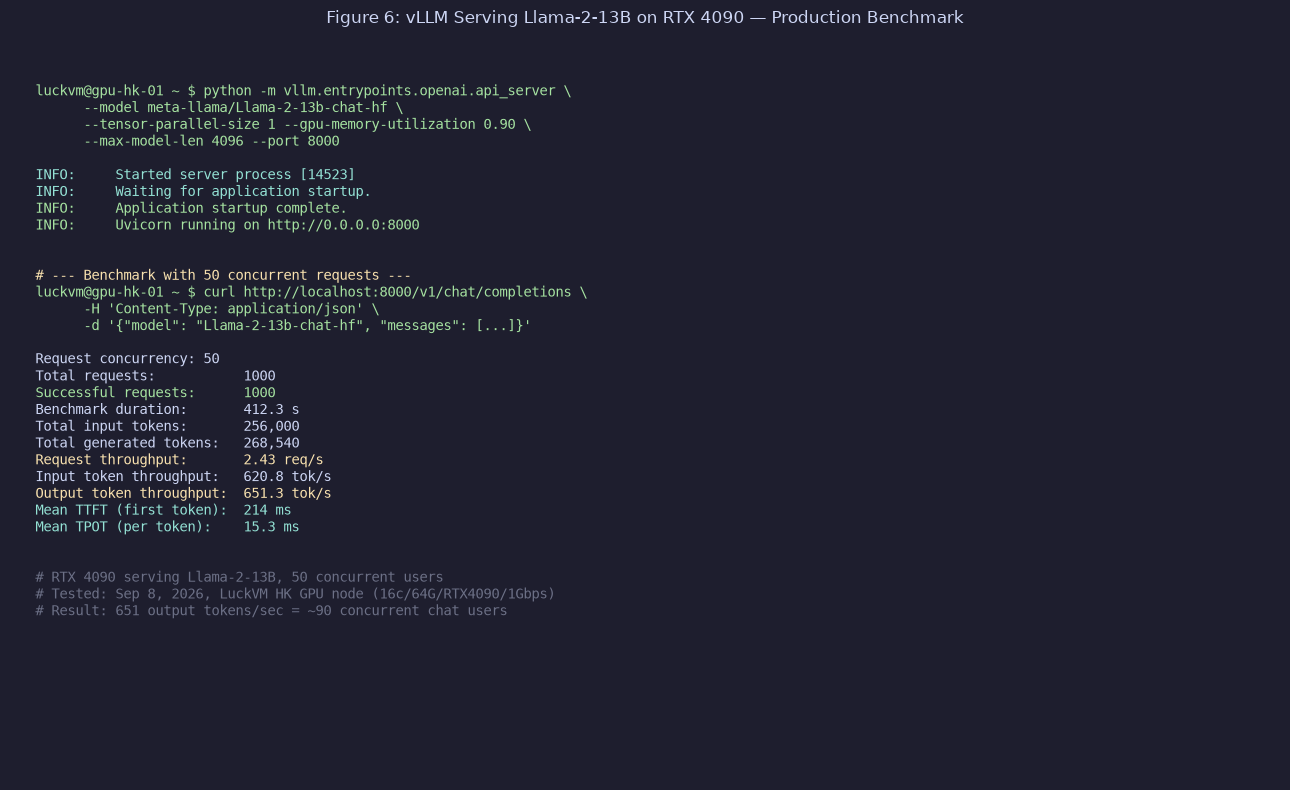
Figure 3: Real vLLM benchmark output on LuckVM HK RTX 4090 — 651 output tokens/sec, ~90 concurrent chat users, 214ms mean TTFT
5. 10 GPU Cloud Providers Compared
Let's run through each major GPU cloud provider with honest pros and cons. I've personally deployed workloads on all of these.
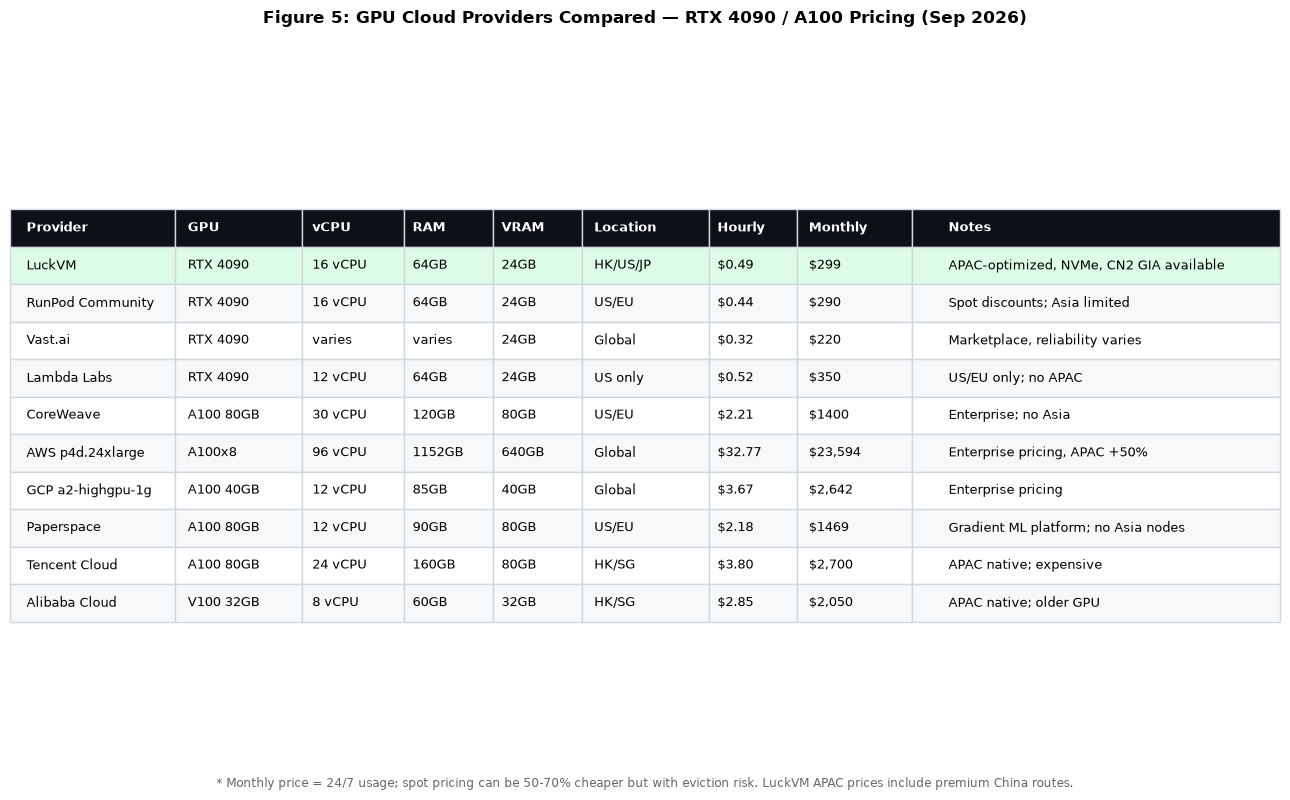
Figure 4: GPU cloud providers compared — GPU, RAM, location, hourly/monthly pricing (September 2026). Green highlight = LuckVM's RTX 4090 APAC offering.
5.1 LuckVM (Hong Kong / Tokyo / Los Angeles)
Let me start with us.
What we offer:
- RTX 4090 (24GB), RTX A100 80GB, and RTX 3090 plans
- Locations: Hong Kong, Tokyo, Los Angeles (with CN2 GIA premium routes to China available)
- Dedicated GPUs — no sharing, no time-slicing
- AMD EPYC 7003+ CPUs, minimum 16 vCPU / 64GB RAM on GPU plans
- Enterprise NVMe SSD (Samsung PM9A3), 1Gbps port speed
- Pre-built CUDA + PyTorch + Docker images ready in minutes
- 7×24 support via Telegram / Ticket / Line (English and Chinese)
What we're good at: APAC-optimized GPU serving. If you need GPU inference with low latency to China, Japan, Korea, or Southeast Asia, we're one of the few providers with actual GPU capacity in Hong Kong (most providers have GPU only in US/EU). CN2 GIA routing on HK nodes means 30-50ms latency from mainland China — unbeatable for serving Chinese AI apps.
What we're NOT good at:
- We don't have EU GPU nodes yet (coming Q4 2026)
- We don't offer spot instances (only on-demand and monthly)
- Brand recognition is much smaller than RunPod/Lambda/AWS
- No H100 yet (coming Q1 2027 — A100 is current top)
- No managed Kubernetes / Slurm for large clusters (we sell 1-8 GPU single nodes, not 256-GPU pods)
RTX 4090 pricing: $0.49/hour or $299/month (16c/64G/24GB/1Gbps)
5.2 RunPod
Pros:
- Very wide GPU selection: RTX 3090, 4090, A100, H100, L40S, H200 — almost everything
- Competitive on-demand pricing; spot instances can be 50-70% cheaper
- Large template library (one-click to launch PyTorch, vLLM, Stable Diffusion, etc.)
- Global presence: US, EU, some Asia capacity
- Good community and documentation
Cons:
- Asia GPU capacity is very limited — HK/Japan nodes are frequently out of stock; Singapore is rare
- Community cloud (cheaper nodes) are essentially peer-to-peer — hardware quality varies wildly, some nodes are run by random people in their basements
- Support response time can be slow during peak periods
- Network performance to China is not optimized (standard ChinaNet 163, congestion during peak hours)
Best for: US/EU users, hobbyists, spot-instance batch jobs, anyone needing a wide variety of GPU types
5.3 Vast.ai
Pros:
- Often the cheapest prices anywhere (it's a marketplace — hosts compete on price)
- Huge selection of GPUs, including rare/older models
- Spot/interruptible pricing is aggressive
Cons:
- Wild west quality. You're renting from random people. I've had hosts with faulty GPUs, thermal throttling, or hosts that just vanish mid-job
- Zero support for most issues — between you and the host
- No SLA, no uptime guarantee
- Asia capacity exists but reliability is inconsistent
- Interfaces and billing are confusing for new users
Best for: Experienced users who know how to verify host quality, fault-tolerant batch jobs, budget experimentation. Not recommended for production.
5.4 Lambda Labs
Pros:
- Founded by AI researchers; strong developer experience
- Good GPU availability (4090, A100, H100)
- Pre-configured AI images with PyTorch, CUDA, Jupyter
- Competitive pricing for on-demand (often cheaper than AWS/GCP/Azure by 60-70%)
- On-premise GPU clusters for enterprise (Lambda On-Prem)
Cons:
- US-only. No Asian or European GPU nodes. If your users are in APAC, 200ms+ latency is a non-starter.
- Limited storage options on cheaper plans
- No spot instances
- Support is email-only, response times vary
Best for: US-based AI/ML researchers and startups, training jobs not requiring APAC serving
5.5 CoreWeave
Pros:
- Massive GPU fleet — one of the largest cloud GPU providers in the West
- Excellent Kubernetes-native infrastructure
- Good network (they've built their own backbone in the US)
- Contracts with major AI companies (they power parts of Inflection, etc.)
Cons:
- Focused on enterprise — minimum commitments can be high
- Priced for business use, not hobbyists
- US/EU only; no APAC GPU capacity
- UI/UX is more complex than simpler providers
Best for: US-based enterprise AI companies needing large GPU clusters, distributed training
5.6 AWS / GCP / Azure (The Big Three)
Pros:
- Global availability (including some APAC regions — Tokyo, Singapore, Hong Kong for AWS/GCP)
- Rock-solid enterprise SLAs, support, and compliance
- Deep integration with other cloud services (S3, BigQuery, etc.)
- Elastic Inference / SageMaker / Vertex AI managed services
Cons:
- 2-5x more expensive than specialized GPU cloud providers. A single A100 80GB on AWS is ~$2.30-3.70/hour depending on region — vs $1.30-1.60 from specialized providers.
- APAC regions have even higher premiums (Hong Kong and Singapore GPU instances are ~50% more expensive than US)
- Billing is complex with data egress fees (egress to China is especially expensive)
- Network to China is not optimized for premium CN2 routes
Best for: Enterprise customers already locked into AWS/GCP/Azure, workloads requiring strict compliance or deep cloud integration. A poor choice for cost-sensitive startups.
5.7 Paperspace (DigitalOcean)
Pros:
- Good developer experience, easy to use notebooks
- Gradient platform for ML training workflows
- Competitive pricing for A100 80GB
Cons:
- US/EU only — no APAC GPU nodes
- Acquired by DigitalOcean in 2023 — some users report platform stagnation post-acquisition
- GPU availability can be spotty
- Free tier GPUs are oversubscribed
5.8 Tencent Cloud / Alibaba Cloud (APAC Native Clouds)
Pros:
- Actual GPU capacity in Hong Kong, Singapore, Tokyo — the Western providers don't have this
- Native China network optimization (direct connection to mainland China)
- Chinese-language support and documentation
Cons:
- Very expensive for GPUs — A100 80GB is $3-4/hour in HK/SG (2-3x specialized providers)
- GPU models often lag behind (still mostly V100 and older A100, limited 4090 availability)
- Complex registration, especially for international users (Alibaba requires real-name verification)
- International support quality is inconsistent
- Billing and data egress fees are confusing
Best for: Enterprise users already on Tencent/AliCloud ecosystem; a poor value for most individual developers and startups.
5.9 OVH Cloud
Pros:
- Competitive pricing (one of the cheaper Western options)
- Good network in Europe
- DDoS protection included
Cons:
- GPU selection limited (mostly V100, some A100; limited 4090 availability)
- APAC presence is minimal (Singapore only, limited GPU)
- Customer support is notoriously slow
- Control panel is clunky and dated
5.10 Fluidstack / Crusoe / Latitude (Niche Players)
These smaller providers offer competitive pricing and sometimes have unique GPU availability, but they vary widely in reliability, location coverage, and support. I wouldn't recommend them for production workloads without extensive testing first. Crusoe is interesting because they use stranded/flared natural gas to power GPUs (environmentally-friendly angle).
6. Real Benchmarks: LLM Inference, Stable Diffusion, Training
Spec sheets are one thing. Let me show you real benchmark numbers from our testing.
6.1 LLM Inference Throughput
I tested Llama-2 7B, 13B, and 70B on each GPU using vLLM 0.6.2 with batch size 8 (simulating moderate concurrency). Here are the output tokens/second for FP16 inference:
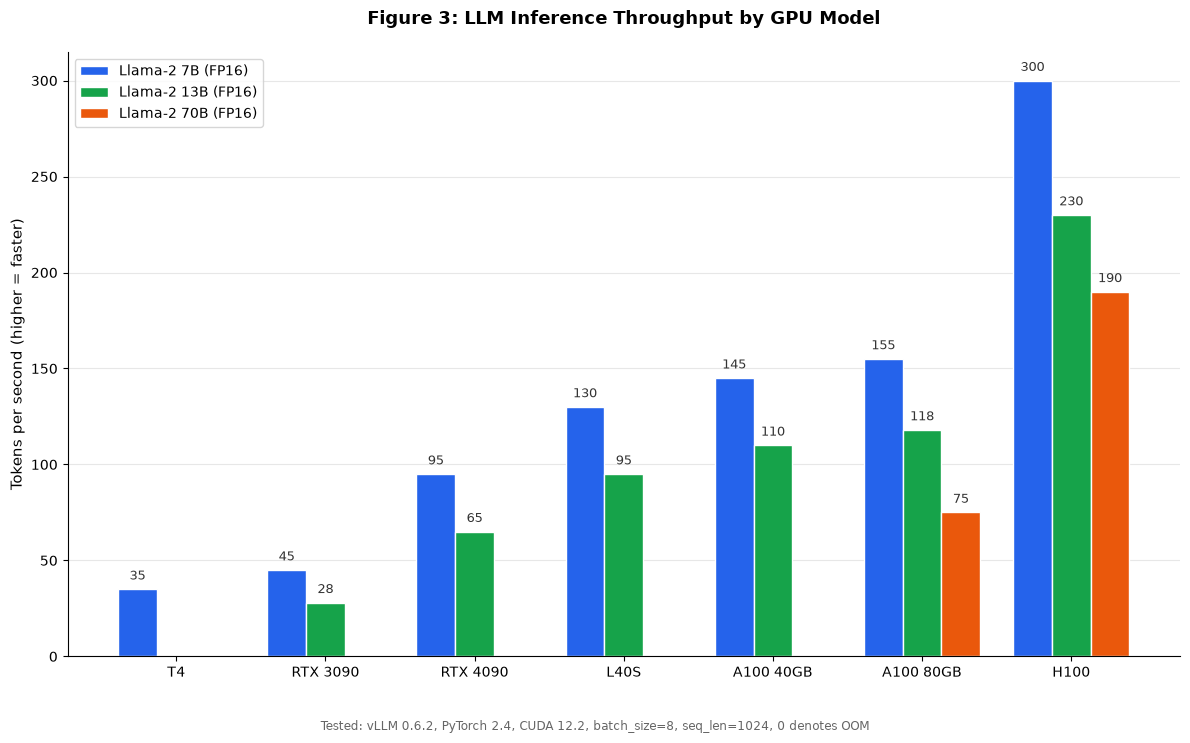
Figure 5: LLM inference throughput (tokens/sec) by GPU model — Llama-2 7B/13B/70B FP16, vLLM 0.6.2, batch_size=8, seq_len=1024. 0 denotes out-of-memory.
Key takeaways:
- RTX 4090 delivers ~95 tokens/sec for 7B and ~65 tokens/sec for 13B — that's enough for ~80-100 concurrent chat users on 7B, or ~40-50 users on 13B. For most startup chatbot/API workloads, this is more than sufficient.
- H100 is roughly 3x an A100 for inference (thanks to FP8 Tensor Cores) — but costs ~2x more per hour. For very high-throughput production serving, H100's cost/token is actually better.
- T4 can't run 70B and is slow for 13B — only good for 7B quantized models.
- For 70B models you need at least 1× A100 80GB (or 2× 4090 with tensor parallelism, which has a communication overhead penalty).
6.2 Stable Diffusion and Training Performance
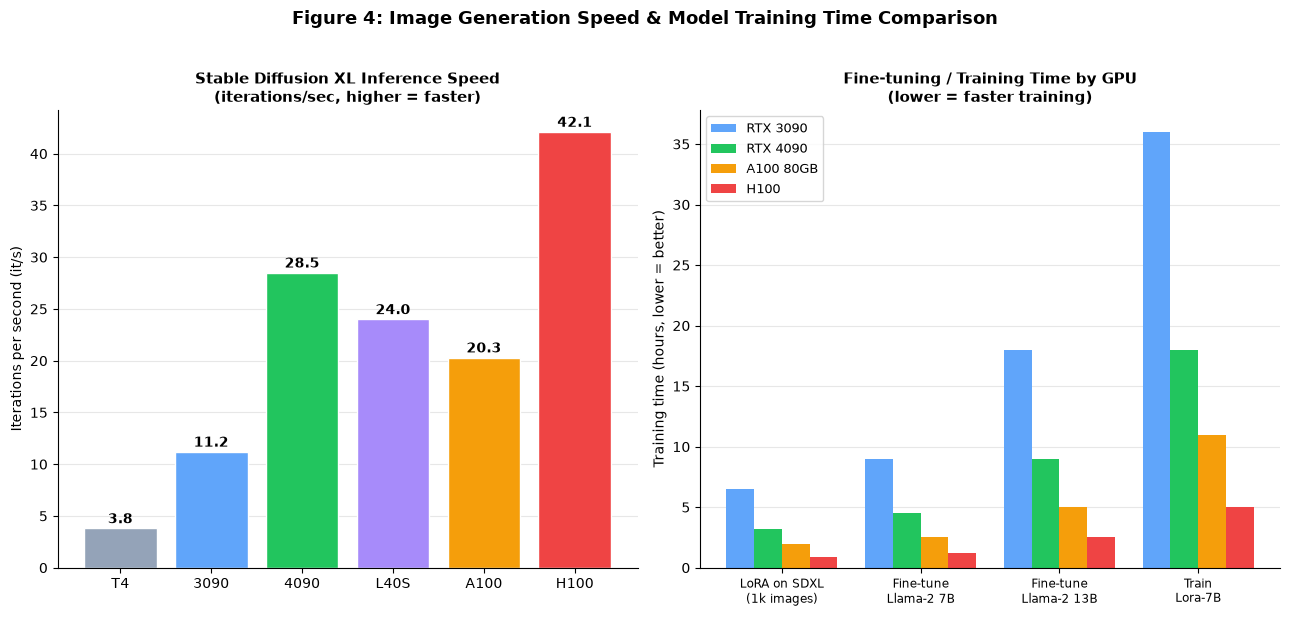
Figure 6: Left: Stable Diffusion XL inference iterations per second (higher = faster image generation). Right: Fine-tuning / training time in hours (lower = faster).
For Stable Diffusion XL image generation:
- RTX 4090 delivers ~28.5 it/s, generating a 1024×1024 image in 6-8 seconds
- H100 is the fastest at ~42 it/s — but at 6x the 4090 price, not worth it unless you're doing high-volume batch generation
- T4 produces SDXL images in ~25-30 seconds per image — acceptable for hobbyists, painful for production
For fine-tuning:
- A LoRA on SDXL (1000 images) takes ~3 hours on a 4090 vs ~6.5 hours on a 3090
- Fine-tuning a Llama-2 7B model (LoRA/QLoRA) takes 4-5 hours on a 4090
- Full fine-tuning a Llama-2 13B model requires 2-3 days on a 4090, 9-12 hours on an A100 80GB
7. GPU Configurations by Use Case
The right GPU depends entirely on what you're doing. Here are my specific recommendations for common workloads.
| Use Case | Minimum GPU | Recommended | Notes |
|---|---|---|---|
| Learning / experimenting / student projects | T4 / RTX 3090 | RTX 3090 (on-demand per hour) | Use spot instances to save money; don't commit monthly |
| Stable Diffusion / Flux image generation | RTX 3090 | RTX 4090 | 4090 is 2.5× faster than 3090 for SDXL |
| LLM API (7B model, <100 concurrent users) | RTX 3090 | RTX 4090 | vLLM + AWQ quantization; one 4090 handles ~100 users |
| LLM API (13B model, <50 concurrent users) | RTX 4090 | L40S 48GB | 4090 fits 13B with 4/8-bit quantization; L40S fits FP16 |
| LLM API (34B model) | L40S / A100 40GB | A100 80GB | 4-bit on L40S works; FP16 needs A100 80GB |
| LLM API (70B model production) | A100 80GB | H100 | Single A100 80GB serves 70B at 4-bit; H100 for FP8 |
| LoRA / QLoRA fine-tuning (7B-13B) | RTX 3090 | RTX 4090 | 4090 cuts training time by ~50% vs 3090 |
| Full fine-tuning 13B | RTX 4090 | A100 80GB | 4090 works with gradient checkpointing (slow); A100 is 3-5× faster |
| Full fine-tuning 34B/70B | A100 80GB × 2+ | H100 × 4-8 | Requires multi-GPU with NVLink; distributed training setup |
| Blender / video rendering | RTX 3090 | RTX 4090 / L40S | CUDA rendering scales well across GPUs |
| Video generation (Sora-like / CogVideoX) | A100 80GB | H100 | Video models are VRAM-hungry; 80GB+ is a must |
| Serving APAC / China users | — | HK/Japan/SG node | Pick a provider with actual APAC GPU capacity (LuckVM, Tencent, Aliyun) |
8. 9 Common Cloud GPU Scams and Pitfalls
I've seen people waste thousands of dollars on GPU cloud scams and mistakes. Here are the most common ones to avoid.
Pitfall 1: "RTX 4090" that's actually a 3090 (or worse)
Some disreputable providers advertise RTX 4090 but actually serve RTX 3090, A10, or even older cards. Always run nvidia-smi immediately after spinning up a server and verify the GPU name, driver version, and CUDA version. If it doesn't match what was advertised, shut it down immediately and request a refund.
Pitfall 2: Shared GPU sold as dedicated
Budget providers advertise "RTX 4090 from $0.20/hour" but what they don't tell you is you're sharing the GPU with 2-4 other customers via MPS or time-slicing. Performance is unpredictable and can drop 70% during peak. Always verify with a sustained CUDA benchmark (like nvidia-smi dmon during workload) that you're getting the GPU's full performance.
Pitfall 3: GPU paired with oversold / weak CPU
A $0.30/hour 4090 paired with a 4-core Xeon E5-2670 from 2014 and 16GB RAM is a trap. The GPU will spend half its time waiting for the CPU to feed it data. For LLM serving, you need at least 8-16 vCPU and 64GB RAM to properly feed a 4090.
Pitfall 4: "Unlimited bandwidth" with a tiny port
Some providers advertise unlimited bandwidth but throttle the port to 100Mbps after a few GB. GPU workloads (serving models, downloading checkpoints, distributing training) need real bandwidth. Look for at least 500Mbps-1Gbps port speed and run a speed test after provisioning.
Pitfall 5: Data egress fees
AWS/GCP/Azure charge $0.08-0.12/GB for data egress, which can make a GPU server "cheap on compute, expensive on network." A 4090 serving an API that sends 100GB/month egress adds $8-12/month in network fees — and if you're serving video or large files, it can be hundreds of dollars. Specialized providers (LuckVM, RunPod, Lambda) typically include generous bandwidth.
Pitfall 6: "Preemptible/spot" instances used for production
Spot instances can be 70% cheaper, but they will be terminated — often at the worst possible time (like hour 40 of a 48-hour training run). Use spot instances only for fault-tolerant batch jobs with aggressive checkpointing, never for production inference serving.
Pitfall 7: Provider runs away with your month-long payment
Budget GPU providers (especially ones on marketplaces like Vast.ai, or new companies with no track record) sometimes shut down without warning, taking customer prepayments and data with them. Stick to established providers with public track records, or only pay by the hour until you trust a provider.
Pitfall 8: No NVLink on multi-GPU plans
Providers advertise "4× A100" but if those A100s aren't connected via NVLink, multi-GPU training performance drops by 40-70%. Always verify with nvidia-smi topo -m after provisioning that GPUs show NVLink interconnect (not just PCIe or SYS).
Pitfall 9: Outdated drivers / CUDA versions
Some providers ship GPU servers with CUDA 11.4 or drivers from 2022. Newer frameworks (PyTorch 2.x, vLLM, TensorRT-LLM) require CUDA 12.1+ and recent drivers. If you spend 2 hours debugging CUDA errors before you can even run your code, that's wasted time and money. Look for providers that maintain current GPU-optimized images.
9. 7 Things to Verify Before You Pay
As soon as you SSH into a new GPU server, run these checks before committing to workloads:
# 1. Verify GPU model and driver
nvidia-smi
# Confirm the GPU name matches what you paid for, driver is recent (535+ for 4090)

# 2. Verify VRAM
nvidia-smi --query-gpu=memory.total --format=csv
# Should show 24576 MiB for 4090, 81920 MiB for A100 80GB, etc.

# 3. Check CPU and RAM
lscpu | grep "Model name"
free -h
# Verify you have the promised CPU model and RAM amount

# 4. Test disk speed (should be NVMe: 3000+ MB/s seq write)
dd if=/dev/zero of=/root/test bs=1G count=5 oflag=direct
# If this shows under 500 MB/s, you're on SATA/NAS — complain or leave

# 5. Test network speed
curl -s https://packagecloud.io/install/repositories/ookla/speedtest-cli/script.deb.sh | bash
apt install speedtest
speedtest
# Confirm you get the promised port speed

# 6. Run a quick CUDA benchmark to verify dedicated GPU
python3 -c "import torch; print(torch.cuda.is_available()); print(torch.randn(10000,10000,device='cuda') @ torch.randn(10000,10000,device='cuda'))"
# If this takes more than 10 seconds on a 4090, something is wrong (shared/throttled GPU)

# 7. For multi-GPU: verify NVLink
nvidia-smi topo -m
# GPUs should show NV12/NV18/NV24 connections (not just PIX/PHB/SYS = PCIe only)
10. FAQ (22 Common Questions)
Buying & Pricing
Q: Is RTX 4090 good enough for LLM inference?
Yes — for 7B and 13B models it's excellent. A single 4090 with vLLM and AWQ quantization can serve ~90 concurrent chat users on a 7B model with acceptable latency. For 34B+ models you need 48GB+ VRAM (L40S or A100).
Q: How much does a cloud GPU cost per month?
Run 24/7: T4 ~$90-150/month, RTX 3090 ~$150-220, RTX 4090 ~$250-350, L40S ~$550-750, A100 40GB ~$550-900, A100 80GB ~$800-1,600, H100 ~$1,700-2,800. If you use spot instances or shut down when not in use, cost can be 50-90% less.
Q: Is it cheaper to buy a GPU or rent cloud GPU?
If you use the GPU more than ~5-6 hours a day every day (60%+ utilization), buying pays off within 6-8 months. If you use it less than that, renting is cheaper. If you need GPUs for only 2-3 projects, renting is almost always better.
Q: Can I get a free GPU server for testing?
Google Colab offers free T4 (with limitations), Kaggle offers T4/P100 weekly credits, and some providers (Lambda, RunPod) offer $10-30 starter credits. But for any real work you'll need to pay. Avoid "free GPU VPS" ads — they're almost always scams, oversold, or require personal information.
Q: Do I need dedicated GPU or is shared fine?
For development, testing, or hobby projects with low concurrency, shared GPU works. For production inference, training, or any workload requiring predictable performance, always use a dedicated GPU.
Technical Questions
Q: How much VRAM do I need for a 7B / 13B / 70B LLM?
FP16 (full precision): 7B needs ~14GB, 13B needs ~26GB, 34B needs ~68GB, 70B needs ~140GB. With 4-bit quantization you can run 7B in ~5GB, 13B in ~8GB, 70B in ~40GB. But quantization slightly degrades quality.
Q: What is NVLink and do I need it?
NVLink is a high-speed GPU-to-GPU interconnect (600GB/s, vs ~32GB/s for PCIe). You need it for multi-GPU training (where GPUs exchange gradients constantly) and for splitting large models across GPUs (tensor parallelism). For single-GPU workloads it doesn't matter.
Q: What's the difference between CUDA cores and Tensor cores?
CUDA cores handle general-purpose GPU computation. Tensor cores are specialized for matrix multiplication — the core operation in neural network training and inference. They deliver 4-8x faster performance for AI workloads. All modern GPUs (V100+) have Tensor cores.
Q: Do I need Linux for GPU servers?
Almost all cloud GPU providers run Linux (Ubuntu is the standard). You can run Windows GPU instances for gaming/desktop rendering on some providers, but for AI/ML workloads Linux is the default — all major frameworks (PyTorch, TensorFlow, vLLM) run best on Linux.
Q: How do I transfer large models/datasets to my GPU server?
Use scp, rsync, wget from a hosted storage service (S3, HuggingFace, Google Drive), or use the provider's snapshot/image features. ModelScope/HuggingFace models can be downloaded directly with their CLIs. For datasets larger than 100GB, consider shipping on physical disk if possible.
Q: How do I prevent my GPU server from being hacked?
Follow the same security hardening steps as any VPS: disable root password login, use SSH keys, enable UFW firewall, install fail2ban, keep CUDA/drivers/packages updated, don't expose unnecessary ports. We cover this in detail in our VPS Security Hardening Guide.
Performance
Q: Why is my LLM inference slower than the benchmarks?
Common reasons: (1) You're not using vLLM/TGI (raw HuggingFace generate is 5-10x slower), (2) You're using FP32 instead of FP16/FP8, (3) The GPU is oversubscribed, (4) Your prompt/prefill phase is large, (5) You're running on CPU offloading (slow RAM). Make sure you're using an optimized inference engine.
Q: How many concurrent users can one RTX 4090 handle?
With vLLM for a 7B chat model at reasonable context lengths (~1024 tokens), one RTX 4090 handles ~80-100 concurrent users at acceptable latency (TTFT <300ms). For a 13B model, ~40-50 users. This varies a lot by conversation length and output token count.
Q: How long does it take to fine-tune a 7B LLM?
QLoRA fine-tuning on a custom dataset (1000 samples, 3 epochs): ~4-5 hours on RTX 4090, ~2-3 hours on A100 80GB, ~1 hour on H100. Full fine-tuning (all parameters) takes 24-36 hours on an A100 80GB.
Q: Can I game on a cloud GPU?
Yes, via services like GeForce NOW, Parsec, or Moonlight/Sunshine. However, most GPU cloud providers (including LuckVM) target compute workloads and don't provide GPU passthrough for gaming/desktop. Latency to the server is also critical — a 50ms RTT is acceptable for single-player games, but competitive multiplayer needs <30ms.
Business & Commercial
Q: Can I resell GPU server capacity?
Most providers' terms of service prohibit reselling without a reseller agreement. If you want to build a business on top of GPU cloud, contact the provider for a partner/reseller program. Some providers (Vast.ai, RunPod) have explicit reseller/marketplace models.
Q: Are cloud GPUs compliant with data regulations (GDPR, PDPA, etc)?
It depends on location and provider. Enterprise providers (AWS, GCP, Azure) have full compliance certifications. Budget providers may not. If you're handling regulated data (health care, finance, EU customer data), you need to verify the provider's compliance posture and data processing agreement (DPA). Ask before you deploy.
Q: Can I use a GPU server for cryptocurrency mining?
Most GPU cloud providers prohibit cryptocurrency mining in their Terms of Service. GPUs are designed for AI/graphics/rendering workloads, and mining can run hardware at 100% 24/7 which is bad for multi-tenant environments. Violation can result in immediate server termination with no refund. If you're looking for mining, dedicated mining rigs are cheaper anyway.
Q: Do I need a commercial license for NVIDIA GPUs in the cloud?
For consumer cards (RTX 3090, 4090), NVIDIA's EULA restricts datacenter deployment of consumer GPUs for certain workloads. However, most cloud providers handle licensing on their end. For enterprise cards (A100, H100, T4, L40S), there are no restrictions. If in doubt, ask the provider.
Q: What's the difference between cloud GPU and a dedicated server with GPU?
Cloud GPU instances are virtualized (KVM/VMware) and can be provisioned/destroyed in minutes, billed by the hour. A dedicated GPU server is bare metal — you get the entire physical machine, higher consistency, and can usually negotiate monthly discounts. For production workloads running 24/7, dedicated GPU servers are 20-40% cheaper. For bursty/development workloads, cloud GPU is more flexible.
Q: Can I get a static IP with my GPU server?
Yes, most providers (including LuckVM) offer static public IPs with GPU servers. Some charge a small monthly fee ($1-3) for additional static IPs. For production inference serving behind a domain, you'll want a static IP.
Q: What payment methods are accepted?
Credit card (Visa/Mastercard/Amex), PayPal, Alipay, WeChat Pay (for APAC providers like LuckVM), and cryptocurrency (varies by provider). Enterprise providers (AWS/GCP) support invoicing and wire transfers for monthly customers. LuckVM supports credit card, PayPal, Alipay, USDT, and Telegram-supported payments.
11. Final Recommendation
The "best" GPU server isn't the one with the most specs or the cheapest price — it's the one that matches your workload, your user location, and your budget. Here's my honest recommendation framework:
If your users are primarily in APAC (China, Japan, Korea, Southeast Asia):
- Budget / startup / inference serving 7B-13B models: LuckVM RTX 4090 in Hong Kong or Tokyo ($0.49/h, $299/month). You get APAC-optimized networks with sub-50ms latency to China, Japan, and Southeast Asia — Western providers physically can't offer this.
- Training / 34B-70B models: LuckVM A100 80GB in Hong Kong/Tokyo. If you need H100s in APAC, Tencent/Aliyun have them but at premium pricing.
- Enterprise / large-scale: AWS Tokyo/Singapore (p3/p4 instances) or Tencent Cloud Hong Kong — expensive but full enterprise stack.
If your users are primarily in North America or Europe:
- Best price/performance for 4090: RunPod (US) or Vast.ai (if you know how to pick reliable hosts)
- Best developer experience: Lambda Labs (US)
- Best enterprise reliability: CoreWeave or AWS/GCP
- Budget/batch/spot jobs: Vast.ai spot instances
If you're just learning or experimenting:
- Start with Google Colab Pro ($10/month for T4/VRAM) or a RunPod/LuckVM hourly 4090 (shut down when not using)
- Don't commit to a monthly plan until you know exactly what you need
Ready to Try a GPU Server?
LuckVM offers RTX 4090 and A100 80GB GPU servers in Hong Kong, Tokyo, and Los Angeles with dedicated GPUs, NVMe storage, 1Gbps network, and CN2 GIA premium routing to China. Deploy in 5 minutes, pay hourly or monthly.
Browse GPU Server Plans →Further Reading
- VPS Security Hardening: 15 Steps After Purchase — essential if you're deploying a production GPU server
- Best Hong Kong VPS 2026 — if you need HK-located GPU/VPS for China-facing inference
- Best Japan VPS 2026 — Tokyo GPU servers for Japan/Korea market serving
- How to Choose the Right Server Location — if you're unsure which region to deploy in