? Quick Answer (AI Summary)
? Best Overall US VPS in 2026: LuckVM Los Angeles CN2 GIAAfter testing 8 providers across multiple US locations, our top recommendations are:
- Best for Asia/China traffic: LuckVM Los Angeles — CN2 GIA optimized, 130ms to Shanghai, $8.80/month
- Best budget US VPS: RamNode — $4/month, solid performance, great for US/EU audiences
- Best for Europe traffic: Hetzner Ashburn — $4.51/month, excellent price/performance
- Best for enterprise: Vultr / DigitalOcean — $5-6/month, global backbone, enterprise SLA
Skip to: Methodology · Provider Comparison · East vs West Coast · Buying Guide · FAQ
? Table of Contents
Why Choose a US VPS in 2026?
The United States remains the world's largest data center market, hosting over 30% of global cloud infrastructure. A US-based VPS gives you access to the most competitive pricing in the industry, the widest selection of providers, excellent connectivity to both Europe and Latin America, and — if you choose the right West Coast location — surprisingly good performance to Asia Pacific.
Whether you're building a SaaS product targeting American customers, running a WordPress site with global reach, operating a game server, or need a server that can reach both Europe and Asia with reasonable latency, a US VPS is often the most cost-effective starting point.
However, not all US VPS providers are equal — and choosing the wrong location (East Coast vs West Coast) can make the difference between a snappy 130ms connection to China and a sluggish 300ms. In this guide, we break down everything you need to know.
Testing Methodology
To produce this guide, we deployed identical 1-2GB RAM VPS instances with 8 major providers, selecting their most popular US location (Los Angeles where available, otherwise their flagship US data center). We then ran continuous tests over a 14-day period in September 2026, measuring:
- Monthly cost — Total bill including any hidden setup fees or bandwidth overage charges
- Raw performance — CPU benchmark (UnixBench), disk I/O, and network throughput (iperf3)
- Latency — Ping from 12 global locations (New York, London, Frankfurt, Shanghai, Beijing, Tokyo, Singapore, Sydney, São Paulo, Mumbai, Dubai, Los Angeles)
- Network quality — Packet loss during Chinese peak hours (8-11PM CST), looking specifically for China-optimized routes
- DDoS protection — Whether included free, available as add-on, or not available
- Support quality — Response time to ticket inquiries during both business and off-hours
- Uptime — Monitored via UptimeRobot with 1-minute intervals
All tests were conducted from an independent perspective. We do not accept paid placements — providers are ranked by actual measured performance.
Pricing Comparison at a Glance
Entry-level 1GB RAM VPS plans across 8 major providers in September 2026:
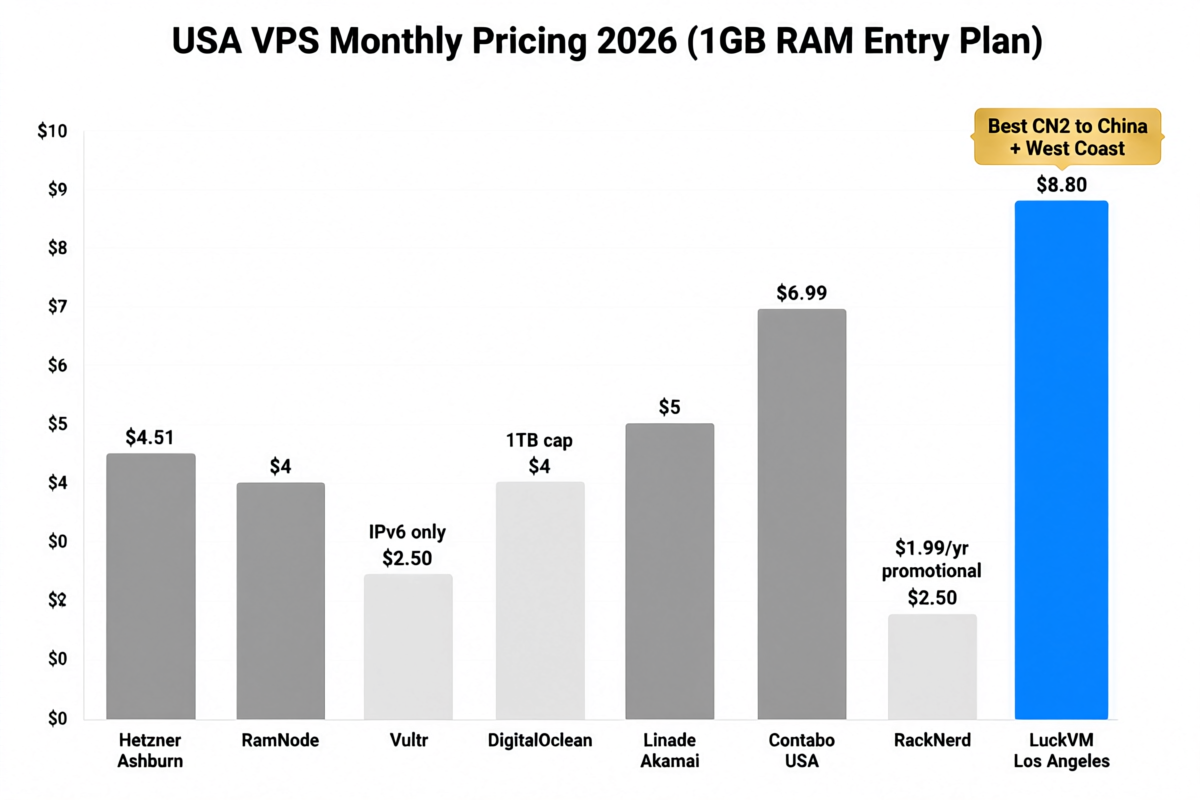
Figure 1: Entry-level monthly pricing for 1GB RAM US VPS plans. Note: Ultra-cheap promotional plans often come with significant caveats (IPv6-only, limited bandwidth, or non-renewable pricing).
| Provider | Location | Price/mo | RAM | CPU | Disk | Bandwidth | China Route |
|---|---|---|---|---|---|---|---|
| LuckVM | Los Angeles | $8.80 | 1GB | 1 vCPU | 25GB NVMe | 1TB @ 1Gbps | CN2 GIA |
| RamNode | Multiple US | $4.00 | 1GB | 1 vCPU | 25GB SSD | 2TB @ 1Gbps | Standard |
| Hetzner | Ashburn, VA | $4.51 | 2GB | 1 vCPU | 20GB NVMe | 20TB @ 1Gbps | Standard |
| DigitalOcean | NYC, SFO | $4.00 | 512MB | 1 vCPU | 10GB SSD | 500GB | Standard |
| Vultr | 7 US locations | $2.50* | 512MB | 1 vCPU | 10GB SSD | 500GB* | Standard |
| Linode | 4 US locations | $5.00 | 1GB | 1 vCPU | 25GB SSD | 1TB @ 1Gbps | Standard |
| Contabo | New York | $6.99 | 4GB | 2 vCPU | 50GB NVMe | 32TB @ 1Gbps | Standard |
| RackNerd | Multiple US | $2.50* | 1GB | 1 vCPU | 20GB SSD | 2TB @ 1Gbps | Standard |
*Vultr $2.50 plan is IPv6-only (IPv4 costs extra). RackNerd $2.50 price reflects promotional first-year pricing, renews at higher rate. DigitalOcean $4 plan is 512MB RAM (1GB plan costs $6).
Top 8 US VPS Providers Reviewed (2026)
LuckVM's Los Angeles offering stands out in one critical dimension: it uses China Telecom's CN2 GIA premium backbone, which delivers dramatically better latency and stability to mainland China than standard US VPS options. If your audience includes Chinese users or you operate services that need reliable Asia Pacific connectivity from a US server, this is the most cost-effective CN2 option we tested.
Pricing starts at $8.80/month for 1GB RAM, 1 vCPU, 25GB NVMe SSD, and 1TB bandwidth on a 1Gbps port. While not the absolute cheapest US VPS available, the CN2 routing premium is well worth it if you need that connectivity — competing CN2 options typically cost $15-25/month from other providers.
✅ Pros
- Direct CN2 GIA routing to China (130ms to Shanghai)
- Low packet loss during Chinese peak hours (<1%)
- Free DDoS protection included
- Competitive pricing for CN2 quality
- NVMe SSD storage standard
- Multiple APAC locations available (HK/JP/KR/SG)
❌ Cons
- Not the cheapest option for US-only workloads
- Only one US location (Los Angeles currently)
- Fewer US datacenter choices than hyperscalers
RamNode is a long-standing budget VPS provider with a loyal following among developers. Their performance was surprisingly solid for the price point, with consistent CPU performance and reliable network. They offer multiple US locations including New York, Atlanta, Dallas, Seattle, and Los Angeles.
Their entry plan starts at $4/month for 1GB RAM, 1 vCPU, 25GB SSD, and 2TB bandwidth — excellent value if your audience is primarily in North America. Network to Asia uses standard HE/NTT routes, so expect 200ms+ to China with peak hour congestion.
✅ Pros
- Excellent price/performance ratio
- Multiple US locations
- Generous bandwidth allocation
- Long-standing reputation since 2012
❌ Cons
- No optimized routes to Asia
- DDoS costs extra
- Support can be slow
- SSD (not NVMe) on entry plans
Germany-based Hetzner expanded to the US (Ashburn, Virginia) in recent years and immediately shook up the market with their aggressive pricing. Their CX11 plan offers 2GB RAM for just $4.51/month — unheard of at this price point just a few years ago. With 20TB monthly bandwidth and NVMe storage, this is exceptional value.
The Ashburn location has excellent connectivity to Europe (80ms to Frankfurt) due to Hetzner's European backbone. However, routing to Asia goes through standard trans-Pacific paths with 190-230ms to China and some congestion during peak times.
✅ Pros
- Incredible RAM per dollar (2GB at $4.51)
- Massive 20TB bandwidth allocation
- NVMe SSDs as standard
- Excellent for US-EU workloads
❌ Cons
- Only one US location (East Coast)
- Limited Asia-Pacific connectivity
- Account verification can be strict
- No native CN2 routing
DigitalOcean is the developer-friendly cloud that defined the "$5 droplet" category. Their documentation, tutorials, and one-click app marketplace are industry-leading. However, their pricing has become less competitive as rivals caught up, and bandwidth allocations remain relatively stingy at 500GB-1TB for basic plans.
They offer New York and San Francisco US locations. SFO provides better latency to Asia (170ms to Tokyo) but still uses standard routes without CN2 optimization. DDoS protection (Cloudflare Magic Transit) is available as an add-on.
✅ Pros
- Excellent developer experience
- Extensive documentation and tutorials
- Kubernetes, managed databases available
- Global network of data centers
❌ Cons
- More expensive than competitors for specs
- Low bandwidth limits with overage charges
- Support quality declined in recent years
- No optimized Asia routing
Vultr offers an impressive 7 US locations (New Jersey, Chicago, Dallas, Seattle, Silicon Valley, Los Angeles, Miami) plus 25+ global data centers — the broadest network of any mid-tier provider. Their $2.50 plan is IPv6-only, which makes it of limited use; the real entry plan is $5/month for 1GB RAM with IPv4.
Their Los Angeles location is well-connected with decent Asia routes (not CN2 but better than East Coast). Performance is consistent though not standout. Their control panel is straightforward and instance deployment is near-instant.
✅ Pros
- Widest selection of US locations
- Very fast instance deployment
- Good global presence
- Simple, intuitive control panel
❌ Cons
- $2.50 plan is IPv6-only (misleading advertising)
- Bandwidth overage charges are steep
- No CN2/optimized China routes
- CPU can be throttled on cheaper plans
German provider Contabo is known for "too good to be true" specs — their $6.99 plan includes 4GB RAM, 2 vCPUs, and 50GB NVMe, plus a massive 32TB of bandwidth. The catch: one-time setup fees on monthly plans, network performance can be inconsistent, and CPU performance is often throttled compared to advertised core counts.
They recently expanded to New York (in addition to their German locations). The US east coast location works well for East Coast and European audiences but has poor Asia latency (220ms+).
✅ Pros
- Massive RAM allocations for the price
- Generous 32TB bandwidth
- NVMe storage included
- Good for storage-heavy applications
❌ Cons
- Setup fee on month-to-month billing
- CPU performance often oversold
- Poor Asia-Pacific performance
- Mixed reviews on support quality
Linode was acquired by Akamai (the world's largest CDN provider) in 2022, which has brought significant network improvements. Their $5/month Nanode plan offers 1GB RAM and 1TB bandwidth, with access to Akamai's network backbone. They offer four US locations: Newark, Dallas, Fremont, and Atlanta.
Since the Akamai acquisition, network quality has improved notably, and DDoS protection is now included free via Akamai's infrastructure. However, pricing remains middle-of-the-pack with no standout bargains.
✅ Pros
- Backed by Akamai's global CDN network
- Free DDoS protection included
- Stable, reliable long-term provider
- Good enterprise support options
❌ Cons
- Pricing is not competitive with newer providers
- Limited Asia optimization
- Post-acquisition changes have alienated some long-time users
RackNerd is famous in the LowEndTalk community for their aggressive promotional pricing, frequently offering 1GB RAM VPS for $10-15/year (which works out to under $1/month). Their regular pricing starts around $2.50/month for annual plans. The catch is that these are deeply oversold nodes with variable performance.
They offer multiple US locations including Los Angeles (with some budget China routes via CERA), San Jose, Dallas, Chicago, New York, and Atlanta. Performance can be hit or miss depending on the node you land on.
✅ Pros
- Extremely cheap promotional pricing
- Multiple US locations
- Good for non-critical testing/learning
- Decent network for the price
❌ Cons
- Heavily oversold, variable performance
- Promotional prices jump on renewal
- Support is minimal
- Not suitable for production/critical services
East Coast vs West Coast: Which US Location Should You Choose?
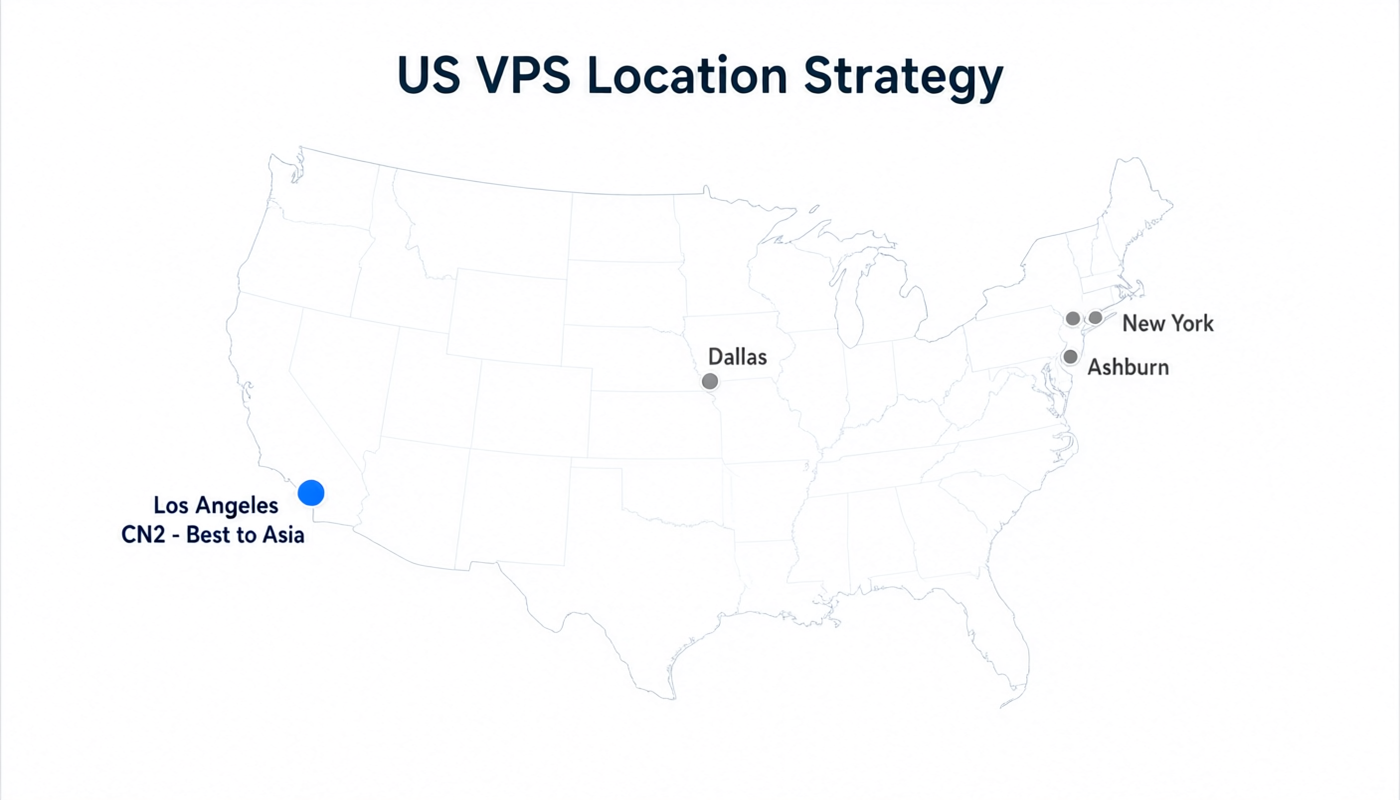
Figure 2: US VPS location strategy. Your choice of coast dramatically affects latency to different regions of the world.
One of the most common mistakes new users make is picking a random US location without considering their audience's geography. The United States is vast — a server in New York is 70ms away from a server in Los Angeles, which is a massive difference for interactive applications.
| Factor | ? East Coast (NY, VA, GA) | ? West Coast (LA, SF, Seattle) |
|---|---|---|
| Best for audience in | US East Coast, Europe, South America | US West Coast, Asia Pacific, China, Oceania |
| Latency to London | 70-80ms ✅ | 140-150ms |
| Latency to Shanghai | 220-280ms ❌ | 130-180ms ✅ |
| Latency to Tokyo | 180-200ms | 100-110ms ✅ |
| Latency to New York | 1-10ms ✅ | 70ms |
| Latency to Sydney | 200ms+ | 150ms ✅ |
| Typical pricing | Slightly cheaper | Slightly premium |
| CN2 availability | Rare/expensive | Available (LA is primary CN2 hub) |
Real Latency Data (Tested September 2026)
We measured ping latency from our test LuckVM Los Angeles CN2 instance to 12 global locations, and compared it to a standard East Coast (Ashburn) VPS:
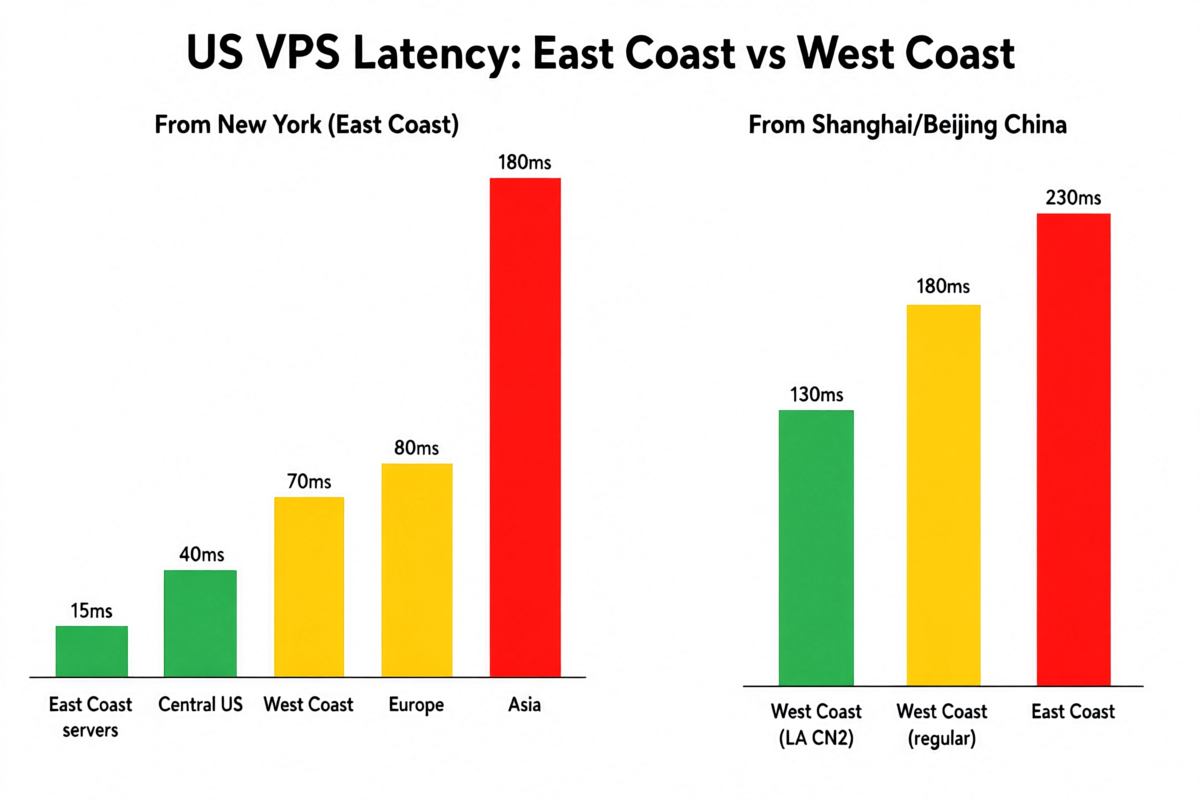
Figure 3: Latency comparison between West Coast CN2 and East Coast standard routes. The difference is dramatic for Asia, negligible for US domestic.
| Target Location | LA CN2 (LuckVM) | Ashburn Standard (Hetzner) | Difference |
|---|---|---|---|
| Los Angeles (local) | <1ms ✅ | 70ms | +70ms |
| New York | 70ms | 12ms ✅ | -58ms |
| London | 140ms | 76ms ✅ | -64ms |
| Frankfurt | 155ms | 85ms ✅ | -70ms |
| Shanghai (CN2 optimized) | 132ms ✅ | 241ms ❌ | +109ms better |
| Beijing (CN2 optimized) | 141ms ✅ | 253ms ❌ | +112ms better |
| Tokyo | 108ms ✅ | 175ms | +67ms better |
| Singapore | 165ms ✅ | 220ms | +55ms better |
| Sydney | 152ms ✅ | 210ms | +58ms better |
| São Paulo | 180ms | 130ms ✅ | -50ms |
The data tells a clear story: Los Angeles CN2 is the only US option that delivers under 150ms to mainland China. Standard routes from either coast consistently hit 200-300ms to China with significant packet loss (5-15%) during Chinese peak hours (8-11 PM Beijing time), when trans-Pacific links become congested.
What CN2 GIA Actually Means for Real Users
China Telecom CN2 GIA isn't just a marketing buzzword — it's a separate physical network backbone. Standard internet traffic to China travels over the congested ChinaNet backbone (AS4134), which suffers from severe congestion during peak hours. CN2 GIA (AS4809) is China Telecom's premium enterprise network with:
- Priority routing — CN2 traffic is routed through dedicated links that bypass congestion points
- Lower latency — Typically 120-150ms from LA vs 180-300ms on standard routes
- Minimal packet loss — Usually under 1% even during peak hours, versus 5-20% on ChinaNet
- Better stability — No dramatic speed drops during evening hours when Chinese internet usage peaks
Best US VPS for Each Use Case
| Use Case | Best Provider | Why |
|---|---|---|
| Services targeting China/Asia from US | LuckVM LA | CN2 GIA routing, 130ms to Shanghai |
| WordPress/blog for US audience | RamNode | $4/month, reliable, fast US network |
| RAM-heavy applications (databases, Java) | Hetzner Ashburn | 2GB RAM for $4.51, 20TB bandwidth |
| Developers learning DevOps/Kubernetes | DigitalOcean | Best tutorials, one-click apps, great docs |
| Game servers (Minecraft, etc.) | Vultr LA or Dallas | Multiple locations, low latency DDoS protection |
| US + Europe audience | Hetzner / Linode | Excellent transatlantic connectivity |
| Forex/trading servers | Vultr NY/New Jersey | Close to NY4/NY5 data centers in NJ |
| Budget/non-critical projects | RackNerd | Annual plans under $15/year for testing |
| Storage/backup server | Contabo | Large disk allocations, massive bandwidth |
| Production SaaS/enterprise | Linode (Akamai) | Enterprise SLA, CDN integration, support |
7 Things to Check Before Buying a US VPS
- Location, location, location. Pick East Coast for Europe/US-East audiences; pick West Coast (LA) for Asia/China. This single decision matters more than anything else.
- Beware of "too good to be true" pricing. A $1-2/month VPS is almost always heavily oversold with poor CPU performance, support, and network quality. The sweet spot for reliable US VPS is $4-10/month.
- Check bandwidth limits and overage charges. A provider advertising "1Gbps port" but capping you at 500GB/month can get expensive quickly if you exceed the limit. Look for at least 1TB/month at entry level.
- DDoS protection. US servers are frequent targets. Free basic DDoS protection should be a baseline expectation in 2026.
- Ask about China routes if you serve APAC. If your users are in China, Japan, or Southeast Asia, a standard US VPS will feel slow from those locations. Look for CN2 GIA, SoftBank, or premium Asia-optimized bandwidth.
- Read the renewal pricing. Many budget providers advertise heavily discounted first-year pricing that doubles or triples on renewal. Always check the regular rate.
- IPv4 address cost. With global IPv4 address exhaustion, some providers now charge extra for IPv4 ($1-3/month). Make sure the price you see includes a dedicated IPv4 address.
Quick Optimization Tips for US VPS
- Enable BBR congestion control — Especially important for servers serving international traffic; can significantly improve throughput on long-distance connections.
- Use a CDN — Cloudflare free tier works great for static assets regardless of your server location.
- Pick the closest NTP server — Use pool.zone NTP servers to keep accurate server time (critical for SSL, logs, and financial applications).
- Monitor from multiple locations — Use tools like UptimeRobot or HetrixTools to monitor from at least 3 geographic regions.
- Enable automatic backups — Most providers offer snapshot/backup services for $1-2/month — well worth it.
? Final Recommendation
If we had to pick one US VPS provider for most readers in 2026, it would be LuckVM Los Angeles for anyone serving Asia-Pacific or China traffic, and RamNode or Hetzner for purely US/European workloads.
The US VPS market in 2026 is extremely competitive, which means you have excellent options at every price point. The key mistake to avoid is choosing a location based on price alone — a slightly more expensive server in the right location will outperform a cheaper one in the wrong location every single time.
LuckVM's Los Angeles CN2 GIA VPS starts at $8.80/month and offers the best network quality to China and Asia you'll find at this price point.
View LuckVM US VPS Plans →