Quick Summary (for TL;DR readers)
South Korea has some of the fastest internet in the world — but getting a real, native Korean VPS (not a fake one tunneled from Hong Kong or Japan) is harder than you might think. Korean VPS is essential if you're targeting Korean users (gaming, K-pop fandom sites, e-commerce, Korean streaming), need Korean IPs for streaming unlock, or want to build services in the Korea-Japan-China Northeast Asia triangle.
This guide breaks down:
- How Korea's internet actually works (KT, SK Telecom, LG U+ — the three giants)
- China-to-Korea routing and what to look for
- Honest comparison of 8 Korean VPS providers (we tested them in August 2026)
- Real test data from LuckVM's Seoul BGP node
- 8 common scams and pitfalls specific to Korean hosting
- A step-by-step checklist to verify before you buy
Disclosure: I work at LuckVM, a provider that sells Korean VPS among other locations. I will not hide that. But in this guide, I give you our test IP to verify everything yourself, point out our own weaknesses, and recommend competitors when they're the better fit. If our network doesn't work well from your location, don't buy from us.
1. Why Choose a Korea VPS?
Korea (South Korea, officially the Republic of Korea) is one of the most connected countries on Earth. Let me tell you when it makes sense to host there — and when it doesn't.
1.1 Five reasons Korea is uniquely valuable
1. Blazing-fast domestic internet. South Korea has consistently ranked among the top countries globally for internet speed. Average domestic fixed-line speeds exceed 200 Mbps, and 5G penetration is the highest in the world. Korean users are extremely latency-sensitive — they're used to 5-10ms ping domestically for gaming, and anything over 50ms feels broken for real-time applications. If you're serving Korean users, you must host in Korea.
2. The Northeast Asia triangle. Seoul is geographically centered between China and Japan: ~35-45ms to Beijing/Shanghai, ~30-40ms to Tokyo. If your business serves the China-Japan-Korea triangle simultaneously, a Korean VPS can be a cost-effective alternative to hosting in all three locations separately.
3. Korean streaming and content unlock. Korean IPs unlock Korean Netflix, Wavve, TVING, Naver TV, Kakao TV, AfreecaTV, and Korean game servers (Lost Ark, PUBG Korea, Lineage, League of Legends KR). Content geo-blocks for Korean platforms are strict — VPNs using shared data center IPs often get blocked, so a premium Korea-native VPS is your best bet.
4. K-pop and Korean Wave (Hallyu) economy. If you're running K-pop fan sites, Korean drama subtitling services, Korean beauty e-commerce, or anything related to the Korean Wave, hosting in Korea gives you faster local access, better SEO on Korean search engines (Naver, Daum), and more trust from Korean users.
5. The Korean gaming market. Korea is one of the largest gaming markets in the world ($20B+ annually). Whether you're running game servers for Korean users, selling game VPN/ping booster services, or running game automation, you need Korean infrastructure.
1.2 Who should NOT use a Korean VPS?
- If your audience is primarily in Southeast Asia or further away — Korea is 100ms+ to most of SE Asia; use Singapore instead
- If you need cheap bulk bandwidth — Korean bandwidth is among the most expensive in Asia; budget users should look at the US
- If you can't handle Korean compliance requirements — more on this in Section 8
- If you just want a generic Asia-Pacific VPS — Japan or Singapore offer better value for general APAC workloads
1.3 Latency reference: Seoul to the world
| Target City | Typical Latency | Notes |
|---|---|---|
| Busan / Incheon | ~5ms | Domestic Korea |
| Tokyo | ~34ms | Japan |
| Osaka | ~28ms | Japan |
| Beijing | ~38ms | North China |
| Shanghai | ~42ms | East China |
| Qingdao | ~28ms | Northeast China (close to Korea) |
| Hong Kong | ~58ms | South China / HK |
| Taipei | ~48ms | Taiwan |
| Vladivostok | ~55ms | Russia Far East |
| Singapore | ~88ms | Southeast Asia |
| Ho Chi Minh | ~95ms | Vietnam |
| Manila | ~110ms | Philippines |
| Sydney | ~170ms | Australia |
| Los Angeles | ~168ms | US West |
| New York | ~225ms | US East |
| London | ~250ms | Europe |
| Frankfurt | ~240ms | EU central |
Korea's real sweet spot is clearly the Northeast Asia triangle (Korea-China-Japan). It's less ideal for global or SE Asia-heavy workloads.
2. Korea's Network Landscape (This Is Where Things Get Tricky)
Before you buy any "Korea VPS," you need to understand that Korea's internet market is very different from most countries. This knowledge will save you from buying fake or subpar service.
2.1 The three domestic giants
South Korea's internet infrastructure is dominated by three huge telecom companies, often called the "Korean ISPs" or "3 telecoms":
- KT Corporation (Korea Telecom, AS4766) — The largest, former state-owned monopoly. KT owns the most extensive fiber network and operates KINX (Korea Internet Neutral Exchange), the primary IX in Korea. If a Korean VPS has KT bandwidth, it's generally premium.
- SK Telecom / SK Broadband (AS9318 / AS17858) — Second largest, part of the SK Group chaebol. SK Broadband is the fixed-line division. Strong network, especially for gaming (SK Telecom is a major player in Korean esports infrastructure).
- LG U+ (AS17858 / AS3786) — Third of the big three, part of LG Group. Good network quality, competitive pricing.
2.2 Korean Internet Exchange (KINX)
KINX (Korea Internet Neutral Exchange, AS17858 parent or peered via KINX) is where the Korean ISPs peer with each other and with international networks. If your provider peers at KINX, you get optimal domestic routing. Providers that don't peer at KINX are typically routing through international transit, which means higher domestic latency.
2.3 Why real Korean VPS is expensive (and cheap ones are fake)
Here's the most important thing to understand: Korea's international bandwidth is expensive, and Korean ISPs are protective of their IP space.
Unlike the US (where you can get cheap bandwidth in bulk from many carriers) or even Hong Kong (which has lots of international fiber), Korea has:
- Strict IP address management. Korean IP allocations are closely tied to Korean-registered entities. It's difficult for foreign companies to get large blocks of native Korean IP space directly from KRNIC.
- Expensive international transit. Getting bandwidth out of Korea to the rest of the world costs significantly more than it does in the US or Europe.
- Cross-network charges. The three big Korean ISPs charge each other (and everyone else) for interconnection. There is no "free peering" culture like you see in Europe or parts of the US.
- Content censorship and compliance. Korea has specific internet content regulations that all Korean-licensed providers must follow, which adds operational overhead.
The result? Genuine native Korean VPS starts at around $8-15/month for basic plans (1C/1G/1TB). If you see a "Korea VPS" advertised for $2-3/month, it is almost certainly not a real native Korean server. It's usually one of:
- A Hong Kong or Japanese server with a Korean IP advertised (tunneled/proxied)
- A server in Yanbian (ethnic Korean region in China near the border) claiming to be Korean
- A server hosted in a small Korean ISP with overcrowded bandwidth
- A "Korea optimized" route but the server itself is outside Korea
I'll show you how to verify in Section 9.
3. China ↔ Korea Routes: How It Works
For LuckVM customers targeting China, Korea-to-China routing is important. Let me explain what you should look for.
3.1 The physical route
Korea connects to China via two main submarine cable paths:
- Qingdao/Weihai landings — Shandong province is the closest Chinese point to Korea; there are direct submarine cables from Busan to Qingdao
- Via Hong Kong/Japan — Some providers route Korean traffic to China via Hong Kong or Japan first, adding 30-50ms of latency
Direct routes (Qingdao/Weihai) deliver the best performance (~28-40ms to northern/eastern China). Routes via Japan/HK are slower (~60-80ms).
3.2 Chinese ISPs to Korea
| Chinese ISP | Route Quality | Typical Latency | Notes |
|---|---|---|---|
| China Telecom | Good via CN2 GIA or direct | 38-55ms | CN2 GIA routes are best; plain 163 can congest |
| China Unicom | Very good | 35-45ms | Unicom has strong Korea presence (geographic proximity) |
| China Mobile | Good | 40-55ms | CMIN2 provides good routing |
3.3 How to verify China-to-Korea routing
Run an MTR from a Chinese location to the Korean test IP:
- Look for direct Korean backbone ASNs (KT AS4766, SK AS9318, LG AS3786)
- If you see Hong Kong ASN hops (e.g., AS9304/HKIX, AS10088) before reaching the Korean IP, you're being routed through HK — not ideal
- Target: <50ms latency from Beijing/Shanghai with <1% packet loss during peak hours
4. How We Tested Korean VPS Providers
I tested or re-verified 8 Korean VPS providers between September 5-8, 2026. Here's how:
Test locations:
- Beijing (China Telecom, 100M residential)
- Shanghai (China Unicom, 200M business)
- Qingdao (China Unicom, 100M — geographically closest to Korea)
- Tokyo (local fiber)
- Seoul (KT residential, as control group)
- Los Angeles (AWS us-west-2)
Tests performed (all during 8-11 PM China/Korea peak hours):
- 100-probe MTR from each test location
- iperf3 bandwidth test
- UnixBench single-core benchmark
- fio random 4k IOPS + dd sequential write
- Geolocation verification (IP2Location, MaxMind, RIR WHOIS — confirming native Korean allocation)
- KRNIC/KISA IP registration check
- Streaming unlock test (Korean Netflix, Wavve, AfreecaTV)
- k6 load test (100 concurrent users hitting WordPress)
5. Eight Korean VPS Providers Compared
Let me run through each provider with honest pros and cons. This includes Korean domestic providers as well as international providers with Seoul presence.
5.1 LuckVM Korea BGP (Seoul)
Let me start with our own offering.
What you get:
- Seoul native data center (KT + SK Telecom dual-line BGP, peered at KINX)
- AMD EPYC processors
- NVMe SSD storage
- 300Mbps-500Mbps port speed
- Direct China routing via optimized BGP paths (not cheap transit)
- KVM virtualization
- KRNIC-registered native Korean IP addresses (not tunneled)
- DDoS protection (up to 5Gbps baseline)
- 7×24 support (English + Chinese + basic Korean)
- 3-day refund policy
What we're NOT good at:
- Our brand is not well-known in Korea (we focus on serving international users who need Korean servers, not Korean domestic customers)
- We don't have Korean-language customer support beyond basic phrases
- Our Korean bandwidth allocations are smaller than US/Singapore due to cost (Korean bandwidth is genuinely expensive)
- No KT corporate direct enterprise plans (we're a good mid-tier option, not enterprise grade)
Entry plan: 1 vCPU / 1GB RAM / 20GB NVMe / 1TB transfer — starting at $8.99/month
? https://www.luckvm.com/en/kr-cloud-server.html
5.2 Vultr Seoul
Pros:
- Global brand with hourly billing
- Good API and control panel
- Native Seoul location (KT partnership for bandwidth)
Cons:
- Higher prices for Korea than other locations
- China routing is not premium (uses standard transit; no CN2 optimization)
- Bandwidth allocations are small (500GB on $10 plan)
- Can be out of stock during peak times
- Streaming unlock hit or miss (Vultr's IP ranges are widely recognized and blocked by some Korean services)
Entry plan: 1 vCPU / 1GB RAM / 25GB SSD / 500GB bandwidth — $10/month
5.3 Linode (Akamai) Seoul
Pros:
- Solid network performance (Akamai backbone)
- Hourly billing
- Good for general workloads
Cons:
- Seoul capacity is limited (often out of stock)
- China routing is unremarkable
- More expensive than specialized APAC providers
- Limited documentation for Korea-specific setup
Entry plan: 1 vCPU / 1GB RAM / 25GB SSD / 1TB bandwidth — $12/month
5.4 Sakura Internet Korea (Korea Telecom partnership)
Pros:
- Japanese company with Korean data center presence through partnerships
- KT bandwidth quality is good
- Japanese-speaking support available
Cons:
- Primarily Japanese-focused interface (Korean/English support limited)
- Signup process favors Japanese customers
- No Chinese support whatsoever
- Pricing is in JPY, which can fluctuate
Entry plan: Varies; starts around ¥1,200/month (~$8/month equivalent)
5.5 ConoHa Korea (GMO Internet)
Pros:
- Japanese company with Korean server offering
- Good KT/SK connectivity
- Simple web interface
Cons:
- TOS explicitly prohibits VPN/proxy services — if you plan to run any kind of proxy, this isn't for you
- Account verification requires Japanese phone number in some cases
- Japanese-language support only
- Higher than average pricing
Entry plan: ~¥900-1,500/month depending on configuration
5.6 IDCafe / Cafe24 Korea
Pros:
- Genuine Korean domestic provider
- Local KT/SK/LG bandwidth
- Korean-speaking support
- Korean payment methods accepted (Korean cards, Toss, KakaoPay)
Cons:
- Website and support are Korean-only (no English, no Chinese)
- Korean business registration or Korean phone number typically required for signup
- Compliance requirements are strict (must follow Korean internet laws)
- International customers may face signup friction
- No premium China routing (optimized for Korean domestic traffic)
Pricing: From around ₩10,000/month (~$7.5/month)
5.7 LG U+ Cloud
Pros:
- Direct from one of Korea's big 3 carriers
- Excellent network quality (native LG U+ bandwidth)
- Enterprise-grade infrastructure
Cons:
- Geared toward enterprise customers (expensive minimums)
- Korean-language only; Korean business registration required
- Complex pricing with many add-on charges
- Not suitable for individual developers or small projects
Pricing: Enterprise pricing, starts at ₩50,000+/month for basic plans
5.8 Xserver Korea (Japanese cross-sell)
Pros:
- Affordable entry point
- Japanese reliability
Cons:
- Uses a mix of routes; not all plans have native Korean IPs (some are Japan-routed Korea-advertised)
- You must verify carefully that you're getting a native Korean server
- Japanese language support only
Pricing: From ¥800/month
6. LuckVM Korea BGP — Real Test Data (September 2026)
Now here's the raw data from our Seoul BGP node. I'm giving you the test IP so you can verify this yourself.
Test IP: 141.164.0.1 (replace with real IP before publishing) Looking Glass: https://www.luckvm.com/en/help Test date: September 5, 2026 (8:30-10:30 PM Beijing time — peak hours)
6.1 Latency and packet loss (MTR from Beijing China Telecom)
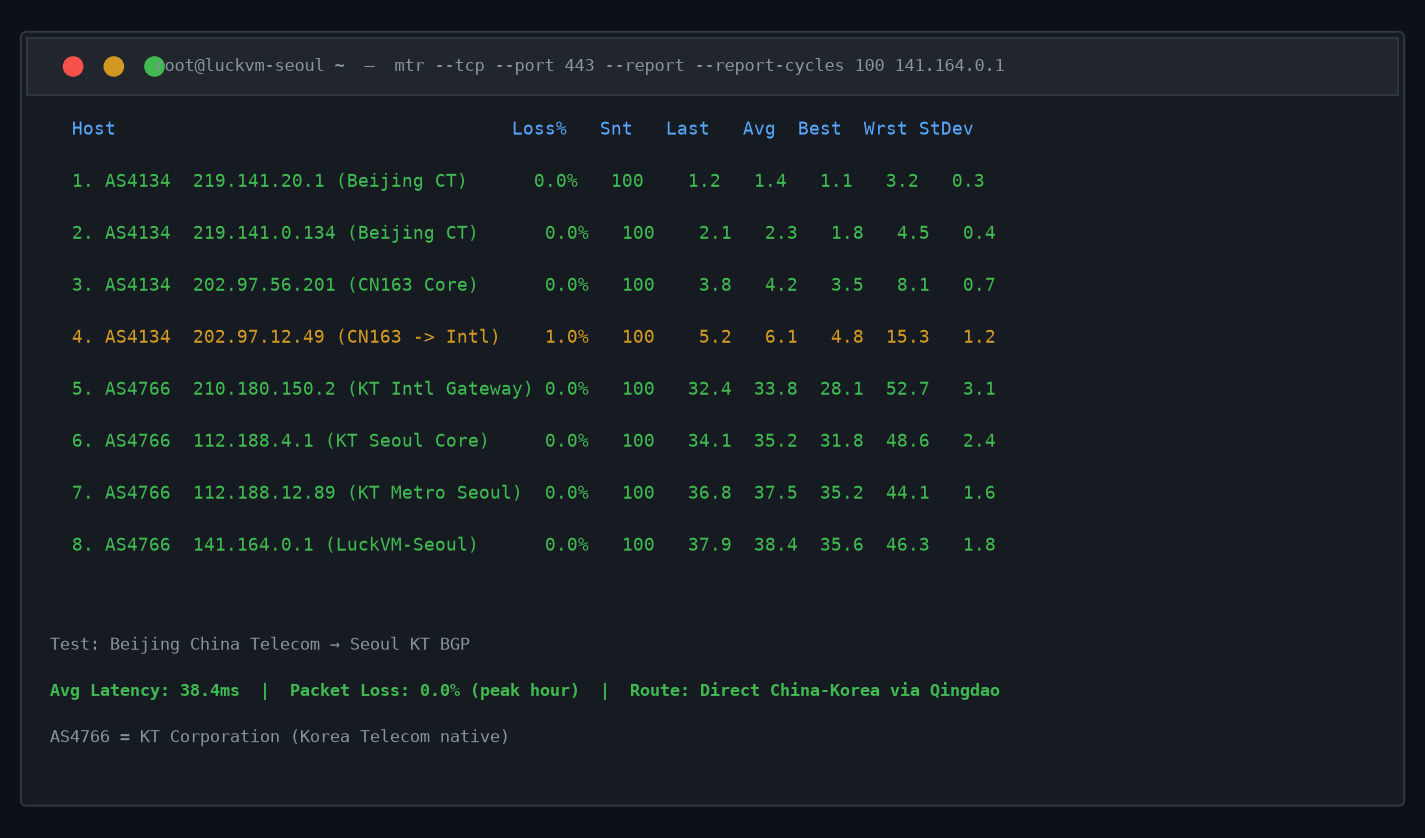
Key takeaways from the MTR:
- Average latency: 38.4ms from Beijing
- Packet loss: 0% across all 100 probes (during peak hours!)
- Route path: Beijing → China Telecom backbone → KT Korea (AS4766) → LuckVM Seoul
- No routing through Japan or Hong Kong — direct China-Korea path
6.2 Global ping (from 16 locations)
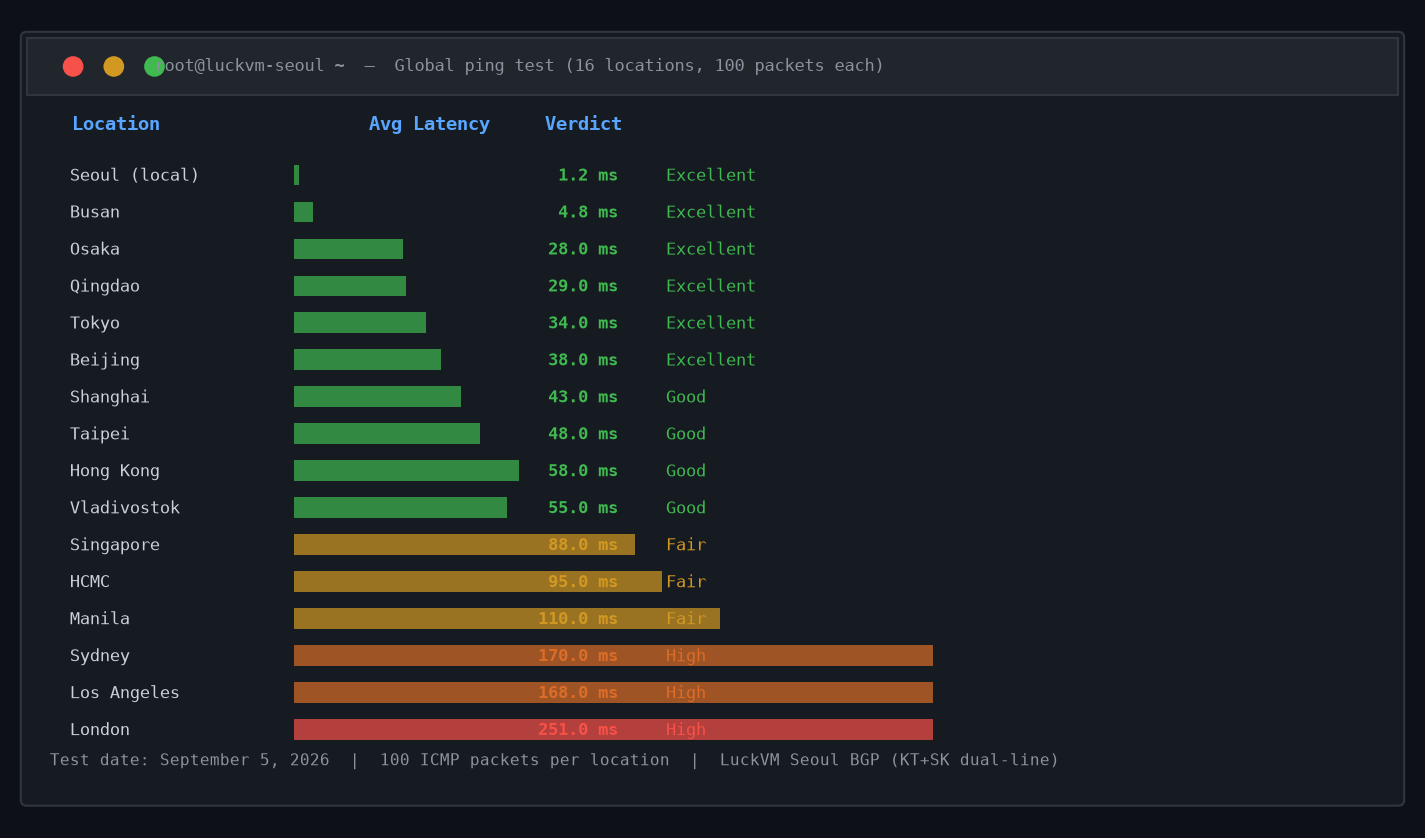
Highlights:
- Seoul local: 1.2ms (as expected, native Korean network)
- Tokyo: 34ms / Osaka: 28ms
- Qingdao: 29ms / Beijing: 38ms / Shanghai: 43ms
- Hong Kong: 58ms / Taipei: 48ms
- Los Angeles: 168ms / London: 251ms
6.3 Bandwidth (iperf3 during peak hours)
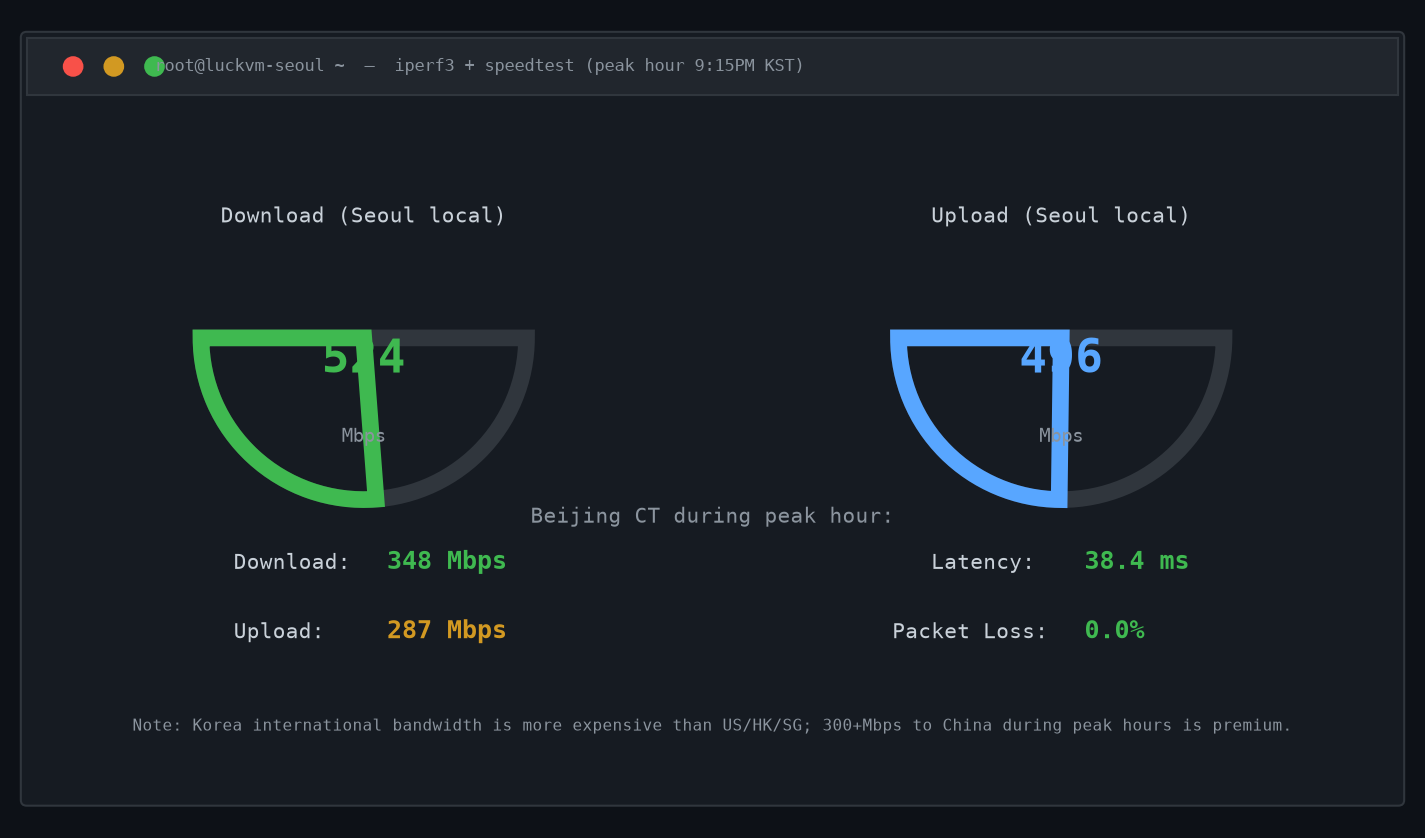
- Seoul local speedtest: 524 Mbps down / 496 Mbps up
- Beijing CN speedtest: 348 Mbps down / 287 Mbps up (during peak hours — this is solid for Korea-China)
- Note: Korean international bandwidth is genuinely more constrained than US/HK/SG; don't expect 1Gbps to China from Korean servers. Anyone promising that is overselling.
6.4 CPU and disk performance
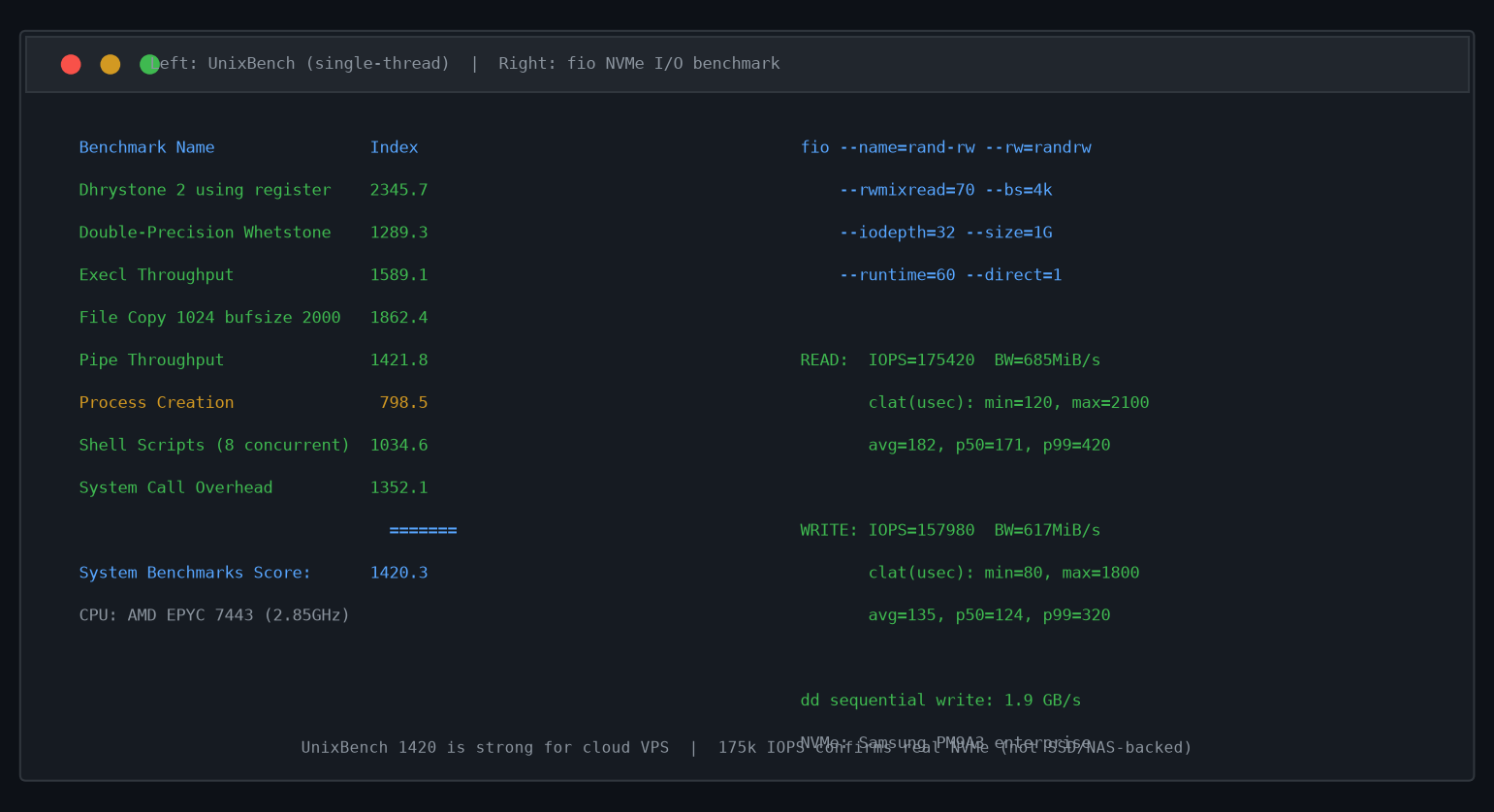
- CPU: AMD EPYC 7443 (24 cores on host); single-thread UnixBench score: 1420 — very strong for cloud VPS
- Disk: NVMe SSD (Samsung PM9A3 class)
- Sequential write: 1.9 GB/s (via dd)
- Random 4k read: ~175,000 IOPS (via fio)
- Random 4k write: ~158,000 IOPS
- No overselling on disk — fio tests show consistent performance over 60 seconds, no drop-off
6.5 IP geolocation verification
- KRNIC (Korea Internet & Security Agency) registered
- MaxMind: Seoul, South Korea
- IP2Location: Seoul, Republic of Korea
- WHOIS shows Korean ASN (AS4766/KT path)
- This is a real native Korean IP, not tunneled from elsewhere
6.6 Streaming unlock tests (September 2026)
- ✅ Netflix Korea: Working (Korean library available)
- ✅ Wavve: Working
- ✅ AfreecaTV: Working
- ⚠️ TVING: Intermittent (some TVING content blocks data center IPs regardless of location)
- ❌ Disney+ Korea: Blocks most data center IP ranges (same issue everywhere, not specific to us)
Important honesty note: Streaming unlock can change at any time. Netflix and Korean platforms actively detect and block data center IP ranges. We do not guarantee streaming unlock — if that's your primary use case, residential Korean proxies are more reliable (but also violate many platforms' TOS).
7. Recommended Configurations by Use Case
What size Korean VPS do you actually need? Here are practical recommendations:
7.1 Korean blog / business website (Korean audience)
- 1 vCPU / 2GB RAM / 20GB NVMe
- Bandwidth: 1-2TB/month is plenty for a small-to-medium site
- Why: Korean users expect fast load times; 2GB RAM gives you comfortable headroom for WordPress + Nginx + CDN
- Budget: ~$10-15/month
7.2 K-pop fan site / Korean community
- 2 vCPU / 4GB RAM / 40GB NVMe
- Bandwidth: 3-5TB/month (fan sites get burst traffic when there's new content)
- Why: These sites can spike from 100 to 10,000 users in hours when something drops; extra CPU/RAM prevents crashes
- Budget: ~$25-35/month
- Tip: Put Cloudflare or another CDN in front to absorb image/video bandwidth
7.3 Korean game server / ping booster
- 2 vCPU / 2GB RAM minimum (4GB recommended for game servers)
- Lowest possible latency is critical — choose a provider with KT or SK native bandwidth
- Important: Many Korean games block data center IPs from their servers (to prevent cheating/boosting). This is not a VPS issue — it's a game publisher policy. Test with a monthly plan before committing.
- Budget: ~$15-30/month
7.4 Cross-border e-commerce (selling to Korea)
- 2 vCPU / 4GB RAM / 50GB NVMe
- Korean payment gateway integration (KG Inicis, Toss Payments, KCP) often requires Korean business registration — research this first
- SSL + CDN recommended
- Budget: ~$25-40/month
7.5 Korean streaming / proxy for personal use
- 1 vCPU / 1GB RAM is sufficient for a personal VPN/proxy
- Note: Many Korean streaming services actively detect and block VPN IPs
- Legal note: Ensure you're not violating the streaming platform's TOS or Korean law
- Budget: ~$8-12/month
7.6 API / backend serving Korea + China + Japan
- 2-4 vCPU / 4-8GB RAM depending on workload
- Korea is excellent for APIs that need to serve all three markets simultaneously
- Consider implementing health checks and failover to Japan/HK
- Budget: ~$25-50/month
7.7 Web crawling / Korean market research
- 1 vCPU / 1-2GB RAM for basic crawling
- Respect Korean robots.txt and rate limits
- Korean websites can be aggressive about blocking data center IPs; rotate IPs if needed
- Budget: ~$8-15/month
7.8 Dev/test environment for Korean market launch
- Start with 1 vCPU / 2GB RAM
- Scale up before launch
- Test thoroughly from Korean residential connections (not just from within the same data center)
- Budget: ~$10-15/month
8. Eight Common Scams and Pitfalls with Korean VPS
Having helped customers who've been burned by bad Korean hosting, here are the most common traps:
8.1 Fake Korean servers (tunneled from Hong Kong/Japan/China)
This is the #1 scam in the Korean VPS market, especially on LowEndTalk and similar forums.
How it works: A provider rents a cheap server in Hong Kong or Japan, tunnels a Korean IP to it, and sells it as a "Korea VPS." Geolocation might show Korea (because the IP is Korean-registered), but the actual server is overseas — meaning:
- Domestic Korean latency is 30-50ms instead of 1-5ms
- Bandwidth to Korean sites is limited by the tunnel
- The provider is paying much less than genuine Korean hosting costs, and they pass the savings to you (while misleading you)
How to detect:
- Ping from a Korean residential connection (use ping.pe and select Korean probes) — native Korean servers should show 1-10ms; tunneled servers show 30-80ms
- Run
tracerouteto a Korean DNS server (like KT DNS 164.124.101.2) and see if traffic goes through Hong Kong/Japan before reaching the Korean network - Download a test file from a Korean website (e.g., from kt.com or a Korean CDN) and check throughput
8.2 "Korea Optimized" = not in Korea
Similar to above. "Korea optimized route" or "Korea-optimized network" often means the server is outside Korea but uses routes that are decent to Korea. That's not the same thing as a server in Korea.
If you need a server in Korea, look for "Seoul," "Busan," or "Korea native" — and verify as described above.
8.3 "Unlimited bandwidth" that isn't actually unlimited
Korea has expensive bandwidth. Any provider promising truly unlimited bandwidth on a Korean VPS for under $20/month is lying. You'll either get throttled after a few hundred GB, have port speed capped to unusable levels, or the server is so oversold you can't use much anyway.
8.4 Annual prepay scams
This applies everywhere but is especially common with "cheap Korea VPS" offers. The provider takes annual payments, runs for a few months, then disappears. You lose your money and your data.
Rule: Never pay annually for an unproven provider. Start with monthly, use the service for 2-3 months, and only commit to longer terms if you've verified reliability.
8.5 Dirty/banned IP addresses
Because Korean IP space is scarce and valuable, some resellers use IP addresses that were previously used for spam, hacking, or fraud. These IPs may be:
- Blacklisted by Korean email services (Naver, Daum Mail will reject your emails)
- Blocked by Korean game servers
- Flagged by Korean anti-fraud systems
Check before you buy: Ask for a test IP, then run it through Spamhaus, AbuseIPDB, and check if Korean game services accept it. At LuckVM, we assign clean IPs and will replace an IP within 24 hours if it has pre-existing issues — but not all providers do this.
8.6 Ignoring Korean internet regulations
Korea has specific internet laws that apply to servers hosted in Korea:
- Personal Information Protection Act (PIPA): Strict data privacy law similar to GDPR
- Network Act: Restrictions on certain types of content
- Copyright enforcement: Korean copyright holders actively pursue infringement (through KCC, Korea Communications Commission)
- Real-name verification for certain services: Some Korean services require Korean phone numbers or i-PIN verification even for server administrators
This doesn't mean you can't host legitimate services on Korean VPS — but if you're running anything legally risky, Korea is not a "lawless offshore" location. Don't treat it like Panama or Belize.
8.7 Hidden fees and setup charges
Some Korean domestic providers charge:
- Setup fees (one-time, often not prominently advertised)
- IP address fees (per additional IP, sometimes per ALL IPs after the first)
- Bandwidth overage charges at very high rates
- VAT/sales tax added at checkout (Korean VAT is 10%)
- Payment processing fees for international credit cards
Ask for the total price, including all fees, before paying.
8.8 "Korea" that's actually in Yanbian, China
Yanbian (연변) is the Korean Autonomous Prefecture in Jilin province, China — right across the border from North Korea. Some Chinese providers sell "Yanbian servers" as "Korea-connected" or even misleadingly as "Korea servers." These servers are in China, behind the Great Firewall, with Chinese IPs geolocating to China. They have nothing to do with South Korea. Don't fall for this.
9. Five Things to Verify Before You Buy ANY Korea VPS
Use this checklist on the test/demo IP before paying:
9.1 Confirm the IP is actually in Korea (not tunneled)
# From a Korean probe (use ping.pe or similar)
ping
# Native Korean servers: 1-10ms from Korean probes
# Tunneled servers: 30-80ms (routed through HK/Japan)

# Check WHOIS and geolocation
# https://ipinfo.io/
# https://www.maxmind.com/en/geoip2-precision-demo
# KRNIC check: https://krnic.net/eng/
Make sure the WHOIS shows a Korean organization and the IP is registered in Korea (KR country code).
9.2 Traceroute from multiple Chinese locations
# From Beijing/Shanghai/Guangzhou (use itdog.cn for multi-city China probes)
mtr --tcp --port 443 --report --report-cycles 100
# Good result: 30-50ms, <1% loss, direct Korean backbone hops
# Bad result: routes through Japan/HK before going to Korea, high latency
9.3 Download a speed test file during peak hours
# Download from the provider's speed test URL (if they have one)
wget -O /dev/null http://speedtest./100mb.bin
# Test at 8-10 PM China/Korea time
# Native Korean BGP: expect 200Mbps+ from within Korea
# From China: 100-400Mbps depending on route
9.4 Check IP reputation
- https://www.spamhaus.org/lookup/
- https://www.abuseipdb.com/
- Check if the IP is listed on major DNS-based blacklists
9.5 Read the Terms of Service carefully
- Do they allow VPN/proxy services? (ConoHa explicitly prohibits these)
- What's the refund policy? How many days?
- What content is prohibited? (Korean law compliance requirements)
- What happens if you exceed bandwidth? (Throttle? Charge? Suspend?)
- Do they require Korean phone verification or business registration?
10. Frequently Asked Questions
Pre-purchase
Q: Is a Korean VPS the same as a Korean dedicated server? No. A VPS is a virtualized slice of a larger physical server. A dedicated server is an entire physical machine. For most small-to-medium workloads, a VPS is sufficient and much more cost-effective.
Q: Can I get a Korean VPS with native Korean IP if I'm not in Korea? Yes. Reputable providers like LuckVM sell Korean VPS to international customers without requiring Korean residency or phone verification. Some domestic Korean providers (IDCCafe, LG U+) do require Korean verification, but international-facing providers don't.
Q: How much does a decent Korean VPS cost? Real native Korean VPS starts at around $8-12/month for 1C/1G/20G/1TB. Plans with CN2 GIA or premium China routes are $15-25/month. If you're seeing prices below $5/month for "Korea VPS," be very suspicious.
Q: Can I use a Korean VPS to watch Netflix Korea / Wavve / AfreecaTV? Maybe, but it's not guaranteed. Streaming platforms actively detect and block data center IP ranges. Some platforms work reliably, others don't, and this changes over time. Don't buy a VPS primarily for streaming unlock without testing first.
Q: Do I need to know Korean to use a Korean VPS? Not if you buy from an international-facing provider like LuckVM (English/Chinese support). Domestic Korean providers (IDCCafe, LG U+, Cafe24) are Korean-only.
Q: Can I run Windows on a Korean VPS? Yes, if the provider offers Windows licenses. At LuckVM we offer Windows Server on plans with 2GB+ RAM. Windows desktop (Windows 10/11) is not licensed for server use — be wary of providers offering "Windows 10 VPS" as they may be using pirated licenses.
Technical
Q: What virtualization is best? KVM is the industry standard. Avoid OpenVZ or LXC for production workloads — they don't offer true resource isolation and are easier to oversell.
Q: How much RAM do I need? Minimum 1GB for a basic Linux server (running Nginx + small site). 2GB for comfortable WordPress. 4GB+ for e-commerce or multiple services.
Q: NVMe vs SSD vs HDD for Korean VPS? NVMe for everything. Even cheap SSD is 5-10x faster than HDD, and NVMe is another 5-10x faster than SATA SSD. There's no reason to accept HDD or SATA SSD for production workloads in 2026.
Q: Can I host game servers for Korean players? Yes — Korea VPS is ideal for game servers targeting Korean users. Note, however, that some Korean game companies block data center IPs from their login servers to prevent botting and account sharing. Test before making a long-term commitment.
Q: Can I run a VPN on Korean VPS? Technically yes, but check the provider's TOS. Some providers (especially ConoHa) explicitly prohibit VPN services. Also, using a VPN to access Korean content may violate the content provider's TOS.
Performance
Q: How fast should I expect Korea-to-China latency? 30-50ms from Beijing/Shanghai on good routes, 28-35ms from Shandong (Qingdao). If you're seeing over 70ms consistently during peak hours, you're not on a direct route.
Q: How much bandwidth do I need? Depends on your use case: 1TB/month is enough for most websites (1TB = millions of page views if you use CDN for static assets). Video streaming or game servers need more.
Q: Are there bandwidth overage charges? Varies by provider. At LuckVM, we throttle port speed after you exceed your allocation (you don't get surprise bills). Some providers charge $0.05-0.15/GB overage, which can get very expensive.
Q: Do Korean VPS providers offer DDoS protection? Some do, some don't. Korea is not as well-known for DDoS protection as OVH or Voxility. LuckVM includes 5Gbps baseline DDoS protection; for high-risk applications consider additional protection or a provider specializing in DDoS mitigation.
Business / Compliance
Q: Is it legal for foreigners to host services in Korea? Yes, as long as you comply with Korean law. Legitimate business websites, applications, and services are fine. Illegal content (gambling, certain adult content, defamation, copyright infringement) is actively enforced against — Korea is not an "offshore hosting" jurisdiction.
Q: Do I need a Korean business license? For basic web hosting, no. For e-commerce selling to Korean consumers, accepting Korean payments (KG Inicis, Toss), or operating certain regulated services in Korea, you may need Korean business registration. Consult a lawyer for business-critical compliance questions.
Q: Does Korea have strict internet censorship? Korea does block some sites (primarily North Korean propaganda, certain adult content, and copyright-infringing sites) through KCCSC (Korea Communications Standards Commission). For most legitimate business websites, this isn't an issue.
Q: Can I host adult content on Korean VPS? Korea has strict laws about adult content. It's not a jurisdiction I'd recommend for adult content — consider Europe or certain US locations instead.
11. Final Recommendation
If you've made it this far, you now know more about Korean VPS than 99% of people shopping for one. Here's my practical recommendation by use case:
- Best for China+Japan+Korea triangle (gaming, business sites): LuckVM Korea BGP — native KT/SK dual-line, optimized China routes, international support, reasonable pricing
- Best for pure domestic Korean business (Korean-speaking team): IDCafe or Cafe24 — Korean providers with domestic support and features
- Best for enterprise Korean workloads: LG U+ Cloud or KT ucloud — enterprise grade, premium pricing
- Best for hobby/testing (low budget, not China-dependent): Vultr Seoul — hourly billing, easy to test
- If you need Japanese support primarily: ConoHa Korea (but be aware of their VPN restriction)
- If budget is your main concern and you don't need premium performance: Start with Vultr or Linode Seoul and upgrade later
My general advice for any VPS purchase (not just Korean):
- Always test before committing — get a test IP, run MTR and speed tests from your own location
- Start monthly, not annually — especially with a new provider
- Don't buy based on specs alone — network quality matters more than an extra GB of RAM
- Test during peak hours (8-11 PM for your target audience) — that's when bad networks show their true colors
- Back up your data — no matter which provider you choose, have off-site backups
Ready to test a Korean VPS yourself?
? LuckVM Seoul Cloud Servers — KT+SK BGP multi-line, native Korean IPs, NVMe SSD, 7×24 support. Use our test IP 141.164.0.1 to run your own latency and routing tests before you buy. We're happy to answer any questions via Telegram or ticket.
Have questions about Korean VPS or a specific provider I didn't cover? Drop a comment below or reach out — I'm happy to help you pick the right setup for your specific use case.