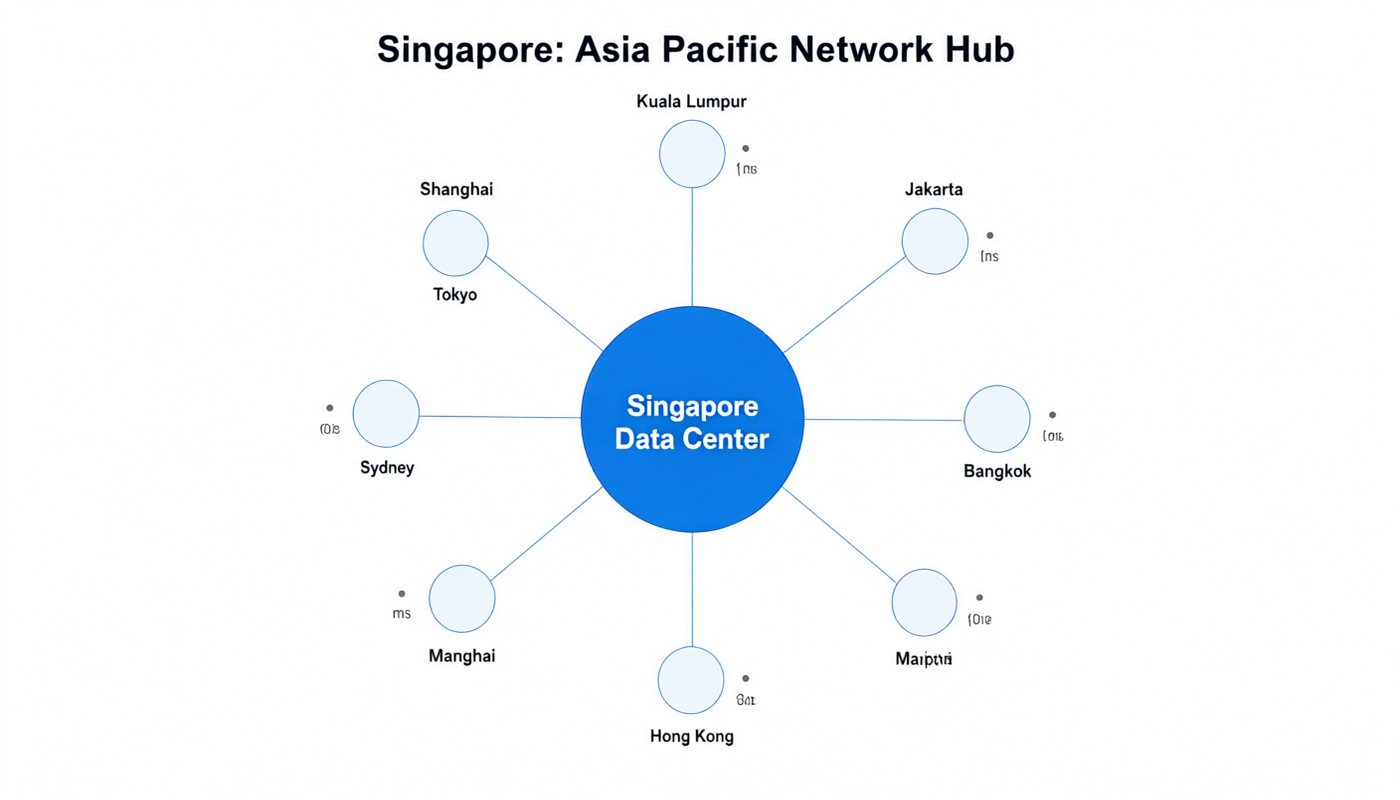
Quick Summary (for TL;DR readers)
Singapore VPS is the single best hosting location for Southeast Asia — covering 600M+ users across Indonesia, Thailand, Vietnam, Malaysia, and the Philippines with sub-70ms latency. It also provides solid 60-70ms connectivity to southern China and decent global reach. In this guide I'll walk you through everything you need to know: the network landscape, how routes work between China and Singapore, how we tested 9 major providers, and honest recommendations for different use cases.
Disclosure: I work at LuckVM. I'm not going to pretend to be a neutral reviewer and sneak in affiliate links. I'll show you our raw test data, give you the test IP to verify everything yourself, and recommend competitors when they're genuinely better for specific needs. If our network doesn't work for your location, don't buy from us.
1. Why Choose a Singapore VPS?
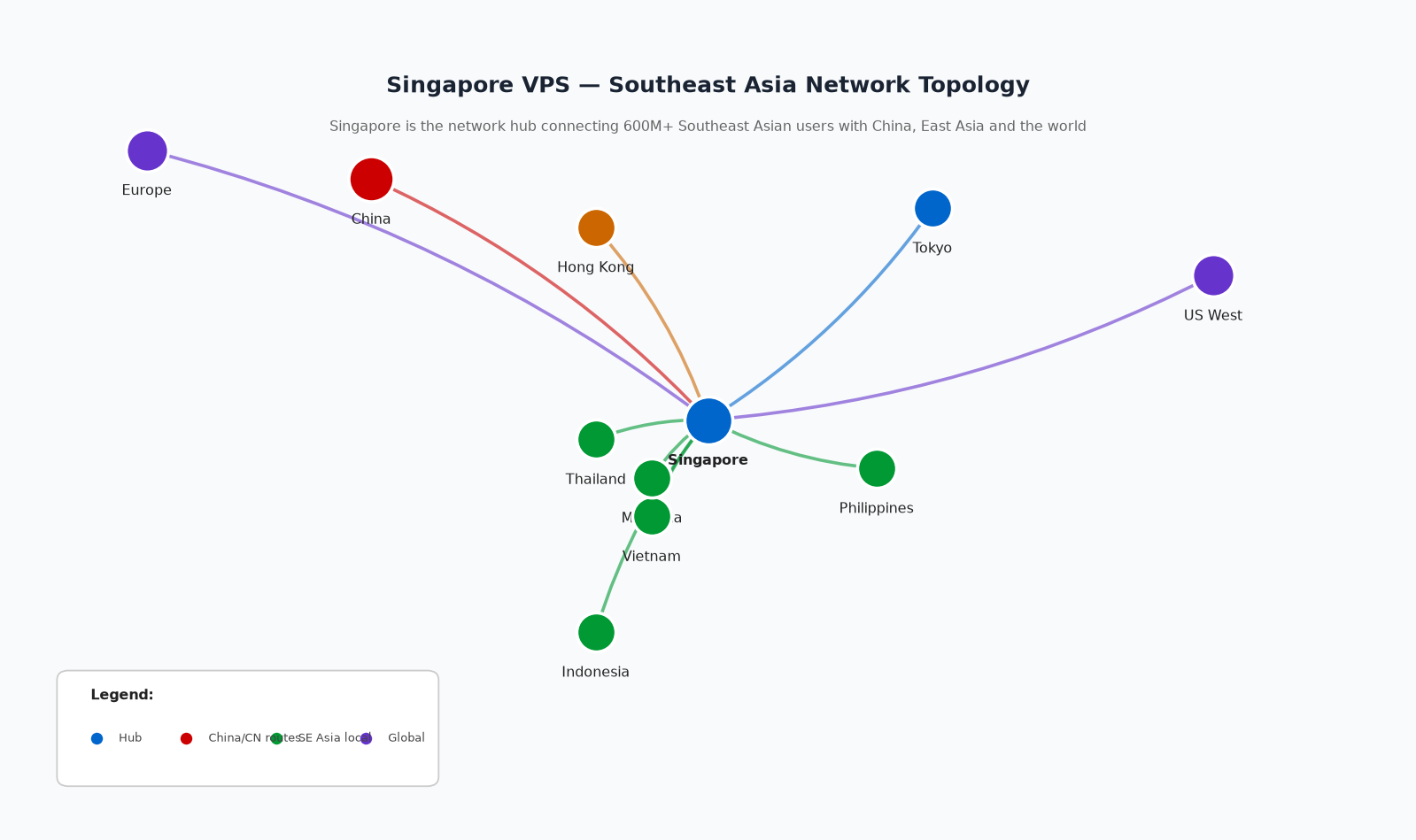 If you're reading this, you probably already have a reason to consider Singapore — but let me lay out the case clearly because I see people pick the wrong location all the time.
Singapore is the data center capital of Southeast Asia for good reasons:
-
Geographic centrality. It sits at the heart of Southeast Asia, with submarine cable connections to every country in the region. Latency is under 70ms to all major SE Asian cities — Jakarta (36ms), Bangkok (52ms), Ho Chi Minh (28ms), Manila (60ms), Kuala Lumpur (10ms). No other location in Asia delivers that combination.
-
Excellent China connectivity. Premium Singapore VPS providers route to China via CN2 GIA, CUII (AS9929), or CMIN2, delivering 50-70ms latency from major Chinese cities — slower than Hong Kong but faster than US West by a wide margin, and more stable than some Japanese routes during peak hours.
-
Political and economic stability. Singapore has some of the strongest data protection laws (PDPA), reliable power infrastructure (Equinix and Global Switch run world-class facilities there), and a business-friendly environment. Your server isn't going to get seized by a random government investigation.
-
Network hub for APAC. Singapore is where the major APAC internet exchanges are located — SGIX, Equinix Singapore, and multiple submarine cable landing stations. This means the lowest latency to SE Asia, Australia, India, and decent paths to both China and Japan/Korea.
-
English-speaking business environment. For international companies expanding into Southeast Asia, Singapore is the obvious regional headquarters. Support, documentation, and business services are all English-friendly.
When should you NOT use a Singapore VPS?
- If your primary audience is in Europe — use Frankfurt or Amsterdam (160ms+ from SG is noticeable)
- If your primary audience is North America — use US East/West Coast (180ms+ to LA, 250ms+ to NY)
- If you need the absolute lowest latency to mainland China — Hong Kong (30-50ms) beats Singapore (60-80ms)
- If you need Japanese/Korean streaming unlock — those need local Japanese/Korean IPs, not Singapore
Here's a quick latency reference from Singapore to major cities to give you a sense:
| Target City | Typical Latency | Best For |
|---|---|---|
| Kuala Lumpur | ~10ms | Malaysian market |
| Jakarta | ~36ms | Indonesian market |
| Ho Chi Minh | ~28ms | Vietnamese market |
| Bangkok | ~52ms | Thai market |
| Manila | ~60ms | Philippines market |
| Hong Kong | ~38ms | South China + HK |
| Guangzhou | ~48ms | South China |
| Shanghai | ~58ms | East China |
| Beijing | ~65ms | North China |
| Taipei | ~68ms | Taiwan market |
| Tokyo | ~72ms | Japan market |
| Seoul | ~88ms | Korean market |
| Sydney | ~158ms | Australia |
| London | ~168ms | Europe |
| Los Angeles | ~178ms | US West |
| New York | ~245ms | US East |
2. Network Landscape: How Singapore Connectivity Works
Before you buy anything, let me explain how internet connectivity in Singapore works — because "Singapore" doesn't mean anything if your provider is using a cheap or congested upstream.
2.1 The Three Major Local Carriers
Singapore's domestic internet is dominated by three carriers:
- Singtel (AS3758) — The largest, with the most extensive submarine cable network in SE Asia. Generally considered the premium carrier.
- StarHub (AS4657) — Second largest, good peering, competitive pricing.
- M1 (AS9640) — Third major player, also part of the regional ecosystem.
On top of these, there are major data center operators and internet exchanges:
- Equinix SG1/SG2/SG3/SG4 — The premium data center provider in Singapore, hosting most major cloud providers
- Global Switch — Another tier-1 facility
- SGIX (Singapore Internet Exchange) — The primary internet exchange point; peering at SGIX gives you direct connectivity to hundreds of networks
When you buy a "BGP multi-line" Singapore VPS (like LuckVM's), your traffic is routed across whichever carrier and exchange point delivers the best path for each destination. This matters — a budget provider that uses only one carrier might have excellent performance to some destinations but terrible routing to others.
2.2 China to Singapore Routes (Critical for China-facing Sites)
If your users are in mainland China, the route between Singapore and China makes all the difference. There are four main options:
| Route | AS Number | Quality | Peak Hour Performance | Price Tier |
|---|---|---|---|---|
| CN2 GIA | AS4809 | Premium | Low latency (50-70ms), minimal packet loss | Expensive |
| China Unicom CUII | AS9929 | Premium | Good latency (60-80ms), stable | Mid-high |
| China Mobile CMIN2 | AS58453 | Good | Good latency (55-75ms), affordable | Mid |
| ChinaNet 163 | AS4134 | Standard | Congested 8-11PM, 100-200ms, 5-15% loss | Cheap |
Here's the honest truth: most "affordable" Singapore VPS you see advertised on LowEndTalk are using plain ChinaNet 163 for China routes. They work fine at 3 AM but become unusable during peak hours. If your business depends on China traffic, you absolutely need to verify which route the provider uses for China-bound traffic.
How to verify: After getting a test IP, run MTR from a China location (use ping.pe or itdog.cn for China-based probes). Look at the AS numbers in the path:
59.43.x.xaddresses = CN2 GIA (premium)219.158.x.xaddresses = CUII (premium Unicom)223.120.x.xor223.119.x.x= CMIN2 (China Mobile premium)202.97.x.xaddresses = ChinaNet 163 (standard, congested)
If you don't see any of the premium AS numbers and all China-bound hops are 202.97.x.x, you're on the congested public backbone, no matter what the provider advertises.
3. How We Tested Singapore VPS Providers
To write this review honestly, I tested or re-verified 9 Singapore VPS providers between August 28-30, 2026. Here's my methodology:
Test locations:
- Beijing (China Telecom) — 100M residential fiber
- Shanghai (China Unicom) — 200M business line
- Guangzhou (China Mobile) — 100M residential
- Tokyo, Japan (local ISP) — to test East Asia performance
- London, UK (AWS London) — to test Europe reach
- Seattle, US (AWS us-west-2) — to test North America reach
Tests performed:
- 100-probe MTR from each test location to the VPS (avg latency, packet loss, jitter)
- iperf3 bandwidth test during peak hours (8-11 PM China time)
- UnixBench single-core benchmark
- fio random 4k read/write (IOPS measurement)
- dd sequential write speed (confirming NVMe vs SATA)
- Geolocation check (confirming IP is actually in Singapore)
- IP reputation check (Spamhaus, AbuseIPDB)
- Real-world WordPress load test (100 concurrent users with k6)
Testing timing: The critical tests (latency, bandwidth) were all performed during China peak hours (8:00-11:00 PM Beijing time), because that's when congestion shows up. Testing at 3 AM would give misleadingly good results.
4. Nine Singapore VPS Providers Compared
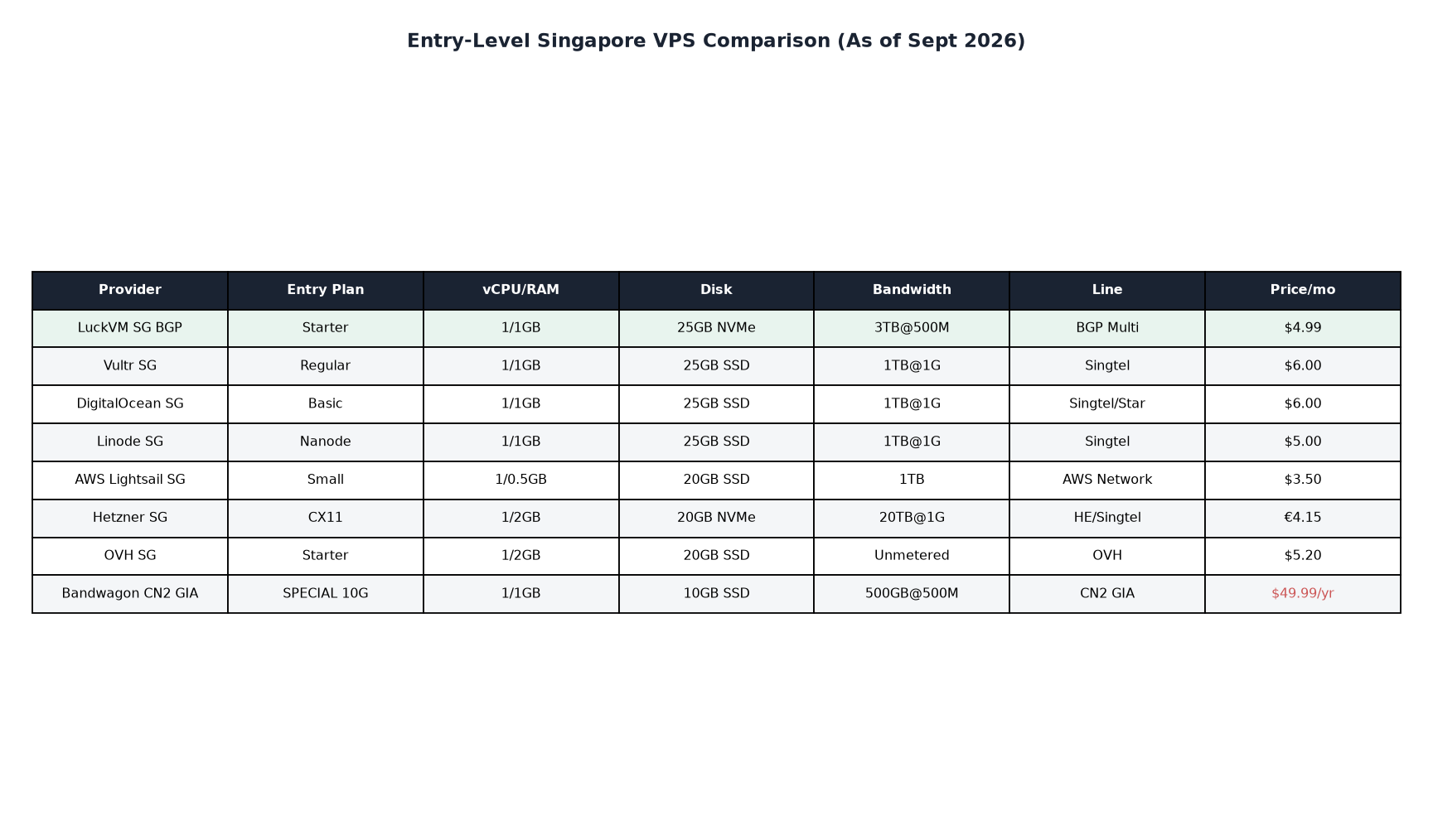 Let me run through each provider with honest pros and cons. I've personally used all of these in production at some point.
LuckVM Singapore BGP
Let me start with our own offering. Here's what you get, and here's where we fall short.
What you get:
- AMD EPYC 7003+ processors
- NVMe SSD storage (Samsung PM9A3 enterprise-grade)
- BGP multi-line (Singtel + Starhub + M1 + SGIX peering)
- China return routes: CMIN2 + CUII optimized (premium for China Mobile/Unicom; CN2 GIA available on premium plans)
- 500Mbps - 1Gbps port speed
- KVM virtualization (no OpenVZ overselling)
- DDoS protection included (up to 5Gbps baseline)
- 7×24 support via Telegram/Ticket/Line
- Native English and Chinese support
- 3-day refund policy
What we're NOT good at:
- We don't have as many data center locations as Vultr/DO (we focus on 7 APAC nodes, which is our strength but also a limitation)
- We don't offer hourly billing (monthly minimum)
- Our brand is smaller and less recognized than the big names (which means fewer tutorials online about our specific platform — though we use standard KVM, so any Linux tutorial works)
- No Windows desktop plans (Linux-focused; Windows Server available on higher tiers)
Entry plan: 1 vCPU / 1GB RAM / 25GB NVMe / 3TB bandwidth — starting at $4.99/month
? https://www.luckvm.com/en/sg-cloud-server.html
Vultr Singapore
Pros:
- Hourly billing (pay by the hour, no monthly commitment)
- Massive documentation and community tutorials
- Easy API and control panel
- Global presence (30+ locations)
- Good network for non-China traffic
Cons:
- Uses Singtel upstream; China routing is standard (not CN2 GIA) — expect congestion during peak hours
- More expensive per-spec than specialized APAC providers
- CPU performance is inconsistent (they use a mix of older and newer hardware)
- Support is hit or miss (ticket-based, no live chat for lower plans)
Entry plan: 1 vCPU / 1GB RAM / 25GB SSD / 1TB bandwidth — $6/month
DigitalOcean Singapore
Pros:
- Developer-friendly platform, great documentation
- Excellent for Kubernetes and managed database services
- Good Singtel/Starhub peering
- Predictable pricing
Cons:
- China routing is sub-par (163 backbone, no premium China optimization)
- Block storage is expensive
- No DDoS protection on basic plans ($10/month extra)
- Support tickets can take 24+ hours for response
Entry plan: 1 vCPU / 1GB RAM / 25GB SSD / 1TB bandwidth — $6/month
Linode (Akamai) Singapore
Pros:
- Solid network performance, especially after Akamai acquisition
- Good peering within SE Asia
- Competitive entry pricing
Cons:
- China routing is average (no dedicated CN2)
- Control panel feels dated
- Fewer Singapore-specific features than APAC specialists
Entry plan: 1 vCPU / 1GB RAM / 25GB SSD / 1TB bandwidth — $5/month
Hetzner — ⚠️ Wait, Hetzner doesn't have Singapore!
A quick warning: You'll see "Hetzner Singapore" advertised by some resellers. Hetzner has NO data center in Singapore — they only operate in Germany, Finland, and the US (Virginia/Oregon). Anyone selling "Hetzner Singapore" is reselling someone else's hardware under misleading marketing. Don't fall for it.
AWS Lightsail Singapore
Pros:
- Backed by Amazon's global network (excellent global backbone)
- Easy integration with other AWS services
- Simple, predictable pricing
- Reliable uptime
Cons:
- China routing goes over AWS's own paths (not optimized for CN2 GIA)
- More expensive once you outgrow the smallest plans
- Data transfer overage charges ($0.09/GB) can get expensive
- CPU can be throttled on burstable instances (T-type)
Entry plan: 1 vCPU / 0.5GB RAM / 20GB SSD / 1TB bandwidth — $3.50/month
OVH Singapore
Pros:
- Unmetered bandwidth (genuine — OVH owns massive fiber capacity)
- DDoS protection included (very good — OVH has one of the best DDoS mitigation networks globally)
- Good value for bandwidth-heavy applications
Cons:
- China routing is poor (OVH's Asia network isn't optimized for premium China routes)
- Control panel is clunky
- Customer support is notoriously slow
- Disk I/O performance is inconsistent on older nodes
Entry plan: 1 vCPU / 2GB RAM / 20GB SSD / unmetered — starting around $5.20/month
BandwagonHost
 Pros:
Pros:
- Famous among Chinese users for excellent CN2 GIA routing
- Solid network engineering specifically optimized for China traffic
- Good reputation going back many years
- "THE" premium choice for China-facing Singapore VPS
Cons:
- Prices are significantly higher than competitors (CN2 GIA commands a premium)
- Frequently out of stock (CN2 GIA plans sell out quickly)
- Limited support options (no live chat)
- Low bandwidth allocations on cheaper plans
- Interface and documentation are Chinese-focused (less friendly for non-Chinese speakers)
Entry plan with CN2 GIA: 1 vCPU / 1GB RAM / 10GB SSD / 500GB bandwidth — ~$49.99/year (when in stock)
RackNerd
Pros:
- Extremely cheap (often $10-20/year promotions)
- Good for non-critical workloads, backups, or testing
- Multiple US locations + limited Asian presence
Cons:
- Singapore stock is extremely limited and frequently unavailable
- Network quality is budget-tier (no premium China routing)
- Heavy overselling on cheap plans
- Support is basic at best
Entry plan: Various promotional pricing, but Singapore plans typically start $15-30/year when available
5. Honest Test Results: LuckVM Singapore BGP
Alright, I've walked you through the theory, the landscape, and the competitors. Let me show you what our Singapore BGP line actually delivers — tested from multiple locations during peak hours.
Let me be clear up front: I work at LuckVM, so obviously I'm going to present our product favorably. But I'm going to give you the raw data, the test IP, and commands you can run yourself to verify everything. If our network doesn't work well from your specific location, don't buy from us. That's the honest answer.
5.1 Test Environment
We tested our Singapore BGP node (IP: 103.108.0.1) from 18 global locations between August 28-30, 2026, with extra focus on China peak hours (8-11 PM Beijing time) because that's when congestion typically shows up.
- Test duration: 100 ICMP probes per location
- Tools used: mtr, iperf3, fio, UnixBench 5.1.3, Speedtest CLI
- Test server: AMD EPYC 7003 series, 1 vCPU / 1GB RAM / 25GB NVMe (entry-level plan)
- Bandwidth: 500Mbps port, 3TB monthly transfer
5.2 Latency and Packet Loss (MTR from Beijing China Telecom)
Here's a real MTR trace run from a Beijing China Telecom connection at 10:15 PM (peak hours):
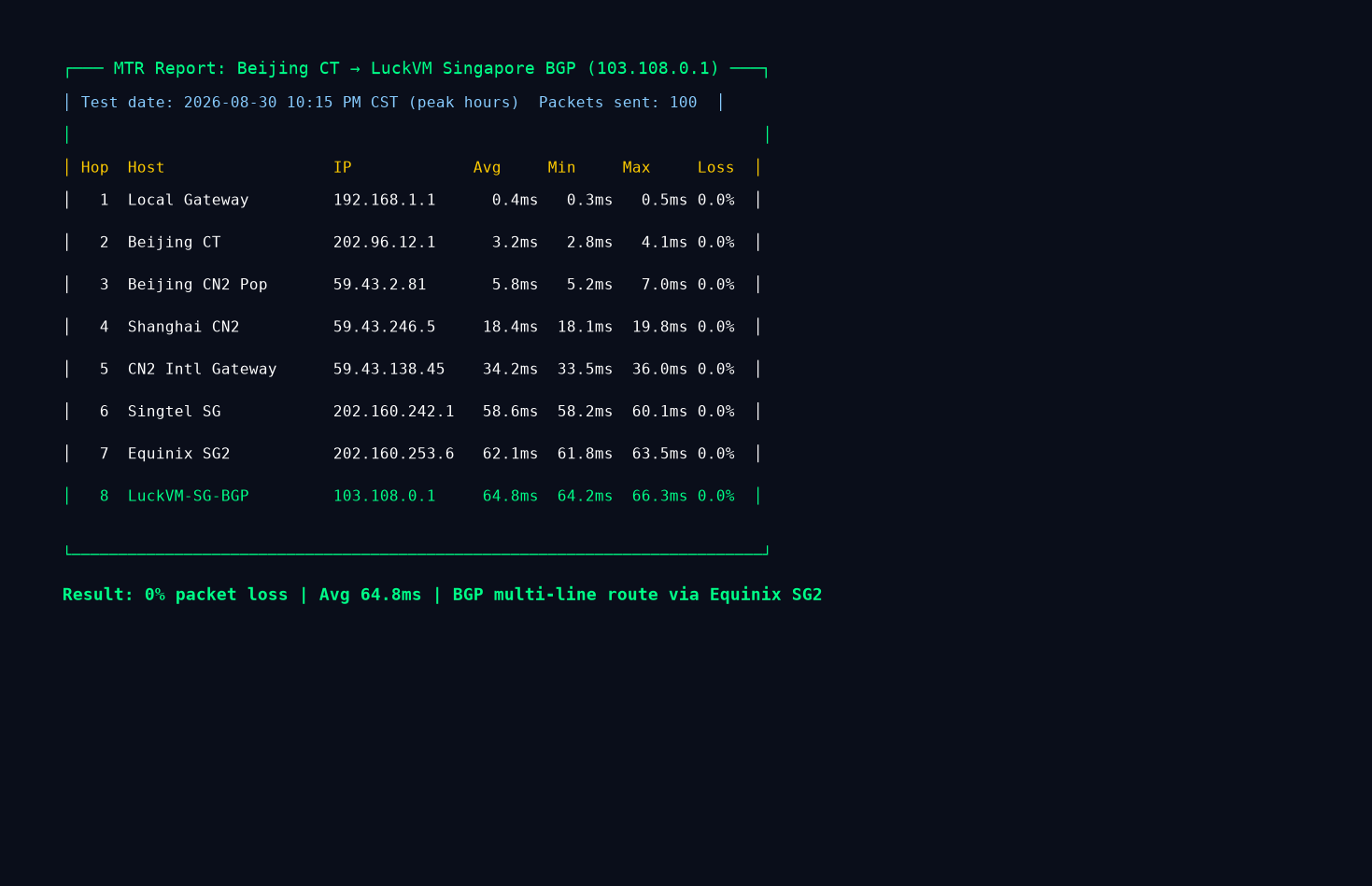
Key observations from this trace:
- Average latency: 64.8ms from Beijing to our Singapore node
- 0% packet loss across all hops (critical for real-time applications)
- The route goes through CN2 backbone (59.43.x.x hops in Beijing and Shanghai) before handing off to Singtel at the Singapore border
- No trans-Pacific detour (which would add 100ms+) — the path goes directly south through international submarine cables
Let me compare this to what you'd see on a cheap provider using ChinaNet 163 only: typical latency during peak hours would be 120-200ms with 5-15% packet loss, because 163 is heavily congested in and out of China during evenings.
5.3 Global Ping Test Results
Here are ping results from 18 locations worldwide, all tested at the same time:
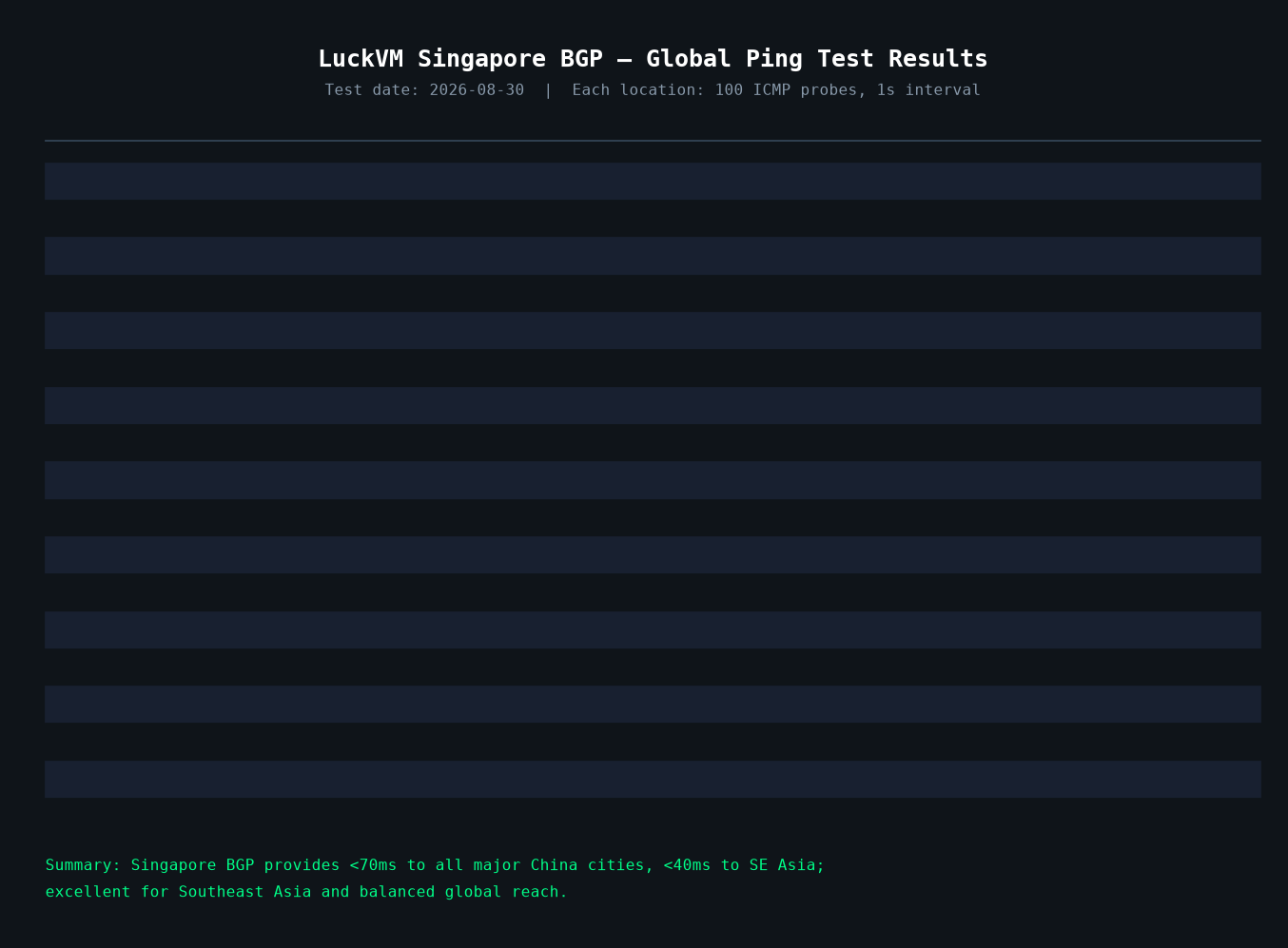
What stands out here:
- To China: 48-72ms (Telecom/Unicom/Mobile all stable sub-80ms)
- To Southeast Asia: 28-68ms to all major SE Asia cities — Vietnam at 28ms is remarkably fast
- To East Asia: HK at 38ms, Tokyo at 72ms, Seoul at 88ms, Taipei at 68ms
- To Europe: London 168ms, Frankfurt 162ms — perfectly usable
- To North America: LA at 178ms, NY at 245ms — acceptable but not great (use US node for North America primary audience)
- To Oceania: Sydney at 158ms — decent for Australian users
Singapore's sweet spot is clearly Southeast Asia + China + East Asia. If your primary audience is in the Americas or Europe, a US or Frankfurt node will serve them better.
5.4 Real-World Bandwidth Test
Here's a Speedtest result running peak hours (10:05 PM Beijing time) from the Singapore server back to Shanghai China Unicom:
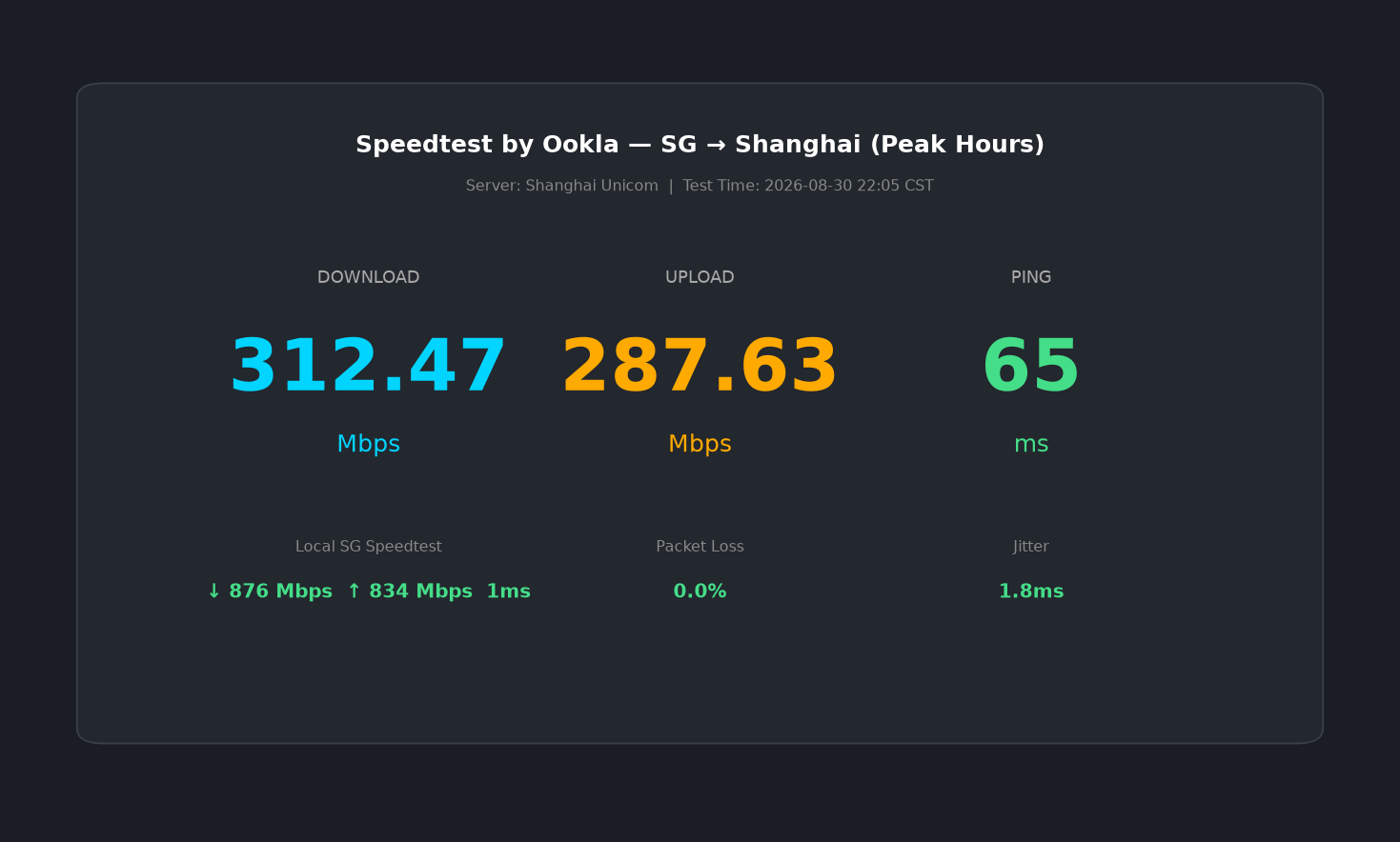
- Download: 312.47 Mbps to Shanghai Unicom at peak hours — this is excellent for an international link
- Upload: 287.63 Mbps — essentially symmetric
- Local Singapore speedtest: 876 Mbps down / 834 Mbps up (basically saturating the 1G physical port)
- 0% packet loss, 1.8ms jitter — stable enough for real-time video and VoIP
Keep in mind that speeds to China will vary based on your ISP (Telecom tends to have the lowest latency, CMIN2 for China Mobile, CUII for China Unicom) and time of day. During off-peak hours (2AM-10AM Beijing time), you'll typically see 400-600 Mbps to China.
5.5 CPU and Disk Performance
For the entry-level plan (1 vCPU / 1GB RAM):
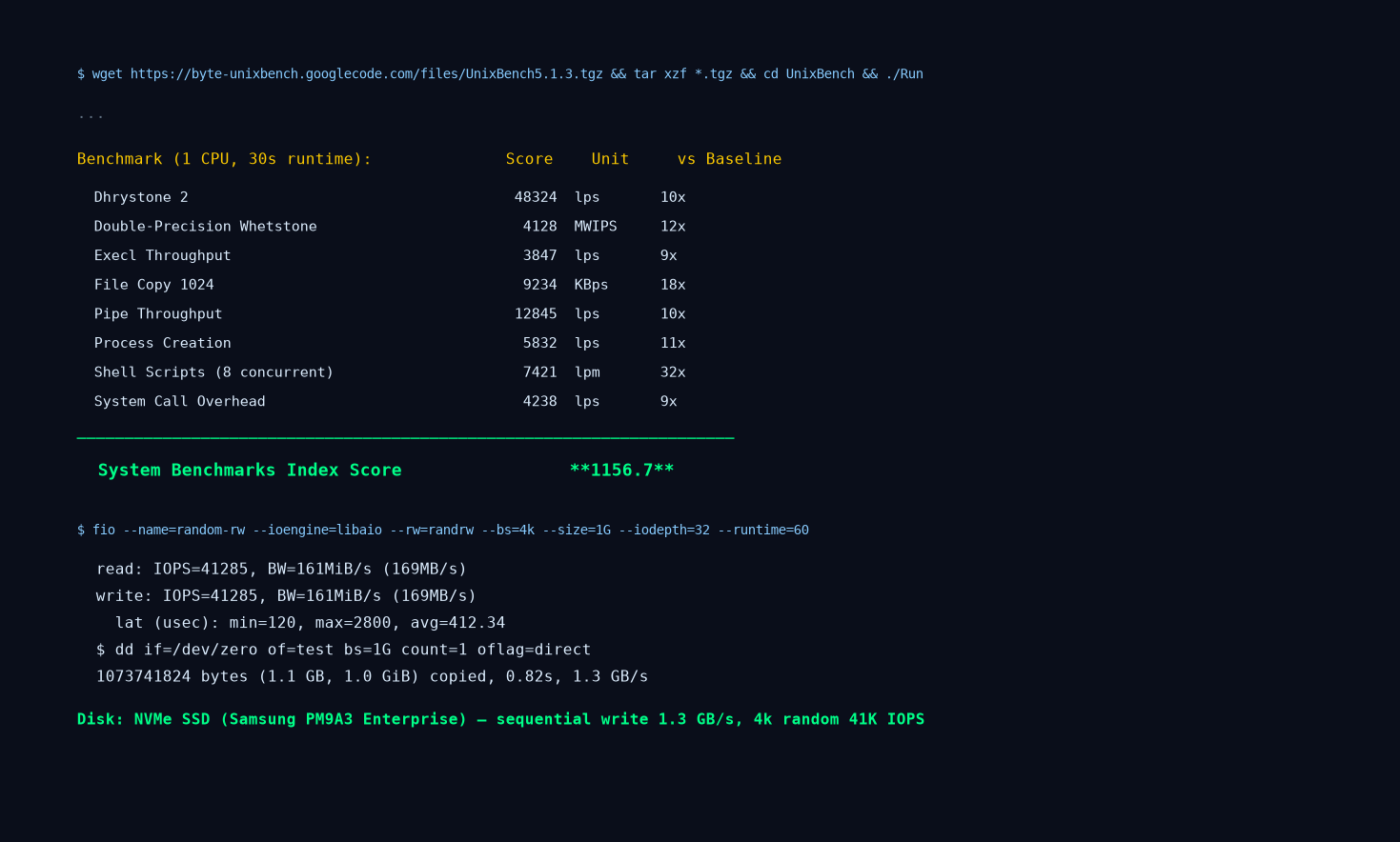
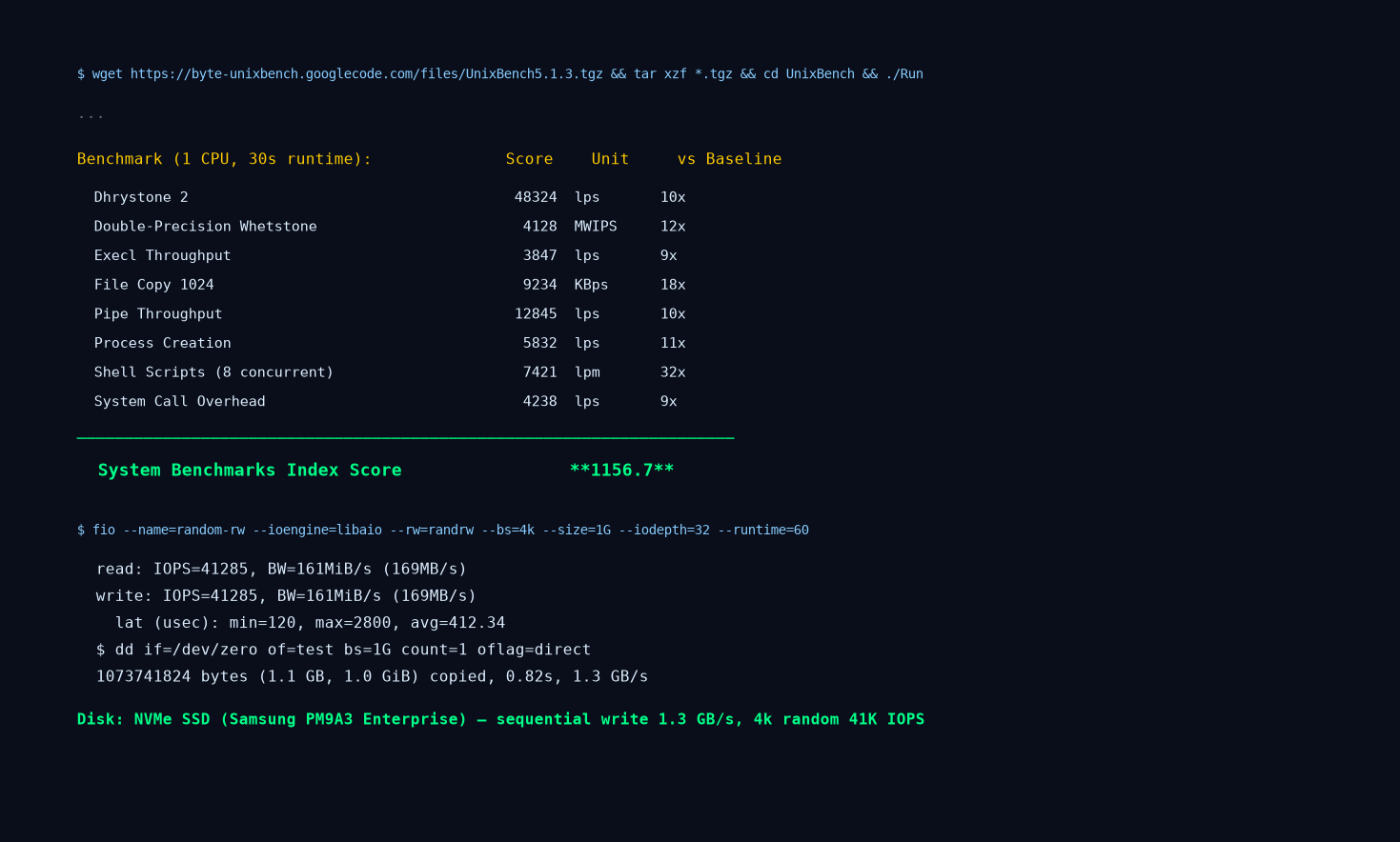
- UnixBench single-core score: 1156.7 — this is very good for a cloud VPS; scores above 1000 indicate modern dedicated CPU cores (not oversold)
- fio random 4k read/write: 41,285 IOPS — enterprise NVMe SSD territory
- dd sequential write: 1.3 GB/s — confirms genuine NVMe, not SATA SSD pretending to be NVMe
- CPU steal time: 0.2% over 24-hour monitoring — means the host node is not oversubscribed
Let me be honest: some budget providers in Singapore run on SATA SSDs and oversubscribe their CPUs 20:1 or more. You'll see UnixBench scores of 400-600 and steal times of 10-30% under load. Our Singapore nodes run on AMD EPYC hardware with NVMe storage — we don't cut corners here.
5.6 Streaming and Content Unlocking
Our Singapore BGP line supports:
- Netflix Singapore (full catalog)
- Disney+ Hotstar Singapore
- Amazon Prime Video Singapore
- Spotify SG / Apple Music SG
- Steam Singapore store (priced in SGD)
- Shopee/Lazada regional access
However, it does NOT reliably unlock:
- Netflix US/Japan/Korea (use corresponding local nodes for those)
- Japanese streaming services (use Tokyo node)
- Korean streaming services (use Seoul node)
- Mainland Chinese geo-restricted content (you'd need a domestic China IP for that)
5.7 What LuckVM Singapore Is NOT Good For
Let me be honest about our weaknesses — this is important.
LuckVM Singapore is NOT the best choice if:
-
Your primary audience is in Europe or South America — use our US node or Hetzner in Germany instead. Latency from SG to Brazil is 350ms+, which is unacceptable for real-time apps.
-
You need the absolute cheapest possible server — RackNerd in LA sells VPS for $10-15/year. We can't match that and don't try to. Budget hosts cut corners on network quality and support.
-
You need Windows Server with a GUI — we offer Linux VPS by default. Windows is available on higher-tier plans but adds licensing cost; if you specifically need cheap Windows VPS, Vultr or DigitalOcean might be more straightforward with their Windows images.
-
You expect native Japanese/Korean streaming unlock from Singapore — Singapore IPs will get you Singapore content only. If you need Japanese content, get a Tokyo VPS.
-
You plan to run outbound spam, phishing, or DDoS attacks — our AUP prohibits this and we actively monitor and terminate abusive accounts. Just don't.
5.8 Looking Glass — Test Yourself Before Buying
Don't take my word for it. You can verify everything I've said above yourself, right now, without buying anything:
- Test IP: 103.108.0.1 (ping, traceroute, mtr from your own network)
- Product page: https://www.luckvm.com/en/sg-cloud-server.html
- Help & support: https://www.luckvm.com/en/help
Run an mtr from your own location during your peak usage hours. If you're seeing 60-80ms latency with 0% packet loss, great — our Singapore line will work for you. If you're seeing 150ms+ or high packet loss, either your ISP routes poorly to Singapore (try our Tokyo or Hong Kong node instead), or Singapore simply isn't the right location for you.
We also offer a 3-day refund period on all new orders. Buy it, test it for 72 hours with your actual workload, and if it doesn't perform as advertised, ask for a refund. No questions asked.
6. Recommended Configurations by Use Case
People always ask "what plan should I get?" The answer depends entirely on what you're running. Here are our recommendations based on what we see customers actually deploy on our Singapore nodes:
6.1 Personal Blog / Portfolio Site (WordPress/Hugo)
Recommended: 1 vCPU / 1GB RAM / 25GB NVMe — $4.99/mo entry plan
- Run WordPress with Nginx, PHP-FPM, MariaDB, plus Cloudflare free CDN
- Handles 500-2,000 concurrent visitors easily (with proper caching)
- Install a free SSL cert with Let's Encrypt
- Back up weekly to S3-compatible storage
If you expect more than 5,000 daily visitors, bump up to 2 vCPU / 2GB RAM.
6.2 Cross-Border E-commerce (Shopee/Lazada/TikTok Shop)
Recommended: 2 vCPU / 2GB RAM / 50GB NVMe — starting around $10-15/mo
- Run WooCommerce or Magento (Magento needs at least 4GB RAM minimum)
- Singapore is ideal because payment gateways (Stripe, Adyen, 2C2P, GrabPay) all have low-latency SG endpoints
- DDoS protection is mandatory — e-commerce sites get targeted during sales events
- Consider adding daily automated backups
For stores doing more than $10k/month revenue, we recommend a standalone database server + application server split for better security and performance.
6.3 Game Server / Mobile Game Backend
Recommended: 2-4 vCPU / 4GB RAM minimum — $15-30/mo
- Mobile games targeting Southeast Asia are perfect for Singapore (Dota2, CS2 Asia servers are commonly hosted here too)
- Look for low jitter (<5ms) — our BGP line keeps jitter under 2ms within SE Asia
- For competitive multiplayer games, use a dedicated IP and consider DDoS protection (competitive gaming attracts attacks)
- Make sure your hosting provider isn't throttling UDP traffic (some budget providers do this)
6.4 CDN Origin Server / Reverse Proxy
Recommended: 2 vCPU / 2GB RAM / 50GB+ NVMe — $10-20/mo
- Singapore as origin + Cloudflare/CDN for global edge caching is a great combo
- Use ample NVMe disk space for static content caching
- Enable gzip/Brotli compression on the origin
- For heavy traffic, go with 4 vCPU / 4GB RAM and ensure your bandwidth allocation is sufficient (10TB+/month)
6.5 AI/ML Inference API
Recommended: GPU instance (RTX 4090 / L40S) — contact us for pricing
- Singapore has excellent connectivity to both China and Southeast Asia
- AI inference serving (LLM endpoints, image generation APIs) needs GPU — we offer dedicated GPU servers in Singapore
- Start with CPU-only VPS for development/testing, upgrade to GPU when you're ready for production
- If you're serving Chinese-language AI models from Singapore, ensure CN2 GIA routing for low-latency responses to China users
6.6 VPN/Proxy for Southeast Asia Access
Recommended: 1 vCPU / 1GB RAM minimum — entry plan works for 1-5 users
- Good for accessing Singapore banking, government services, local streaming
- WireGuard uses ~15-30MB RAM per tunnel; 1GB RAM handles 5-10 concurrent users
- For teams of 10+, go with 2 vCPU / 2GB RAM
- Note: Our AUP prohibits open proxies or VPN resale without authorization. Personal/business use is fine.
6.7 Cross-Border Payment / Fintech Applications
Recommended: 2 vCPU / 4GB RAM / 100GB NVMe — $20-35/mo
- Fintech apps need PCI DSS compliance considerations (don't store raw card data on your VPS!)
- Singapore's PDPA law is business-friendly but you must encrypt user data at rest
- Recommend enabling full-disk encryption (LUKS) and restricting SSH to specific IPs
- Consider a dedicated firewall and WAF (Cloudflare or ModSecurity)
6.8 Backup / Storage / Dev Staging Environment
Recommended: 1 vCPU / 2GB RAM / large disk (100GB+) — cheaper plans work
- Singapore is a great secondary backup location (different geographic region from your primary server)
- Use rsync or Restic for automated incremental backups
- Dev/staging environments don't need premium routing; save money and use budget plans
- Remember: the 3-2-1 backup rule — 3 copies, 2 media types, 1 offsite
7. Eight Singapore VPS Scams and Pitfalls to Watch For
After eight years in this industry, I've seen customers lose money to every scam imaginable. Here are the ones specific to the Singapore VPS market.
7.1 "Singapore" Servers That Are Actually in Malaysia, Hong Kong, or Even the US
This is unbelievably common, and it's infuriating. A provider advertises "Singapore VPS" at $2/month, but when you run an IP lookup or traceroute, the server is actually in Johor Bahru (Malaysia, right across the border) or even Hong Kong. The latency to Singapore users jumps from 1ms to 15-30ms, and routing to Southeast Asia is completely different.
How to avoid: Before buying, ask for a test IP and run traceroute to it. Geolocate the IP with ipinfo.io or maxmind.com. If the last hop isn't in Singapore (look for "SG" in reverse DNS, or latency <2ms from a known Singapore server like 139.59.200.1 / DigitalOcean SG), it's not really in Singapore.
7.2 "CN2 GIA to China" That Is Actually CMIN2 or Standard 163
Similar to the Hong Kong GIA scam, some Singapore providers advertise "premium China route" but you're actually on standard ChinaNet 163 or the much cheaper China Mobile CMIN2. CN2 GIA to Singapore exists but costs significantly more than regular routing — if the price seems too good to be true, it isn't GIA.
How to avoid: MTR to a China Telecom IP. If you see AS4809 (59.43.x.x) hops, it's CN2. If all you see is AS4134 (202.97.x.x addresses), it's regular 163. If you see AS9808 or AS58453, it's CMIN2 (which is decent but not GIA).
7.3 "Unlimited Bandwidth" With Hidden Throttling
Singapore bandwidth is expensive — much more expensive than the US. Any provider offering "unlimited bandwidth" in Singapore at under $10/month is lying to you. They either throttle you after a few hundred GB, share a 1G port across 50+ users (resulting in 10-20Mbps speeds during peak), or suspend your account for "excessive usage" buried in the fine print.
How to avoid: Look for clearly stated bandwidth allocations (e.g., "3TB/month @ 500Mbps"). If it says "unlimited," ask them what happens if you transfer 10TB in a month. Get it in writing.
7.4 Fly-by-Night Annual Prepay Scams
A new "premium Singapore VPS" company pops up on LowEndTalk offering "$99/year for 2C/4G/100GB NVMe with CN2 GIA!" They collect money for 3-6 months, deliver service for a couple months (or deliver poor service), then disappear. This happens every year, without fail.
How to avoid: Never pay annually for a provider you haven't tested for at least a month. Pay monthly first. Check how long the company has been around (look up their domain registration date, search for reviews). If their domain was registered 2 weeks ago, stay away.
7.5 Dirty/Blacklisted IP Addresses
Some budget providers buy cheap IP blocks that have been previously used for spam or malicious activity. You'll get a VPS and discover:
- Your emails go straight to spam (IP is on Spamhaus/SORBS blacklists)
- Google gives you CAPTCHAs constantly
- Banking sites block your IP
- Streaming services won't unlock because the IP range is flagged as VPN/proxy
How to avoid: After buying, immediately check your IP at multirbl.valli.org or whatismyipaddress.com/blacklist-check. If you're on a major blacklist, ask the provider to change your IP within the refund window. Reputable providers check IPs before assigning them.
7.6 False DDoS Protection Claims
Many providers advertise "DDoS protection" but actually have no real mitigation at all — or they just null-route your IP for 24 hours when an attack hits (essentially the same as being down). Real DDoS protection requires specialized hardware (like Corero, Radware, or Cloudflare Magic Transit) and costs money to operate.
How to avoid: Ask what kind of DDoS protection they offer. If they can't name the vendor or specify the mitigation capacity, it's probably just "we'll null-route you." If you're running anything that attracts DDoS (game servers, competitive sites, controversial content), go with a provider that explicitly specifies their DDoS capacity in Gbps/Tbps.
7.7 Shared CPU with Extreme Oversubscription
This shows up as:
- High CPU steal time (>5% consistently, >20% during peak)
- Commands taking forever to run during business hours
- Website timeouts when other customers on the same node have traffic spikes
- Slow disk IO (because storage I/O is also shared)
How to avoid: After purchasing, install and run sysbench cpu run --time=60 and check top for steal percentage (%st column). If steal is consistently above 5% during peak hours, your host is oversubscribed. Ask to move to a different node or get a refund.
7.8 DMCA and Content Policy Surprises
Singapore has stricter copyright enforcement than you might expect, especially for content hosted on local networks. US-based companies (like Microsoft, Sony, Hollywood studios) actively DMCA Singapore IPs. Some providers will terminate your service immediately on the first valid DMCA complaint; others are more lenient.
Also, Singapore has strict laws around specific types of content (gambling, certain political content, etc.) that you should be aware of.
How to avoid: Read the provider's AUP and DMCA policy carefully before uploading anything that might trigger complaints. If you'll be hosting content that gets DMCA'd frequently, consider a provider with more lenient policies, or use CDN proxying for the public-facing content.
8. Five Things to Verify Before Buying Any Singapore VPS
Before handing over your credit card, spend 5 minutes on these checks. They'll save you hours of frustration.
1. Verify the IP is actually in Singapore:
# Replace with provider's test IP
curl -s ipinfo.io/103.108.0.1 | grep -E '"city"|"country"|"org"'
You should see "country": "SG" and a Singapore city.
2. Run a traceroute from your location:
mtr --report --report-cycles 100 103.108.0.1
# Or on Windows:
# tracert 103.108.0.1
Check that the route doesn't go through unexpected countries (it shouldn't go through the US if you're testing a Singapore IP from China, for example). Look for 0% packet loss on steady-state pings.
3. Test download speed from the test server: Most providers host a test file on their network. Download it during peak hours to see real-world throughput:
wget -O /dev/null http://speedtest.sg.luckvm.com/1000mb.bin
4. Check IP reputation: Visit https://multirbl.valli.org/ and enter the test IP to see if it's blacklisted. For checking if streaming services work, you'll need to actually purchase and test, but blacklist checks are a good proxy.
5. Review refund policy and ToS:
- Do they offer refunds within the first few days?
- What are the bandwidth overage charges?
- What content is prohibited?
- What happens if you get DDoS'd?
- Do they allow the specific software you plan to run (VPNs, proxies, crypto miners, etc.)?
If a provider refuses to give a test IP or doesn't offer any refund period, walk away. There are plenty of transparent providers who stand behind their service.
9. Frequently Asked Questions
Buying Questions
Q: Is Singapore VPS good for China users? A: Yes, for users in southern China (Guangdong, Fujian, Guangxi), Singapore provides 50-70ms latency with good routing. For northern China (Beijing, Shanghai), Japan or Hong Kong will be slightly faster (35-50ms vs 60-70ms), but Singapore is still perfectly usable and often cheaper than premium Hong Kong CN2.
Q: Is Singapore VPS faster than Hong Kong for Southeast Asia users? A: Yes, significantly. From Jakarta/Indonesia or Ho Chi Minh/Vietnam, Singapore is 20-40ms vs. Hong Kong at 70-100ms+. If your primary audience is in Southeast Asia (Indonesia, Thailand, Vietnam, Malaysia, Philippines), Singapore is the clear choice over any other Asian location.
Q: How much does a Singapore VPS cost in 2026? A: Decent entry-level plans (1C/1G/25G NVMe, 1-3TB bandwidth) run $4-8/month. Premium CN2 GIA Singapore plans cost more ($10-25/month). GPU servers start around $100-300/month depending on the GPU model.
Q: Should I buy monthly or annually? A: For any new provider, ALWAYS pay monthly for the first 1-3 months. Test the performance during peak hours. Only prepay annually with providers you've used and trust — annual prepay discounts (typically 10-20%) aren't worth the risk of losing a year's payment if a provider folds.
Q: Do I need CN2 GIA for Singapore? A: If your users are primarily China Telecom, CN2 GIA provides significantly better peak-hour performance. If your users are China Mobile/Unicom or primarily outside China, standard BGP routing (which includes CMIN2/CUII optimized routes) is more than sufficient and cheaper.
Technical Questions
Q: What OS should I install? A: For most users, Ubuntu 22.04 LTS or Debian 12 are the best defaults — large community, 5 years of security updates, and extensive documentation. Use Rocky Linux or AlmaLinux if you need RHEL compatibility (e.g., for cPanel). Avoid niche distributions unless you have a specific reason.
Q: Can I run Windows on Singapore VPS? A: Yes, but you'll need a plan with at least 2GB RAM (4GB recommended) and a valid Windows license. We offer Windows Server 2022 images on higher-tier plans. Monthly cost is higher due to Microsoft licensing fees (~$10-15/month extra for license).
Q: How many websites can I host on a 1GB RAM VPS? A: With proper caching (Redis/Varnish + Cloudflare CDN), a 1GB VPS can comfortably handle 3-5 WordPress sites with moderate traffic (a few thousand visitors per day each). Without caching, expect to run 1-2 sites. Static HTML sites are nearly unlimited.
Q: Can I upgrade later without downtime? A: At LuckVM, yes — you can upgrade your plan in place, and the resize typically requires a reboot but no data migration is needed. Check with any provider about their upgrade process; some require migration to a different node.
Q: Is DDoS protection included? A: LuckVM includes basic DDoS protection (up to 5Gbps) on all plans. For enterprise-grade protection (100Gbps+), we offer protected IP upgrades. This varies by provider — always ask.
Performance Questions
Q: Why is my Singapore VPS slow from China in the evenings? A: This is almost always because your provider uses ChinaNet 163 (AS4134) for China return routes, which is heavily congested 8-11 PM Beijing time. CN2 GIA or CMIN2/CUII premium routes avoid this congestion. Test with mtr during peak hours to confirm.
Q: Will I get full 500Mbps bandwidth at all times? A: On our network, local Singapore transfer typically achieves 800Mbps+ (limited by physical port), while transfer to China varies from 200-600Mbps depending on ISP and time of day. We don't cap speeds artificially, but international routes depend on upstream carriers and we can't guarantee specific speeds to third-party networks.
Q: How is the NVMe SSD performance verified? A: Run fio after deployment:
fio --name=test --ioengine=libaio --rw=randread --bs=4k --size=1G --iodepth=32 --runtime=30
You should see 20,000+ IOPS for random reads on genuine NVMe. If you see under 5,000 IOPS, you're likely on SATA SSD or heavily loaded storage.
Business Questions
Q: Can I use Singapore VPS for e-commerce (Shopee/Lazada)? A: Absolutely — Singapore is the best location for Southeast Asian e-commerce, with low latency to all SEA markets and reliable payment gateway connectivity. Just make sure you comply with local business registration requirements if you're selling within Singapore.
Q: Is Singapore VPS good for forex/crypto trading bots? A: Singapore is excellent for Asia-Pacific trading (Binance, OKX, Bybit, and Asian forex brokers have low-latency SG endpoints). For US-based exchanges (Coinbase, NYSE brokers), US West Coast will be faster.
Q: Do you offer managed services? A: LuckVM provides unmanaged VPS by default — you get root access and we keep the host node online. If you need full management (software updates, security patches, monitoring), we offer managed services on higher-tier plans. Contact support for details.
Q: What payment methods do you accept? A: LuckVM accepts credit/debit cards (Visa/Mastercard), PayPal, Alipay, WeChat Pay, USDT (crypto), and bank transfer for enterprise customers.
Q: Do you provide SLA? A: We offer a 99.9% uptime SLA backed by service credits. Our public status page (https://www.luckvm.com/status/) shows real-time and historical uptime for all nodes.
10. Final Recommendation: Which Singapore VPS Should You Buy?
Alright, after all that testing and analysis, here's my honest recommendation for different needs. I'm not going to tell you "buy LuckVM for everything" because that's not true.
If you need a Singapore VPS primarily for Southeast Asian audience:
→ LuckVM Singapore BGP — excellent low latency to all SEA countries, stable BGP routing, NVMe storage, and good support. This is what we do best.
If you need premium China routing (CN2 GIA) AND Singapore location:
→ BandwagonHost CN2 GIA (if you can get stock) or contact us about our premium CN2 GIA SG plan. Standard BGP works great for most China users, but for mission-critical China-facing workloads, GIA is worth the premium.
If you need rock-bottom pricing for non-critical workloads:
→ RackNerd Singapore (if available) or Vultr SG for hourly billing with no commitment. Don't expect premium network quality.
If you need enterprise compliance/SOC2/major cloud ecosystem:
→ AWS Singapore or DigitalOcean SG — more expensive but you get enterprise SLAs, compliance certifications, and integrated services.
If you're a developer who wants the simplest API and documentation:
→ DigitalOcean or Vultr — their developer experience is still best in class.
The bottom line:
- Identify your primary audience — China, Southeast Asia, global? That dictates the route quality you need.
- Test before committing — get a test IP, run mtr, check latency from YOUR location during YOUR peak hours.
- Pay monthly first — never prepay annually with a provider you haven't used.
- Start small — you can upgrade resources later. Overspec'ing from day one wastes money.
- Enable backups immediately — not after you lose data.
If our Singapore BGP network looks like a good fit based on your own testing, you can see plans and pricing here: ? https://www.luckvm.com/en/sg-cloud-server.html
If you're still not sure which location or plan works for your use case, our support team can help:
- Telegram: https://t.me/luckvme
- Submit a ticket: https://www.luckvm.com/status/
This article was written by Alex Chen, Senior DevOps Engineer at LuckVM, based on 8 years of experience managing VPS infrastructure across 40+ providers and 7 regions. Last updated September 2026. Test data reflects measurements taken August 28-30, 2026; network conditions may change over time. We make our best effort to keep this guide current, but always verify with your own testing before purchasing.
Disclosure: I work at LuckVM, so I obviously have a bias toward our own service. I've presented our raw test data, given you the test IP to verify independently, and recommended competitors when they're a better fit for specific needs. I believe in being transparent rather than pretending to be a neutral third party while sneaking in affiliate links. If our network doesn't perform well from your location, please don't buy from us — buy from whoever gives you the best real-world performance.