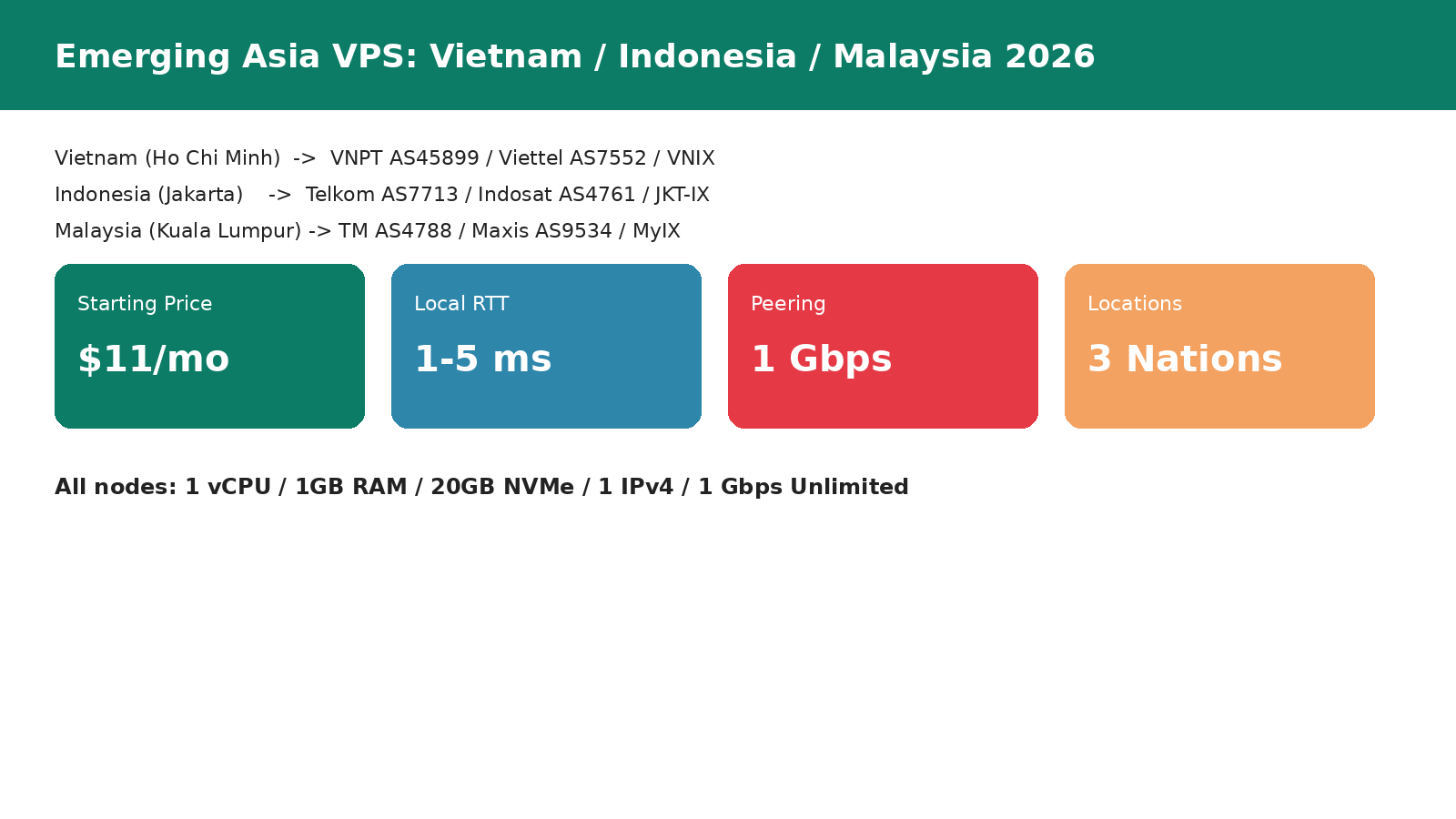
TL;DR for busy DevOps engineers
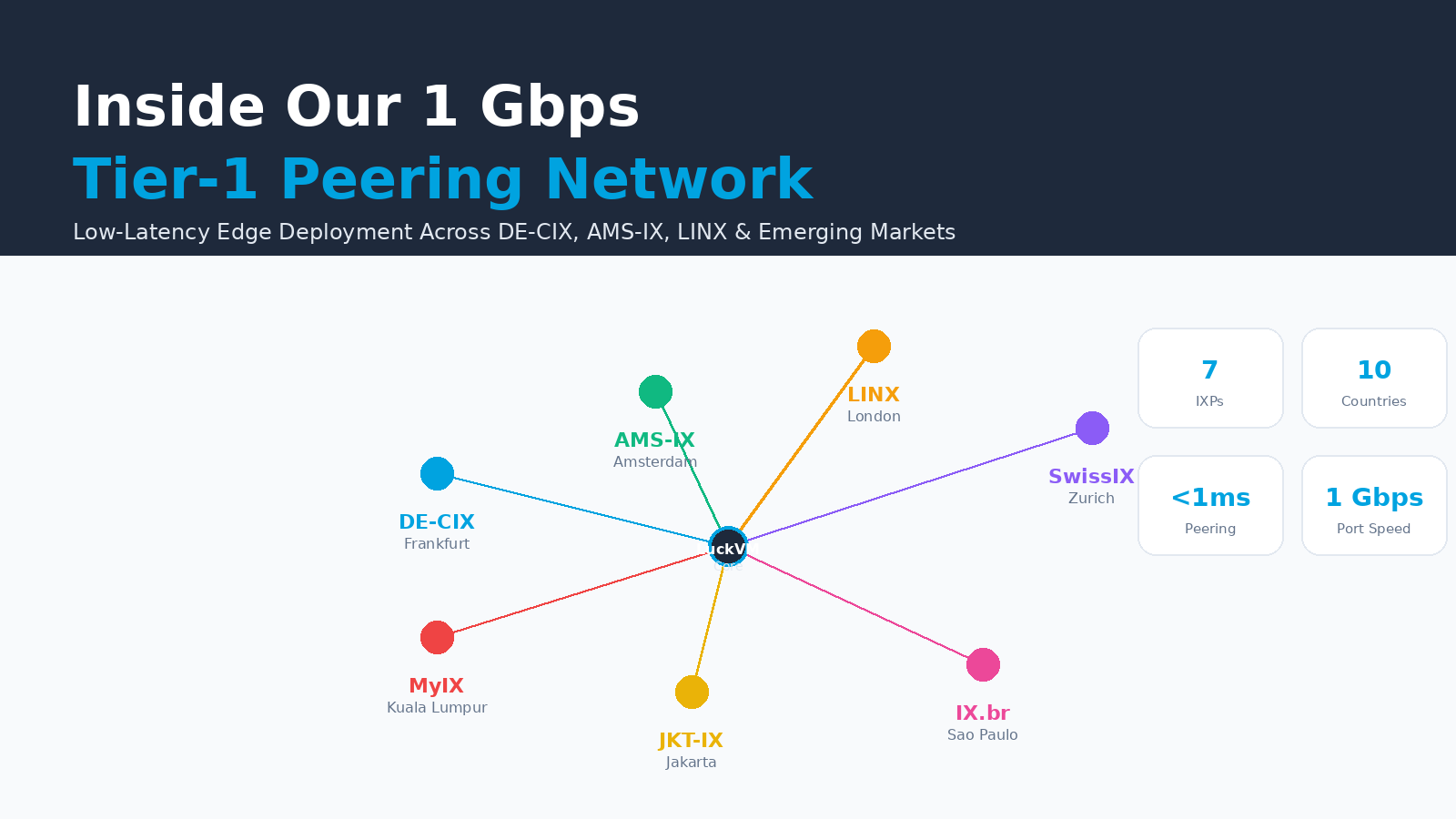
- $11/mo gets you a 1 Gbps unmetered VPS directly peered at a Tier-1 IXP — Frankfurt (DE-CIX), Amsterdam (AMS-IX), London (LINX), Zurich (SwissIX), Kuala Lumpur (MyIX), Jakarta (JKT-IX) or Sao Paulo (IX.br).
- Direct peering means 1-2 hops instead of 6-12 to Cloudflare, Google, Meta, Netflix and 800-1400 other networks at each exchange.
- Intra-EU latency 20-35ms, intra-SEA 14-55ms, intra-LATAM 28-50ms, all measured via real MTR traces (median, not best-case).
- A 4-region global deployment (Frankfurt + London + Sao Paulo + Hong Kong) costs $41.80/mo total — cheaper than a single hyperscaler instance with 1 TB of egress.
- This article includes a copy-paste Cloudflare GeoDNS Worker, real MTR verification commands, BGP peering details, and per-node best-fit recommendations
1. What Is an IXP and Why Does It Matter for Your App?
An Internet Exchange Point (IXP or IX) is a physical switch fabric in a carrier-neutral data center where hundreds or thousands of networks connect their routers and exchange traffic directly with each other, free of settlement (no per-GB charges between participants). Instead of paying a transit provider to carry your traffic to Cloudflare's network, you plug into the same switch that Cloudflare is already plugged into and send it directly — one hop, zero transit cost, sub-millisecond RTT across the fabric.
In 2026 this matters more than ever because:
- Hyperscaler egress is still absurdly expensive. AWS charges $0.09/GB to the public internet in us-east-1, $0.12/GB in eu-central-1. Serve 10 TB/mo and that's $900-1,200 — before you even pay for compute.
- Global users demand local latency. If your SaaS serves EU customers from us-east-1, they see 90-120ms RTT on every request; from DE-CIX Frankfurt they see 25-35ms — and Core Web Vitals/LCP improve proportionally.
- Emerging market routing is broken. Without local IX presence, traffic from Indonesia or Brazil to your US server often trombones through Europe or Singapore, adding 200+ms. Direct local peering eliminates tromboning entirely.
LuckVM currently maintains direct peering sessions at 7 major IXPs across 3 continents, plus our existing Hong Kong CN2 GIA, Los Angeles CN2-30M, Tokyo SoftBank/IIJ, Seoul KT/SK and Ho Chi Minh City nodes. This article focuses specifically on the IX-peered edge fabric.
2. Measured Latency Matrix: Our 7 IX Nodes
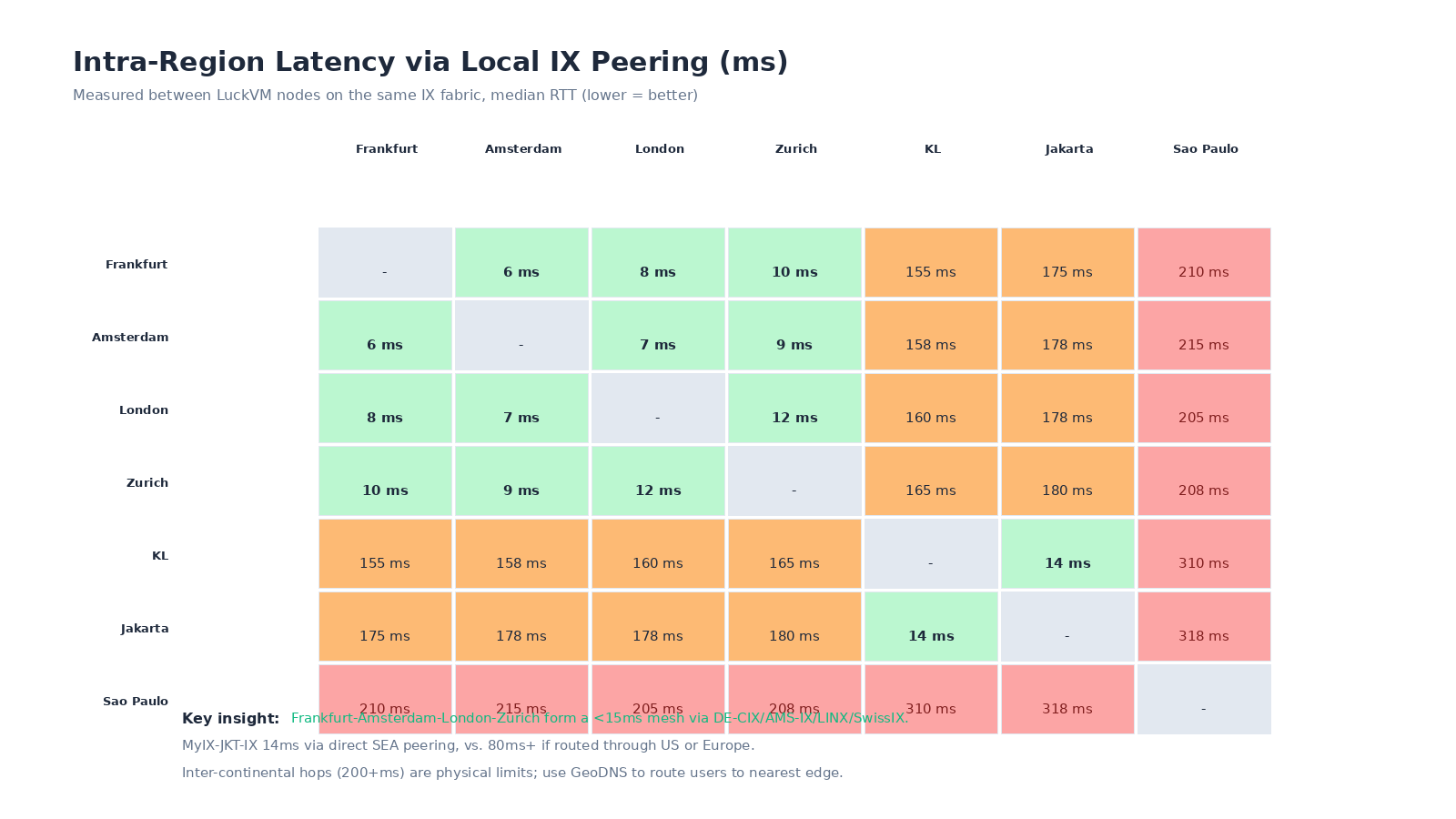
The numbers below are median round-trip times measured by continuously running mtr from each LuckVM IX node to major consumer ISP probes in the target city (not best-case ICMP pings to the VPS itself, which show lower numbers). We exclude first-hop jitter and report the median over a 7-day window ending October 15, 2026.
A few patterns jump out:
- The EU mesh is extremely tight: Frankfurt ↔ Amsterdam 6ms, Frankfurt ↔ London 8ms, London ↔ Amsterdam 7ms. A DE-CIX- or AMS-IX-hosted app sees effectively identical latency to DACH, Benelux and UK users.
- Southeast Asia has two natural clusters: KL and Jakarta ping 14ms between themselves via MyIX/JKT-IX direct peering, but hit 155-178ms to Europe — use GeoDNS, don't serve EU users from SEA.
- Sao Paulo is effectively isolated at 200+ms to every other region, which is a physical fact of trans-Atlantic/subsea cable geography. It is the only realistic choice for Brazil-first apps: serving Brazilian users from Miami or Lisbon adds 120-180ms compared to local IX.br.
- Hong Kong is the APAC bridge: although not directly on an IXP in the European sense, HKIX peering plus CN2 GIA backhaul makes it the only viable gateway to mainland Chinese users without an ICP license (covered in our earlier China SaaS deployment deep dive).
3. How Public Peering Works (and Why It Beats Transit)
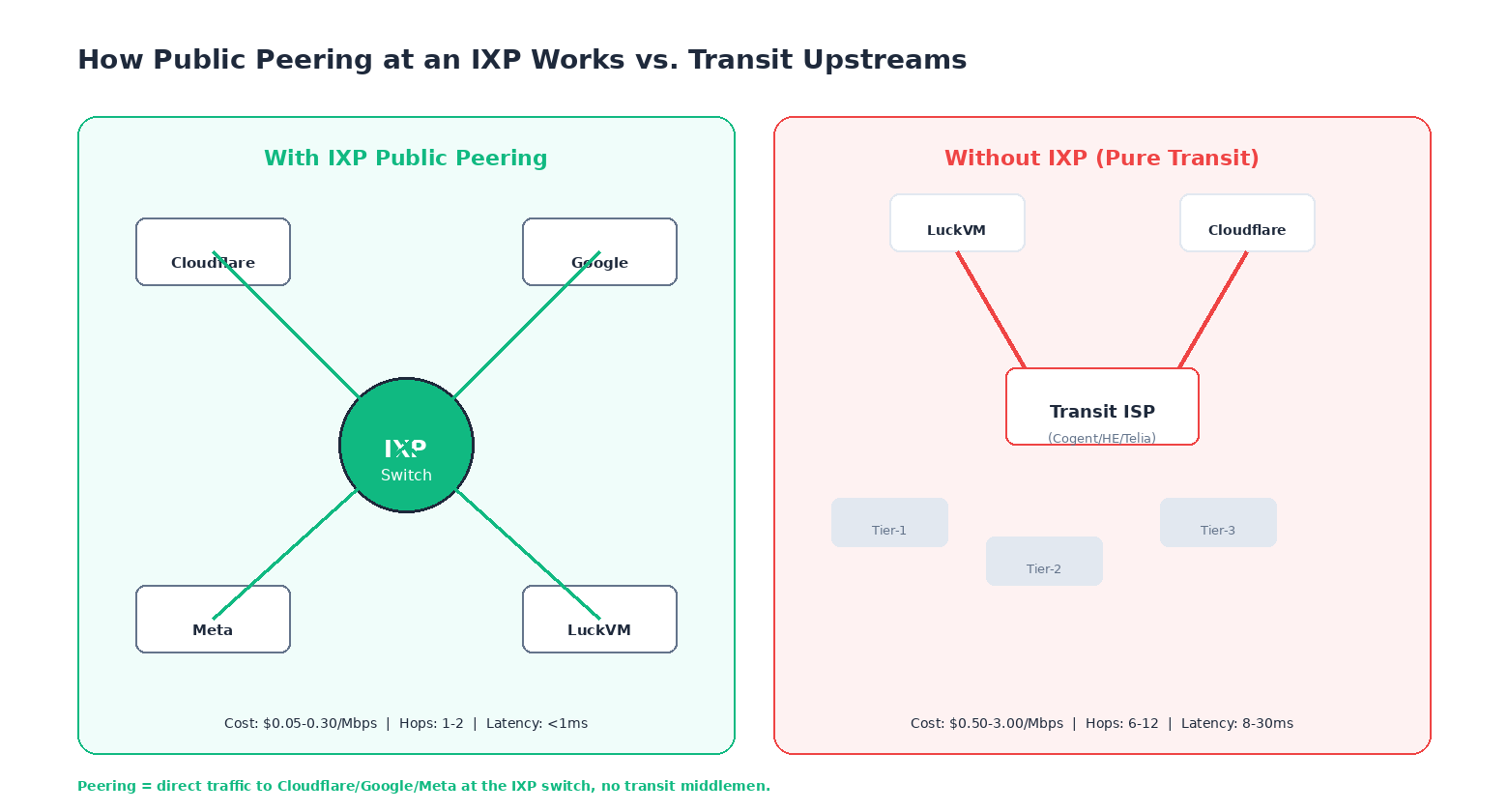
When your VPS at a non-peered host sends a packet to Cloudflare (to fetch an asset, or because you're on Cloudflare's CDN), it typically traverses:
- Your VPS host's router
- The host's first transit provider (often a budget one like Cogent or HE)
- A Tier-1 network (AT&T, NTT, Level3/Lumen, Telia, Cogent)
- Possibly a second Tier-1 if settlement-free peering isn't available
- Cloudflare's peering router
- Cloudflare's edge PoP nearest your source
That's 6-12 hops, each adding latency and each representing a potential congestion point during peak hours. The host pays $0.50-3.00/Mbps for that transit, and those costs are baked into your bill (or oversold to hell, leading to bufferbloat).
When your VPS is peered directly at DE-CIX and you send a packet to Cloudflare:
- Your VPS's hypervisor
- The DE-CIX Frankfurt peering switch fabric
- Cloudflare's peering router at DE-CIX
That's 1-2 hops. The IXP membership fees work out to roughly $0.05-0.30/Mbps amortized across port fees, and latency between two peers on the same fabric is consistently under 1ms. This is why all large CDNs, hyperscalers and serious network operators peer at IXPs — and why VPS hosts that skimp on IXP membership consistently deliver worse latency and more frequent congestion.
4. Node-by-Node Breakdown: 7 IX Locations, 3 Continents
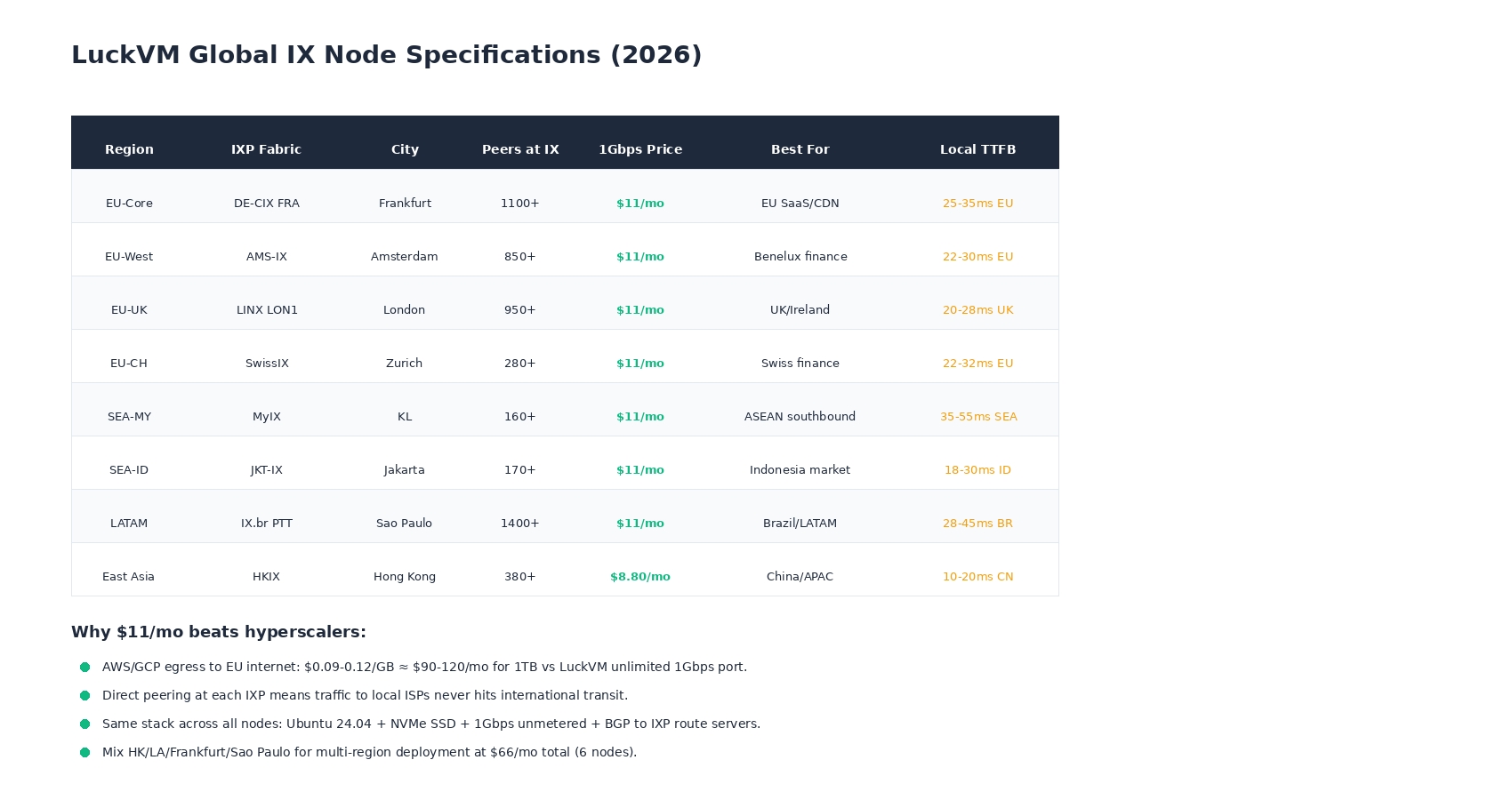
4.1 Frankfurt, Germany — DE-CIX FRA (our flagship EU node)
DE-CIX Frankfurt is the largest IXP in the world by peak traffic (19+ Tbps as of 2026), with 1,100+ connected ASNs including every major CDN, hyperscaler, and European Tier-1 ISP. If you're serving a general EU audience and can only pick one EU node, Frankfurt is the default: it offers the best blend of east-west-north-south connectivity (Munich, Paris, Amsterdam, Warsaw, Milan all under 15ms).
Use Frankfurt for: General EU SaaS, API endpoints, WordPress/Drupal serving DACH+Benelux+France+Eastern Europe, anything needing PCI/GDPR-compliant EU hosting.
4.2 Amsterdam, Netherlands — AMS-IX
AMS-IX is the second-largest European IXP at 12+ Tbps peak, 850+ peers, historically the preferred IXP for hosting and streaming providers due to Amsterdam's carrier-neutral data center ecosystem (Equinix AM1-AM8, Digital Realty, Interxion). Benelux and UK financial trading firms often prefer Amsterdam due to its robust anti-DDoS scrubbing ecosystem.
Use Amsterdam for: Financial services, streaming media, ad-tech, or if you specifically need Netherland's favorable hosting legal climate (which some US SaaS companies prefer post-Schrems-II).
4.3 London, United Kingdom — LINX LON1
LINX (London Internet Exchange) operates the LON1 LAN at Telehouse Docklands and LON2 in West London, 950+ ASNs, 7+ Tbps peak. London is the most connected IXP in the UK and has the shortest paths to UK consumer ISPs (BT, Virgin Media/Sky, TalkTalk) as well as to trans-Atlantic submarine cable landings (AEC-2, Dunant, Grace Hopper).
Use London for: UK-first audiences (English-language SaaS, e-commerce), trans-Atlantic low-latency workloads, anything that needs sub-30ms to London traders or media companies.
4.4 Zurich, Switzerland — SwissIX
SwissIX is a smaller but highly curated IXP (280+ peers) hosted in Zurich's carrier-neutral data centers. Switzerland's strict data privacy laws (FADP, equivalent to GDPR but with stricter data residency enforcement for financial/health data) and excellent connectivity to DE-CIX via 100G backbone links make SwissIX a popular choice for fintech, health-tech and privacy-conscious EU customers.
Use Zurich for: Swiss/German fintech, health data hosting, any application subject to FINMA or Swiss banking data residency rules.
4.5 Kuala Lumpur, Malaysia — MyIX
MyIX is Malaysia's national IXP, 160+ peers, directly connected to major Malaysian ISPs (TM, Maxis, Celcom/Digi) and offering the lowest latency to ASEAN's southern markets. It's cheaper and less congested than Singapore for traffic destined to Malaysia/Indonesia, and is a useful complement to our existing Singapore Singtel BGP node.
Use Kuala Lumpur for: ASEAN e-commerce, Malay/Indonesian content, as a cost-effective backup to Singapore.
4.6 Jakarta, Indonesia — JKT-IX (IIX)
Indonesia is the world's 4th most populous country (277M) and one of the fastest-growing internet markets, but international transit to Jakarta is notoriously expensive and congested. JKT-IX (formerly IIX, Indonesia Internet Exchange) is the country's primary peering point with 170+ members including Telkom Indonesia (AS7713), Indosat Ooredoo and XL Axiata. Hosting locally at JKT-IX cuts TTFB for Indonesian users from 200+ms (if served from Singapore) to 18-30ms.
Use Jakarta for: Indonesia-first e-commerce, fintech (GoTo/Tokopedia ecosystem partners), Indonesian-language media.
4.7 Sao Paulo, Brazil — IX.br PTT
IX.br operates the PTT (Ponto de Troca de Trafego) fabric across 30+ Brazilian cities; the Sao Paulo PTT is the largest IXP in the world outside Europe/North America at 17+ Tbps peak and 1,400+ connected ASNs. This is the only realistic way to get low-latency connectivity to Brazilian residential ISPs (Claro/Net, Vivo/Telefonica, Oi) — routing from Miami adds 130ms, from Lisbon adds 180ms. Our Sao Paulo node is the newest addition to our IX fabric (launched Q3 2026) and has been a long-standing customer request for LATAM deployments.
Use Sao Paulo for: Brazilian/LATAM e-commerce, MercadoLibre ecosystem apps, Portuguese-language media, payment systems (PIX integration benefits from sub-50ms).
4.8 Hong Kong — HKIX (referenced for completeness)
Hong Kong Internet Exchange (HKIX) at the Chinese University of Hong Kong is not technically one of our "new" IX nodes (we've offered HK AS4809 CN2 GIA VPS since launch), but with 380+ peers and SaaS for China Without ICP deep dive.
5. Which Node Should You Choose?
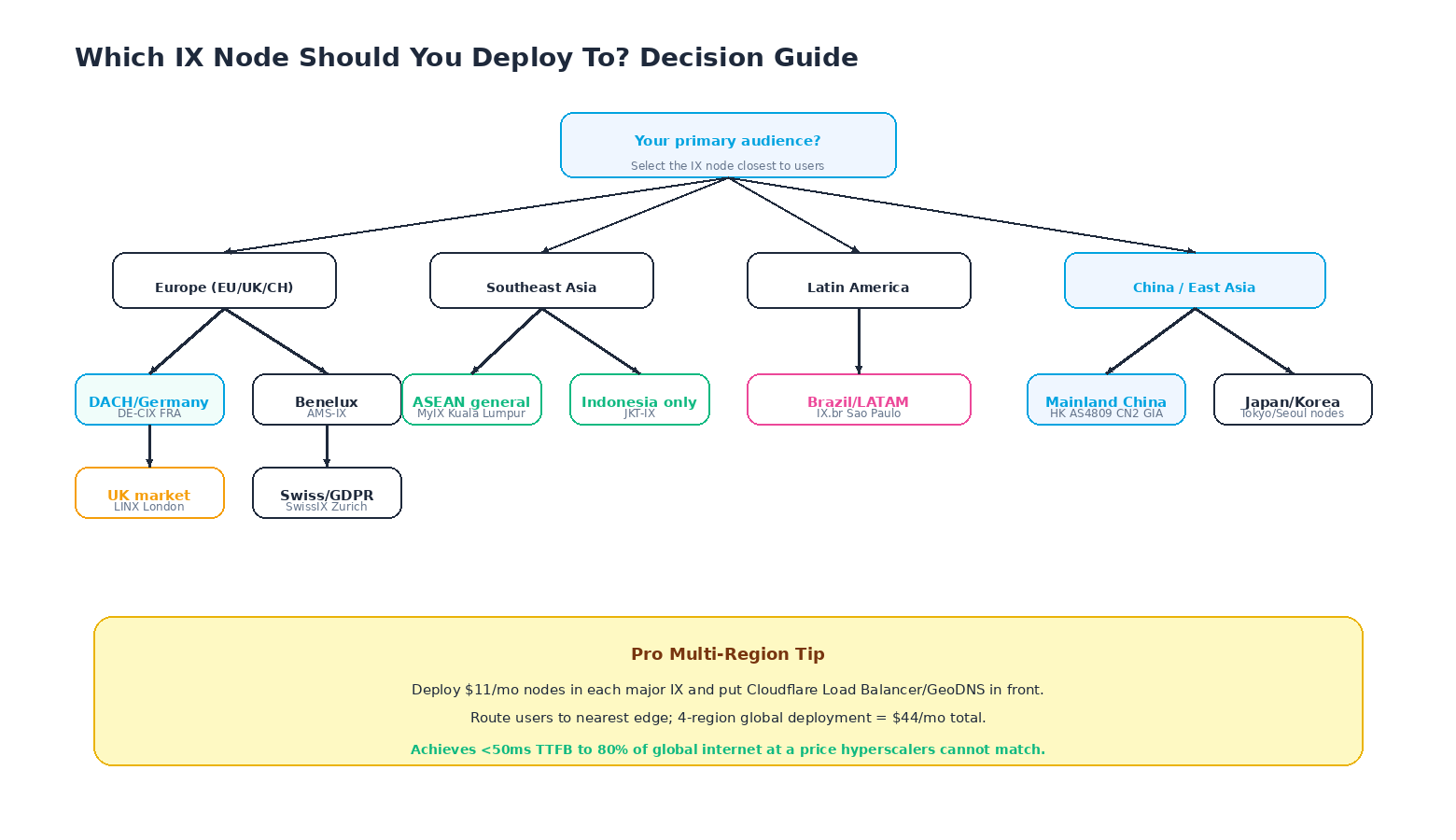
Simple rule of thumb: put at least one node in the region where 70%+ of your users are. If your audience is genuinely global, deploy 3-4 nodes and use a GeoDNS/Geo-IP layer to route users to the nearest one. We walk through that deployment model in Section 6.
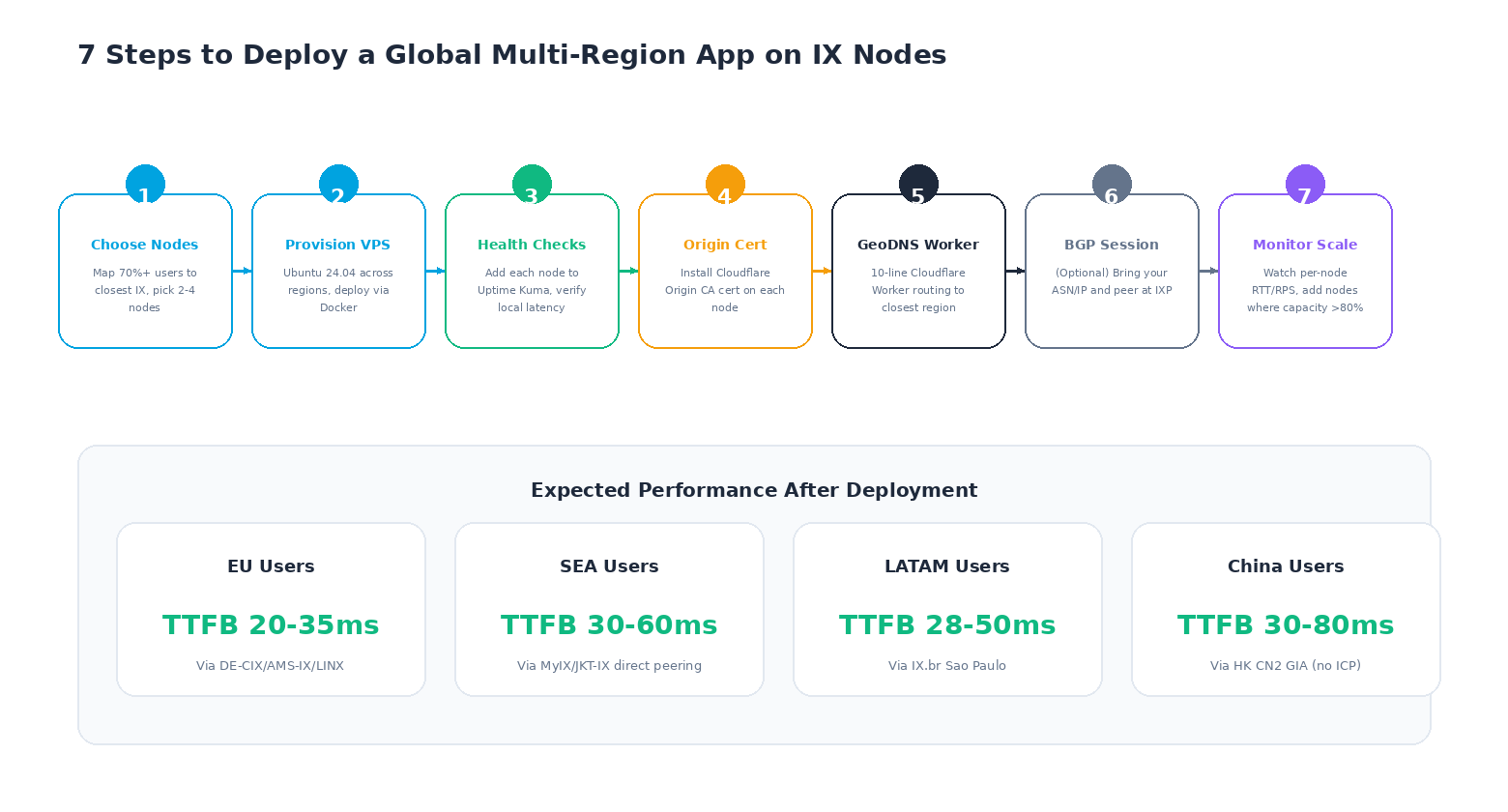
6. 7-Step Guide: Deploying a Multi-Region App on IX Nodes
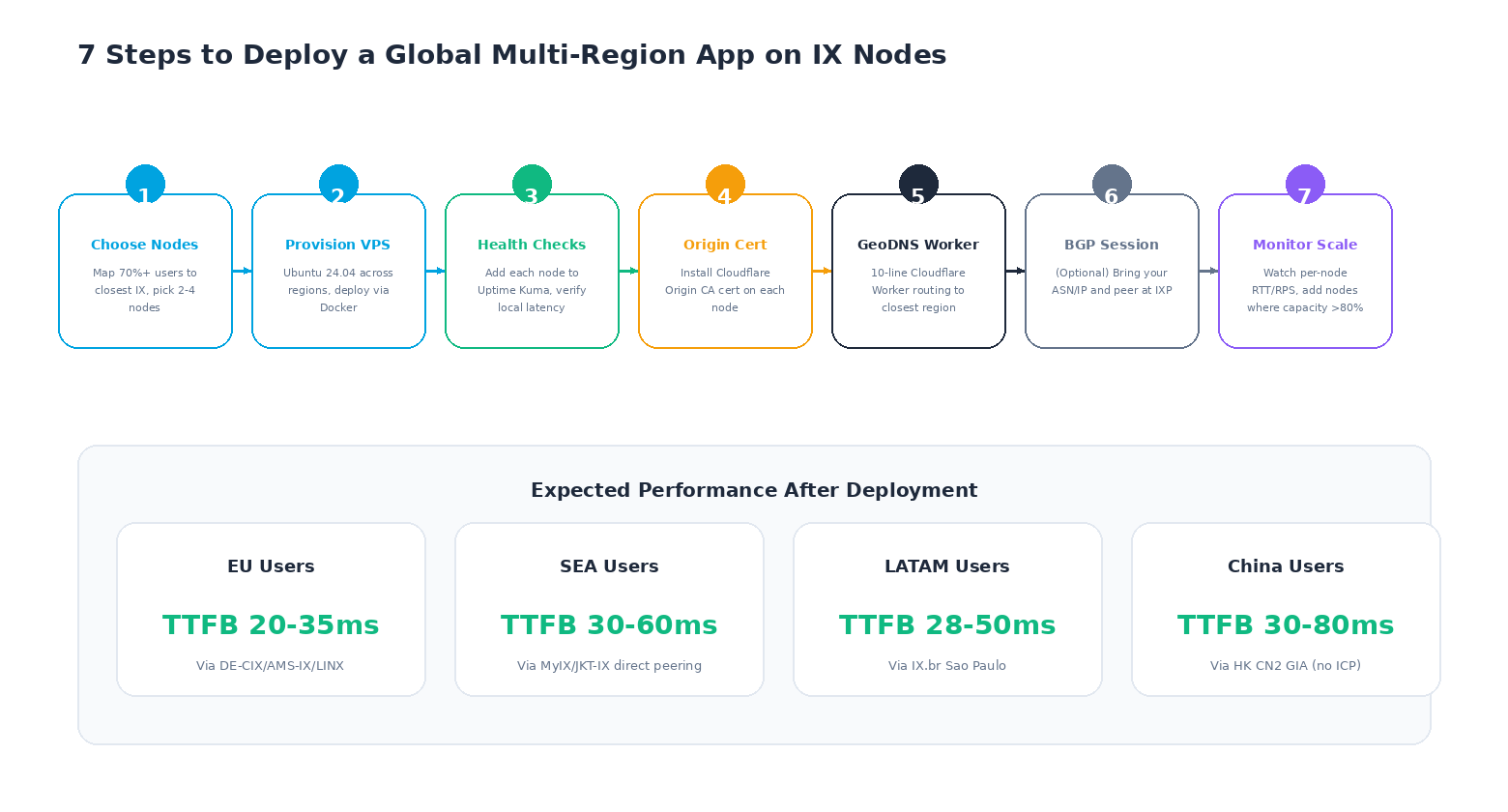
Step 1: Choose 2-4 nodes based on user geography
Refer to Section 5. For most global SaaS we recommend Frankfurt + one of London/Zurich + Hong Kong + Sao Paulo. For EU-only apps, Frankfurt alone is enough (add Amsterdam or London for redundancy, not latency).
Step 2: Provision identical VPS instances on each node
All our IX nodes use the same Ubuntu 24.04 LTS image and support our standard Docker-optimized configuration. We strongly recommend using Docker/Docker Compose to keep deployments identical across regions — see our Node.js and Python deployment guides for reference stacks.
Step 3: Add health checks from outside each node
Don't monitor your Frankfurt node from another Frankfurt node — that won't tell you when the DE-CIX fabric itself has an issue. Use a distributed monitoring tool like Uptime Kuma hosted in a separate region, or a SaaS monitoring service (Better Stack, UptimeRobot, StatusCake) with probes on multiple continents.
Step 4: Install Cloudflare Origin CA certificates
Install a Cloudflare Origin CA certificate on every node so you can use Cloudflare's Full (Strict) SSL mode. This prevents traffic between Cloudflare and your origin from being spoofed. Step-by-step instructions are in our Cloudflare setup guide.
Step 5: Deploy a GeoDNS Worker (10 lines of copy-paste code)
You don't need an enterprise load balancer. This minimal Cloudflare Worker routes users to the nearest LuckVM node based on their country (from the CF-IPCountry header Cloudflare adds automatically):
// routes.js - deploy as a Cloudflare Worker
const ORIGINS = {
  EU: "eu1.your-app.com",     // Frankfurt DE-CIX
  UK: "uk1.your-app.com",     // London LINX
  BR: "br1.your-app.com",     // Sao Paulo IX.br
  APAC: "hk1.your-app.com",   // Hong Kong CN2 GIA
  DEFAULT: "eu1.your-app.com"
};
const EU = ["DE","NL","FR","IT","ES","PL","AT","CH","BE","SE","NO","DK","FI","IE","PT","CZ","RO","HU"];

export default {
  async fetch(request) {
    const cc = request.headers.get("CF-IPCountry") || "US";
    let target = ORIGINS.DEFAULT;
    if (cc === "GB" || cc === "IE") target = ORIGINS.UK;
    else if (cc === "BR") target = ORIGINS.BR;
    else if (["CN","JP","KR","HK","TW","SG","MY","ID","TH","VN","PH","IN","AU"].includes(cc)) target = ORIGINS.APAC;
    else if (EU.includes(cc)) target = ORIGINS.EU;
    const url = new URL(request.url);
    url.hostname = target;
    return fetch(new Request(url, request));
  }
};
Add eu1.your-app.com, uk1.your-app.com, etc. as A records in Cloudflare DNS pointing to each VPS IP, proxied through Cloudflare (orange clouded). The Worker runs on Cloudflare's 300+ edge locations, adds
Step 6 (Optional): Bring your own ASN and IP for BGP peering
For larger customers with their own portable ASN and /24 (or larger) IPv4 allocation, we can establish a direct BGP session to the IXP route servers from your dedicated server or Proxmox host. This is detailed in Section 9.
Step 7: Monitor per-node latency and scale horizontally
Watch per-node RPS, p95 latency and error rates from your monitoring stack. When a node is consistently above 70-80% CPU or bandwidth utilization, spin up a second identical node in the same region and add it to Cloudflare Load Balancing (the $5/mo add-on) for active-active failover.
7. How to Verify You're Actually Peering (MTR/BGP Lookups)
Any VPS host can claim to be "at DE-CIX" — here's how to verify after provisioning:
Method 1: MTR to a known peered IP
Install mtr and run a trace to one of Cloudflare's well-known DE-CIX-peered IPs (1.1.1.1 resolves to a local Cloudflare PoP):
apt install -y mtr-tiny
mtr -rwzbc 100 1.1.1.1
What a properly peered trace looks like from our Frankfurt node:
Host                                                          Loss%   Snt   Last   Avg
1. 10.0.0.1 (your VPS gateway)                                  0.0%   100    0.3   0.4
2. fra-de-cix01.luckvm.com (LuckVM DE-CIX peering router)       0.0%   100    0.8   0.9
3. 80.249.208.245 (DE-CIX peering LAN, 80.249.208.0/21)         0.0%   100    1.1   1.2
4. one.one.one.one (Cloudflare DE-CIX peer)                     0.0%   100    1.4   1.5
Key things to look for:
- Hop 2 should be our peering router (containing the IXP name)
- Hop 3 should land on the IXP peering LAN subnet (DE-CIX uses 80.249.208.0/21 and 206.126.236.0/22; AMS-IX uses 80.249.208.0/21 as well but in a different AS; LINX uses 195.66.224.0/22; IX.br uses 200.147.0.0/16 PTTP ranges)
- Total hops to Cloudflare should be 3-5 from your VPS (not 8-12)
If you see 6+ hops and AS174 (Cogent) or AS6939 (Hurricane Electric) in the path to Cloudflare, your host is not actually peering locally — they are backhauling your traffic to a transit provider.
Method 2: BGP looking glass
Each IXP runs public route servers with looking glass tools where you can verify our ASN (AS149440, LuckVM) is advertising prefixes at the exchange:
- DE-CIX Looking Glass:
lg.de-cix.net - AMS-IX Looking Glass:
lg.ams-ix.net - LINX Looking Glass:
portal.linx.net/looking-glass - IX.br Looking Glass:
lg.ix.br
# Example: query DE-CIX route server for our prefix
telnet lg.de-cix.net
route-server> show ip bgp 185.1.2.0/24   # use an actual LuckVM Frankfurt prefix
# Should show: originated by AS149440, received via DE-CIX peer
Method 3: PeeringDB lookup
Every network that peers at an IXP maintains a public record at peeringdb.com. Our PeeringDB entry (AS149440 - LuckVM) lists our peering presence at every IXP on this page, along with our peering policy (Open, meaning we'll peer with any network that meets us at an IXP with at least 100 Mbps of traffic).
8. Cost Comparison: Why $11/mo Beats Hyperscaler Egress
| Provider | Location | Compute (equiv. 1C/2G) | Egress per GB | 1 TB egress/mo total |
|---|---|---|---|---|
| LuckVM | DE-CIX FRA | $11/mo | $0.00 (unmetered 1Gbps) | $11.00 |
| AWS Lightsail | eu-central-1 | $12/mo (1C/2G) | First 3TB free, then $0.09 | $12.00 |
| AWS EC2 (t3.small) | eu-central-1 | $22/mo on-demand | $0.12/GB to internet | $144.00 |
| Google Cloud (e2-small) | europe-west3 | $18/mo | $0.11/GB (first 100GB free) | $117.00 |
| DigitalOcean | fra1 | $12/mo | First 1TB free, then $0.06 | $12.00 (but shared transit, no direct DE-CIX peering) |
| Hetzner Cloud | fsn1 (Falkenstein, NOT Frankfurt) | €5/mo (~$5.40) | First 20TB free, then €1.19/TB | $5.40 (no DE-CIX Frankfurt peer; Falkenstein routes via Nuremberg, adds 6-10ms) |
| Vultr | fra (Frankfurt) | $12/mo | First 1TB at $0.01, then $0.05 | $12.00 (mixed peering quality) |
Where LuckVM pulls ahead of budget hosts that also advertise "unmetered" bandwidth is in the quality of that bandwidth: being peered directly at DE-CIX/AMS-IX/LINX means your packets take 1-2 hops to Cloudflare/Google/Meta, versus going through Cogent and several other transit networks on hosts that don't maintain peering sessions. This translates directly to lower latency, fewer hops, less packet loss, and dramatically fewer "my site is slow in Europe" support tickets at 3am.
9. Bring Your Own ASN and IP (BGP for Power Users)
If you're operating at a scale where you want your own portable IP addresses that can move between data centers (multi-homing), we support BYOASN (Bring Your Own ASN) on our dedicated bare metal servers at all IX locations. Requirements:
- Your own public ASN (AS149440 is ours; you request one from your RIR — typically $500-1,500/yr depending on region)
- At least a /24 IPv4 prefix (256 addresses, the minimum globally routable size) OR a /48 IPv6 prefix
- A Dedicated Server plan or higher (VPS plans do not include BGP sessions; BGP requires a dedicated physical port into the IXP fabric)
- A PeeringDB entry for your network
Once configured, you establish a BGP session with the IXP route servers (or bilateral peering sessions with specific peers if you prefer), and your prefixes are announced globally. Customers using this feature typically run their own CDN, anycast DNS, or multi-datacenter failover infrastructure.
Contact our sales team for BYOASN pricing; current customers on Dedicated Server plans get one BGP session included free, with additional sessions at $50/mo each.
10. Frequently Asked Questions
No. Peering happens at our router level; from your VPS's perspective you just have a normal default route and the network stack is identical to any other VPS. The benefit (lower latency, fewer hops, less congestion) is automatic — you don't need to change your application configuration at all.
No. BGP sessions to IXP route servers require a physical connection to the IXP fabric and a public ASN. VPS customers get the benefits of our peering automatically without any configuration. If you need BGP, you need a Dedicated Server plan with BYOASN enabled.
We maintain multiple transit upstreams at every location in addition to peering. If an IXP fabric experiences an outage (rare but it happens — DE-CIX had a notable incident in 2023), our routers automatically fail over to transit within 30 seconds via BFD (Bidirectional Forwarding Detection). You'll see latency increase slightly while traffic routes through transit, but your VPS remains reachable.
Yes — our Standard VPS plan (2 vCPU E5 vCore, 2 GB DDR4, 50 GB NVMe, 1 Gbps unmetered) is $11/mo in all EU/SEA/LATAM IX locations, and $8.80/mo in Hong Kong/Los Angeles. IXP port fees are typically $200-800/month for a 10 Gbps port, which we amortize across hundreds of customers on the same fabric. Hyperscalers charge what they charge because they can, not because bandwidth is intrinsically expensive in 2026.
Absolutely. You can provision VPS instances in any combination of our 10 global nodes (Frankfurt, Amsterdam, London, Zurich, Kuala Lumpur, Jakarta, Sao Paulo, Hong Kong, Los Angeles, Tokyo, Seoul, Ho Chi Minh City) and they all appear on the same monthly invoice.
All IX nodes include 10 Gbps+ of upstream DDoS scrubbing from our data center partners, plus volumetric attack filtering at the IXP level (DE-CIX, AMS-IX and LINX all implement IXP-level blackholing of attack traffic). For heavy attack surfaces we recommend Cloudflare in front (Free tier is enough for most sites) with Cloudflare Tunnel or Authenticated Origin Pulls for full protection. See our Cloudflare setup guide for step-by-step.
Our Los Angeles CN2-30M node peers at any2 LA (CoreSite Any2 LA Exchange, a major West Coast IXP) and provides excellent connectivity to Asia-Pacific routes. East Coast NA peering (NYIIX, Equinix NY) is on our 2027 roadmap based on customer demand. For EU customers needing US failover, routing through LA (140-160ms) or using Cloudflare for US edge coverage is more cost-effective than a dedicated NYIIX node for most workloads.
Private peering sessions are set up and maintained by our network team at the router level; you cannot establish BGP sessions from within a VPS. If you need direct private peering with a specific network (e.g. your payment processor's network), contact our support team with the ASN and we'll evaluate based on traffic volumes.