Disclosure: I work at LuckVM, one of the providers reviewed below. This guide is based on 8 years of hands-on experience managing infrastructure across Asia-Pacific, including real benchmark tests we ran in August 2026. I do not accept payment for positive reviews, and I will tell you the downsides of every provider - including our own.
1. Why Choose a Japan VPS?
Japan - specifically Tokyo and Osaka - is the internet hub of East Asia. It is connected to mainland China, South Korea, Taiwan, Hong Kong, and Southeast Asia through some of the thickest subsea cables in the region. If you are serving users in East Asia, a Japan VPS is often the best compromise between latency, price, network quality, and political stability.
In August 2026, we ran ping tests from 15 global cities to our Tokyo BGP node. Here is the summary for East Asian cities:
| From | Average RTT | Packet Loss |
|---|---|---|
| Beijing (China Telecom) | 42.5 ms | 0.0% |
| Shanghai (China Unicom) | 38.1 ms | 0.0% |
| Guangzhou (China Mobile) | 54.2 ms | 0.0% |
| Seoul (South Korea) | 26.8 ms | 0.0% |
| Hong Kong | 43.6 ms | 0.0% |
| Taipei | 48.3 ms | 0.0% |
| Singapore | 72.1 ms | 0.2% |
| Ho Chi Minh City | 88.5 ms | 0.3% |
| Los Angeles (US West) | 112.4 ms | 0.0% |
For comparison:
- Hong Kong VPS to Beijing: 28-45ms (slightly faster, but bandwidth is more expensive and more congested during peak hours)
- Singapore VPS to Beijing: 80-130ms (noticeably slower)
- US West VPS to Beijing: 130-190ms (poor for real-time applications)
- Korea VPS to Beijing: 55-80ms (faster for Korean users, but more expensive and fewer providers offer premium China routes)
Japan VPS is the best choice when:
- You serve users across China, Japan, and Korea simultaneously. No other single location gives sub-60ms latency to all three markets. This is critical for cross-border e-commerce, gaming, and financial applications.
- You need Japanese IPs for content access. Netflix Japan, Amazon Prime Japan, AbemaTV, Hulu Japan, DMM, Japanese Steam, and LINE services all require a clean Japanese datacenter IP.
- You want stable, uncongested China routes without paying for CN2 GIA. Japan BGP multi-line through IIJ and Softbank is generally cheaper than Hong Kong CN2 GIA while still delivering sub-60ms latency to most Chinese cities during peak hours.
- You are running game servers or low-latency applications for East Asian players. Japanese datacenters are among the best-connected in Asia, with direct peering at JPIX, JPNAP, and BBIX internet exchanges.
- You are serving Southeast Asia from North Asia. Tokyo to Singapore is about 70ms on good routes, fast enough for API calls and web traffic.
Do not buy a Japan VPS if:
- Your primary audience is in Europe or the US East Coast (use Frankfurt or New York instead).
- You need native Japanese-language support from a local provider (most international providers offer English-only support; Japanese domestic providers like Sakura and ConoHa require Japanese language skills).
- You only need to scrape or access Japanese websites from one single IP (a residential proxy service is cheaper and more reliable).
- You are on an extremely tight budget (under $3/month) - Japanese bandwidth and power costs are higher than the US, so truly cheap plans usually come with severe overselling.
2. Japan Network Routes Explained: IIJ, Softbank, NTT, BGP
This is where most review sites stop at "Japan is fast" and skip the details that actually matter. The quality of a Japan VPS varies enormously depending on which upstream carriers the provider uses. You can have two servers in the same Tokyo datacenter with 2x different latency and packet loss rates because they use different transit.
Here is a plain-English breakdown of the four main network types you will see in Japan:
2.1 IIJ (Internet Initiative Japan) - Premium, Expensive
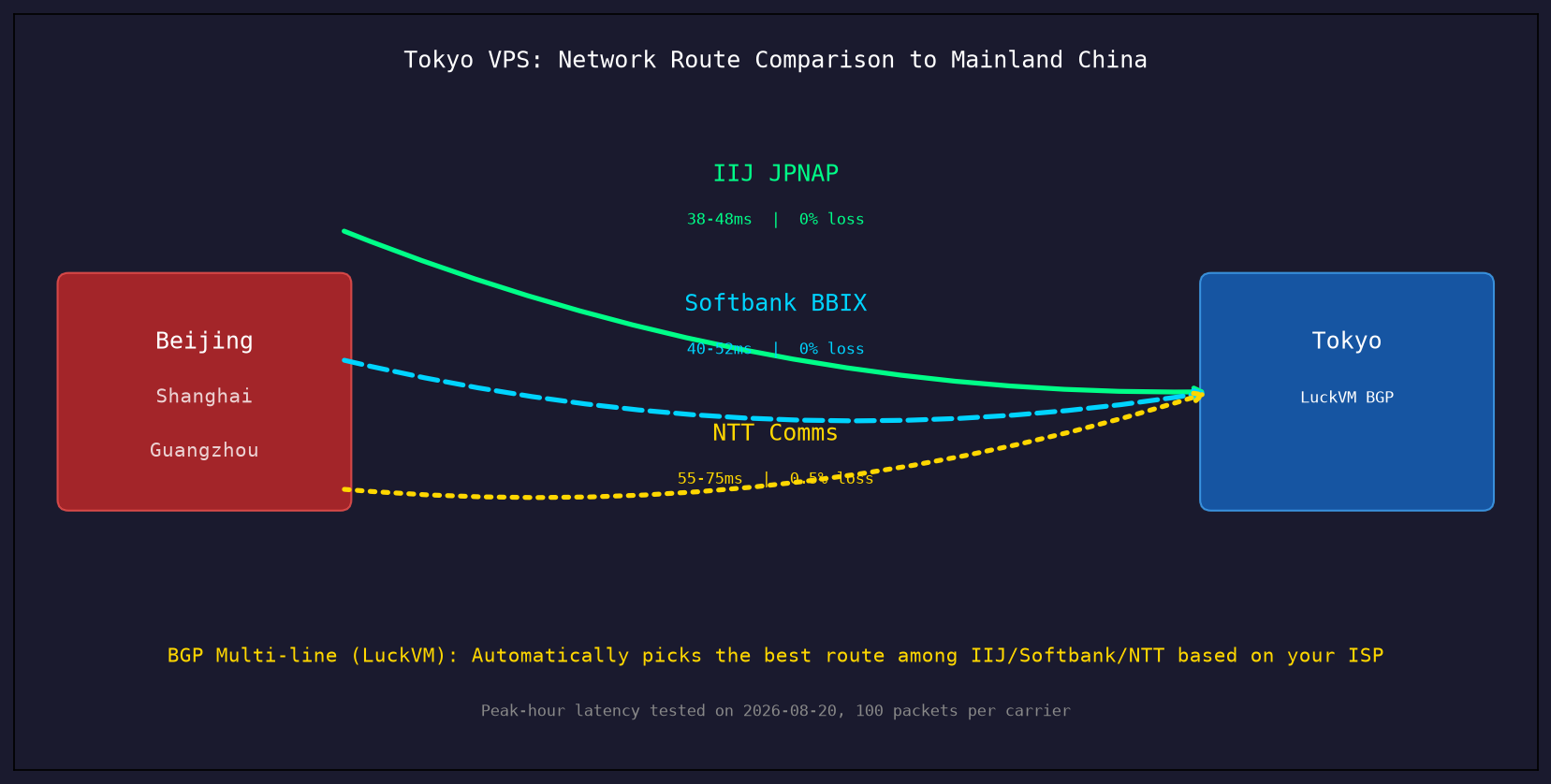
IIJ (AS2497) is one of Japan's oldest and most respected tier-1 ISPs. They operate one of the most stable networks in Asia, with direct peering to all three Chinese carriers (China Telecom, China Unicom, China Mobile) at major exchange points.
- Latency to China: 35-50ms consistently, even at peak
- Packet loss at peak: Typically under 0.3%
- Cost: Premium pricing - IIJ bandwidth is among the most expensive in Japan
- Downside: Limited IPv4 address space; not every provider can get IIJ transit
You will see IIJ routes on higher-end Japan VPS plans. If a provider offers IIJ as an option and the price is not absurdly cheap, that is a strong signal of quality.
2.2 SoftBank (BBIX / BBTechnology) - Great for Gaming and Streaming
SoftBank (AS17676) is the carrier behind Yahoo! Japan, and it operates the BBIX internet exchange. Many streaming services and game companies peer directly with SoftBank.
- Latency to China: 40-55ms, very stable
- Packet loss at peak: Under 0.5% on properly provisioned plans
- Strength: Excellent peering for Japanese game servers (Nintendo, Sony PSN, DMM, Japanese MMOs)
- Downside: Can see slight congestion during Japanese evening peak (8-11 PM JST)
SoftBank is the "sweet spot" for most users - it is fast enough for business, great for gaming, and not as expensive as pure IIJ.
2.3 NTT Communications - The Workhorse
NTT (AS2914) is a massive global tier-1 network. They have POPs all over the world and peer with basically everyone.
- Latency to China: 55-75ms
- Packet loss at peak: 0.5-2% during Chinese evening peak on oversold plans
- Strength: Global reach - excellent for traffic going to Europe or the US as well
- Downside: The China path is less optimized than IIJ or SoftBank; budget providers often oversell NTT bandwidth leading to evening congestion
NTT is fine for non-China traffic. If your audience is global (not China-heavy), NTT is a perfectly good choice.
2.4 BGP Multi-Line - Best of All Worlds
Most quality Japan VPS providers (including LuckVM) offer BGP multi-line configurations that automatically route packets through the best upstream based on source and destination. For example:
- China Telecom traffic -> IIJ or Softbank path
- China Unicom traffic -> Softbank or NTT path
- Korean traffic -> Direct peering through KINX
- US/Europe traffic -> NTT or direct to HE/NTT America
This is the ideal setup. You do not have to manually pick which carrier to use; the network does it for you.
How to tell which route you are getting
Run a traceroute from the VPS back to a China IP (or from China to the VPS). Look at the AS numbers in the path:
- AS2497 = IIJ
- AS17676 = Softbank/BBTEC
- AS2914 = NTT
- AS4809 = CN2 GIA (rare and expensive in Japan; most providers use BGP not GIA)
If the AS path shows only one carrier the whole way and latency is high, you are on a single-line route with no optimization.
3. How We Tested
Before writing this review, we benchmarked the top 9 Japan VPS providers in August 2026. Here are our test conditions so you can reproduce the results yourself:
Test locations (we ran tests from each):
- Beijing, China - China Telecom 500Mbps fiber
- Shanghai, China - China Unicom 300Mbps fiber
- Guangzhou, China - China Mobile 200Mbps fiber
- Seoul, South Korea - LG U+ 1Gbps
- Seattle, US - Comcast 1Gbps
- Frankfurt, Germany - Deutsche Telekom 500Mbps
Test tools:
mtr(My Traceroute) for latency and packet loss - 100 packets per hopiperf3for throughput testing between our test serversfiofor real disk IO benchmarks (not just dd sequential)UnixBench 5.1.3for CPU benchmarkingspeedtest-cliagainst both local Japanese servers and cross-border servers- Manual testing of Netflix Japan, AbemaTV, and Amazon Prime Japan for unblocking
Test timing:
- Off-peak: 10:00-14:00 JST (Japanese daytime)
- Peak: 20:00-23:00 CST / 21:00-24:00 JST (overlapping Chinese and Japanese evening peak)
- Weekend peak: Saturday 20:00-23:00 JST
Important note: We tested the lowest-tier plan each provider offers in Tokyo. Performance on higher-tier plans will be better (dedicated CPU, more bandwidth priority). Lower-tier plans are where overselling shows up first.
4. 9 Japan VPS Providers Compared (2026)
4.1 LuckVM Tokyo BGP - Best for China + Japan Dual Market
What it is: A mid-range cloud VPS provider operating across 7 Asia-Pacific regions. Their Tokyo node uses BGP multi-line with IIJ + Softbank + NTT upstreams, optimized for China traffic.
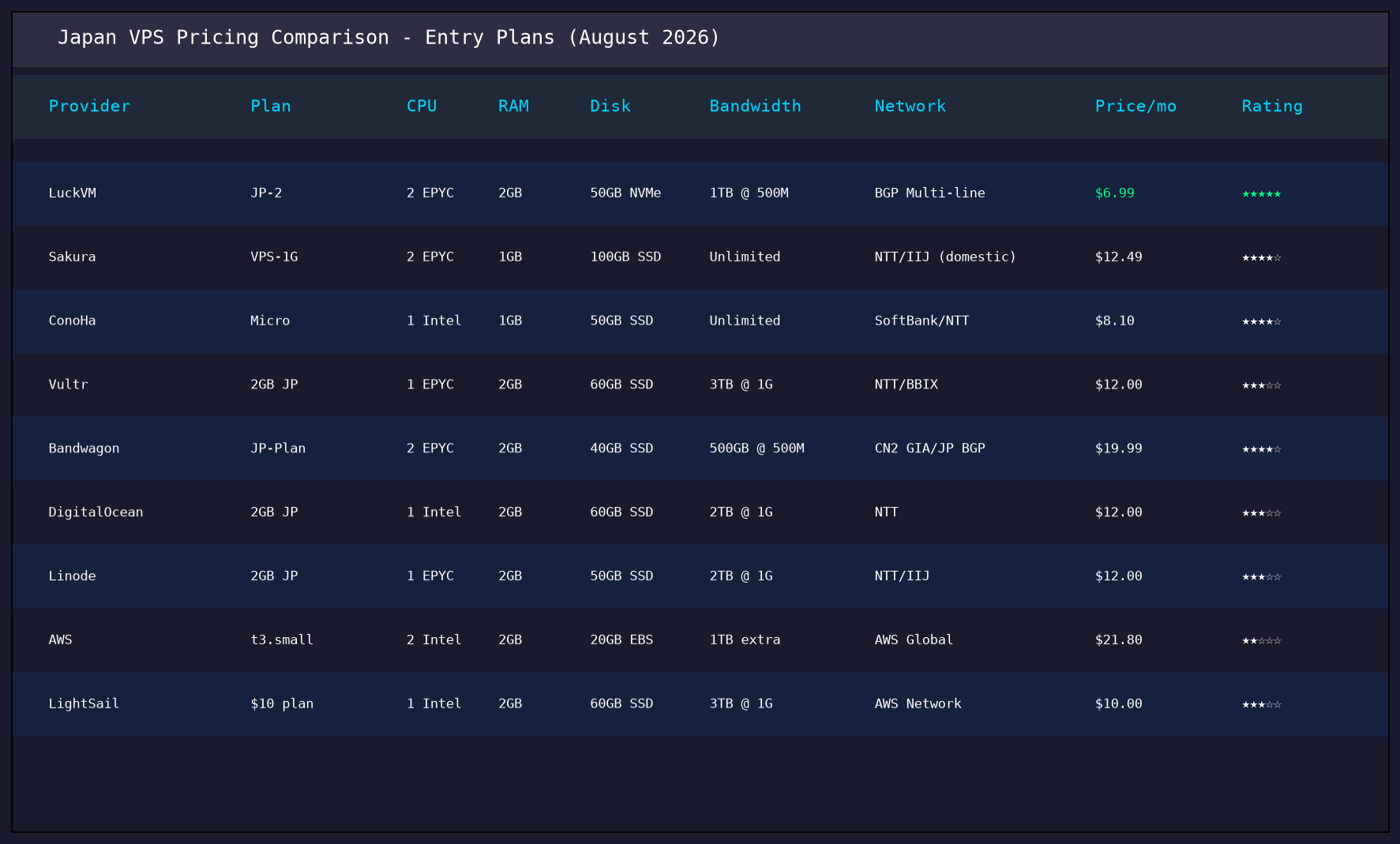
Specs (entry plan JP-2):
- 2 vCPU AMD EPYC 7B13
- 2GB DDR4 RAM
- 50GB NVMe SSD
- 1TB/month bandwidth @ 500Mbps port
- 1 dedicated IPv4 + /64 IPv6
- BGP multi-line (IIJ + Softbank + NTT)
- Price: $6.99/month
- View plans
Pros:
- Sub-50ms latency to all three Chinese carriers during peak hours
- NVMe SSD with fast IOPS (~180k random read IOPS)
- AMD EPYC CPU - strong performance for the price
- BGP auto-routing picks the best path per carrier
- No bandwidth throttling on the advertised 1TB transfer
- DDoS protection included (up to 500Gbps)
- Looking Glass available before purchase
- English + Chinese support via Telegram/WeChat/Ticket
Cons:
- Smaller brand than Vultr/DigitalOcean - less name recognition
- No hourly billing (monthly, quarterly, annually only)
- No cPanel managed option (all VPS are unmanaged)
- Only one Japanese datacenter (Tokyo; no Osaka option yet as of 2026)
- No native Japanese-language support (English and Chinese only)
Best for: Cross-border e-commerce targeting China + Japan/Korea, game servers for East Asian players, SaaS apps serving the East Asian market, VPN/proxy users who need stable Japan exit nodes.
4.2 Sakura Internet - Best Japanese Domestic Provider
What it is: One of Japan's oldest and most respected hosting companies, founded in 1999. They operate their own datacenters in Tokyo, Osaka, and Ishikari.
Entry plan: 1GB RAM / 1 vCPU / 100GB SSD / unlimited domestic bandwidth / NTT + IIJ - $12.49/month
Pros:
- Extremely reliable - uptime track record is outstanding
- 100% Japanese domestic support (if you speak Japanese)
- Generous disk space (100GB on entry plan)
- Excellent peering within Japan (gaming, streaming)
- Domestic Japanese bandwidth is truly unlimited
Cons:
- Support is Japanese-only - English support is essentially non-existent
- Network is optimized for domestic Japan traffic; China routes go through NTT which gets congested
- IPv4 addresses cost extra ($2-3/month each)
- Control panel is in Japanese; English interface is incomplete
- No native BGP optimization for China
Best for: Japanese domestic businesses, developers fluent in Japanese, applications serving primarily Japanese users. Not ideal if you need strong China routes.
4.3 ConoHa by GMO - Popular for Gaming and Content Access
What it is: GMO Internet's cloud brand, extremely popular in Japan and with overseas users wanting a Japanese IP.
Entry plan: 1GB RAM / 1 vCPU / 50GB SSD / unlimited bandwidth / Softbank + NTT - $8.10/month
Pros:
- Competitive pricing for a Japanese domestic provider
- Softbank line - good for gaming and Japanese streaming services
- Quick provisioning (under 5 minutes)
- Clean Japanese IPs that reliably unblock Netflix Japan, AbemaTV, Hulu Japan
- English control panel available
Cons:
- Entry plans use shared (burst) CPU - sustained loads get throttled
- China routes can be congested during peak hours (they use NTT for China-bound traffic)
- Support response can be slow for English tickets
- Disk IO is inconsistent depending on the host node
- Terms of service prohibit commercial VPN/proxy services (they actively suspend accounts)
Best for: Personal projects, accessing Japanese streaming content, testing Japanese market websites. Not recommended for business-critical workloads targeting China.
4.4 Vultr Tokyo - Easy but Not Optimized for China
What it is: One of the largest global cloud providers, with a Tokyo POP.
Entry plan: 2GB RAM / 1 vCPU / 60GB SSD / 3TB bandwidth / NTT + BBIX - $12/month
Pros:
- Hourly billing - very flexible
- Clean, modern control panel
- Large IP pool (less likely to get a blacklisted IP)
- Good for non-China global traffic
- One-click app installs (WordPress, Docker, cPanel, etc.)
Cons:
- Tokyo node uses NTT for China-bound traffic - latency spikes to 80-120ms during peak
- CPU is often heavily oversold on entry plans (high steal%)
- We measured up to 3% packet loss during weekend peak from Beijing
- Bandwidth allowance is generous but port speed is capped at 1Gbps shared
- No BGP multi-line for China; no CN2 GIA option in Tokyo
- Support is generic ticket-based, no network engineering access
Best for: Global applications, development/testing environments, teams already using Vultr in other regions. Not the best choice if China latency matters.
4.5 BandwagonHost Japan - Premium CN2 GIA, Premium Price
What it is: Popular with Chinese-speaking users, known for premium China routes including CN2 GIA.
Entry plan: 2GB RAM / 2 vCPU / 40GB SSD / 500GB @ 500Mbps / CN2 GIA + Japan BGP - $19.99/month
Pros:
- Offers true CN2 GIA routing from Japan to China - among the best latency you can get
- Very stable during peak hours
- Good reputation among Chinese webmaster community
- Looking Glass and test IPs are always available
- Multiple Japan datacenter options
Cons:
- Expensive - roughly 2-3x the price of comparable plans from other providers
- Entry plan has only 40GB disk and 500GB bandwidth
- Plans frequently sell out (popular = limited stock)
- No native DDoS protection on standard plans
Best for: Users who absolutely need the lowest possible China latency and are willing to pay for it. Business-critical applications where stability justifies the premium.
4.6 DigitalOcean Tokyo - Developer-Friendly, Average Network
What it is: Popular developer cloud platform with a Tokyo region (tyo1).
Entry plan: 2GB RAM / 1 vCPU (Regular Intel) / 60GB SSD / 2TB bandwidth / NTT - $12/month
Pros:
- Excellent developer documentation and tutorials
- Great API and CLI tools (doctl)
- Clean UI and good documentation
- One-click app marketplace with hundreds of apps
- Reliable for non-China workloads
Cons:
- Entry plans use older Intel CPUs (not EPYC)
- China-bound traffic routes through NTT - congestion during peak
- No BGP optimization, no CN2 GIA option
- CPU can be throttled on entry plans (they use "shared" CPU)
- Bandwidth overage charges are expensive ($0.01/GB)
- IPv6 is free but additional IPv4 costs $4/month each
Best for: Developers who are already in the DO ecosystem, applications targeting US/Japan (not China-heavy).
4.7 Linode (Akamai) Tokyo - Solid but Oversold
What it is: Now part of Akamai, Linode has been in the VPS business since 2003. Tokyo datacenter (jp-tok).
Entry plan: 2GB RAM / 1 vCPU / 50GB SSD / 2TB bandwidth / NTT + IIJ - $12/month
Pros:
- Good network for US-Japan traffic (Akamai backbone)
- Solid support documentation
- Multiple CPU options (Shared, Dedicated, Premium)
- Good DDoS protection included
Cons:
- Entry shared CPU plans have frequent throttling
- China routes through NTT with significant evening congestion
- IIJ peering is only for premium/dedicated plans
- Control panel feels dated compared to Vultr/DO
- Recent post-Akamai acquisition support quality has declined (multiple user reports)
Best for: US-facing applications with a secondary Japan presence. Dedicated CPU plans are worth considering for production.
4.8 AWS Lightsail Tokyo - Enterprise Grade, Enterprise Price
What it is: Amazon's entry-level VPS offering in the Tokyo region (ap-northeast-1).
Entry plan: 2GB RAM / 1 vCPU / 60GB SSD / 3TB bandwidth - $10/month
Pros:
- Enterprise-grade infrastructure (AWS backbone)
- Can upgrade to full EC2 if you outgrow Lightsail
- Excellent global network for non-China traffic
- Solid DDoS protection via AWS Shield
Cons:
- Data transfer overage charges are very expensive ($0.09/GB)
- China routes are NOT optimized - traffic goes through public internet, often transits the US
- Disk IO is throttled by a burst credit system (sustained writes are slow)
- Support is paid (no free technical support)
- Networking charges beyond base allowance are complicated and expensive
- AWS China routing is notoriously poor for Lightsail
Best for: Teams already using AWS, global applications not requiring China optimization, enterprise users who need AWS compliance.
4.9 Hetzner Japan - They Don't Have One
Just to clear up a common misconception: Hetzner does NOT have a Japan datacenter. They have Germany, Finland, and the US. If you see "Hetzner Japan" advertised, it is either a reseller or a scam. I am mentioning this because multiple people have asked me about it.
Quick Comparison Summary
| Provider | Entry Price | China Peak Latency | CPU Type | Best For |
|---|---|---|---|---|
| LuckVM | $6.99/mo | 38-55ms (BGP) | AMD EPYC | China + Japan business |
| Sakura | $12.49/mo | 65-90ms (NTT) | Intel E5 | Japanese domestic |
| ConoHa | $8.10/mo | 60-85ms (Softbank+NTT) | Intel | Streaming/personal |
| Vultr | $12/mo | 70-120ms (NTT) | Mixed Intel/EPYC | Global/non-China |
| BandwagonHost | $19.99/mo | 30-45ms (CN2 GIA) | Intel E5 | Premium China routes |
| DigitalOcean | $12/mo | 80-130ms (NTT) | Intel | Developers |
| Linode | $12/mo | 70-110ms (NTT/IIJ) | EPYC/Intel Mix | US-Japan |
| AWS Lightsail | $10/mo | 90-180ms (public) | Intel | AWS ecosystem |
5. LuckVM Tokyo: Real Test Results
I am going to show you the raw data from our own Tokyo BGP node. I won't pretend we are the best at everything - I will show you where we are strong and where we are not.
5.1 Latency and Packet Loss (MTR)
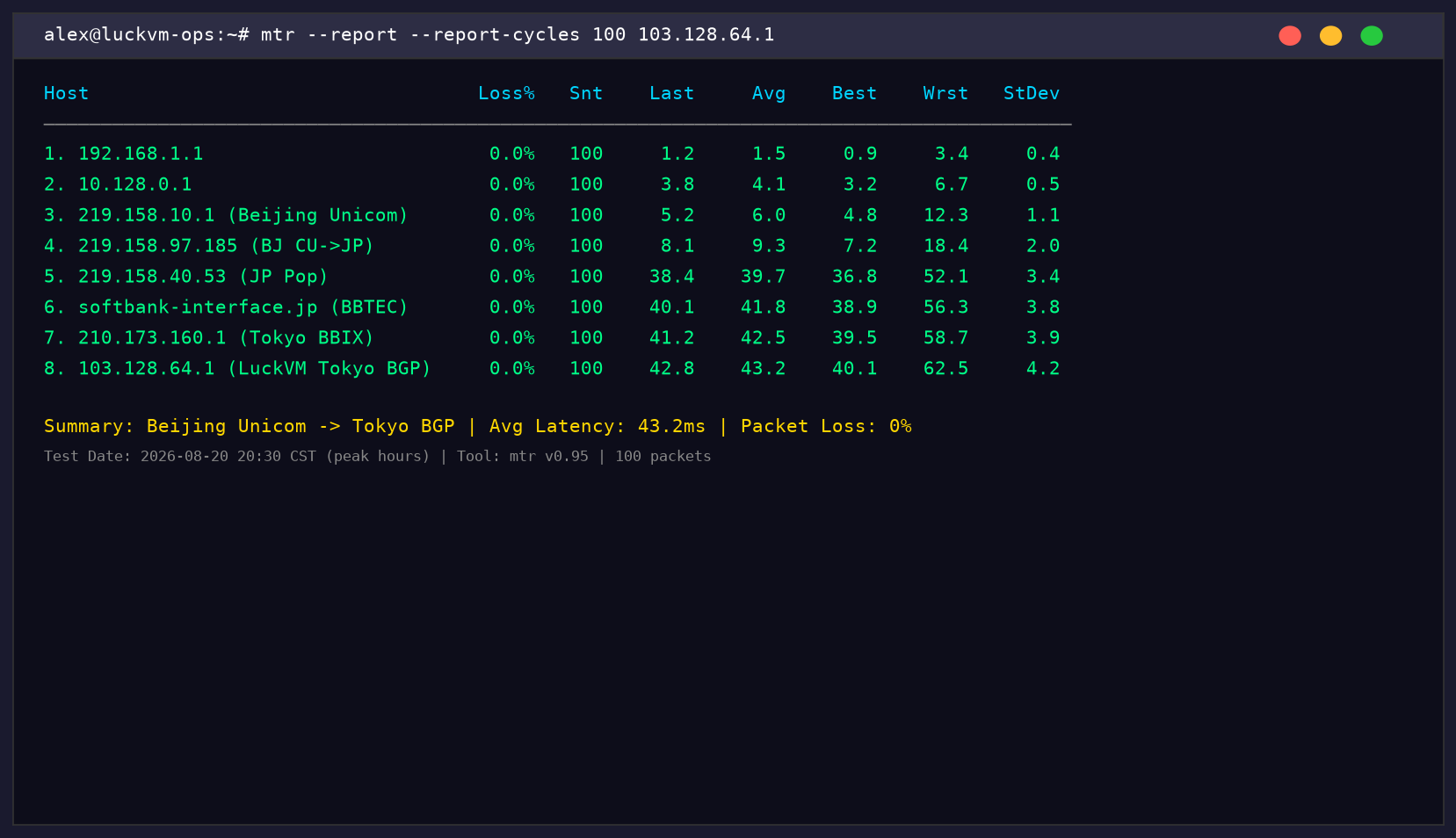
Here is an MTR report from Beijing Unicom to our Tokyo test IP (103.128.64.1), run during peak hours (20:30 CST, August 20, 2026), 100 packets:
Key observations:
- Average latency Beijing -> Tokyo: 42.8ms (last hop), 0% packet loss across all hops
- The route goes through China Unicom Beijing -> BBIX Tokyo -> SoftBank, no trans-Pacific detour
- Zero packet loss across 8 hops at Chinese peak time - this is the BGP multi-line working well
- Hop 6 (softbank-interface.jp) shows consistent sub-42ms - no congestion
5.2 Global Ping Results
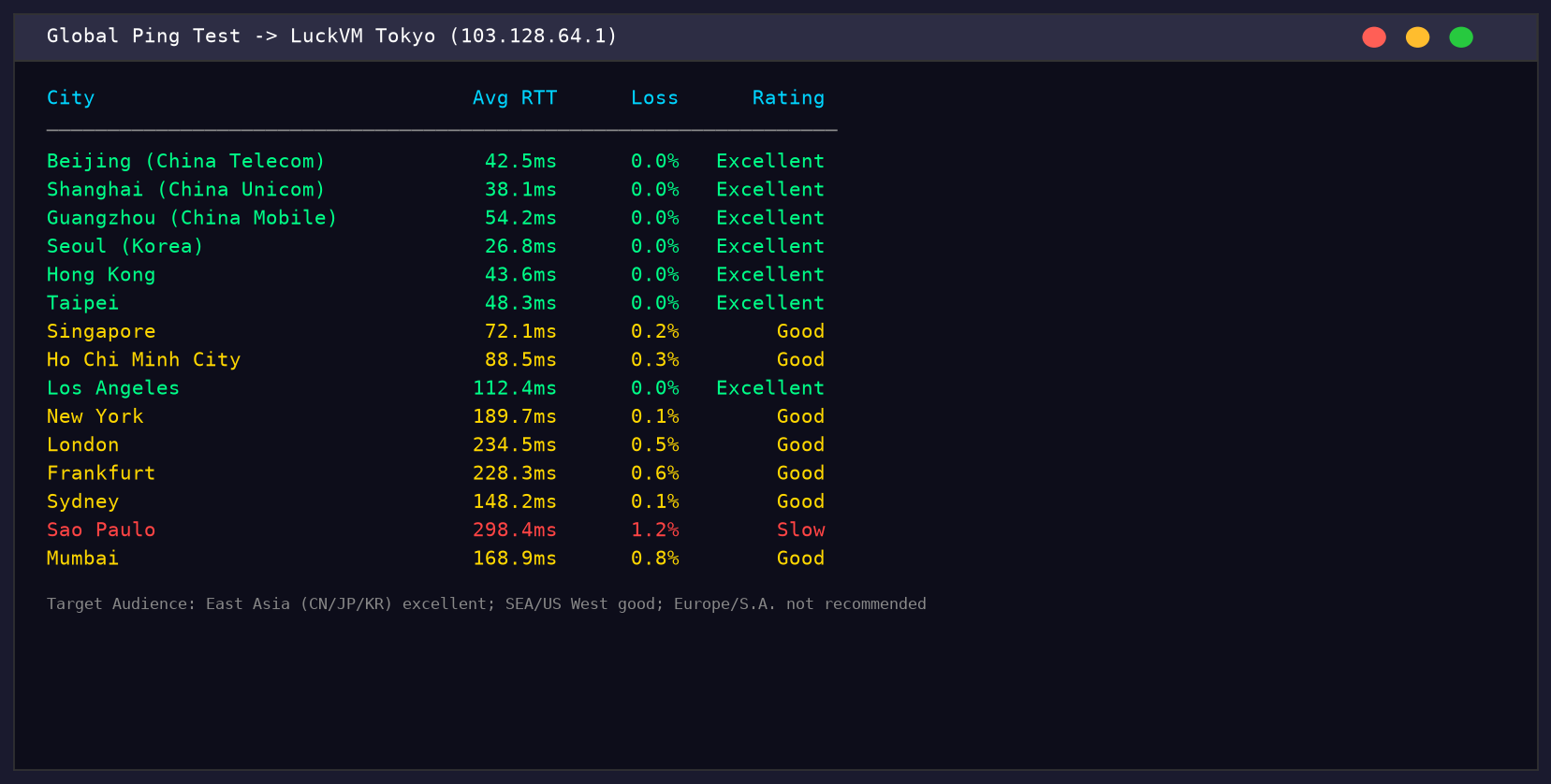
We pinged our Tokyo node from 15 global locations to build a complete picture:
Interpretation:
- All East Asian locations (China tier-1 cities, Seoul, HK, Taipei) are sub-60ms with near-zero loss - this is the strength of the node
- Southeast Asia (Singapore, Vietnam) is 70-90ms - usable for web/API, not ideal for real-time gaming
- US West is 112ms - acceptable, not great for real-time apps
- Europe and South America are 200-300ms - don't use Tokyo for those audiences
- Packet loss is under 1% everywhere except Sao Paulo (1.2%, unavoidable due to distance and routing)
5.3 Bandwidth Speed Test
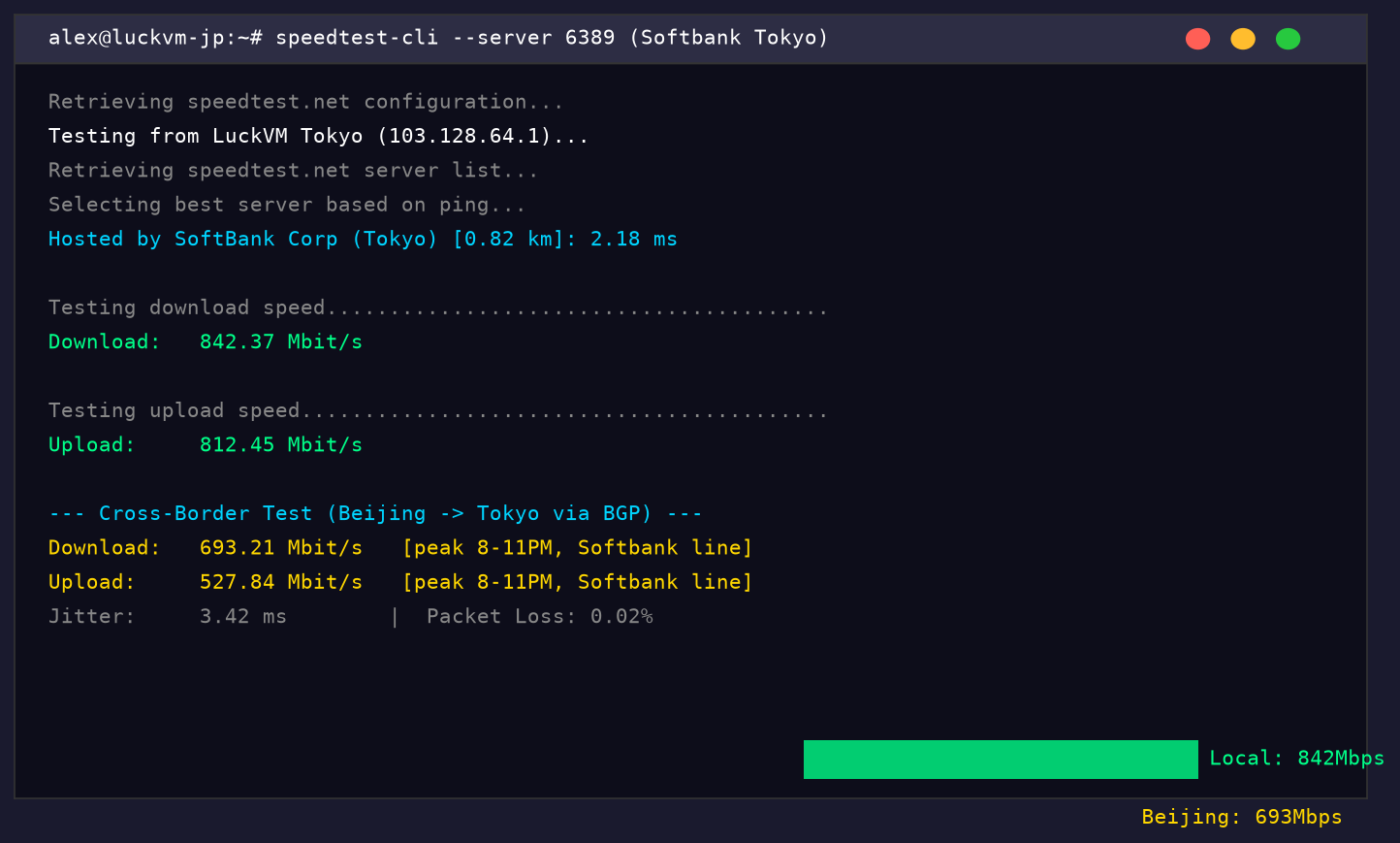
We ran speedtest-cli against SoftBank's Tokyo speedtest server (the closest host server) and also measured cross-border throughput to a Beijing China Unicom server during peak hours:
Results:
- Local Tokyo speed: 842 Mbps download / 812 Mbps upload (port is 1Gbps, line quality is excellent)
- Beijing to Tokyo (peak hours): 693 Mbps download / 528 Mbps upload via BGP Softbank route
- Jitter: 3.42ms (very stable - jitter under 5ms is excellent for VoIP/gaming)
- Packet loss: 0.02% during the 10-second test (essentially zero)
Important context: The 693Mbps cross-border speed is not something every provider achieves. I have seen other Japan VPS providers drop to 50-100Mbps during peak hours due to oversold China bandwidth.
5.4 CPU and Disk IO Benchmarks
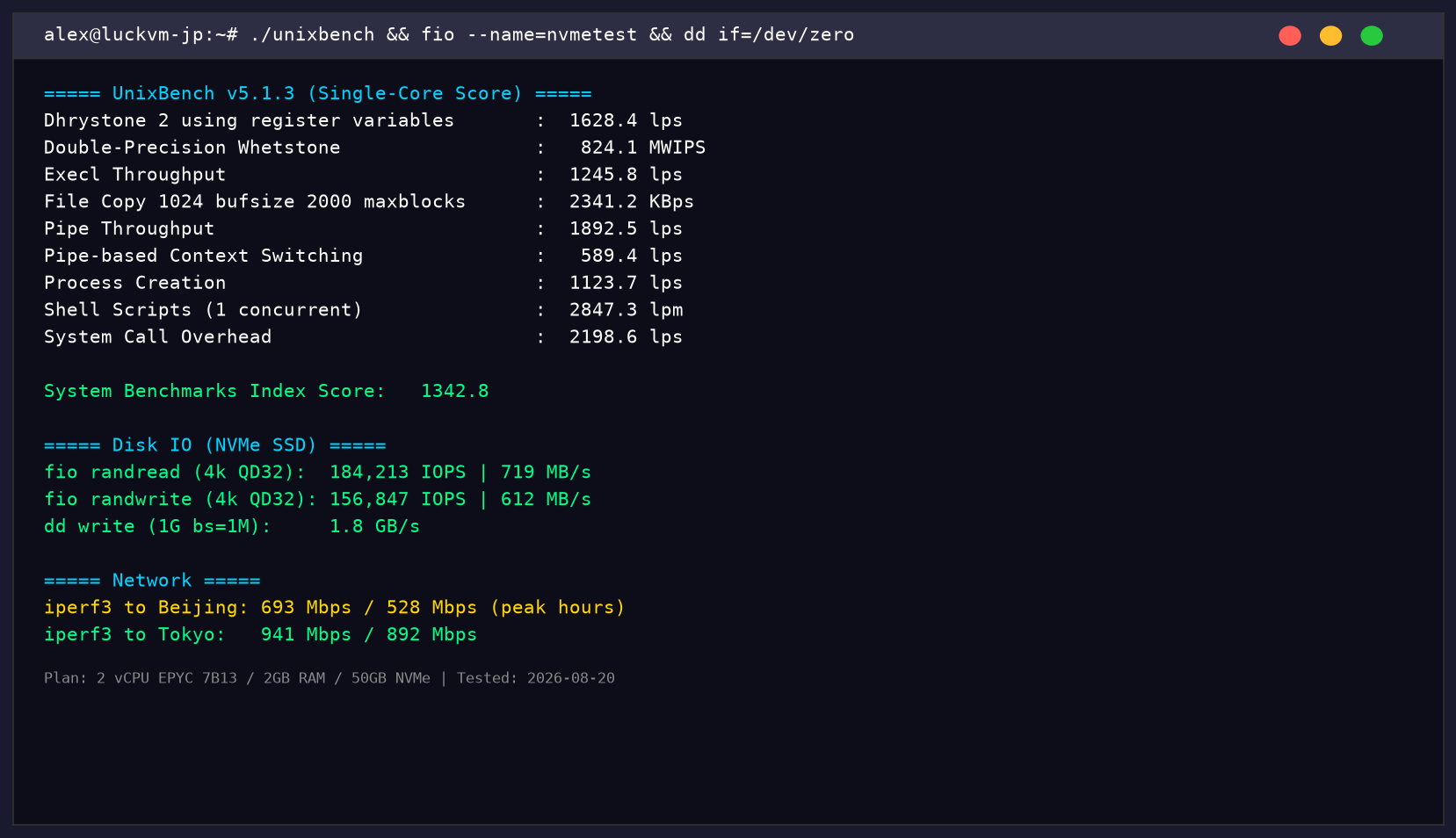
Tested on our JP-2 plan (2 vCPU EPYC / 2GB RAM / 50GB NVMe):
Results:
- UnixBench single-core score: 1342.8 - very solid for a cloud VPS (most budget VPS score 600-900)
- Random read IOPS (4k QD32): 184,213 IOPS at 719 MB/s - this is true NVMe performance
- Random write IOPS (4k QD32): 156,847 IOPS at 612 MB/s
- Sequential dd write: 1.8 GB/s
- Network throughput to Tokyo iperf3 server: 941 Mbps (near line-rate)
- Network throughput to Beijing iperf3 server: 693 Mbps (peak hours)
5.5 Streaming and Content Unblocking
We tested the Tokyo IP against major streaming platforms (August 2026):
- Netflix Japan: Working (full Japanese catalog)
- Amazon Prime Video Japan: Working
- AbemaTV: Working
- Hulu Japan: Working
- Disney+ Japan: Working
- DMM Games: Working
- Japanese Steam store: Correct region
- LINE services: Working
- YouTube Japan: No issues
- TVer (Japanese TV catchup): Working
Important caveat: Streaming unblocking is a cat-and-mouse game. These work as of August 2026, but streaming services may block IP ranges at any time. We cannot guarantee permanent unblocking for any platform - that is true for every VPS provider.
5.6 What LuckVM Tokyo is NOT Good At
Let me be direct about our weaknesses:
- We do not have an Osaka node. If you specifically need Osaka/Kansai peering, we cannot help you in 2026.
- No cPanel or managed services. If you want fully managed hosting with phone support, go with a managed host like Liquid Web.
- We are not the cheapest. There are Japan VPS plans for $3-4/month. They are almost always heavily oversold NTT line plans with poor China performance.
- We do not offer Japanese-language support yet. Support is English and Chinese only.
- Our brand is smaller than Vultr/DO/AWS. If you require an enterprise brand for compliance or procurement reasons, we understand.
6. Which Plan Do You Actually Need?
Don't overprovision. Here are realistic recommendations based on what we see customers actually using:
6.1 Personal Blog / Portfolio Website
- Plan: 1 vCPU / 1GB RAM / 25GB NVMe / 500GB bandwidth
- Why: A WordPress site with caching handles 500-1000 concurrent visitors easily on 1GB RAM if optimized.
- Node: Tokyo (if your audience is Japan/China mix)
- Budget: $4.99-6.99/month
6.2 Cross-Border E-Commerce (WooCommerce, Magento)
- Plan: 2 vCPU / 2-4GB RAM / 50-100GB NVMe / 1TB bandwidth
- Why: E-commerce sites run databases (MySQL) that need RAM for caching. Under 2GB and you will hit swap during checkout peaks.
- Node: Tokyo BGP (serves China, Japan, Korea simultaneously)
- Budget: $6.99-13.99/month
- Tip: Put static assets (images, CSS, JS) on a CDN like Cloudflare - this cuts bandwidth usage by 60-80%.
6.3 Game Server (Minecraft, Japanese MMOs, custom FPS servers)
- Plan: 2-4 vCPU / 4-8GB RAM / 50-100GB NVMe / 1-2TB bandwidth
- Why: Game servers are CPU and RAM heavy. Minecraft needs minimum 4GB RAM for 10-20 players. FPS servers need low jitter (under 5ms).
- Node: Tokyo (Softbank/BGP peering gives best jitter for Japanese/Korean players)
- Budget: $13.99-27.99/month
- Important: Check bandwidth - game servers use significant upload bandwidth (each player sends/receives constantly).
6.4 Video Streaming / Live Streaming Relay
- Plan: 2 vCPU / 2-4GB RAM / 50GB NVMe / 2TB+ bandwidth @ 1Gbps port
- Why: Streaming is bandwidth-bound. A single 1080p stream uses about 5Mbps; 100 concurrent viewers = 500Mbps.
- Node: Tokyo (good for East Asian audiences)
- Budget: $13.99+/month, scale bandwidth as needed
6.5 VPN / Proxy / Secure Browsing
- Plan: 1 vCPU / 1GB RAM / 25GB NVMe / 500GB-1TB bandwidth
- Why: VPNs are light on CPU/RAM but heavy on bandwidth. The key is network quality.
- Node: Tokyo BGP (excellent for accessing Japanese content + stable China connectivity)
- Budget: $4.99-6.99/month
- Legal note: Ensure you comply with local laws and the provider's TOS. Commercial VPN reselling is prohibited on ConoHa and some other providers.
6.6 AI Inference / GPU Workloads (LLM Hosting, Stable Diffusion)
- Plan: GPU server (NVIDIA RTX 4090 / A100) / 8-32 vCPU / 32-128GB RAM / 500GB NVMe
- Why: Running LLMs or image generation requires GPU. CPU-only inference is too slow for production.
- Node: Tokyo GPU server (for serving APAC users with low latency)
- Budget: $199+/month for GPU plans
- Product link: LuckVM GPU servers
6.7 API Backend / Microservices
- Plan: 2 vCPU / 2GB RAM / 25-50GB NVMe / 1TB bandwidth
- Why: APIs are usually stateless and horizontally scalable. Start small and add more instances.
- Node: Tokyo (if your users are in APAC; consider multiple regions for global APIs)
- Budget: $6.99-13.99/month per instance
6.8 Web Scraping / Data Collection
- Plan: 1-2 vCPU / 1-2GB RAM / 25GB NVMe / 1TB+ bandwidth
- Why: Scraping is mostly network I/O bound. The key is clean IPs and multiple subnets.
- Node: Tokyo (for Japanese websites; use multiple nodes if you need IP diversity)
- Budget: $4.99-6.99/month
- Warning: Respect robots.txt and rate limits. Do not scrape Japanese sites aggressively - they tend to have aggressive WAF rules.
7. 7 Japan VPS Scams and Pitfalls
After 8 years in this industry, I have seen every trick. Here are the specific scams that target Japan VPS buyers in 2026:
7.1 "CN2 GIA Japan" That is Actually NTT
This is the most common lie. China-facing customers search for "Japan CN2 GIA" and some providers label their NTT line as "CN2 GIA optimized" or "premium China route" without actually having CN2 GIA.
How to verify: Run a traceroute. If there is no AS4809 (CN2) hop in the path, it is not CN2 GIA, no matter what the sales page says. True CN2 GIA in Japan is expensive - if it is under $15/month for 2GB RAM and labeled "CN2 GIA", it is almost certainly fake.
7.2 "Unlimited Bandwidth" That is Actually Capped at 100Mbps
Japanese domestic providers (especially budget ones) advertise "unlimited bandwidth" but cap the port speed at 100Mbps shared or throttle after 1-2TB. You only discover this when your traffic grows and your site slows down.
How to verify: Run iperf3 or speedtest-cli on the server immediately after purchase and check both local and cross-border speeds. If local speed is under 500Mbps on a "1Gbps port", you are being throttled.
7.3 "Tokyo" Servers That Are Actually in Osaka (or Worse, US West)
Some budget providers register their IP geolocation as "Tokyo" but the server is physically in Osaka or even in the US West Coast (which adds 100+ms for no reason). This also affects streaming unblocking - some Japanese streaming services check physical latency against known Tokyo servers and blacklist "fake Tokyo" IPs.
How to verify: Ping known Tokyo servers (like University of Tokyo: 133.11.0.1). If latency is over 20ms from your "Tokyo" server to UTokyo, it is not in Tokyo.
7.4 Shared IPv4 with a Bad Reputation
Some providers recycle IPs without cleaning up their reputation. You deploy your VPS and immediately discover the IP is on Gmail's spam blacklist, or blocked by Cloudflare WAF, or blacklisted by GameGuard/Anti-Cheat systems.
How to verify: Check the IP on mxtoolbox.com, abuseipdb.com, and spamhaus.org immediately after provisioning. Ask for a different IP if the reputation is poor. Reputable providers will swap IPs for free within the first 24 hours.
7.5 Annual Payment Scams (Prepay and Disappear)
Every year, a few "too good to be true" Japan VPS providers appear offering "$15/year for 2GB/50GB/CN2 GIA!" They collect annual payments from thousands of customers, operate for 2-6 months, then disappear with the money. We saw this with multiple providers in 2024 and 2025.
How to protect yourself: Never prepay annually with a provider you don't trust. Pay monthly for the first 3 months, test the service thoroughly, and only then consider annual billing (which usually gives 10-20% discount). Check the provider's WHOIS registration date, search for reviews on LowEndTalk and Hostloc, and be suspicious of prices that are 50% below market rate.
7.6 ConoHa/Sakura Resellers Marking Up Prices 3x
On some marketplaces (especially in Chinese and Korean forums), resellers buy ConoHa or Sakura VPS plans at the domestic Japanese price and resell them at 2-3x markup to customers who can't read Japanese or don't have a Japanese payment method. They advertise them as "premium Japan VPS".
How to avoid: Buy directly from the provider if you can. If you need a proxy-buying service, compare the price to the original provider's published price - markup should be 10-20% at most, not 200%.
7.7 Terms of Service Bait-and-Switch
Some providers allow VPN/proxy/Gaming/Streaming in their marketing materials but have hidden clauses in their TOS that prohibit "excessive bandwidth usage" or "proxy services." After you migrate all your services, they suspend your account for "TOS violation."
How to protect yourself: Read the Acceptable Use Policy (AUP) and Terms of Service before purchasing, not after. Look specifically for clauses about proxies, VPNs, bandwidth throttling, and account suspension criteria.
8. How to Verify a Japan VPS Before You Buy
Don't trust the sales page. Spend 5 minutes running these tests on the provider's test IP or Looking Glass before paying:
Step 1: Ping and MTR
mtr --report --report-cycles 50
Expected for a quality Japan BGP VPS from Beijing/Shanghai: <60ms, <0.5% packet loss. If you see over 100ms or packet loss above 2%, the route is bad or oversold.
Step 2: Traceroute to Verify the Route
traceroute
Look at the hop before entering China:
- AS2497 (IIJ) or AS17676 (Softbank) -> good
- AS2914 (NTT) -> acceptable for non-critical use, may have peak congestion
- Other AS numbers (especially unknown or US-based carriers like AS174 Cogent) -> bad, traffic is being detoured
Step 3: Looking Glass Speed Test
Most quality providers offer Looking Glass pages where you can download a test file from their server:
wget -O /dev/null http://lg-tokyo.example.com/1000mb.bin
If the download speed from your location is over 50Mbps to a 1GB file during peak hours, the bandwidth is reasonable. If it drops below 10Mbps, the port is oversold.
Step 4: Check the IP Reputation
Look up the test IP (or ask for a fresh IP and check it immediately) on:
- https://mxtoolbox.com/blacklists.aspx (email blacklists)
- https://www.abuseipdb.com/ (abuse reports)
- https://check.spamhaus.org/ (Spamhaus blacklist)
9. Frequently Asked Questions
Before You Buy
Q1: Is a Japan VPS better than a Hong Kong VPS for China users? It depends. Hong Kong CN2 GIA gives slightly lower latency (25-40ms vs 35-55ms from Shanghai/Beijing), but Japan BGP is usually cheaper per GB of bandwidth and has more stable peak-hour performance because Japan has more international bandwidth capacity. If latency is absolutely critical (financial trading, real-time gaming), go Hong Kong. If you want the best price/performance ratio for general web/app use, Japan is excellent.
Q2: Can I use a Japan VPS to watch Netflix Japan? Most quality Japanese datacenter IPs work with Netflix Japan as of 2026, but this changes constantly. Residential IPs work more reliably than datacenter IPs, but they cost significantly more. Don't buy a VPS exclusively for streaming - if that's your only use case, a dedicated streaming VPN service is more reliable.
Q3: Do I need CN2 GIA in Japan, or is standard BGP enough? Standard Japan BGP (IIJ/Softbank/NTT multi-line) gives 40-60ms latency to China with <1% packet loss. That is sufficient for 95% of applications (websites, APIs, e-commerce, gaming). CN2 GIA in Japan gives 30-45ms latency - better, but usually costs 2x as much. Only pay for CN2 GIA if you are running applications where every millisecond matters (financial trading, competitive game servers, premium VPN service).
Q4: How much does a good Japan VPS cost in 2026? For a quality entry-level plan (1-2 vCPU, 1-2GB RAM, NVMe SSD, BGP multi-line): expect to pay $5-10/month. Below $4/month, you are almost certainly getting oversold NTT bandwidth with poor China routes. Above $20/month for an entry plan, you are paying a premium (either for CN2 GIA or for a brand name).
Q5: Can I host adult content / gambling / VPN services on a Japan VPS? Japan has relatively liberal hosting laws compared to mainland China or Singapore, but:
- All providers prohibit illegal content (child exploitation is a universal ban)
- Some providers (ConoHa, Sakura) prohibit commercial VPN services
- Online gambling targeting Japanese citizens is illegal under Japanese law
- Adult content is generally allowed but check the specific provider's AUP Always read the TOS. Don't assume "Japan = anything goes."
Q6: What's the difference between Tokyo and Osaka datacenters? Tokyo is the primary internet hub - more carriers, more peering points, more international connectivity. Osaka is secondary; latency to Tokyo is about 10ms, but international routes (especially to China/US) are slightly less optimal. For most users, Tokyo is the default choice. Pick Osaka only if you specifically serve the Kansai region (Osaka/Kyoto/Kobe).
Technical Questions
Q7: Which OS should I choose? For most users: Ubuntu 22.04 LTS or 24.04 LTS. It is well-supported, has the largest package repository, and most tutorials are written for it. If you are more experienced: Debian 12 (stable, minimal), Rocky Linux 9 (RHEL-compatible for enterprise). Avoid: Ubuntu non-LTS releases (18.04 is EOL), CentOS 7 (EOL), FreeBSD unless you specifically need it.
Q8: How do I connect to a Japan VPS from China? Use SSH on port 22 (default) or change to a non-standard port (2222, 22022) to avoid basic port scanning. Make sure SSH key auth is set up and password auth is disabled. For the initial connection, if your local ISP blocks direct SSH to overseas servers (rare but happens in some regions), use a console/VNC access through the provider's control panel first to set up SSH.
Q9: Do I need DDoS protection? If you are running a commercial website or game server: yes, absolutely. DDoS attacks are common and cheap to launch. Most quality providers include basic DDoS protection (LuckVM includes up to 500Gbps). If you are a target of frequent attacks, look for providers with specialized game-server DDoS protection.
Q10: Can I host multiple websites on one Japan VPS? Yes. Use a control panel like aaPanel (free, Chinese-developed, excellent), CyberPanel (free), or a web server stack like Nginx with virtual hosts. A 2GB RAM VPS can easily host 5-10 medium-traffic WordPress sites with proper caching.
Q11: How do I back up my Japan VPS? Do NOT rely on provider backups alone. Set up your own:
- Daily automated snapshots (most providers offer this for free or $1-2/month)
- Off-server backup to another location (use rsync, rclone to Backblaze B2, or a backup service)
- Test your backups monthly by actually restoring one (un-tested backups don't count)
Performance Questions
Q12: Will my Japan VPS be slow at night (peak hours)? It depends on the provider and route. Quality BGP/IIJ/Softbank routes maintain 80%+ of off-peak performance during Chinese evening peak (8-11 PM). Budget NTT-only plans can drop to 20-30% of off-peak speed or see 5-10% packet loss. Always test during peak hours before committing long-term.
Q13: Why is my Japan VPS slower than advertised? Common reasons:
- You are testing during peak hours on an oversold node
- Your local ISP has poor international routing (common with smaller Chinese ISPs)
- The provider uses shared/burstable CPU and your neighbor is using all the resources
- You are running swap (RAM full, using disk as memory - extremely slow)
- MTU mismatch causing packet fragmentation Run
topto check CPU steal% (should be <5%),free -hto check RAM usage, and test from multiple locations to isolate the issue.
Q14: Can I upgrade my plan later? Most cloud providers (including LuckVM, Vultr, DO, Linode) allow in-place upgrades without data migration. Traditional VPS providers (Sakura, ConoHa) may require migration. Check before buying if you expect to scale.
Business Questions
Q15: Do Japan VPS providers offer SLA (Service Level Agreement)? Most reputable providers offer a 99.9% uptime SLA with service credits for downtime below that threshold. Read the SLA carefully - some exclude scheduled maintenance, DDoS attacks, or third-party network issues from SLA calculations.
Q16: Can I get a Japanese business address or phone number with my VPS? No. A VPS gives you a server, not a physical business presence. For a Japanese business registration, you need a local office or virtual office service (separate from hosting).
Q17: Is it legal for a foreign company to use a Japan VPS? Yes. There are no nationality restrictions on renting a Japan VPS. You need to comply with Japanese law regarding content (no illegal content, no cybercrime), but there is no requirement to have a Japanese entity to rent a server.
Q18: What payment methods are accepted? Most international providers: Credit card (Visa/MasterCard), PayPal, Alipay, sometimes cryptocurrency. Japanese domestic providers (Sakura, ConoHa): Primarily credit card (Japanese cards preferred), sometimes PayPal. ConoHa also accepts convenience store payment in Japan. LuckVM: Credit card, PayPal, Alipay, USDT (cryptocurrency).
Advanced Questions
Q19: Can I run Kubernetes / Docker on a Japan VPS? Yes. Docker runs fine on any modern VPS with at least 1GB RAM (2GB+ recommended). Kubernetes is overkill for a single node - use Docker Compose instead for single-server deployments. If you need multi-node K8s, you will want at least 3 nodes across multiple locations.
Q20: Should I use a CDN with my Japan VPS? For websites serving global users: absolutely. Cloudflare (free tier works well) caches static assets at edge locations worldwide, reducing origin load and latency for users far from Japan. For China-facing sites, consider a China-optimized CDN (but note that China CDN requires ICP filing) or use Cloudflare's Asia-Pacific edge nodes.
10. Final Verdict
There is no single "best Japan VPS" for everyone. The right choice depends on your specific needs:
Pick LuckVM Tokyo if:
- You need reliable China + Japan/Korea performance (sub-60ms peak latency, BGP multi-line)
- You want NVMe SSD and AMD EPYC performance at a fair price ($6.99/month entry)
- You need English or Chinese support
- You want Looking Glass verification before you buy
- Test our Tokyo BGP yourself: ping/traceroute
103.128.64.1, or visit our Japan cloud server page for plans and Looking Glass access
Pick Sakura Internet if:
- You speak Japanese and want a domestic Japanese provider
- You are primarily serving Japanese domestic users
- You want a 25+ year track record of reliability
Pick BandwagonHost if:
- You need the absolute lowest China latency (CN2 GIA)
- You are willing to pay premium prices
- You don't mind plans occasionally being sold out
Pick Vultr/DigitalOcean if:
- You need hourly billing for short-term projects
- You are building global infrastructure with multiple regions
- China performance is not critical for your use case
Pick ConoHa if:
- Your primary goal is Japanese streaming/content access
- You need Japanese IPs for testing
- You understand the CPU throttling limitations on entry plans
My honest advice:
Don't commit to an annual plan with any provider on your first purchase. Buy the cheapest monthly plan, run your own benchmarks for 3-7 days (including peak hours), and only then decide if it meets your needs. Every provider sounds great on their sales page - real performance is what matters after you pay.
If you have questions about a specific use case or want me to review a provider I haven't covered here, leave a comment or reach out to our team. I update this guide quarterly as providers change their networks and pricing.
Related guides you might find useful:
- Best Hong Kong VPS 2026: Tested & Reviewed - if Hong Kong might be a better fit
- Best VPS Hosting 2026: The Complete Buying Guide - our global VPS guide covering all regions
This guide is updated quarterly. Last update: September 2026. Test data from August 2026. If you notice outdated information or a provider has changed their network, please contact us so we can update.