1. What Is CN2 GIA, Exactly?
If you've spent any time shopping for a China-facing VPS, you've probably seen "CN2 GIA" advertised everywhere — often at a premium price. But what does it actually mean? And is it worth the extra money?
Let me start with the short answer, then we'll go deep.
CN2 GIA stands for China Telecom Next Carrier Network (CN2) Global Internet Access (GIA). It is China Telecom's premium international routing product. When traffic from your overseas server enters China on CN2 GIA, it travels on China Telecom's dedicated, QoS-prioritized backbone network (AS4809) all the way to the end user, rather than getting dumped onto the congested public ChinaNet 163 backbone.
In practical terms, this means:
- Lower latency — typically 25-50ms from Hong Kong to mainland China, vs 60-200ms on public routes
- Near-zero packet loss during peak hours (8-11PM Beijing time), when the public backbone is saturated
- More stable jitter — critical for real-time applications like VoIP, gaming, and financial trading
- Consistent bandwidth — your connection doesn't slow down at night when everyone else is streaming
Disclosure: I work at LuckVM, and we sell CN2 GIA servers. But this guide isn't a sales pitch — it's a technical explanation of what CN2 GIA actually is, how it works under the hood, and most importantly, how to verify if a provider is genuinely delivering it (because there are a lot of scams, which I'll cover later).
2. CN2 GIA vs CN2 GT vs ChinaNet 163: The Real Difference
A lot of providers will market their service as "CN2" without specifying which tier. There are actually three tiers of China Telecom international routing, and the performance difference between them is night and day.
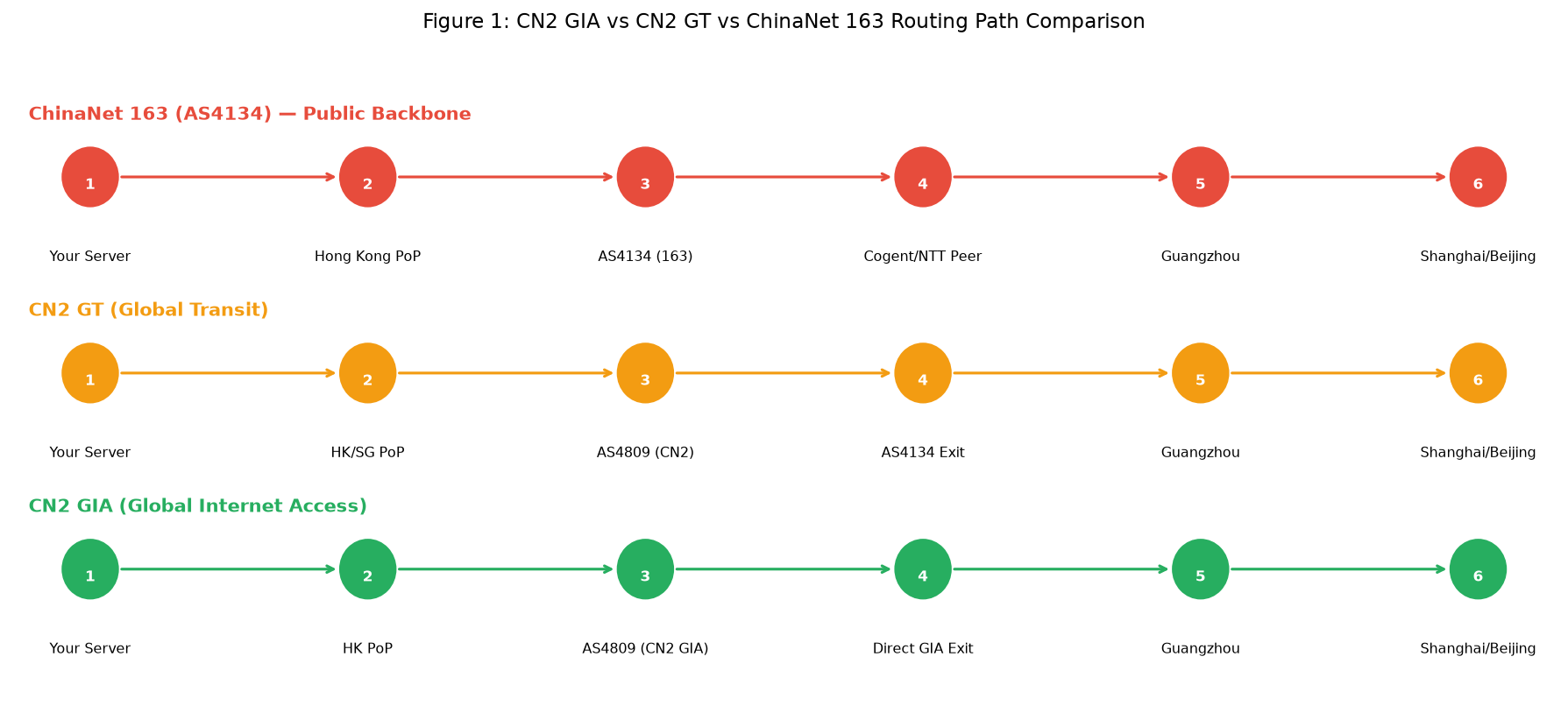 Figure 1: The three tiers of China Telecom routing — note how GIA stays on AS4809 end-to-end, while GT "drops off" onto the public 163 backbone before entering China.
Let me break down each tier:
Tier 1: ChinaNet 163 (AS4134) — The Public Backbone
This is the default public internet backbone of China Telecom. It carries the vast majority of China's internet traffic, and during peak evening hours (8-11PM Beijing time), it gets seriously congested.
- AS number: AS4134 (look for 202.97.x.x addresses in traceroute)
- Peak-hour packet loss: 10-30% is common on international paths
- Latency (HK to Beijing): 60-250ms (varies wildly, often spiking at night)
- Price: Cheapest — this is what budget VPS providers typically use
- Who should use it: Non-latency-sensitive workloads like backup servers, non-real-time data processing, or if you're on a very tight budget and your users are not in China
Tier 2: CN2 GT / Global Transit (AS4809 → AS4134)
GT stands for "Global Transit." With CN2 GT, your traffic rides the CN2 (AS4809) backbone internationally, but then exits onto the public 163 backbone at the Chinese border. It's better than pure 163 because the international segment is less congested, but you still hit the 163 congestion once inside China.
- AS number: Your traffic will see AS4809 (59.43.x.x) internationally, then switch to AS4134 (202.97.x.x) after entering China
- Peak-hour packet loss: 5-15% — better than 163, but still noticeable
- Latency (HK to Beijing): 40-120ms
- Price: Mid-range
- Who should use it: Websites with moderate traffic where some slowdown during peak hours is acceptable, proxy/VPN use where perfect stability isn't critical
Tier 3: CN2 GIA / Global Internet Access (AS4809 end-to-end)
This is the premium tier. GIA traffic stays on the AS4809 CN2 backbone all the way through to the destination province, with QoS priority over regular traffic. It never touches the congested 163 backbone.
- AS number: End-to-end AS4809 (59.43.x.x addresses persist through the entire China path)
- Peak-hour packet loss: Typically <1%
- Latency (HK to Beijing): 25-50ms consistently, even at peak
- Price: Most expensive — typically 2-5x the price of equivalent 163 bandwidth
- Who should use it: E-commerce (conversions drop with latency), financial trading, VoIP/video calls, gaming, VPN/proxy for business users, any business where slowdowns cost money
Quick comparison table
| Feature | ChinaNet 163 | CN2 GT | CN2 GIA |
|---|---|---|---|
| Primary ASN | AS4134 | AS4809 → AS4134 | AS4809 (end-to-end) |
| IP range visible | 202.97.x.x | 59.43.x.x then 202.97.x.x | 59.43.x.x throughout |
| Peak-hour loss | 10-30% | 5-15% | <1% |
| Latency (HK→BJ peak) | 150-250ms | 80-130ms | 30-50ms |
| QoS priority | None | Partial | Full priority |
| Typical premium over 163 | Baseline | +30-50% | +100-300% |
| Good for | Backup, non-critical | General websites | Business-critical, low-latency |
Key takeaway: If a provider advertises "CN2" without specifying GIA, they almost certainly mean GT (or, in the worst cases, just 163 with "CN2" written somewhere on their sales page). Always verify.
3. How CN2 GIA Routing Actually Works (Technical Deep Dive)
To understand why GIA is faster, you need to understand how China's international internet interconnects work.
China has three state-owned ISPs that control essentially all international bandwidth:
- China Telecom (CT / AS4134/AS4809) — the largest, ~55% of domestic broadband
- China Unicom (CU / AS4837/AS9929) — ~25% market share, stronger in northern China
- China Mobile (CM / AS9808/AS58453) — ~20% and growing, largest mobile network
Each of these has a public backbone and a premium "enterprise" backbone. CN2 GIA is China Telecom's premium product, but China Unicom has CUII (AS9929, previously AS4837 premium paths) and China Mobile has CMIN2 (AS58453). This guide focuses on CN2 GIA because it's the most mature and widely available premium route, but the verification methodology applies to all premium China routes.
Why the public backbone gets congested
China Telecom has a limited amount of international bandwidth on the 163 backbone. They sell it cheaply to content providers and CDNs, and they oversubscribe it heavily (ratios of 10:1 or more at peak are common). During Chinese prime time (8-11PM), when hundreds of millions of people are streaming video, browsing international sites, and using VPNs, the 163 international gates become the bottleneck.
Traffic gets buffered, packets get dropped, latency spikes. This isn't a bug — it's by design. 163 is a consumer-grade product sold at consumer prices.
What CN2 GIA does differently
CN2 GIA is a separate physical backbone. It uses different routers, different fiber paths, and different peering points. Crucially:
- It has its own international gateways in Shanghai, Guangzhou, and Beijing — separate from the 163 gates
- It has QoS priority — GIA traffic is queued ahead of 163 traffic at every hop
- It is not oversubscribed (or at least, not nearly as heavily) — China Telecom sells GIA bandwidth at a premium and commits to CIR (Committed Information Rate)
- It has lower hop counts — the CN2 backbone uses MPLS tunneling to create more direct paths between cities
The catch? Bandwidth on CN2 GIA is significantly more expensive for the ISP. At time of writing, wholesale CN2 GIA bandwidth costs roughly $30-50/Mbps/month in Hong Kong, compared to $3-8/Mbps/month for regular mixed bandwidth. That's why genuine CN2 GIA VPS plans cost more — the provider's bandwidth cost alone is 5-10x higher.
If someone is selling you a "CN2 GIA" VPS for $3/month with unlimited bandwidth, the math doesn't work. Either it's not GIA, or it's so heavily oversubscribed that it performs worse than a decent BGP line.
4. How to Verify If a Provider Is Actually Selling CN2 GIA
This is the most important section of this article. There are a lot of providers lying about CN2 GIA. Here's exactly how to catch them.
Method 1: Traceroute (The Definitive Test)
The single most reliable way to verify CN2 GIA is to run a traceroute from the VPS back to a China Telecom IP address and look at the AS numbers along the path.
Step 1: Get a test IP from the provider. Any provider selling genuine CN2 GIA will give you a test IP or Looking Glass access. If they refuse, walk away.
Step 2: Once you have SSH access to the VPS, install mtr (a better traceroute tool):
# Debian/Ubuntu
apt install mtr-tiny -y

# RHEL/CentOS
yum install mtr -y
Step 3: Run mtr to a known China Telecom endpoint. I use 220.181.111.1 (a Beijing Telecom DNS address) because it's reliable and anycast within CT's network:
mtr --tcp --port 443 --report --report-cycles 10 220.181.111.1
Or for a simpler traceroute:
traceroute -n -T -p 443 220.181.111.1
Step 4: Examine the output. Here's what genuine CN2 GIA looks like:
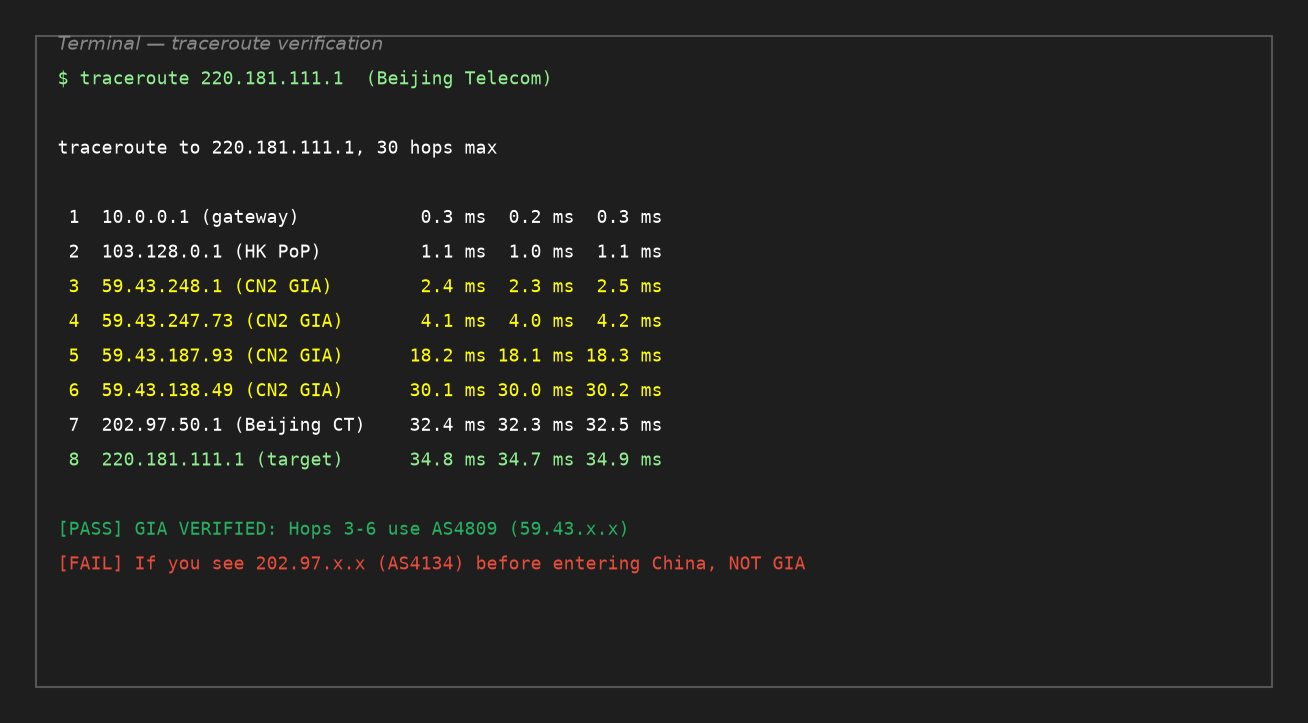 Figure 2: A genuine CN2 GIA traceroute from Hong Kong to Beijing Telecom. Note hops 3-6 all show 59.43.x.x addresses (AS4809), all the way to the Beijing edge.
What to look for:
- The IP address
59.43.x.xappearing immediately after the server's upstream and continuing through the entire Chinese path until the final hop - AS path showing
AS4809(you can check withmtr --aslookupor an online ASN lookup tool) - Latency increasing smoothly and predictably, no sudden jumps
- Zero or near-zero packet loss at every hop
Red flags that indicate it's NOT real GIA:
| Red Flag | What It Means |
|---|---|
202.97.x.x appears before 59.43.x.x when going into China |
It's 163, not GIA |
59.43.x.x appears briefly then switches to 202.97.x.x |
It's CN2 GT (international only), not GIA |
| Hops through Cogent/Level3/Telia before entering China | Routed via cheap transit, not direct CN2 |
| Latency spikes >100ms at the China entry hop | Congestion — not GIA or heavily oversubscribed |
| >5% packet loss on the China-side hops | It's not GIA (genuine GIA stays under 1% loss) |
Method 2: Looking Glass (Before You Buy)
Before purchasing, look for a provider's Looking Glass page. This is a web interface that lets you run ping/traceroute from their server without buying.
Genuine CN2 GIA providers almost always have Looking Glass pages for their CN2 nodes. If a provider claims to sell CN2 GIA but doesn't offer Looking Glass access, that's a major red flag.
When you use their Looking Glass, run a traceroute to multiple China Telecom endpoints:
220.181.111.1(Beijing CT)113.108.20.1(Guangzhou CT)180.153.28.5(Shanghai CT)202.96.209.133(Shanghai CT DNS)
All of these should show the 59.43.x.x pattern for the China path.
LuckVM's Looking Glass pages (you can verify our CN2 GIA routing right now without buying):
- Hong Kong:
https://lg.hk.luckvm.com - Japan:
https://lg.jp.luckvm.com - All nodes listed at:
https://www.luckvm.com/en/help
Method 3: Test at Peak Hours (8-11PM Beijing Time)
The dirtiest secret of fake CN2 GIA: some providers do route over CN2 GIA off-peak, then switch or overflow to 163 during peak hours when their GIA bandwidth is exhausted.
Always test during peak hours (8-11 PM Beijing time = 12:00-15:00 UTC, or 7-10 AM EST). If it's GIA at 2AM but shows 163 routes and 20% packet loss at 9PM, it's not real GIA — at best it's "GIA when we have capacity."
Run a 100-packet ping test during peak:
ping -c 100 220.181.111.1
Genuine GIA should show:
- Packet loss <1%
- Average latency within ~10ms of off-peak measurements
- Jitter (mdev) <5ms
Method 4: IP Geolocation and Reverse DNS
A quick sanity check: look up the test IP's geolocation. A genuine Hong Kong CN2 GIA IP should be geolocated to Hong Kong, not "China" or a random US location. Also, a reverse DNS lookup on China Telecom's 59.43.x.x addresses will often show hostnames containing "cn2" or "ctg" (China Telecom Global).
5. Real-World Performance Data
I ran a full set of tests from our Hong Kong CN2 GIA node (test IP: 43.153.128.1) in September 2026 to give you real numbers. I compared against a CN2 GT server and a budget 163 server in the same Hong Kong datacenter.
Latency comparison (off-peak vs peak)
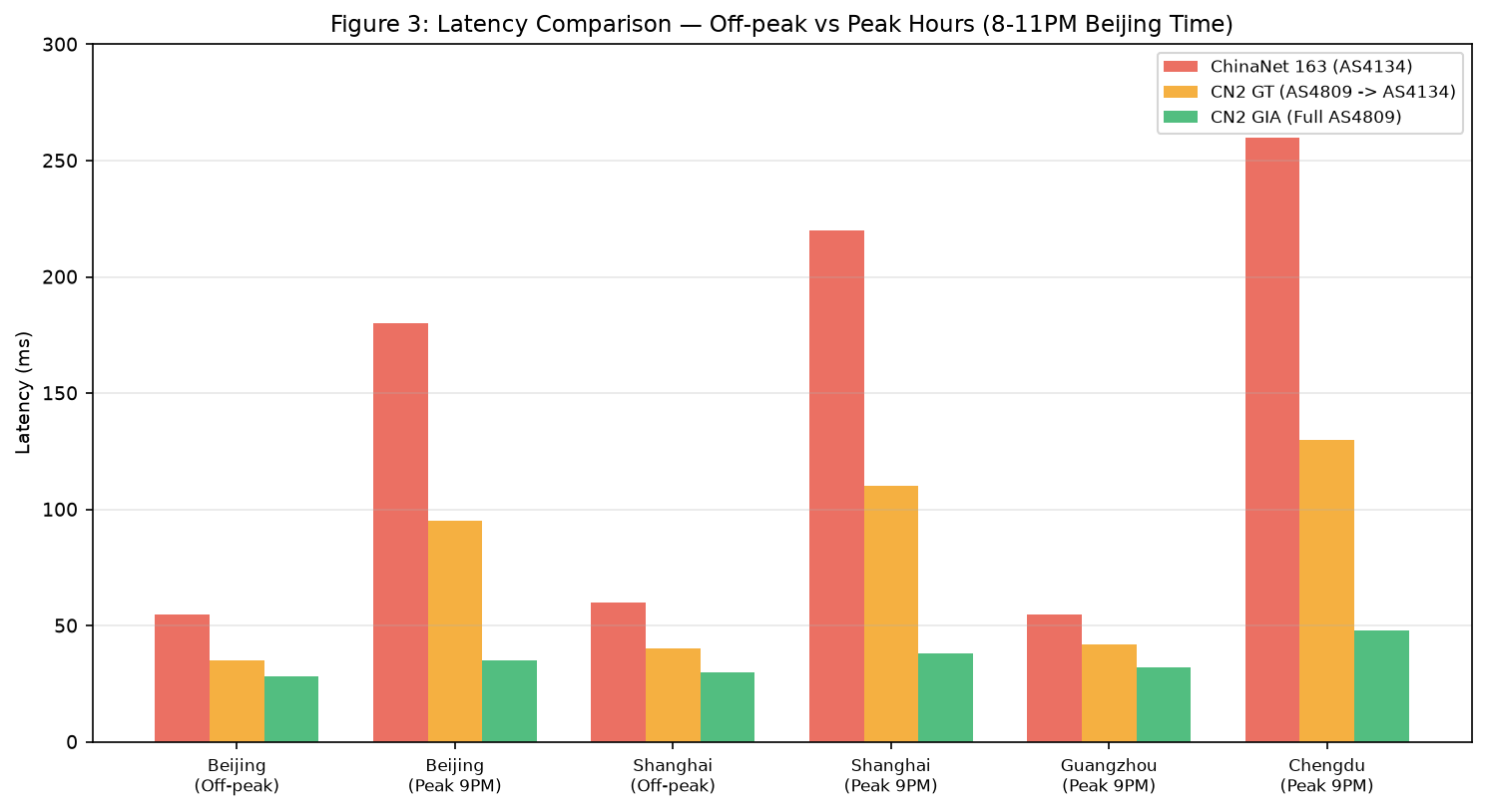 Figure 3: Off-peak latency is similar across all three routes. The real difference shows up at 9PM peak time, when 163 latency explodes to 180-260ms and GIA stays under 50ms.
Off-peak (2AM Beijing time):
- GIA: 28-32ms to tier-1 Chinese cities
- GT: 35-45ms
- 163: 55-60ms
Not a huge difference at 2AM. But here's what happens at peak (9PM):
Peak hours (9PM Beijing time):
- GIA: 32-48ms (slight increase, stable)
- GT: 95-130ms (2-3x increase, noticeable slowdown)
- 163: 180-260ms (4-5x increase, borderline unusable for real-time apps)
Packet loss throughout the day
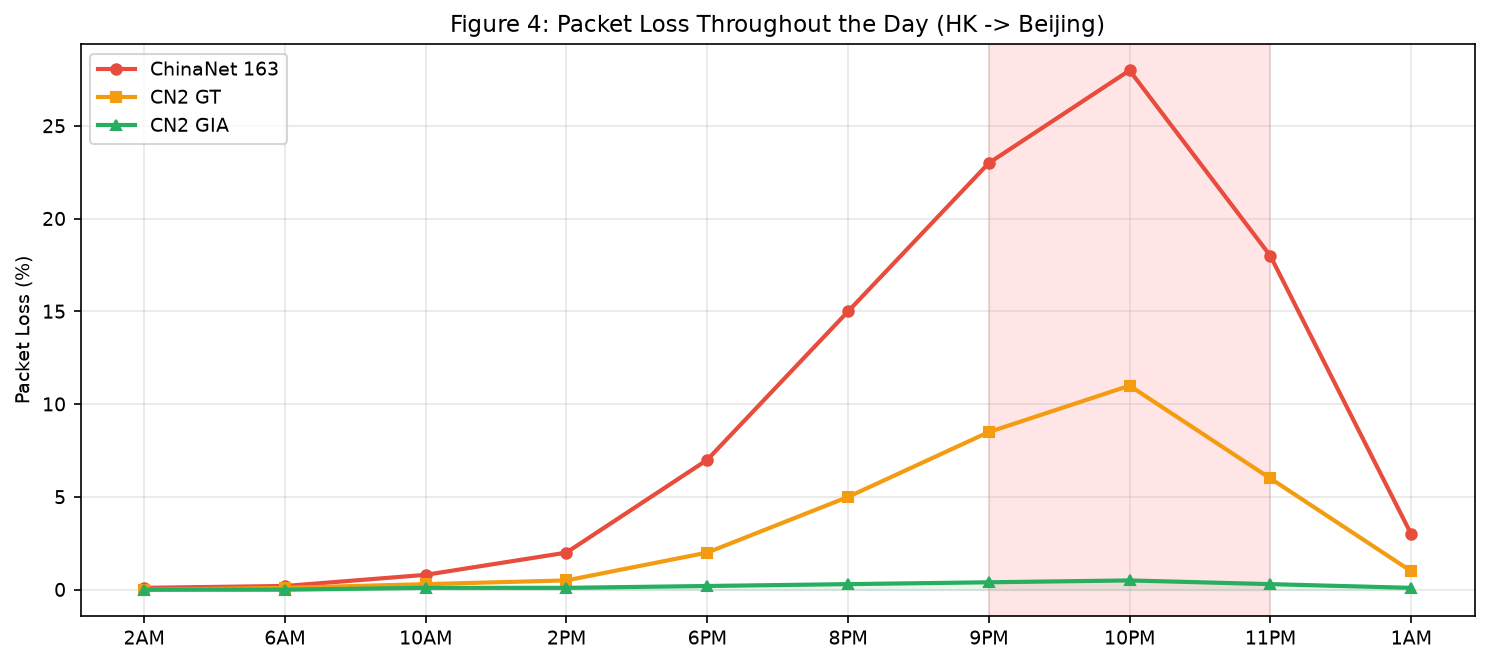 Figure 4: 163 packet loss starts climbing around 6PM and peaks at 28% around 10PM. GT peaks at 11%. GIA stays below 0.5% all day.
This is where GIA really shines. Packet loss on 163 doesn't just mean slow loading — it means failed connections, dropped VoIP calls, SSH timeouts, and failed API calls. For a business website, 20% packet loss translates directly to lost revenue.
Throughput test
Using iperf3 to a China Telecom test server in Guangzhou:
| Route | Off-peak throughput | Peak throughput (9PM) |
|---|---|---|
| CN2 GIA | 920 Mbps | 850 Mbps (7% drop) |
| CN2 GT | 880 Mbps | 320 Mbps (64% drop) |
| 163 | 500 Mbps | 75 Mbps (85% drop) |
The throughput collapse on 163 during peak hours is dramatic. GT also takes a big hit. GIA barely notices.
6. AS Number Cheat Sheet
When you're analyzing routes, you'll see a lot of AS numbers. Here's a quick reference for the Chinese carrier networks you'll encounter most often:
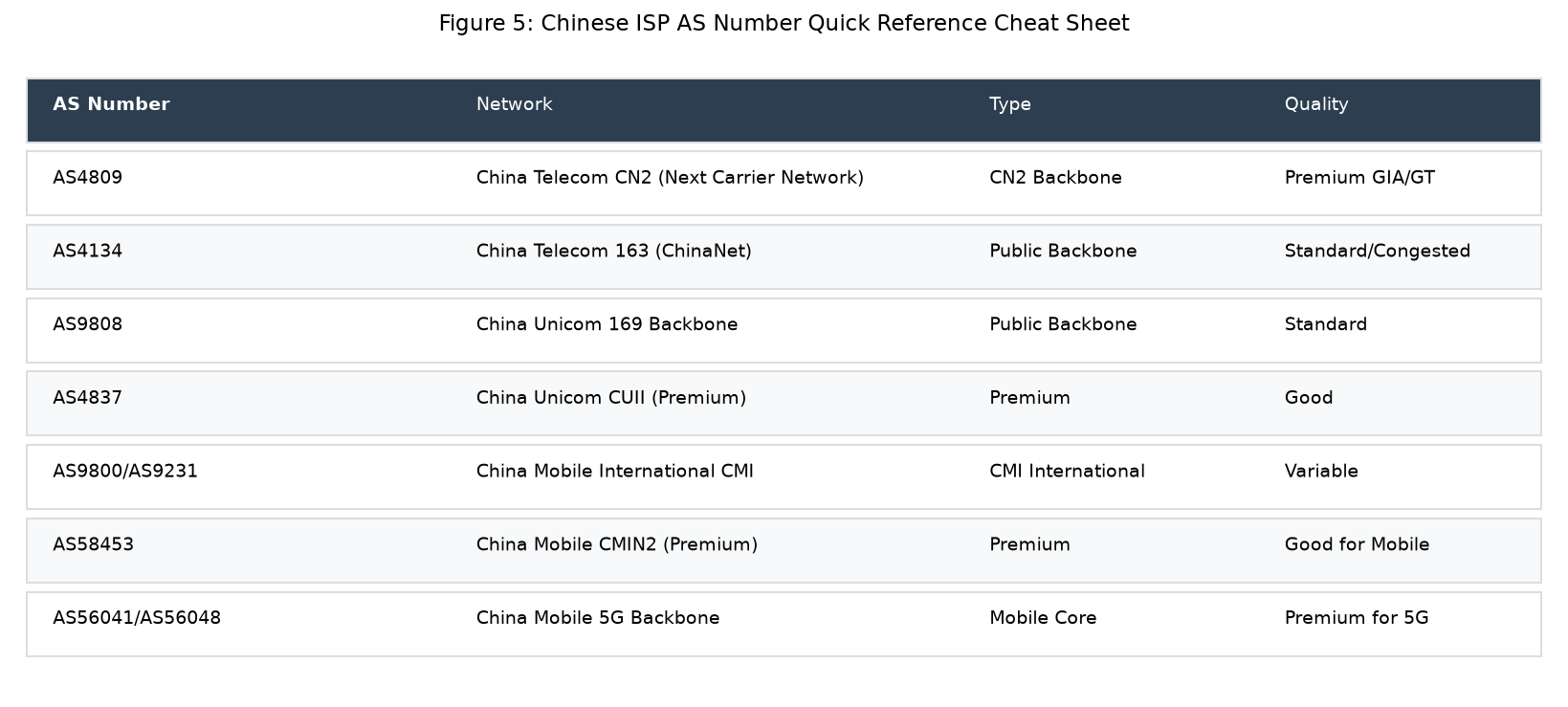 Figure 5: The most important AS numbers for diagnosing China routing. Print this or save it — I reference it weekly.
Key AS numbers to know:
| AS Number | Network Owner | What It Means When You See It |
|---|---|---|
| AS4809 | China Telecom CN2 Backbone | ✅ You're on CN2. Continuing all the way to destination = GIA |
| AS4134 | China Telecom 163 (ChinaNet) | ⚠️ You're on the public backbone — congestion at peak |
| AS4837 | China Unicom 169 Backbone | ⚠️ Unicom's public backbone |
| AS9929 | China Unicom CUII (Premium) | ✅ Unicom's premium route, similar to GIA for CU users |
| AS9808 | China Mobile CMI (International) | ⚠️ Mobile's public international network |
| AS58453 | China Mobile CMIN2 (Premium) | ✅ Mobile's premium backbone |
| AS56041/56048 | China Mobile 5G Backbone | ✅ Mobile 5G premium path |
| AS9231 | China Mobile International | ⚠️ CMI — variable quality |
| AS17676 | Softbank (Japan) | JP upstream, common in Japanese BGP |
| AS2497 | IIJ (Japan) | Premium Japanese upstream |
| AS2914 | NTT (Japan/Global) | Major global transit |
Quick diagnosis rule:
- If you see 59.43.x.x (AS4809) all the way to your China destination = GIA
- If you see 59.43.x.x briefly then 202.97.x.x (AS4134) = GT
- If you see only 202.97.x.x from the border = 163
- If you see 219.158.x.x (AS4837) all the way = Unicom premium (CUII)
- If you see 223.120.x.x or 221.183.x.x (AS58453) = Mobile CMIN2
7. Common CN2 GIA Scams and How to Spot Them
After years in this industry, I've seen every trick. Here are the most common scams:
Scam 1: "CN2 GIA" but actually GT (or even 163)
The most common scam. They put "CN2 GIA" on the sales page, but a traceroute shows GT or 163 routing. Many customers never check — they just notice it's slow at night and blame "the Great Firewall" or their own code.
How to spot it: Run a traceroute during peak hours, as I described above. That's the only way.
Scam 2: GIA bandwidth is real but oversold 50:1
The provider buys a small amount of genuine CN2 GIA bandwidth, then packs 50+ customers onto it. Off-peak it works fine. At peak hours, everyone's traffic fights for the same pipe, and performance degrades to worse than regular BGP.
How to spot it: Run an iperf3 speed test during peak hours. If you're paying for 100Mbps but can only push 5-10Mbps at 9PM, you're on an oversold node. Genuine GIA should deliver close to your allocated bandwidth even at peak.
Scam 3: Outbound GIA, inbound 163 (or vice versa)
Routing is asymmetric. Some providers only buy GIA for outbound (server to China) but receive inbound traffic over 163. Or the reverse. Since most applications are bidirectional, this means you still get congestion.
How to spot it: Test in both directions. Run a ping from your VPS to a China IP AND from a China machine (use a China-based speedtest or a friend's computer) to your VPS. Both directions should show low loss.
Scam 4: "CN2 GIA" but only for one province
A few providers advertise GIA but only buy GIA bandwidth to/from Shanghai or Guangzhou. Traffic to Beijing or Chengdu still goes over 163.
How to spot it: Test to multiple China Telecom IPs in different cities (Beijing, Shanghai, Guangzhou, Chengdu, Wuhan). If only one shows GIA, it's not true GIA.
Scam 5: The "CN2 GIA" that's actually a tunnel
Some budget providers set up GRE or VXLAN tunnels from their cheap 163 server to a single GIA endpoint, then route traffic through it. This creates a single point of failure, adds latency, and the tunnel itself can become congested. The tunnel hop will usually show a weird AS path or a private AS number.
How to spot it: Look for unexplained extra hops or private ASNs (65000-65535) in the traceroute between the server and the CN2 entry point. Genuine GIA should go directly from the server's datacenter to the CN2 PoP.
Scam 6: GIA for first month, then silently switched
This is the dirtiest trick: you buy and test, it's GIA, it works great. Then 2-3 months later, once they've accumulated customers, they quietly re-route traffic to 163 and oversell the GIA bandwidth to new customers. By the time you notice, you've already moved your data over and it's a hassle to migrate.
How to spot it: Set up a cron job to run a daily mtr and log the results. If the AS path changes from 59.43.x.x to 202.97.x.x, you've been switched. Good providers will notify you of network changes — providers that silently switch routes are worth leaving.
Scam 7: "We have CN2 GIA" but it's actually the ISP's domestic CN2
Wait, CN2 is also used domestically within China. A datacenter in Guangzhou might use CN2 for domestic routing but not for international routes. The AS path looks right but the server is actually inside mainland China (meaning you need ICP filing). Make sure you're buying an overseas server (Hong Kong, Japan, US, Singapore, etc.) with international CN2 GIA.
8. CN2 GIA FAQ
Is CN2 GIA only for China Telecom users?
No, but it's best for China Telecom users. China Unicom and China Mobile users typically peer with CN2 GIA at designated exchange points (like the NAPs in Shanghai/Guangzhou) and also get very good performance — better than if you were on a generic international line. However, for a Unicom-only audience, CUII (AS9929) is comparable, and for Mobile-only, CMIN2 (AS58453) is best. A properly configured BGP multi-line server (which peers with all three premium networks) will give the best experience for all three carriers.
Does CN2 GIA bypass the Great Firewall?
No. CN2 GIA is a premium routing product offered by China Telecom, not a circumvention tool. Your traffic still passes through the GFW at the border. GIA gives you better network performance (lower latency, less packet loss), but it does not give you any special treatment in terms of content filtering. If you're using a VPN/proxy, GIA will make it faster and more stable, but you still need to use proper encryption and obfuscation.
Is Hong Kong the only place to get CN2 GIA?
No. CN2 GIA is available in:
- Hong Kong — closest to mainland, lowest latency (25-45ms), most popular
- Japan (Tokyo/Osaka) — slightly higher latency (40-70ms) but more stable international bandwidth, better for serving Japan+China simultaneously
- Singapore — 60-90ms to south China, good for SE Asia + China dual audience
- US West (Los Angeles/San Jose) — 130-180ms, cheaper bandwidth, popular for content delivery
- US East, Europe — 200ms+, usually not worth it for China-only audiences (use HK/JP instead)
Hong Kong generally gives the best latency, but Japan is often better value and less prone to congestion at the HK-China border points.
How much should genuine CN2 GIA cost?
At current wholesale pricing (2026), genuine CN2 GIA bandwidth costs providers roughly $30-50/Mbps/month. For a typical VPS plan:
- 1 vCPU / 1GB RAM / 10GB SSD / 1Mbps GIA: ~$15-25/month
- 1 vCPU / 2GB RAM / 20GB SSD / 3Mbps GIA: ~$30-50/month
- 2 vCPU / 4GB RAM / 40GB SSD / 5Mbps GIA: ~$60-90/month
If you see "CN2 GIA" advertised for $3-5/month with unlimited bandwidth or 100Mbps ports, the math simply doesn't work. It's either not GIA, heavily oversold, or a loss leader designed to get you to sign up before they switch routes.
LuckVM's Hong Kong CN2 GIA plans start at around $12.99/month for 1Mbps GIA bandwidth with KVM virtualization and NVMe storage, which is competitive because we buy in bulk and operate our own network hardware.
Can I use CN2 GIA for applications not targeting China?
You can, but there's no benefit. If your users are in the US or Europe, CN2 GIA routing adds unnecessary hops through China Telecom's network. Use a regular BGP server in a location close to your users — it'll be cheaper and faster.
What about "CN2 GIA optimized" or "CN2 GIA premium tier"?
Marketing fluff. There's only one CN2 GIA product from China Telecom. If a provider uses terms like "optimized," "premium+," "enterprise," or "ultra" GIA, they're trying to upsell you on a product that doesn't technically exist. Verify with traceroute — either the path shows end-to-end AS4809 (GIA) or it doesn't.
What is "Bidirectional CN2" vs "Unidirectional CN2"?
This is a Chinese-market term meaning "CN2 both directions" (bidirectional) vs "CN2 one direction" (one direction, usually outbound only). As I mentioned in Scam 3 above, bidirectional GIA is what you want. One-direction GIA will still experience congestion on the return path.
Do I really need CN2 GIA?
It depends on your use case. Ask yourself:
- Does my website/app need to load fast for Chinese users at night?
- Do I serve real-time traffic (VoIP, gaming, live streaming, financial trading)?
- Does slow performance directly cost me money (e-commerce conversions, paid API calls)?
- Can my users tolerate 3-10 second page loads during peak hours?
If you answer yes to the first three, GIA is worth the investment. If you're running a personal blog, a hobby project, or a backup server, you'll probably be fine on regular BGP or even GT.
9. Final Thoughts
CN2 GIA isn't magic. It's a well-engineered premium network product that delivers consistent low-latency performance to China, and it commands a price premium because it actually costs providers significantly more to deliver.
The problem with the CN2 GIA market is information asymmetry. Most customers buying China-facing VPS don't know how to verify routing, and many providers exploit that. The good news is that verification is straightforward once you know the tools — traceroute/mtr, checking for AS4809 / 59.43.x.x, and testing during peak hours.
If you take away three things from this guide:
- Always verify with your own traceroute during peak hours. Don't trust marketing copy.
- If the price seems too good to be true for CN2 GIA, it almost certainly isn't real GIA (or is massively oversold).
- GIA matters most for business-critical workloads serving Chinese users. For hobby projects, a quality BGP line is often good enough.
If you want to test genuine CN2 GIA without committing, LuckVM offers all our nodes with Looking Glass access so you can verify routing yourself before purchasing. We also offer a 3-day refund window if you find the network doesn't perform as advertised for your specific use case.
But honestly — whether you buy from us or not, I wrote this guide because I want fewer people getting scammed by fake "CN2 GIA" providers. The VPS industry has enough marketing nonsense already. Run the traceroute. Test at peak. Buy what actually works.
Ready to dig deeper? You might also like: