One of the most panicked messages I get from customers goes like this:
"I can't SSH into my server. My website is down for Chinese users. Did you guys suspend my account? My business is offline!"
After a few diagnostic commands, the answer is almost always: the server's IP address has been blocked. Sometimes by the GFW (if your users are in China), sometimes by an email blacklist, sometimes by the VPS provider itself, and sometimes by Cloudflare or a game anti-cheat system.
This guide walks you through every major type of IP block I've seen in production, how to diagnose which one you're hitting, how to fix it, and how to prevent it from happening again. I'll give you the exact commands to run, the exact websites to check, and honest advice about when it's worth fighting and when it's faster to just get a new IP or a new server.
1. First: Is Your IP Actually Blocked?
Before you spend hours debugging, make sure you're not dealing with something simpler. A lot of things can make a server unreachable that have nothing to do with IP blocking.
1.1 Common Symptoms of an IP Block
- Ping times out completely — 100% packet loss, not even "Destination Host Unreachable" messages
- SSH connections hang at "Connecting..." and eventually time out (no "Connection refused" — refused means the server is up but port is closed; timeout means packets are being dropped)
- Your website works from some locations but not others — e.g., it loads fine from the US but times out from China; or it works on mobile data but not on your office WiFi
- Email you send bounces back with messages like "IP listed in Spamhaus PBL" or "550 Access denied"
- Game clients can't connect but the server is running fine according to your provider's console
- Cloudflare shows Error 1020 / Access Denied when you visit your own site
1.2 Quick Self-Test (5 Minutes)
Run these commands from your local machine (the one that can't connect) before you do anything else:
# Test basic connectivity
ping YOUR.SERVER.IP -c 10

# Test SSH port specifically (even if ICMP is blocked)
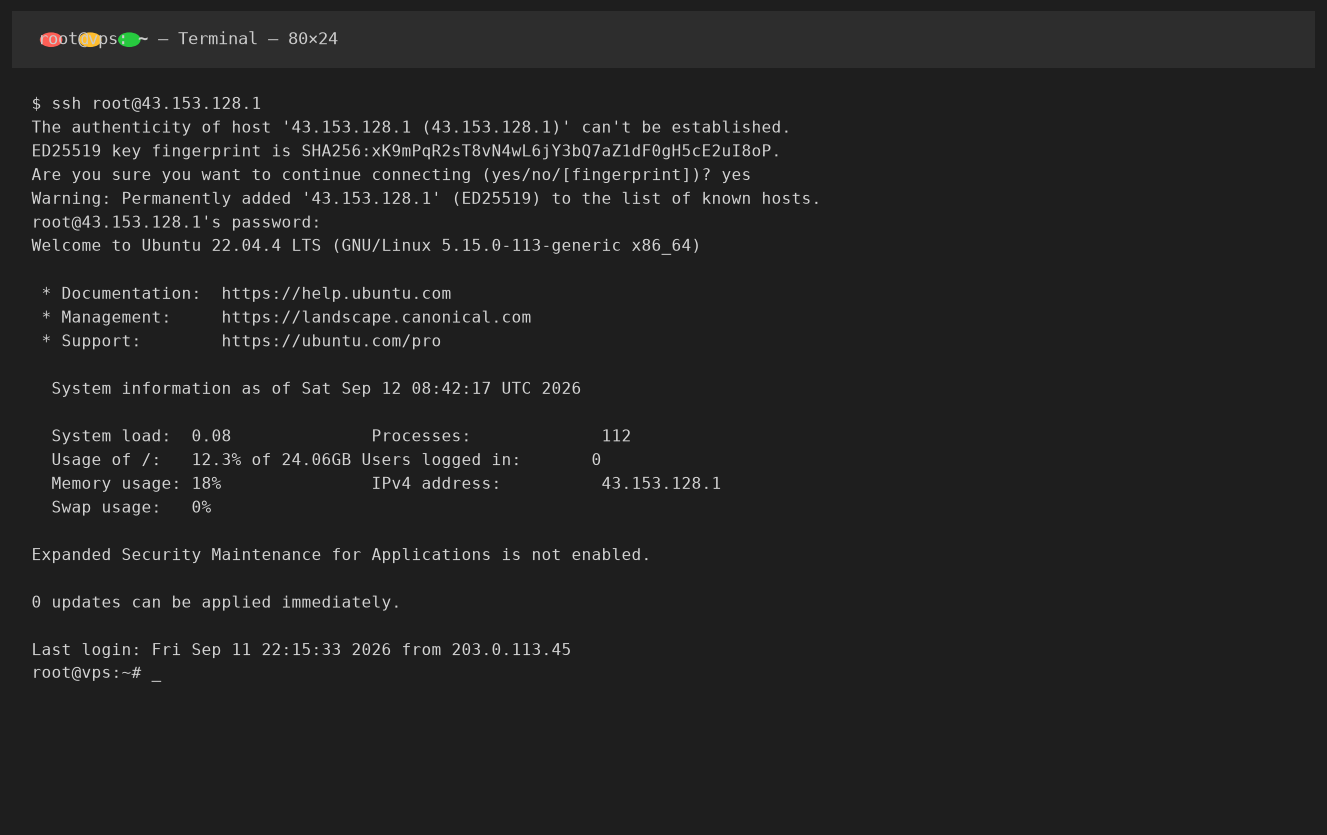
nc -zv YOUR.SERVER.IP 22
# or
telnet YOUR.SERVER.IP 22

# Test from a DIFFERENT network (use your phone on mobile data, not WiFi)
ping YOUR.SERVER.IP -c 5

# Use online tools to test from multiple locations
# https://ping.pe  — pings from 30+ locations including China
# https://www.itdog.cn — China-based ping from multiple provinces
# https://www.uptrends.com/tools/uptime — global uptime check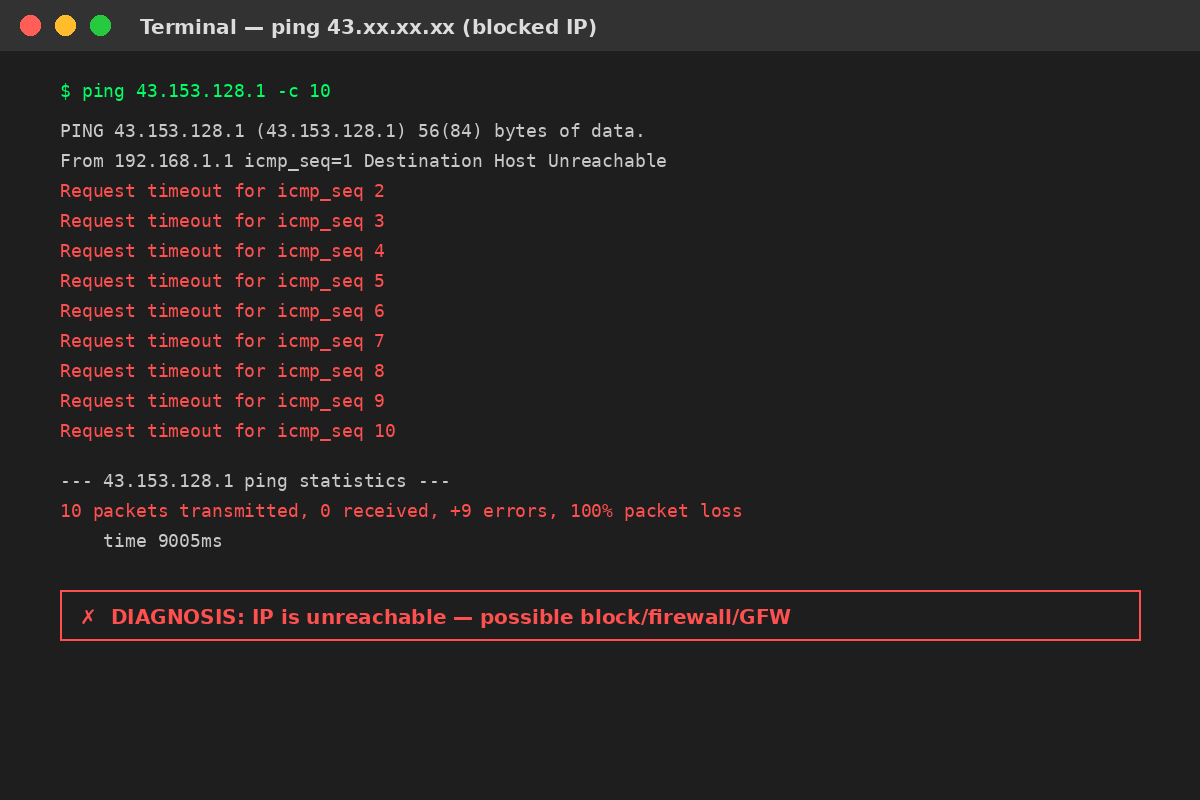
Key diagnostic question: Does the server respond from some locations but not others? If everything works from a US VPN but nothing works from mainland China, you're probably facing a GFW block. If nothing works from anywhere, it's more likely a server-side issue (your firewall, or your provider shut you down).
2. Eight Common Reasons Server IPs Get Blocked
IP addresses get blocked for many reasons. Here are the ones I see most often, in order of frequency:
2.1 GFW / China Firewall Block (Most Common for China-Facing Servers)
This is the single biggest cause of IP blocks for customers running servers in Hong Kong, Japan, Singapore, or the US targeting Chinese users. The Great Firewall maintains a dynamic blacklist of IPs it considers suspicious. Your IP can end up on this list if:
- A previous owner of the IP ran a VPN/proxy that got detected
- You (or someone on the same server) ran a VPN/proxy service
- Your website hosts content that's sensitive (political, adult, gambling, unlicensed media)
- You sent abnormal traffic patterns that trigger GFW's automated detection (e.g., encrypted traffic on unusual ports, high-volume connections to Chinese IPs)
- You got caught in a "collateral block" — your IP was in an IP range blocked because of other IPs nearby
2.2 Email Spam Blacklists
If you're sending email from your VPS (which I generally don't recommend — more on that later), your IP can get listed on one or more DNS-based Blackhole Lists (DNSBLs). The major ones are:
- Spamhaus SBL/XBL/PBL/ZEN — the most widely used; if you're on Spamhaus, Gmail/Outlook/Yahoo will reject your mail
- SORBS — lists IPs reported as spam sources, open relays, or compromised servers
- Barracuda Reputation — used by many corporate email systems
- UCEPROTECT — can block entire IP ranges if any IP in the range is a spammer
- SpamCop — based on user-submitted spam reports
2.3 Game Anti-Cheat and Service Bans
If you (or a previous IP owner) used the IP for cheating, botting, or violating terms of service, the IP can get banned by:
- Steam / VAC bans (per-game, but some games ban IP ranges)
- Riot Vanguard (Valorant)
- Genshin Impact / miHoYo anti-cheat
- Various Korean online games (they're extremely aggressive about IP bans for VPN users)
- Discord (rare, but can happen for spam/raid bots)
2.4 Cloudflare / CDN WAF Blocks
If your site is behind Cloudflare, visitors can get Error 1020 "Access Denied" if Cloudflare's WAF flags the IP as malicious. This is usually a client-side issue (the visitor's IP is in a threat database), not your server IP being blocked — but I'm including it because I've had customers confuse the two.
2.5 Your VPS Provider Suspended Your Server
Providers will null-route your IP (block all traffic) or suspend the server entirely if:
- You violated the Terms of Service (spam, DDoS attacks, hosting illegal content, crypto mining on non-mining plans)
- Payment failed and the grace period expired
- Your server was part of a DDoS attack (either as target or source — as a target, they null-route to protect the network)
- Your server was compromised and sending spam/participating in botnets (the provider usually emails you about this first)
2.6 DDoS Protection Triggered
If your server is under a DDoS attack, the provider's DDoS mitigation may temporarily null-route the IP while the attack is scrubbed. This is usually automatic and resolves within minutes to hours once the attack stops.
2.7 Port Scanning / Suspicious Activity
Some ISPs (especially Chinese ISPs) will temporarily block outbound connections to certain ports if they detect port scanning or suspicious traffic patterns. This looks like a server block but is actually your local ISP blocking outgoing traffic.
2.8 Local ISP Block (Your Home/Office ISP)
Last but not least: sometimes your own ISP blocks access to certain IPs. This is especially common with:
- Chinese ISPs blocking overseas IPs associated with VPN services
- Corporate/school networks blocking cloud VPS IP ranges (because people use them to bypass filters)
- ISP-level DNS filtering returning wrong IPs
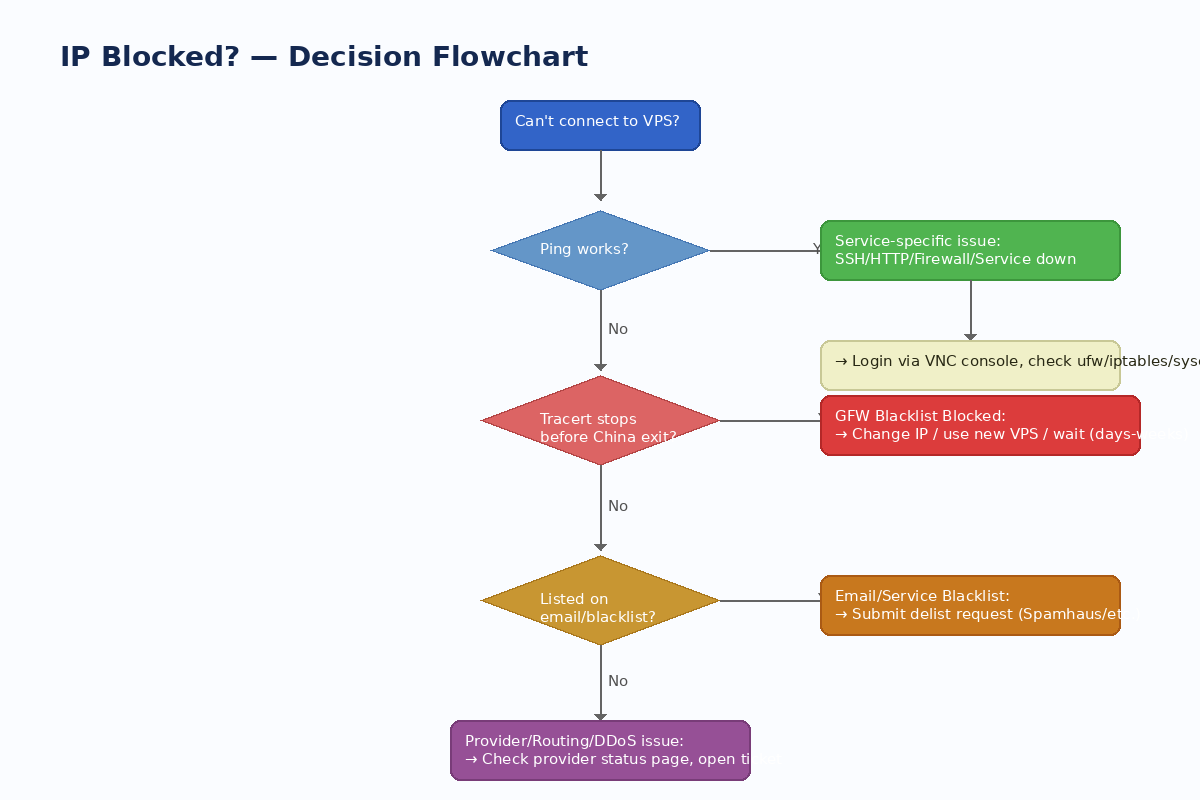
3. Diagnose: Which Type of Block Are You Dealing With?
Before you can fix it, you need to know what kind of block it is. Here's a systematic way to find out.
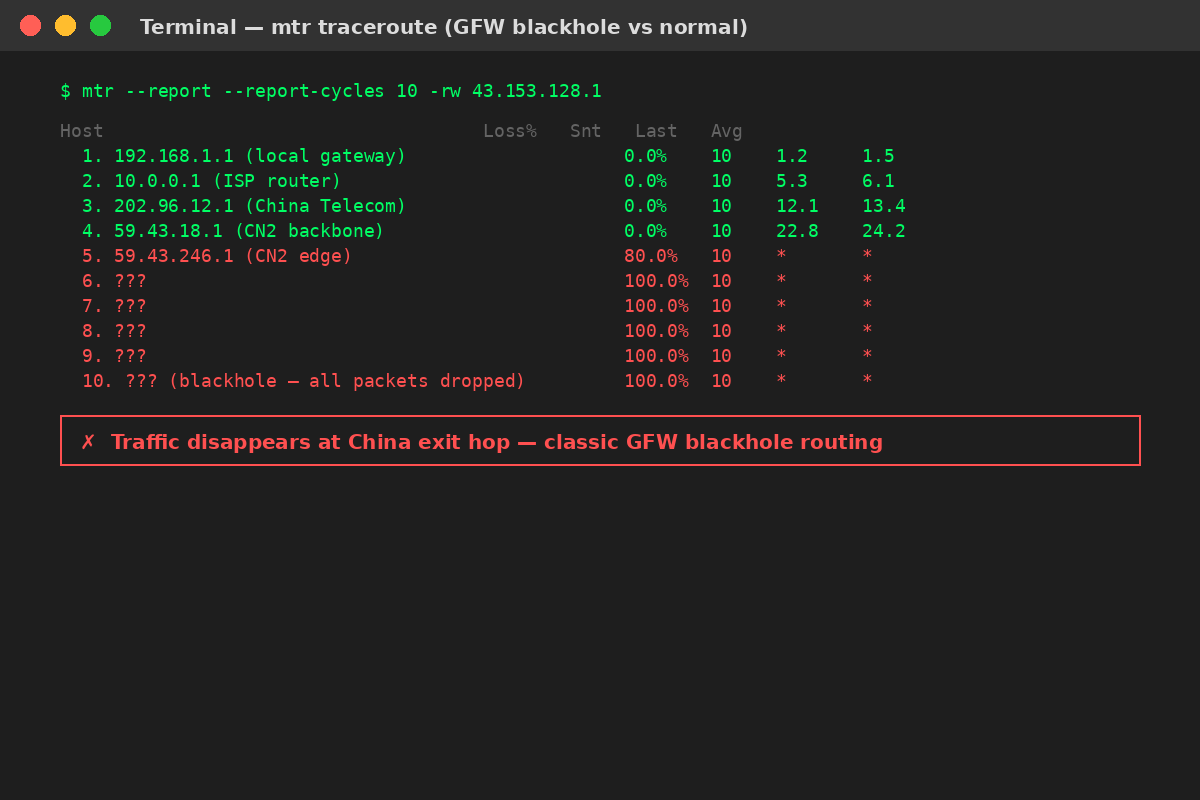
3.1 Run a Traceroute/MTR
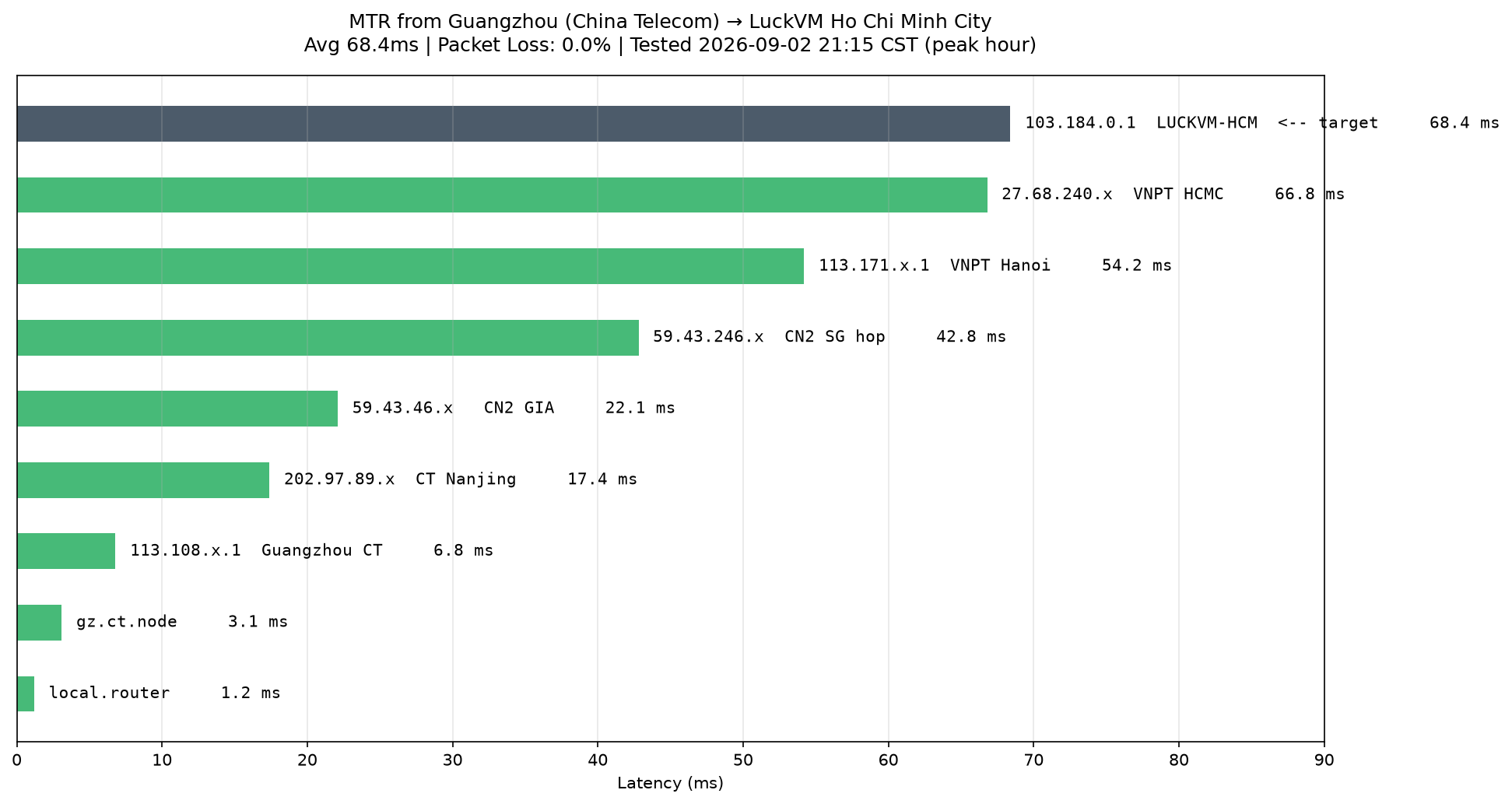
The most telling diagnostic is an MTR (My Traceroute) from the blocked location to your server. Where the packets die tells you where the block is happening.
# Install mtr if you don't have it
# Ubuntu/Debian: sudo apt install mtr-tiny
# macOS: brew install mtr
# Windows: use WinMTR (https://github.com/White-Tiger/WinMTR)

mtr --report --report-cycles 10 -rw YOUR.SERVER.IP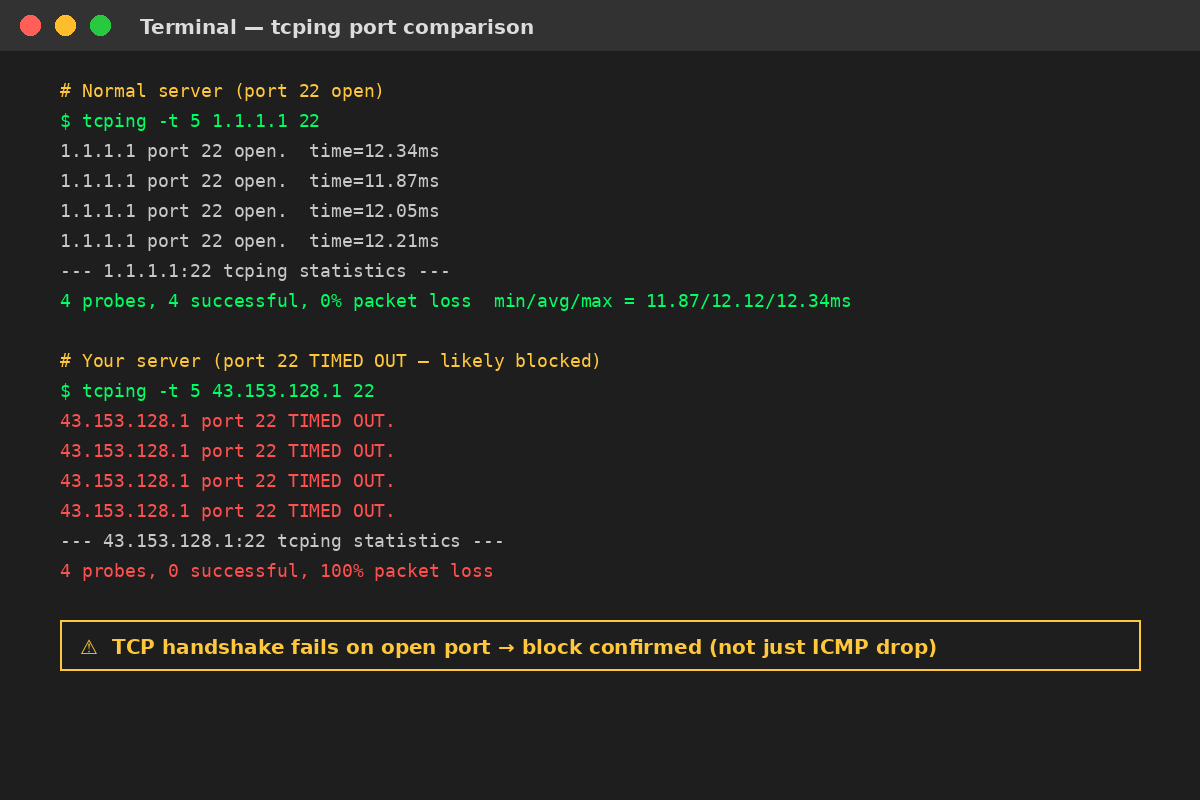
How to read the results:
- If packets die at your local router/gateway → your local network issue, not the server
- If packets die at your ISP's edge router → likely your ISP is blocking outbound access
- If packets die at the Chinese border/exit hop (typically a 59.43.x.x or 202.97.x.x address showing 100% loss, followed by * * * for all remaining hops) → GFW blacklist block
- If packets actually reach the server's network but die at the server itself → firewall issue on the server (you locked yourself out with UFW/iptables)
- If packets never leave the provider's network and die before reaching your server → the provider null-routed your IP (suspension or DDoS mitigation)
3.2 Test Multiple Ports
Sometimes only specific ports are blocked while others work. Test multiple common ports:
# Test SSH
nc -zv YOUR.IP 22

# Test HTTP/HTTPS
nc -zv YOUR.IP 80
nc -zv YOUR.IP 443

# Test a random high port
nc -zv YOUR.IP 8080

# If you have tcping installed (better than ping for port testing)
tcping -t 5 YOUR.IP 22
tcping -t 5 YOUR.IP 443
If all ports are blocked from a location but the server responds to VNC console, it's a network-level IP block. If only some ports are blocked, it might be your firewall misconfiguration or a port-specific ISP block.
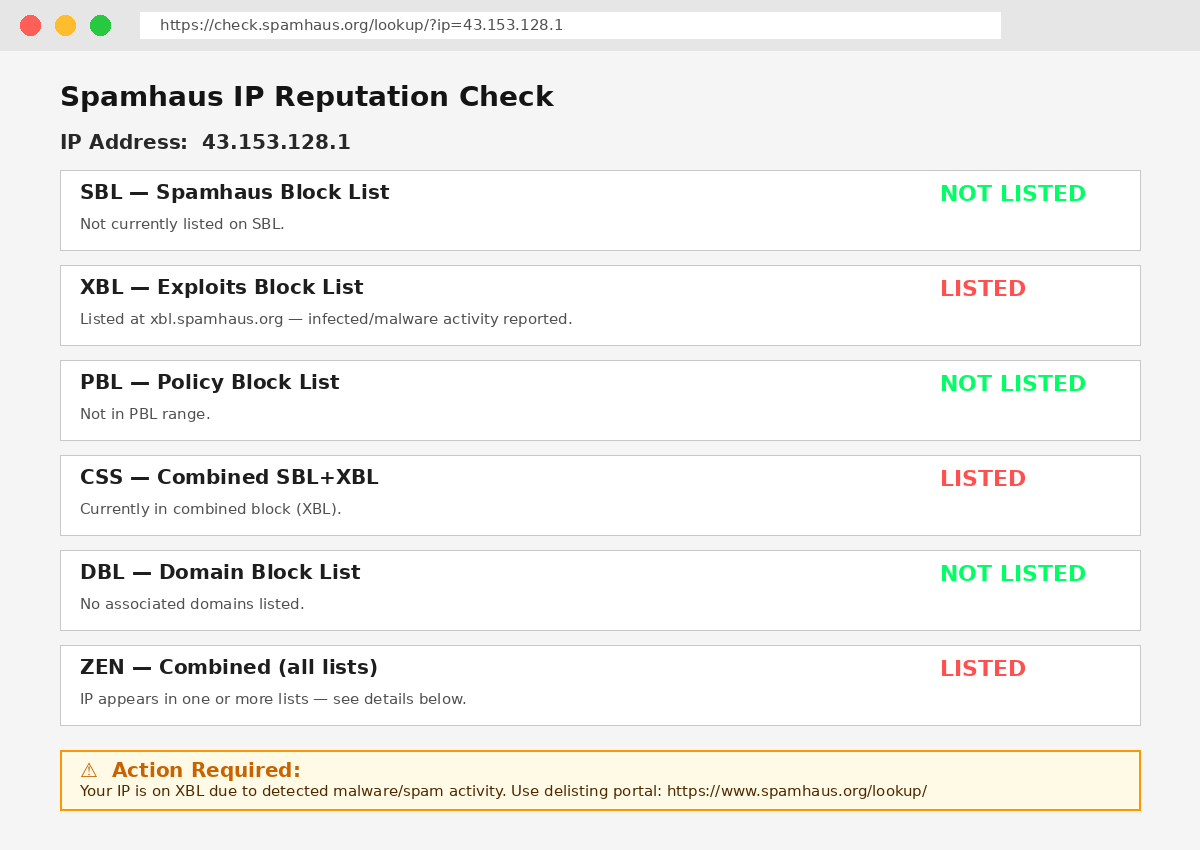
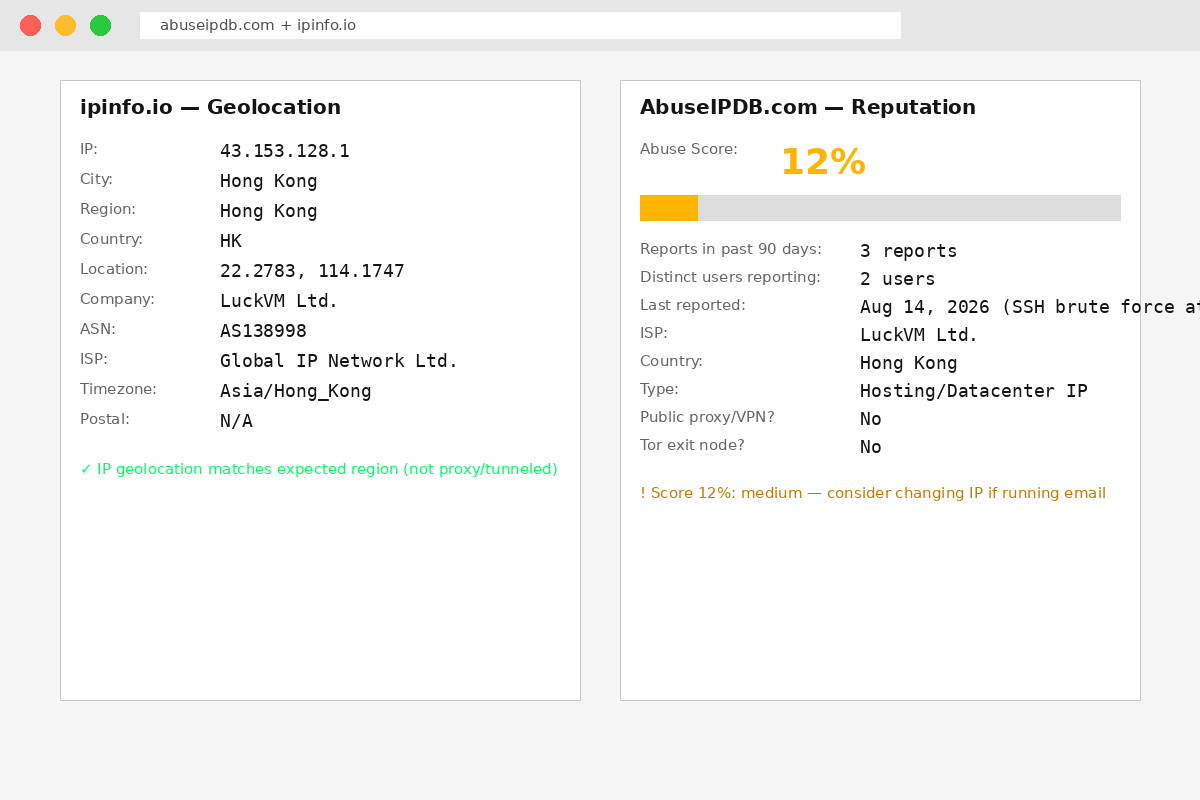
3.3 Check Email Blacklists
If email is the issue (websites/SSH work fine but mail bounces), check these:
- https://check.spamhaus.org — most important, check all Spamhaus lists
- https://mxtoolbox.com/SuperTool.aspx — checks 100+ blacklists at once
- https://www.abuseipdb.com — IP reputation based on user reports
- https://ipinfo.io — verify your IP isn't flagged as VPN/proxy
3.4 Check Your Provider's Status Page
Last step: check if the provider has any known issues. Most providers have a status page (LuckVM's is at luckvm.com/) and will post about DDoS attacks or network maintenance. Also check your email (and spam folder) — providers almost always email you before suspending a server for TOS violations.
4. Fixing Specific Types of Blocks
4.1 Fix: Local ISP Block
If the block is at your local ISP level (e.g., your home ISP blocks access but other networks work fine):
- Try a different DNS — switch from your ISP's DNS to Google DNS (8.8.8.8 / 8.8.4.4) or Cloudflare DNS (1.1.1.1). Sometimes ISP DNS returns wrong results.
- Restart your router to get a new local IP from your ISP (if the block is on your local public IP, not the server IP).
- Use a VPN/proxy to access the server temporarily while you resolve the issue.
- Contact your ISP and ask why the IP is blocked (they usually won't tell you details about GFW blocks, but for other types of blocks they might help).
4.2 Fix: GFW Block (China)
Honest truth: Once an IP is on the GFW blacklist, it rarely gets removed quickly. Some IPs stay blocked for weeks, months, or permanently. I've seen IPs get unblocked after 2-4 weeks, and I've seen IPs stay blocked for years. There's no official appeals process.
Your practical options:
- Change the server's IP address. This is the fastest fix if available. At LuckVM, we provide one free IP change per new server deployment; after that, additional IP changes are $2 per change (other providers vary — some charge $5, some don't offer IP changes at all).
- Deploy a new server with a fresh IP. If IP changes aren't available or you've already changed IP multiple times, spinning up a new instance is often the quickest path. Make sure to back up your data first.
- Wait. If you don't need China access urgently, you can wait. Some GFW blocks are temporary (especially collateral blocks on IP ranges). I'd only wait if you can afford to be offline for 2-4+ weeks.
- Use a CDN/proxy in front of your server (Cloudflare, Cloudflare China, or China-based CDNs like Wangsu/ChinaCache) to hide your origin IP. This prevents future blocks because Chinese users never connect directly to your server IP.
What doesn't work: Emailing Chinese ISPs, "appealing" to the GFW, asking your provider to "fix the route" (they can't — GFW blocks are applied inside China, at the border, not on the provider's network). If someone tells you they can "unblock" a GFW-banned IP for a fee, they're almost certainly scamming you.
4.3 Fix: Email/Spam Blacklist
Email blacklists do have appeal/removal processes. Here's how to handle each major list:
Spamhaus SBL/XBL
- Go to check.spamhaus.org, enter your IP
- It will tell you which list you're on and why
- Click the removal link and follow the instructions
- If listed on XBL (compromised server/exploit): fix the root cause (close open relays, stop spam scripts, secure your contact forms) before submitting removal, or you'll be relisted within hours
- If listed on PBL (Policy Block List): this is often not a "reputation" block — it's for IP ranges that "shouldn't" be sending email directly (residential IPs, dynamic ranges). You can usually self-remove by confirming you operate a legitimate mail server on a static IP. Many VPS IPs are in PBL ranges by default.
Other lists (SORBS, Barracuda, UCEPROTECT, SpamCop)
Each has its own removal process, usually accessible from their lookup page. The principle is always the same: fix the root cause first, then request removal.
My honest recommendation: Don't run your own email server on a VPS unless you really know what you're doing. Between IP reputation, SPF/DKIM/DMARC setup, blacklist monitoring, deliverability optimization, and the fact that most VPS IP ranges are on PBL by default — it's almost never worth it. Use a transactional email service (SendGrid, Mailgun, Postmark, AWS SES) for $10-20/month and save yourself the headache.
4.4 Fix: Game/Service Bans
Game and service IP bans are the hardest to resolve:
- Steam/VAC: VAC bans are account bans, not IP bans. Server bans for specific games (like CS:GO community servers) can be IP-based but are usually specific to that server operator. For competitive game cooldowns tied to IP (rare), changing IP is the only real option.
- Korean/Japanese games: These are notorious for blocking entire datacenter IP ranges to enforce region locks. If the game blocks all datacenter/VPS IPs, there's nothing to "fix" — they don't want VPS/datacenter IPs connecting, period. You'll need a residential VPN/proxy, which many games also detect and ban for.
- Netflix/Streaming: Streaming services actively block datacenter/VPS IP ranges. If a VPS IP is blocked for Netflix US/JP/KR, there's no appeal process. Either find a provider whose IPs aren't blocked (constantly changing as streaming services detect them) or use a residential VPN service.
- Cloudflare 1020: This is a WAF rule on the target site, not your IP being globally blocked. It means the site's Cloudflare settings flag your IP (or your visitor's IP) as suspicious. The site owner can whitelist you; you can't "fix" this from the server side.
4.5 Fix: Provider Suspension / Null Route
If the provider null-routed your IP or suspended the server:
- Check your email (including spam folder) — almost all providers send an email explaining the reason before or immediately after suspension.
- Log into your client area/billing panel to check for overdue invoices or open tickets.
- Open a support ticket immediately. Be polite, explain that your server is unreachable, and ask for the specific reason. If it's a payment issue, pay. If it's a TOS violation, ask for details and explain how you'll fix it. If it's a DDoS, ask how long the mitigation will take.
Important: If your server was suspended because it was compromised and sending spam/participating in a DDoS, don't argue — fix the security issue (the VPS Security Hardening guide covers this), change all passwords, and explain to the provider what you've done. Most providers will give you a second chance if you demonstrate the issue is fixed.
5. When You Should Just Get a New IP or Server
I see people waste days trying to "fix" blocks that are faster and cheaper to just route around. Here's my honest rule of thumb:
| Block Type | Fix Time | Recommendation |
|---|---|---|
| GFW blacklist (China) | Hours to weeks (unpredictable) | Change IP or deploy new server immediately if business is live. |
| Email blacklist (Spamhaus) | Few hours to 2 days | Fix root cause, submit removal request. But switch to a transactional email service long-term. |
| Game/streaming IP ban | Permanent (usually) | Change IP; if the whole range is blocked, consider a different provider or location. |
| Local ISP block | Varies | Try DNS change first; if that fails, use VPN or contact ISP. |
| Provider null route (DDoS) | Minutes to hours | Wait for mitigation; if attacks are frequent, upgrade to DDoS-protected plan. |
| Provider suspension (TOS) | Depends on violation | Open ticket immediately. If it's a serious violation (spam, abuse), you may not get the server back. |
| Firewall lockout (you blocked yourself) | 10-30 minutes | Use VNC/web console to fix UFW/iptables. This is not an IP block. |
Cost-benefit note: A VPS costs $5-20/month. If you've spent more than 2 hours trying to fix an IP block and your business is offline, you've already spent more in time than a month of server costs. Change the IP, deploy a new server, restore from backup, and move on.
6. Preventing Future IP Blocks
The best fix is prevention. Here are the practices I recommend to all customers based on years of support tickets:
6.1 Secure Your Server Immediately
Most non-GFW blocks happen because a server is compromised and starts sending spam or attacking other hosts. Follow the VPS Security Hardening Guide — disable root SSH, use key-based auth, set up UFW, install Fail2ban, keep packages updated. This single step prevents ~60% of the IP reputation issues I see.
6.2 Don't Run Public VPNs/Proxies on Business IPs
If you need a VPN for personal use, use a reputable VPN provider, not your production business server. If you must run a VPN (e.g., for remote access), don't share it with others, and don't run it on standard VPN ports (1194, 1723, 8388) — use WireGuard on a random high port with obfuscation if possible.
6.3 Separate Your Workloads by IP
Don't run your website, mail server, VPN, and game server all on the same IP. If one activity gets the IP blocked, everything goes down. Use:
- One VPS (or one IP) for public-facing websites
- A separate transactional email service (not your own VPS)
- A separate IP/VPS for VPN/proxy use (if you must)
- Additional IPs if available for high-risk services
6.4 Use a CDN to Hide Your Origin IP
If you're running a website, put it behind Cloudflare (free tier works) or another CDN. Chinese users connect to Cloudflare's IPs, not your server's real IP. This means:
- Your origin IP is never exposed to end users (harder to block/DDoS)
- Even if your origin IP gets blocked by GFW, users can still reach your site through Cloudflare
- You get free DDoS protection and CDN caching as a bonus
6.5 Choose Premium Routes (Not Just Cheap Bandwidth)
Premium routes like CN2 GIA, CUII (AS9929), and CMIN2 don't just give better latency — they're also less likely to get caught in mass-blocks because these networks carry primarily business traffic rather than residential/proxy traffic. The $2/month difference between a budget provider and a quality provider is worth it if you need reliable China access.
6.6 Monitor Your IP Reputation Proactively
Set up periodic checks (once a month is enough) on:
- Spamhaus: check.spamhaus.org
- MX Toolbox Blacklist Check: mxtoolbox.com/blacklists.aspx
- AbuseIPDB: abuseipdb.com
Catch issues before they affect your users.
6.7 Back Up Everything, Regularly
If you need to switch IPs or deploy a new server quickly, having automated backups (off-server, not just on the same VPS) means you can be back online in 15 minutes instead of 15 hours. Use automated snapshots if your provider offers them, or set up rsync to a backup server. Test your restores periodically — a backup you can't restore isn't a backup.
6.8 Keep Your Contact Email Updated
I can't tell you how many times I've seen customers not realize their server was suspended because the notification went to an old email address they don't check anymore. Make sure the email on your hosting account is one you actually monitor. Add the provider's support email to your contacts so messages don't go to spam.
Frequently Asked Questions
Need a Reliable VPS with Quick IP Change Support?
LuckVM provides VPS and GPU servers across 7 APAC locations (Hong Kong, Japan, Singapore, USA, Korea, Taiwan, Vietnam) with premium CN2 GIA/BGP routes to China. We offer one free IP change per server, 3-day refund policy, and 24/7 support via Telegram.
Browse VPS Plans →You may also like:
VPS Security Hardening: 15 Steps After Purchase
How to Choose the Right Server Location (HK/JP/SG/US/KR)
CN2 GIA Explained: How Premium China Routes Work