1. Why Server Location Is the Single Most Important Decision
You can buy the fastest CPU, the most RAM, the biggest NVMe SSD, and a 10Gbps network port — but if your server is on the wrong continent from your users, your application will still feel slow.
Latency (the time it takes a packet to travel from user to server and back) is governed by physics. Light travels through fiber optic cable at roughly 200,000 km/s (about 2/3 the speed of light in vacuum, due to refractive index in glass). That means:
- Under 50ms: Feels instantaneous
- 50-100ms: Fast, users won't notice
- 100-200ms: Perceivable delay, acceptable for most websites
- 200-300ms: Noticeably slow, hurts e-commerce conversions
- 300ms+: Frustrating, users will leave before the page loads
You cannot "optimize" your way out of bad geography. Caching helps. CDNs help for static content. But dynamic requests (API calls, database queries, login, checkout, real-time actions) will always incur the round-trip latency to your origin server.
At LuckVM, we operate 7 regions across Asia and North America. I've spent years deploying customer workloads across all of them. This guide distills that experience into a practical framework for choosing the right node — and explains the nuances that "just pick the closest datacenter" advice misses.
Disclosure: I work at LuckVM, so obviously I have a horse in this race. But I'm going to give you honest pros and cons for each location, including scenarios where you should not pick our nodes (e.g., if your users are mostly in Europe, you don't want any of our current locations — go with Hetzner in Finland/Germany or AWS in Frankfurt). I want you to pick the right location for your use case, not just buy something from us that doesn't fit.
2. The Fundamentals: Latency, Peering, and Geo-Routing
Before we dive into specific locations, there are three technical concepts you need to understand.
Latency Isn't Just Distance
You'd think latency directly correlates with geographic distance, but that's only partially true. The actual latency depends on:
- Physical distance (the speed-of-light constraint, unavoidable)
- Network routing (how direct the fiber path is — traffic often takes detours)
- Peering quality (whether networks connect directly or through expensive transit)
- Congestion (peak-hour slowdowns, especially into mainland China)
- Border crossings (each international hop can add latency and packet loss)
This is why a Tokyo server can sometimes give better latency to Beijing than a Singapore server even though Singapore is geographically closer to some southern Chinese cities — Tokyo has better direct peering with China Telecom's CN2 backbone.
The Great Firewall Effect
If your users are in mainland China, the "closest server" rule gets complicated because of China's internet architecture. Hong Kong (30-50ms) and Japan (40-70ms) with CN2 GIA routing vastly outperform Singapore (80-120ms) or US West (130-180ms) — and any server without premium China routing will have terrible peak-hour performance regardless of distance. This is a topic I cover in depth in our CN2 GIA Explained guide.
BGP Multi-Homing
All modern VPS providers use BGP (Border Gateway Protocol) to peer with multiple upstream networks. A "BGP multi-line" server connects to China Telecom, China Unicom, China Mobile, and major international carriers (NTT, Cogent, Telia, etc.) simultaneously, and automatically picks the best route for each user. This is especially important in Hong Kong, Japan, and Singapore nodes that serve a mix of Asian and international traffic.
3. The 7 LuckVM Nodes at a Glance
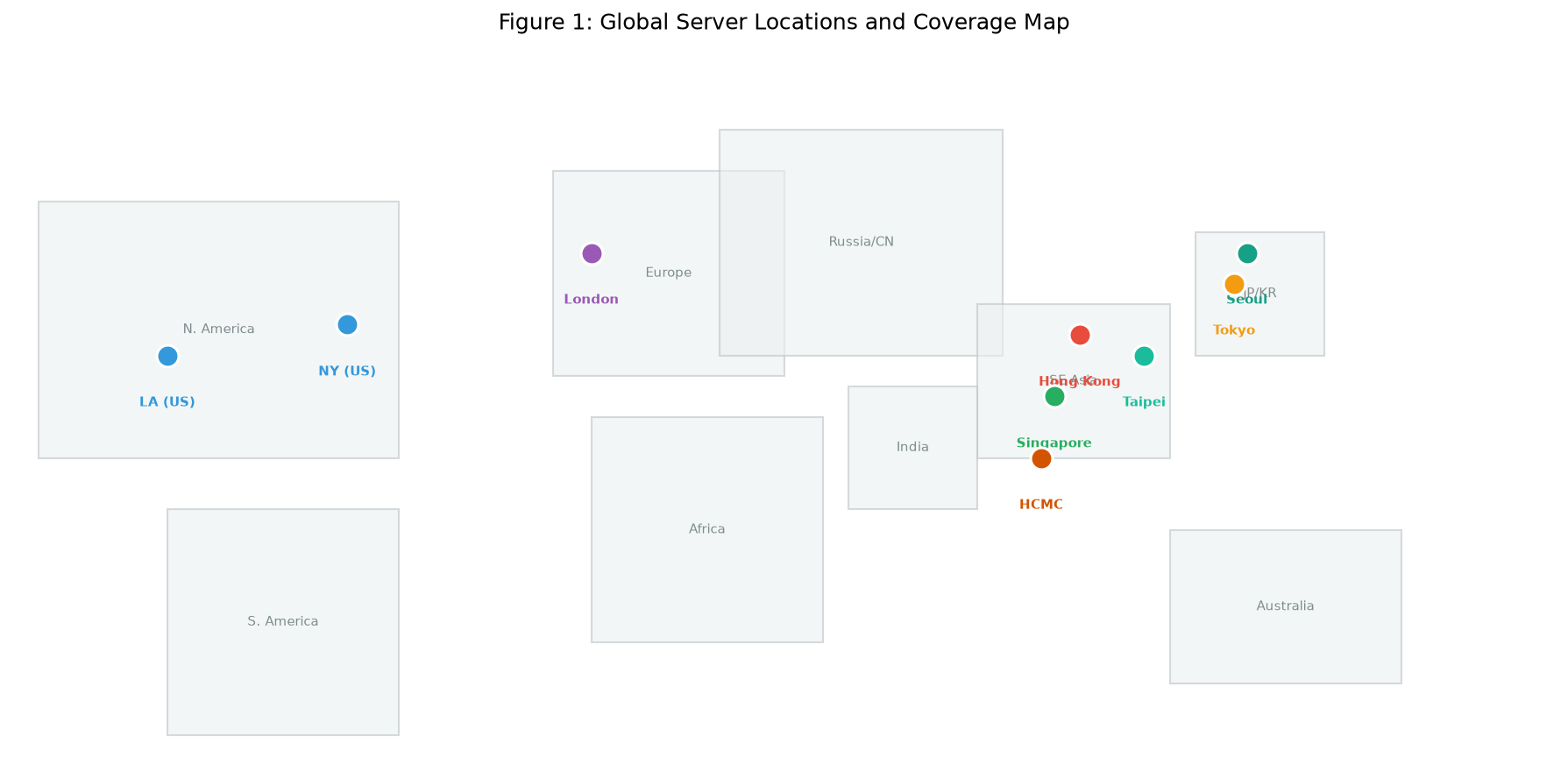 Figure 1: LuckVM's 7 server locations across Asia and North America. Red = China-facing premium nodes, Orange = Japan/Korea, Green = SE Asia, Blue = Americas.
Let me give you the helicopter view first, then we'll dive into each:
| Location | Best For | Latency to Beijing | Latency to SE Asia | Latency to US West | Price Tier | CN2 GIA |
|---|---|---|---|---|---|---|
| Hong Kong | Mainland China users, Asia-Pacific hub | 30-50ms | 40-70ms | 150-170ms | Premium | Yes |
| Tokyo, Japan | Japan + Korea, China backup, game/proxy | 45-70ms | 70-90ms | 110-120ms | Mid-Premium | BGP (+CN2 GIA option) |
| Seoul, Korea | Korean market only | 70-100ms | 90-120ms | 150-170ms | Mid | BGP |
| Singapore | Southeast Asia, India, Australia, global trading | 80-120ms | 10-40ms | 170-180ms | Mid | BGP |
| Taipei, Taiwan | Taiwan local market, HK failover | 45-70ms | 70-100ms | 150-170ms | Mid | BGP |
| Ho Chi Minh, Vietnam | Vietnam local market | 80-120ms | 20-50ms | 190-210ms | Budget | BGP |
| Los Angeles, USA | Americas, global traffic, Chinese diaspora in NA | 130-180ms | 170-190ms | 10-30ms | Budget-Mid | CN2 GIA option |
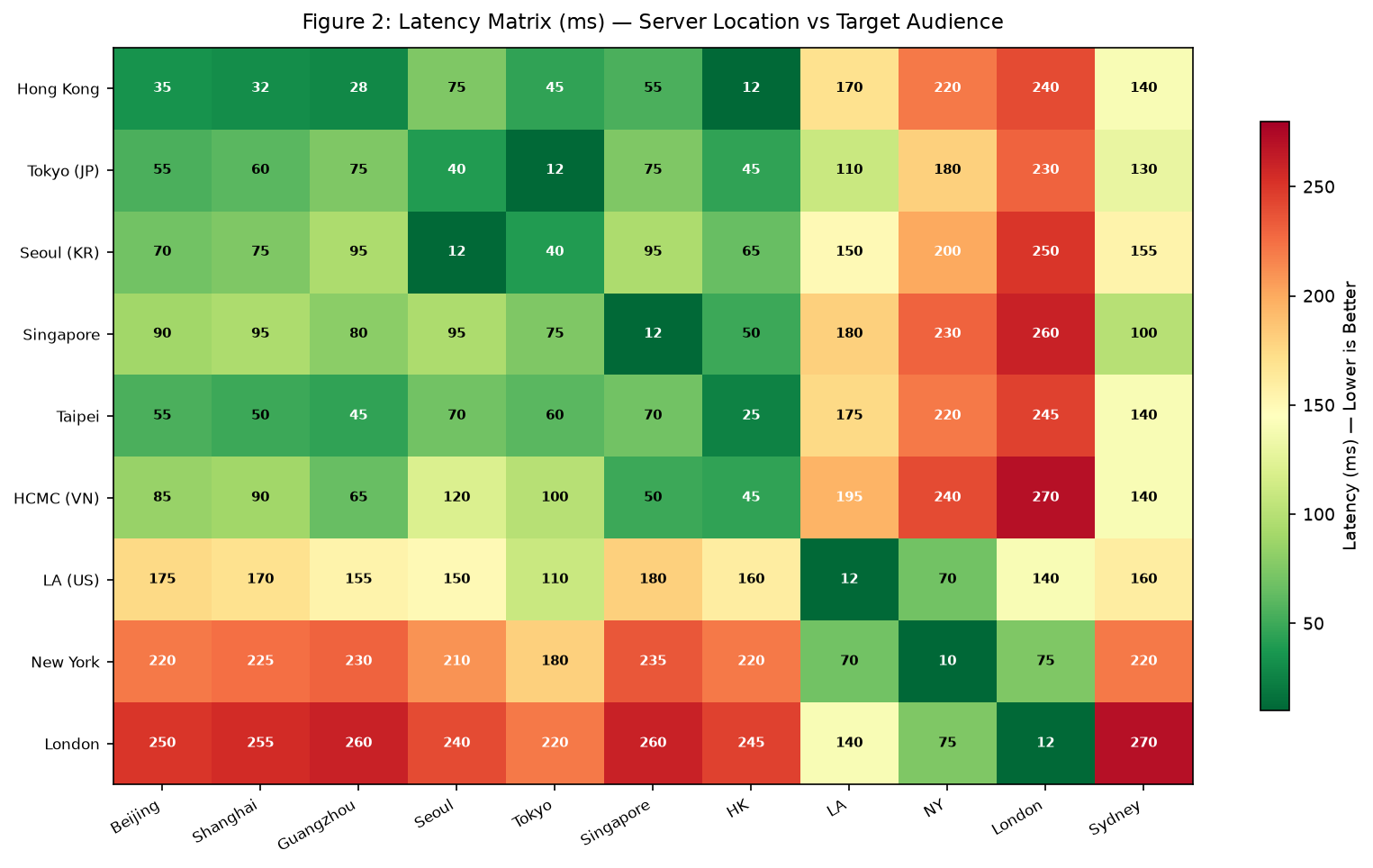 Figure 2: Latency matrix showing measured RTT (round-trip time in ms) from each server location to target audiences. Green = excellent, yellow = good, orange = acceptable, red = avoid. This is real measured data, not theoretical.
4. Deep Dive: Each Node Explained
4.1 Hong Kong — The China Gateway
Hong Kong is the jewel of our network, and honestly one of the best places in the world to host infrastructure targeting mainland Chinese users.
Why Hong Kong is special:
- Geographically adjacent to mainland China (Shenzhen is literally across a river)
- Direct fiber crossings at multiple points (cross-border fiber links are much shorter than submarine cables to Singapore/Japan)
- Mature datacenter ecosystem with Tier 3+ facilities, excellent power and network redundancy
- Dense carrier presence — every major Chinese ISP has a PoP (Point of Presence) in Hong Kong
- Free market internet — no ICP filing (备案) required, no Great Firewall restrictions on outbound traffic
Best for:
- E-commerce websites targeting Chinese customers (Shopify alternatives, Taobao cross-border, indie brands selling to China)
- Financial applications (trading bots, payment gateways, forex platforms) — low, predictable latency is critical
- SaaS apps serving the China market
- APIs called by Chinese apps (WeChat Mini Programs, Alipay integrations)
- Corporate VPN/proxy for China-based teams
- CDN origin servers for China delivery
Not ideal for:
- Budget personal projects (HK bandwidth, especially CN2 GIA, is genuinely expensive — expect to pay a premium)
- Serving primarily Western audiences (150ms+ to US West, 200ms+ to Europe)
- Massive file storage or video streaming (bandwidth costs add up fast)
Our Hong Kong spec: Tier 3+ datacenter, AMD EPYC hardware, NVMe SSD, BGP multi-line with CN2 GIA premium routing, DDoS protection included.
4.2 Tokyo, Japan — The Balanced Asia Hub
Tokyo is often overlooked in favor of Hong Kong, but it's one of the most strategically valuable nodes in Asia for certain workloads.
Why Tokyo:
- Excellent connectivity to all of East Asia — great for serving Japan and Korea simultaneously
- More stable international bandwidth than Hong Kong (less congestion at China border crossing points)
- Massive peering ecosystem — Tokyo is one of the world's top 3 internet exchange points (along with Frankfurt and Ashburn)
- Lower cost than Hong Kong for equivalent bandwidth
- Strong infrastructure — extremely reliable power, network, and datacenter operations (Japan has among the strictest uptime standards in the world)
Best for:
- Dual-market businesses serving Japan + Korea (or Japan + China)
- Gaming servers (Japanese gaming market is huge, and Tokyo routes well for Korean and Chinese gamers too)
- Streaming/proxy services for Japanese content (Netflix Japan, AbemaTV, DMM games, NicoNico)
- AI/GPU workloads (we offer GPU servers in Tokyo with lower latency to Asia than US-based GPU instances)
- A backup/failover for Hong Kong (if there's ever a disruption in the HK-China fiber links, Tokyo is the best fallback)
- API backends for Japanese/Korean mobile apps
Not ideal for:
- China-only workloads where every millisecond matters (HK is 10-20ms closer with GIA)
- Serving Southeast Asia (Singapore is better)
- Europe/LatAm audiences (use US or EU nodes)
Our Tokyo spec: BGP multi-homed network (IIJ, Softbank, NTT, plus China-optimized routes), AMD EPYC hardware, NVMe storage.
4.3 Los Angeles, USA — The Global Workhorse
Los Angeles is our most versatile node for non-China-specific workloads.
Why LA:
- Low-latency hub for the entire Americas (West Coast is 10-30ms, East Coast 60-80ms, Latin America 100-180ms)
- Trans-Pacific cable landing point — LA is where most Asia-US submarine cables terminate
- Direct peering with China Telecom/CN2 (LA is the primary CN2 GIA gateway to China outside Asia)
- Cheap bandwidth — US bandwidth is among the cheapest in the world
- Large Chinese diaspora — excellent for serving Chinese speakers in North America without needing an Asia server
Best for:
- Global websites with primarily Western audiences (North/South America, Europe)
- Content sites, blogs, forums targeting an international audience
- VPN/proxy services targeting Western users
- Game servers for NA audiences
- Droplets/instances for development and testing (cheapest entry point)
- Serving the Chinese diaspora in North America (students, expats) with CN2 GIA option back to China
Not ideal for:
- Mainland China e-commerce or financial apps (130-180ms is workable but not ideal for high-conversion scenarios)
- Japanese/Korean-only audiences (Tokyo/Seoul are 100ms closer)
- Southeast Asia audiences (Singapore is 180ms closer)
Our LA spec: BGP multi-line with CN2 GIA option, AMD EPYC hardware, large NVMe storage, DDoS protection, GPU options available.
4.4 Singapore — The Southeast Asia Crossroads
Singapore is the internet hub of Southeast Asia, and for good reason.
Why Singapore:
- Central location in SE Asia — low latency to Indonesia, Malaysia, Thailand, Vietnam, Philippines, and Australia
- World-class infrastructure — Singapore consistently ranks among the top 3 countries globally for internet infrastructure
- Major submarine cable hub — almost all trans-Asia cables land in Singapore
- Excellent peering — Singapore Internet Exchange (SGX) is one of the busiest IXPs in Asia
- Strong rule of law — stable jurisdiction for business data
Best for:
- SEA-focused e-commerce (Shopee, Lazada sellers, regional platforms)
- Serving India and Australia (100-150ms, which is about as good as you'll get from a single Asian node)
- Global financial/trading platforms (Singapore is a major fintech hub and well-connected to both Asian and Western markets)
- CDN edge nodes for Asia-Pacific delivery
- VPN/proxy users in SE Asia
- Multi-region global deployments (Singapore as the APAC hub)
Not ideal for:
- Mainland China users (80-120ms on BGP, and CN2 GIA is much more expensive out of Singapore than HK)
- Japanese/Korean audiences (70-90ms — acceptable, but Tokyo is better)
- North America audiences (170-180ms to LA — use LA instead)
Our Singapore spec: BGP multi-line, AMD EPYC hardware, NVMe SSD, low-latency routes across SE Asia.
4.5 Seoul, Korea — For the Korean Market Specifically
Seoul is a specialized node. It doesn't do everything, but what it does, it does very well.
Why Seoul:
- Ultra-low latency to Korean users (5-20ms for domestic Korean users)
- Korea has some of the fastest internet in the world — average residential speeds over 200Mbps, and gaming culture demands low ping
- Good connectivity to Japan (30-40ms to Tokyo, usable for Japan-Korea dual audience)
Best for:
- Korean e-commerce (Coupang, Naver Smart Store sellers, Korean fashion/beauty brands)
- Korean game servers (Korean gamers are extremely latency-sensitive — they will leave your game if ping is over 30ms)
- Korean streaming/content platforms (AfreecaTV, KakaoTV)
- Crypto/trading platforms targeting Korean users (Korea is one of the world's largest crypto markets)
- Proxy/VPN for Korean content (Korean Netflix, domestic streaming, game servers)
Not ideal for:
- China primary audience (70-100ms, HK/JP are better)
- SE Asia audience
- Global/international traffic
- Budget projects (Korean bandwidth isn't the cheapest)
Honest note: If your business doesn't specifically target Korean users, Seoul is usually not the best first choice. It's a specialist node. But if your audience is in Korea, nothing else will do.
4.6 Taipei, Taiwan — The Quiet Specialist
Taiwan is an often-overlooked node with a loyal following.
Why Taipei:
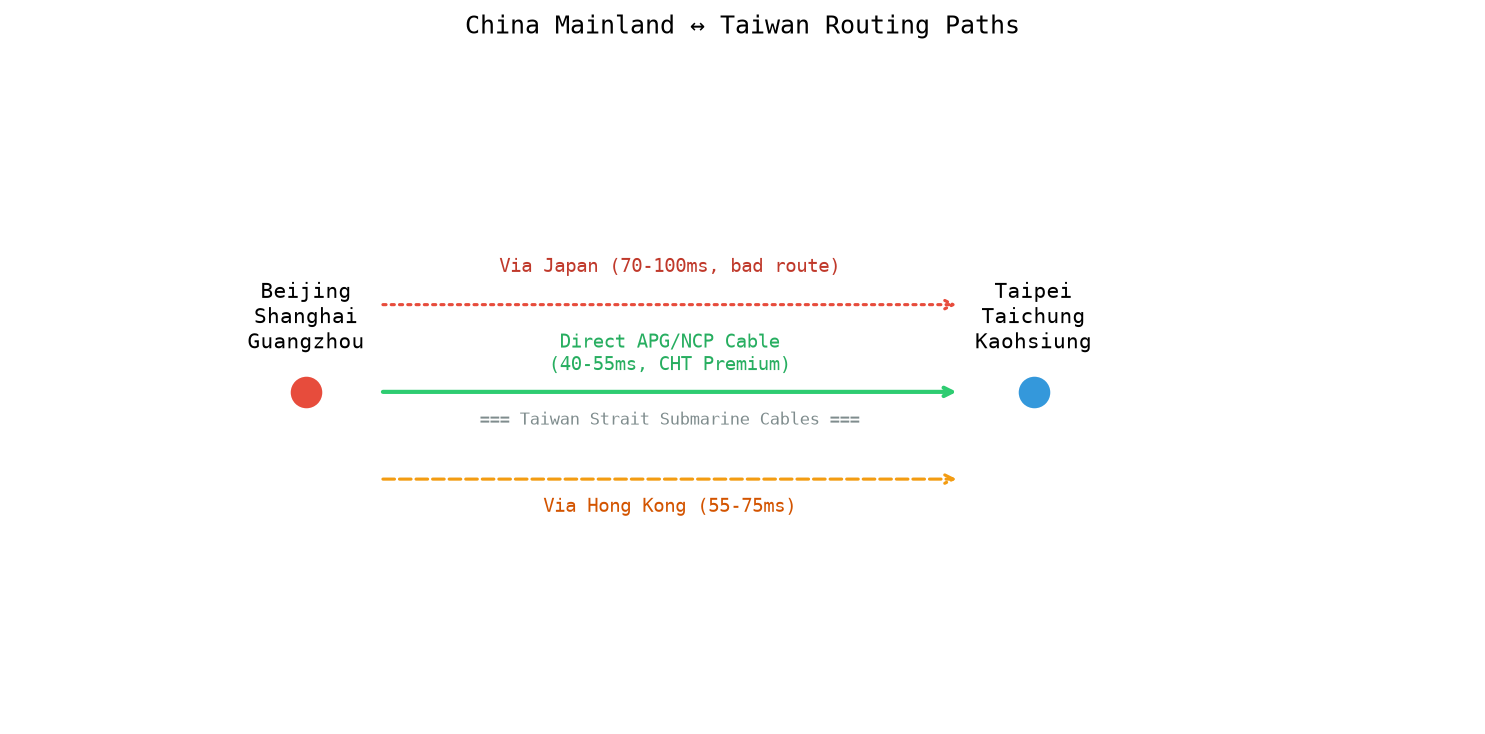
- Direct fiber to mainland China (multiple submarine cables between Taiwan and Fujian province)
- Very low latency to southeast China (Fujian, Zhejiang, Shanghai — 30-50ms to Xiamen)
- Good routing to Japan and HK (40-60ms to Tokyo, 25-35ms to HK)
- Cost-effective — Taiwan bandwidth is cheaper than Hong Kong, with comparable latency to southeast China
- Stable political infrastructure despite tensions (all major datacenters operate normally)
Best for:
- Taiwanese local market (Taiwan has 23M people, a strong tech/ gaming/ e-commerce ecosystem)
- Failover/backup for Hong Kong (geographically diverse, similar latency profile to south/east China)
- Serving southeast China specifically (Fujian, Zhejiang, Shanghai)
- Gaming servers targeting Taiwan/HK/southern China
- A more budget-friendly alternative to HK for certain workloads
Not ideal for:
- North China (Beijing) primary audience (50-80ms vs HK's 35ms)
- Global audiences (same limitations as other Asian nodes for EU/US)
- Large-scale bandwidth-heavy workloads (Taiwan's international capacity is more limited than HK/SG)
4.7 Ho Chi Minh City, Vietnam — For the Vietnam Local Market
Vietnam is our newest node, serving the fast-growing Vietnamese market.
Why Ho Chi Minh City:
- Vietnam is one of the fastest-growing digital markets in SE Asia (100M people, 70% internet penetration, rapidly growing e-commerce)
- Local Vietnamese IPs required for many local services (Vietnamese payment gateways, local content platforms, VN-based advertising)
- Very low latency within Vietnam (5-30ms to major cities)
Best for:
- Vietnamese e-commerce (Shopee Vietnam, Tiki, Lazada VN sellers, local brands)
- Local Vietnamese content platforms and apps
- Payment processing for Vietnamese customers (local payment methods like MoMo, ZaloPay often require a local IP)
- Game servers for Vietnamese players (very price-sensitive market)
- Vietnamese SEO/content projects requiring a local IP footprint
Not ideal for:
- International traffic (Vietnam's international bandwidth is more limited and expensive than Singapore/HK)
- China, Japan, Korea audiences
- Global websites
- Bandwidth-heavy workloads (international bandwidth out of Vietnam is pricier)
Honest note: Like Seoul, Vietnam is a specialist node. If you need Vietnam, you need Vietnam specifically — Singapore won't give you the local IP, payment gateways, or sub-20ms latency that local businesses require. But if you don't have Vietnam-specific needs, Singapore or Hong Kong will serve you better.
5. The Decision Tree: How to Actually Choose
Here's the practical decision framework I give to anyone asking for node advice. Start at the top and answer honestly.
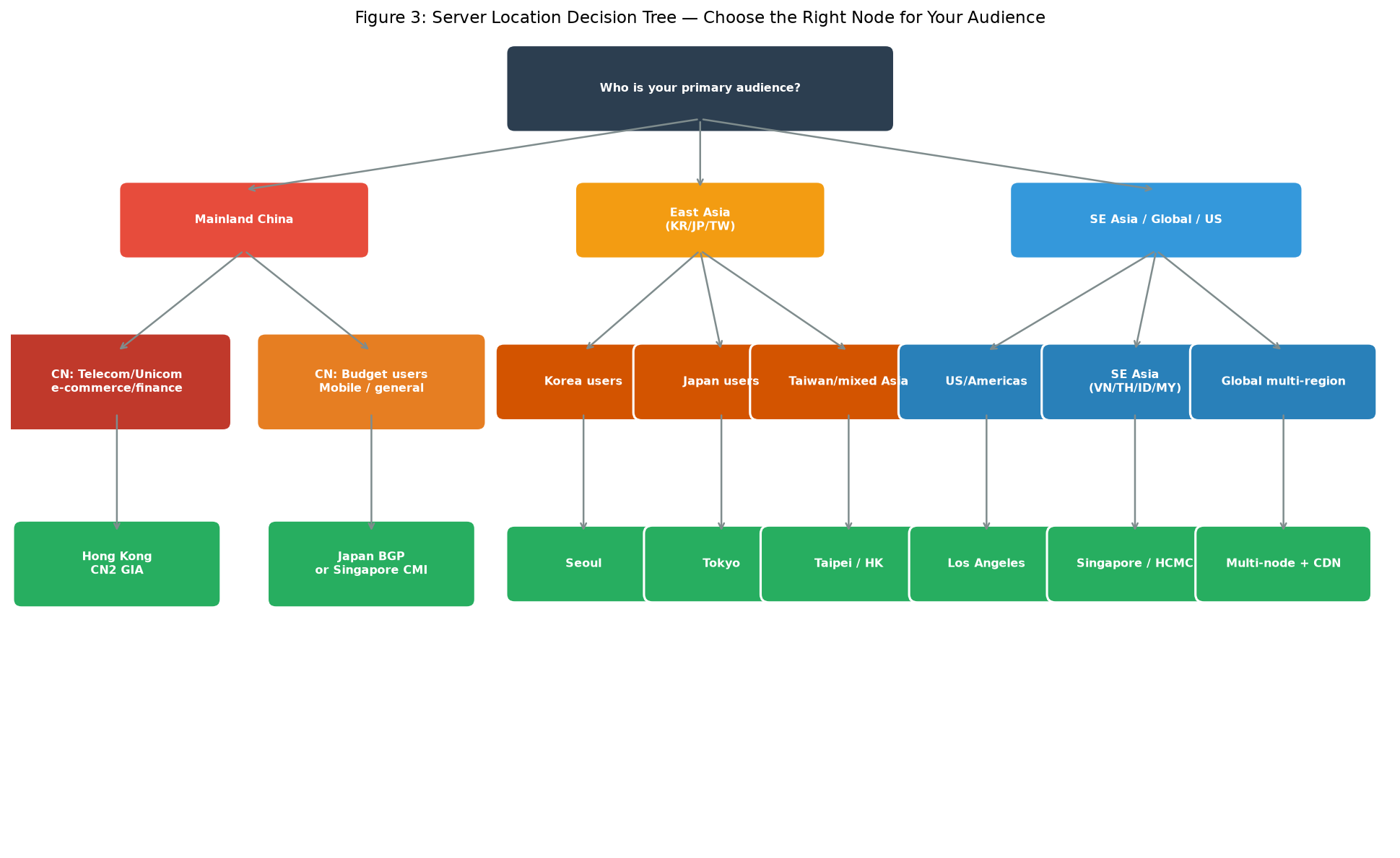 Figure 3: Use this decision tree to pick the right node based on your primary audience. Starting from "Who is your audience?" and following the branches will get you to the right node in 2-3 steps.
Decision Step 1: Who is your PRIMARY audience?
If 70%+ of your users are in:
Mainland China → Ask: Is low latency critical (e-commerce, finance, real-time)?
- Yes → Hong Kong CN2 GIA (no substitute — it's the best latency money can buy)
- It's a general website / budget matters → Japan BGP or Singapore CMI (cheaper, still decent latency)
- You need the absolute cheapest option for non-critical use → Los Angeles CN2 GIA (acceptable for south/coastal China)
Japan → Tokyo Korea → Seoul Taiwan → Taipei (or Hong Kong if you need broader China coverage too) Vietnam → Ho Chi Minh City Southeast Asia (multiple countries) → Singapore
North America → Los Angeles Europe → We don't currently offer an EU node (use a European provider like Hetzner for EU audiences) Mixed/Global/Not sure → Los Angeles (most versatile starting point)
Both China AND international audiences → Two-node strategy (see next section)
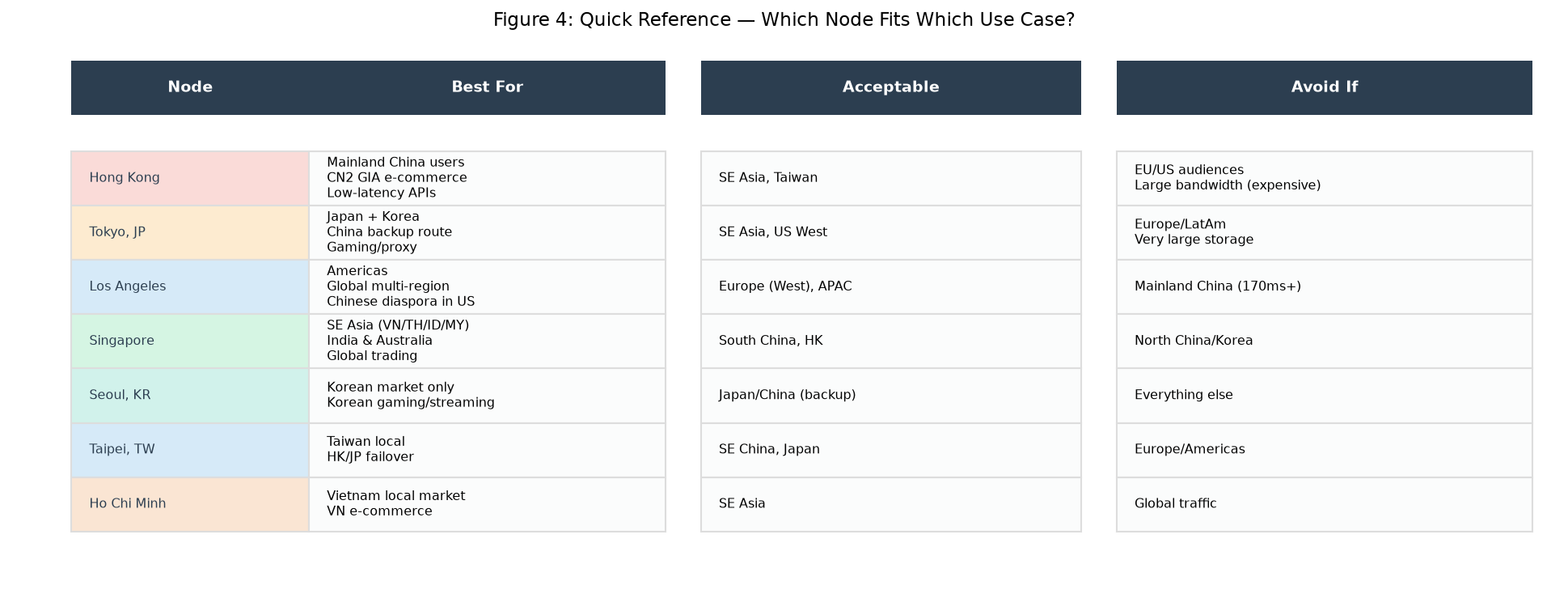 Figure 4: Quick reference matrix for matching your use case to the right node. Green check = best fit, yellow = acceptable, red = avoid.
6. Special Scenarios: When You Need Multiple Nodes
Some workloads genuinely need more than one server location. Here are the most common scenarios:
Scenario A: China + International Audience
If you serve both Chinese users and global users, Hong Kong + Los Angeles is the most common and effective pair. Route China traffic to HK, rest of world to LA. Use GeoDNS or Cloudflare Load Balancing to automatically direct users to the nearest server.
Scenario B: East Asia Regional Platform
If you serve Japan, Korea, China, Taiwan, and SE Asia simultaneously, a 3-node setup of Hong Kong + Tokyo + Singapore covers the region effectively. Each covers its primary market with <50ms latency.
Scenario C: Global SaaS / API Platform
For truly global reach, you need multi-region with CDN: Los Angeles (Americas) + London/Frankfurt (Europe, from another provider) + Singapore (APAC) + Hong Kong (if China is important).
Scenario D: Game Servers
Gamers demand <50ms ping. You need a node in each market you serve:
- Japanese players → Tokyo
- Korean players → Seoul
- Chinese players → Hong Kong (with good anti-DDoS)
- SEA players → Singapore
- NA players → Los Angeles
There is no single node that serves all Asian gamers well. Attempting to serve Korean players from Tokyo will give you 40ms+ additional ping — enough that serious Korean gamers will avoid your server.
Scenario E: High-Availability / Disaster Recovery
For business-critical applications, deploy two nodes in different regions with active-passive replication:
- Primary: Hong Kong
- Standby: Tokyo or Singapore (different seismic/political/infrastructure risk profile)
If one node goes down (datacenter outage, cable cut, DDoS), you can fail over to the standby in 30-60 seconds.
7. Multi-Region Deployment Architecture
If you decide to deploy across multiple nodes, here's a reference architecture that works well:
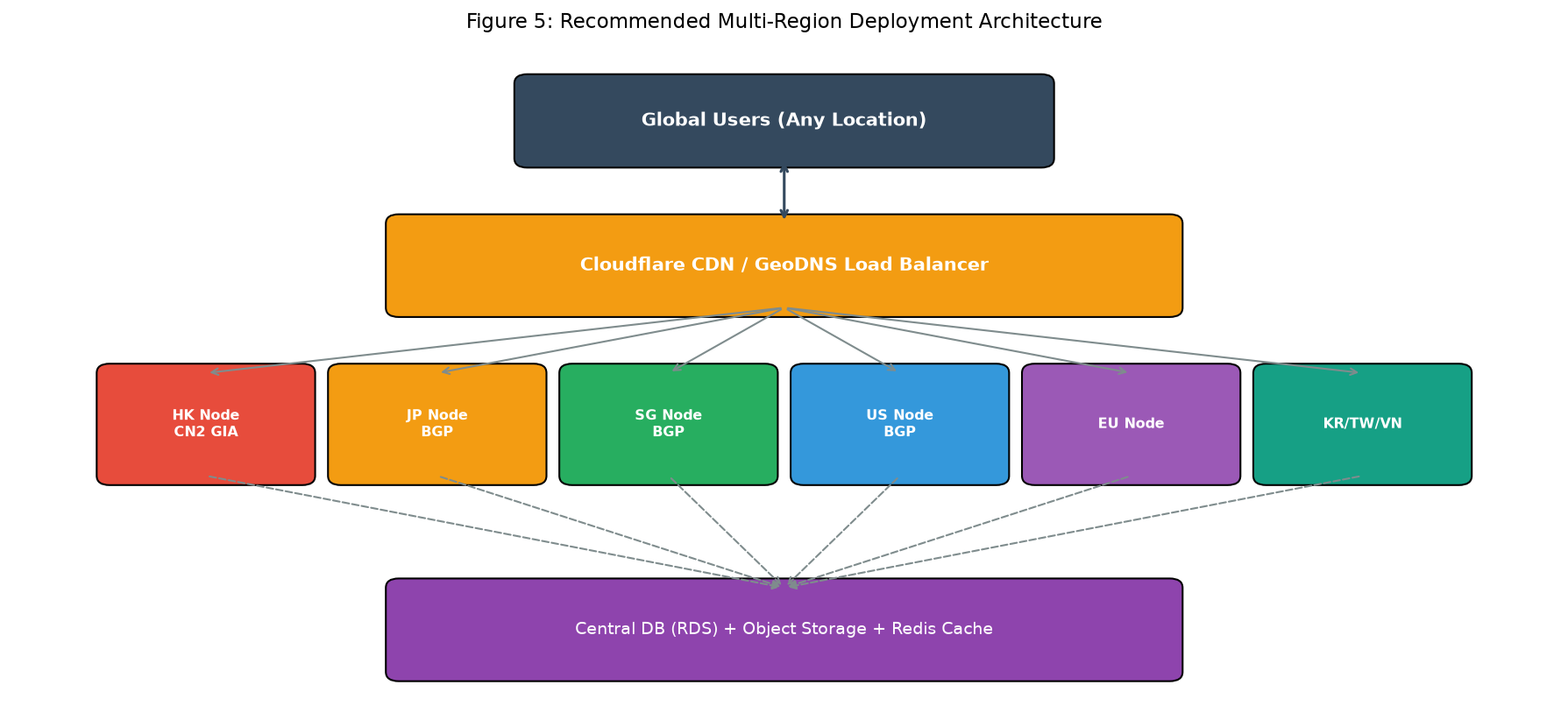 Figure 5: Recommended multi-region architecture: Users → Cloudflare CDN/GeoDNS → Nearest node → Central database + shared storage.
The key components:
- Cloudflare (or equivalent CDN) in front: Handles SSL, DDoS protection, static asset caching, and GeoDNS routing (directs users to the nearest origin).
- GeoDNS / Load Balancer: Routes traffic based on source IP geography. Cloudflare Load Balancing, AWS Route 53, or NS1 all do this well.
- Application servers at each node: Your web/app tier deployed to multiple regions, each serving nearest users.
- Central database: Use a managed database (like a cloud RDS) with read replicas in each region, or design for multi-master. For simpler setups, run your primary DB in one location (Singapore or LA are good central hubs) with asynchronous replication to standby nodes.
- Shared object storage: Use S3-compatible storage (Cloudflare R2, Backblaze B2, AWS S3) for user uploads and static assets, so files are accessible from all nodes.
- Redis/Memcached cache: Regional caches for frequently accessed data.
For most sites just starting out, don't overbuild. Start with one node, validate your product gets traction, and add regions only when latency measurements show it's needed. Multi-region architecture adds significant operational complexity (database replication, consistency issues, deployment pipelines).
8. Tools to Test Latency from Your Users' Locations
Before committing to a node, test the actual latency from your users' real locations. Don't just trust our marketing copy.
Use Looking Glass
LuckVM provides Looking Glass test pages for every node. You can run ping, traceroute, and speed tests without purchasing:
- Hong Kong LG:
https://lg.hk.luckvm.com - Japan LG:
https://lg.jp.luckvm.com - US (LA) LG:
https://lg.la.luckvm.com - Singapore LG:
https://lg.sg.luckvm.com - Korea LG:
https://lg.kr.luckvm.com - Taiwan LG:
https://lg.tw.luckvm.com - Vietnam LG:
https://lg.vn.luckvm.com
Test from China
To test China-facing performance, you need testing points inside China. Useful tools:
- ITDOG (
https://www.itdog.cn/ping/) — ping tests from dozens of Chinese vantage points - Ping.pe (
https://ping.pe/) — global ping test including Chinese locations - WebPageTest China (
https://www.webpagetest.org/with Chinese locations) — real page load tests
Test globally
- ping.pe — ping from 30+ global vantage points
- WonderNetwork (
https://wondernetwork.com/pings) — latency between global cities - Cloudflare Speed Test — end user perspective
Load-testing location-specific performance
After deploying, use a service like Loader.io, k6 Cloud, or Gatling with load generators in your target geography to measure actual throughput and latency under load.
9. Server Location FAQ
Is Hong Kong still "safe" for business data given political changes?
This is a legitimate concern we hear from international customers. In practice:
- International datacenter operators (Equinix, SUNeVision, etc.) continue to invest heavily in Hong Kong
- The cross-border fiber network and internet exchange points continue operating normally
- LuckVM's Hong Kong network operates under international datacenter standards with standard privacy protections
- For customers in highly regulated industries (finance, healthcare) with strict data residency requirements, Singapore or Tokyo offer alternatives with similar technical performance for Asian audiences
We have not seen any material change in Hong Kong's internet infrastructure reliability or international connectivity since 2020. The network performance remains excellent.
Can I use CDN to fix bad location choice?
Partially. CDNs (Cloudflare, CloudFront, Akamai, Aliyun CDN for China) work extremely well for static content (images, CSS, JS, pre-rendered pages). They cache these at edge locations worldwide, making static content fast regardless of your origin.
However, dynamic content cannot be fully cached:
- API calls
- User authentication / login
- Checkout and payment flows
- Personalized content (recommendations, dashboards)
- Real-time features (chat, notifications, live updates)
These requests still travel all the way to your origin server. A CDN improves 80% of page load weight, but the 20% that's dynamic (and often the most business-critical) still depends on your server location.
What about GDPR / data residency laws?
If you serve European customers subject to GDPR, data storage location matters. Currently, LuckVM doesn't offer EU-based nodes. If GDPR requires EU data residency, host in Europe (Hetzner in Finland/Germany, AWS eu-west-1, etc.) and use our Asia/US nodes for non-EU users.
For Chinese data residency requirements (PIPL), data doesn't need to be stored in China, but cross-border transfers have requirements. Hong Kong is typically treated as "overseas" for data residency purposes, similar to Singapore. If you need data physically in mainland China (with ICP filing), you need a mainland China cloud provider (Alibaba Cloud, Tencent Cloud) — that's a different product category than what we offer.
Should I pick based on where I am, or where my users are?
Where your users are. Always.
If you live in London but your customers are in Shanghai, host in Hong Kong. Where you connect from only matters for your own SSH/management experience (which is a few KB of SSH traffic) — your users' experience is what makes you money.
How much does the datacenter tier matter?
All LuckVM nodes operate in Tier 3+ datacenters with:
- 99.982%+ uptime SLA (about 1.6 hours of downtime per year maximum)
- Redundant power (N+1 or 2N UPS + generators)
- Redundant network (multiple upstream carriers, diverse fiber paths)
- Physical security (biometric access, 24/7 security, CCTV)
For 99% of customers, Tier 3 is sufficient. Tier 4 (99.995%) exists but is significantly more expensive and usually only needed for ultra-critical infrastructure like hospitals or core financial systems.
Does the "country" of IP geolocation matter?
Yes, for certain use cases:
- SEO and local search: Google and other search engines use IP geolocation as a ranking signal for local results. A Hong Kong IP will tend to rank better in Hong Kong search results, a Japanese IP in Japan, etc. If you're doing local SEO, host in the target country.
- Payment gateways: Some payment processors and fraud detection systems flag transactions from "unexpected" countries. If you're processing payments for Japanese customers, a Japanese IP helps reduce false fraud flags.
- Local content restrictions: Some streaming services and government websites restrict access to local IPs. A Korean IP is required to access Korean-only game servers or domestic streaming.
- Ad networks: Advertising platforms (Google Ads, Facebook, local ad networks) sometimes use IP location for campaign targeting and approval.
10. Final Recommendations
Here's my honest recommendation, as someone who has deployed thousands of workloads across these nodes:
If you're just getting started and aren't sure yet: Pick Los Angeles. It's our most versatile node, offers the best price-performance ratio, and provides acceptable service to most of the world. You can always add more nodes later as your user base grows and you learn where your traffic comes from.
If you know your users are in China: Start with Hong Kong CN2 GIA. There is no substitute for low, stable latency when dealing with Chinese internet congestion. Invest the extra money — the conversion rate and uptime improvement pays for itself quickly for business sites.
If you serve Japan and Korea: Tokyo is your hub. Add Seoul later if you see significant Korean traffic.
If you serve Southeast Asia: Singapore is your hub. Add Ho Chi Minh City later if you see significant Vietnam-specific traffic.
If you're running a global business: Start with Los Angeles + Cloudflare CDN, add Hong Kong if you have meaningful China traffic, add Singapore when you have enough SE Asia users to justify it, add EU nodes from another provider if Europe is a major market.
If you're running game servers: You need a presence in each market. There is no "one Asia node" for gaming — gamers will not tolerate 80ms when competitors offer 20ms.
Before you commit to any long-term plan, buy a monthly plan (not annual!) and test for 7-14 days. Run actual latency tests from your users' locations. Measure page load times for your real application. Every application is different — and no marketing page can tell you as much as a week of real testing.
All LuckVM nodes support Looking Glass pre-purchase testing, and we offer a 3-day refund window if a node doesn't perform as expected for your use case.
Ready to pick your node?
- Hong Kong Cloud Servers
- Japan Cloud Servers
- US Cloud Servers
- Singapore Cloud Servers
- Korea Cloud Servers
- Taiwan Cloud Servers
- Vietnam Cloud Servers
- GPU Servers (all regions)
- All VPS Plans
Further reading: