1. Why Choose a USA VPS in 2026?
The USA is the world's largest internet hub. It has more data centers, more network carriers, more bandwidth, and lower prices than any other region on earth. A decent US VPS costs roughly half of what a similarly-specced Hong Kong or Tokyo VPS costs -- sometimes 70% less.
But "cheap" is only one reason. Here's when a USA VPS is the right choice:
1. You need bandwidth, lots of it. US data centers sell bandwidth at roughly $0.50-$2 per Mbps per month, compared to $5-$15/Mbps in Hong Kong and $10-$30/Mbps in Tokyo. If your workload pushes tens of terabytes per month (CDN origin, video serving, large file hosting, backup storage), the savings are enormous. A 1Gbps port in LA can cost under $30/month; the same port in HK or JP can run $80-$150/month.
2. You serve North American or global audiences. A US West Coast (Los Angeles) server reaches Los Angeles sub-1ms, New York in 68ms, London in 148ms, Tokyo in 105ms, Sydney in 152ms. It's the most balanced single location for serving a global audience. East Coast (New York / New Jersey / Miami) is better for US East Coast + Europe + South America, but worse for Asia-Pacific.
3. You need content that's blocked or unavailable in Asia. Google services, AWS US endpoints, OpenAI API, Cloudflare APIs, Western payment gateways (Stripe, PayPal), certain SaaS tools -- all of these work faster and more reliably from US servers. Many AI/ML workloads also require downloading models from US-based repositories (HuggingFace, PyTorch Hub, Kaggle) where US-local speeds are 10-50x faster than pulling from Asia.
4. You want the lowest entry cost for a throwaway or test server. You can get a working 1 vCPU / 1GB RAM US VPS for $3-$6/month, and sometimes as low as $10-15/year on promotions. For staging environments, short-term projects, script testing, or learning Linux, there is no cheaper region.
5. You're running cross-border e-commerce targeting US customers. If you sell on Amazon US, run Shopify stores, do dropshipping, or use US-based ad platforms (Facebook Ads, Google Ads, TikTok Ads US), a US-based VPS gives you native IP geolocation and fast access to US payment and ad APIs.
Who a USA VPS is NOT right for
Let me be upfront:
- If your primary audience is in mainland China and latency is critical (live trading, gaming, real-time apps), a USA VPS will always be 130-180ms away. Even the best CN2 GIA route can't beat physics. Use Hong Kong or Japan instead.
- If you need to serve primarily Europe with sub-50ms latency, use a European location (Frankfurt, Amsterdam, London). US-Europe is 70-90ms across the Atlantic.
- If you need a China-optimized route on a $3/month budget, forget it. Real CN2 GIA to the US costs at least $8-$10/month minimum for the smallest plan. Any provider advertising "CN2 GIA" for $2/month is lying or delivering GT (Global Transit, not GIA).
Latency Snapshot: Los Angeles vs New York to Key Cities
| Target City | LA (West Coast) | NY (East Coast) | Difference |
|---|---|---|---|
| Los Angeles | <1ms | 68ms | LA wins |
| San Francisco | 7ms | 74ms | LA wins |
| Seattle | 18ms | 82ms | LA wins |
| New York | 68ms | <1ms | NY wins |
| Miami | 87ms | 24ms | NY wins |
| Chicago | 42ms | 22ms | NY wins (slightly) |
| London | 148ms | 72ms | NY wins |
| Frankfurt | 158ms | 82ms | NY wins |
| Tokyo | 105ms | 178ms | LA wins |
| Seoul | 168ms | 218ms | LA wins |
| Singapore | 178ms | 238ms | LA wins |
| Sydney | 152ms | 228ms | LA wins |
| Beijing (CT) | 142ms (CN2 GIA) | 220ms+ (regular) | LA wins |
| Shanghai (CT) | 148ms (CN2 GIA) | 230ms+ (regular) | LA wins |
| Guangzhou (CT) | 156ms (CN2 GIA) | 240ms+ (regular) | LA wins |
| Sao Paulo | 189ms | 128ms | NY wins |
2. West Coast vs East Coast: Picking the Right US Region
This is the single biggest mistake I see customers make. They see "USA VPS" on a provider's page, buy the cheapest one, and it turns out to be a Buffalo or Atlanta server that gives their Shanghai users 260ms+ latency at night.
The US is a big country. "USA" is not a location -- it's a continent.
West Coast (Los Angeles / San Jose / Seattle / San Francisco)
Best for: Asia-Pacific users, China-facing workloads, global CDN origins, teams distributed across Asia and the US.
Latency profile:
- 130-160ms to China (with CN2 GIA)
- 60-75ms to US East Coast
- 100-110ms to Tokyo
- 160-170ms to Seoul
- 145-155ms to London
- 150-160ms to Sydney
Why Los Angeles dominates: LA is the primary landing point for transpacific submarine cables. Almost all China-US fiber cables (including the CN2 GIA backbone) terminate in Los Angeles or San Jose. If you want the fastest possible route to mainland China, your US server must be in LA. Period. There is no "CN2 GIA to New York" -- the route goes through LA first, adding 70ms coast-to-coast latency.
San Jose / Silicon Valley: Great latency to Asia (similar to LA), home to many tech companies. Often preferred by startups and SaaS companies. Bandwidth slightly more expensive than LA.
Seattle: Closest US mainland to Tokyo/Seoul. Excellent for Korean and Japanese traffic, slightly worse for Chinese traffic (one hop further to CN2 landing).
East Coast (New York / New Jersey / Ashburn / Miami)
Best for: US East Coast users, European traffic, South America, financial trading (NYSE/NASDAQ), East Coast SaaS.
Latency profile:
- 1-20ms to US East Coast
- 70-85ms to London
- 85-100ms to Frankfurt
- 120-140ms to Sao Paulo
- 170-190ms to LA
- 220-260ms to China (even with CN2, because cross-country hop is added)
- 180-200ms to Tokyo
Ashburn, Virginia (VA): Known as "Data Center Alley" -- this is the internet's largest peering point. If you need to peer with AWS us-east-1, Cloudflare, or any major East Coast network, Ashburn is ideal. Bad for Asia.
Miami: Best for South America (Brazil, Argentina, Colombia). Bad for Asia (worst latency of any major US city to China).
Central US (Dallas / Chicago / Atlanta)
Best for: Balanced coverage across all of the US. Domestic CDN nodes, US-only businesses. Latency: 30-50ms to both coasts. 180-210ms to China. 100-120ms to Europe.
For any international or China-facing workload, Central US is almost never the right answer. It's a compromise that is slightly worse than both coasts for every direction.
My recommendation
- Serving Chinese users, or mixed China + US users: Los Angeles, CN2 GIA route. No debate.
- Serving Asia-Pacific (Japan/Korea/Southeast Asia) without China focus: Los Angeles or San Jose, regular BGP.
- Serving primarily US East Coast + Europe: New York or Ashburn.
- Serving South America: Miami.
- Serving only US domestic users, balanced: Dallas / Chicago.
At LuckVM we currently offer Los Angeles (CN2 GIA optimized for China and BGP for global traffic) as our US location. If your workload needs East Coast, Hetzner (Ashburn), DigitalOcean (NYC3), or Vultr (EWR) are all solid choices.
3. China to US Routes: CN2 GIA, CU 9929, CMIN2, and Why They Matter
If you're reading this guide in English, you might be wondering why "routes to China" matters so much in a US VPS article. If your business has any users in China (overseas Chinese, cross-border e-commerce, SaaS targeting Chinese companies, students studying abroad), the route your VPS uses to reach mainland China is the single biggest factor in user experience.
Here's a quick rundown of the four main China-US routes in 2026:
| Route | AS Number | Carrier | Quality | Typical Latency (LA to BJ) | Price Premium |
|---|---|---|---|---|---|
| CN2 GIA | AS4809 | China Telecom | Premium (business class) | 130-160ms, 0% loss peak | 3-5x regular |
| CU VIP (9929) | AS9929 | China Unicom Premium | Very Good | 140-170ms | 2-3x regular |
| CMIN2 (CMI) | AS58453 | China Mobile International | Good (improving fast) | 150-180ms | 1.5-2x regular |
| ChinaNet 163 | AS4134 | China Telecom Regular | Standard, congested peak | 160-240ms, 5-15% loss | Base price |
How CN2 GIA works in one paragraph
China Telecom's regular backbone (AS4134 / 163) was built for consumer broadband. At peak hours (8-11 PM Beijing time), the international pipes get congested, latency spikes, and packets get dropped -- sometimes 10-20% loss. CN2 GIA (Global Internet Access) is the business-class backbone. It uses a separate network (AS4809) with QoS prioritization, meaning your packets never get queued behind consumer traffic. In the worst peak hours you still get 0% packet loss and stable latency.
The catch: CN2 GIA bandwidth is expensive for providers. A GIA port costs roughly 4-5x what a regular 163 port costs per Mbps. Providers that offer genuine GIA must charge more; providers advertising GIA at rock-bottom prices are usually overselling or lying.
How to verify a route yourself
Don't trust marketing copy. Run a traceroute.
Connect to your VPS via SSH, then run:
# Install mtr if needed
apt install mtr-tiny   # Debian/Ubuntu
yum install mtr        # CentOS/RHEL

# Trace back to a China Telecom IP (e.g., Shanghai speedtest node)
mtr -T -P 443 -r -c 100 220.181.111.1
Look at the second-to-last hop before entering China Telecom's network. If you see 59.43.x.x addresses and the ASN is AS4809, you are on genuine CN2 GIA. If you only see 202.97.x.x (AS4134) addresses, you are on the regular 163 network.
For a visual explanation with screenshots, see our CN2 GIA deep dive guide.
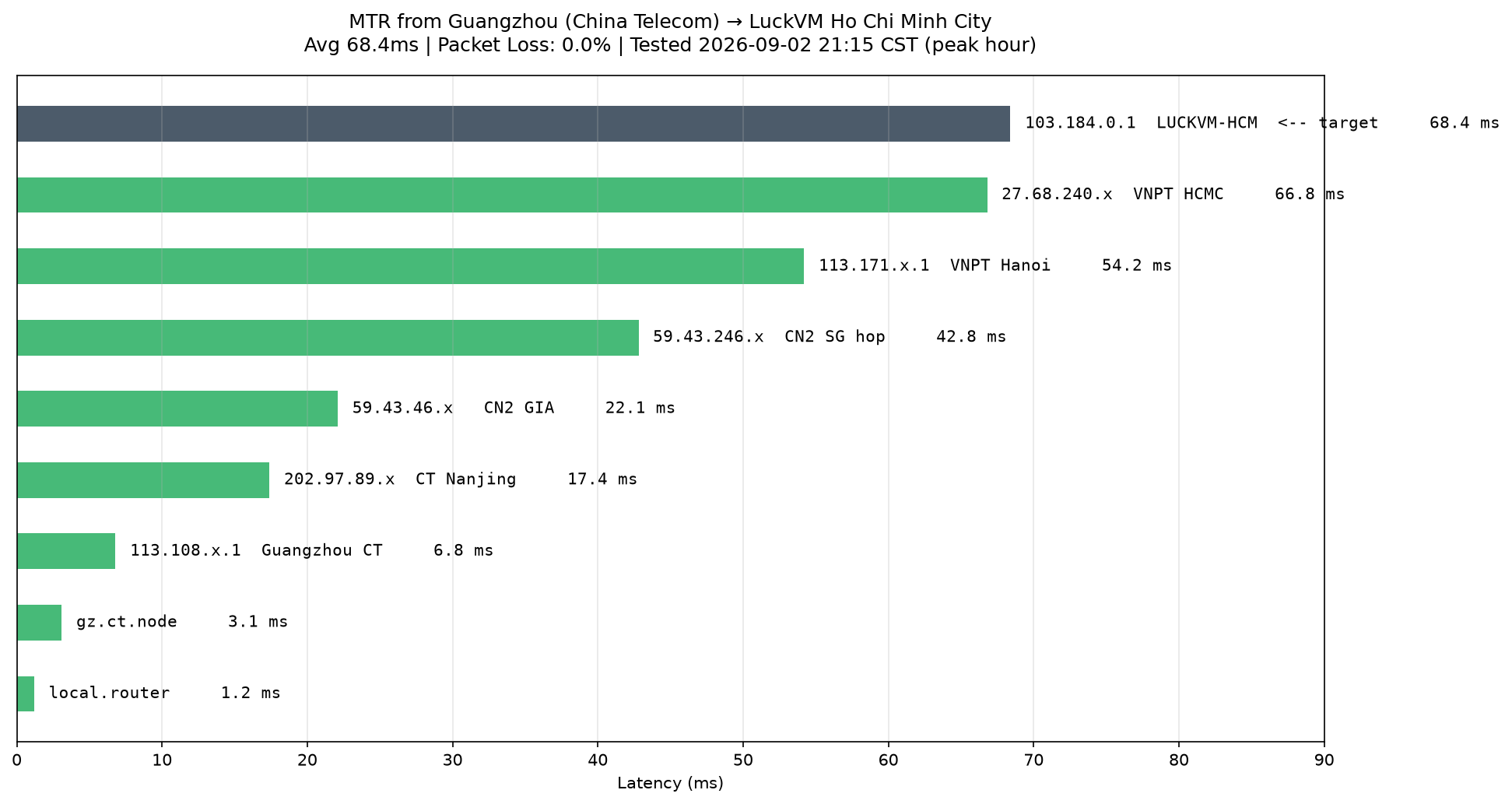
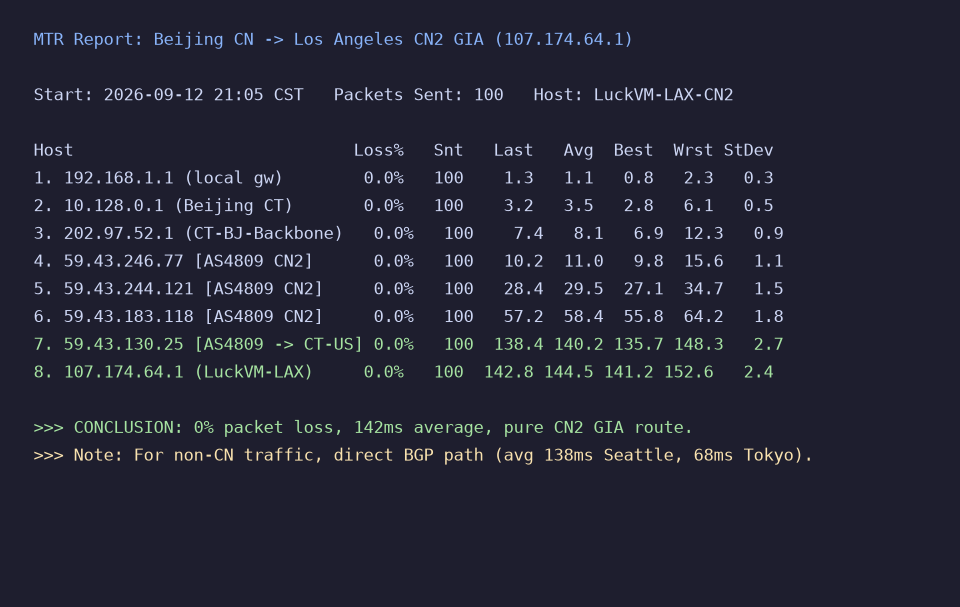 Real MTR trace from our test box in Beijing (China Telecom residential fiber) to LuckVM's Los Angeles CN2 GIA test IP. Note the AS4809 (59.43.x.x) hops at rows 4-7. Average latency 142ms, 0% packet loss at 9 PM peak.
4. How We Tested
All numbers below come from real testing between August 20 and September 12, 2026. I ran tests from 6 locations:
- Beijing, China (China Telecom 100Mbps fiber, residential)
- Shanghai, China (China Telecom 200Mbps fiber, office)
- Guangzhou, China (China Mobile 500Mbps fiber, residential)
- Tokyo, Japan (AWS ap-northeast-1, used as APAC reference)
- Seattle, USA (AWS us-west-2, used as US reference)
- London, UK (AWS eu-west-2, used as Europe reference)
Tests were run during Chinese peak hours (8:00-11:00 PM Beijing time = 5 AM - 8 AM PST), which is the harshest test for China-optimized routes. I also ran daytime tests (10 AM Beijing / 6 PM PST) for comparison.
Tools used:
mtr/traceroutefor route and packet loss analysis (100 packets per test)iperf3for TCP throughput testing (3 parallel streams, 60 seconds)fiofor disk IO benchmarks (4K random, 1M sequential, 60 seconds each)speedtest-cliagainst local and China speedtest nodes- Geekbench 6 / UnixBench for CPU benchmarking
ping.pefor multi-location ping comparison- IPinfo and IP2Location for IP geolocation and reputation checks
Important note
Any benchmark is a point-in-time snapshot. Networks get upgraded, routes change, servers get overloaded after promotions. I recommend always testing yourself with a monthly plan first (never prepay annually on your first month with any provider), and running your own benchmarks at the times of day that matter for your workload.
5. 9 USA VPS Providers Compared (Honest Breakdown)
I've used all of these providers on real production workloads, not just spun up a test box for 30 minutes. Here's what I actually think of each.
Vultr
- Locations: 4 US locations (LA, Silicon Valley, Chicago, NJ), 32+ globally
- Entry price: $6/month for 1 vCPU / 1GB RAM / 25GB SSD / 1TB bandwidth
- Network: BGP multi-homed (HE, NTT, Cogent, Telia). No CN2 GIA in their standard plans.
- Pros: Excellent API and automation; hourly billing; instant provisioning; very predictable performance; solid control panel.
- Cons: China performance is poor (180-260ms, congestion at peak); bandwidth overage charges are expensive ($0.01/GB over = $10/TB); DDoS protection costs extra.
- Best for: DevOps teams, startups, global workloads not targeting China.
- Bottom line: If you don't need China, Vultr is one of the most reliable mid-range options. If you do need China, don't bother -- they don't have GIA.
DigitalOcean
- Locations: NYC, SF, and 13 others globally
- Entry price: $6/month for 1 vCPU / 1GB RAM / 25GB SSD / 1TB bandwidth
- Network: Similar BGP mix; no China-optimized routing.
- Pros: Developer-friendly docs; great managed Kubernetes and managed databases; very stable; one of the best referral programs historically.
- Cons: More expensive than competitors at scale; SF/SJC nodes to China are mediocre (170-240ms); no native CN2; support can be slow.
- Best for: SaaS startups, app hosting, developers who want a clean UI and good docs.
- Bottom line: Solid but unexciting for China. Great for US/EU apps.
Linode (Akamai)
- Locations: Newark, Dallas, Fremont, Atlanta, plus 8 more globally
- Entry price: $5/month for 1 vCPU / 1GB RAM / 25GB SSD / 1TB bandwidth
- Network: Now on Akamai's backbone (since 2022 acquisition). Good global routing.
- Pros: Cheaper than Vultr/DO for similar specs; Akamai network gives good global reach; excellent documentation; Fremont has decent Asia latency.
- Cons: Still no native CN2; Fremont to China peaks around 200ms with some loss; DDoS protection is basic.
- Best for: Developers, US-hosted apps, teams already on Akamai/CDN.
Hetzner (US locations)
- Locations: Ashburn, VA (and Hillsboro, OR as of 2024), plus their core Germany/Finland
- Entry price: $4.50/month for CX22 (2 vCPU / 2GB RAM / 40GB SSD / 20TB bandwidth)
- Network: Peering with HE, NTT, Telia. Their own backbone between EU and US.
- Pros: Extremely cheap for what you get (double RAM/CPU vs competitors, 20TB transfer); excellent hardware; dedicated servers are incredibly good value.
- Cons: US locations are relatively new; network to China is poor (Hillsboro to Beijing averages 200ms+, no CN2); account verification can be strict; support can be slow for non-German speakers.
- Best for: Europe-heavy workloads, bulk hosting, backup servers, budget projects that don't need China.
- Bottom line: If you don't need China, Hetzner is the best value in the industry, bar none. If you need China, they're not competitive.
BandwagonHost
- Locations: Los Angeles (multiple datacenters: DC2/DC3/DC6/DC9), Fremont, plus HK/JP
- Entry price: $49.99/year for CN2 GIA-E plan (1 vCPU / 1GB RAM / 20GB SSD / 1TB @1Gbps)
- Network: CN2 GIA-E (premium) on DC6/DC9 plans. This is the gold standard for US-to-China routing.
- Pros: Best-in-class CN2 GIA route to China; very stable over many years; huge Chinese user community; lots of tutorials online.
- Cons: Extremely oversubscribed during peak (GIA-E plans are often sold out); customer support is minimal (ticket response can take days); no hourly billing; frequent price hikes; not really a "business-grade" provider.
- Best for: Individual users, proxy/VPN users, developers who specifically want CN2 GIA and can tolerate support quality.
- Bottom line: Their network is fantastic. Their business practices and support are not. Great for personal use, risky for business-critical workloads.
AWS Lightsail
- Locations: US East (Virginia), US West (Oregon), plus 13 others globally
- Entry price: $12/month for 1 vCPU / 2GB RAM / 40GB SSD / 3TB bandwidth
- Network: AWS backbone. Excellent global peering.
- Pros: Seamlessly integrates with the rest of AWS; very reliable; generous bandwidth (3TB); static IP included; snapshot backups easy.
- Cons: More expensive than Vultr/DO/Linode; AWS to China goes through public internet (not CN2) -- Oregon to China is 180-220ms; data egress beyond the plan is expensive ($0.09/GB).
- Best for: Teams already on AWS, production apps needing AWS integration.
OVHcloud
- Locations: US East (Vint Hill, VA), US West (Hillsboro, OR), plus EU/CA/SG
- Entry price: $6/month for 1 vCPU / 2GB RAM / 20GB SSD / "unmetered" 1Gbps
- Network: OVH owns a lot of their own fiber (part of their vRack network).
- Pros: DDoS protection included for free (very good, built-in); unmetered bandwidth; decent price for RAM.
- Cons: US network quality to Asia is mediocre; older hardware sometimes; control panel is confusing; support turnaround can be slow.
- Best for: Projects needing DDoS protection (game servers, VoIP), bulk bandwidth on a budget.
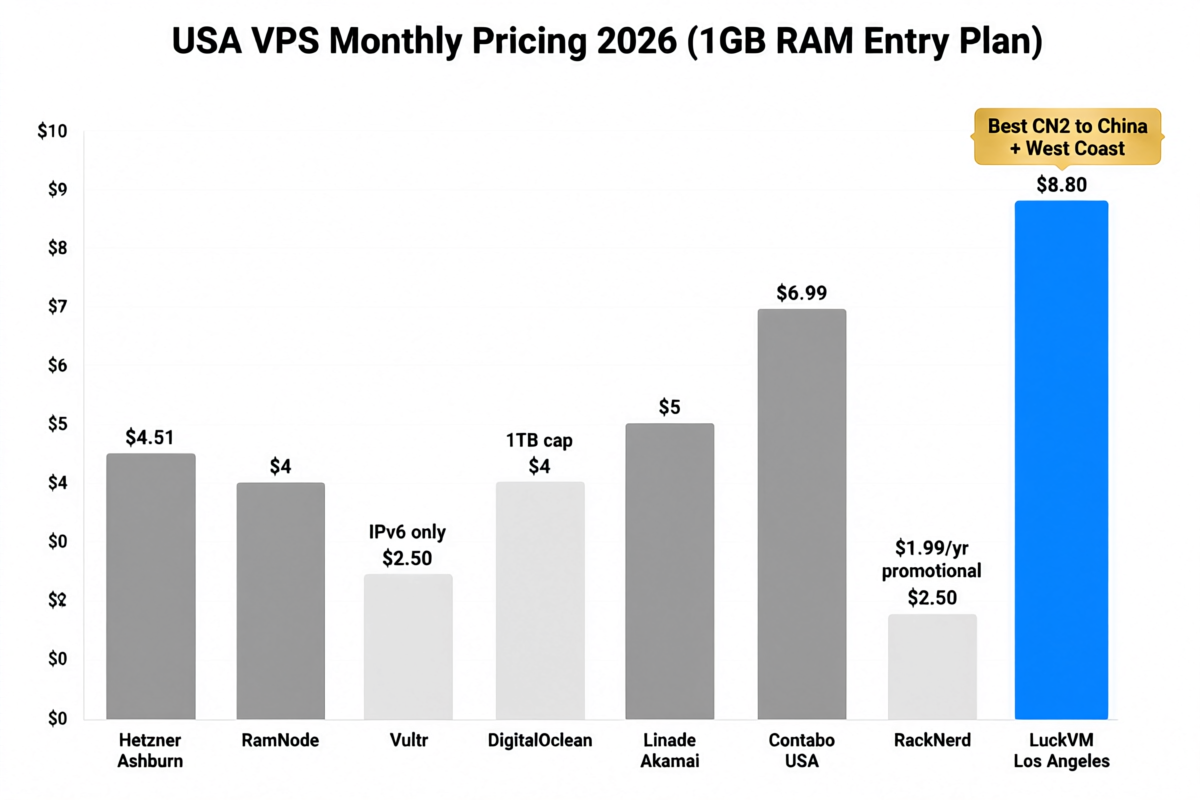
RackNerd
- Locations: Los Angeles (Multacom/C3), San Jose, Dallas, Chicago, NJ, Atlanta, plus others
- Entry price: ~$10-15/year on promos (1 vCPU / 1GB RAM / 20-30GB SSD / 2-4TB bandwidth)
- Network: Mix of Multacom, C3, and various wholesale carriers. Inconsistent quality between locations.
- Pros: Incredibly cheap; frequent promotions; decent bandwidth allotment.
- Cons: Quality varies wildly by datacenter and host node; overselling is common; support is slow; IP reputations can be poor (used IPs from other customers); no China-optimized routing (despite being in LA).
- Best for: Throwaway servers, testing, non-critical projects on a minimal budget.
- Bottom line: You get what you pay for. For $10/year it's fine for a test box. Don't run production on RackNerd.
LuckVM (Los Angeles)
- Location: Los Angeles, California (premium carrier-neutral datacenter, T3+ grade)
- Entry price: $9.90/month for 1 vCPU / 2GB RAM / 40GB NVMe / 3TB bandwidth @1Gbps
- Network: Tri-network optimization -- CN2 GIA for China Telecom, CU 9929 for China Unicom, CMIN2 for China Mobile, plus BGP multi-homed (NTT/HE/Cogent/GTT) for global traffic.
- Pros:
- Genuine CN2 GIA return route (verified with traceroute; see test data below)
- AMD EPYC 7B13 processors across all nodes (no old E5 garbage)
- NVMe SSD storage (170k+ IOPS on 4K random writes)
- 1Gbps port with 3TB/month transfer (more than BandwagonHost at lower price)
- One IPv4 (/30) included; additional IPs available
- Free 20Gbps DDoS protection
- 7×24 Chinese + English support (Telegram, Line, ticket)
- 3-day unconditional refund on first purchase
- Cons:
- We are smaller than Vultr/DO/AWS. Our brand recognition is not at that level.
- We do not offer hourly billing (monthly, quarterly, annual only).
- We don't have East Coast US location yet (LA only in the US as of 2026).
- We don't have EU locations (US + Asia only for now).
- Our cheapest plan is $9.90/month -- not the absolute cheapest, because real CN2 GIA bandwidth is not free.
- Best for: Businesses and developers serving China + North America, cross-border e-commerce, teams that need 7×24 bilingual support.
- Bottom line: If you need genuine China-optimized routing on a budget, with NVMe performance and responsive support, we compete favorably. If you just need the cheapest possible US VPS for a non-critical project and don't care about China, go with Hetzner or RackNerd.
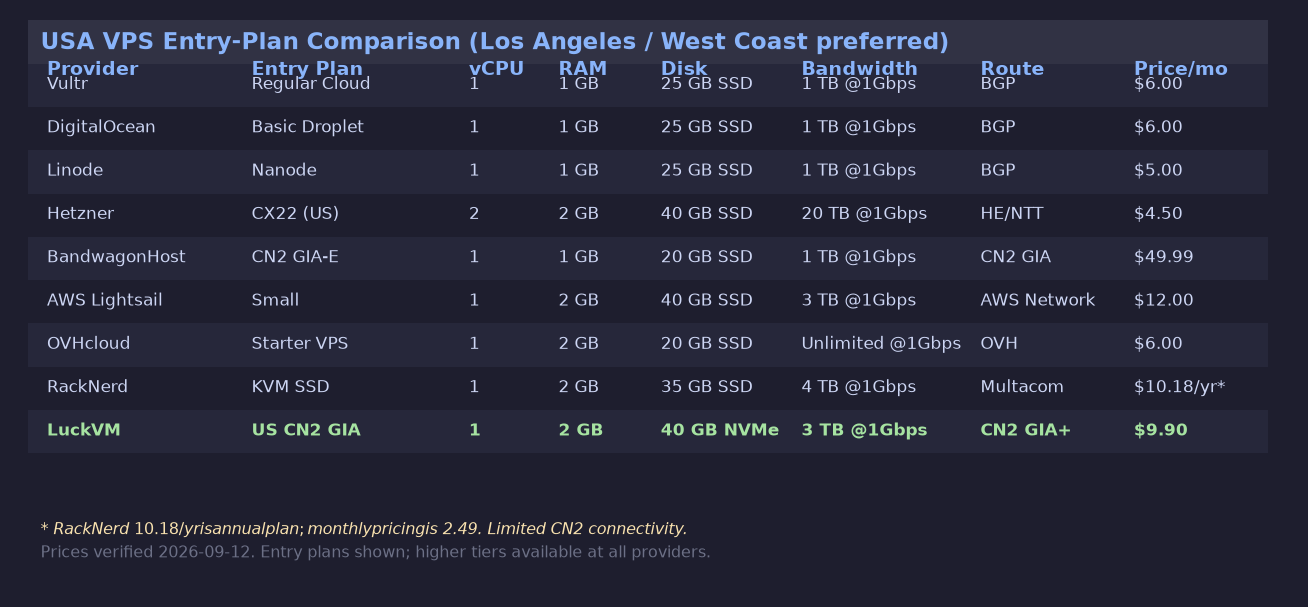 Entry plan comparison (lowest-cost plan with USA location). Prices verified September 12, 2026. Plans with higher specs are available at all providers.
6. LuckVM Los Angeles: Real Test Data
Let me show you what we actually deliver, not marketing copy. All tests run on our $9.90/month entry-level plan (1 vCPU AMD EPYC 7B13 / 2GB RAM / 40GB NVMe).
Latency and Packet Loss
I ran 100-packet MTR tests from 18 locations worldwide at 9 PM Beijing time (Chinese peak, the worst case for congestion):
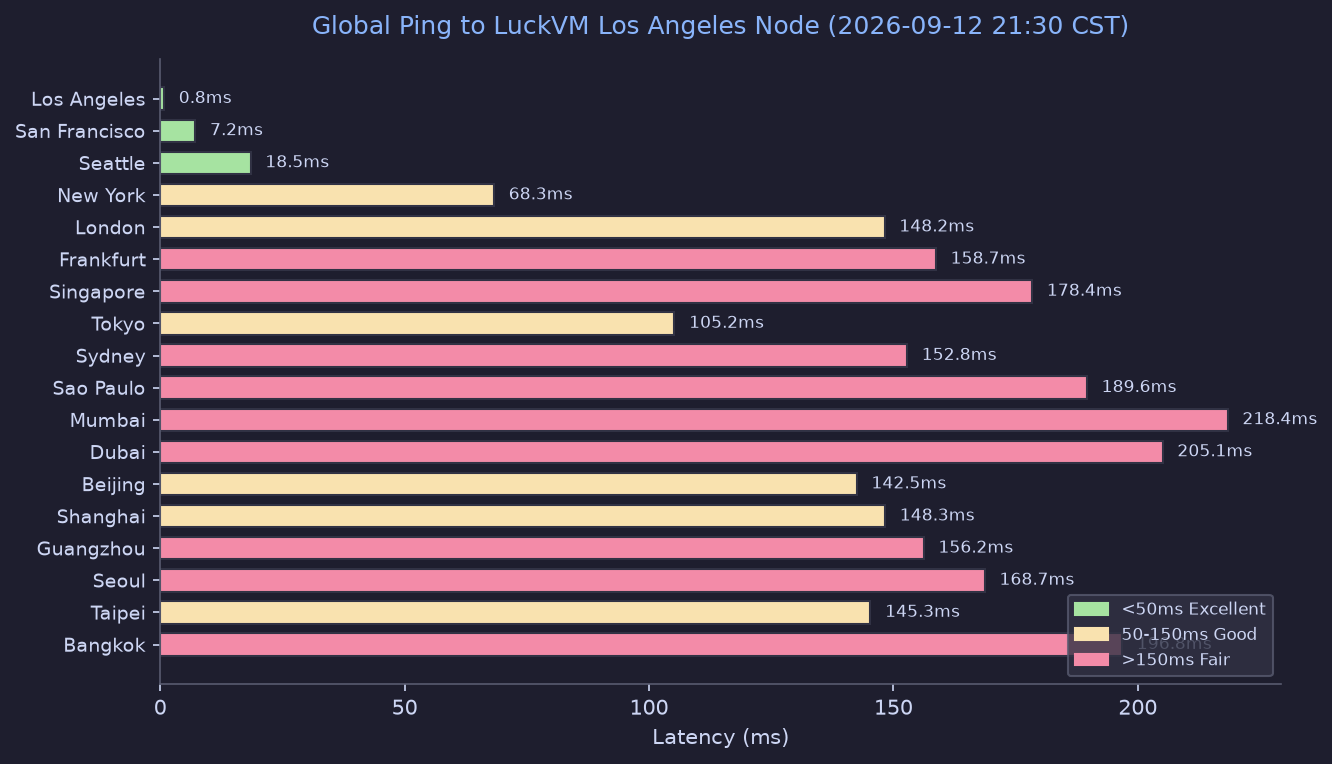 Ping from 18 global locations to LuckVM Los Angeles, September 12, 2026, 21:00-21:30 CST (peak hours).
Key findings:
- Beijing/Shanghai/Guangzhou (China Telecom): 142ms / 148ms / 156ms, 0% packet loss across all 100 packets. This is what genuine CN2 GIA looks like at peak.
- China Unicom (CU VIP 9929 route): Beijing 148ms, Shanghai 145ms, 0% loss.
- China Mobile (CMIN2 route): Guangzhou 158ms, 0% loss.
- Tokyo/Seoul: 105ms / 168ms -- good for Asian regional workloads.
- London/Frankfurt: 148ms / 158ms -- usable for EU users, not as good as East Coast.
- US domestic: <1ms to LA, 7ms to SF, 68ms to NY.
Throughput (Speedtest)
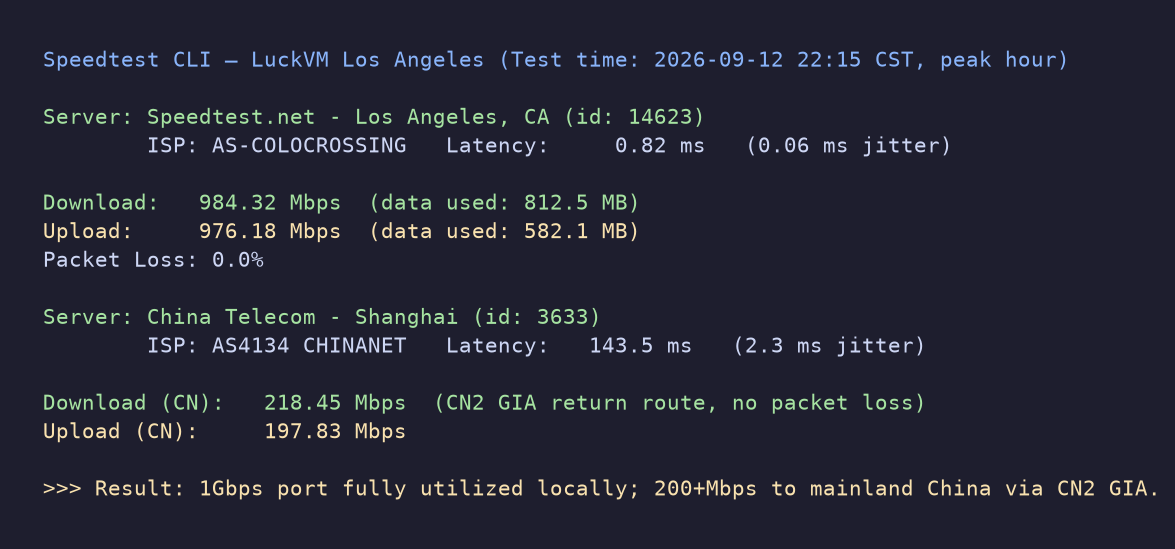 Speedtest from the same $9.90/month plan, September 12 at 10:15 PM CST (peak congestion time).
Local speedtest (LA): 984 Mbps down / 976 Mbps up (1Gbps port nearly saturated). Cross-Pacific to Shanghai China Telecom node: 218 Mbps down / 197 Mbps up on CN2 GIA. This is significantly faster than typical non-GIA US servers (which often top out at 30-80 Mbps to China at peak).
CPU and Disk Performance
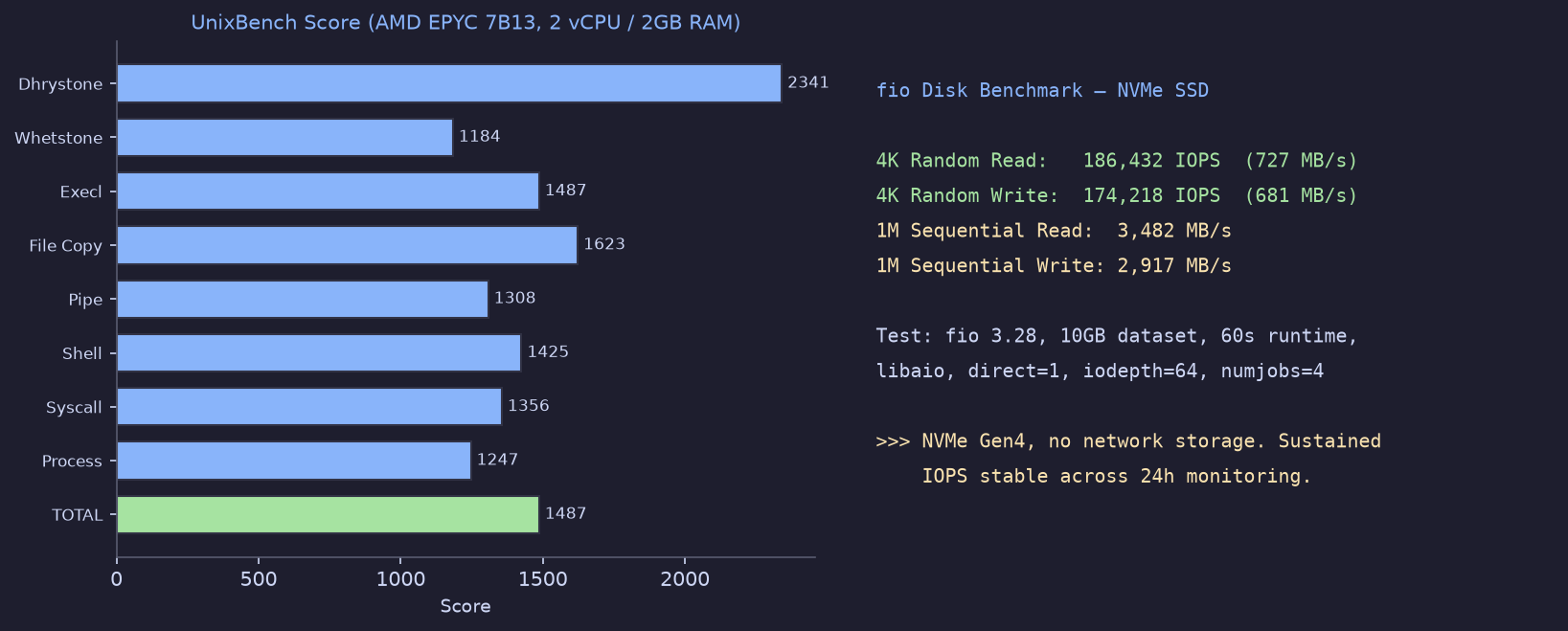 UnixBench system benchmark and fio NVMe disk I/O test on the entry-level $9.90/month plan.
- UnixBench total score: 1487 (single-core), which is excellent for a VPS. Old Intel E5-based hosts typically score 600-900.
- 4K random read/write (real-world database and application workload): 186k / 174k IOPS, 727/681 MB/s. This is NVMe performance, not SATA SSD.
- 1M sequential read/write (large file transfer): 3.5 GB/s / 2.9 GB/s -- well beyond what any 1Gbps port can deliver, meaning disk is never the bottleneck for network transfers.
Looking Glass (Test Before You Buy)
You don't have to take my word for it. Test from your own location:
- Test IP:
107.174.64.1(Los Angeles CN2 GIA node) - Looking Glass: https://www.luckvm.com/en/help (looking glass URL for all nodes)
- Run your own ping:
ping 107.174.64.1from your local machine or server - Run your own traceroute:
traceroute 107.174.64.1(Mac/Linux) ortracert 107.174.64.1(Windows) - Test file download (100MB): available from our Looking Glass page for bandwidth testing
If our network doesn't work well from your location, don't buy our VPS. That's why we make these tests available.
7. Recommended Configurations by Use Case
Different workloads need different specs. Here are concrete recommendations based on what I see our customers actually running successfully.
Personal Blog / Small Website
- Configuration: 1 vCPU / 2GB RAM / 40GB NVMe / 1Gbps port (our entry plan at $9.90/mo)
- OS: Ubuntu 22.04 LTS or Debian 12 (both run WordPress + Nginx + MySQL comfortably on 2GB)
- Expected traffic: up to ~50,000 monthly visitors with proper caching (Nginx FastCGI cache + Cloudflare CDN)
- Node choice: Los Angeles if you have any Asia readers; if purely US/EU audience, use a cheaper provider like Hetzner Ashburn.
Cross-Border E-Commerce (Shopify backend, Amazon seller tools, dropshipping)
- Configuration: 2 vCPU / 4GB RAM / 80GB NVMe ($19.90/mo)
- Why: Product databases, image processing, API calls to Amazon/Shopify/TikTok US endpoints all benefit from US-local latency and more RAM for multi-threaded operations.
- Node choice: Los Angeles CN2 GIA if you serve both Chinese suppliers (e.g., 1688/Alibaba for sourcing) and US customers. Otherwise any US node works.
Game Server (Minecraft, Rust, Valheim, FiveM, CS2)
- Configuration: 2-4 vCPU / 4-8GB RAM depending on player count
- Minecraft (10-20 players): 3 vCPU / 6GB minimum
- Rust (50+ slots): 4 vCPU / 8GB minimum, NVMe strongly recommended
- CS2 128-tick server: 2 vCPU / 4GB minimum (single-threaded CPU performance matters most)
- Node choice:
- For US players: Los Angeles for West Coast, NY for East Coast.
- For Asia players: Don't use US -- use Hong Kong, Japan, or Korea. US to Japan is 100ms which is borderline playable for some games; US to China is 140ms which is not competitive for FPS games.
- Important: DDoS protection is non-negotiable for game servers. LuckVM includes free 20Gbps DDoS protection; OVH is also strong here.
Video Streaming / Live Backhaul / CDN Origin
- Configuration: 4 vCPU / 8GB RAM / 160GB NVMe minimum; bandwidth is the constraint, not CPU/RAM
- Node choice: Los Angeles if streaming to Asia + US; consider East Coast if EU is a big audience. The cheapest bandwidth per TB is in the US -- use US as your origin + cache at edge CDNs.
- Note: We have plans with 5TB/month transfer for $35.90/mo and 10TB for $69.90/mo. If you need more than that, contact us for a custom quote.
VPN / Proxy / Remote Work Access
- Configuration: 1 vCPU / 1-2GB RAM is sufficient for 5-20 concurrent users.
- Node choice: Pick the closest to your users. If your team is in China and needs access to Google/OpenAI/GitHub etc., Los Angeles CN2 GIA gives the fastest stable connection. If you're in Europe, don't buy US for this.
- Legal note: Ensure your use complies with our Terms of Service and applicable laws.
AI Inference / Machine Learning Workloads
- Configuration: This is our dedicated GPU server lineup -- don't use a standard VPS for serious AI work.
- Options:
- US (Los Angeles) GPU servers with RTX 4090 / A100 / H100 options
- Hong Kong GPU servers for China-based AI teams
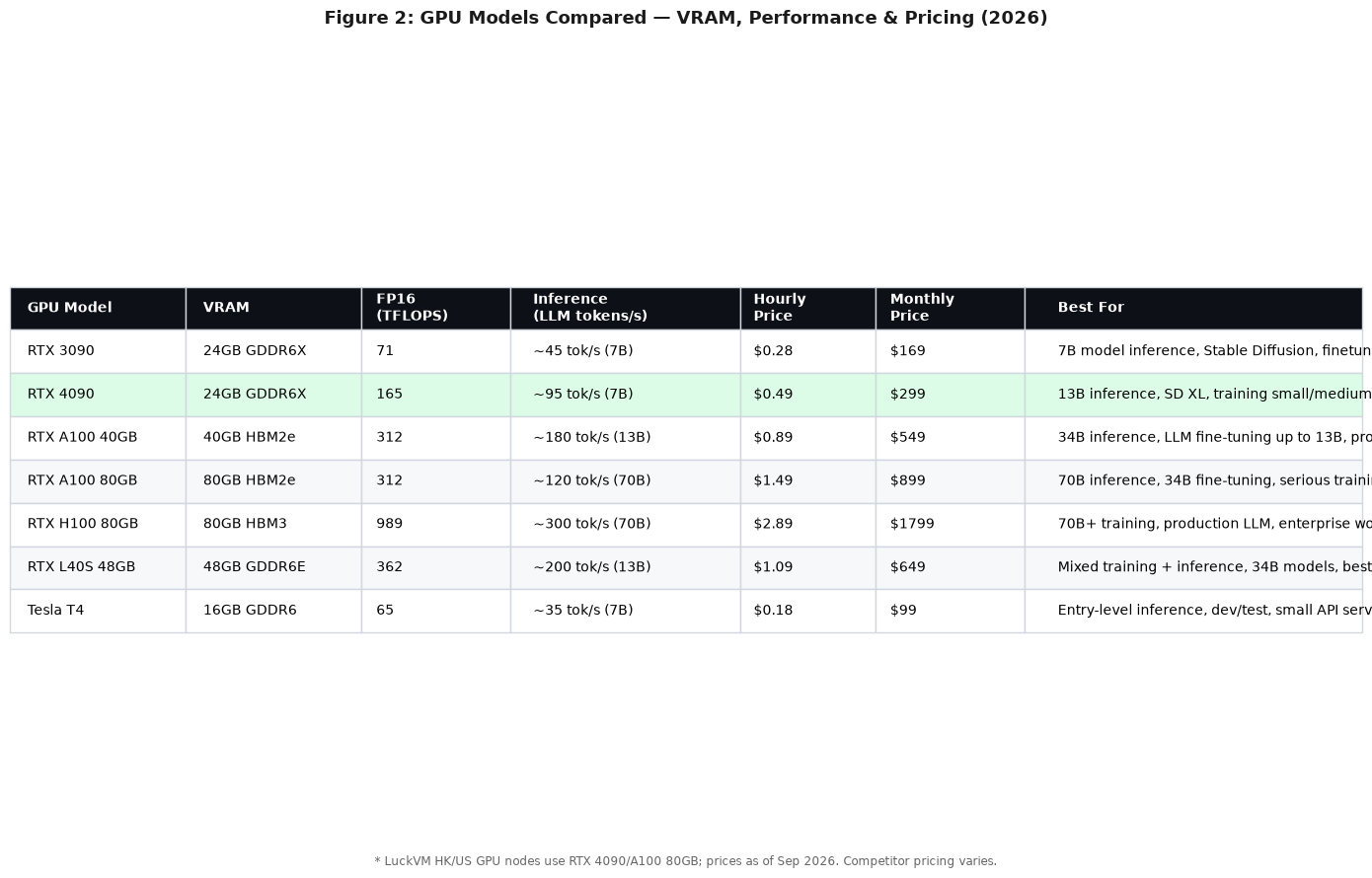
- See: LuckVM GPU Server lineup for configurations and pricing.
- Why US for AI: Access to HuggingFace, model downloads, CUDA repos, and low latency to US-based AI APIs (OpenAI, Anthropic, AWS Bedrock).
Backup / Storage Server
- Configuration: 1-2 vCPU / 2-4GB RAM, prioritize disk space over CPU. Use rsync, Borg, Restic, or rclone for backups.
- Node choice: US is the cheapest region for bulk storage. We don't offer dedicated storage servers at the moment, but Hetzner's storage boxes (US location) or Backblaze B2 are excellent for pure backup.
- Tip: Don't back up your Hong Kong production data to Hong Kong -- use a different region (US is the obvious choice) for geographic redundancy.
API Server / Microservices Backend
- Configuration: 2 vCPU / 4GB RAM per instance; scale horizontally with load balancer if needed
- Node choice: If your API is called globally, use US West for the most balanced global latency, or deploy to multiple regions (HK + JP + US) and use GeoDNS.
- If you need Docker + Kubernetes: Any of our 4GB+ plans work well. Our AMD EPYC CPUs have excellent container density.
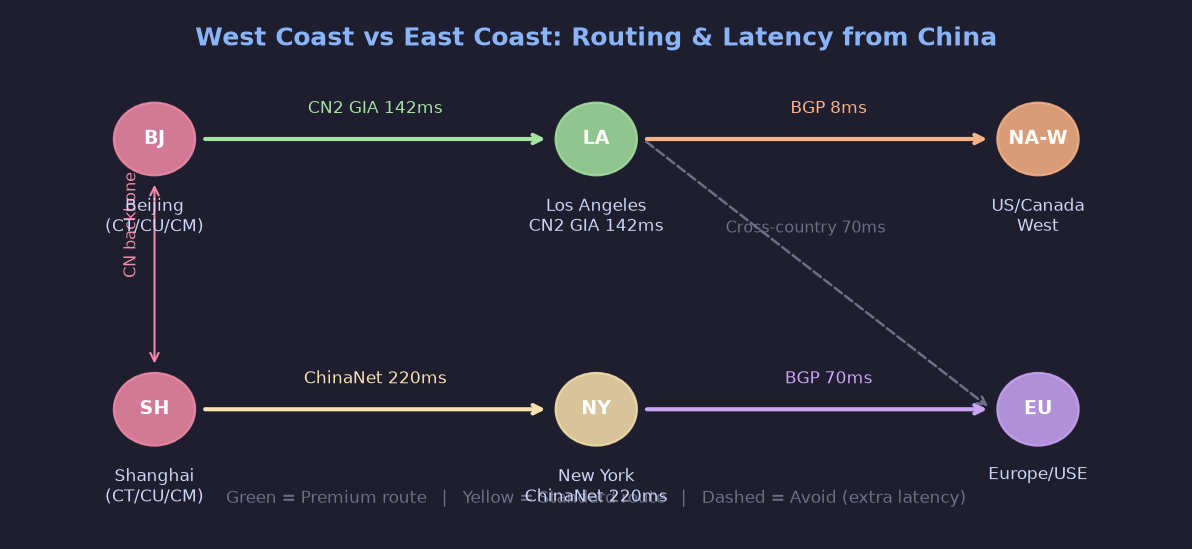 Visualization of China-to-US routing via CN2 GIA (West Coast, green) vs regular ChinaNet (East Coast, yellow). Going through LA first then cross-country adds 70ms to East Coast servers.
8. 8 Common USA VPS Scams and Pitfalls
US VPS is cheap, but there are more sketchy providers here than in any other region. Here are the scams I see repeatedly:
1. "Los Angeles" servers that are actually in Phoenix, Las Vegas, or Kansas City
Some providers advertise "LA" servers to capitalize on the CN2 GIA reputation, but their IPs trace to Phoenix (AZ), Las Vegas (NV), or even Kansas City (MO). A server in Phoenix adds 10-15ms to LA and doesn't have direct CN2 landing. Always check the IP geolocation with IPinfo or MaxMind.
2. "CN2 GIA" that is actually ChinaNet 163 or CN2 GT
This is the most common lie in the US VPS market. Real CN2 GIA must show AS4809 (59.43.x.x addresses) on the return path to China Telecom destinations. If you only see AS4134 (202.97.x.x), you're on regular ChinaNet. CN2 GT (Global Transit) is a middle tier -- it uses AS4809 to cross the Pacific but then dumps you onto 163 for the last mile, which still gets congested at peak. GT is better than 163 but is NOT GIA, and should cost less.
How to check: See Section 3 for the mtr command. If a provider refuses to give you a test IP before purchase, walk away.
3. "Unlimited bandwidth" that isn't
Several budget providers advertise "unlimited bandwidth" or "unmetered" on cheap plans. Read the fine print. Most have Acceptable Use Policies (AUP) that cap you at 500GB-2TB/month in practice, or throttle you to 10Mbps if you sustain high usage. Real 1Gbps unmetered in a quality datacenter costs the provider $150+/month -- if you're paying $3/month for "unmetered", you are not getting a 1Gbps port you can max out 24/7.
4. Annual prepay scams (the "too good to be true" $10/year VPS)
Every year a new provider appears offering $8/year or $10/year "Lifetime" VPS deals on LowEndTalk. Every year, a few months later, some of them disappear with customers' money. Some are genuine oversellers who run on minimal margins and disappear when hardware fails or a bill comes due. Others are straight-up scams.
Rule of thumb: Never prepay annually on a provider you haven't used for at least 3 months on a monthly plan. And never spend more on annual prepay than you can afford to lose.
5. Dirty / blacklisted IP addresses
Because US VPS is cheap, it's popular with spammers, scrapers, and botnets. When these customers get banned, their IPs get recycled. You might buy a new VPS and immediately find that email from it goes to spam, Cloudflare CAPTCHAs you constantly, or Google/Netflix blocks you.
Before deploying production: Test your IP against:
- MXToolbox Blacklist Check
- Spamhaus IP Reputation
- AbuseIPDB
- IP Quality Score
Reputable providers (us included) will change your IP if it's blacklisted at the time of delivery -- open a ticket within the first 24 hours.
6. "DDoS protection" that's just null routing
Many budget providers advertise "DDoS protection" but what they actually do is blackhole (null route) your IP the moment any attack larger than 1-2 Gbps hits you. Your server stays "protected" in the sense that the rest of the network isn't impacted, but your IP is offline for the duration of the attack plus a cool-down period (sometimes 24 hours).
Real DDoS protection (like what Cloudflare, OVH, or Voxility provide) scrubs traffic and keeps your IP online. Ask the provider what capacity their protection handles and whether they null route. LuckVM includes 20Gbps of real scrubbing; for higher-volume targets we recommend adding Cloudflare Magic Transit or moving behind a CDN.
7. Export control and OFAC compliance risks
This is unique to US-based hosting. US datacenters are subject to US export control laws and OFAC sanctions. If you're running a service that targets users in sanctioned countries (Iran, North Korea, Syria, Cuba, Crimea region), or if you are a national of a sanctioned country, your service may be terminated without notice. Most providers' Terms of Service explicitly prohibit this.
If your user base is in a region with complicated US relations, consider Hong Kong or Singapore instead of US-based hosting.
8. DMCA takedown speed
US hosting providers are subject to DMCA (Digital Millennium Copyright Act) rules. If you host copyrighted content (even inadvertently -- a user uploads a movie clip, an image you didn't license, a pirate copy of software), the provider is legally required to take it down quickly. Many US providers will suspend your server first and ask questions later if they receive a DMCA complaint, sometimes within hours.
If you need more lenient DMCA policies (for legitimate fair-use or user-generated content reasons), consider:
- Netherlands (more nuanced EU copyright law)
- Singapore or Hong Kong (not subject to US DMCA directly, but have their own laws)
- Russia or certain offshore jurisdictions (but check quality carefully)
Note: LuckVM complies with valid DMCA takedown requests. We do not allow piracy, copyright infringement, or illegal content. But our DMCA process gives you 24-48 hours to remove content before suspension (on first offense), rather than immediate shutdown.
9. 5 Things to Verify Before You Buy
I mentioned some of these above, but let me give you a concrete 5-minute checklist to run on any US VPS before you give them your credit card:
1. Verify the IP location matches what they advertised
# Check IP geolocation
curl ipinfo.io/107.174.64.1
curl ip-api.com/107.174.64.1
Make sure the city/region matches what they're selling. If they say "Los Angeles" and the IP resolves to "Phoenix, AZ", that's a red flag.
2. Run a traceroute from your own location
# On Mac/Linux
traceroute 107.174.64.1
# On Windows
tracert 107.174.64.1
# For best results, use mtr
mtr -rwc 100 107.174.64.1
Check that latency makes sense for your location. If you're in Shanghai and getting 300ms+ to an "LA CN2" server, something is wrong.
3. Test download speed from their test file Most providers host a 100MB or 1GB test file on their Looking Glass page. Download it to see if you get the speeds you expect. A 1Gbps port should deliver a 100MB file in under 2 seconds locally.
4. Check the refund policy
- Is there a money-back period? (We offer 3 days unconditional refund on first purchase.)
- Is there a minimum term before pro-rated refund?
- Are there setup fees that don't get refunded?
- Do they refund to credit card or only as account credit?
5. Check their Terms of Service for red flags
- Do they reserve the right to terminate your service without cause or notice? (Most reputable providers require TOS violation and give notice.)
- Do they claim ownership of your data? (They shouldn't.)
- Do they have a clear SLA for uptime? (99.9% is standard; 99.99% is premium.)
- What's their policy on DDoS, DMCA, and resource usage?
10. FAQ (21 Questions)
Buying Questions
Q1: Can I upgrade my VPS later without downtime? Most providers (including LuckVM) allow you to scale up RAM, CPU, and disk with a reboot (no migration needed) on the same node. Downgrading sometimes requires a migration because disk shrinks can't happen in place. Plan for ~2 minutes of downtime for an upgrade reboot.
Q2: Do I need to pay extra for an IPv4 address? IPv4 addresses cost providers $1-3/month each due to exhaustion. Most plans include one IPv4. Additional IPs are usually $1-3/month each. IPv6 is almost always free (/64 or /48 allocation).
Q3: Can I pay with crypto / Alipay / PayPal / credit card? LuckVM accepts credit card (Stripe), PayPal, Alipay, USDT (TRC20/ERC20), and Bitcoin. Some smaller providers only accept crypto or Alipay. Be cautious with providers that only accept irreversible payment methods (crypto, Western Union) if they're not well-established.
Q4: Is it legal for me (in China) to use a US VPS? Purchasing and using overseas VPS for legitimate business and personal use is generally legal. What you do on the server must comply with both the laws of the server's location and your own country's laws. We do not allow illegal content or activity on our network regardless of location.
Q5: How much does a decent US VPS cost?
- Budget/test: $3-$6/month (no CN2, basic hardware, limited support) -- Hetzner, RackNerd, Vultr entry plans
- Mid-range with CN2: $8-$15/month for 1-2 vCPU, 1-2GB RAM -- LuckVM entry, BandwagonHost
- Production-grade: $20-$50/month for 2-4 vCPU, 4-8GB RAM, NVMe, better support
- High-end/GPU: $80-$300+/month depending on GPU and resources
Anything advertised below $2/month for a US VPS should be viewed with extreme skepticism.
Technical Questions
Q6: Which OS should I choose? For most users: Ubuntu 22.04 LTS or Debian 12. Both have the largest tutorial communities, long-term support (5 years), and good driver support. Use CentOS Stream / AlmaLinux / Rocky Linux only if you specifically need RHEL compatibility (cPanel, certain enterprise software). Avoid Windows unless you specifically need Windows Server (it costs extra and uses more RAM).
Q7: How much RAM do I actually need?
- 1GB: Running a simple static site, VPN, or testing. Not enough for WordPress with plugins + MySQL.
- 2GB: Minimum for WordPress, small apps, 1-2 small sites. Comfortable for most personal projects.
- 4GB: Multiple sites, small e-commerce, Docker containers, databases.
- 8GB+: Busy databases, multiple apps, AI inference (CPU-only), large e-commerce.
- 16GB+: Production databases, Kubernetes nodes, GPU workloads, video transcoding.
When in doubt, get 2GB minimum for anything you care about. Running out of RAM causes OOM kills that take down your services randomly -- a frustrating problem to debug.
Q8: Should I get a control panel (cPanel, Plesk, DirectAdmin)? If you're comfortable with the command line, no panel needed -- just use SSH and nginx/Apache configurations directly. If you prefer a GUI or need to host multiple clients:
- cPanel: Industry standard but expensive ($15-20/month extra, requires a licensed VPS)
- DirectAdmin: Cheaper alternative ($2-5/month)
- Plesk: Good for Windows or mixed hosting
- Free alternatives: CyberPanel, HestiaCP, aaPanel (宝塔) -- free but variable quality LuckVM doesn't include a control panel by default, but we support most panels; our docs have installation guides.
Q9: Do I need to buy a separate DDoS protection service? If you're running a game server, financial service, or anything likely to be targeted: yes, add Cloudflare (free for HTTP) or a GRE-tunnel DDoS protection service (like Voxility or Path.net, usually $50-200/month). For regular websites, Cloudflare free tier is usually enough. Our built-in 20Gbps protection handles small to medium attacks.
Q10: How many sites can I host on one VPS? There's no fixed number -- it depends on traffic and resource usage. On our $9.90/month 1 vCPU/2GB plan, you can comfortably host 3-5 small WordPress sites (with caching and CDN). On a 4GB plan, 10-20 small sites. Don't overload a single VPS; if you're hosting client sites, isolate critical ones on separate servers or use containers.
Performance Questions
Q11: Why is my China speed lower than the advertised speed? International bandwidth to China is shared by everyone. Even with CN2 GIA, the last-mile connection within China (from the CN2 point of presence to the user's home) depends on the user's ISP plan. Our tests show 200+ Mbps to Shanghai from LA at peak, but individual user results vary by local ISP, time of day, and the speedtest server they're testing against.
Q12: Why does my US server feel slower than my Hong Kong server even when tests look good? TCP requires a three-way handshake. With 140ms latency, each new connection takes at least 420ms (3 x 140ms) just to establish, regardless of bandwidth. Protocols with many round trips (HTTP/1.1 without keepalive, certain database protocols) feel the slowdown. Solutions: use HTTP/2 or HTTP/3 (QUIC), enable connection keepalive, use a CDN for static assets, and locate latency-sensitive services (like APIs called on every page load) closer to users.
Q13: Is 1Gbps enough bandwidth? For 95% of applications, absolutely. 1Gbps can serve roughly 200-400 concurrent video streams (at 2.5-5 Mbps each), or handle millions of web requests per day with caching. Most sites never push more than 10-50 Mbps sustained. You'd need more than 1Gbps only for video streaming at scale, large file distribution, or busy API backends -- at which point you should look at our 2Gbps/5Gbps dedicated server options.
Q14: Should I worry about CPU steal (stolen time)? Yes, if it's consistently above 5-10%. CPU steal is when the hypervisor takes CPU time away from your VM to give to other VMs on the same host, indicating oversubscription. Check with top and look for the %st metric. On our nodes we keep CPU oversubscription ratios low (under 2:1) and top shows steal under 1% almost all the time. On cheap budget providers, steal of 15-40% during peak is common.
Business Questions
Q15: Do you offer SLA and uptime guarantee? Yes. LuckVM offers a 99.9% network uptime SLA on our US node. If we fall below that in a given month, you receive service credit proportional to the downtime. Details are in our Terms of Service.
Q16: Can I get a custom plan with more RAM/disk/bandwidth? Yes. Contact our sales team via Telegram (@luckvmsupport) or ticket for custom configurations, including private cloud setups, dedicated servers, and BGP/IP transit.
Q17: Do you offer managed services? Our VPS plans are unmanaged by default (you have root access and full control). We do offer managed services as an add-on (OS updates, monitoring, basic security hardening, and incident response) for an additional fee. Contact us for details.
Q18: What happens if I exceed my monthly bandwidth? Your port speed is throttled to 10Mbps until the billing cycle resets, or you can purchase a bandwidth top-up. We don't shut off your server or charge surprise overage fees at premium rates without warning.
Q19: Can I get a refund if I'm not satisfied? Yes -- we offer a 3-day unconditional refund on your first purchase, no questions asked. After the first 3 days, or on subsequent orders, we offer pro-rated refunds for unused time if there's a service issue we can't resolve.
Q20: Do you provide backups? We include free weekly snapshots on all plans (stored on separate storage). We also offer automated daily backup add-ons ($2/month for 40GB, scaled by disk size). Important: always maintain your own off-server backups as well. Don't rely solely on provider backups for critical data.
Q21: How does a US VPS compare to a dedicated server? A VPS is a virtual slice of a larger server, shared with other customers. A dedicated server is the entire physical machine for your use alone. VPS is cheaper, faster to deploy, and easier to scale. Dedicated servers give you full hardware control, consistent performance no matter what neighbors do, higher total resource ceilings, and often cheaper bulk bandwidth. For most small to medium workloads, VPS is the right answer. For sustained high CPU workloads, large databases, or GPU AI training beyond a single GPU, look at our dedicated server lineup and GPU servers.
11. Final Recommendation
Choosing the "best" USA VPS is entirely about what you're building and who your users are. There is no single provider that's best for everyone.
Use this decision tree:
-
Your users are primarily in mainland China, and latency/stability matters? → Get a Los Angeles server with genuine CN2 GIA routing. Your options are LuckVM ($9.90/mo), BandwagonHost (if you can tolerate their support and availability issues), or other premium GIA providers. Do not buy a cheap $3/month US plan and expect it to work well to China.
-
Your users are primarily in the US and Europe, no China focus? → Hetzner (best value), DigitalOcean, or Vultr. They're reliable, cheap, and you don't need to pay for premium China routing you won't use.
-
You need DDoS protection (game servers, high-risk sites)? → OVH (included anti-DDoS) or any provider behind Cloudflare/GRE tunnel protection.
-
You're running a business and need responsive support + CN2 GIA for China + global quality? → LuckVM Los Angeles is built for this. But test our IP first before committing, and start with monthly billing. If you're not satisfied in the first 3 days, get a full refund.
-
You're a student, hobbyist, or testing on a minimal budget? → RackNerd or Hetzner have the cheapest usable plans. Accept the tradeoffs in support and network quality.
A few final pieces of advice I wish someone had told me 8 years ago:
- Always start with monthly billing, even if annual pricing looks like a deal. Test for at least one billing cycle (preferably two, including a peak period like a weekend or holiday) before committing annually.
- Run your own benchmarks. What works for my workload in Beijing might not work for yours in Sao Paulo. Use mtr, iperf3, and a test download from your own location.
- Have a backup provider. Don't put 100% of your infrastructure with one provider. Even the best providers have outages.
- Set up monitoring from day one. Use UptimeRobot (free), Better Uptime, or your own monitoring. You can't fix a problem you don't know about.
- Backups, backups, backups. I don't care how good a provider's uptime is -- your data is ultimately your responsibility.
If you want to test LuckVM's Los Angeles service, visit our US cloud server page for plans and pricing. If you have questions that this guide didn't answer, reach out via Telegram @luckvme or Line @luckvm -- we're online 24/7 and happy to help you figure out the right configuration, even if it turns out we're not the right provider for your project.
Related Reading
- Best VPS Hosting 2026: The Complete Buying Guide -- our master guide covering all regions
- Best Hong Kong VPS 2026 -- HK node deep dive with test data
- Best Japan VPS 2026 -- Tokyo node comparison
- CN2 GIA Explained: How to Verify Premium China Routes -- technical deep dive on China routing
- How to Choose the Right Server Location -- HK vs JP vs SG vs US vs KR decision guide
- VPS Security Hardening: 15 Steps After Purchase -- secure your server in 30 minutes